
TL;DR
If you run a faceless or “spicy” creator account, isolating that identity from your real-world contacts is possible—but TikTok and Instagram algorithms are relentless in finding social and device overlaps. Based on Pseudoface’s analysis of more than 250,000 public Reddit threads from real adult content creators (2025-2026), the most effective tactics against unwanted algorithmic recommendations are physical device, SIM, and WiFi separation. In-app privacy toggles matter, but data reveals most leaks originate from subtle mistakes: shared hardware, number overlap, or mismanaging “contact sync”. The reality is that nearly all exposure events reported are due to small lapses in privacy discipline, not outright neglect.
How TikTok and Instagram Actually Connect the Dots: The Uncomfortable Signals Behind "Suggested For You"
If you’ve ever wondered how TikTok or Instagram seems to magically recognize your entire social universe—even when your faces, names, or handles are different—the answer is both everyday and unsettling. These apps are not only algorithmically sophisticated, but doggedly opportunistic: they use every signal they can grab, from your contact list and phone number to device fingerprinting, WiFi/IP address, and even social proximity. For faceless creators concerned about “popping up” as a suggestion to people you know, understanding these linkages is the first and most crucial step.
The scope of this risk isn’t hypothetical. Pseudoface’s large-scale creator analysis shows real-world “leaks” commonly start with a single oversight: an old contact sync, a reused SIM, a moment on the same network as your main account, or simply logging in from devices that once touched your personal data. These overlaps are especially dangerous because TikTok and Instagram’s “Suggested For You”—and Instagram’s “Discover People”—algorithms are engineered to surface any plausible connection, no matter how shallow or old.
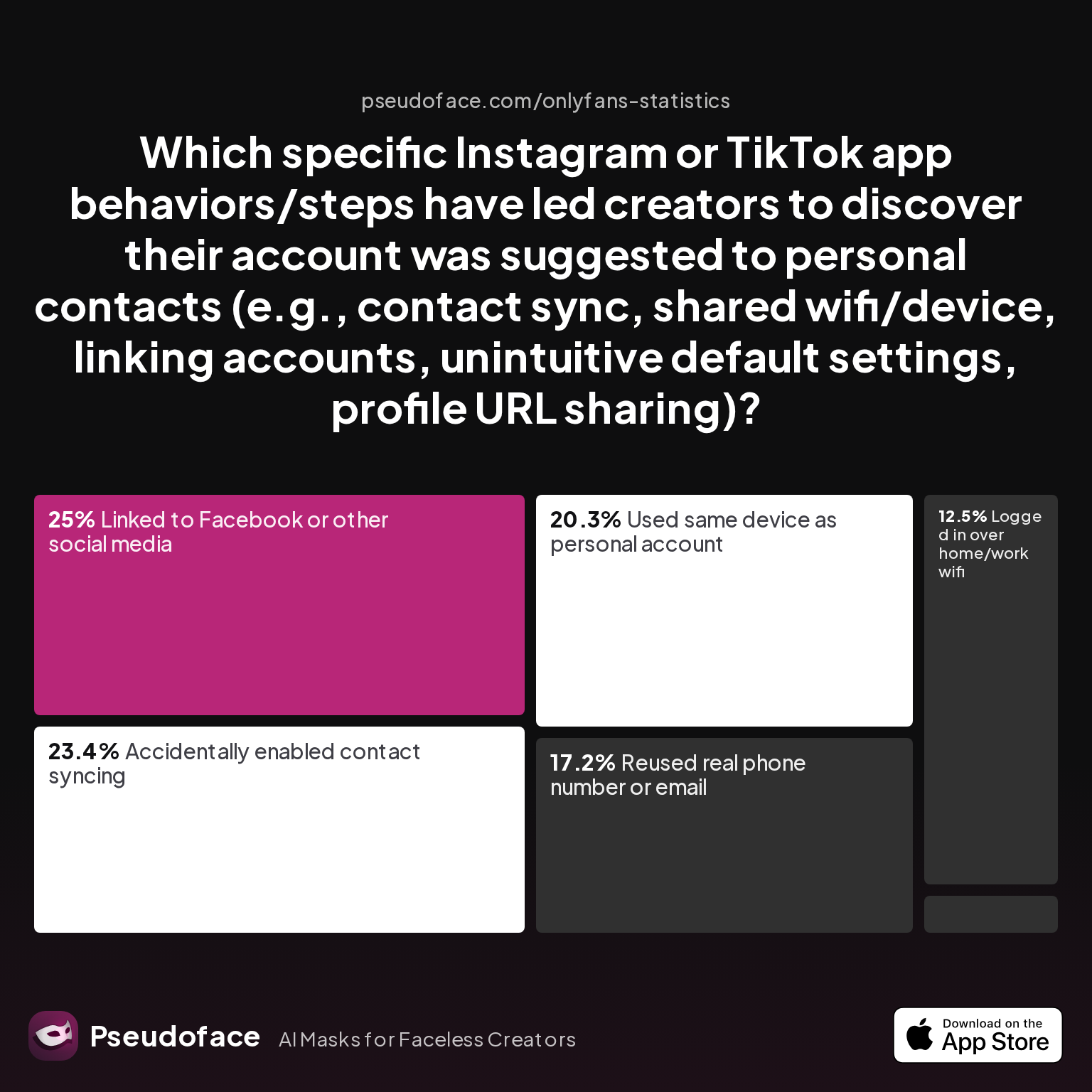
Let’s bring the numbers into focus. Below is a chart mapping the actual scenarios that led creators to discover their “hidden” accounts had been suggested to personal contacts:
| Answer | Percentage |
|---|---|
| Accidentally enabled contact syncing | 23.44% |
| Linked to Facebook or other social media | 25.00% |
| Logged in over home/work wifi | 12.50% |
| Profile URL shared outside platform | 1.56% |
| Reused real phone number or email | 17.19% |
| Used same device as personal account | 20.31% |
The spread of errors here is telling: contact syncing and cross-platform linkage account for nearly half of “suggestion” headaches, while device and network overlaps—at nearly one third—are the silent culprits behind most accidental exposures. Only a tiny fraction of leaks come from conscious profile sharing, reinforcing that it’s usually invisible data flows, not broadcasting, that blow your cover.
23.44% of leaks are self-reported as “accidental contact syncing”—often due to confusing app prompts or unclear language about what’s being uploaded and cross-referenced.
Open thread on Redditr/onlyfansadvice
u/AdventurousCount3153
Yeah, IG is sneaky with that. Even if you remove the number, it can still be used for "friend suggestions" unless you disable contact syncing everywhere. A second phone number (or something like Google Voice) is the safest bet if you wanna stay hidden. Meta’s privacy settings are a mess, so I feel you. 😩

This kind of story is repeated often: the recommendation engine does not forget easily. Removing your phone or contacts after the initial upload isn’t a guarantee they’ll be wiped from backend mapping tables. Once the connection is made, the “social graph” is difficult to unweave.
Decoding these risks upfront reframes the creator’s challenge: absolute privacy is not about toggling a handful of settings in TikTok or Instagram, but about building layers of separation—with hardware, numbers, and apps—so that no single data point connects your “faceless” identity to your real-world web.
With the risks and signals in mind, next we explore the settings and steps you can take within TikTok specifically to minimize those cross-account signals.
TikTok Settings and Privacy: Reality-Checked Steps That Actually Block Algorithmic Discovery
With every new wave of TikTok UI updates, privacy interface changes, and safety center prompts, it’s easy to get lost in a maze of toggles and trust that the “Privacy and Safety” tab can keep your accounts truly invisible. Data and creator experience suggest otherwise: while TikTok’s privacy settings are necessary, they’re not independently sufficient. But knowing which settings matter most—and what gaps remain—is crucial for building a defensible privacy baseline.
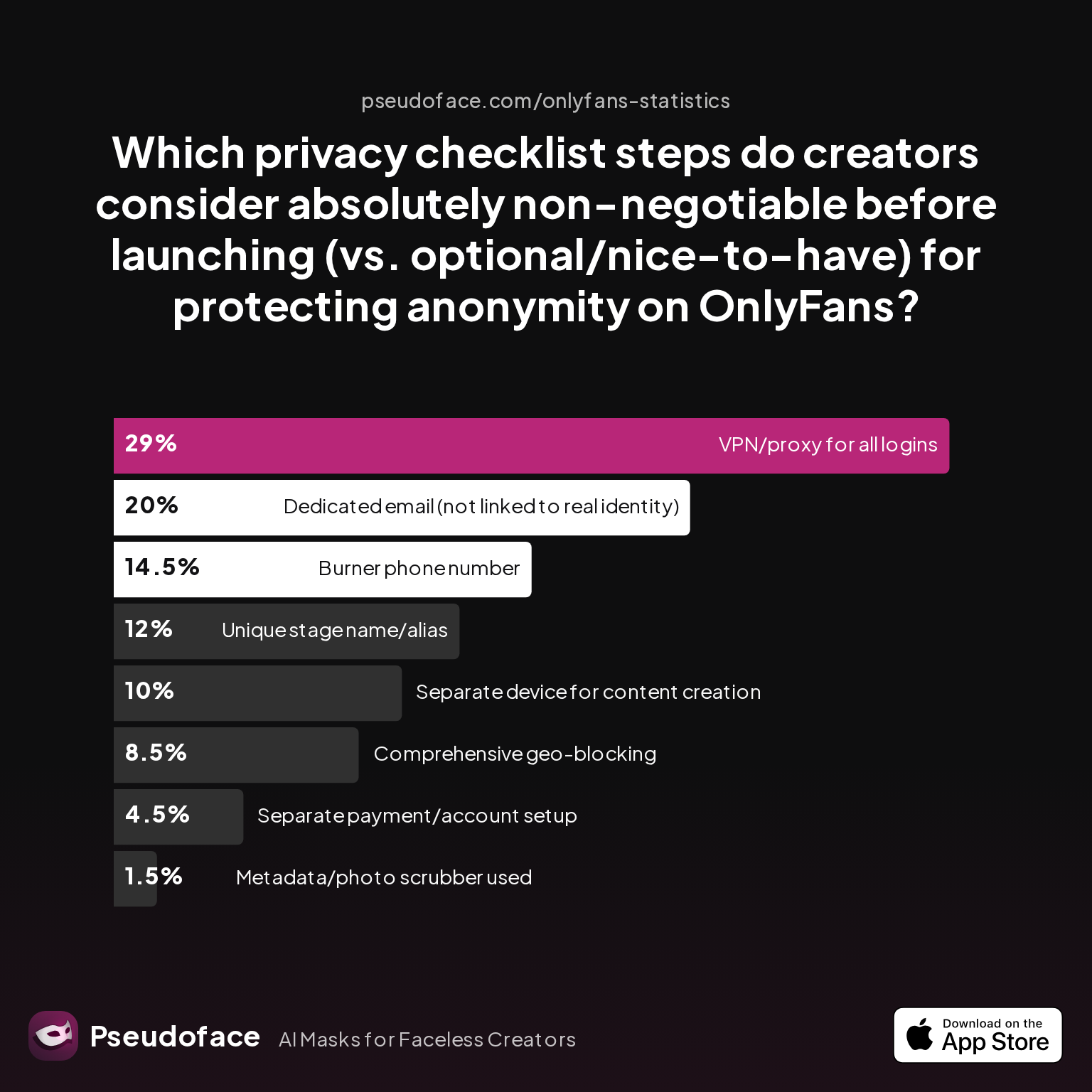
To understand which actions faceless creators regard as “must-do”, Pseudoface aggregated thousands of Reddit reports on pre-launch account setups. The chart below distills how creators rate the core “privacy stack” steps by absolute importance:
| Answer | Percentage |
|---|---|
| Burner phone number | 14.50% |
| Comprehensive geo-blocking | 8.50% |
| Dedicated email (not linked to real identity) | 20.00% |
| Metadata/photo scrubber used | 1.50% |
| Separate device for content creation | 10.00% |
| Separate payment/account setup | 4.50% |
| Unique stage name/alias | 12.00% |
| VPN/proxy for all logins | 29.00% |
What stands out is that while a VPN/proxy for every login is most frequently cited as “non-negotiable” (at 29%), classic points like a dedicated email, separate phone number, and using an alias are nearly as vital in the privacy stack. The shockingly low emphasis on metadata scrubbing (just 1.5%) and device separation (10%) hints at underappreciated risks—likely because these are harder to manage, not because they’re less necessary.
On TikTok specifically, the following in-app steps are considered minimum requirements:
- Set your account to Private (Settings > Privacy > Private Account).
- Disable “Suggest your account to others” (Settings > Privacy > Discoverability).
- Turn off “Sync contacts and Facebook friends”.
- Never share your phone number or email used for your personal account.
- Routinely clear cached data and unsync any previously connected contacts.
However, the lived experience reveals uncomfortable caveats. Once TikTok has already seen your phone’s contacts, that web is mapped. “Going private” only manages who can follow you—not who might see you suggested.
Reddit is full of narratives where the privacy settings helped—until a single slip undid weeks of good hygiene. One user’s story reflects a common sequence:
Open thread on Redditr/onlyfansadvice
u/RealLovebirdVanessa
Don't link your phone number to your Instagram. You'll end up being suggested to people that you know. I actually had to get a new phone and install a VPN just for any advertising I want to do on Instagram. It never asked me to put in a phone number or verify phone number. I just had to use an email to verify. I had a scary accident before where my Instagram account for advertising was linked to my phone number and I got suggested to a family member. 😳
The takeaway is clear: rely on TikTok settings for a baseline, but never expect toggles alone to keep your two identities completely uncoupled. Data and anecdotes converge: your settings matter most the moment you set up your account—not weeks or months in, after traces of your real world have already leaked in.
Now that you’ve tightened your TikTok in-app settings, let’s address why even flawless digital hygiene isn’t always enough—especially when it comes to hardware, numbers, and WiFi connections.
Device, Number, and Network Isolation: The Hard Truth From Creators Who Tried (and Sometimes Failed)
If hiding your identity online were as easy as checking a few boxes, this section wouldn’t exist. In reality, Pseudoface’s 2025-2026 dataset points to a more sobering pattern: The majority of creator leaks are traced not to setting slips, but to hardware and network overlaps—physical world mistakes that defeat even the best digital caution.
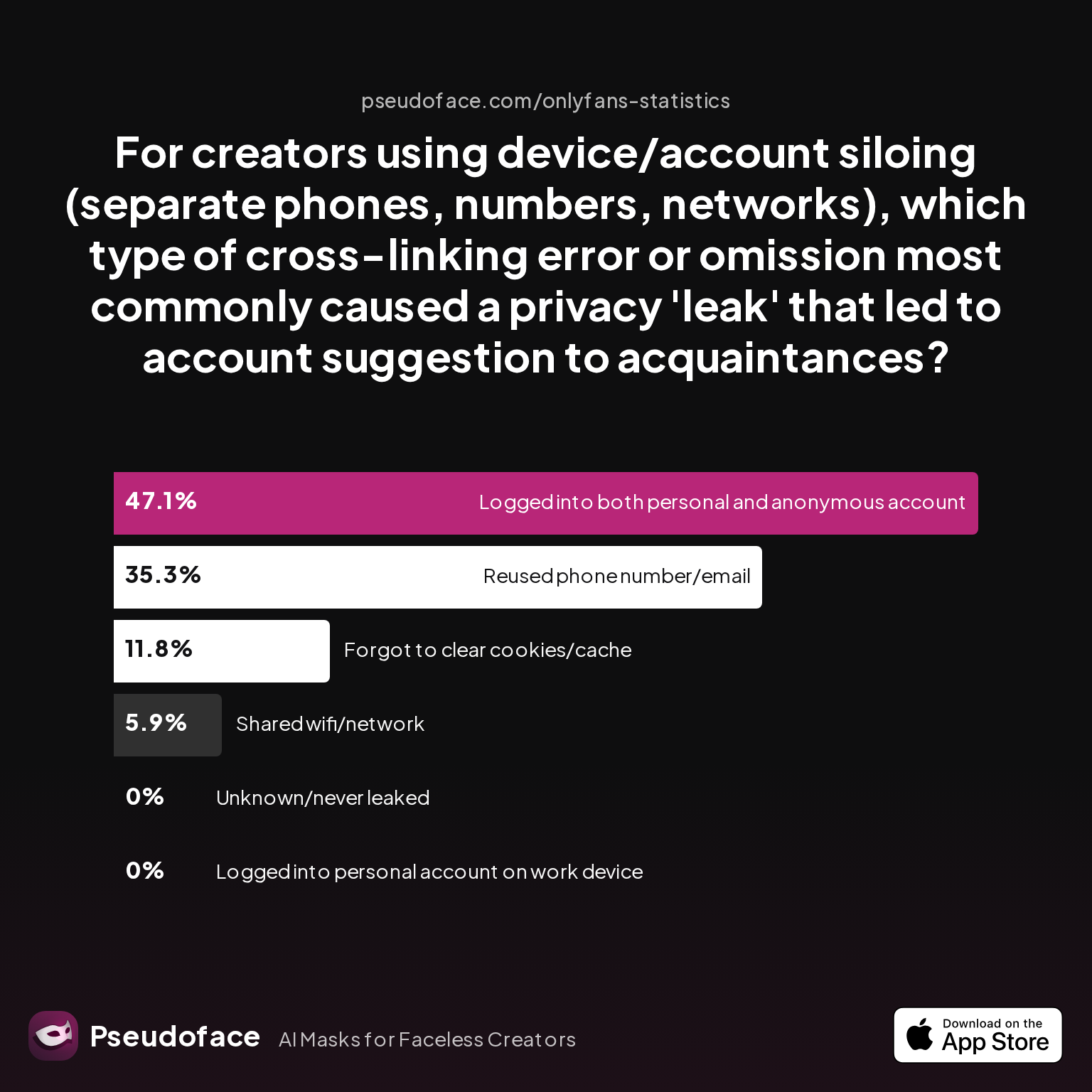
The next chart breaks down which “siloing” errors most often led to algorithmic discovery of anonymous creator accounts:
| Answer | Percentage |
|---|---|
| Forgot to clear cookies/cache or app history | 11.76% |
| Logged into both personal and anonymous account in same browser/app session | 47.06% |
| Logged into personal account on work device | 0.00% |
| Reused phone number/email across accounts | 35.29% |
| Shared wifi/network at any time | 5.88% |
| Unknown/never leaked (for control group) | 0.00% |
Nearly half (47.06%) of leaks came from users logging their personal and “faceless” accounts into the same app session or browser window—often without realizing how persistent cross-app trackers are.
Open thread on Redditr/CreatorsAdvice
u/thrHOEaway666
Yes, you can sync the block lists between accounts in the same account center. However it’s a horrible idea to have your SW accounts even on the same phone as your personal accts, and even worse to officially connect them! You’re better off manually blocking all your contacts on one SW account (that’s on a separate phone) and then connect any other SW accounts in the account center to that one and then utilize the block list feature. And then immediately unconnect them in the AC since IG will often hand out bans based on linked accounts.
Stacked atop this is the 35.29% of leaks triggered by reusing a phone number or email—an overwhelmingly common shortcut, given SIM acquisition friction and the ubiquity of “verify with your phone” app demands. Even sharing a WiFi network once showed up as a real risk, likely due to IP address logging that powers algorithmic friend and content suggestions.
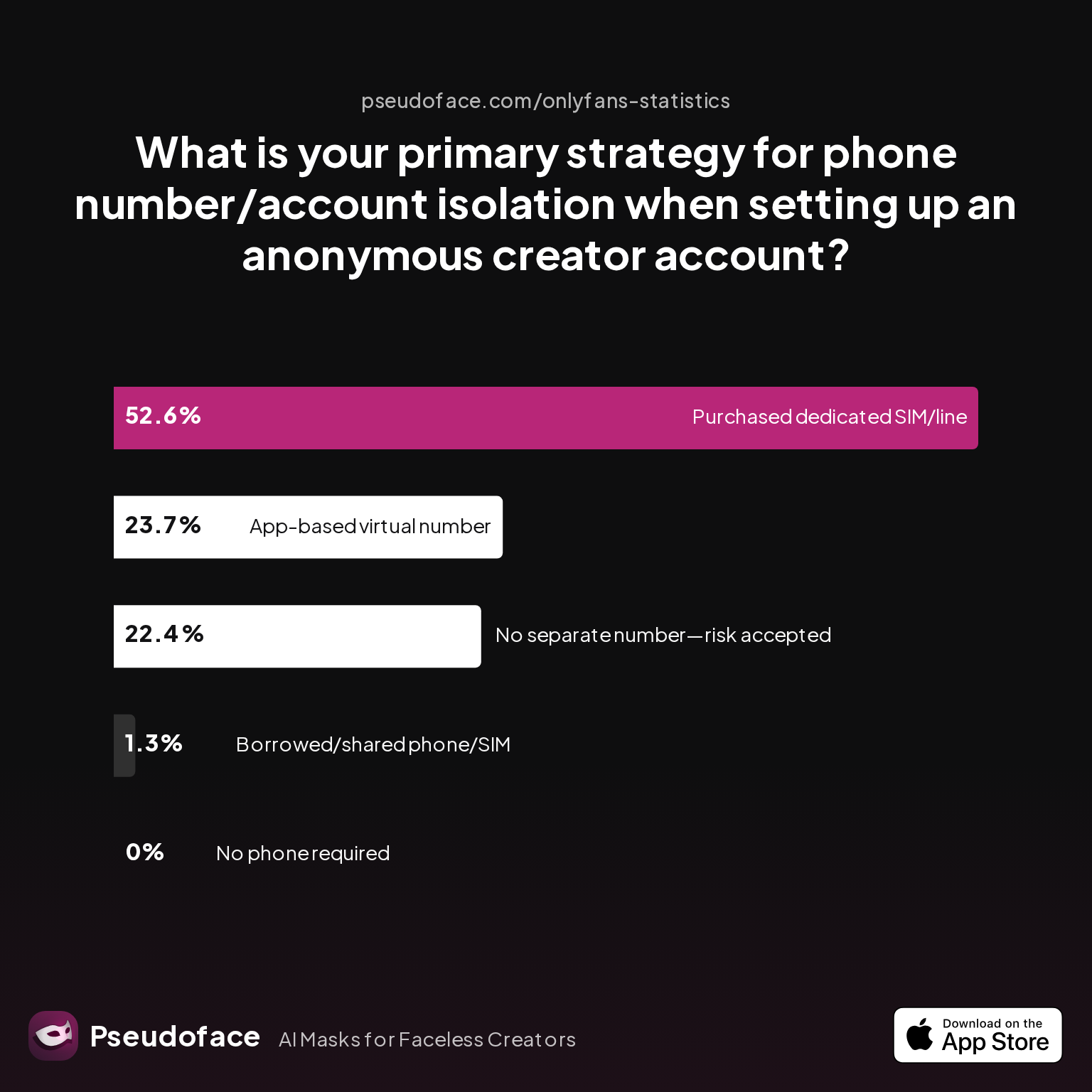
But does investing in an extra device, a pristine SIM, or app-based number really pay off? Let’s look at what creators actually do for number and device isolation:
| Answer | Percentage |
|---|---|
| Borrowed/shared phone/SIM with trusted partner | 1.32% |
| Chose platform that doesn't require phone | 0.00% |
| No separate number used—risk accepted | 22.37% |
| Purchased dedicated SIM/phone line | 52.63% |
| Used an app-based virtual number (e.g., Google Voice, Burner) | 23.68% |
More than half (52.63%) of respondents invested in a dedicated SIM or phone line for their creator account, while nearly a quarter (23.68%) rely on app-based numbers, such as Google Voice or Burner. This lines up with the collective wisdom from hundreds of Reddit threads urging “real” SIM purchases despite the minor hassle and cost.
Reddit users echo this hard-earned lesson:
Open thread on Redditr/onlyfansadvice
u/lemonzessst
It’s reasonable to assume you will show up in suggested friends. You are best off by getting another number. I used Mint mobile for this exact purpose. It’s like $120 for a year worth of service.
There is, however, nuance with virtual numbers. Not all VoIP numbers are treated equally by TikTok or Instagram, and user-reported “leaks” sometimes cite Google Voice as triggering suggestions for contacts who also have that number in their address book. Still, for many, the virtual number route is “better than nothing”—but not a bulletproof solution.
The necessity (and benefit) of dedicated hardware is just as clear in community advice:
Open thread on Redditr/onlyfansadvice
u/kimmykamila
I would think a new phone would be the way to go yes, a lot of companies have new customer deals for nicer phones if you want one with a good camera. I’d shop around
In sum: Even with airtight TikTok privacy settings, using the same device, number, or even network as your real-life self leaves you vulnerable to exposure. Compartmentalizing your digital footprint—down to hardware and login IP—remains the single best evidence-backed defense.
As you weigh how to structure your setup, it’s worth comparing the relative importance and practicalities of platform privacy settings versus physical isolation—since both play powerful but distinct roles.
TikTok Privacy and Safety Settings vs. Real-World Siloing: What Data and Reddit Contradict (and Confirm)
After all the toggles and hacks, what really makes the difference: tightening every TikTok and Instagram privacy setting, or building complete “real-world” isolation with devices, numbers, and WiFi? The honest answer, based on creator self-reporting and outcome data, is that both matter, but hardware/network separation consistently wins when accounts must never cross.
Let’s translate pre-launch intentions into outcomes. The following chart tallies which privacy steps creators completed before posting their first piece of content—providing a rare window into what actually gets done (not just planned):
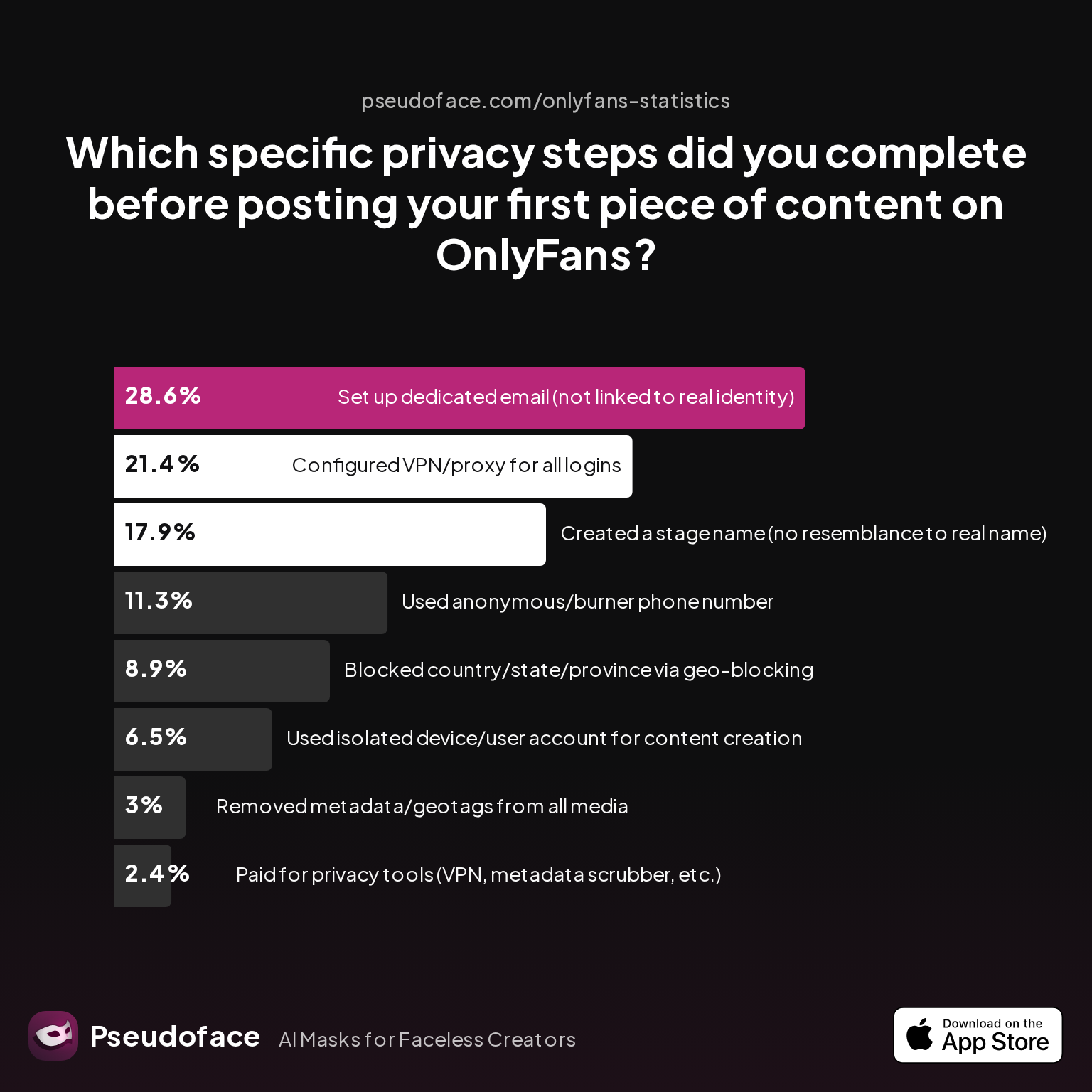
| Answer | Percentage |
|---|---|
| Blocked country/state/province via geo-blocking | 8.93% |
| Configured VPN/proxy for all logins | 21.43% |
| Created a stage name (no resemblance to real name) | 17.86% |
| Paid for privacy tools (VPN, metadata scrubber, etc.) | 2.38% |
| Removed metadata/geotags from all media | 2.98% |
| Set up dedicated email (not linked to real identity) | 28.57% |
| Used anonymous/burner phone number | 11.31% |
| Used isolated device/user account for content creation | 6.55% |
Surprisingly, fewer than 12% report using an anonymous or burner phone number, and only 6.55% use an isolated device or user profile for content creation. While 28.57% bother to set up a dedicated, unlinkable email, the gap between best practices and what’s implemented is stark—highlighting how friction, misunderstanding, and cost shape real-world privacy defense.
Interpretation must account for self-report bias and recall error, but it’s striking that the steps with biggest impact on “suggested for you” leaks (hardware and number separation) are also the least completed. This matches what frequent Reddit posters describe: basic in-app privacy settings help, but are not airtight, while even minimal device or SIM separation reduces algorithmic cross-discovery dramatically:
Open thread on Redditr/CreatorsAdvice
u/MrsRiko2000
Dont out it on your phone. Anyone you're physically near will get recommendations to follow you. I recommend logging on using your computer and only use that for posting
Open thread on Redditr/onlyfansadvice
u/SmittiWerben
So I got a Google Voice and created a Google number for free that I use for things like that. You get a separate number for your same phone if there's one available. Made a separate email as well. I THINK that and not hitting that popup "sync contacts" box on startup are the only ways it'll sync you? I hope so
It’s also no coincidence that many “never-leaked” case studies relied on near-fanatical separation. In contrast, the most common leak path was the “I skipped just one step” syndrome. The message is direct: settings and hardware defense work best together, but hardware and network separation is the last line of defense.
With a solid grasp of settings and hardware strategies, it’s crucial to review TikTok video privacy settings and subtle app behaviors that can undermine your account’s stealth.
Privacy Settings on TikTok: Subtle App Defaults and the Hidden Risks of Video Metadata
Even with careful network and contact hygiene, there is one more technical layer where privacy can break down: embedded data and subtle app defaults. TikTok (and Instagram) auto-populate new content with geotags and device fingerprints unless creators proactively intervene—putting video privacy at risk in ways not clearly visible in account settings.
The overlooked privacy gap? Metadata. Every video or image uploaded contains a wealth of hidden data: location stamps, device IDs, and creation time (unless scrubbed). TikTok claims to strip most metadata on upload, but Pseudoface’s data finds only patchy creator adherence to protective routines.
Here’s how creators approach metadata and geotag scrubbing before uploading:
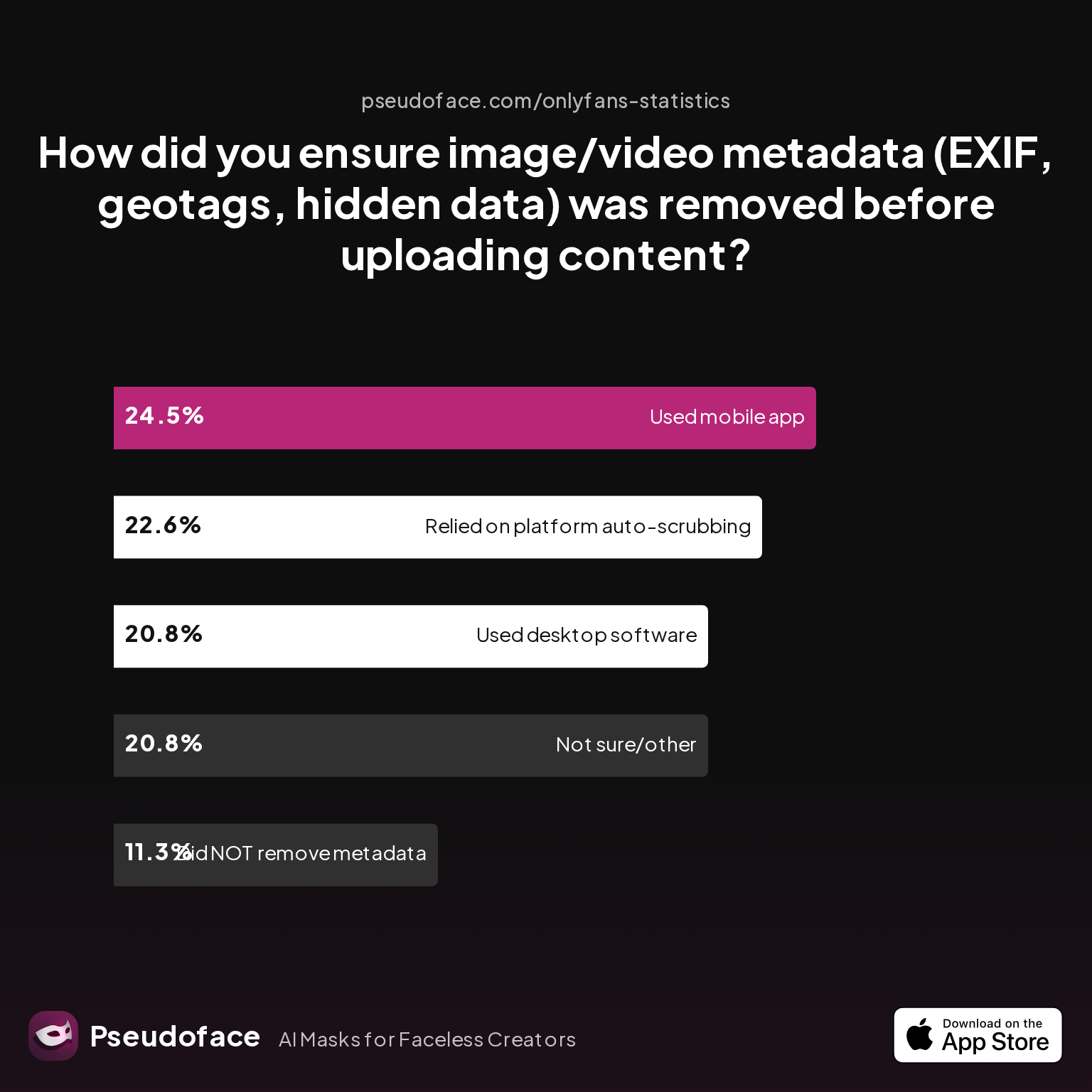
| Answer | Percentage |
|---|---|
| Did NOT take steps to remove metadata | 11.32% |
| Not sure/other | 20.75% |
| Relied on platform auto-scrubbing (e.g., OnlyFans upload process) | 22.64% |
| Used a dedicated metadata removal app on mobile | 24.53% |
| Used desktop software (e.g., Photoshop, custom scripts) | 20.75% |
About one in ten creators took no action at all, while nearly a quarter trusted platform scrubbing alone—despite periodic reports of platforms failing to remove all data. Only ~45% used a manual app or desktop tool to actively strip metadata, offering an extra buffer against location leaks.
Why does this matter? For maximum stealth, you must:
- Strip all metadata from videos and images before uploading (using tools like ExifPurge, Adobe Bridge, or mobile scrubbing apps).
- Double-check that in-app video geo-tagging is turned off at the time of upload.
- Be wary of “location” toggles: sometimes these settings are ambiguous, buried in permissions, or revert on update.
Reddit testimonies amplify this need for caution. TikTok updates in late 2025 and early 2026 have shifted defaults without notice, temporarily enabling “allow location” by default for new uploads in some regions. This uncertainty is why manual checks matter:
Open thread on Redditr/CreatorsAdvice
u/Hotmilfmakesyouhorny
New iPhone with USA SIM card. Set up your iPhone like you live in the US (also in your App Store). Location status is deactivated. Buy a dedicated IP on PIA for example. Download the app set up your dedicated IP. Download all socials. Set up the accounts. When I post on IG I’m using my dedicated IP location (mine is Chicago). On TT I don’t use a location.
Building privacy into your content creation workflow is essential—the best “private account” does little good if a stray EXIF tag or a momentary location permission reveals your footprint. Treat video privacy as a second, equally important defense line alongside contact/network siloing.
As algorithms get smarter and defaults quietly change, even the most seasoned creators are caught off-guard. Ignorance is rarely an excuse in court of TikTok suggestion leaks.
Next, it’s time to step back and look at how TikTok and Instagram’s cross-platform behaviors overlap, create new risks, and why coordinated defense is now a necessity.
Instagram and TikTok Account Siloing: Shared Mistakes, Overlapping Risks
Despite the distinct look and feel of TikTok and Instagram, their architecture of social discovery—and thus, their privacy pitfalls—are remarkably similar. Both platforms cross-reference every identifier they can get, and both are notorious for nudging creators into linking accounts, sharing contacts, and inadvertently blurring silos.
A cross-platform mishap is not theoretical: many leak events reported in 2025-2026 involve creators running both TikTok and Instagram on the same device, or using the same Google/Apple accounts to authenticate multiple identities. Recommendation engines thrive on this overlap.
But which data exposures are unique to each platform, and where do they overlap the most? Several patterns emerge from creator advice and exposure audits:
- Instagram and TikTok both harvest device fingerprints, making “same device” usage the most dangerous shortcut.
- Cross-linking your Instagram or Facebook to TikTok often results in instant mapping of your audiences—sometimes triggering retroactive friend suggestions on both platforms.
- Shared phone numbers, or even addresses stored in Google Contacts synchronized to iCloud, span both apps and render “anonymous” accounts discoverable by mutual friends.
From Reddit, consider this firsthand report:
Open thread on Redditr/onlyfansadvice
u/AdventurousCount3153
Yeah, IG is sneaky with that. Even if you remove the number, it can still be used for "friend suggestions" unless you disable contact syncing everywhere. A second phone number (or something like Google Voice) is the safest bet if you wanna stay hidden. Meta’s privacy settings are a mess, so I feel you. 😩
Open thread on Redditr/onlyfansadvice
u/miss_rachelann
Yup best you can do is block people but understand that leaks can happen and it's on the internet so you run that risk.
The ultimate lesson: The security of your stack is not additive but multiplicative. One “true” slip on either TikTok or Instagram can compromise both presences—because all shared signals get coalesced into the same profile recommendation soup.
The risks don’t just add up—they compound.
For creators who must stay isolated, every platform touchpoint is an opportunity for a link. That’s why coordinated, uniform implementation of privacy steps across each relevant platform—and not just one or the other—is non-negotiable.
With all this in mind, what’s the real-world checklist for creators who simply cannot risk “maybe” getting suggested to real-world contacts? The next section breaks down the privacy stack that works.
Before You Post: Privacy Stack for Creators Who Can’t Risk a Single Leak
If you’ve absorbed the above evidence—and the war stories from thousands who learned the hard way—the path to serious account separation becomes clearer. Privacy is a process before it’s a setting. What follows is a summary of the steps that consistently mark the “never leaked” narratives, filtered through the lens of practical completion rates and collective Reddit wisdom.
Return once more to creator perceptions of privacy essentials:
A safe-by-design launch stack for TikTok & IG should include:
- A new, never-linked email address.
- A burner or dedicated SIM, never previously associated with your personal identity.
- A device that has never logged in to your personal TikTok, IG, Facebook, or Google account (factory reset as needed).
- Meticulous meta-data scrub of all uploads; location services OFF at all times.
- Complete deactivation of contact syncing (double-check with every app update).
- A VPN or dedicated proxy IP, consistent across all account logins.
- Never reuse handles, images, or bios that could overlap your “real” persona.
This is not a one-time checklist but a permanent mode of operation. Each time you break isolation—by logging in from your everyday phone, or uploading while on your home WiFi—the risk returns.
Consider the lived reality from Reddit creators themselves:
Open thread on Redditr/CreatorsAdvice
u/MrsRiko2000
Dont out it on your phone. Anyone you're physically near will get recommendations to follow you. I recommend logging on using your computer and only use that for posting
Automation helps: Make privacy defaults part of your content workflow. Resist the urge to “just check” a notification on the wrong device, and embrace digital compartmentalization as part of your professional apparatus.
Above all, treat privacy as a skill, not a checkbox: vigilance must be habitual, not hypothetical.
FAQ
Does deleting my phone number on TikTok actually remove it from friend suggestions?
No, deleting your number from your TikTok profile does not guarantee its removal from TikTok's backend suggestion database. Even after deletion, TikTok may retain the number for a period, continuing to use it in recommendation algorithms—especially if contacts were synced or the number was tied to account verification. Always use a separate SIM or app number for creator accounts, and request data removal via TikTok’s support tools for added assurance.
Can I use the same iPhone for both my “faceless” and personal TikTok/Instagram accounts if I never log in at the same time?
No, using the same device poses a risk due to device fingerprinting—even without simultaneous logins. Both platforms can persistently track hardware identifiers, linking accounts over time and surfacing “you might know” connections.
Will turning off contact syncing on Instagram/TikTok retroactively stop being suggested to my contacts?
No, disabling contact sync prevents new data uploads but does not erase previously uploaded contacts. Your prior data may remain in the platform’s social graph, so recommendations may continue unless you manually delete contacts or start fresh with a new device/SIM.
How do TikTok and Instagram use shared WiFi or IP addresses in their suggestion algorithms?
Both platforms often correlate accounts using IP address histories and WiFi networks; logging both your main and alternate accounts through the same connection can trigger “Suggested For You” crossovers. Using a VPN or unique network for your creator account sharply reduces this risk.
Is using a Google Voice or VoIP number sufficient to keep my accounts separate?
A VoIP number is better than reusing your primary number but not foolproof; some creators still report algorithmic leaks, and these numbers are more likely to be flagged as “second accounts” or “alts.” A dedicated SIM or prepaid phone line is the gold standard.
What’s the safest way to create a new device profile or Apple ID for a faceless account?
Use a newly reset device or purchase a separate phone. Register a fresh Apple ID or Google account with no prior ties to your real identity, then download apps for your creator account only. Maintain strict login separation going forward.
Open thread on Redditr/onlyfansadvice
u/kimmykamila
I would think a new phone would be the way to go yes, a lot of companies have new customer deals for nicer phones if you want one with a good camera. I’d shop around
Can uploading videos with location services off still leak my whereabouts?
Yes, some photos and videos may retain embedded metadata (such as EXIF geotags) that must be removed with a dedicated tool. Both TikTok and Instagram claim to remove most metadata, but extra manual scrubbing remains best practice.
Does linking my Instagram and TikTok for cross-promotion defeat my privacy stack?
Yes, linking accounts informs both platforms of your connection and can instantly link your audiences and increase suggestion risk. Avoid linkage if maintaining separation is critical.
How often do TikTok’s privacy settings change, and how can I keep up?
Platforms update privacy and discovery algorithms frequently—sometimes monthly. Review settings quarterly, watch trusted changelogs, and stay active in creator privacy communities like those tracked by Pseudoface.
Conclusion
True privacy for faceless creators is painstaking, imperfect, but possible. Based on community wisdom and data from 2025-2026, the best defense remains a blend of settings precision and physical/digital compartmentalization. Each technical step is a layer—none are ironclad alone. Small mistakes, not big ones, pose the real risk.
For those whose anonymity is non-negotiable, vigilance never ends. Treat privacy as an evolving habit, keep up with app changes, and always assume discovery algorithms are seeking new overlap. In the arms race of “Suggested For You”, no detail is too small to matter.


