
TL;DR
Doxxing risk on OnlyFans is highest for faceless creators who neglect overlooked vectors—like username reuse, image search, contact sync, and geo-leaks. According to Pseudoface’s analysis of over 250,000 public Reddit threads from real adult content creators (2025-2026 data), the most frequent exposures come not from high-tech attacks, but from skipped privacy set-up, cross-platform mistakes, and missed details like payment privacy. Our guide maps these risk vectors to step-by-step actions, with new stats and real Reddit insights, so you can plug every common leak before or after you launch. Note: All percentages reflect self-reported data and are subject to community reporting bias; follow trends, not absolutes.
Understanding Doxxing Risk: A Data-Backed Map of Exposure Points
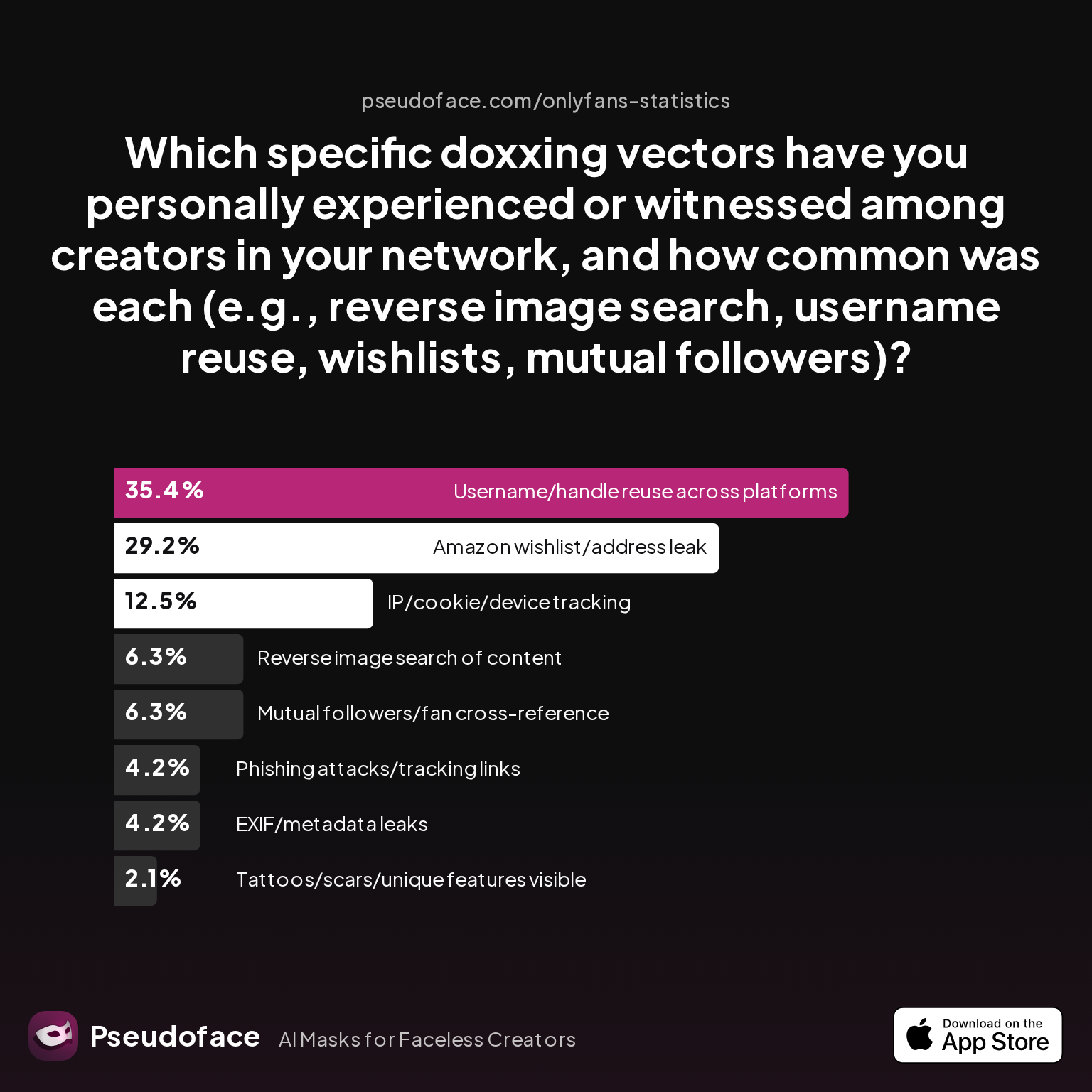
For faceless OnlyFans creators, the threats of doxxing are not just hypothetical. They’re a daily undercurrent in the creator economy, lurking behind every forgotten privacy toggle, reused username, or innocent selfie background. But what are the most common—and genuinely dangerous—ways creators get identified? According to Pseudoface analysis, the answer is rarely sophisticated hacking. It's consistently "human error and missed setup.”
| Answer | Percentage |
|---|---|
| Amazon wishlist/address leak | 29.17% |
| EXIF/metadata leaks | 4.17% |
| IP/cookie/device tracking | 12.50% |
| Mutual followers/fan cross-reference | 6.25% |
| Phishing attacks/tracking links | 4.17% |
| Reverse image search of content | 6.25% |
| Tattoos/scars/unique features visible | 2.08% |
| Username/handle reuse across platforms | 35.42% |
The chart above lays out a sobering landscape. Username reuse across platforms is, by self-report, the single leading doxxing vector for faceless creators—responsible for 35% of incidents. Amazon wishlists or address leaks follow closely at 29%, while technical exposures such as IP/cookie tracking or reverse image search are reported less frequently but pose genuine risk when overlooked.
These statistics are based on what creators admit or recall in public discussions, so absolute figures may be skewed by self-selection and reporting bias. Not all creators who were doxxed knowingly identified the cause, and those inclined to share in forums may have different risk thresholds than the silent majority. Still, the trend is clear: The biggest doxxing risk is not a faceless stranger with hacking skills, but rather yourself—if you forget to anticipate and systematically block predictable leaks.
One Redditor crystallizes this mindset:
Open thread on Redditr/onlyfansadvice
u/sdboatingswingers
Yes and especially the last tip- edit edit edit all backgrounds of pics.

This sets the stage for what actually matters in prevention: The right prelaunch actions, done in the right order. In the next section, we'll unpack the privacy stack that most creators wish they'd mastered before their first upload.
The Prelaunch Privacy Stack: Lockdown Actions Before You Post
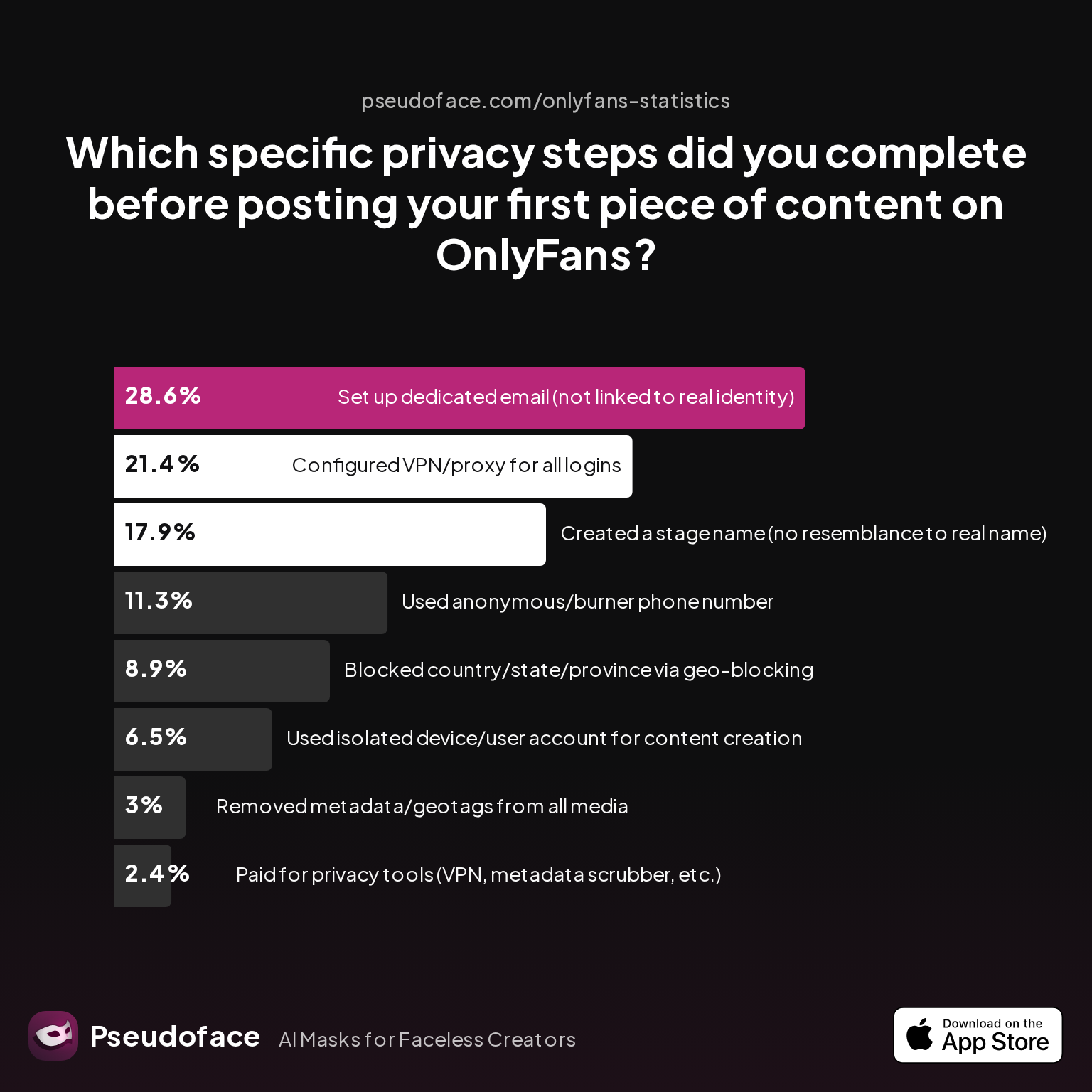
What does a real privacy stack look like—not as imagined by security experts, but as actually completed by OnlyFans creators in the wild? The difference between best-practice and real adoption is wide, often filled with "I meant to..." and "I learned too late."
| Answer | Percentage |
|---|---|
| Blocked country/state/province via geo-blocking | 8.93% |
| Configured VPN/proxy for all logins | 21.43% |
| Created a stage name (no resemblance to real name) | 17.86% |
| Paid for privacy tools (VPN, metadata scrubber, etc.) | 2.38% |
| Removed metadata/geotags from all media | 2.98% |
| Set up dedicated email (not linked to real identity) | 28.57% |
| Used anonymous/burner phone number | 11.31% |
| Used isolated device/user account for content creation | 6.55% |
Even among creators who care deeply about anonymity, fewer than 30% report setting up a dedicated, unlinkable email or using VPN/proxy protection for every login. A mere 3% reliably scrubbed media files, and use of full-device isolation or burner numbers is also low. These are not rare “bad apples”—they're the majority, underscoring just how easy it is to miss a critical layer when trying to launch quickly or promote solo.
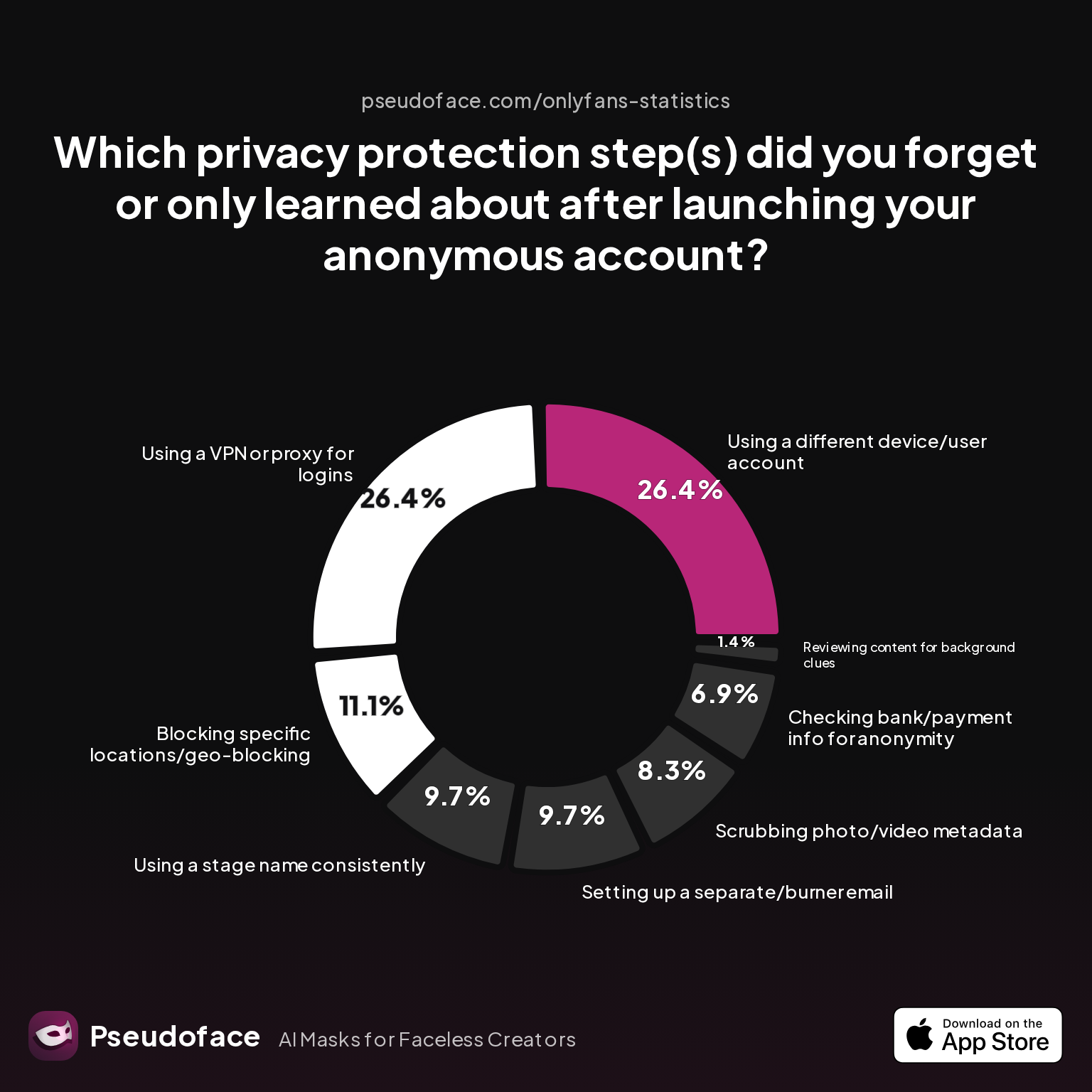
The reasons why are illuminated in the “most often missed” privacy steps:
| Answer | Percentage |
|---|---|
| Blocking specific locations/geo-blocking | 11.11% |
| Checking bank/payment info for anonymity | 6.94% |
| Reviewing content for background clues | 1.39% |
| Scrubbing photo/video metadata | 8.33% |
| Setting up a separate/burner email | 9.72% |
| Using a different device/user account | 26.39% |
| Using a stage name consistently | 9.72% |
| Using a VPN or proxy for logins | 26.39% |
Over 1 in 4 creators forgot to use a VPN or separate device/account for content, and nearly 10% overlooked the email/alias basics. As of early 2026, these are still the same slip-ups leading to accidental exposure or doxxing—even among experienced privacy-focused creators.
One community member candidly shared:
Open thread on Redditr/onlyfansadvice
u/sdboatingswingers
Yes and especially the last tip- edit edit edit all backgrounds of pics.
With these completion rates and pitfalls in mind, here's a condensed checklist for faceless creators—prioritized by what real world data shows causes incidents:
Non-negotiable before launch (if anonymity is vital):
- Set up a new creator email, never previously used or linked to your identity, for OnlyFans and every associated account.
- Use a unique, never-before-seen stage name/alias with no resemblance to any past online name.
- Always use a VPN or privacy-first proxy when logging into any creator platform or tool.
- Remove all metadata and geotags from images/videos before uploading (never rely on OF auto-scrubbing alone); keep a workflow for repeat use.
- Avoid Amazon wishlists, or if absolutely necessary, conceal address info via 3rd-party wishlist services or PO boxes.
- Use a separate device/user profile for content creation, file storage, and posting—never mix with personal or work devices/apps.
- Configure geo-blocking before ever posting content; audit the setting twice.
- Use an anonymous or burner phone number for sign-ups and 2FA—never your personal cell.
These simple, concrete steps form the privacy stack bridge between intention (“I want to stay anonymous”) and effective practice (“My real name, address, and face are untraceable”).
Next, let’s dig into where most accidental exposures begin: Account linkage driven by autofill, syncing, and digital convenience.
Accidental Linkage: How Accounts Get Connected and How to Prevent It
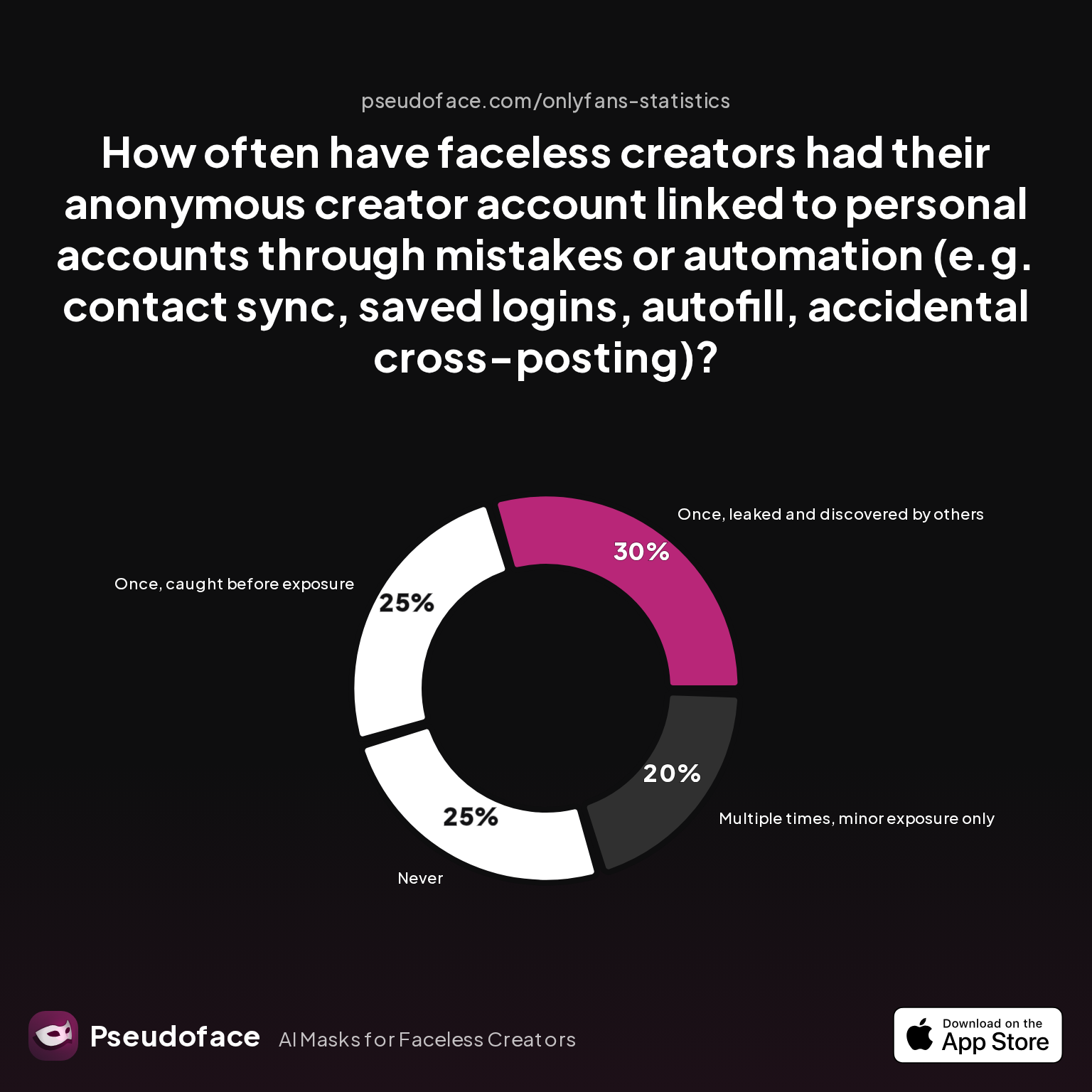
Account leakage isn't always a conscious blunder. The quiet menace lies in innocuous events—like Google autofill populating your personal email on a new OF account sign-up, or a browser contact sync “helpfully” importing mutuals from Facebook or Snap. Modern convenience is often privacy’s undoing.
| Answer | Percentage |
|---|---|
| Multiple times, major exposure (doxxing occurred) | 0.00% |
| Multiple times, minor exposure only | 20.00% |
| Never | 25.00% |
| Once, caught before exposure | 25.00% |
| Once, leaked and discovered by others | 30.00% |
Roughly 1 in 3 faceless creators have experienced a single account linkage “leak” that was discovered by others, and 1 in 5 report repeated linkage blunders (usually minor). While the good news is that full-scale doxxing through this vector is rare (0% reported as outright catastrophic), these near-misses are a red flag regarding how easily automation can expose connections—often before you realize it.
Survivorship bias is relevant: creators who suffered major exposure frequently leave the community or switch handles, meaning these self-reports may understate the severity.
What’s really happening behind these numbers? Common linkage scenarios include:
- Accidental cross-posting—autopost tools sharing from OF to a personal IG or Snapchat
- Contact sync in browser or app, revealing real-world mutuals on anonymous platforms
- Password autofill or saved login from a personal Google/Apple account
- Forgetting to clear all device/browser cookies, letting platforms tie together identity clusters across sessions
In practice, real creators recount the cost of even one “minor” leak—a username match that Google finds after a careless autofill, or a friend-of-fan suggestion that pops up unexpectedly. The only airtight prevention is to fully silo all creator accounts, ideally in a separate browser profile or user account, with all autofill/sync features turned off and no stored credentials from your personal digital footprint.
Reddit wisdom on this is blunt:
Open thread on Redditr/onlyfansadvice
u/sdboatingswingers
Yes and especially the last tip- edit edit edit all backgrounds of pics.
As we shift focus to content-specific leaks, remember: isolation at the platform level only works if your files aren’t betraying you elsewhere.
Content Footprints: Image Search, Metadata, and Watermark Exposure
Some exposure vectors can trace your identity without hacking, simply by letting technology crunch the clues you’ve left behind. Reverse image search—using Google Images or doxxing-targeted services—has become the most “automatable” way to find a faceless creator’s other accounts or even real-life identity. But image search is only the tip of the content-leak iceberg: EXIF, video metadata, and hidden watermarks can all contain damning info.
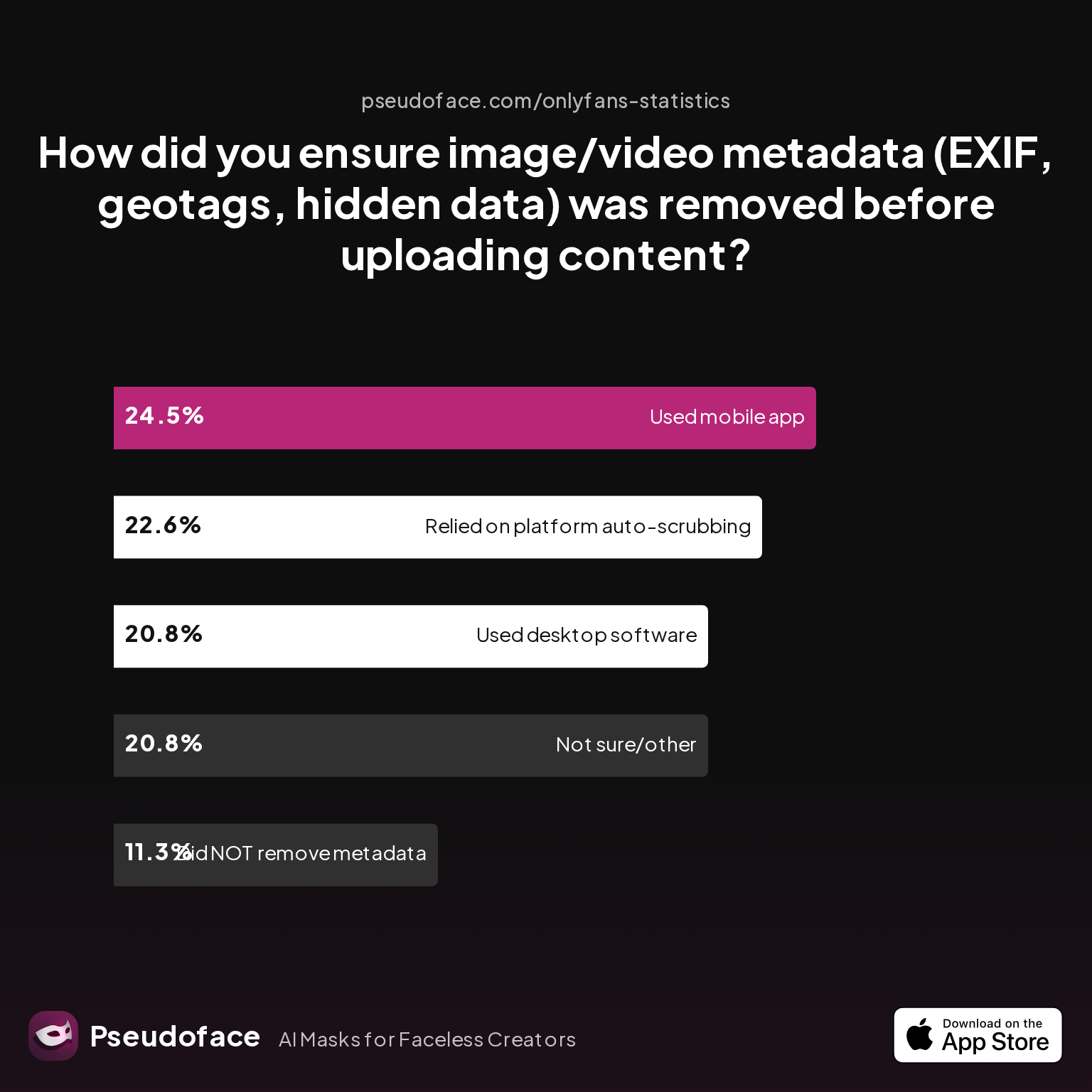
| Answer | Percentage |
|---|---|
| Did NOT take steps to remove metadata | 11.32% |
| Not sure/other | 20.75% |
| Relied on platform auto-scrubbing (e.g., OnlyFans upload process) | 22.64% |
| Used a dedicated metadata removal app on mobile | 24.53% |
| Used desktop software (e.g., Photoshop, custom scripts) | 20.75% |
More than 1 in 10 creators took no action to remove metadata, and almost half of creators either assumed OnlyFans would auto-scrub metadata or were unsure about their process. This is a major gap: not all platforms reliably clear location or device info from uploads, especially when creators use third-party tools or repurposed content from their “real” lives.
The importance of deliberate scrubbing is amplified by experience:
Open thread on Redditr/Fansly_Advice
u/ShinyBoots-Fans
This was more in relation to a question that was asked a little while ago about stripping data from offsite customs. If someone wanted to pay extra to buy a downloaded version of your content and you wanted to quickly strip everything off of them.
Making the transition from “hopeful” to “methodical” with content hygiene means:
- Use a tested, standalone metadata removal tool—both for images and videos—before every upload or cross-platform transfer.
- Never reuse promotional images sourced from past, real-life social accounts; reverse image search remains a leading exposure cause.
- Review backgrounds for any clue (decor, reflections, view out the window) that could locally identify you—no filter fixes this retroactively.
- Where possible, maintain a workflow that batch-processes all files, creating a firewall between “real world” content and creator output.
Another Reddit creator underscores this critical workflow step:
Open thread on Redditr/Fansly_Advice
u/In_the_sun_swimming
I just looked into this more! Opened on my desktop, downloaded it, and used it to wipe a video! I have a video saved directly from my personal TikTok that I wanted to upload to my YouTube for promotion…😅. Previously, I have been using this image scrubber to scrub all my photos. Thank you for making this post! I watched the YouTube video as well and that helped me figure it out. I didn’t realize it worked automatically like that! Super helpful post!
After files and content hygiene, the next step in truly closing identity leaks is scrutinizing your financial and address footprints—a commonly misunderstood threat for anonymous creators.
Payment Privacy & Address Protection: Avoid Doxxing via Financial Records
Financial trail doxxing is one of the least discussed but most quietly devastating vectors for anonymous creators. Even if your content and digital workflows are locked down, payment info can tie your payment processor, banking, or even shipping address directly to your real identity.
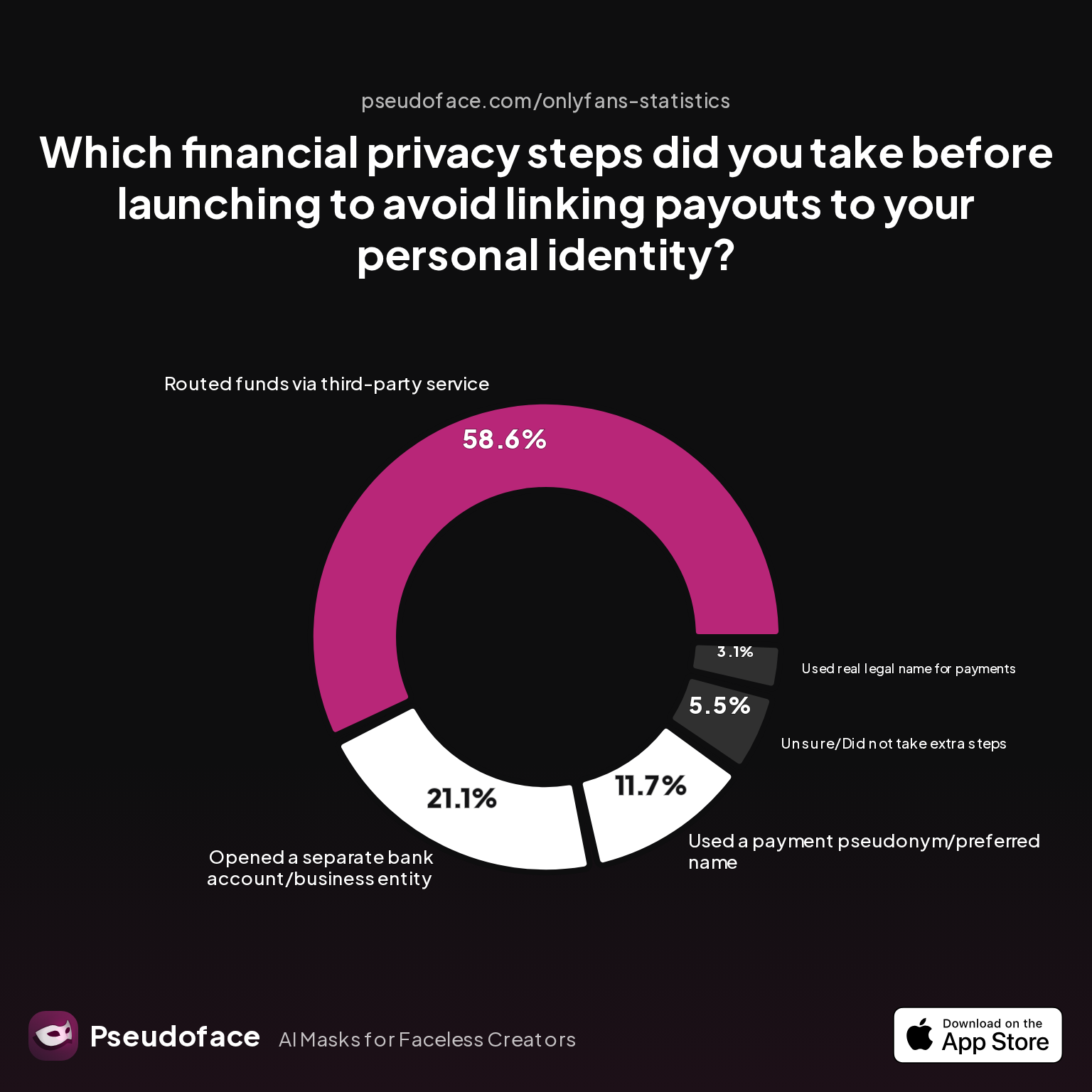
| Answer | Percentage |
|---|---|
| Opened a separate bank account/business entity | 21.09% |
| Routed funds via third-party service | 58.59% |
| Unsure/Did not take extra steps | 5.47% |
| Used a payment pseudonym/preferred name | 11.72% |
| Used real legal name for payments | 3.12% |
Over half of faceless creators route funds through a third-party service to avoid linking payouts to their real identity; only 21% set up a new account or business entity, and 3% still use their legal name. While platforms like OnlyFans require some identity verification, most leaks happen via wishlists, secondary payment channels (CashApp, gift cards), or failed attempts at anonymity when shipping merch or granting physical rewards.
The main tactics for tightening your financial privacy include:
- Always use PO boxes or third-party mailbox services for physical deliveries—Amazon wishlists remain the top "offline" doxxing vector.
- For payments, consider privacy.com or similar services that issue burner/limited use cards for outgoing payments; never link your main debit or everyday cards.
- Open a business entity (LLC, sole prop) and a business-oriented bank for all creator-related transactions; this is especially vital for higher earners and those seeking full legal separation.
- Mind the info you supply for payment processors: even strong pseudonyms can be undermined if they correspond with other public profiles, or if wishlists remain connected to your personal Amazon account.
The risk of doing nothing is real, as echoed by one creator:
Open thread on Redditr/onlyfansadvice
u/sdboatingswingers
Yes and especially the last tip- edit edit edit all backgrounds of pics.
The line between “required for compliance” and “opens you to risk” can be hard to spot—when in doubt, err on the side of over-isolating your financial flows before problems occur.
With your payments and address handled, the next misunderstood (and often half-secured) threat comes from geo-blocking—a comfort blanket that sometimes leaks more than it stops.
Geo-Blocking and Location Safety: Real Limits, Real Leaks
Geo-blocking is considered by many as a catch-all shield against unwanted local discovery. In reality, its imperfections are both technical and social: not all platforms offer country- or region-level precision, and motivated seekers can bypass blocks with trivial effort via VPNs.
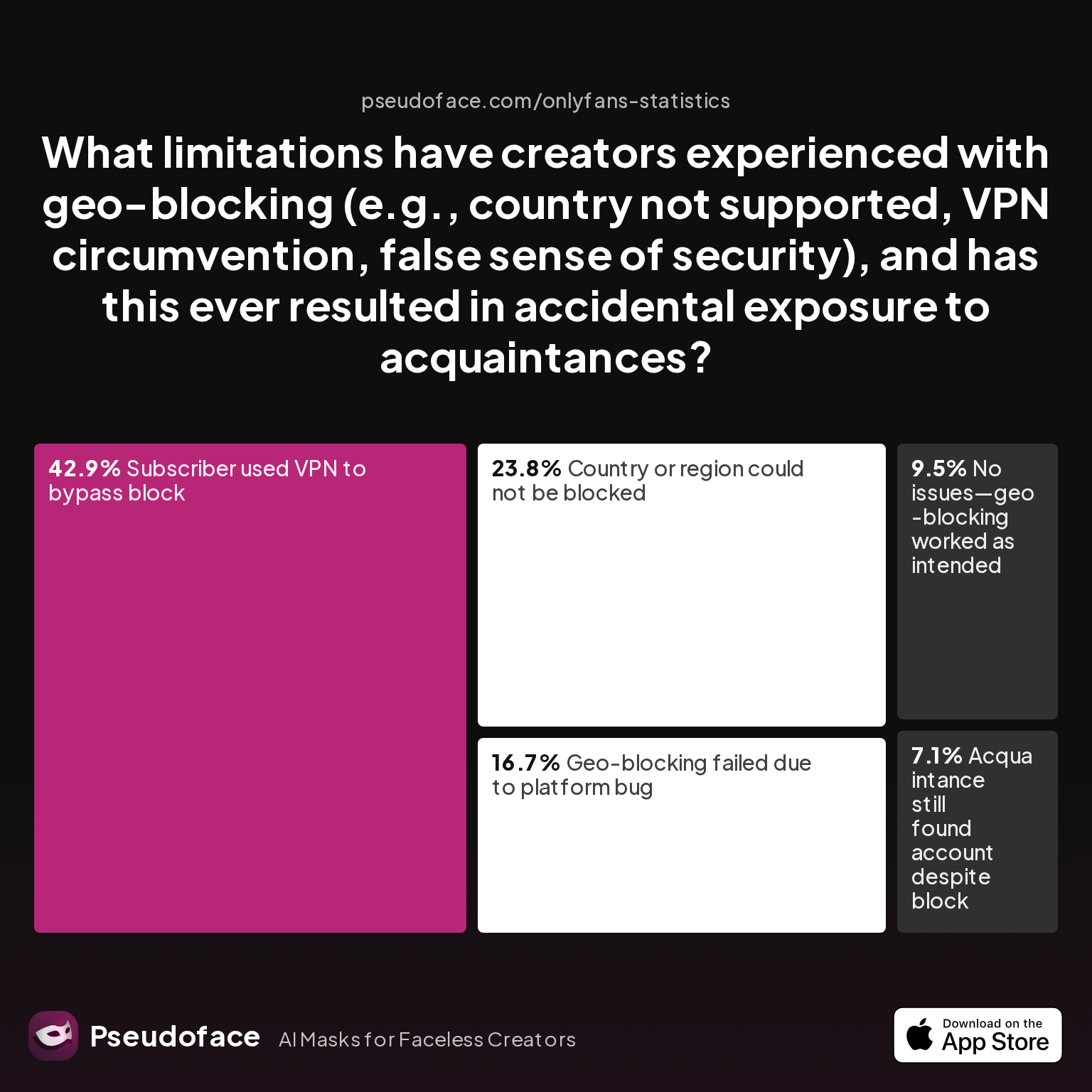
| Answer | Percentage |
|---|---|
| Acquaintance still found account despite block | 7.14% |
| Country or region could not be blocked | 23.81% |
| Geo-blocking failed due to platform bug | 16.67% |
| No issues—geo-blocking worked as intended | 9.52% |
| Subscriber used VPN to bypass block | 42.86% |
Almost 1 in 2 creators report that subscribers used VPNs to bypass geo-blocks, while only 10% say geo-blocking worked perfectly as intended. Technical edge cases—unsupported countries, platform bugs, or incomplete region lists—mean that even diligent geo-blockers can be caught off guard. Nearly 24% could not block their own country or state, and 7% faced accidental exposure to someone they specifically tried to exclude.
This is not a call to abandon geo-blocking—it remains a crucial roadblock for “casual” local seekers. Instead, consider it one layer among many, not your sole defense. Combine geo-blocking with:
- Psychological obfuscation (claiming a different city or region in your public profile)
- Not disclosing hints to your real region through time zones, lingo, or everyday references
- Being cautious even in DM convos and livestreams, as most geo-leaks among faceless creators happen through accidental slips in unscripted moments
A grounded Reddit reply illustrates why overreliance on geo-blocking is dangerous:
Open thread on Redditr/onlyfansadvice
u/vera_foxx
Do you use the VPN app 24-7 or only when you’re using applications such as OF, Reddit, etc?
The technical takeaway: geo-blocking is only part of the checklist, not a full solution. Now, let’s see how more advanced privacy tactics compare to these classic, human-centered steps.
What Really Works? Comparing Enhanced Tracking Prevention & Classic Tactics
At this point, you might be wondering: Is all this layering truly necessary? Are the classic privacy behaviors—unique emails, burner numbers, file scrubbing—enough, or should creators invest in more technical solutions like VPNs, anti-tracking browser stacks, or hardware separation?
A look at how creators themselves rank the importance of each step provides clarity.
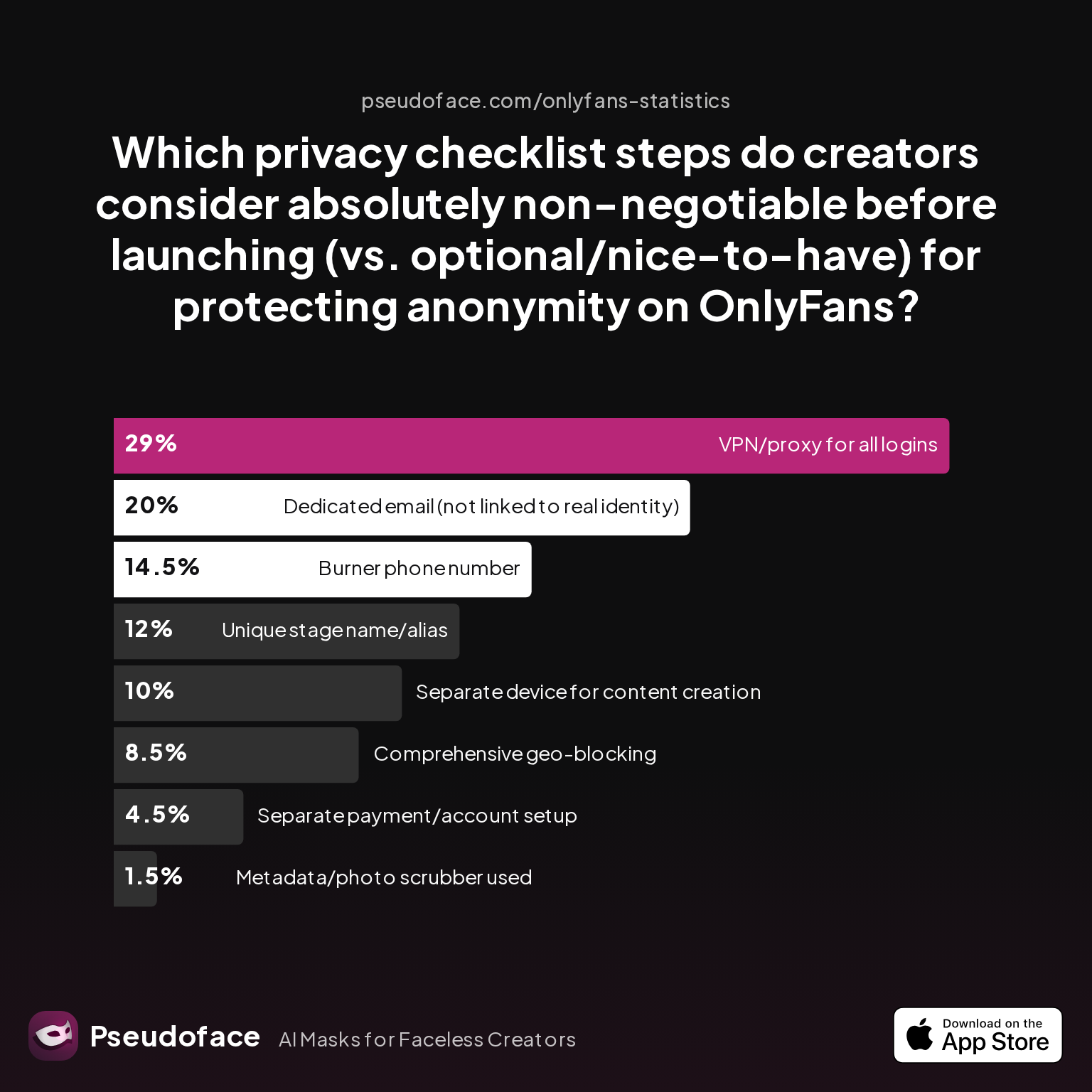
| Answer | Percentage |
|---|---|
| Burner phone number | 14.50% |
| Comprehensive geo-blocking | 8.50% |
| Dedicated email (not linked to real identity) | 20.00% |
| Metadata/photo scrubber used | 1.50% |
| Separate device for content creation | 10.00% |
| Separate payment/account setup | 4.50% |
| Unique stage name/alias | 12.00% |
| VPN/proxy for all logins | 29.00% |
VPN/proxy use for all logins tops the list of “absolutely non-negotiable” steps, with dedicated email and a burner number also scoring highest; geo-blocking, file scrubbing, and business banking are seen as less essential but still important by veteran creators. This hierarchy is echoed in open Reddit discussions—both practical and tech tactics, when combined in a layered fashion, offer the greatest protection.
For quick reference, here’s how classic vs. enhanced tracking steps compare:
| Step | Classic | Enhanced/Modern | Perceived Importance* |
|---|---|---|---|
| Unique creator email | ✔️ | ✔️ | High |
| Consistent stage name | ✔️ | Medium | |
| Metadata scrubbing | ✔️ | Automated workflow | Low |
| VPN for all logins | ✔️ | Highest | |
| Geo-blocking | ✔️ | Per-country & region | Low-med |
| Separate device/profile | ✔️ | Medium | |
| Third-party payment card | ✔️ | Medium |
*Directionally based on creator ranking in Pseudoface Reddit data, with self-selection and recall biases placing technical steps like VPN higher, possibly due to raised awareness in subreddit discussions since 2025.
As a synthesis: Layered diligence is the best insurance. No single tactic is bulletproof, but overlapping classic and enhanced steps dramatically reduces your real-world risk.
Next, we address the most persistent and urgent doxxing-prevention questions—those every privacy-first OnlyFans creator should resolve before, or right after, their first “go live.”
FAQ: Doxxing & Privacy for Faceless OnlyFans Creators
What is a doxxing service and how can I protect against automated identity discovery on OnlyFans?
A doxxing service is any tool or paid service that cross-references online clues—usernames, images, payment history—to identify anonymous creators.
Automated reverse image search is the most common method. Use unique content, never reuse personal images, and always scrub metadata (see chart and Reddit advice above). For added protection, watermark images uniquely for each platform, and never post promo selfies reused from past personal profiles.
How does OnlyFans keep content private for faceless creators?
OnlyFans uses default privacy and content paywalls, but does not guarantee anonymity—user error, unblocked locations, and leaked metadata can all lead to exposure.
You must build privacy through your own setup: geo-blocking, unique logins, and contact/payment isolation are critical and under your control.
Should I use a privacy.com card for OnlyFans payouts (privacy com card onlyfans)?
Yes, a privacy.com card (or equivalent) limits payment trail exposure and reduces risk if platform or third-party leaks occur.
Over 50% of creators route funds via third-party services for this reason. Pair with PO boxes for all physical deliveries and avoid wishlists or interface leaks to your banking identity.
Can geo-blocking fully prevent stalking or accidental discovery from local acquaintances?
No, geo-blocking prevents only some local discovery. Motivated stalkers routinely bypass it with VPNs or platform bugs—42% of creators have seen this happen.
Use fake profile locations and keep background clues ambiguous for added camouflage.
What are the most common doxxing address vectors, and how can I close them?
The most frequent address leaks come from Amazon wishlists and physical shipments.
Avoid listing real addresses or personal Amazon accounts, use PO boxes, and favor digital/virtual gifts where possible.
What’s the difference between classic privacy steps and enhanced tracking prevention for OnlyFans creators?
Classic steps include unique emails, stage names, and file scrubbing; enhanced steps add technical isolation like VPNs and device separation.
Creators consistently rate VPN/proxy use as the single most critical modern step, but the most resilient privacy comes from combining both classic and advanced tactics.
How likely is it for my anonymous creator account to be linked to my real identity through autofill, browser, or syncing features?
Based on self-reported data, about 30% of creators have had account leaks discovered by others from autofill or sync mistakes.
Use browser profiles with NO saved logins, never autofill, and avoid contact syncing across personal and creator accounts for stronger separation.
Is eavesdropping prevention (audio/video metadata) a concern for faceless OnlyFans creators?
Yes, though less frequent than visual leaks, audio/video files can contain metadata or clues (background sounds, home echoes) that betray location or routine.
Always scrub files, preview before uploading, and, when possible, edit out environmental sounds and backgrounds.
What privacy steps are considered “absolutely necessary” before launching a faceless OnlyFans?
VPN/proxy use, unique email, and account separation (device, phone number) are the highest-priority “musts” per experienced creators.
Skip any one at your own risk; even minor leaks have led to real-world doxxing events.
If I forgot a privacy step after launching, what should I do to recover?
Immediately update/change credentials, replace or delete compromised files, audit participation on all linked platforms, and communicate with fans if needed.
Many creators have successfully “reset” after missed steps, but time is critical—take action at the first sign of exposure.
Final Thoughts
Staying faceless on OnlyFans is not about paranoia or technical firewalls—it's about clear, recurring habits. The most common doxxing incidents stem not from targeted attacks, but from moments of inattention, routine shortcuts, or misunderstanding what each privacy feature really delivers. By following the data-backed checklist above—layered, methodical, and rooted in real world creator experiences (as distilled from 250,000+ public Reddit threads in 2025-2026)—you can dramatically reduce your odds of accidental exposure and continue to create, promote, and earn with true peace of mind. Stay vigilant, update your habits as threats evolve, and remember: anonymity is a moving target, but every layer you add makes you harder to find.


