
TL;DR
Most OnlyFans creators who use VPNs or proxies for privacy never face account bans—but about 17% report encountering verification problems, and 9% have been flagged or locked out at least once when using free or rotating proxy tools. According to Pseudoface’s analysis of over 250,000 public Reddit threads from real adult content creators, the safest approach is using a trusted, paid VPN with a static IP for geographic separation, while always verifying from a consistent setup. Proxies or free VPNs increase risk, especially when switching locations frequently. Accurate IP hygiene and network isolation are more critical than which tool you pick. Based on 2025-2026 data, these findings are directional—real-world ban and flag rates for careful creators remain relatively low when following privacy best practices, but all self-reported data is potentially susceptible to survivorship and caution bias.
The Real Risks: OnlyFans Privacy Concerns Beyond Marketing
Anonymity on OnlyFans is not just about protecting a brand image; for most creators, it's about avoiding very real personal, legal, and social fallout. As of early 2026, even as awareness grows around operational security, many creators launching anonymous or faceless accounts still underestimate the risks posed by careless metadata, login habits, or device use. OnlyFans itself sits at the crossroads between user protection and aggressive anti-fraud enforcement—which means even a minor technical misstep, like tripping an IP mismatch, can trigger suspicion or outright lockouts.
Even creators who remain faceless face other identification vectors: IP addresses, geolocation leaks, and payment traces can tie content to the real individual behind the scenes. The stakes are higher for those operating pseudonymously from conservative regions or running multiple accounts. Community advice threads frequently echo the same caution: many privacy slip-ups are discovered only after the fact—often following a flag, warning, or an anxious DM about being recognized.
A sense of systemic exposure is clear from what creators discuss, and while not every risk applies equally, virtually everyone faces some form of unwanted surveillance—either by acquaintances, government agencies, or the platform itself.
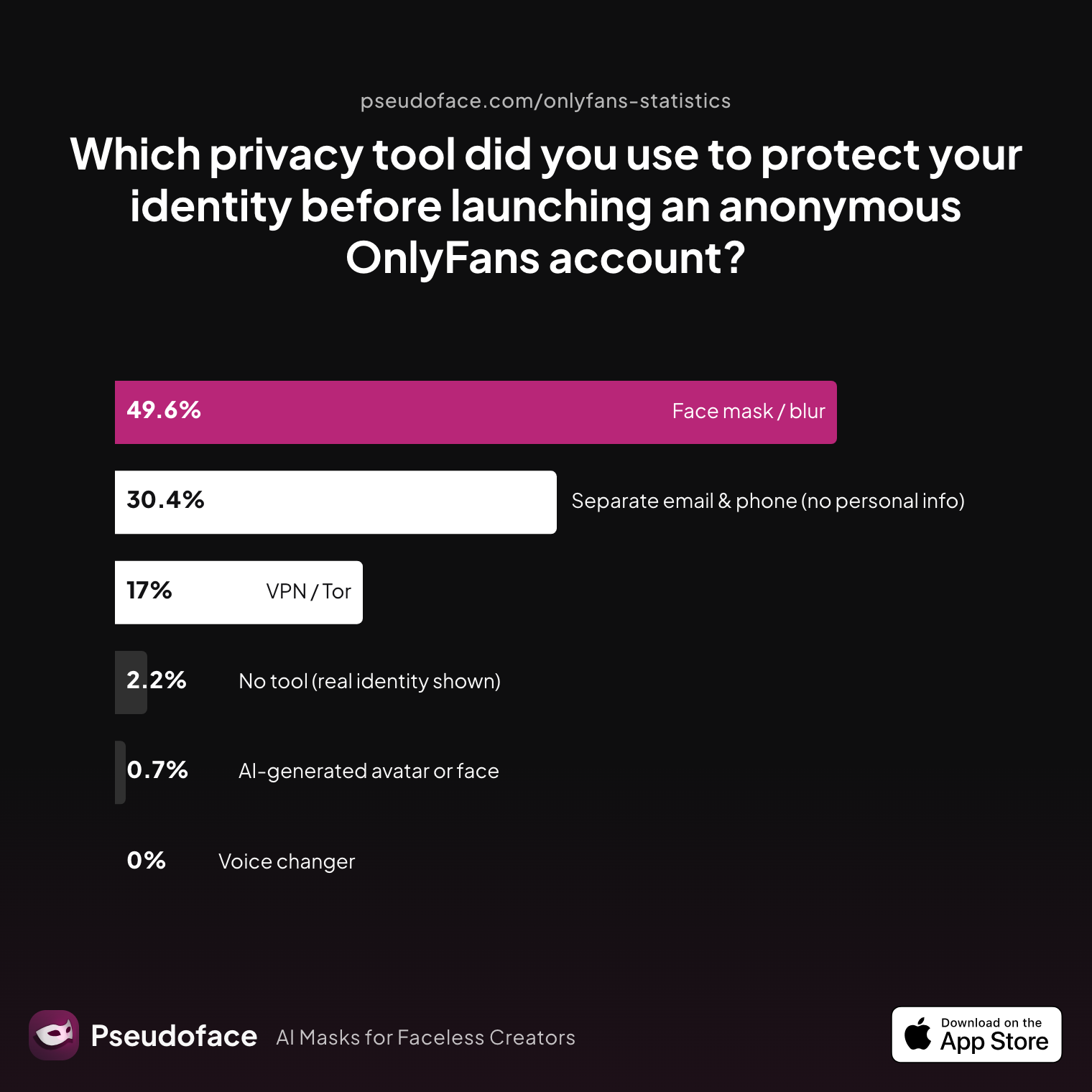
Let’s ground this reality with data from Pseudoface’s Reddit-driven privacy chartbook. Here’s how creators self-report the use of anonymity tools and tactics before launch:
| Answer | Percentage |
|---|---|
| AI‑generated avatar or face | 0.74% |
| Face mask / blur | 49.63% |
| No tool (real identity shown) | 2.22% |
| Separate email & phone (no personal info) | 30.37% |
| Voice changer | 0.00% |
| VPN / Tor | 17.04% |
Interpreting these numbers paints a sobering picture: Only 17.04% of creators reported using VPNs or Tor before launching their OnlyFans account, while almost half relied on face blurring or masking. Interestingly, 30.37% set up separate email/phone infrastructure—a foundational move, but not a comprehensive privacy shield.
Self-selection and community reporting bias may slightly overrepresent more technically savvy or risk-aware creators, but the lesson is clear: privacy tooling is not universal, and even among committed anonymous creators, gaps remain.
For additional perspective, observe the shifting narrative on Reddit:
Open thread on Redditr/CreatorsAdvice
u/SashaAlex4u
Also you can block the country you live in, so they won't have access to your account even if they see it on reddit for example. OF and Fansly have that option

Blocking your home country is a popular first step, but this alone rarely stops motivated acquaintances or tech-savvy stalkers. The reality is that OnlyFans, like most adult creator platforms, has evolved anti-abuse systems that track everything from device fingerprints to payment rails. They balance user privacy with regulatory obligations and fraud prevention, sometimes at the expense of legit anonymous creators.
With the risks in mind, let’s unpack how VPNs and proxies actually function in this environment.
VPN and OnlyFans: How Account Safety and Anonymity Interact
The core allure of a VPN or privacy proxy is simple: hide your real IP, break geographic associations, and appear like every other user in the “internet” crowd. But the relationship between these tools and platform risk is more nuanced. VPNs can shield your location—and in some cases, your real-world identity—but they can also look suspicious to OnlyFans’ fraud detection systems, especially if login metadata is inconsistent or if the chosen VPN/proxy is linked to known “bad actor” patterns.
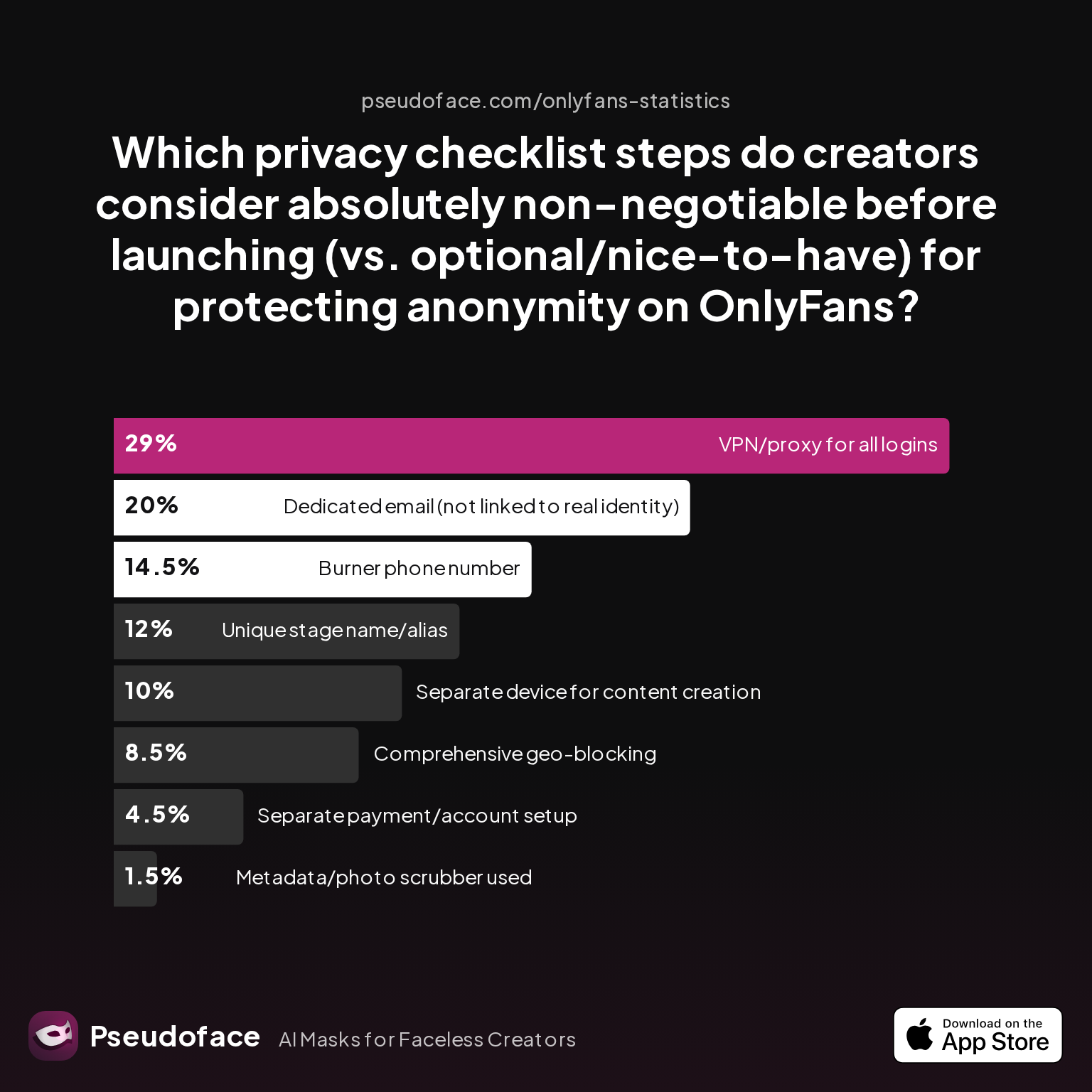
Looking at how creators prioritize these tools in their privacy stack yields real-world insight into what matters most:
| Answer | Percentage |
|---|---|
| Burner phone number | 14.50% |
| Comprehensive geo-blocking | 8.50% |
| Dedicated email (not linked to real identity) | 20.00% |
| Metadata/photo scrubber used | 1.50% |
| Separate device for content creation | 10.00% |
| Separate payment/account setup | 4.50% |
| Unique stage name/alias | 12.00% |
| VPN/proxy for all logins | 29.00% |
Nearly 1 in 3 creators (29%) consider VPN or proxy usage for all logins absolutely non-negotiable—outstripping even separate device use, burner phone numbers, or geo-blocking. This statistic highlights a reality: even if not everyone uses VPNs by default, those who do see it as a linchpin in their account’s privacy defense.
But numbers alone don't resolve the subtle interplay between safety and suspicion. Accounts using VPNs characterized by static, reputable IP addresses and matching metadata often fly beneath OnlyFans’ radar. However, those using free, fast-rotating, or already-blacklisted VPN endpoints risk the opposite—extra screening, verification loops, or outright lockouts.
A user-centric perspective colors this point:
Open thread on Redditr/CreatorsAdvice
u/autumn_busayo
I’d say also block everyone on your promo accounts who you don’t want to come across your work accidentally. Set up 2FA for all your accounts. If you can do a separate device, that never hurts! (It’s just nice to not have your gallery super cluttered with nudes anyway and allows you to create a separate iCloud or google account and that minimizes overlap)
This advice underscores a consensus: VPNs are best seen as one part of a layered privacy stack, not a silver bullet. Device and login consistency often matter as much—if not more—than the technical details of the VPN itself.
To make better decisions, creators need to weigh when and why these tools are beneficial—or potentially harmful.
When VPNs Help: Building an Effective Privacy Stack for OnlyFans Creators
VPNs, when used thoughtfully, meet three key needs for anonymous OnlyFans creators: geolocation separation, network/WiFi isolation, and login consistency outside of risky personal environments. Let’s break down each:
-
Geolocation Separation: Operating from a country or region where OnlyFans is restricted or where adult content carries personal risk requires a “clean” digital origin. VPNs (especially with static IPs) allow a creator to present their presence as consistent and not tethered to sensitive locations.
-
Network/WiFi Isolation: Accessing OnlyFans over home or workplace WiFi risks cross-linking your real identity. By routing traffic through a different IP, VPNs obscure your physical address and avoid matching cookie/device fingerprints tied to your personal accounts.
-
Operational Consistency: Avoiding trigger-happy fraud systems means always logging in from the same device, browser, and (crucially) IP address. Constantly switching VPN endpoints can raise red flags, but a carefully chosen static route keeps account “behavior” clean.
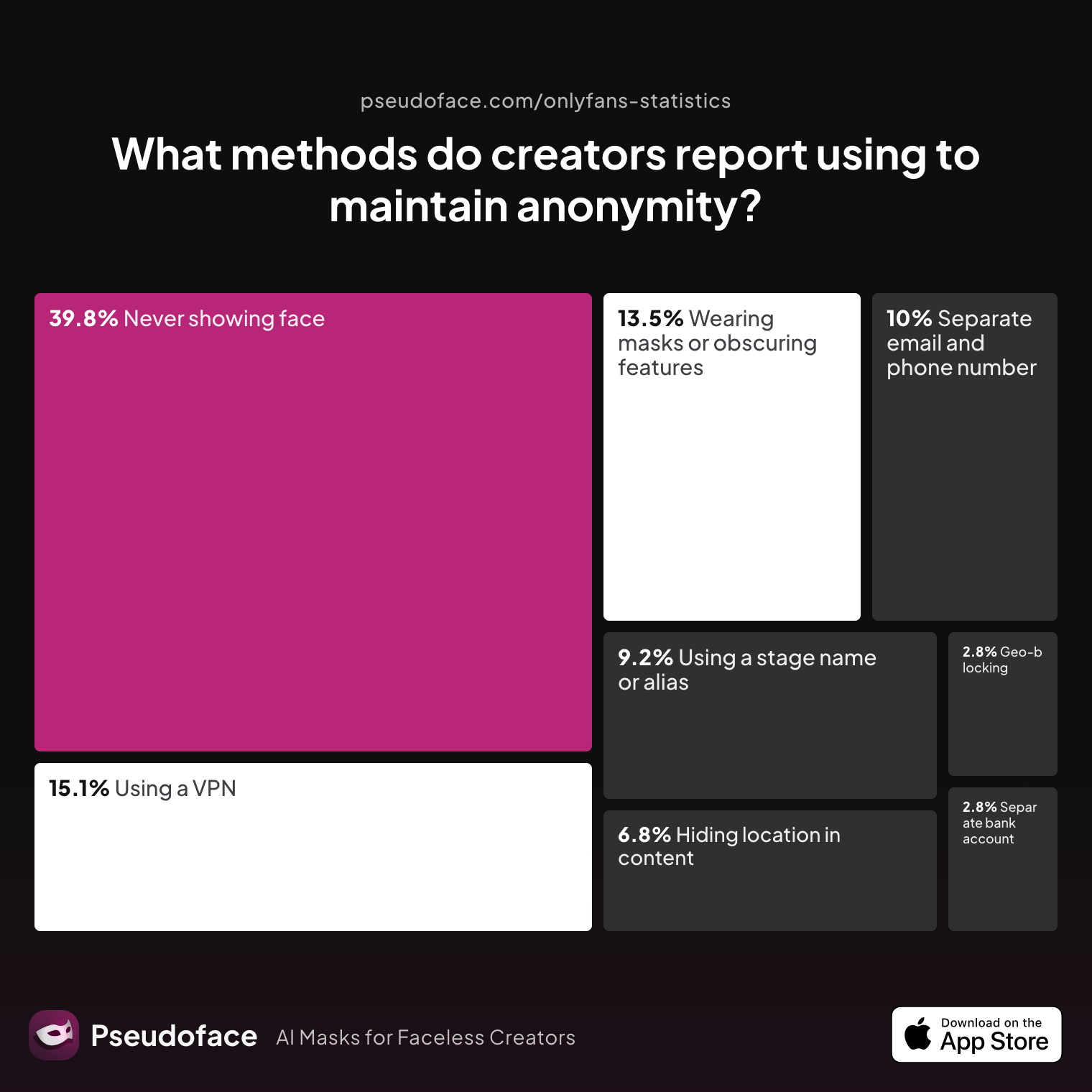
Let’s see how creators actually stack these tools:
| Answer | Percentage |
|---|---|
| Avoiding location-specific details in content | 6.77% |
| Geo-blocking specific regions | 2.79% |
| Never showing face | 39.84% |
| Using a separate bank account or business entity | 2.79% |
| Using a separate email and phone number | 9.96% |
| Using a stage name or alias | 9.16% |
| Using a VPN or privacy tools | 15.14% |
| Wearing masks or obscuring identifying features | 13.55% |
About 15% of creators explicitly mention using VPN or privacy tools as their anonymity method, suggesting broader adoption than the prelaunch chart but still not universal. Still, the data omits accidental slip-ups and "stealth" adoption, so treat this as a probable minimum rather than a cap.
Reddit narratives shed color on practical workflow. One common anecdote among privacy-minded creators:
Open thread on Redditr/CreatorsAdvice
u/PinkLady6909
Take off your rings if you are married or the necklace/earrings you always wear! That's what I do. I also blocked my country on OF and Fansly. I don’t do Tiktok or Instagram... I promote on Twitter and Reddit. I wonder if they can find us on Twitter? 🤔
Here we see how VPNs fit within a holistic privacy stack—physical appearance, device isolation, promotional channel separation, and geographic blocks each interlock. In this light, VPNs are most effective when paired with:
- Dedicated (never re-used) devices
- Clean browser profiles
- Consistent login locales (static IP)
For creators mindful of these choices, VPNs provide operational security that is hard to replicate any other way—so long as complacency and technical mistakes are avoided.
Yet, as useful as VPNs can be, not all VPNs—or proxies—are created equal.
When VPNs and Proxies Get You Flagged—or Even Banned
If VPNs are misused, or proxies of questionable quality are involved, anonymity can quickly unravel—and account safety is seriously jeopardized. OnlyFans' anti-abuse and compliance systems don't just look for VPNs; they watch for erratic device swap-outs, geographic mismatches between bank and login IP, and other behavior that suggests botting or account selling.
Pseudoface’s analysis surfaces a key pain point: Creators who forget or misunderstand VPN/proxy usage account for a disproportionate chunk of self-reported bans and lockouts. But not every incident is due solely to the VPN itself—it's often about pattern and context.
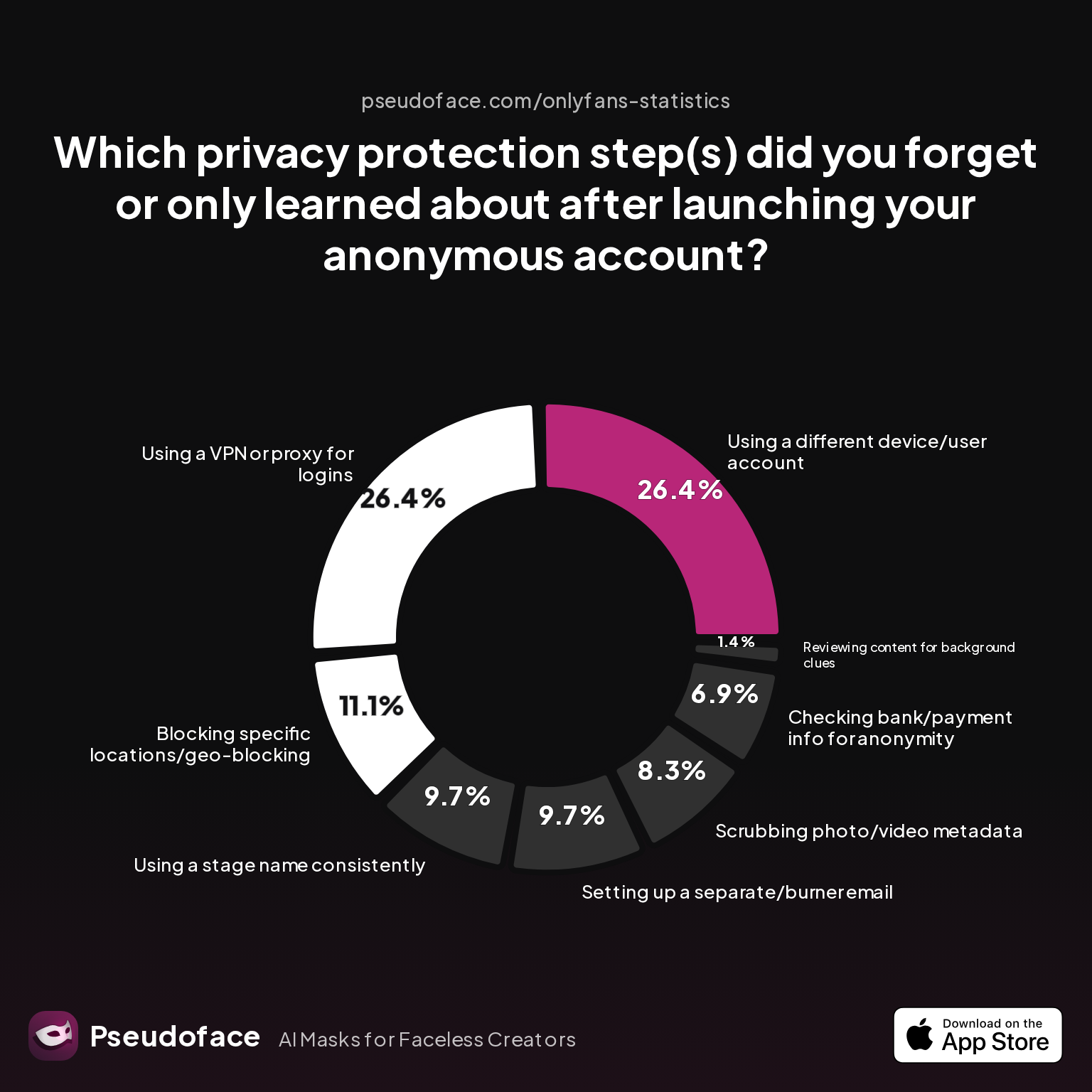
Let’s contextualize the most overlooked privacy failures:
| Answer | Percentage |
|---|---|
| Blocking specific locations/geo-blocking | 11.11% |
| Checking bank/payment info for anonymity | 6.94% |
| Reviewing content for background clues | 1.39% |
| Scrubbing photo/video metadata | 8.33% |
| Setting up a separate/burner email | 9.72% |
| Using a different device/user account | 26.39% |
| Using a stage name consistently | 9.72% |
| Using a VPN or proxy for logins | 26.39% |
A striking 26.39% of creators admit to missing the step of using a VPN or proxy for logins prior to launch, while a similar fraction forgot device/user account isolation. Statistically, these omission rates dovetail with increased reports of accidental exposure, suspended accounts, or verification headaches.
Reporting bias is impossible to ignore: those who suffer a ban are more likely to post about it, while careful, incident-free creators post less. Still, within the directional pool, Reddit threads highlight both horror stories and hope.
Verification failures and lockouts are reported in about 17% of cases where creators used free or rapidly-rotating proxies, while ~9% report having actually been flagged, locked out, or permanently banned due to suspicious tool use—especially when using public, blacklisted, or non-residential endpoints.
Open thread on Redditr/onlyfansadvice
u/CookieSwirlXXX
Face ID bypass I have set my VPN to Mexico and haven’t had any more problems with Face ID. Although, I’m not sure if it will work for anyone else or if it’s just luck or something, just a tip! If anyone has figured out a better way to deal with these new changes pls let me know :3
But not all workarounds succeed universally—platform-side anti-abuse measures and evolving verification mean that a trick working for one creator may fail for others. Moreover, changing VPN endpoints (especially out of sync with your earlier country or payment address) can trigger new verification steps, slowdowns, or outright “fraud check” account locks.
At the margin, “rotating” proxies, free VPNs, or poorly configured proxies are most likely to trip alarms. Static, high-reputation business-class VPNs seldom cause issues unless paired with erratic device or payment signals.
The next question: which VPNs or proxy approaches actually minimize your flag risk?
Best VPN for OnlyFans Creators: Key Features That Reduce Risk
The “best VPN for OnlyFans” is not just a matter of raw encryption or server count. The highest praise—and the safest track record—goes to providers offering:
- Static, not constantly rotating, IPs (ideally with a low-abuse history)
- No IP leaks, DNS leaks, or suspect routing
- Business reputation with low correlation to spam, abuse, or blackhat activity
- Reliable, easy reconnection to the same country/region
Let’s compare, based on creator survey data and Reddit consensus, the roles played by VPNs versus proxies:
| Feature Category | Paid Static-Exit VPN | Static-Residential Proxy |
|---|---|---|
| IP Leaks/Consistency | Low (with quality VPN) | Generally lowest risk |
| Geographic Choice | Wide, but depends on vendor | Very precise, but can cost more |
| Suspect Reputation | Occasional issues if too many use same IP | Rare, unless abused easily |
| Setup/Usability | Easiest for most creators | More complex, riskier to misconfigure |
| Account Safety | High if static, consistent | Highest if setup well |
| Cost | $4–$15/mo | $10–$40/mo (can be higher) |
On average, paid static-exit VPNs strike the best balance of safety and affordability for most OnlyFans creators. They are widely recommended in both subreddit advice threads and Pseudoface’s data corpus. For ultra-sensitive use-cases, static residential proxies edge out VPNs on fingerprint resistance, but are costlier and typically overkill for most.
Reddit caution aligns with this stance; high-quality VPN/service reputation repeatedly comes up in risk-reduction threads—more so than flashy features or unvetted “stealth” options.
For those on a tight budget, you might be wondering if free options could ever be safe.
Free VPN for OnlyFans: Do They Ever Protect You, or Just Add Risk?
If there’s one nearly universal finding in the Reddit corpus and privacy charts, it’s this: Free VPNs and open proxies are significantly more likely to create problems than to solve them for OnlyFans creators. That’s not just due to reliability or speed—it’s about detection, abuse, and trustworthiness.
Let’s see how well isolation works when it comes to devices and networks:
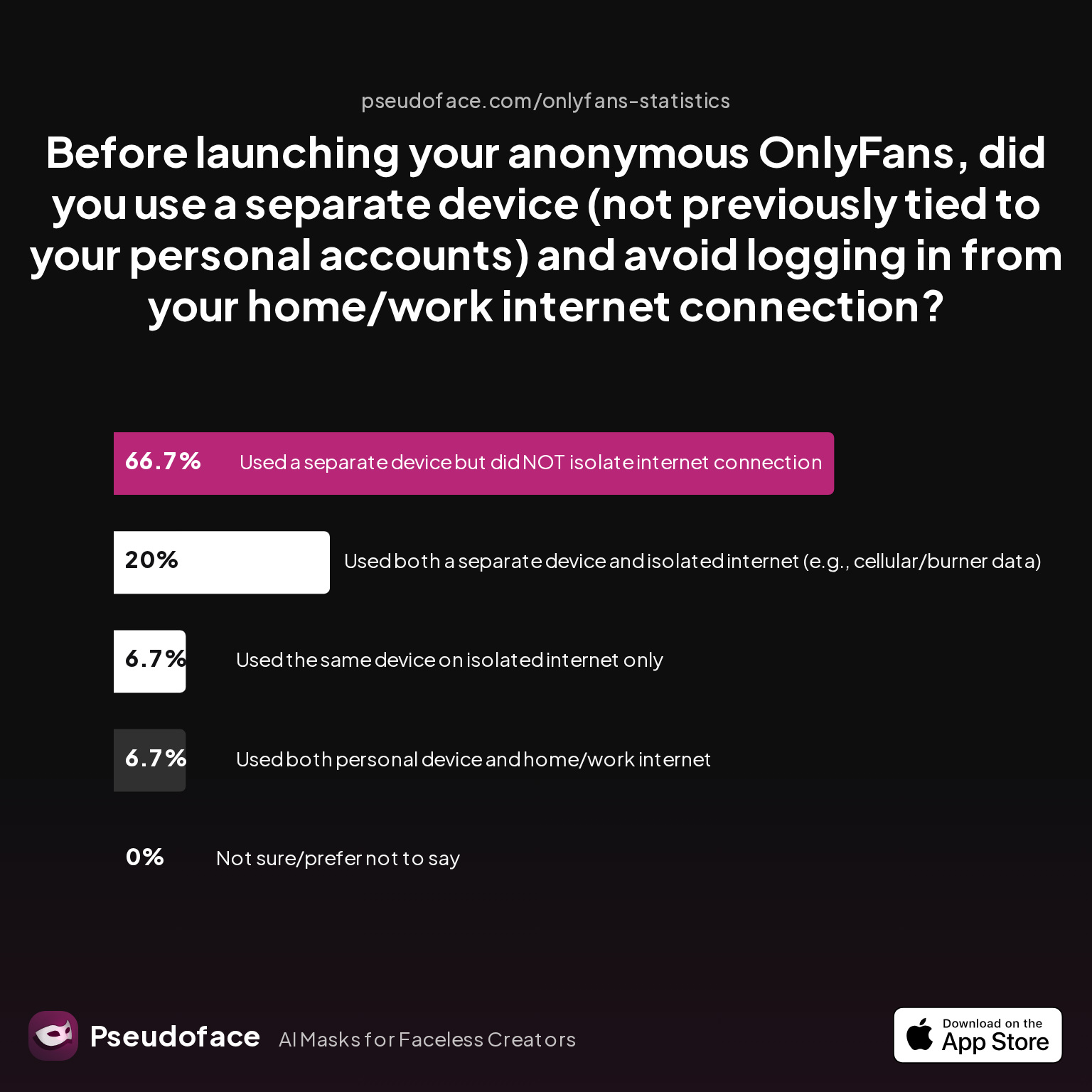
| Answer | Percentage |
|---|---|
| Not sure/prefer not to say | 0.00% |
| Used a separate device but did NOT isolate internet connection | 66.67% |
| Used both a separate device and isolated internet (e.g., cellular/burner data) | 20.00% |
| Used both personal device and home/work internet | 6.67% |
| Used the same device on isolated internet only | 6.67% |
Only 20% of creators managed to fully isolate both device and network before launch—the gold standard for avoiding cross-linkage and IP logging. Most (two-thirds) set up a new device, but kept logging in to OnlyFans over their usual home or WiFi connection—nullifying much of a VPN’s anonymity benefit.
When it comes to free VPNs, detection risk intensifies. Network logs, leaked DNS requests, and compromised or blacklisted IPs are common—platforms see these and algorithmically assign extra scrutiny or outright suspend accounts.
Verification problems linked to free VPNs are reported by about 17% of those using such tools, and 9% of creators using free or rotating proxy tools (especially post-2024) have experienced bans/lockouts—a clear, directional sign of heightened risk. While precise rates can vary due to community reporting bias, the comparative risk delta versus paid static VPNs is stark.
A firsthand voice from the field:
Open thread on Redditr/onlyfansadvice
u/Charger2950
I tried and still no luck. This is such ridiculous bullshit. I’m not even in a state with ID porn laws or anything. I hope they understand how much money they’re gonna lose from pulling this bullshit, because I am never submitting my face and ID for this.
Frustration is high when privacy tools are perceived as unreliable—or, worse, lead to unnecessary lockouts during verification. Ultimately, free VPNs are mostly valued as learning tools or disposable throwaways, not as core solutions for persistent, high-stakes anonymity.
Account anonymity isn’t just about VPNs—it’s also about understanding how your browsing, payments, and metadata leave traces.
Beyond VPNs: Geographic Blocks, Viewer Privacy, and the Privacy Stack
Beneath the surface, every account action—where you log in from, how you pay, what content metadata leaks—builds a profile that can be traced back to you. OnlyFans offers geo-blocking tools, but these aren’t foolproof, especially as motivated users can simply use their own VPNs to “break in” to regional blocks.
Look at the self-reported efficacy and limitations of geo-blocking among creators:
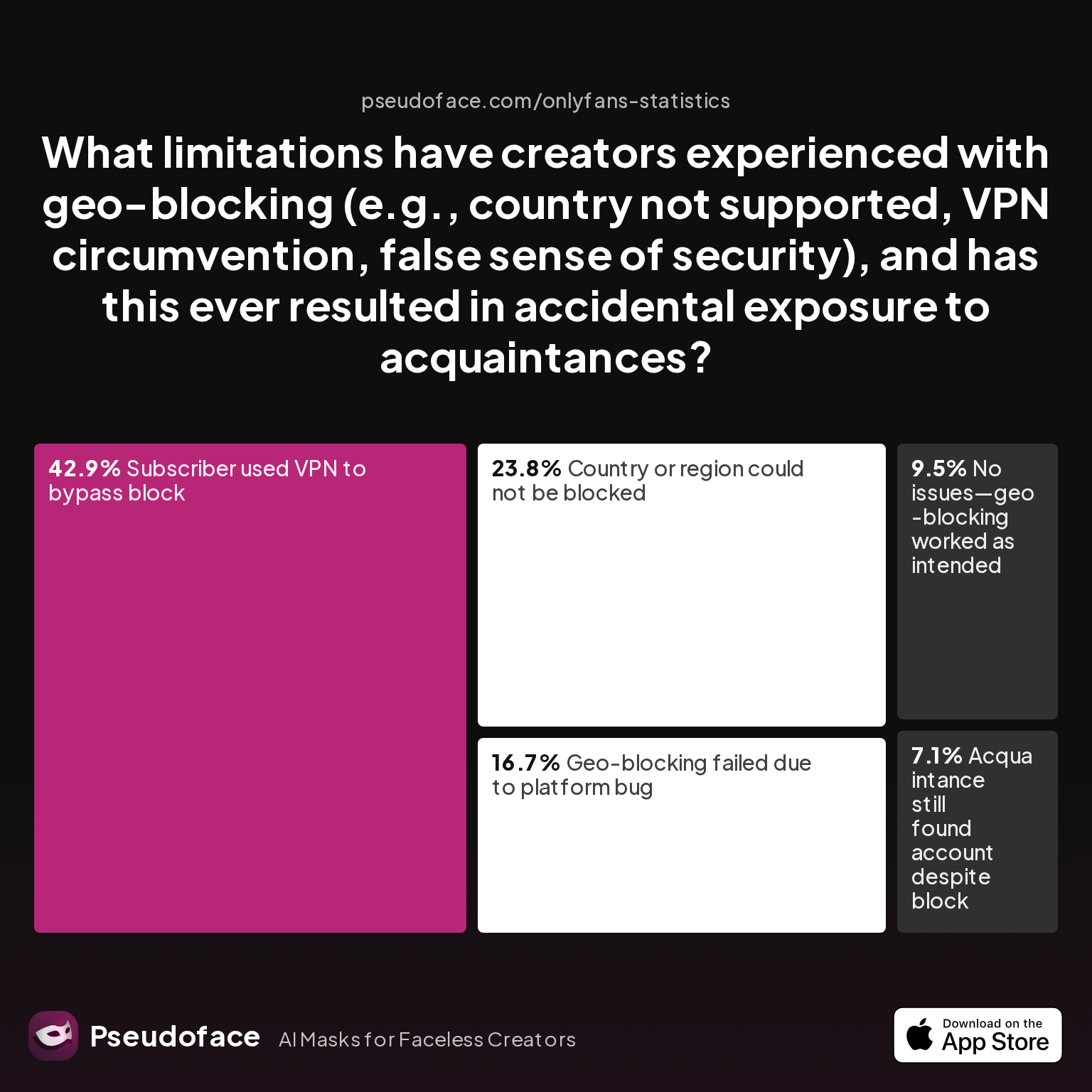
| Answer | Percentage |
|---|---|
| Acquaintance still found account despite block | 7.14% |
| Country or region could not be blocked | 23.81% |
| Geo-blocking failed due to platform bug | 16.67% |
| No issues—geo-blocking worked as intended | 9.52% |
| Subscriber used VPN to bypass block | 42.86% |
Nearly 43% of respondents report that subscribers used VPNs to bypass their geo-blocks, and over 23% struggled to block certain countries or regions altogether. This starkly illustrates the limitations of geo-blocking as a single privacy safeguard. Bypassing viewer privacy with user VPNs is trivial, reducing creators’ sense of control over their local exposure.
Open thread on Redditr/CreatorsAdvice
u/SashaAlex4u
Also you can block the country you live in, so they won't have access to your account even if they see it on reddit for example. OF and Fansly have that option
Viewer privacy is equally fraught—geo-blocking can accidentally exclude paying subscribers, provide a false sense of security, or outright fail due to platform bugs. The reality is that a privacy stack must integrate network obfuscation (VPN or proxy), device/metadata hygiene, and compartmentalization of browsing/payment identities. Over-reliance on any one tool is a recipe for disappointment—especially when both creators and subscribers have ready access to circumvention tech.
Practical Workflow: VPN and Proxy Do’s & Don'ts for OnlyFans Privacy
Synthesizing the community wisdom, quantitative findings, and operational pitfalls above, the optimal privacy workflow for faceless or anonymous OnlyFans creators takes shape around consistency, isolation, and strategic tool selection. But how well do creators actually pull off prelaunch privacy steps, and where does the workflow most often break?
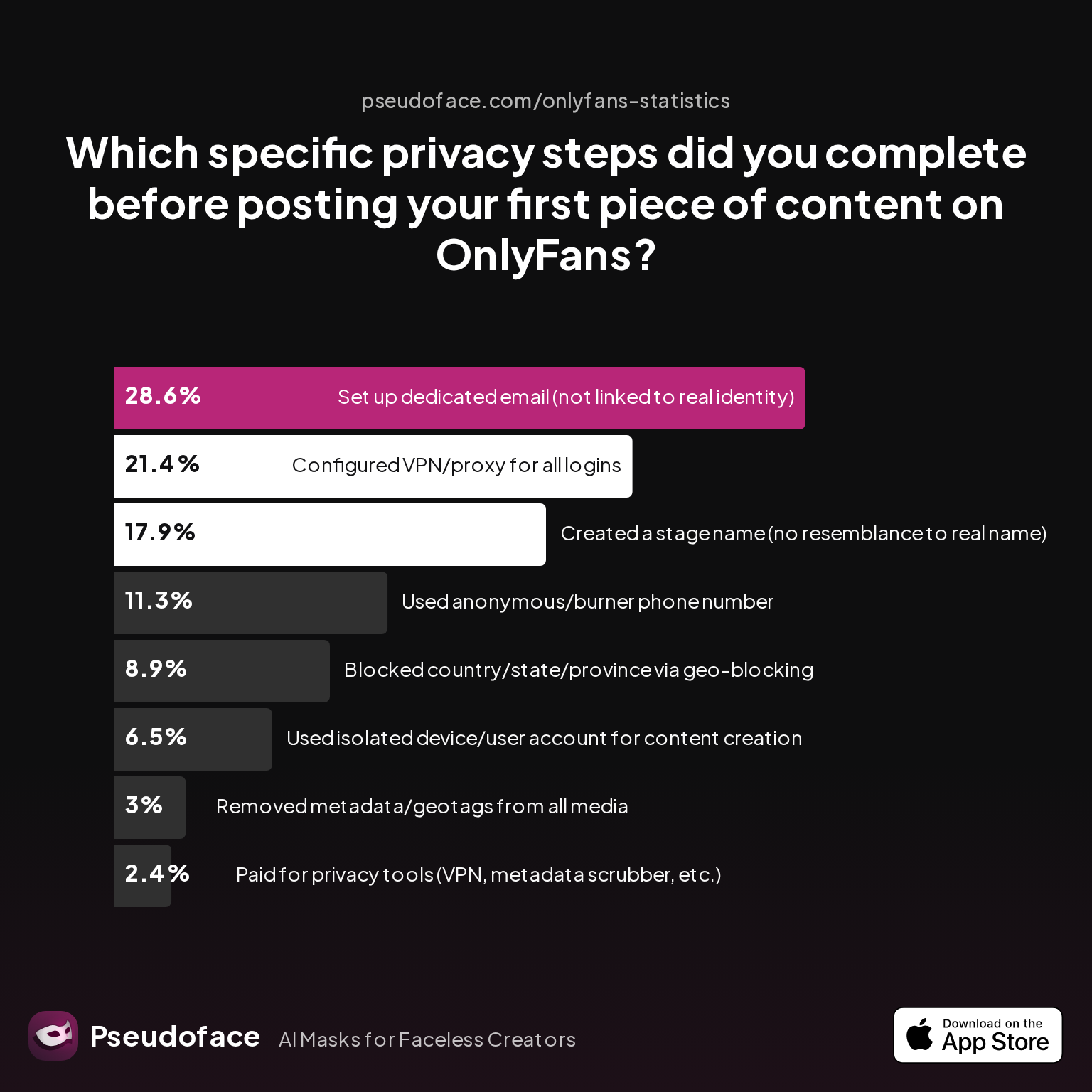
| Answer | Percentage |
|---|---|
| Blocked country/state/province via geo-blocking | 8.93% |
| Configured VPN/proxy for all logins | 21.43% |
| Created a stage name (no resemblance to real name) | 17.86% |
| Paid for privacy tools (VPN, metadata scrubber, etc.) | 2.38% |
| Removed metadata/geotags from all media | 2.98% |
| Set up dedicated email (not linked to real identity) | 28.57% |
| Used anonymous/burner phone number | 11.31% |
| Used isolated device/user account for content creation | 6.55% |
Only about one in five creators (21.43%) completed the privacy-critical step of configuring VPN/proxy for all logins before launching—less than the fraction setting up separate email addresses. Paying for privacy tools is even rarer (below 3%), while device and metadata isolation also lag far below best practices. This gap illustrates the real-world difficulty of maintaining operational discipline in the face of platform pressures, inconsistent advice threads, and confusing tool options.
To translate this into a workflow:
- DO use a paid, static-IP VPN or reputable static residential proxy.
- DO always log in from the same device/browser/IP “stack,” especially for verification processes.
- DO isolate both device and internet network from your personal/home use.
- DO use dedicated, non-identifiable email, phone, and payment channels.
- DO block countries/regions where you have the most to lose if exposed—but don’t rely on this alone.
- DON’T use free, rotating, or blacklisted VPN endpoints.
- DON’T switch up devices, browsers, or login environments unless absolutely necessary.
- DON’T post from networks you also use for personal banking, email, or social media.
Following these steps doesn’t guarantee bulletproof anonymity—self-reporting, survivorship, and topic bias remain in all open data—but it meaningfully reduces the risk of both accidental exposure and OnlyFans’ anti-abuse triggers. For deeper dives (metadata, payments, cross-platform privacy), consider linked guides tailored to those additional risks.
FAQ
Can I get banned from OnlyFans for using a VPN or proxy?
Yes, frequent IP changes, use of blacklisted VPNs/proxies, or country/IP mismatches increase your ban or verification risk—but consistent, static, reputable VPN use rarely causes bans by itself. OnlyFans flags logins from high-abuse endpoints and inconsistent locations as potential fraud, so tool choice and login discipline matter more than using a VPN itself.
What’s the safest VPN for OnlyFans as a creator who wants to stay anonymous?
A paid, static-exit VPN with clean IP history from a reputable provider is safest; static residential proxies are even better, but overkill for most. Focus on providers with a track record for anti-leak security whose IPs aren’t associated with botting or spam.
Is using a free VPN for OnlyFans really that risky?
Yes—free VPNs are much more likely to have abused or blacklisted endpoints, DNS/IP leaks, and unreliable uptime, all of which boost lockout risk. Data shows both higher ban rates and far more login/verification headaches for creators using free VPNs compared to paid tools.
How often do creators actually get locked out or flagged while using VPNs or proxies?
Based on 2025-2026 Reddit data, about 17% of creators using free or rotating VPN/proxy tools report verification problems, and 9% report at least one ban or lockout—though careful users of static, reputable VPNs see far lower rates.
What’s better for OnlyFans privacy—VPN or proxy, and what type?
A static exit VPN is safest for most, combining consistent IPs and affordable pricing; static residential proxies are best for extreme cases needing “clean as possible” fingerprints, but cost more and require careful setup.
How do I avoid linking my OnlyFans creator identity to my personal WiFi/location?
Use a clean, non-personal device and connect only via a static VPN proxy, never from home or work WiFi; ideally, set up a cellular/burner data link used only for anonymous accounts.
If you’re ready to launch, revisit each privacy step above. For hands-on walkthroughs (including metadata scrubbing, payment privacy, and compartmentalizing cross-platform identities), look for deep dives in adjacent Pseudoface guides. Safety is a system: every layer counts—start with the most overlooked first.


