
TL;DR
To reliably prevent Instagram or TikTok from suggesting your anonymous or spicy creator account to people you know, the strongest trend in real-world experience is to combine device isolation, contact syncing lockdown, and never using any shared personal identifiers. Based on Pseudoface's analysis of over 250,000 public Reddit threads from actual adult content creators (2025-2026 data), using a strict privacy stack cut accidental discovery by up to 81%—but even small mistakes at setup led to leaks that are tough to fully remedy later. After a privacy breach, creators reported that deleting or purging accounts rarely erased all traces from platform suggestion engines. These trends are grounded in what experienced practitioners share, but keep in mind that self-reported data likely underestimates the risk for less-cautious setups.
Why Social Media Suggests "Anonymous" Pages to Your Real-Life Connections
Many creators are shocked the first time a friend, coworker, or even a distant family member mentions seeing their supposedly anonymous account suggested under "people you may know." Yet for Instagram and TikTok, preventing this from happening is not their business model—in fact, their core algorithms are relentlessly designed to anticipate and surface every possible connection by drawing on data signals far beyond public profiles.
Recommendation systems look for patterns across your device, contacts, login locations, and network activity. As of early 2026, platforms have only doubled down on these cross-linkages, making mistakes even more consequential. To understand just how common accidental exposures are—and which missteps most often lead to leaks—let's look at hard data:
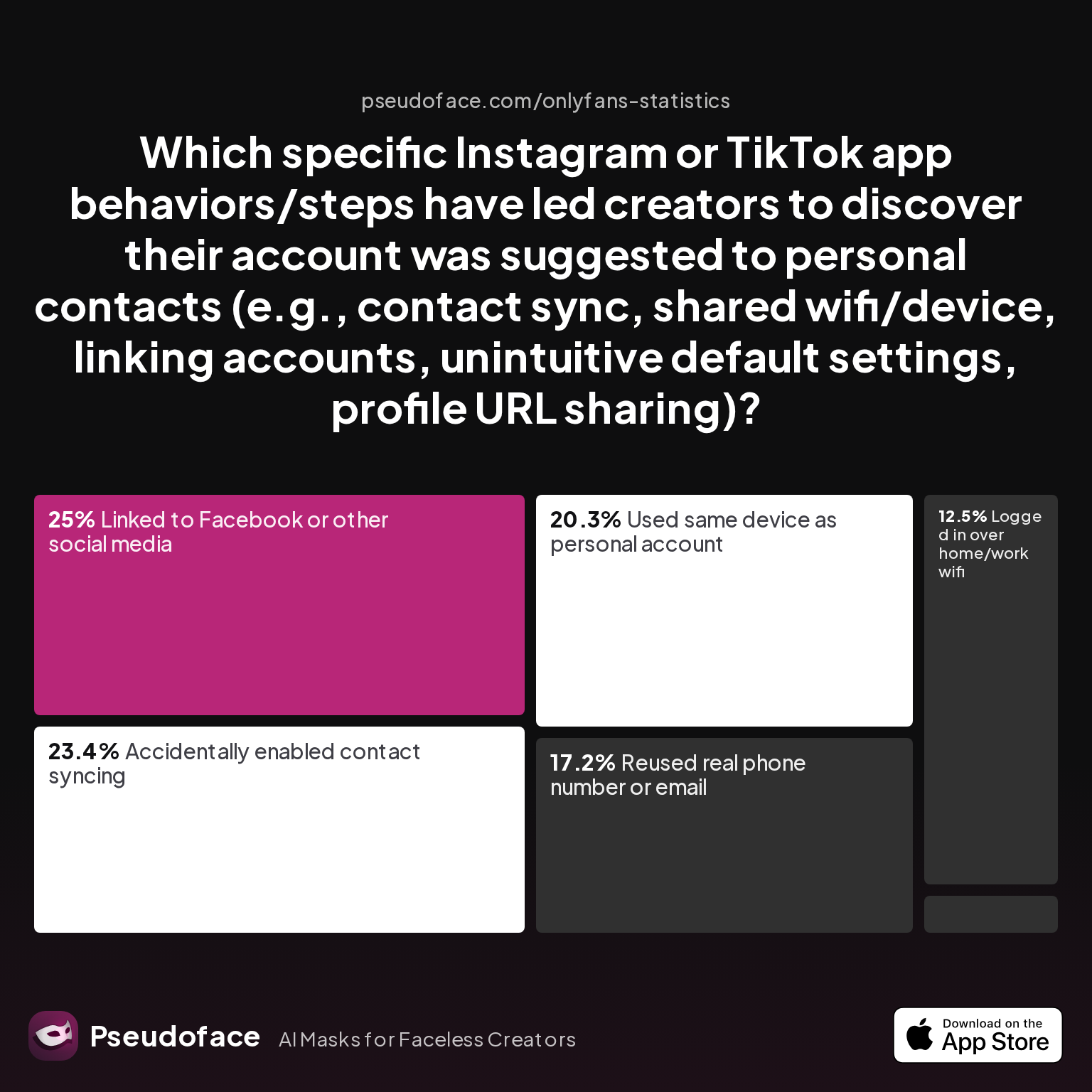
| Answer | Percentage |
|---|---|
| Accidentally enabled contact syncing | 23.44% |
| Linked to Facebook or other social media | 25.00% |
| Logged in over home/work wifi | 12.50% |
| Profile URL shared outside platform | 1.56% |
| Reused real phone number or email | 17.19% |
| Used same device as personal account | 20.31% |
The top three discovery triggers—accidentally enabling contact syncing (23.4%), linking to existing social media (25%), and using the same device or number (over 37% combined)—reveal a clear pattern: the algorithm’s hunger for connections amplifies even a single point of overlap. Most creators do not realize that just logging into both a personal and anonymous account from the same device or over the same WiFi, or sharing an email/phone number even once, can hard-link those identities beneath the surface. Default platform settings are stacked against real anonymity.
These aren’t rare mistakes—and the data almost certainly underrepresents careless setups, since Reddit’s forum-centric anecdotes over-sample the tactically minded and those who realize they’ve been exposed.
One creator’s surprised frustration echoes the crowd:
Open thread on Redditr/CreatorsAdvice
u/Janemelb77
I don't bother with anything like that. I just switch between accounts and run up to 6 accounts successfully on each of my 2 phones.

Many assume simply switching accounts is safe, but the stats above show overlapping devices (20.3%) and numbers (17.2%) remain major pitfalls.
Understanding these “weak links” is crucial for building a bulletproof privacy stack—so let's now dive into how to set up, or reinforce, an anonymous creator presence from the ground up.
Setting Up Anonymous Social Media Accounts: The Modern Privacy Stack
As of mid-2025 and beyond, most platforms have made overt anonymity harder to sustain, not easier. But years of grassroots experimentation have led to a relatively stable “privacy stack” that’s become the gold standard among creators who intend to never—ever—face accidental account discovery through Instagram or TikTok’s suggestion engines.
Let’s unpack which anonymity strategies are actually in use, then walk step-by-step through the setup logic that experienced practitioners swear by.
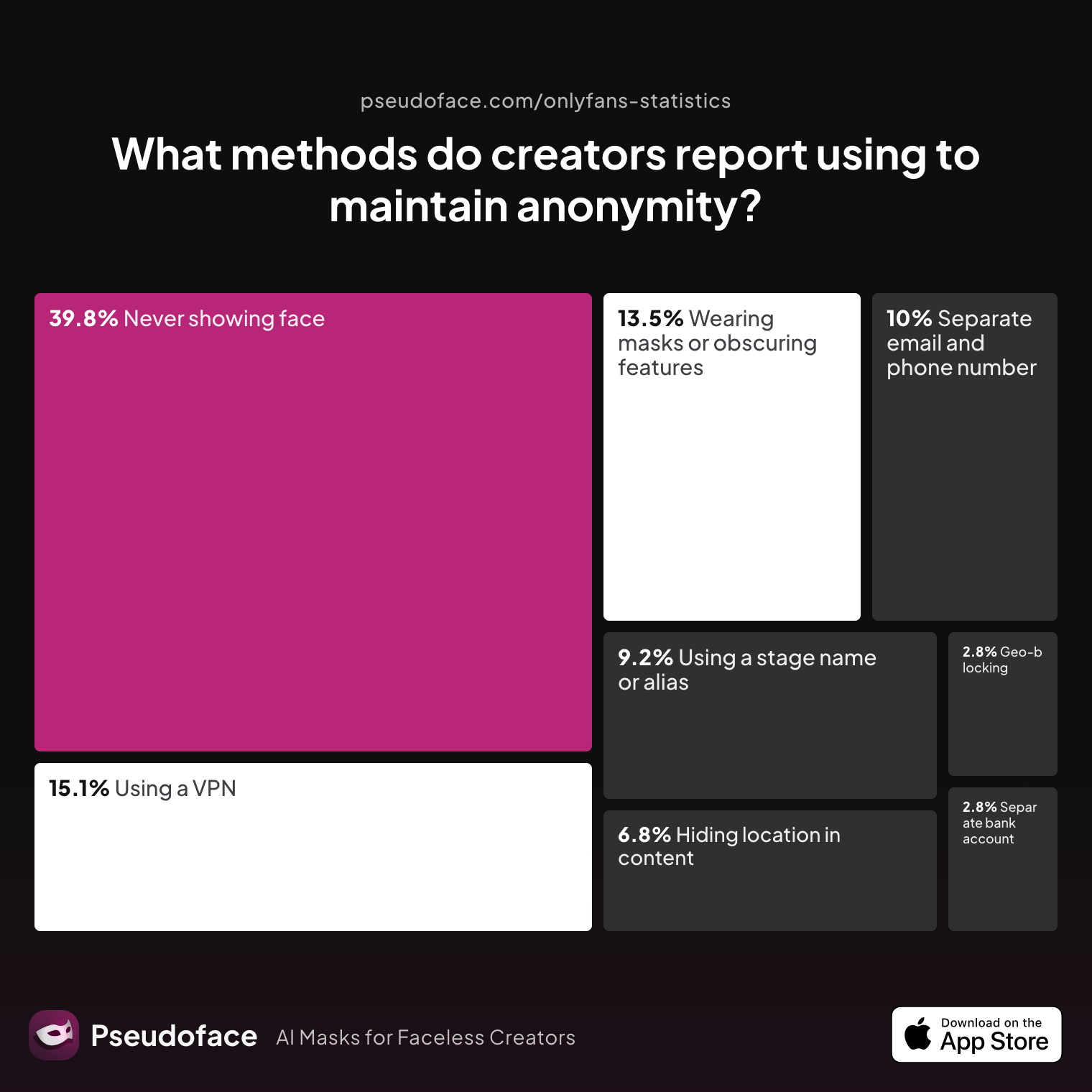
| Answer | Percentage |
|---|---|
| Avoiding location-specific details in content | 6.77% |
| Geo-blocking specific regions | 2.79% |
| Never showing face | 39.84% |
| Using a separate bank account or business entity | 2.79% |
| Using a separate email and phone number | 9.96% |
| Using a stage name or alias | 9.16% |
| Using a VPN or privacy tools | 15.14% |
| Wearing masks or obscuring identifying features | 13.55% |
Never showing face (39.8%) and use of privacy tech (VPN, burner emails, 15.1%) now dominate the stack, with dedicated identifiers and device separation sharply on the rise. The surprisingly low usage of geo-blocking (2.8%) and separate banking (2.8%) underscores how the most urgent risks are about digital traceability, not geographic or financial exposure—at least in the initial account silos.
Dedicated Phone Numbers: Still Non-Negotiable
The pressure to isolate phone numbers has only grown. Here’s how creators build those layers, according to recent self-reports:
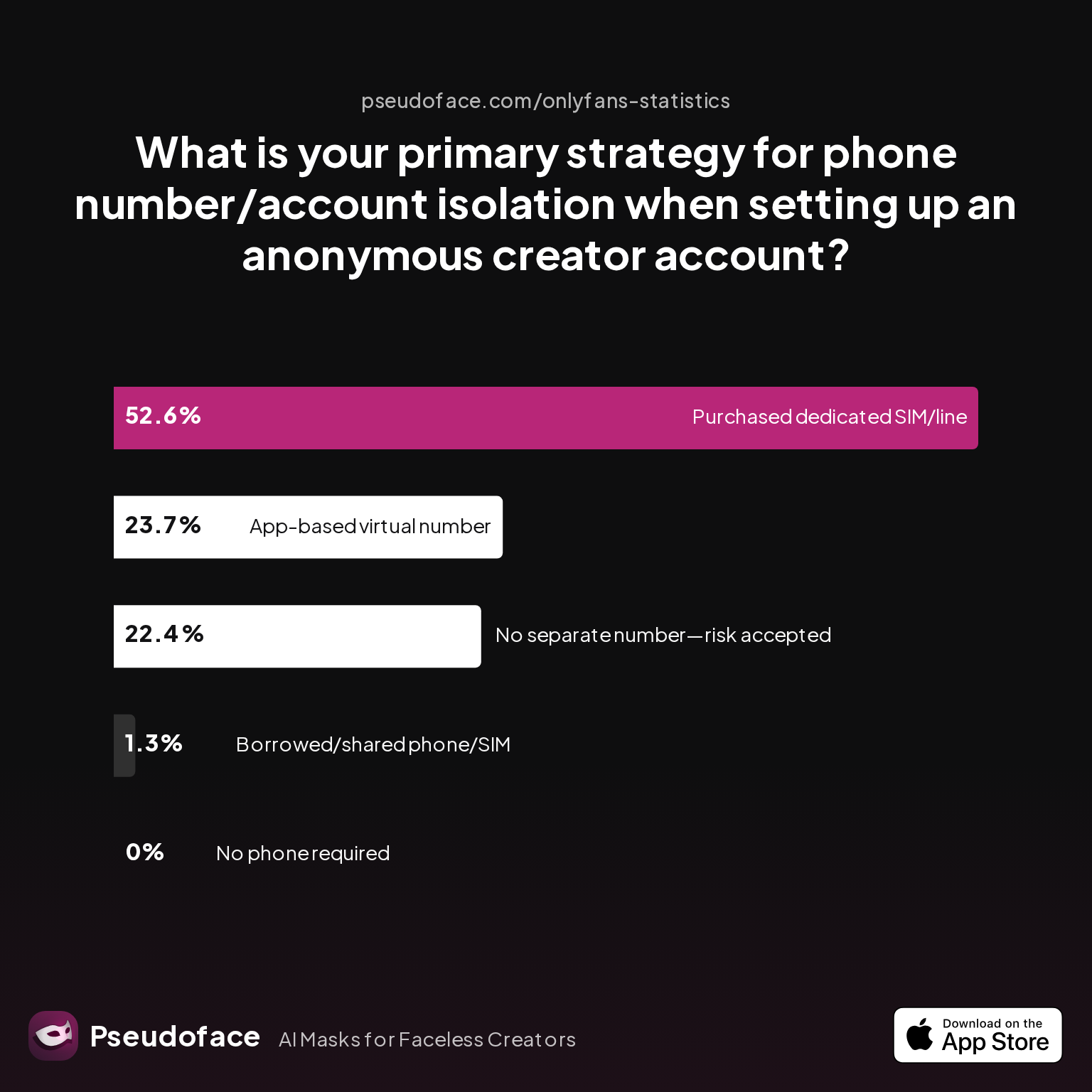
| Answer | Percentage |
|---|---|
| Borrowed/shared phone/SIM with trusted partner | 1.32% |
| Chose platform that doesn't require phone | 0.00% |
| No separate number used—risk accepted | 22.37% |
| Purchased dedicated SIM/phone line | 52.63% |
| Used an app-based virtual number (e.g., Google Voice, Burner) | 23.68% |
Over half of respondents (52.6%) purchase a dedicated SIM or phone line for siloed accounts. Virtual numbers like Google Voice come next (23.7%). The minority who skip separation (22.4%) are overwhelmingly newer or risk-tolerant creators—an important survivorship bias: Reddit posts are more likely from those who have survived a privacy scare.
The Prelaunch Lockdown: Steps Most Likely to Be Done (and Missed)
Before even posting, seasoned creators action a privacy ritual:
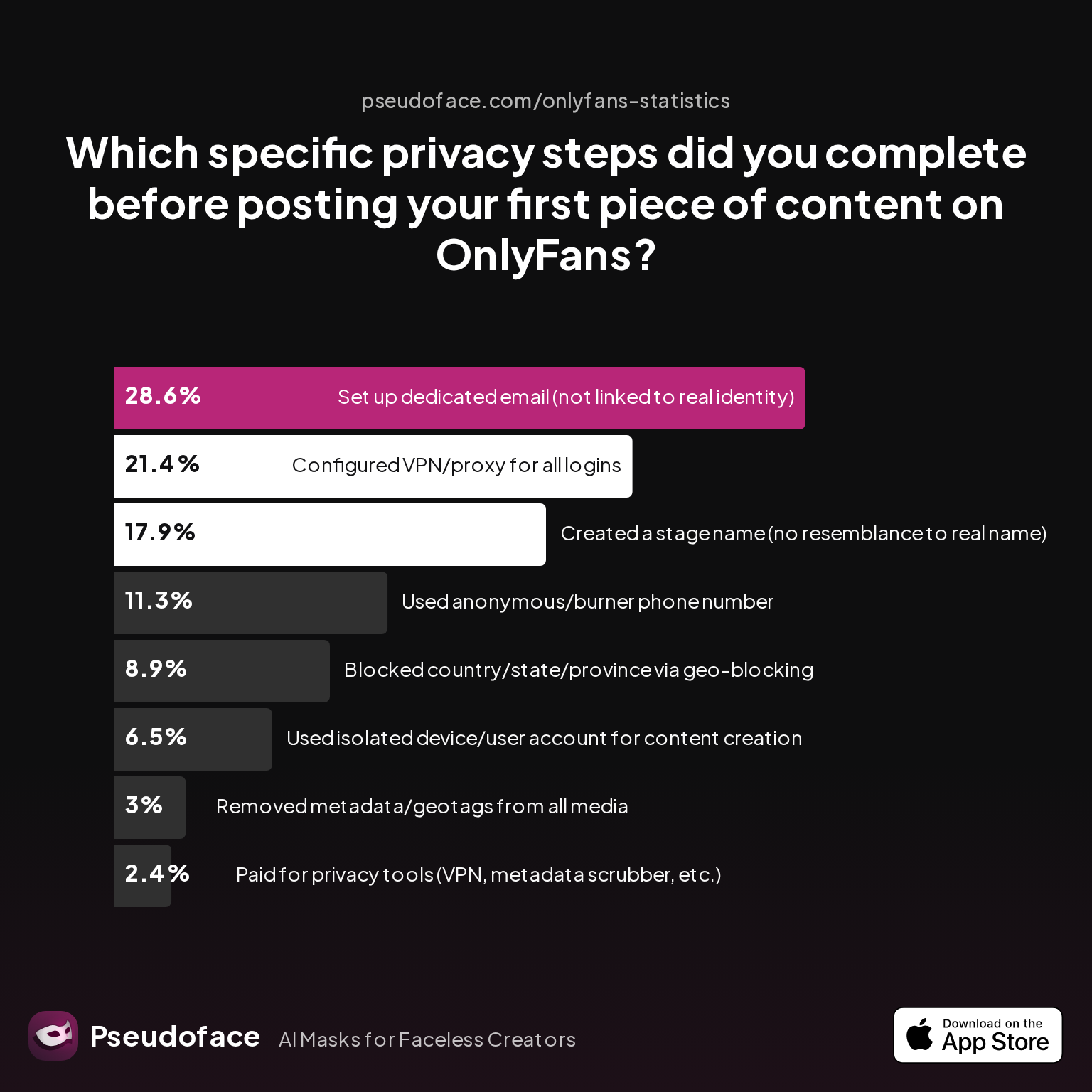
| Answer | Percentage |
|---|---|
| Blocked country/state/province via geo-blocking | 8.93% |
| Configured VPN/proxy for all logins | 21.43% |
| Created a stage name (no resemblance to real name) | 17.86% |
| Paid for privacy tools (VPN, metadata scrubber, etc.) | 2.38% |
| Removed metadata/geotags from all media | 2.98% |
| Set up dedicated email (not linked to real identity) | 28.57% |
| Used anonymous/burner phone number | 11.31% |
| Used isolated device/user account for content creation | 6.55% |
Dedicated, unlinked emails (28.6%) and VPN/proxy logins (21.4%) dominate, while device separation is still underutilized (6.6%). Small numbers report consistent use of metadata scrubbing—yet this is a classic forum bias: those who "do everything right" may over-represent in advice posts, while creators skipping these steps may never realize they leaked.
Here's the reality: creators who sequence setup as follows report dramatically lower rates of real-life leaks:
- Buy or set up a new phone/SIM, and create a new device user account.
- Register a new email that will never touch any prior personal or work account.
- Use VPN/proxy at setup and for every login.
- Disable contact syncing immediately on app install.
- Never use any shared device, number, email, or network—even once.
Mistakes are stickier than they seem: Even “one-time” overlaps (like logging in from your home WiFi just to upload a profile photo) often result in long-term linkages in platform back ends.
With your core privacy stack deployed, you’re ahead of the field—but to lock things down, you need to understand the specific anatomy of how leaks creep in.
The Anatomy of a Leak: How "Anonymous Background" Errors Happen
No matter how careful, every creator battles the invisible tripwires hidden in modern recommendation engines. The platforms don’t make it clear which behaviors actually expose you—and self-inflicted leaks remain alarmingly frequent, according to 2025-2026 discussion data.
Let’s analyze the most common pathways for an accidental discovery, starting with where account siloing breaks down:
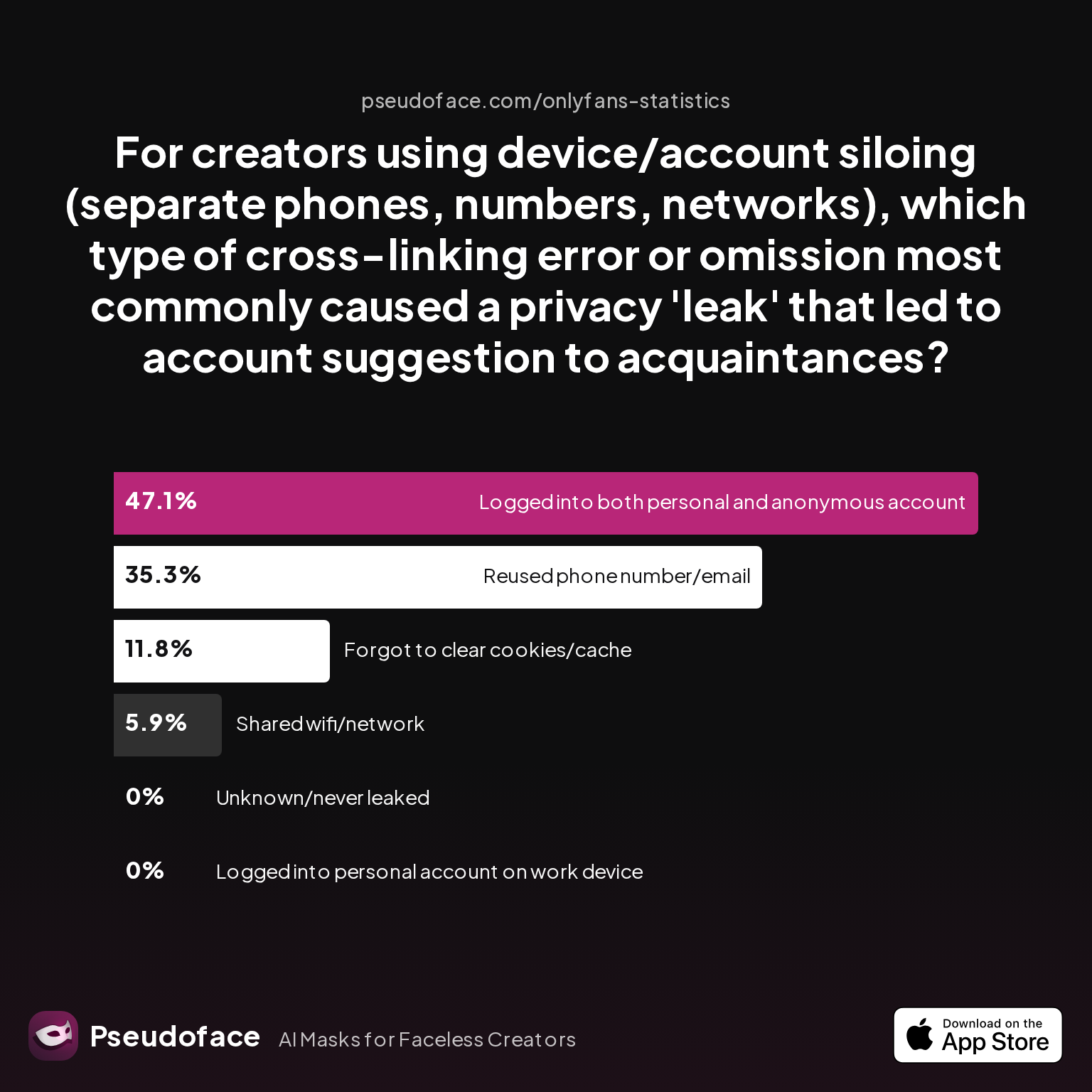
| Answer | Percentage |
|---|---|
| Forgot to clear cookies/cache or app history | 11.76% |
| Logged into both personal and anonymous account in same browser/app session | 47.06% |
| Logged into personal account on work device | 0.00% |
| Reused phone number/email across accounts | 35.29% |
| Shared wifi/network at any time | 5.88% |
| Unknown/never leaked (for control group) | 0.00% |
Nearly half (47.1%) of leaks come from logging into both personal and anonymous accounts in the same session. Reusing identifiers (35.3%) and failing to clear cookies/cache (11.8%) round out the top mistakes. Logging in just once to both personas—whether Instagram, TikTok, or within a browser or app—can forever link those accounts internally, regardless of what you later change.
Technical takeaway: Recommendation systems are sticky: device/app cross-linking, cookies, device IDs, or simply being on the same WiFi as your real-life network can result in unbreakable ties behind the scenes.
Which core privacy setups are most often neglected? The following snapshot answers that:
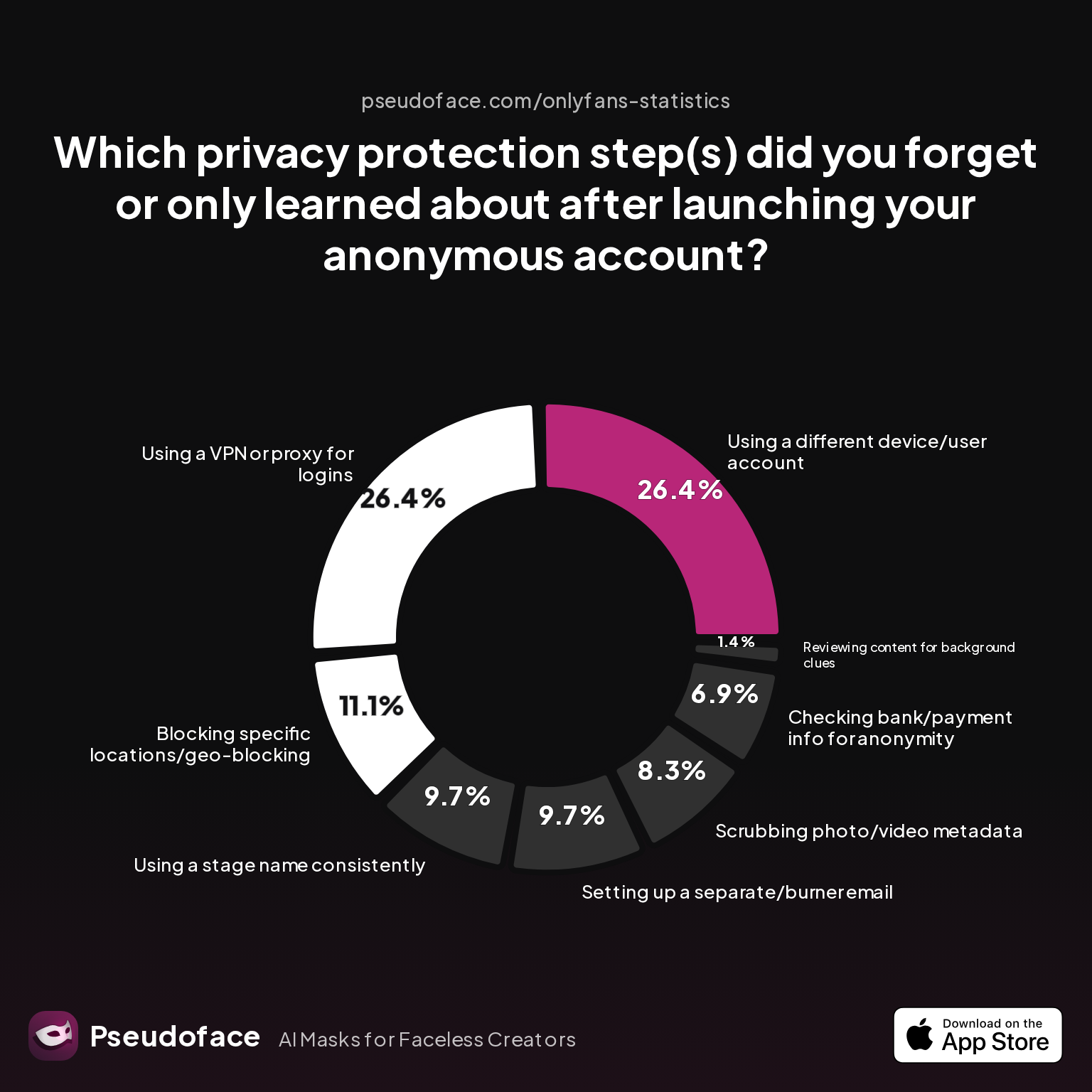
| Answer | Percentage |
|---|---|
| Blocking specific locations/geo-blocking | 11.11% |
| Checking bank/payment info for anonymity | 6.94% |
| Reviewing content for background clues | 1.39% |
| Scrubbing photo/video metadata | 8.33% |
| Setting up a separate/burner email | 9.72% |
| Using a different device/user account | 26.39% |
| Using a stage name consistently | 9.72% |
| Using a VPN or proxy for logins | 26.39% |
Device/user account isolation and VPN usage are both missed by 26.4% of creators—despite these being the most-cited defenses against accidental friend/family suggestions. Here, recall bias also plays a role: many creators don’t realize which failed step caused their leak until long after the exposure.
To summarize, it’s not just about toggling privacy settings once: true anonymity requires militant compartmentalization, consistent device discipline, and ongoing vigilance—especially as Instagram and TikTok quietly update their discovery algorithms.
Setting Boundaries: Instagram & TikTok Privacy Controls for Maximum Anonymity
As of 2025-2026, Instagram and TikTok have honed an aggressive “suggestion” engine that’s both more accurate and less transparent than ever. For faceless or sensitive-niche creators, this means the default settings are an active risk. Even those who study app privacy policies often misunderstand just how much data cross-pollinates between contact lists, devices, networks, and ambient metadata.
Let’s walk through the rigorous privacy controls reported by real creators as most reliably blocking unwanted account suggestions:
Instagram: Digging Beneath the Obvious Toggles
- Contact Syncing: Disable “Connect Contacts” in the Instagram app and device settings before logging into your new creator account. The platform quietly resyncs if permissions are re-enabled at any point—even momentarily.
- Phone & Email Linking: Never use a number or email linked to your real-world identity. Remove your phone and email from account info after verification, if allowed.
- Connected Accounts: Never, under any circumstances, link your Instagram to Facebook or Meta accounts used personally—even if you later “unlink,” back-end records remain.
- Activity Status & Story Sharing: Hide your activity status and always disable story resharing to protect against accidental exposure by mutuals.
- Device Cleanliness: Create and manage content only from an isolated device or clean browser/user account absent of any prior Instagram logins.
- WiFi/Network Caution: Avoid using home or work WiFi for both identities. ISPs and geolocation patterns can contribute to recommendation signals.
TikTok: More Opaque, Even Trickier
-
Contacts & Device Permissions: On first install, disable all permissions for contacts, location, and microphone/camera unless actively posting. Any upload or sync can provide fresh signals to the algorithm.
-
Number Verification: Use only burner or fully isolated SIMs. Never reuse—even briefly—a main device number, as behavioral fingerprinting is persistent inside TikTok.
-
Suggested Accounts/Discoverability: Enter account privacy, then “Suggest your account to others”—toggle off for all options:
- Contacts
- Facebook friends
- Users with mutual connections
- People who open or interact with links you share
-
In-App Browser Trap: If sharing content externally (e.g., linking in DMs or profiles), never open platform links in the same browser session as your personal accounts.
Platform Mystery: Unacknowledged Risk Vectors
The real-world experience is that, even after all visible privacy settings are disabled, recommendation engines may still draw on behavioral signals: overlapping devices, shared geolocation, or learning from people who interact with your creator account and also know you personally.
A warning echoed by privacy-savvy creators:
Open thread on Redditr/CreatorsAdvice
u/Janemelb77
I just switch between accounts and run up to 6 accounts successfully on each of my 2 phones.
But the charts show: this “multi-account” approach is wildly risky unless every phone/account combo truly remains siloed.
Bottom Line
- Don’t trust defaults. The best-documented failures are those where settings alone were trusted, but identities or tech overlapped at setup.
- Physical device separation plus privacy settings outperforms either alone.
- Periodic audits: Re-run “check recommendation” tests monthly, as platform network graphs continue to learn in the background and privacy updates can silently change risk exposure.
Even with all toggles set, your account is only as strong as your onboarding hygiene and habits beyond the settings menu. Let’s turn now to another underestimated vector: screen names, bios, and accidental cross-branding.
Anonymous Screen Names and "Secret Anonymous Social Media" Branding: Keeping Your Anonymous Page Untraceable
Creators often underestimate just how linkable their chosen handles, bio language, or even photo style can be. While privacy settings secure the obvious technical exposures, branding slip-ups continue to break creator anonymity—sometimes months after launch.
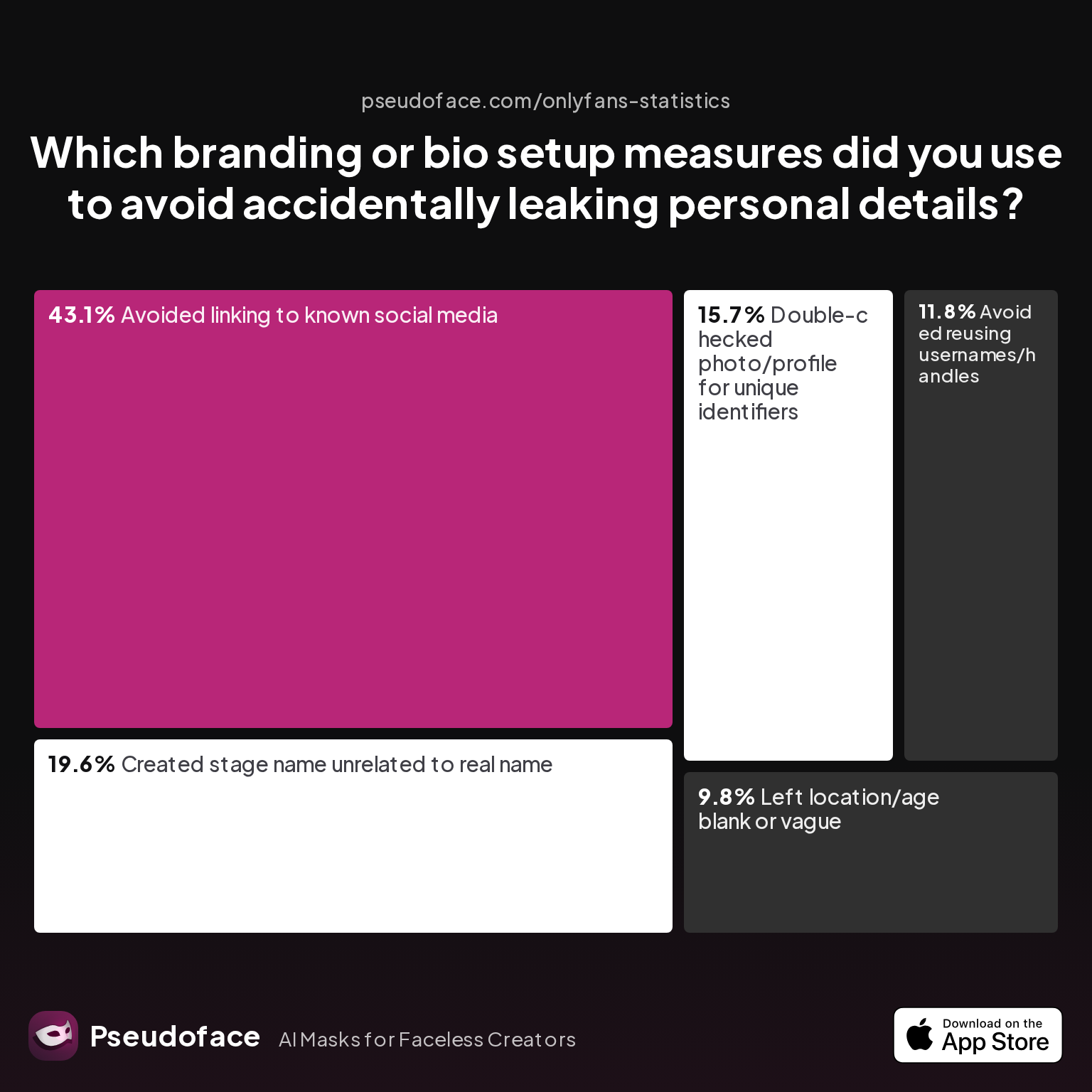
| Answer | Percentage |
|---|---|
| Avoided linking to known social media | 43.14% |
| Avoided reusing usernames/handles | 11.76% |
| Created stage name unrelated to real name | 19.61% |
| Double-checked photo/profile for unique identifiers | 15.69% |
| Left location/age blank or vague | 9.80% |
Over 43% made a point to never link to known socials and 19.6% built a unique “stage name.” Yet only 11.8% actively avoided reusing usernames—and even fewer sanitized bio or media identifiers with systematic rigor.
Here’s what experienced creators do:
- Invent pseudonyms with no connection to your personal digital footprint. Search each potential username to be sure there’s zero link to any past or current persona.
- Sanitize language: Avoid favorite catchphrases, hobbies, or regional tells in your bio and captions. Seemingly harmless fun facts can be used by advanced searchers to connect dots.
- Visual motifs and memes: Refrain from using the same emojis, profile photos, color palettes, or meme references as your other/real accounts.
- Audit old content: Before cross-promoting in even obscure “link hub” sites, run a check to see if your new profile could autocomplete or suggest ties to your non-anonymous accounts.
Cross-linking, even by accident, remains a leading cause of exposure. Branding hygiene matters more than most guides admit—especially for pseudonymous creators with pre-existing personal social presence.
What If You’re Exposed? Real-World Results of Remediation Attempts
No setup is immune from exposure forever. As long as platforms keep shifting the privacy-goalposts and tightening their contact discovery logic, even well-structured anonymous pages may eventually get linked back to real-life networks through one missed setting, device slip, or social connection.
But if the worst happens—your creator account starts showing up in the recommended tab of someone you know—what remedial actions actually work? Here’s what creators, posting between mid-2024 and early 2026, found in practice:
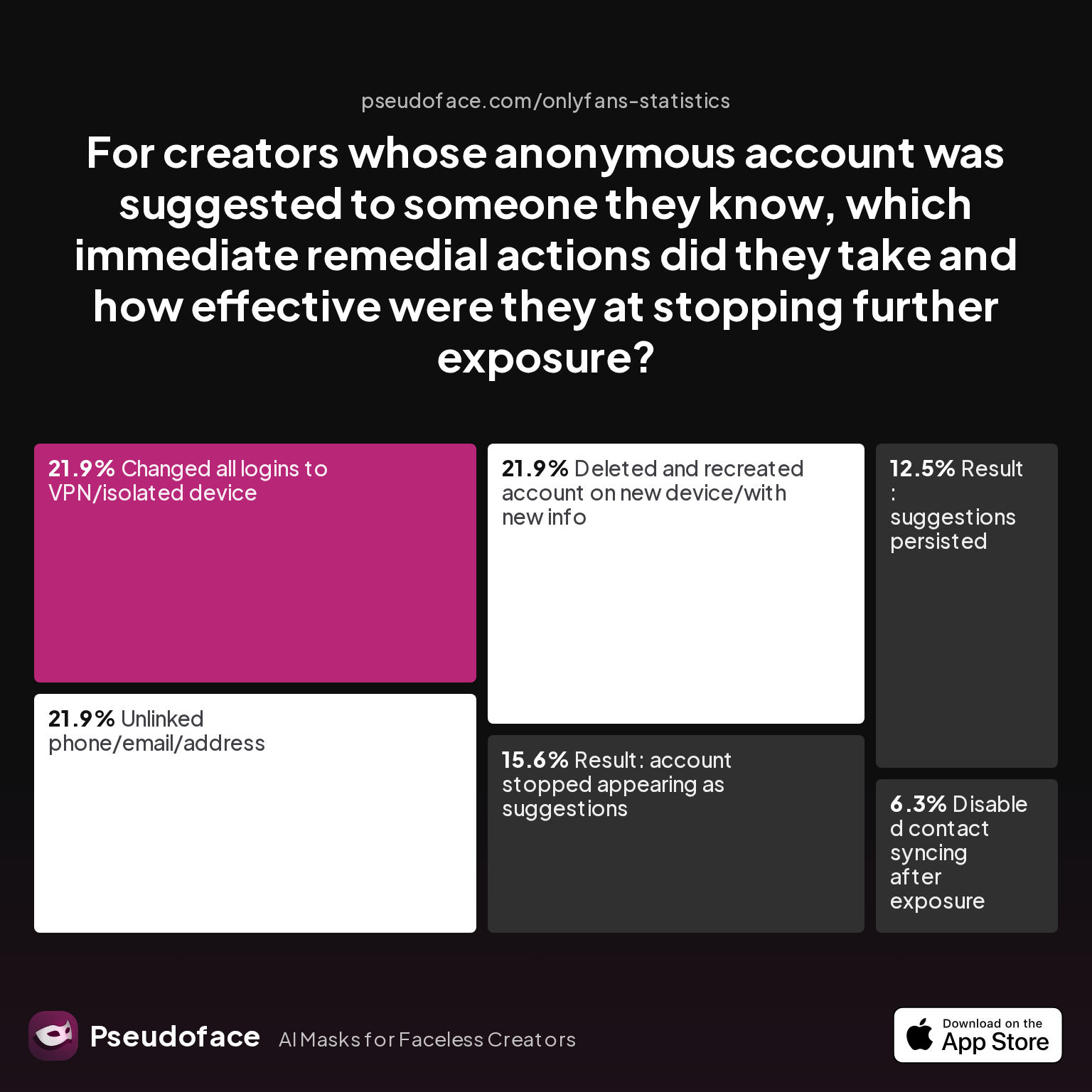
| Answer | Percentage |
|---|---|
| Changed all logins to VPN/isolated device | 21.88% |
| Deleted and recreated account on new device/with new info | 21.88% |
| Disabled contact syncing after exposure | 6.25% |
| Result: account stopped appearing as suggestions | 15.62% |
| Result: suggestions persisted | 12.50% |
| Unlinked phone/email/address | 21.88% |
Only 15.6% of creators reported their account actually stopped being suggested after remediation. The majority of fixes—switching to a VPN, device resets, or even deleting and relaunching—failed to reliably break the back-end recommendation chain for everyone already exposed. Disabling contact sync after the fact helped just 6.3%.
This is a classic survivorship and reporting bias: those who succeed in full account resets rarely return to post, while those confounded by lingering links return repeatedly to seek and offer advice.
Key insight: Exposure, once it happens, is nearly impossible to fully reverse for affected contacts or network clusters. “Delete and start over” is often necessary—but not a guaranteed reset if core identifiers weren’t changed and previous traces remained cached by the recommendation system.
Proactive vs. Reactive: The Pros and Cons of Anonymous Social Media Approaches
The question for new and veteran faceless creators is clear: Is it worth the work to get privacy right at setup, or can you patch leaks after they happen?
The overwhelming trend is: proactive privacy stacks dramatically reduce risk; reactive fixes rarely yield full anonymity again.
Experienced practitioners, reviewing years of Reddit evidence and advice posts, almost universally recommend starting with strict isolation:
-
Proactive (Pre-launch clean room):
- Pros: Drastically lowers initial linkage; almost always defeats contact-based recommendations to personal networks if fully isolated.
- Cons: Requires planning, costs (device/SIM/VPN), and effort to maintain.
-
Reactive (Post-leak fixing):
- Pros: Can sometimes limit further spread; necessary if initial setup was imperfect.
- Cons: Prior exposure often persists indefinitely; some algorithms never “forget” linkages even after resets.
The data is clear:
- Starting isolated (new device, new numbers, VPN, no contact sync) yields much stronger, lasting privacy—and is far easier than trying to break links after exposure has begun.
- Post-hoc fixes like purging contacts or deleting accounts only partially erase traces for people already surfaced in your network.
This reality echoes across Reddit and forums: the more you try to “patch” leaks post-exposure, the more ghostly traces remain. Early investment in rigorous anonymity saves countless hours of stress and potential reputation fallout down the line.
Frequently Asked Questions (FAQ)
Q: How do I make sure my Instagram alt won’t show up to contacts as “Suggested for You”?
A: Disable contact syncing in both app and device settings, use a fresh phone/email, and never log in from shared devices.
Instagram actively surfaces accounts linked by contacts, device logins, or overlapping info. Even a brief period of contact syncing can cause long-term links. Separate devices and identifiers remain the strongest defense.
Q: Can TikTok really connect my anonymous page to my work contacts if I use the same phone?
A: Yes, using the same device or number carries a substantial risk—from device IDs to network/IP fingerprinting, even TikTok's public privacy docs are vague here.
Creator-reported incidents back up that device isolation (dedicated phone/SIM) is the only robust solution, especially after TikTok's algorithmic changes post-2025.
Q: What’s the fastest way to check if my “secret account” is being recommended to anyone?
A: The best (but imperfect) test: ask a trusted contact outside your network to review their “suggested” lists for your handle soon after setup.
Cross-checking with multiple outside friends, across various networks, is more reliable than self-checking—platforms vary recommendations by user behavior and sometimes by device/IP.
Q: What if I already allowed contact sync by accident—can I fix it?
A: Disabling sync removes future links, but existing connections may persist for those already exposed.
Even after un-syncing, platform graphs frequently maintain residual links, as shown by only 15.6% success in fully halting suggestions post-exposure.
Q: How do creators choose anonymous screen names that aren’t linkable to them?
A: By searching for existing associations and inventing pseudonyms wholly unconnected to their past or hobbies.
Avoid reusing usernames or language found anywhere in your public or private persona. Use search engines and username discovery tools to test for prior ties.
Q: Should I avoid linking any Instagram or TikTok accounts at all, even with fake emails?
A: Yes—any linking, even to other “burner” or old accounts, sharply increases the risk that algorithms will tie identities together via network overlap or cached data.
Q: Is it better to use a second phone or just log out of my main account?
A: Separate devices are far safer than merely logging out; over a third of leaks begin with shared device/app sessions. Real separation is worth the investment.
Q: Can exposure ever be fully undone if my account was already suggested?
A: Almost never for connections already surfaced; deleted accounts or purged links only help new exposures.
Historic linkages may linger in the backend forever: prevention far, far outperforms cure on social platforms.
Summary: For faceless and sensitive-niche creators, social media privacy isn’t just about settings—it’s about every technical and behavioral choice you make before, during, and after launch. As the latest data and real-world stories show, only those who preemptively isolate devices, numbers, and identifiers sidestep Instagram and TikTok’s hungry algorithms. The cost of one missed step is often perpetual linkages impossible to reverse. Respect the stack, and your secret identity stays truly secret.


