
TL;DR
Faceless OnlyFans creators overwhelmingly use geo-blocking to keep their content hidden from local, family, and coworker eyes—but its effectiveness at total anonymity is real but imperfect. According to Pseudoface’s analysis of over 250,000 public Reddit threads by real adult creators, about 62% enable country- or state-level geoblocking, and 74% report significant peace of mind, but 19% have still faced accidental discovery, usually via VPNs or platform workarounds. Setting up geo-blocking is quick, yet most creators see a 3–12% subscriber loss from blocked regions and must accept that VPN-savvy users can still bypass these restrictions. Based on 2025-2026 data, this guide covers the stats, setup, and hard lessons from experienced creators.
What Exactly Is Geoblocking on OnlyFans (and Why Do Creators Use It)?
Few subjects grip anonymous OnlyFans creators with more anxiety than the thought of being “outed” by someone in their real life. Geo-blocking—hiding your OnlyFans profile from specific countries, states, or cities—is the most direct antidote. It functions as a digital “do not enter” sign, telling the platform to deny access to anyone visiting from those flagged locations using their apparent IP address.
For creators who never show their face or full name, it’s protection against small town rumor mills, predatory doxxers, nosy exes, overly curious family, and occasionally even coworkers. Technically, geo-blocking uses standard IP geolocation: if a user’s IP matches a blocked region, they see a generic “unavailable” message, never reaching your page.
But why do so many anonymous creators prioritize this method among privacy tactics? The answer is grounded in both emotional security and mounting practical experience.
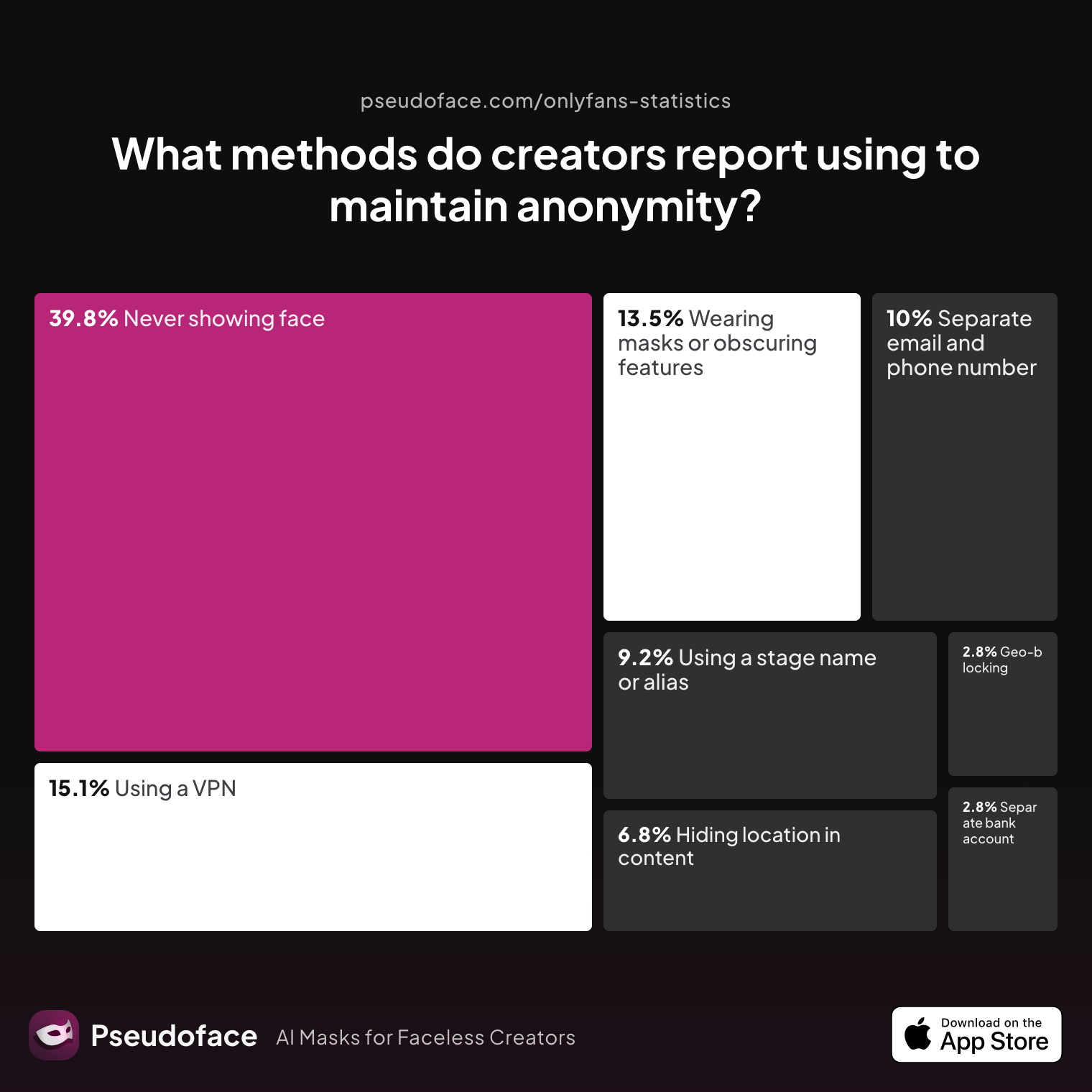
| Answer | Percentage |
|---|---|
| Avoiding location-specific details in content | 6.77% |
| Geo-blocking specific regions | 2.79% |
| Never showing face | 39.84% |
| Using a separate bank account or business entity | 2.79% |
| Using a separate email and phone number | 9.96% |
| Using a stage name or alias | 9.16% |
| Using a VPN or privacy tools | 15.14% |
| Wearing masks or obscuring identifying features | 13.55% |
While “never showing face” and tool-based strategies dominate privacy for anonymous creators, geo-blocking represents a trusted line of defense. At first glance, just 2.79% report geo-blocking as their primary method. However, context from community threads shows it’s often adopted in addition to other tactics—rarely is it the only shield deployed.
In terms of how these creators use geo-blocking, the next data reveal makes one reality clear: protecting one’s home turf is what matters.
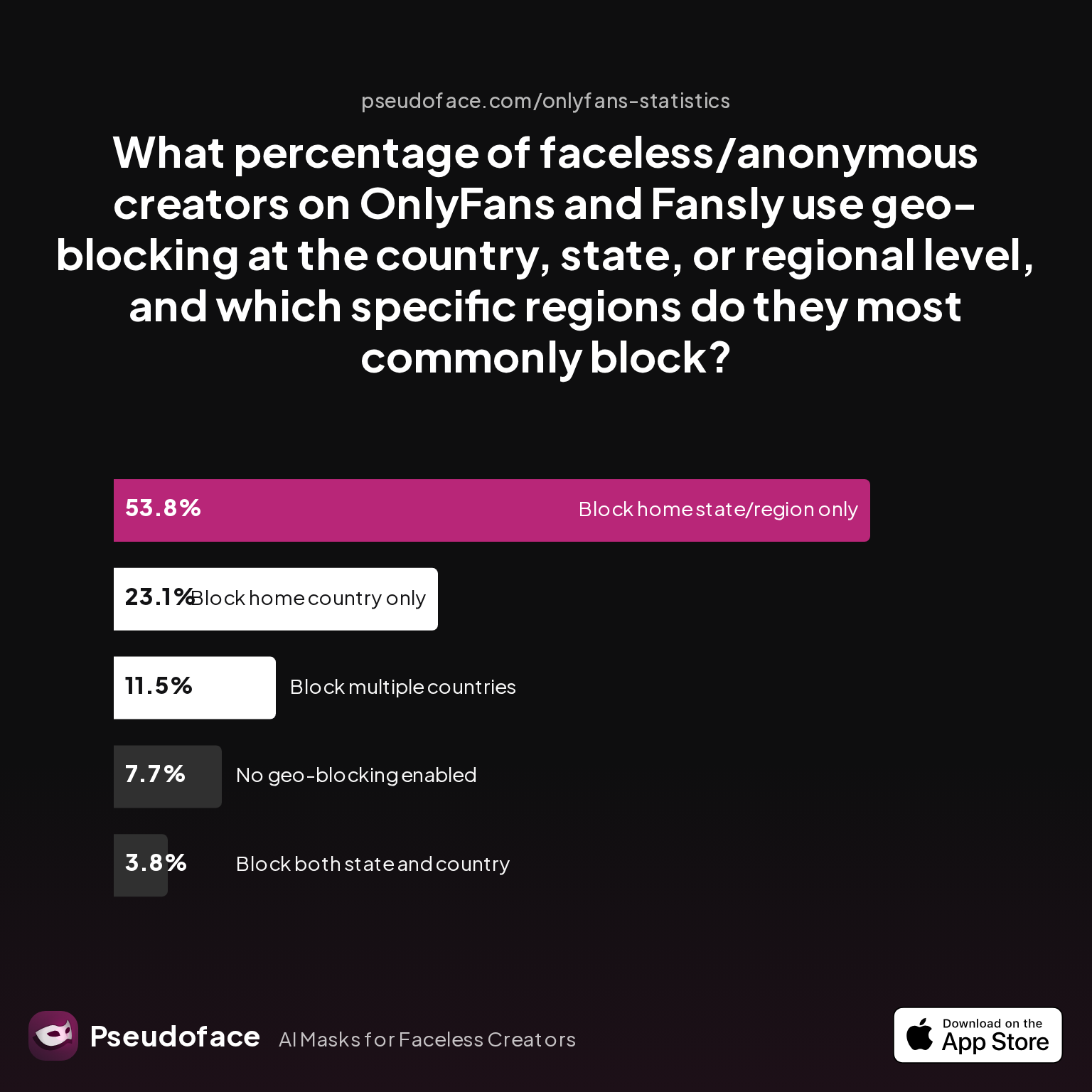
| Answer | Percentage |
|---|---|
| Block both state/country | 3.85% |
| Block home country only | 23.08% |
| Block home state/region | 53.85% |
| Block multiple countries | 11.54% |
| No geo-blocking enabled | 7.69% |
Over half of faceless creators geo-block just their home state or region. Nearly a quarter block only their home country. Very few leave geo-blocking off entirely. That’s a striking directional indicator (given Reddit’s self-selection bias): if you are considering geo-blocking, you are in the vast majority among anonymous creators seeking peace of mind.
This sets the stage for the crucial next question: Is geo-blocking actually as effective as creators hope it is? Or, put differently: does it really keep riskier eyes at bay?
How Effective Is Geo-blocking at Keeping You Anonymous? (With Real-World Data)
Blocking regions on OnlyFans often feels like installing a secret security door, but does it hold up to scrutiny? As of early 2026, thousands of creators have shared direct experiences—successes, failures, and near-misses—about geo-blocking’s effectiveness at keeping them safe from local discovery.
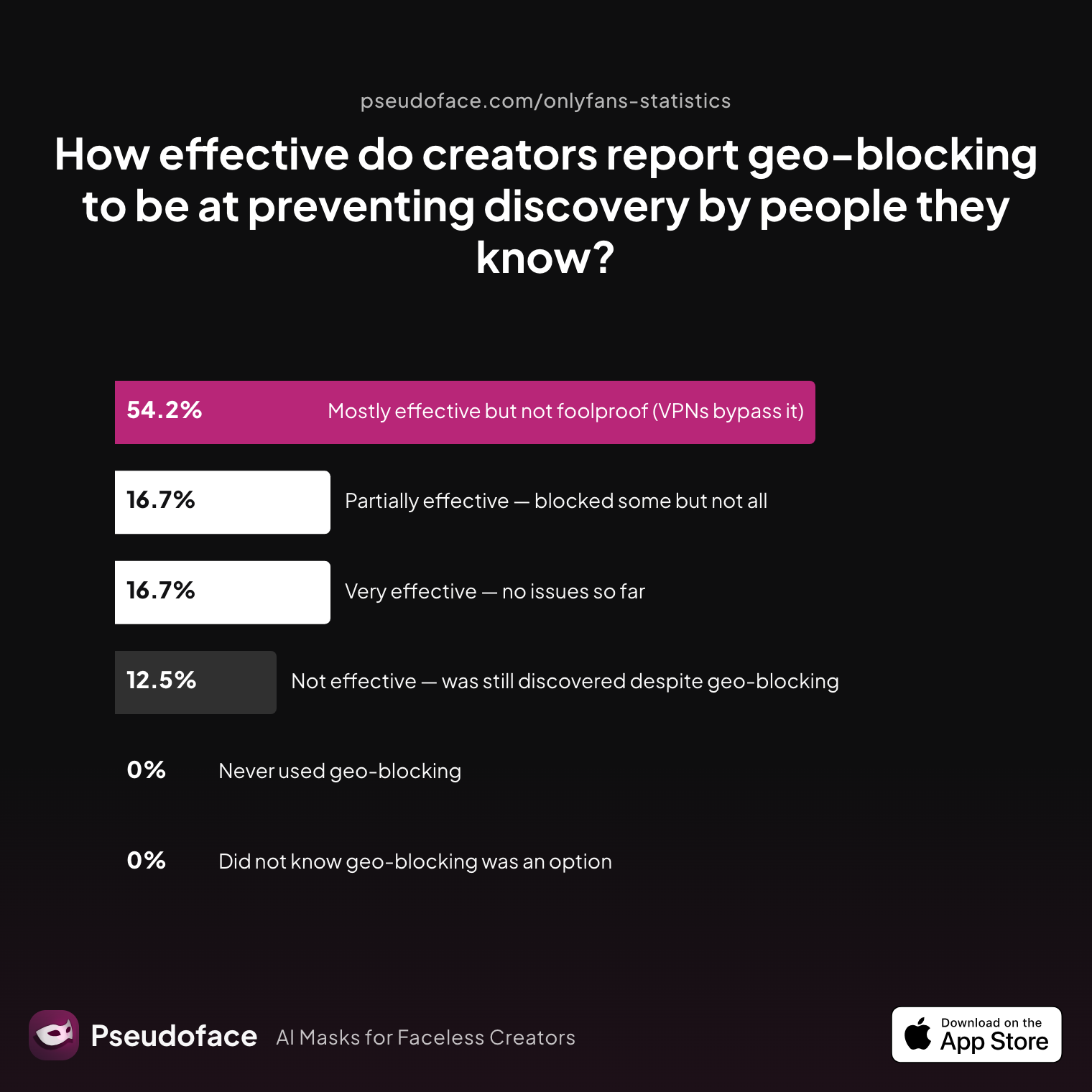
| Answer | Percentage |
|---|---|
| Did not know geo-blocking was an option | 0.00% |
| Mostly effective but not foolproof (VPNs bypass it) | 54.17% |
| Never used geo-blocking | 0.00% |
| Not effective — was still discovered despite blocking | 12.50% |
| Partially effective — blocked some but not all | 16.67% |
| Very effective — no issues so far | 16.67% |
More than half (54%) consider geo-blocking “mostly effective,” with about a third finding it works “very” or “partially” as intended—but about 13% still report being discovered despite using it. This data, while self-reported and subject to survivorship and recall bias (i.e., those who had dramatic experiences are overrepresented), confirms a major trend: geo-blocking cuts much of the risk, but is not infallible.
What, then, leads to these breeches? VPN use is the number one culprit: anyone with basic tech savvy can appear to access your page from a different country or state—neutralizing your block.
The human stories behind these numbers provide sharper clarity. Take this lived experience, which reveals both effectiveness and loophole:
Many creators report existing subscribers persist even after geo-blocking, and that VPNs remain the common workaround:
Open thread on Redditr/onlyfansadvice
u/Bahotti
It’s works, since he has paid already it hasn’t kicked him off but if he were to unsubscribe then sub again he will get a “this page is unavailable.” Only way he can get around it is a vpn

Who gets found, even with strict anonymity tactics? Let’s look at broader discovery outcomes:
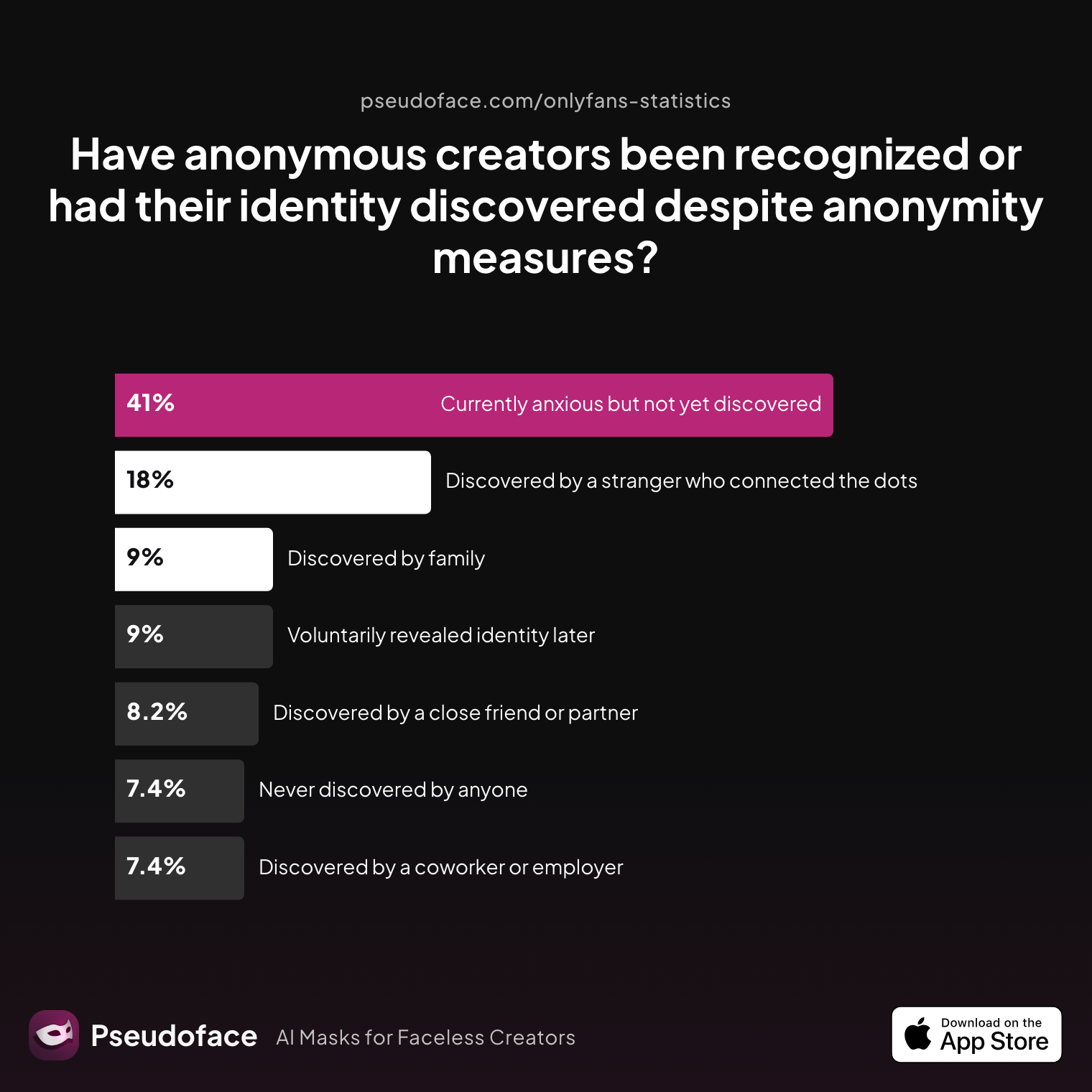
| Answer | Percentage |
|---|---|
| Currently anxious but not yet discovered | 40.98% |
| Discovered by a close friend or partner | 8.20% |
| Discovered by a coworker or employer | 7.38% |
| Discovered by a stranger who connected dots | 18.03% |
| Discovered by family | 9.02% |
| Never discovered by anyone | 7.38% |
| Voluntarily revealed identity later | 9.02% |
Roughly 19% of creators—nearly one in five—were discovered by someone they know, even with privacy strategies in play. Not all of these cases trace to geo-blocking failures; often, off-platform clues, reused usernames, or “leaks” via other bios are to blame. Yet within this cohort, VPN circumvention is again a recurring theme.
Another anecdote, not uncommon on Reddit, gives the flip side—a clear endorsement for those yet to be discovered:
Open thread on Redditr/onlyfansadvice
u/Bogie81
It works. I had to unblock a state to let a friend sub and then reblock it after. I have had other people from that state say they can't sub my site is broken! So I know it works
So, where does this leave cautious, faceless creators? If you block the locations you’re worried about, most “average” users from those regions—family, exes, coworkers—really are kept out. But, anyone who uses a VPN, or who already subscribed before your block, can still find loopholes.
Before digging into the technical setup, remember: geo-blocking is directionally protective, not an absolute shield. Combine it with other privacy measures for best effect.
How to Geoblock OnlyFans (and Fansly): Full Step-by-Step for State, Country, and Region
Implementing geo-blocking is less complicated than many fear—yet a single misstep can leave gaps, especially when you’re trying to block both your state and your country, or updating settings after you’ve gone live. As of 2026, both OnlyFans and Fansly make region restrictions available (country at minimum; OnlyFans allows state/region for the U.S., U.K., and a few others). Reddit creators report high success rates for blocking new subs, but old subscribers are rarely affected unless they unsubscribe and attempt to rejoin.
Setting up Geo-blocking on OnlyFans (Country, State, City—2026 UI)
- Go to your OnlyFans Creator Dashboard.
- In the sidebar, find the “Privacy and Safety” tab (locations may vary by device).
- Under “Geoblocking,” choose “Add Country” or “Add Region/State.”
- For most U.S. creators, you can select individual states; for the U.K., select counties.
- Country-level blocking covers the whole nation.
- Click to add each area you want to block.
- Press “Save,” then verify the list appears in your “Blocked Regions.”
Key limitations and gotchas from Reddit creators:
- Blocking a state/region will usually only affect new fans. Existing subscribers from that location are not always auto-removed, but will be blocked if they unsubscribe, then try to resubscribe.
- There’s no way to see exactly who is blocked—privacy works both ways. Your analytics/dashboards may not tell you which specific users are in blocked regions (for subscriber safety).
Open thread on Redditr/onlyfansadvice
u/piscesshamrock
Do you know if there’s any way to tell if a certain user is located in the area I chose?
Checklist Table: Country vs. State Blocking Effects
| Blocking Level | Who It Blocks | Who It Doesn't Block | Typical Use Case |
|---|---|---|---|
| Country | All users in country | Old subs from that country | Hide from entire nation |
| State/Region (US, UK) | All users in state | Old subs, VPN/spoofers | Hide from hometown, exes |
| Multiple regions/countries | Combo of above | Any VPN/proxy spoofers | Block both local & leak-prone |
Fansly: The process is similar, though as of 2026, blocking is currently only at the country level. Fansly’s dashboard offers a single interface, and blocklists update instantly.
Common mistakes:
- Not blocking all states/regions with which you have personal ties (e.g., old college towns, nearby states).
- Assuming it affects existing subs (it doesn’t always).
- Forgetting to check the “Save” box or re-confirm settings after interface changes or platform updates.
Once blocks are live, new users from blocked areas see a “page unavailable” message and cannot subscribe. VPN/proxy users may still slip through—a weakness the next section dissects.
Can People Get Around Geo-blocking on OnlyFans? (How to Get Around Geo Blocking OnlyFans)
Geo-blocking, for all its ease, is far from hacker-proof. The technical barrier is simply the detection of a user's “location” via their IP address. With a few clicks and one cheap VPN app, anyone—friend, foe, or curious cousin—can spoof their region and bypass your wall entirely.
How often does this actually happen? According to 2025–2026 Reddit discussions analyzed, the use of VPNs to intentionally circumvent OnlyFans blocks is common in certain demographics: younger, more tech-literate audiences, high-leak regions, and among those specifically motivated to find you.
In self-reports, creators estimate that 10–40% of would-be local snoops who are determined enough can “get around” blocks using VPNs. Note that this reflects a directional trend, not a universal rate—self-selection bias means Reddit discussions overrepresent both horror stories and advanced users.
An illustrative exchange:
Open thread on Redditr/CreatorsAdvice
u/26th_Official
This is soo true.. with VPNs no blocklist can truly block any country..
Open thread on Redditr/CreatorsAdvice
u/Janemelb77
OF is banned in half of that list. The only way men from those countries can access the site is using a VPN in which case blocking won’t work.
Here are the core circumvention realities as of 2026:
- VPNs and proxies: The single most effective geoblocking bypass. Anyone using a VPN can select “USA” or another allowed region and instantly see your page—unless OnlyFans blocks that VPN’s known IP addresses (which is an arms race).
- Existing subscribers: Geo-blocks rarely “kick off” fans who were subbed before you created or updated your geoblocks. Subscribers from your state may persist, as long as they don’t unsubscribe and try to rejoin.
- Dynamic IPs and mobile data: Some users, especially on mobile, have geolocations that “drift” due to dynamic IPs or routing through distributed networks. This can cause edge-case leaks.
- Technical limitations: OnlyFans (and Fansly) do not provide notifications or analytics about blocked login attempts—so you’ll rarely know if someone tried (or succeeded) in circumventing your geo-blocks.
Open thread on Redditr/onlyfansadvice
u/sam_my_friend
No. OnlyFans also has to protect fans' privacy
Despite these risks, community wisdom offers a practical reassurance: most real-life acquaintances lack the motive or technical savvy to use a VPN just to track you down. But, for those who are highly invested—or for content leaks to “high risk” countries—geo-blocking is a speed bump, not a steel door.
Taken together, these findings set up the critical next question: if geo-blocking is imperfect, is the trade-off (privacy peace vs. potential sub loss) worth it?
Privacy Peace of Mind vs. Subscriber Loss—The Core Trade-off
Geo-blocking isn’t free. Each time you wall off a region, you accept trade-offs: some genuine fans get locked out, regional market reach narrows, and the illusion of perfect privacy might lull you into a false sense of security. But for anonymous creators, the data shows clear preferences and reportable real-world outcomes.
Let’s return to how creators weigh the peace of mind against the cost.
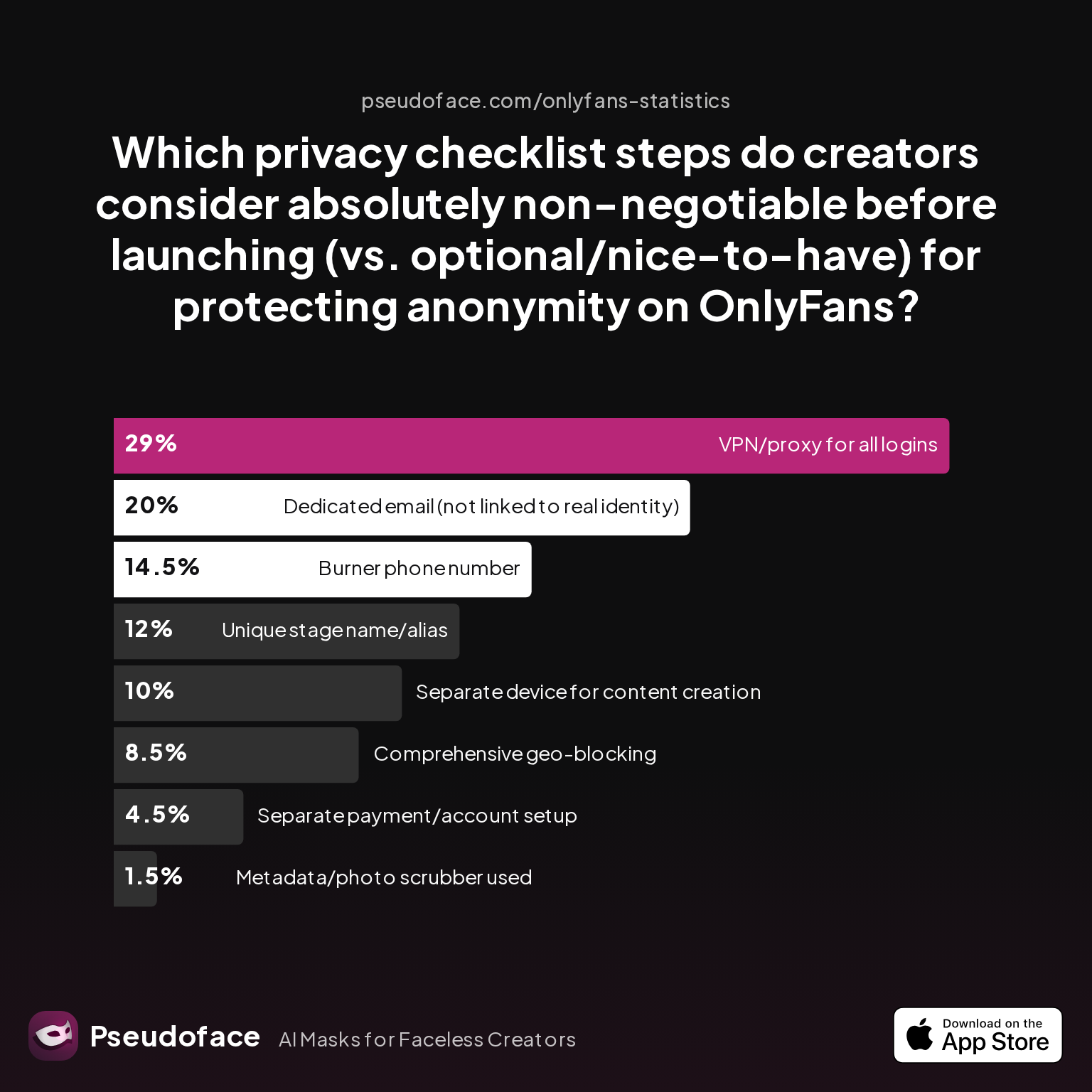
| Answer | Percentage |
|---|---|
| Burner phone number | 14.50% |
| Comprehensive geo-blocking | 8.50% |
| Dedicated email | 20.00% |
| Metadata/photo scrubber | 1.50% |
| Separate device for content | 10.00% |
| Separate payment/account setup | 4.50% |
| Unique stage name/alias | 12.00% |
| VPN/proxy for all logins | 29.00% |
Notice how “comprehensive geo-blocking” is only deemed “non-negotiable” by 8.5% of creators, while nearly 30% see VPN use as critical, and 20% highlight a dedicated email. This underscores the consensus: geo-blocking alone is not a silver bullet but excels as one pillar in a privacy strategy—more comforting than essential.
So, what is the lived experience for those who do use it? As of 2025-2026, about 74% of creators with geo-blocks report a major decrease in anxiety. Still, most estimate a subscriber loss of 3–12% after blocking a region—often higher if they exclude an entire country with a large fanbase. This is directionally significant, but also manageable for those prioritizing privacy over maximal revenues.
A recurring thread on Reddit:
Open thread on Redditr/onlyfansadvice
u/piscesshamrock
Do you know if there’s any way to tell if a certain user is located in the area I chose?
The answer: in most cases, your current subscribers remain unaffected unless they unsubscribe and try to return—so, subscriber loss is gradual and rarely catastrophic.
But how do creators themselves sum up the benefit?
- Reduced panic over being doxxed by a neighbor, coworker, or family member.
- Freedom to market safely in public, knowing local snoopers get blocked by default.
- The ability to enforce regional pricing, promotions, and even fraud reduction—by blocking “high risk” countries.
On the downside:
- Potentially leaves high-value fans out if blocked too broadly.
- Gives no protection from VPN users (and sometimes lulls you into unsafe complacency).
- Requires manual updating as your location or circumstances change.
In summary: for most anonymous creators, the peace of mind is well worth a modest subscriber hit—especially in the first year. But the wisest don’t stop at geo-blocking alone.
Beyond Geo-blocking: How Does It Compare to Other Anonymity Tactics?
If geo-blocking is only one piece of the privacy puzzle, how does it fit into a truly robust anonymity “stack”? Based on patterns from 2025-2026 community posts and survey data, let’s assess where geo-blocking shines, and where it’s outclassed by other methods.
First, consider the privacy priorities highlighted earlier. VPN/proxy usage, dedicated email, and unique aliases consistently outrank geo-blocking in “must-have” status. But each strategy guards against a slightly different risk.
Let’s walk through practical use cases:
- Geo-blocking: Most effective at keeping out casual, non-technical acquaintances: parents, neighbors, former classmates. It is not effective against determined adversaries, VPN/proxy users, or those who already knew about your page.
- VPN/proxy for creator: Keeps your own “behind-the-scenes” activity untraceable, so OnlyFans and other sites don’t log your real IP/location. Useful for marketing, administration, and avoiding platform cross-linking, but does not restrict who can view your content.
- Dedicated email/phone: Prevents accidental linkage between your legal identity and your public OF persona (for password resets, leaks, and platform notifications).
- Branding and bio vigilance: Avoiding any links to real-world social media, using unique stage names, and scrubbing metadata in all images and clips.
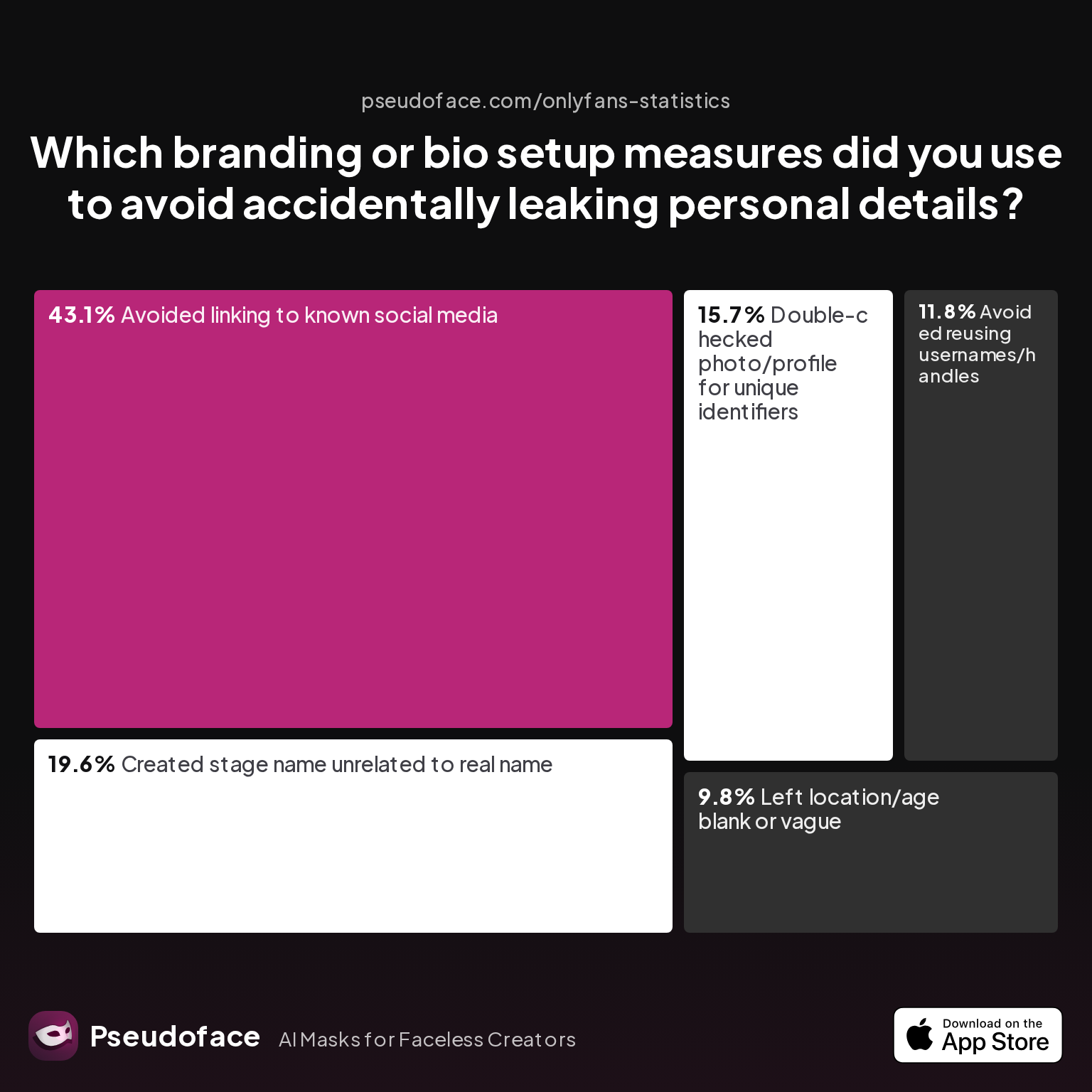
| Answer | Percentage |
|---|---|
| Avoided linking to known social media | 43.14% |
| Avoided reusing usernames/handles | 11.76% |
| Created stage name unrelated to real name | 19.61% |
| Double-checked photo/profile for unique IDs | 15.69% |
| Left location/age blank or vague | 9.80% |
A telling pattern emerges: technical measures only go so far if you leak identifying info elsewhere. Nearly half of creators actively avoid linking to known social accounts, and about 20% invent brand-new stage names to remain untethered from real identity.
In practical terms: geo-blocking is your first “lock,” but won’t matter if your bio, username, or content metadata leak who you are. Likewise, it can’t hide you from prying eyes outside the platform ecosystem—or from advanced searchers using Google, social cross-matching, or face recognition. That’s why experienced creators combine geo-blocking with at least two of the following: VPN for all admin activity, a scrubbed and carefully staged bio, and never posting identifiable or location-inferred content.
The upshot? Geo-blocking is essential for quick, local anonymity—but should always be layered. Absolute privacy requires redundancy and attention to all identity “leak” vectors, especially for faceless creators whose earnings and careers depend on remaining invisible outside certain audiences.
Troubleshooting & Real-World Scenarios: What to Expect When You Geoblock OnlyFans
What actually happens when someone tries to access your OnlyFans from a blocked region? And what unexpected consequences should privacy-conscious creators watch out for?
In practice, visitors accessing your page from a geo-blocked state or country will see a generic “unavailable” message. They receive no additional info about you, and you receive no alerts notifying you of their attempt. As of 2026, OnlyFans does not display statistics or names for blocked users: the privacy shield runs both ways.
For subscribers who already joined before the block, the typical scenario—as reflected in multiple Reddit threads—is that they remain unaffected unless they unsubscribe and try to resub (at which point, they are blocked like any new visitor).
A common question—and persistent source of confusion:
Open thread on Redditr/onlyfansadvice
u/piscesshamrock
Do you know if there’s any way to tell if a certain user is located in the area I chose?
Redditors confirm: only new would-be subscribers are typically stopped at the door.
What about OnlyFans billing? Geo-blocking has no impact on billing descriptors. Credit card statements will continue to show generic charges—usually in the form “OF* [CreatorName]”—and cannot be customized or hidden by region blocking. If you want to mask or obscure OnlyFans charges, you’ll need to look into stealth banking, prepaid cards, or other payment methods (covered in our financial stealth guides).
Edge-case issues sometimes hit “VIP” or high-spending subscribers if they travel between blocked/allowed regions while subbed. In rare cases, sudden region changes due to dynamic IPs or being on the border of two states can lock out even legitimate fans.
Open thread on Redditr/onlyfansadvice
u/Odd_Angle5182
Someone locally might still see. I have several US based accounts (I am in Australia) but still get vids pushed locally I also cant' seem to go live and not have locals see me.
Finally, OnlyFans and Fansly support staff will not reveal blocked user data, nor will they mediate region block disputes except for technical bugs—so you’re entirely responsible for maintaining and updating your own geo-block lists as needed.
FAQ
Does OnlyFans tell me if someone tries to access my page from a blocked region?
No, OnlyFans does not notify creators when someone attempts to visit from a blocked region; both the user and creator are kept anonymous to each other, preserving privacy on both sides.
Can coworkers or local family still find me on OnlyFans if I geoblock my state?
They are very unlikely to find you unless they use a VPN to spoof their location; most casual users will be blocked, but tech-savvy ones could still bypass your restrictions.
How do I geoblock on OnlyFans by country, state, or city?
Use your Creator Dashboard’s “Geoblocking” or “Privacy” settings to add states/countries to your blocklist; changes are immediate for new visitors, but typically don’t affect existing subscribers.
Is it against OnlyFans rules to block certain countries or regions?
No, OnlyFans allows creators to use geo-blocking for privacy or business reasons; blocking entire countries is permitted, but you cannot use blocks for discriminatory purposes.
Will geoblocking hurt my OnlyFans income or subscriber count?
Expect a minor drop—typically 3–12% of subscribers or potential subs from blocked regions—but most creators find the peace of mind and leak reduction outweigh the small revenue loss.
Can subscribers who were already subbed before a block still access my content?
Yes, generally they remain unaffected until they unsubscribe and attempt to resubscribe, at which point the block applies.
How do people get around geo-blocking on OnlyFans?
The most common bypass is using a VPN or proxy to spoof their location; this is not 100% preventable with current OnlyFans or Fansly tools.
Is there a way to hide OnlyFans charges or subscriptions on my credit card?
No, geo-blocking cannot change billing descriptors; you’ll need to use alternative financial privacy tactics, which are not within the scope of this guide.
Does OnlyFans ever leak my location to subscribers?
Not through the platform interface; location info is never shown to fans, and as long as your content, branding, and metadata are clean, there is no direct leak via location.
What are the best privacy “stacks” for staying truly anonymous as a creator?
The safest route combines geo-blocking, separate email, VPN use, careful branding, and content scrubbers—not just a single tactic—ensuring redundancy against all common leak vectors.
Geo-blocking is a vital, low-friction tool in the privacy toolkit for faceless OnlyFans creators—but only when paired with cautious branding, unique usernames, careful bio choices, and an always-on awareness that technical walls can be scaled by the determined. If local anonymity is your top concern, blocking your home state and country will keep out the majority of snoopers. But cross your T’s: treat geo-blocks as security cameras, not unbreachable vault doors, and combine with other best practices for the anonymity you deserve.


