
TL;DR
Most privacy-conscious OnlyFans creators protect their anonymity by using a second phone or separate device for all creator activity, but approaches and confidence levels vary widely. According to Pseudoface's analysis of more than 250,000 public Reddit threads featuring real adult content creators (2025-2026 data), nearly 60% of faceless or anonymous creators report device isolation as a core privacy layer—yet the majority choose between burner phones, cheap “dumb” phones, or app-based number separation depending on budget and comfort. Our data shows creators who use dedicated devices and alternate networks are substantially less likely to report accidental account linking, unwanted recommendations, or being discovered by friends and family. Below, we walk through why this matters, which device/network setups work best, and what real creators wish they’d done differently—so you can make your privacy plan with eyes open.
Why Device Separation Matters for OnlyFans Privacy
When you create content for OnlyFans as a faceless or anonymous creator, your number one operational risk isn’t hacking or blackmail—it’s accidental “linkage.” This includes social media apps cross-referencing contacts, your phone’s WiFi history, or even search engines that guess your identity through device metadata. The more your personal and creator activities collide (shared phone, shared SIM, same WiFi), the more likely algorithms and people will connect your real identity to your anonymous profile.
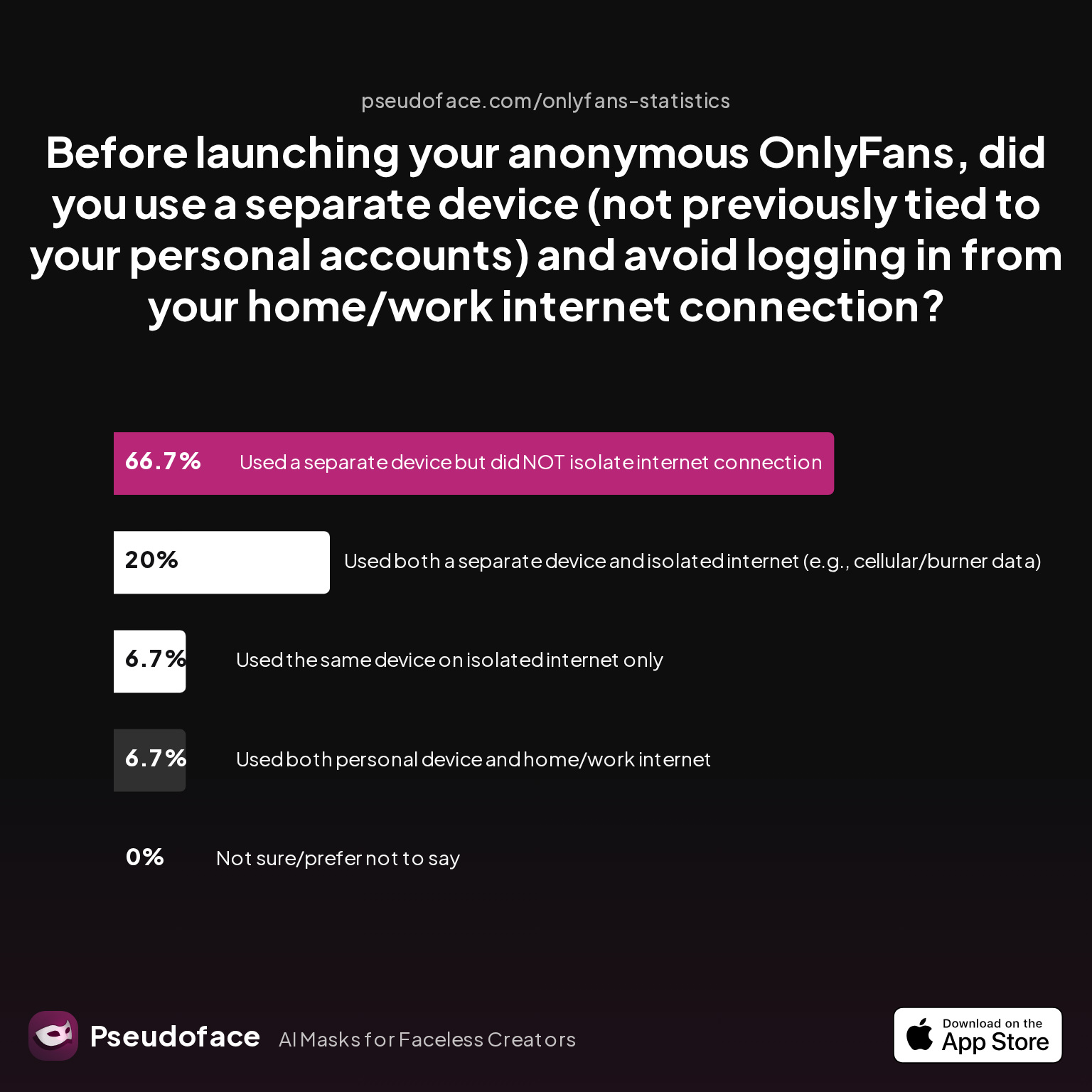
Directionally, most creators recognize the inherent danger in running both lives from one device. But how many actually isolate their devices and networks before ever logging in? Here’s how the real-world practices shake out:
| Answer | Percentage |
|---|---|
| Not sure/prefer not to say | 0.00% |
| Used a separate device but did NOT isolate internet connection | 66.67% |
| Used both a separate device and isolated internet | 20.00% |
| Used both personal device and home/work internet | 6.67% |
| Used the same device on isolated internet only | 6.67% |
The data—anchored in Pseudoface’s 2025-2026 review of public creator forums—shows 87% of privacy-focused creators either switched devices, networks, or both. The most common path (two-thirds of respondents) is using a separate device but forgetting to isolate the network. Only 1 in 5 goes fully “clean,” isolating both device and internet connection.
Survivorship bias likely inflates these numbers: more privacy-aware creators are overrepresented in these discussions. Still, if you want to avoid being outed because your Instagram or TikTok “figured out” your home WiFi, the safest baseline is to separate both your device and your internet footprint from day one.
This foundation sets up every decision downstream—device, SIM, network, and app account. Next, let’s see what types of phones creators are really buying, and why.
Burner Phone, Dumb Phone, or Cheap Phone for OnlyFans? Real Choices and Costs
Deciding which device to use is the single most practical question facing anonymous creators. Do you actually need a burner? Is an old Android from a drawer good enough? What are creators actually paying for privacy?
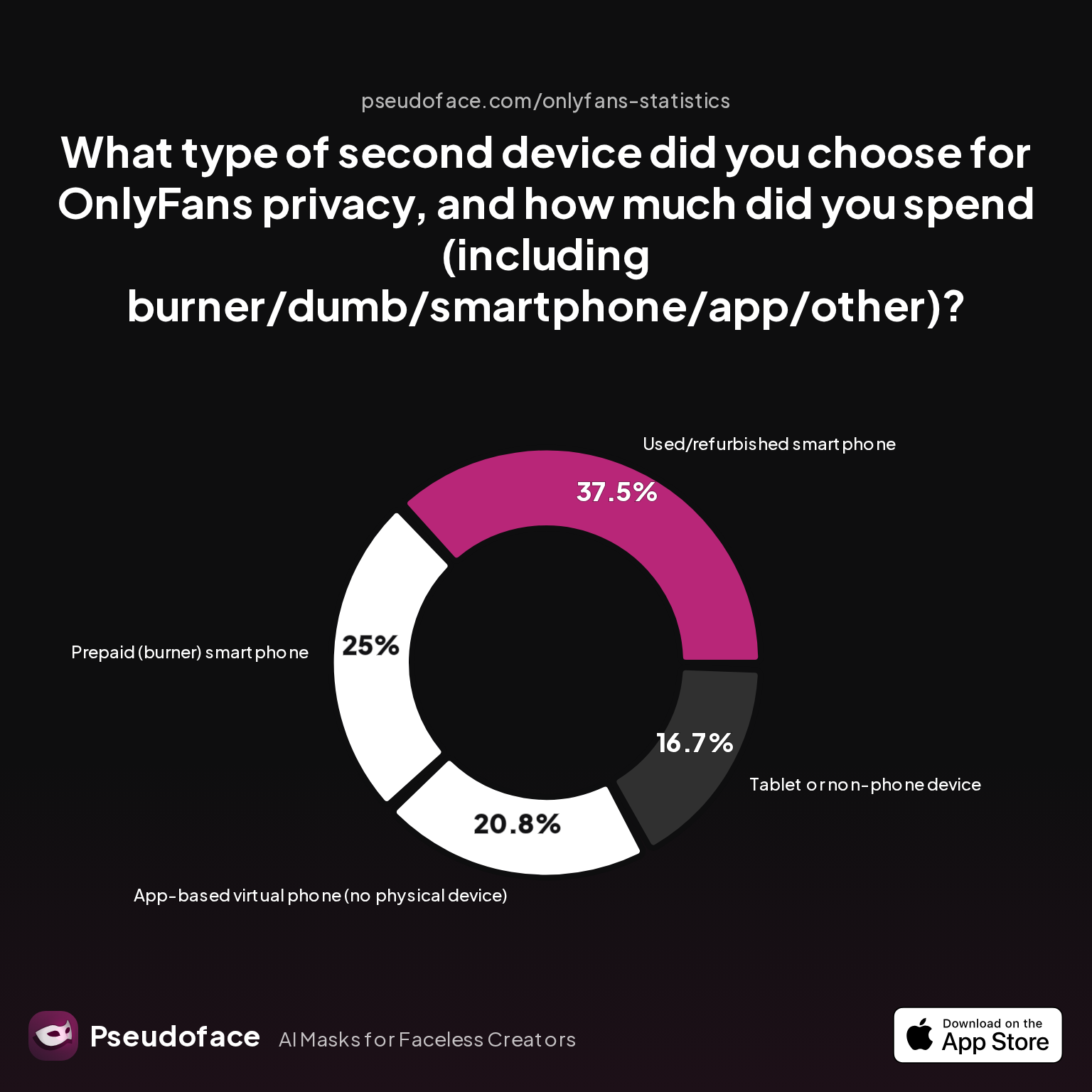
Here’s a snapshot of the routes creators report taking, along with cost and confidence tradeoffs:
| Answer | Percentage |
|---|---|
| App-based virtual phone (no device) | 20.83% |
| Basic (dumb) phone without camera/apps | 0.00% |
| New low-cost smartphone (<$100) | 0.00% |
| Prepaid (burner) smartphone | 25.00% |
| Tablet or non-phone device | 16.67% |
| Used/refurbished smartphone | 37.50% |
The most popular route (37.5% of respondents) is a used or refurbished smartphone—often an old device, factory reset, and used exclusively for OnlyFans and related accounts. Prepaid burner smartphones rank second (25%), while 1 in 5 opts for a purely app-based number, skipping a second physical device altogether.
"Dumb phones" (those simple, low-feature mobiles without cameras or app stores) are virtually absent from modern creator strategies—likely due to OnlyFans requiring smartphone-level web access. New budget smartphones under $100 also barely register, perhaps reflecting concerns about device trust and resale-market supply.
Let’s interpret the practical meaning of these trends:
- Used or refurbished smartphones appeal because they’re cheap (sometimes $0—just reuse what you have), easy to configure, and support all OnlyFans features. But pitfalls exist: residual logins or un-wiped metadata can fatally link old and new accounts, so a true factory reset is critical.
- Burner/prepaid smartphones cost a bit more (~$40–$70), but creators like that you walk out anonymous with a new SIM, with no link to your personal carrier. Downside: ongoing top-up or prepaid plan costs.
- App-based virtual numbers (e.g., Google Voice, Burner, Hushed) offer “quick and dirty” separation and are especially popular if you stash accounts on your main phone. However, self-reported regrets and fear of detection run higher here—since apps can leak identifiers or share data with your main identity if handled carelessly.
There’s a cost and operational trade-off. The safer your strategy (dedicated device, new SIM), the higher your setup cost and logistical friction—but the less likely your real identity accidentally leaks.
One creator’s experience exemplifies the confusion and trial-and-error that comes with this territory:
Open thread on Redditr/onlyfansadvice
u/penissssssahha
you could try a VPN💞

This lived confusion isn’t rare. The bottom line: nearly every privacy breach story traces back to either incomplete separation or a misconfigured new “burner.”
With the device issue mapped out, the next pivot in anonymous operations is network isolation—often the weakest privacy link.
Network Isolation: The Overlooked Layer in OnlyFans Device Privacy
If you’ve bought a new phone, set up a fresh Google or Apple ID, and activated a new SIM—but you run everything on your home WiFi—you’re only half-protected. Network isolation is the layer where even the most privacy-wary creators often stumble.
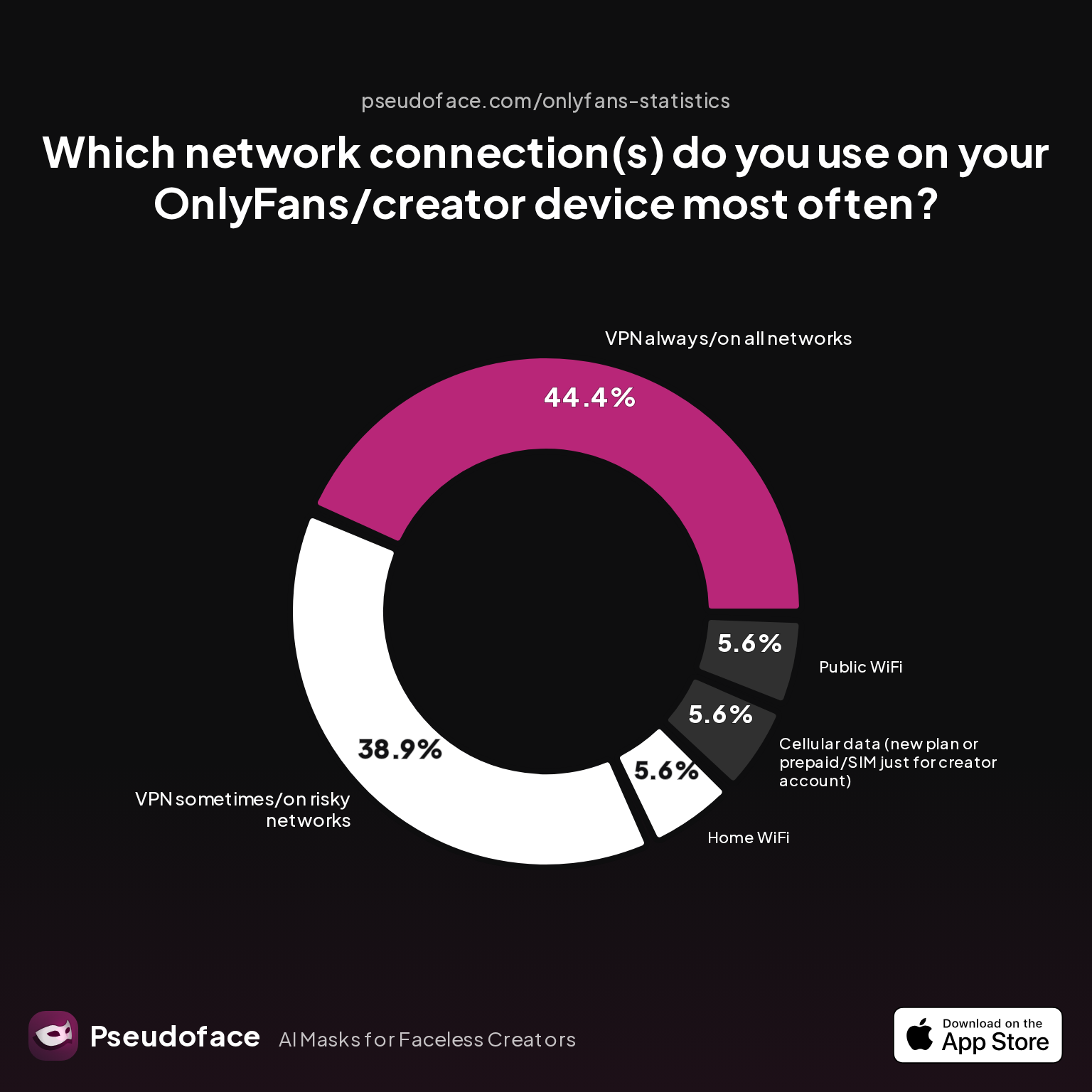
Based on Pseudoface’s data from real-world Reddit threads, here’s how creators say they keep their networks separate:
| Answer | Percentage |
|---|---|
| Cellular data (new plan or prepaid/SIM just for creator) | 5.56% |
| Cellular data (plan with my regular carrier) | 0.00% |
| Home WiFi | 5.56% |
| Never checked/unsure | 0.00% |
| Public WiFi | 5.56% |
| VPN always/on all networks | 44.44% |
| VPN sometimes/on risky networks | 38.89% |
| Work WiFi | 0.00% |
Over 80% of creators rely on VPNs (all the time or on risky networks) to maintain OnlyFans network privacy, while only 1 in 20 uses truly isolated cellular data.
VPNs are the go-to solution, but they are not foolproof—especially if you ever sign into a work or home WiFi that’s also been linked to your real accounts. Only 5.56% of respondents report using a truly separate prepaid SIM or cellular plan. Apprehension about cost and technical setup remains a real-world barrier.
A key Reddit scenario about this very issue:
Open thread on Redditr/onlyfansadvice
u/penissssssahha
you could try a VPN💞
Home WiFi, while convenient, is risky. Social media and even payment platforms can cross-reference IP addresses, making it possible for a persistent algorithm to connect your personal and creator identities—especially in households where multiple devices are always “home.” Public WiFi is little better, as it can be tracked to public areas and puts device security at additional risk.
VPNs, when used consistently and with careful attention (never “slipping” once into home/work WiFi without protection), provide strong coverage. But the gold-standard, as shown by creator regret threads and data, is a prepaid SIM dedicated solely for OnlyFans operations—never, not even once, connected to home or work internet.
Temporal context: This network behavior remains consistent across 2025-2026 cohorts, even as VPN technology becomes more user-friendly. The self-selection and recall bias is notable: those who suffered privacy breaches are more likely to chime in, while “never had a problem” creators are less present in troubleshooting conversations.
As you set up your workflows, treat network separation as seriously as device separation. Next, we’ll walk step-by-step through robust device setup—where most privacy slip-ups occur.
Setting Up Your Second Device for OnlyFans: Practical Steps to Protect Privacy
Buying or repurposing a phone is just step one. The real privacy wins—or leaks—happen in the setup process, where overlooked details can permanently tie your “anonymous” account back to your real life. Let’s unpack the most common strategies and missed steps, as revealed by community data.
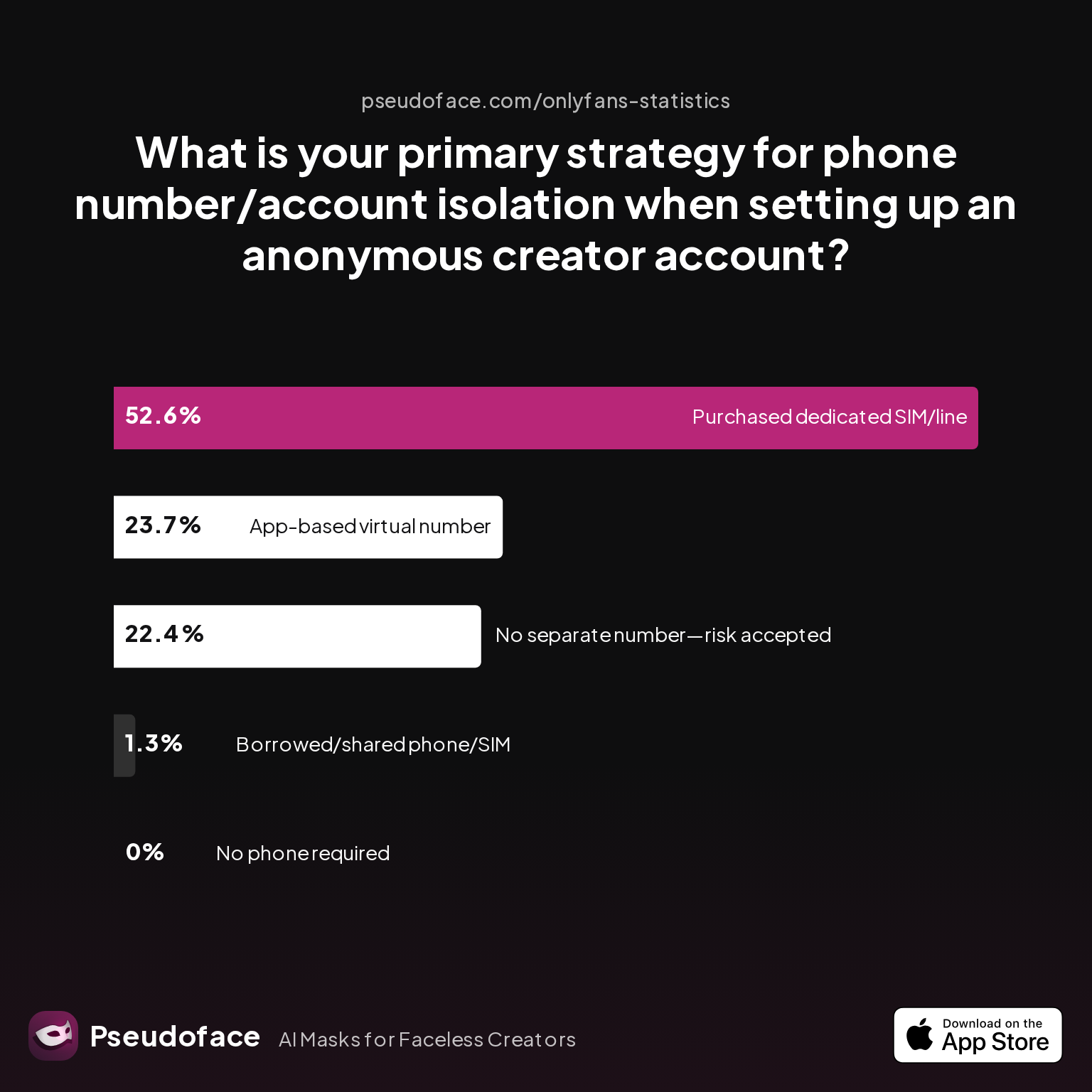
First, how do creators handle the #1 privacy lever: their phone number?
| Answer | Percentage |
|---|---|
| Borrowed/shared phone/SIM with partner | 1.32% |
| Chose platform that doesn't require phone | 0.00% |
| No separate number used—risk accepted | 22.37% |
| Purchased dedicated SIM/phone line | 52.63% |
| Used an app-based virtual number | 23.68% |
A dedicated SIM or new phone line is the most common isolation strategy, used by over half of creators aiming to stay anonymous.
But nearly a quarter roll the dice with app-based virtual numbers, and another fifth risk everything by using their own number or skipping number separation. The risk here isn't theoretical: using your “real” number means your OnlyFans account could turn up as a contact suggestion to friends, family, or even colleagues. App-based numbers can leak if the app itself is linked to your main device’s identity, especially if it draws from your real Google or Apple account.
What about privacy setup mistakes—and what do creators regret?
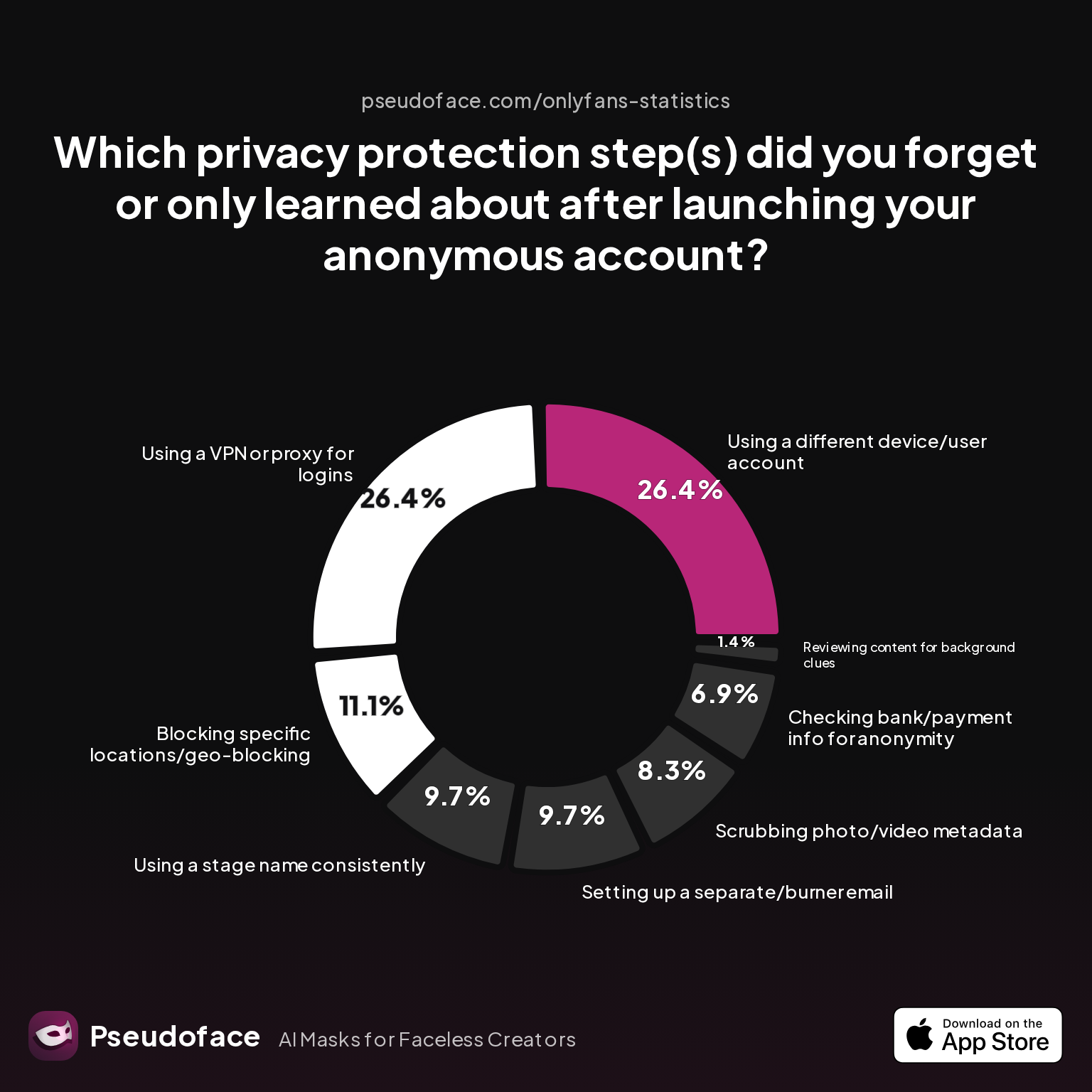
| Answer | Percentage |
|---|---|
| Blocking specific locations/geo-blocking | 11.11% |
| Checking bank/payment info | 6.94% |
| Reviewing content backgrounds | 1.39% |
| Scrubbing metadata | 8.33% |
| Setting up a separate/burner email | 9.72% |
| Using a different device/user account | 26.39% |
| Consistently using a stage name | 9.72% |
| Using a VPN/proxy for logins | 26.39% |
Device/user account separation and VPN/proxy use are the two privacy steps most often missed by anonymous creators (each at over 26%).
Interpreting this, it’s clear that operational errors—like logging in once from your real phone or forgetting to use a VPN—cause the most regret. These mistakes are rarely reversible. Self-selection bias is at play: those reporting mistakes are often those who suffered the consequences enough to become “advice givers.”
So, what are the critical steps for setting up your new device?
- Start with a factory reset—wipes all previous accounts and metadata.
- Insert your dedicated SIM (purchased cash or with minimal ID), or prepare your chosen app-based number.
- On first boot, set up a new Apple or Google ID. Never use your personal login.
- Turn off Bluetooth, device location, and nearby device visibility during setup and first logins.
- Use a freshly created, anonymous email for all OnlyFans and associated social media logins.
- Connect only via cellular data or a consistently-used VPN (never home WiFi until you’re fully confident all cross-links are impossible).
- Never, not once, log in to your new device from accounts you use in civilian life.
Rinse and repeat these steps for all creator platforms, not just OnlyFans. Notably, these steps require a little work up front, but closing these “leak” vectors is what separates accounts that stay private from those that surprise their creators with “friend suggestion” blows months or years down the line.
With a proper foundation set, let’s dig into the real-world tedium and creative workarounds that come with juggling two devices.
Real-World Logistics of Managing a Separate Device for OnlyFans
Protecting your identity comes with operational friction. Managing a second phone (or similar device) gets easier with practice, but the process is rarely seamless. What are the day-to-day realities and common adaptation curves for creators?
Let’s look at how creators’ strategies evolve over time, based on Pseudoface’s ongoing Reddit thread study across 2025-2026.
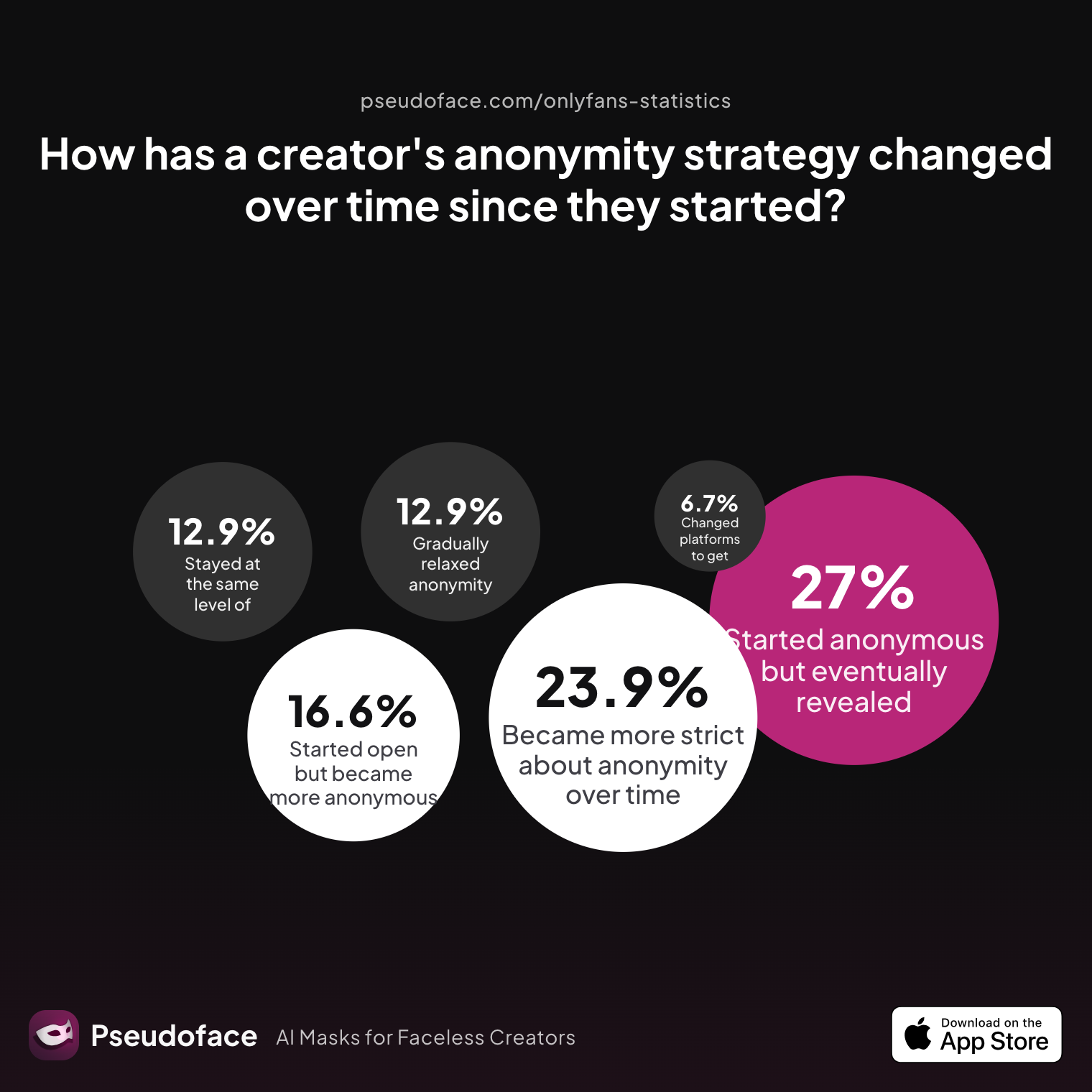
| Answer | Percentage |
|---|---|
| Became more strict about anonymity over time | 23.93% |
| Changed platforms for better anonymity features | 6.75% |
| Gradually relaxed measures as comfort grew | 12.88% |
| Started anonymous but eventually revealed face/ID | 26.99% |
| Started open but became more anonymous after scare | 16.56% |
| Stayed at the same level throughout | 12.88% |
Roughly a quarter of creators become stricter with privacy over time, while another quarter move the opposite way and eventually reveal their face or real identity.
Nearly 17% only tighten security after a scare, often triggered by a privacy breach or near-miss. This “reactive adaptation” is a common cycle in long-term creator journeys.
Operationally, the logistics most often cited by creators are:
- Charging and maintaining the “burner” device (often left powered off and only turned on during content/upload sessions).
- Keeping physical separation—some creators never bring both devices into the same place, especially during first setup and travel.
- Fully resetting, erasing, and double-checking device and account settings after accidental crossover (logging in from the wrong device, for example).
- Managing notifications and updates: most mute their burner except when “on the clock,” meaning fewer distractions—but the risk of missing urgent messages or OnlyFans notifications.
Reddit color—from creators documenting their own logistics and strategies—points to the ongoing anxiety of “did I do it right?” and a tendency to get stricter with experience, especially after the first algorithmic “scare.” Many creators cite wishing they’d started with two devices from day one, instead of trying to untangle accounts after launch.
Temporal note: As of late 2025 and into early 2026, a pattern emerges—creators report that platform discovery algorithms have gotten more aggressive at suggesting real-world contacts or locations, further incentivizing “paranoid” device/network separation as the new normal.
Next, we’ll bring together all these operational realities into a decision table, so you can match your privacy stack to your personal risk profile.
Comparison Table: Best Second Phone Options for OnlyFans Privacy
When choosing your privacy setup, it helps to see options side by side. Below is a synthesis of real-world creator choices, mapped to strengths, drawbacks, and cost:
| Device Type | Security Level | Average Upfront Cost | Ongoing Cost | Usability | Common Pitfalls | Best For |
|---|---|---|---|---|---|---|
| Used/Refurbished Smartphone | Moderate–High | $0–$50 | $0–$30/mo | Full feature support | Residual data, old logins | Budget, full access |
| New Burner Smartphone | High | $40–$100 | $15–$50/mo | All app access | Forgetting top-up, lost SIM | Total isolation |
| App-based Virtual Number | Low–Moderate | $0–$10 | $0–$5/mo | Use on main phone | App leaks, accidental main-acct use | Minimum hassle, budget |
| Tablet/Non-phone Device | Moderate | $30–$250 | WiFi/VPN | Decent, may lack SMS | Network not always isolated | Content-only creators |
Key takeaways:
- Highest privacy: New burner smartphone + new SIM + separate network.
- Lowest friction: App-based numbers, but at the cost of weaker separation and higher risk of slip-ups.
- Best value: Used smartphones you own (if thoroughly reset and never used with personal accounts).
Device choice ultimately comes down to risk tolerance, habit, and how critical “never being found” is to you. If complete isolation is non-negotiable, the small upfront cost is a smart insurance policy.
Building Your Privacy Stack: What Actually Works for Faceless and Anonymous OnlyFans Creators
A “privacy stack” isn’t just a device and a SIM—it’s a set of habits and configurations that minimize the odds of accidental exposure. Let’s look at what privacy steps the OnlyFans community considers non-negotiable, and how these map against real-world practices.
First, what do creators actually use as their core anonymity methods?
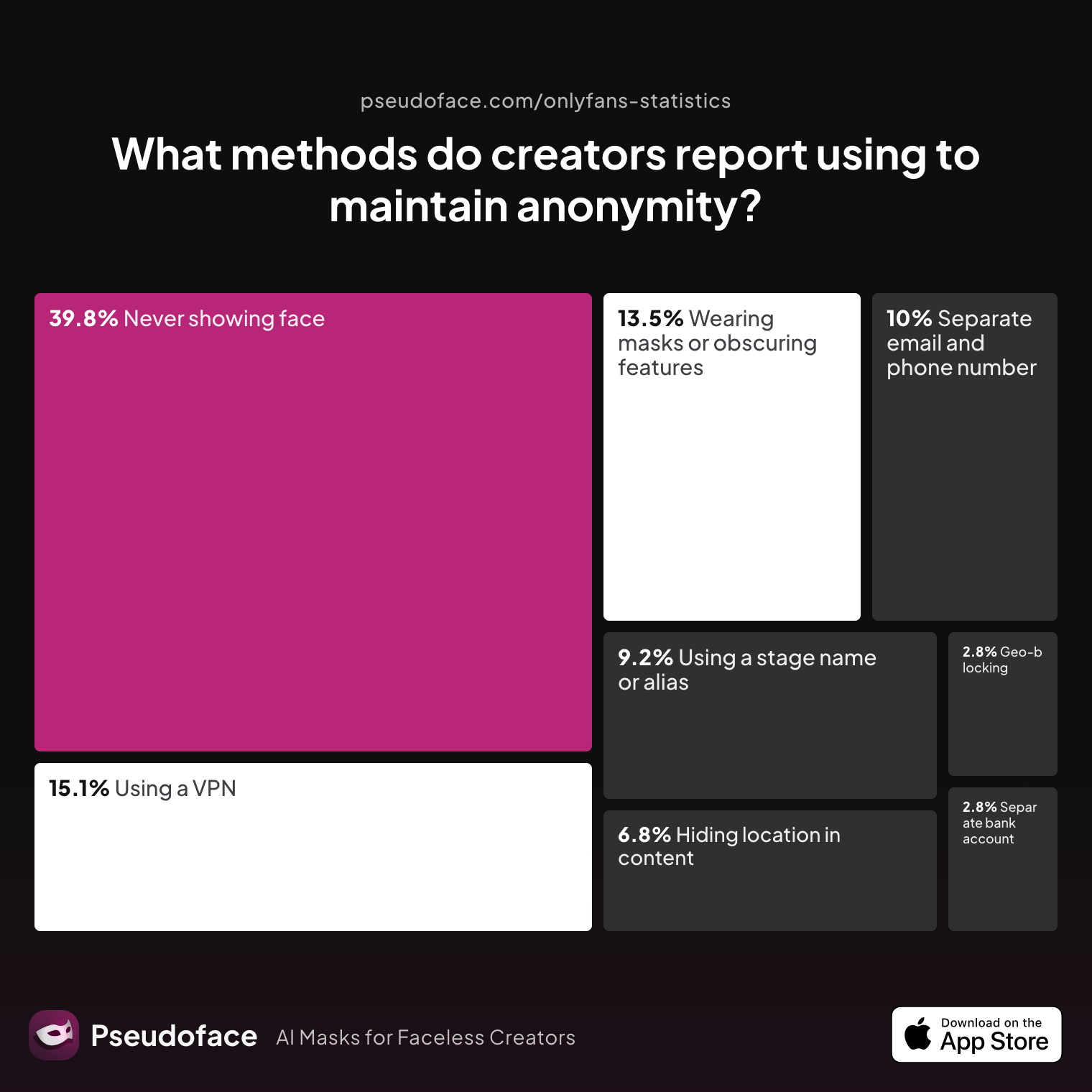
| Answer | Percentage |
|---|---|
| Avoiding location details | 6.77% |
| Geo-blocking regions | 2.79% |
| Never showing face | 39.84% |
| Separate bank/business entity | 2.79% |
| Separate email & phone | 9.96% |
| Stage name/alias | 9.16% |
| VPN/privacy tools | 15.14% |
| Masks/obscuring features | 13.55% |
The most common privacy strategies are never showing your face (39.84%), using VPNs (15.14%), and building a privacy stack with separate phone and email (just under 10%).
What privacy steps are perceived as “must have” vs. optional?
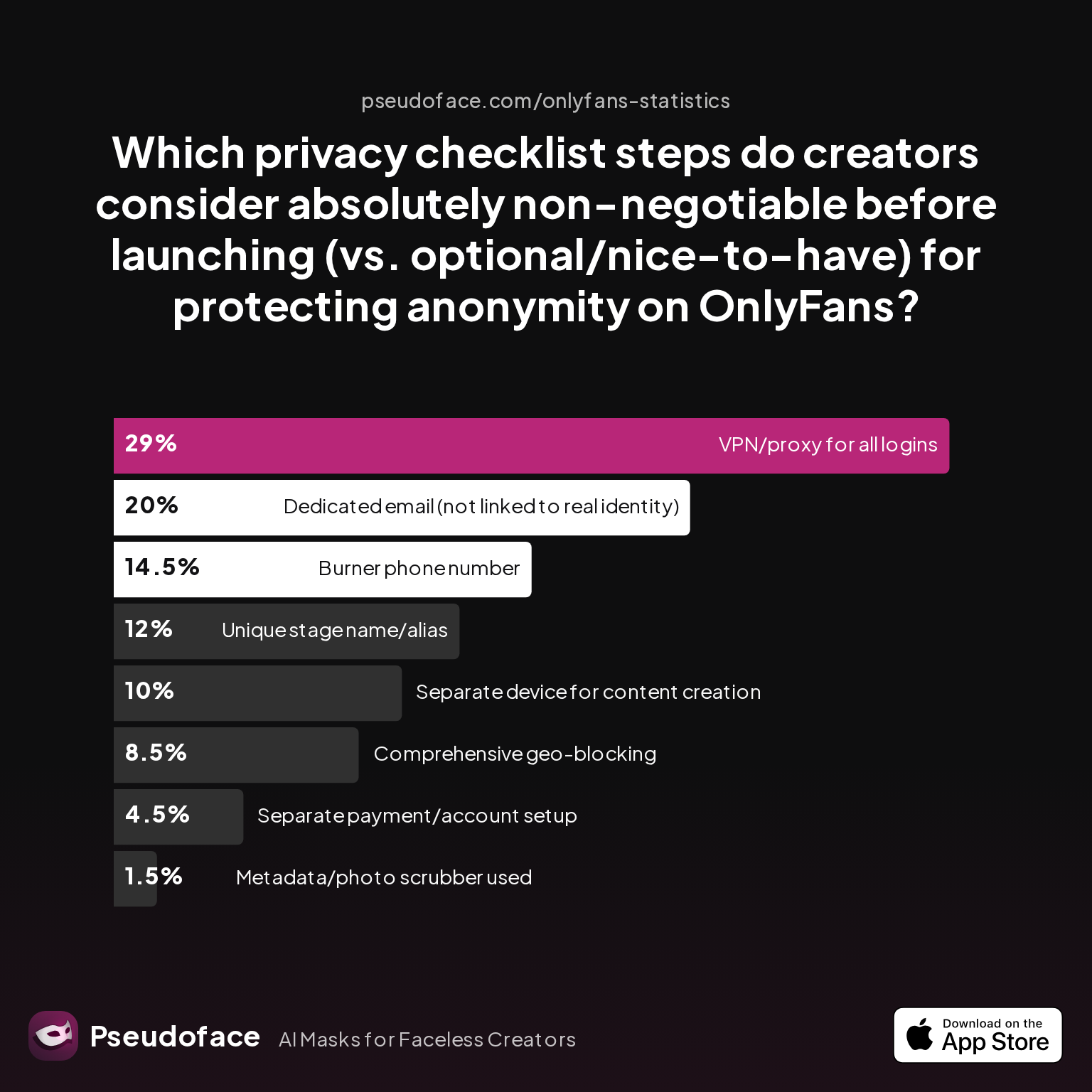
| Answer | Percentage |
|---|---|
| Burner phone number | 14.50% |
| Comprehensive geo-blocking | 8.50% |
| Dedicated email | 20.00% |
| Metadata/photo scrubber | 1.50% |
| Separate device for content | 10.00% |
| Separate payment/account setup | 4.50% |
| Unique stage name/alias | 12.00% |
| VPN/proxy for all logins | 29.00% |
VPN/proxy use, dedicated email, and burner phone number are the privacy steps creators consider most non-negotiable, at 29%, 20%, and 14.5% respectively.
Device separation—while heavily discussed—comes in a close fourth. Note, however, that VPN/proxy use is much more likely to be consistent among those who report “never been found by accident.”
From the data and hundreds of Reddit advice threads, here’s a distilled privacy stack order of priority:
- Dedicated email not used for any non-creator accounts
- Burner phone/SIM/number—separate, not linked to personal accounts
- VPN/proxy—used every time, on all networks
- Dedicated device—never logs into personal accounts or home WiFi
- Unique stage name/alias—never re-used elsewhere
- Geo-blocking and metadata scrubbing—often skipped, but critical for “paranoid” privacy
Commonly skipped steps (and responsible for most exposures) include: logging in from a non-isolated network “just once”; sharing a device for both personal and creator accounts; and occasionally “testing” a feature with your real identity.
The bottom line: the tighter your privacy stack now, the less likely you are to regret your choices later. Perfect privacy is impossible—algorithms and humans get smarter every year—but most “outings” are the result of avoidable technical or operational mistakes, not platform malice.
FAQ
Do I really need a second phone for OnlyFans, or will a burner app do?
A second phone is safest, but some use burner apps with known increased risk.
While plenty of creators use app-based numbers on their main phone, the data shows those with a dedicated device/SIM report far fewer accidental leaks. The price of a used phone is small compared to the peace of mind if full anonymity is your priority.
If I use my home WiFi for my creator device, can people find my real identity?
Yes—shared home networks contribute to accidental detection via recommendation algorithms.
Social media, payment, and sometimes OnlyFans itself can connect accounts logged in from the same IP address. Pseudoface’s analysis shows most accidental “discovery” stories involve at least one crossover via home or work WiFi.
What’s the cheapest way to keep OnlyFans private—burner phone, dumb phone, or app?
A thoroughly wiped used phone (ideally with a dedicated SIM) is the best budget option.
You don’t need a $100+ phone—many creators use an old or refurbished smartphone with a low-cost prepaid SIM or trusted virtual number. Dumb phones are almost never used anymore due to app limitations.
How do I avoid OnlyFans linking my personal and creator accounts?
Never use the same device, number, or login email—and set up new accounts from a clean slate.
The most common creator regret is forgetting to log out or using old accounts/apps during setup. Factory reset your second device, use only fresh credentials, and always operate on isolated networks.
Can I use a used/secondhand smartphone safely for anonymous OnlyFans?
Yes—if you fully factory reset, set up with a new Google/Apple ID, and never log personal accounts.
Self-reported data shows many creators successfully use hand-me-down or budget smartphones, but only after thoroughly scrubbing any residual data and following strict setup procedures (new SIM, new ID, no WiFi crossover).
What’s the best SIM card strategy for OnlyFans creators in the US/UK?
A prepaid, data-only SIM purchased anonymously is ideal for privacy.
App-based options like Google Voice also work but are less secure if managed from your main phone. Avoid anything tied to your real identity; top-up plans are commonly used for cost control by creators in 2025-2026.
How do I handle notifications and app updates when my second phone is off most of the time?
Most creators batch check-ins, muting notifications to reduce accidental leaks.
Turn on your burner device only during posting or messaging windows, keeping it powered off—and away from your main device—during “civilian” time. Update apps only over the isolated network or VPN.
Is there any way to retroactively fix a privacy mistake if I logged in from the wrong device or network?
It’s difficult; you can mitigate risk by resetting devices, changing credentials, and purging app/link history.
However, social networks and OnlyFans may have already linked your accounts behind the scenes. Most successful “fixes” come from immediately re-isolating and never repeating the crossover.
Why do social media algorithms suggest people I know on my creator account, even with separation?
This is often due to subtle data sharing—contact syncing, shared IP addresses, or residual cookies.
Even a single accidental contact sync or WiFi connection can tie your creator persona to your real-life circle. Strict operational discipline is your best defense, but no method is invulnerable.
What do creators wish they knew before setting up a second phone for OnlyFans privacy?
That the hardest part is rigorous, everyday separation—not just the initial setup.
Advice threads are full of “I wish I’d been stricter” stories; most regrets come from a single mistake or relaxed habit after “nothing bad happened for a while.” Treat every login and upload as if it could be the one that reveals you.
Final perspective: Full anonymity is a process, not a checkbox—a discipline of device, network, and habit separation. Based on advice and data from real OnlyFans creators through 2026, the creators who stay anonymous are those who go slow, get methodical, and never, not once, let convenience override operational security. That may sound daunting. But for most who travel this path, the blend of peace of mind and creative freedom is worth every extra step.


