
When creators search "Can you be anonymous on OnlyFans?" the answer is yes — but that "yes" is not absolute. Anonymity on OnlyFans means privacy from the world, not from the platform itself or payment intermediaries. You cannot hide from OnlyFans' internal verification team: legal identification is mandatory, your date of birth is on file, and payout details must trace to a real identity. From fans and the general public, however, you can build a convincing and durable anonymous persona — provided you set up every layer of separation before launch. This hub covers the whole system, drawn from Pseudoface's analysis of 250,000+ public Reddit creator threads (2025–2026). One signpost before we start: this page is about creator anonymity; if you're a subscriber wondering whether your activity is private, that's covered in its own section below.
Can You Be Anonymous on OnlyFans?
Every OnlyFans journey begins with a contradiction that privacy-minded creators must face: the platform itself requires you to prove exactly who you are. Whether you ever show your face or legal name in content, OnlyFans knows exactly who you are — it collects government-issued photo ID, tax documents (for US creators, W-9 and 1099 forms), and bank account details for payouts. That internal linkage is non-negotiable for anyone monetizing on the site.
Outside of the platform's administrative and payment systems, though, you control your public identity almost completely. Subscribers see only your chosen display name and whatever content you post — never your legal name, address, or bank information. Here's the practical split:
| Question | Anonymous/Faceless Account | Real-Name Account |
|---|---|---|
| Platform (OnlyFans) knows legal identity | Yes | Yes |
| Can fans see real name/bank/payout info? | No | Possibly (if doxxed or linked) |
| Payment traceability | Unavoidable — payouts link to bank/PayPal | Same |
| Recoverable if doxxed? | Harder (less public info) | Easier to trace |
Operationally, anonymous creators enjoy near-complete public anonymity with two non-negotiable exceptions: payouts always require real-name, legally verified documentation, and your bank sees the deposits. Your privacy therefore rests on four pillars — brand hygiene, isolated devices and networks, flawless content handling, and personal operational discipline. Any slip can pierce the illusion; the rest of this guide hardens each pillar in turn.
Is OnlyFans Anonymous for Subscribers?
For subscribers, "is OnlyFans anonymous" is a different question — your true identity is hidden from creators, but not from OnlyFans or your payment company. Everyone leaves a financial trail.
What that means in practice: creators never see your real name, card number, or billing details — you appear to them only as your chosen username. OnlyFans and its payment processors, however, hold your full payment identity. And on your own side of the ledger, your bank statement will show the charge — most transactions appear as "OFGP*" or a generic payment-processor code rather than the word "OnlyFans", but anyone with access to your bank account can see the recurring charges and look up what the code means. Subscribing discreetly is realistic; subscribing untraceably is not.
Everything from here on is for creators.
Why Creators Stay Anonymous — and Is It Worth It?
The stereotype says anonymity is about shyness. The data says it's about protecting a life:
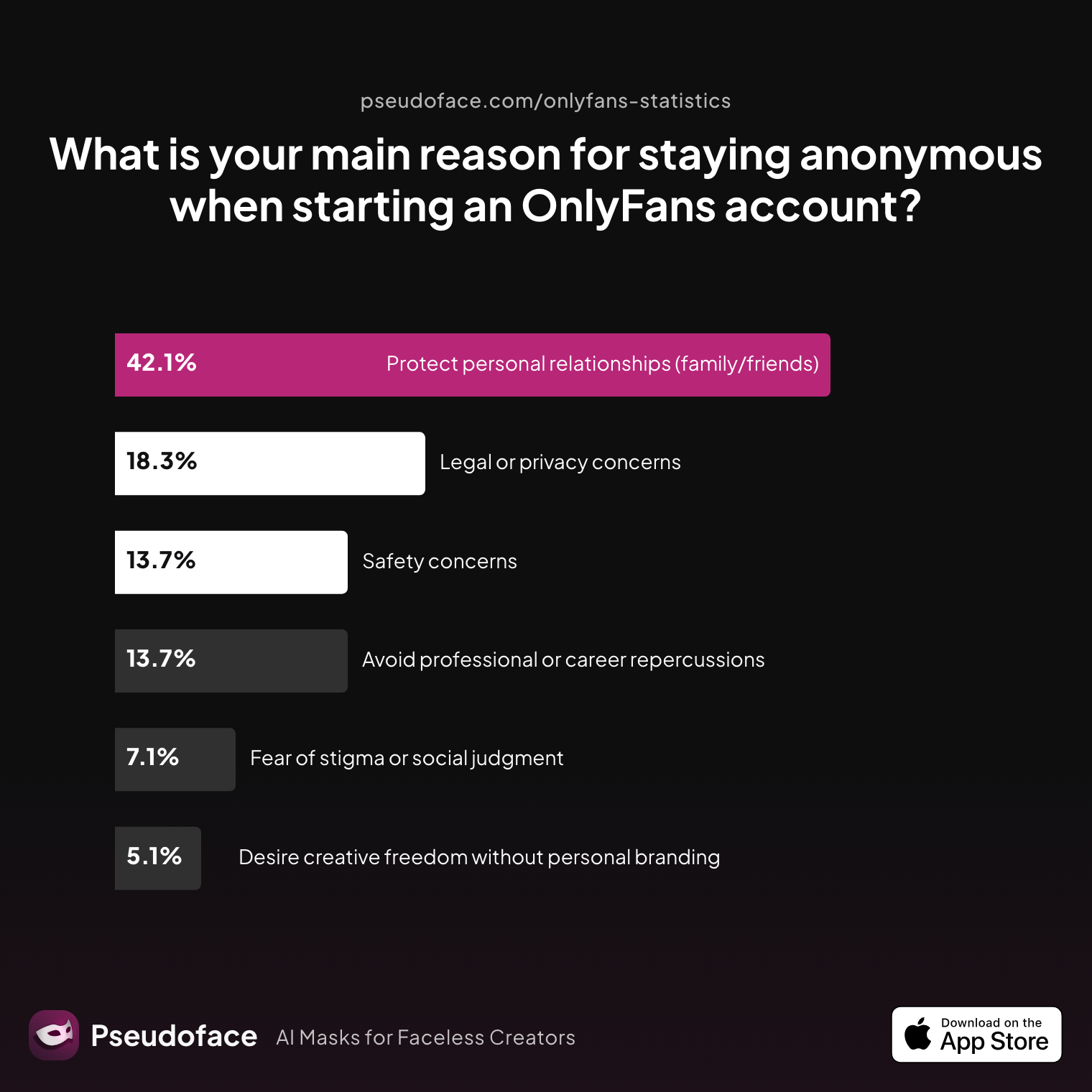
| Answer | Percentage |
|---|---|
| Protect personal relationships (family/friends) | 42.13% |
| Legal or privacy concerns | 18.27% |
| Avoid professional or career repercussions | 13.71% |
| Safety concerns | 13.71% |
| Fear of stigma or social judgment | 7.11% |
| Desire creative freedom without personal branding | 5.08% |
Teachers, nurses, corporate employees — for the overwhelming majority, anonymity is calculated self-protection against career and relationship fallout, not a style choice. Adult creators still face real stigma rooted in traditional values and misconceptions about the industry; anonymity is how thousands participate without betting their offline lives on other people's opinions.
Does the constant discipline pay off? Creators who've run anonymous accounts say yes, emphatically:
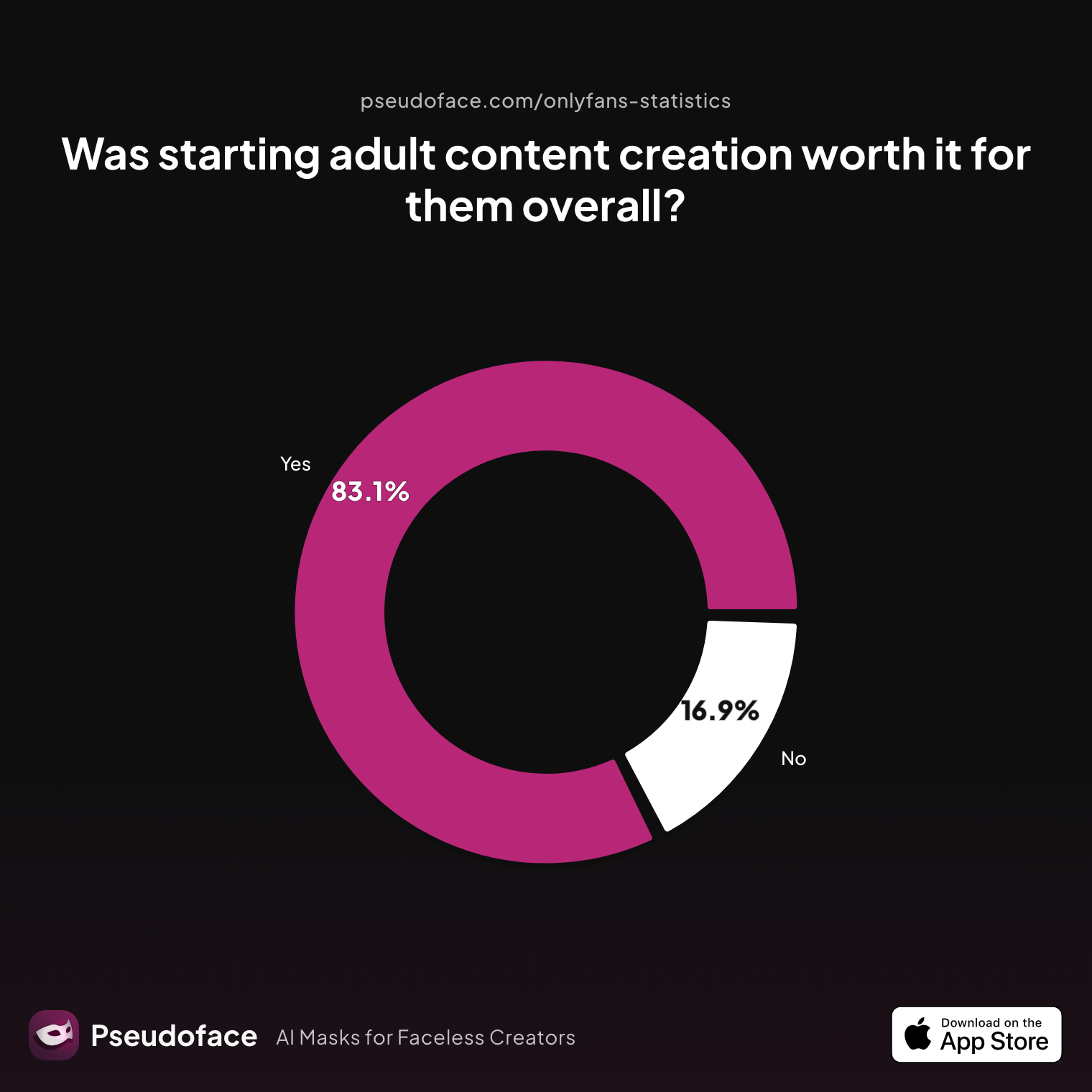
| Answer | Percentage |
|---|---|
| Yes | 83.13% |
| No | 16.87% |
83% say staying anonymous was worth it — with the honest caveat that about 43% of anonymous creators have been discovered or eventually revealed themselves (18% by a stranger connecting the dots, roughly a quarter by family, friends, or coworkers, 9% voluntarily), 41% live with ongoing anxiety but remain hidden, and only 7% report never being discovered and never worrying about it. Anonymity reduces risk; it doesn't eliminate it. The rest of this guide is about pushing your odds as close to that never-discovered group as the tools allow.
How to Start an Anonymous OnlyFans
Anonymous creators spend weeks planning content, but sometimes just seconds forming their OnlyFans persona. That asymmetry is where most future leaks are born. The launch sequence that the never-discovered group actually follows:
1. Identity layer. Verify with your real ID (the KYC check is private — subscribers never see it), then build the public persona: a stage name that doesn't rhyme, overlap, or hint at your real one; a dedicated email never used on any personal platform; a burner-SIM or VoIP phone number; social handles that are distinct, consistent, and never reused from personal life. How carefully creators actually handle this layer:
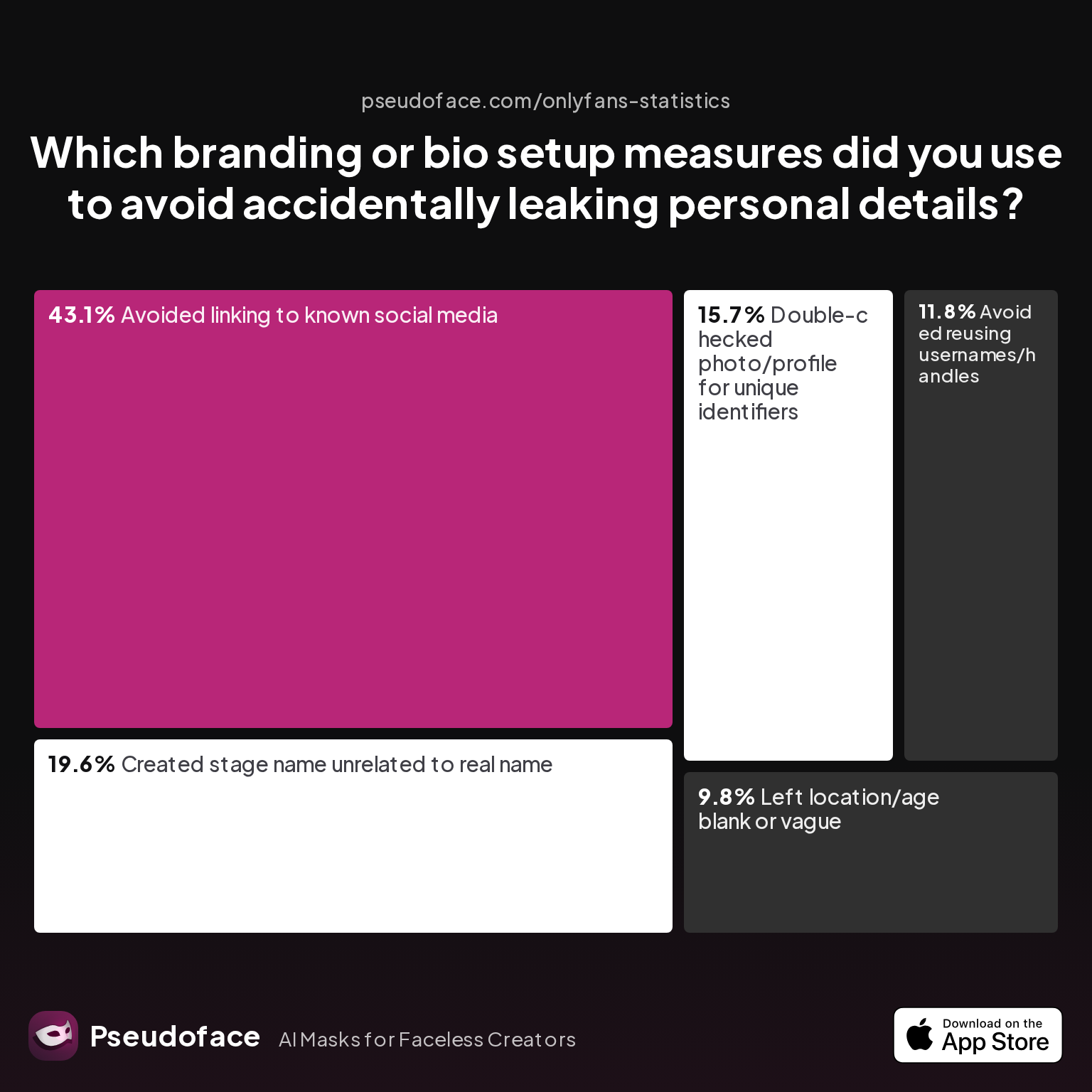
| Answer | Percentage |
|---|---|
| Avoided linking to known social media | 43.14% |
| Stage name unrelated to real name | 19.61% |
| Double-checked photos for identifiers | 15.69% |
| Avoided reusing usernames | 11.76% |
| Left location/age blank | 9.80% |
2. Device and network layer. Imagine your anonymous creator persona living on a different planet than your personal life — that's the kind of digital distance you need. Social platforms like Instagram, TikTok, and Facebook use device IDs, IMEI numbers, and contact syncing to connect user profiles even when everything else is new; resetting a phone or creating a fresh account doesn't erase those fingerprints. Most real-world leaks happen at the device or browser level, not from email usernames. The gold standard is a cheap second phone plus a network your personal devices never touch; budget alternatives (separate user account, no autofill, never logging into both identities on one browser) narrow the gap but don't close it. What creators actually do:
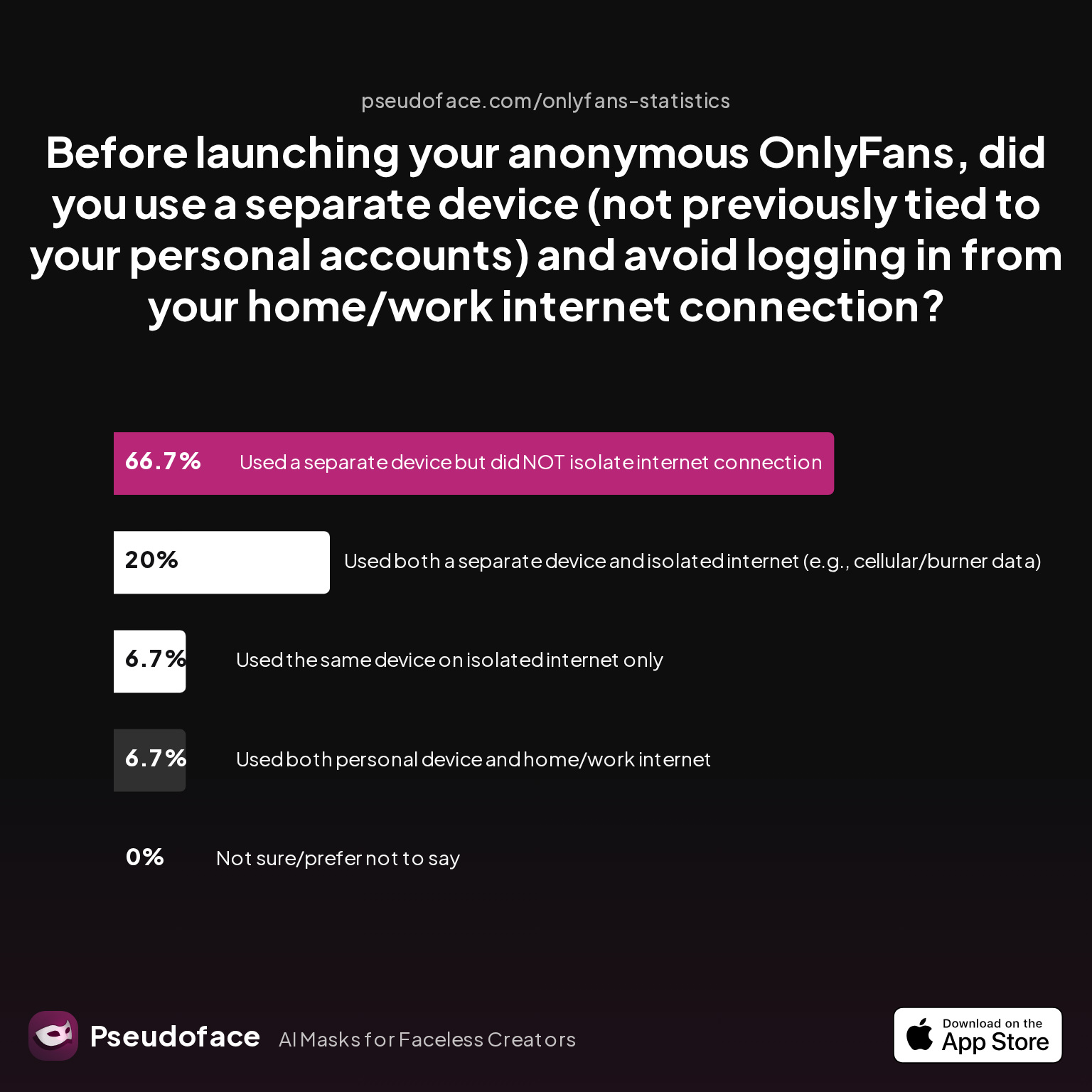
| Answer | Percentage |
|---|---|
| Separate device but NOT isolated internet | 66.67% |
| Both separate device and isolated internet | 20.00% |
| Personal device on home/work internet | 6.67% |
| Same device, isolated internet only | 6.67% |
Only 1 in 5 does both halves. The two-thirds running a separate device on their home network have closed the front door and left the side window open.
3. Content discipline layer. Decide before your first post whether tattoos, birthmarks, backgrounds, or your voice will ever appear — and audit every file against that decision. (Full step-by-step, including the launch-day sequence, lives in our OnlyFans anonymity checklist.)
How to Stay Anonymous on OnlyFans: What Actually Protects You
Staying hidden after launch is a maintenance practice built on layered methods:
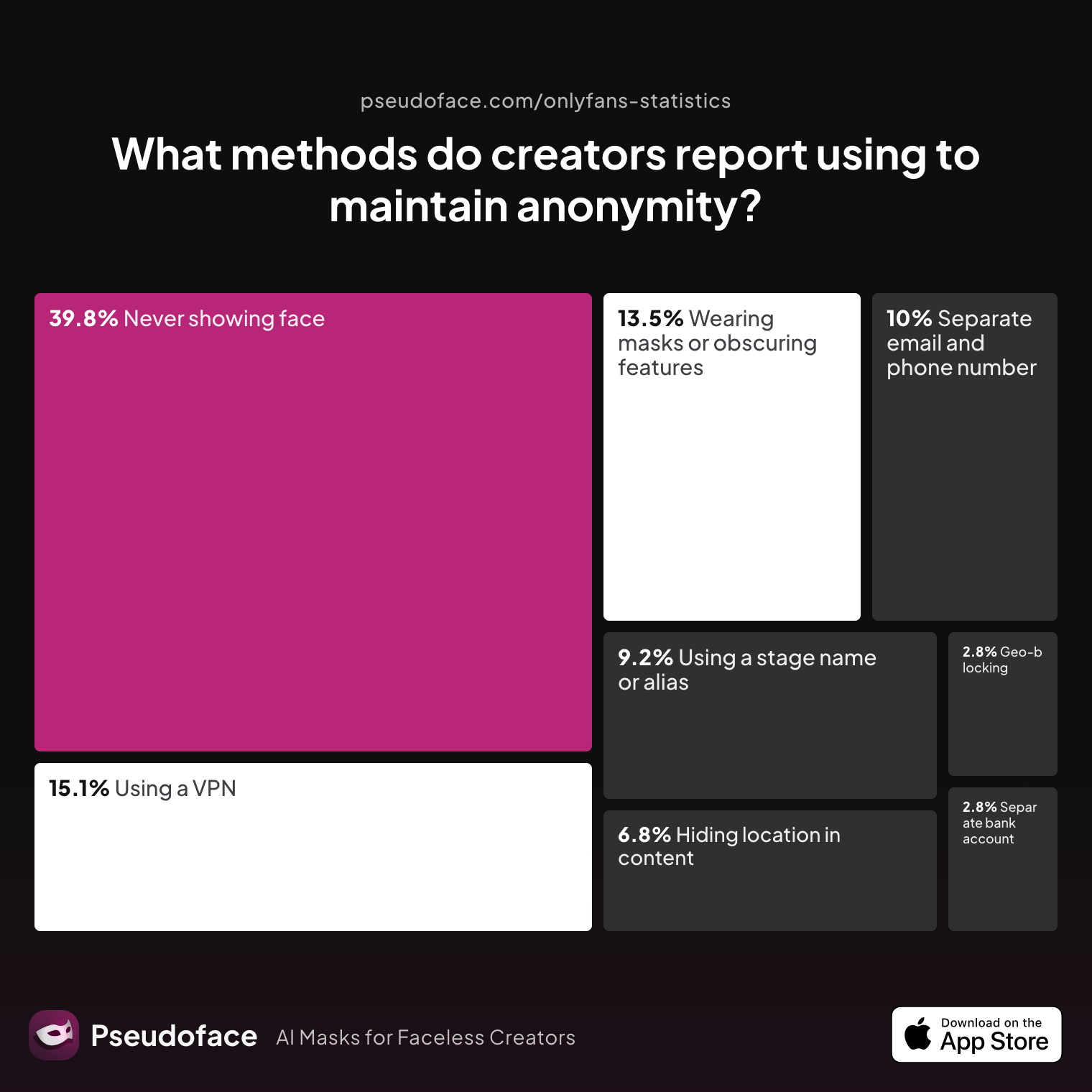
| Answer | Percentage |
|---|---|
| Never showing face | 39.84% |
| VPN/privacy tools | 15.14% |
| Masks or obscuring features | 13.55% |
| Separate email and phone | 9.96% |
| Stage name/alias | 9.16% |
| Avoiding location-specific details | 6.77% |
| Geo-blocking | 2.79% |
| Separate bank account/business entity | 2.79% |
And when creators are asked which tool does the real work of hiding who they are, one category dominates:
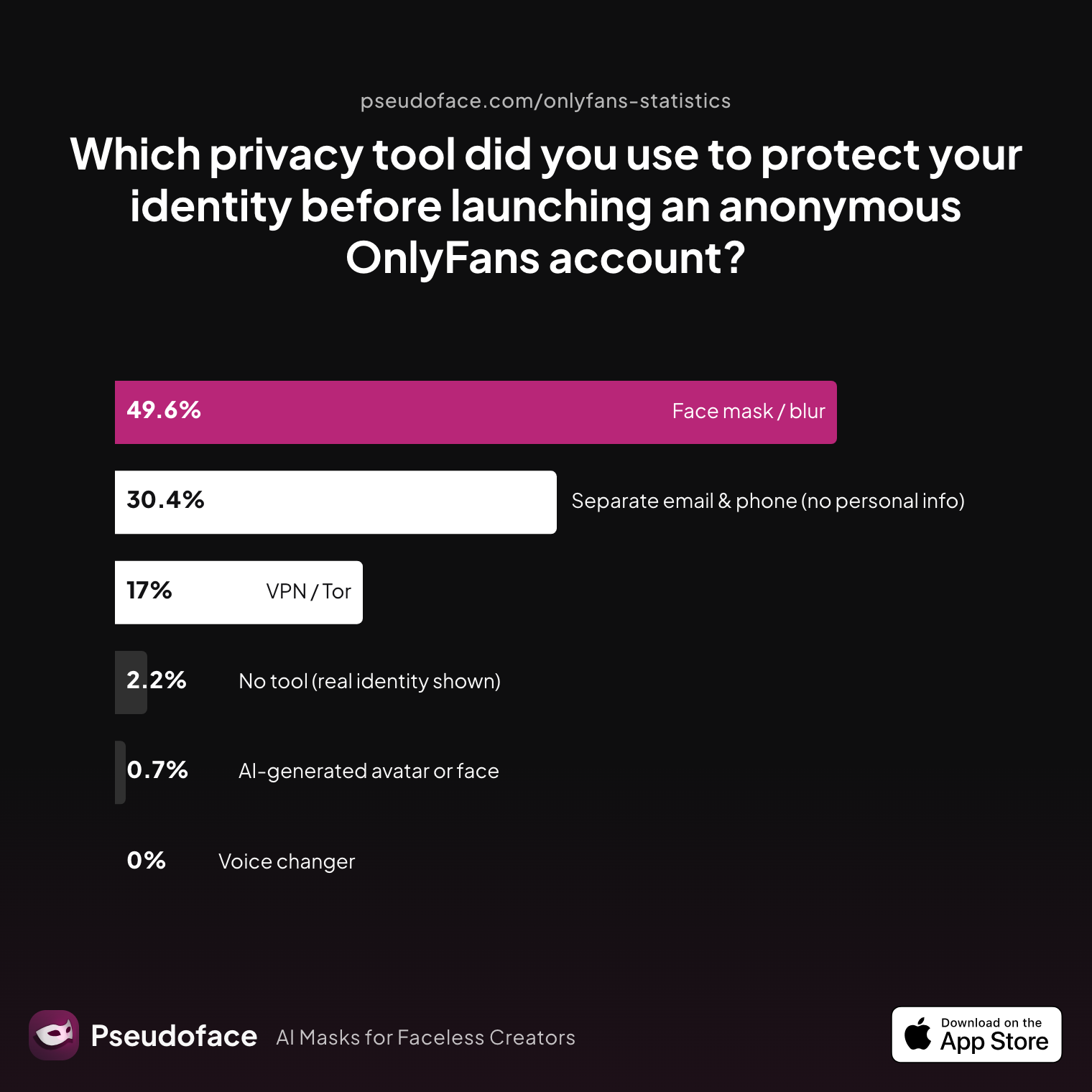
| Answer | Percentage |
|---|---|
| Face mask / blur | 49.63% |
| Separate email & phone | 30.37% |
| VPN/Tor | 17.04% |
| No tool | 2.22% |
| AI-generated avatar | 0.74% |
| Voice changer | 0.00% |
Half of anonymous creators rely on hiding their face as their primary privacy tool. Hold that thought — how you hide it matters, and we'll come back to it.
The discipline gap is where accounts fall. The steps creators most often skip — and learn about the hard way:
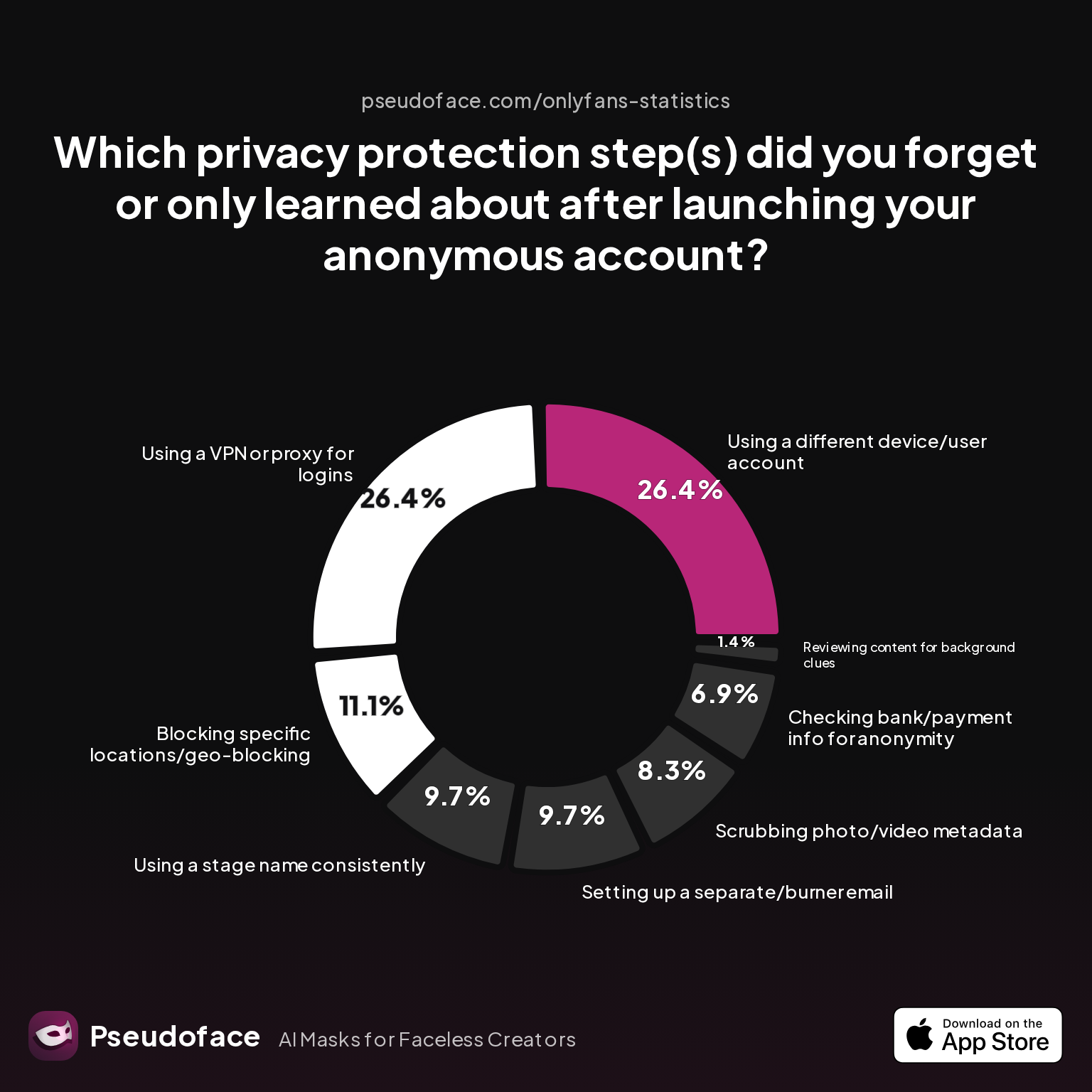
| Answer | Percentage |
|---|---|
| Different device/user account | 26.39% |
| VPN/proxy | 26.39% |
| Geo-blocking | 11.11% |
| Burner email | 9.72% |
| Consistent stage name | 9.72% |
| Metadata scrubbing | 8.33% |
| Bank/payment check | 6.94% |
| Background-clue review | 1.39% |
Metadata deserves its own line of defense: photos and videos carry EXIF data — GPS coordinates, device identifiers, timestamps — unless you strip it, and roughly 17% of identity leaks among anonymous creators originate from this invisible data. Yet:
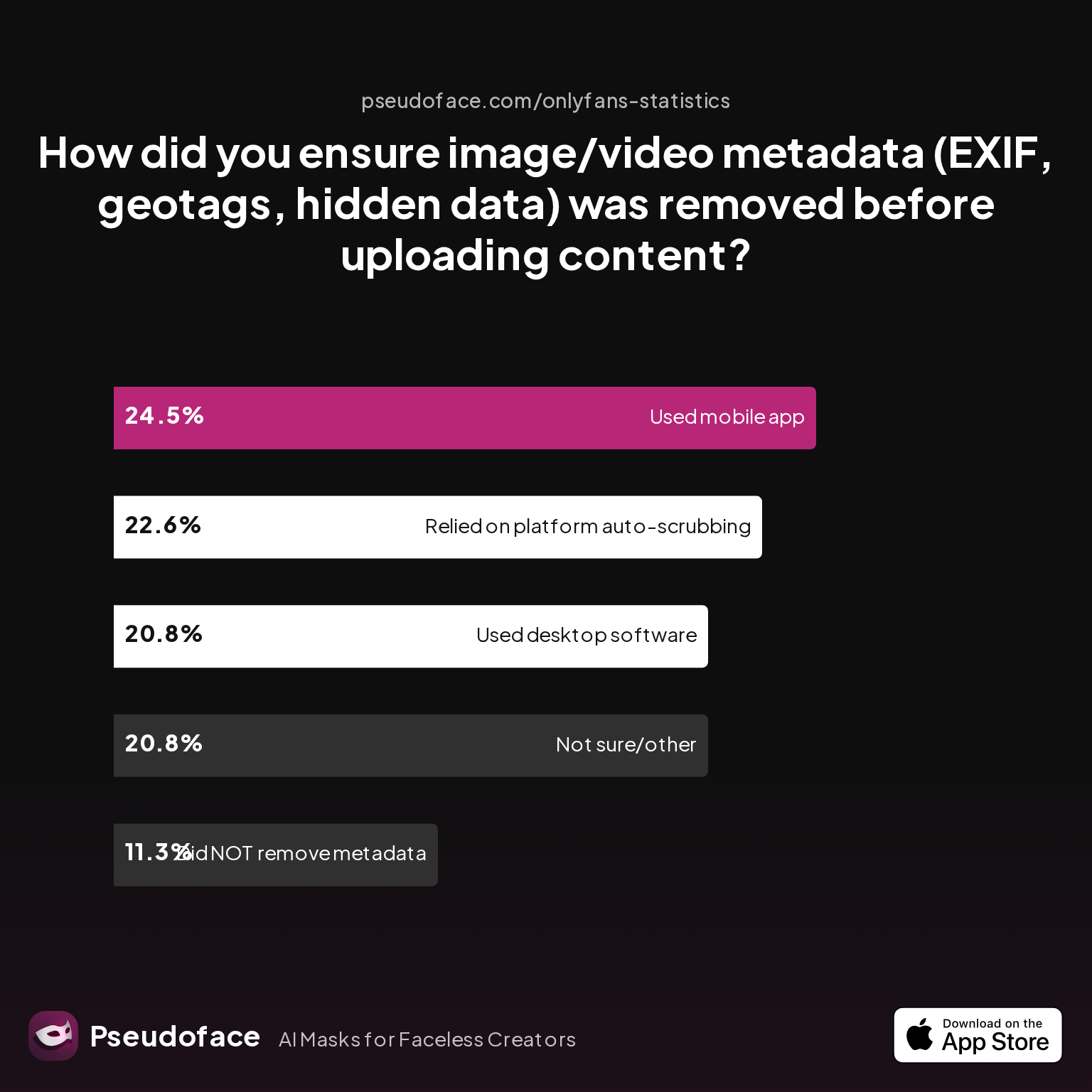
| Answer | Percentage |
|---|---|
| Dedicated mobile metadata app | 24.53% |
| Relied on platform auto-scrubbing | 22.64% |
| Not sure / other | 20.75% |
| Desktop software | 20.75% |
| Did nothing | 11.32% |
Only about 45% use a dedicated tool; a third are trusting luck or the platform. The pattern across all of these charts is the same: discovery almost always traces back to a single point of failure — a device, an email, a payout, or a stray background detail. The leak nearly always comes from the weakest link — the boundary you didn't fortify.
Hiding OnlyFans from Family, Employers, and Your Town
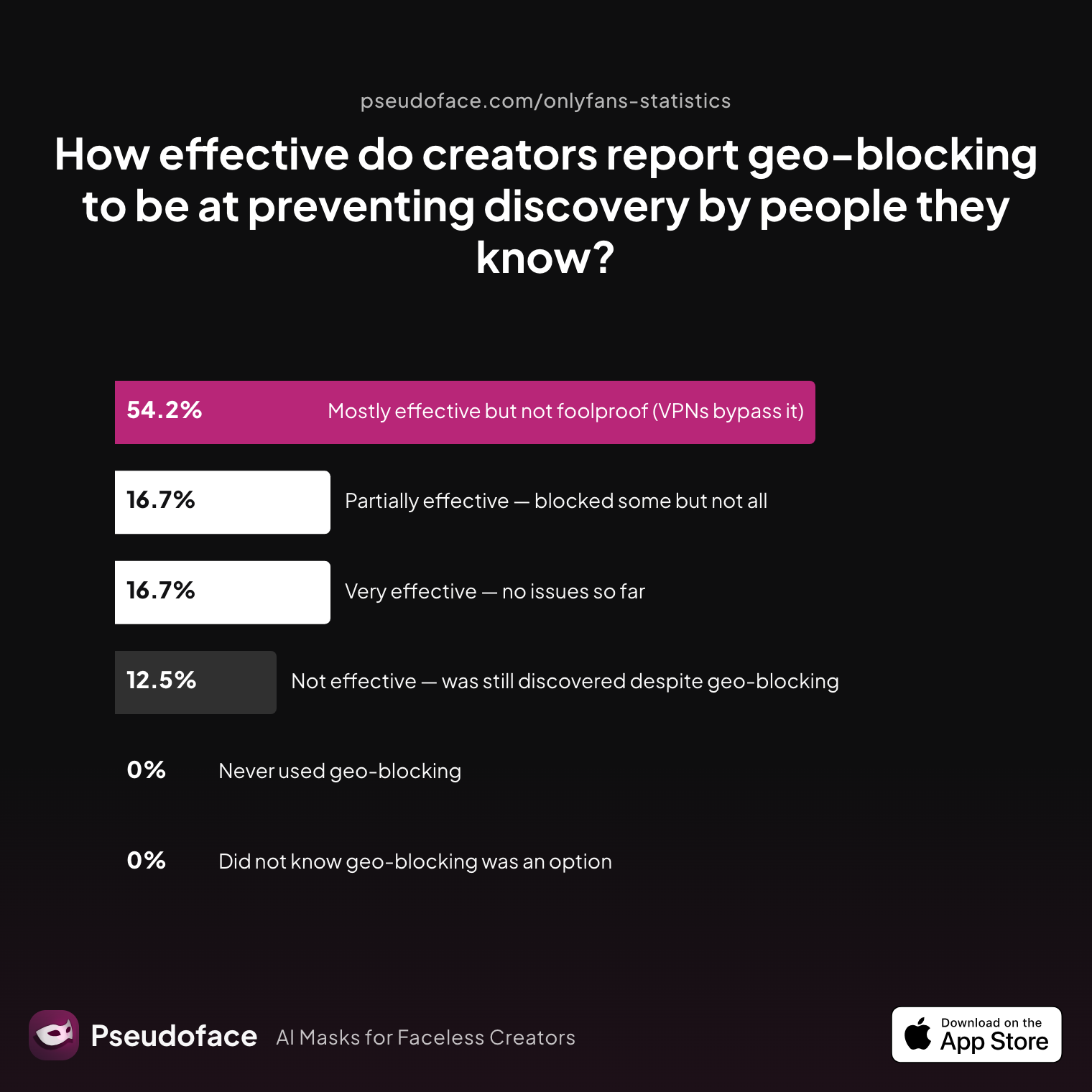
The most personal version of the anonymity question is "how do I keep this from the specific people in my life?" Geo-blocking is the platform's built-in answer — block your country, state, or region so local viewers can't find your page — and creators rate it as useful but leaky:
| Answer | Percentage |
|---|---|
| Mostly effective, not foolproof | 54.17% |
| Very effective | 16.67% |
| Partially effective | 16.67% |
| Not effective — still discovered | 12.50% |
Half call it "mostly effective, not foolproof" — VPNs bypass it trivially, and it does nothing about someone traveling or using a friend's account. Treat it as one layer, then add audience-specific tactics:
- Family: avoid birthdates, room backgrounds, tattoos, or clothing with local school/club logos; geo-block your state; never use a social account connected to your personal email or phone.
- Employers/coworkers: there is no way for HR to "look up" whether you run an OnlyFans — no such directory exists. The real risks are the ones you create: accessing creator accounts from company devices, email, or WiFi (monitored in many industries); a username adjacent to your real name; and social networks' "People You May Know" systems, which use shared contact lists and cookies to surface matches — a common origin for workplace leaks. Your 1099 tax form goes to you and the IRS, not your employer.
- Local community: in small towns, partial recognition and rumors travel fast — shot selection (no house numbers, street signs, distinctive scenery) is vital.
- Partners/close friends: shared devices and accounts are the hazard; one inadvertent auto-complete can unravel everything.
Open thread on Redditr/onlyfansadvice
u/mia_madisonxx
I had the same issue.. I bought a cheap 2nd phone that I can use for my OF business. So my account won't link I don't use any OF accounts on my personal phone. And vice-versa. You can also write it off on your taxes

Getting Paid Without Outing Yourself
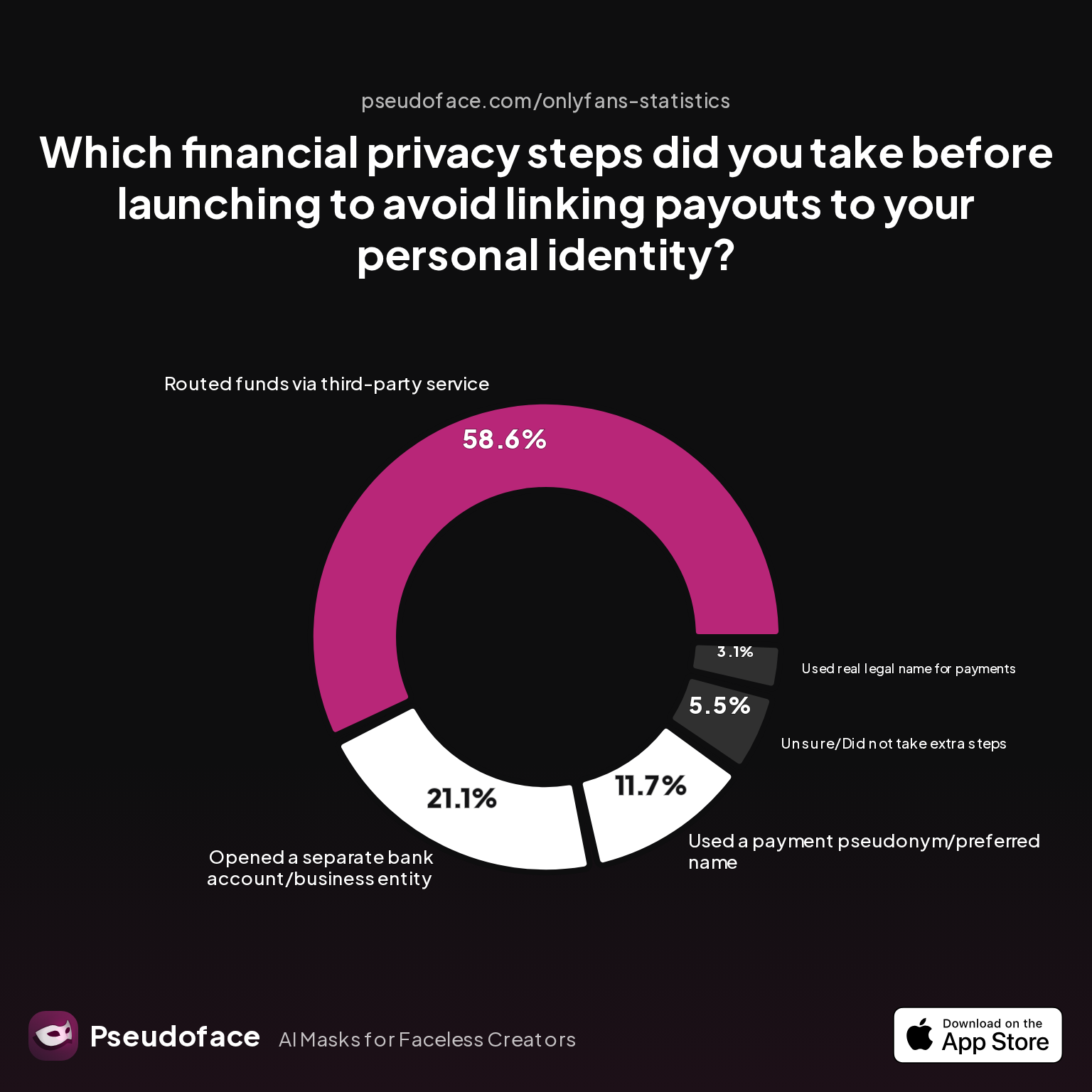
Money is where anonymity has hard limits — and where one early mistake is permanent. How creators handle payout privacy:
| Answer | Percentage |
|---|---|
| Routed funds via third-party service | 58.59% |
| Separate bank account/business entity | 21.09% |
| Payment pseudonym | 11.72% |
| Unsure / no extra steps | 5.47% |
| Used real legal name | 3.12% |
The workflow options, honestly compared:
| Workflow | Effect on Anonymity | Difficulty | Notes |
|---|---|---|---|
| Linking to personal bank account | Breaks anonymity | Easy | Strongly not recommended |
| Masked cards (Privacy.com etc.) | Protects spending privacy | Medium | Only shields spending, not payouts |
| Business/bank account under alias (LLC/DBA) | Highest privacy | Hard | Possible in some states/countries |
| Routing via trusted third party (Payoneer) | High privacy | Medium | Ensure the account can't trace to your real name |
Platform KYC still requires real documentation for cash-out no matter which route you choose — your customer-facing alias persists, but the payout rail is legally yours. The lesson is harsh: privacy can be irreversibly broken at the first payout. Setting up isolated financial infrastructure before launch is far easier than untangling it after a deposit hits your main account.
For physical-world paper trails (model releases, 2257 record-keeping, mail), creators use a tested menu of address options:
Open thread on Redditr/CreatorsAdvice
u/hannah_fit
Use a PO Box or UPS Store box which usually allows you to use their physical address. 2. Use a neighbor or friend's address. 3. If you live in an apartment just use the main building address and omit your apartment number. 4. Use a virtual mailbox. They receive, scan and forward mail to wherever you want. 5. Use a statutory agent service. They can act as custodian of records for everything related to your business.
And on the tax side: OnlyFans issues 1099s (or international equivalents) under your legal name. A distinct business entity or separate account doesn't make taxes anonymous — nothing does — but it organizes the paper trail and keeps it out of your household's shared view.
What Actually Exposes Creators: The Leak Data
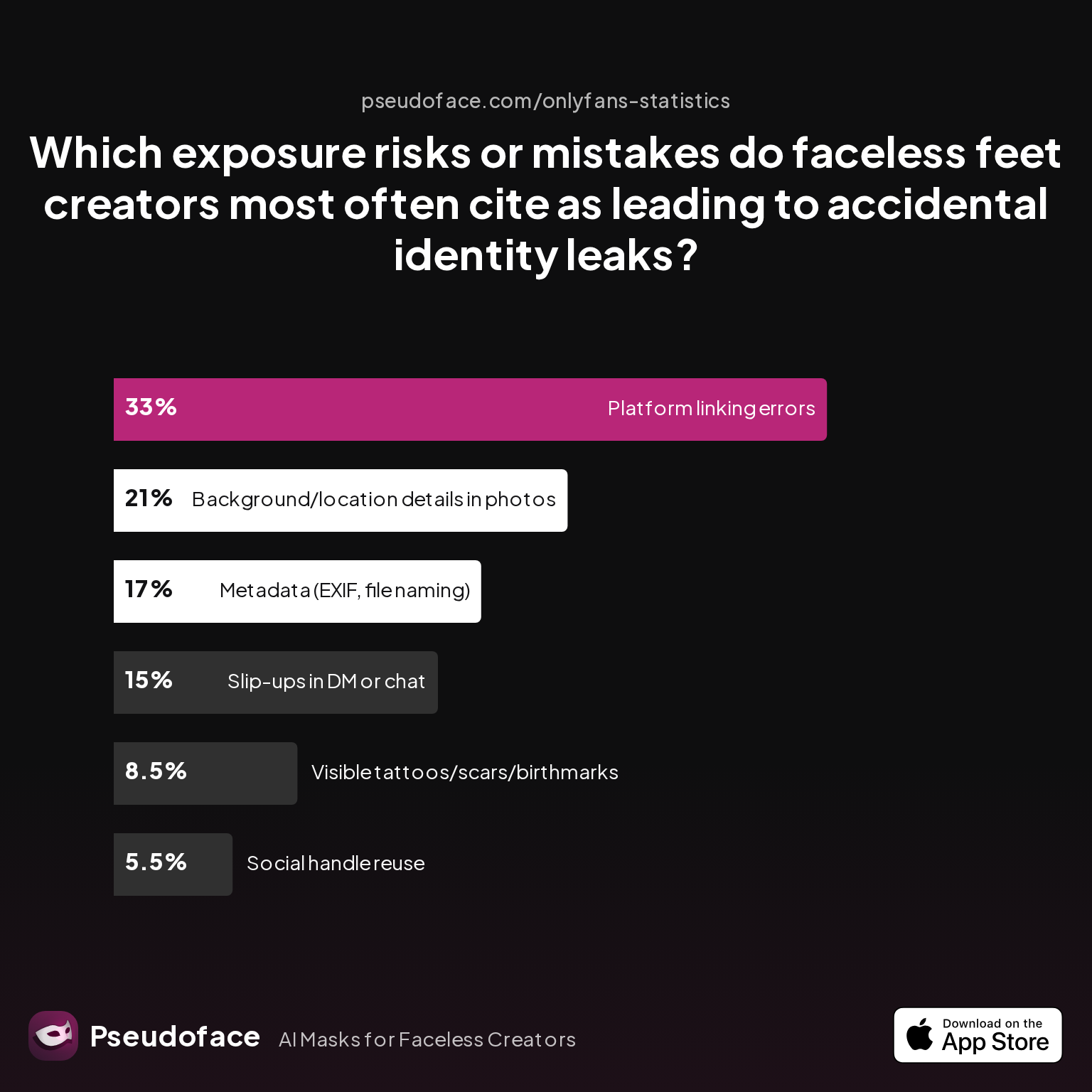
When anonymity fails, it fails in predictable ways:
| Answer | Percentage |
|---|---|
| Platform linking errors | 33.00% |
| Background/location details | 21.00% |
| Metadata (EXIF, file naming) | 17.00% |
| DM/chat slip-ups | 15.00% |
| Visible tattoos/scars/birthmarks | 8.50% |
| Social handle reuse | 5.50% |
A third of exposures come from platform linking errors — the cross-recommendation and contact-sync machinery covered above — and another 38% from backgrounds and metadata combined. The confessions behind the numbers are painfully specific:
- "Wish I'd started on a burner phone instead of my old iPhone."
- "Forgot the VPN just once while uploading from my apartment. Weeks later, I found my account in local results."
- "Never checked the photo backgrounds, didn't realize my degree certificate was in frame in a 'faceless' pic."
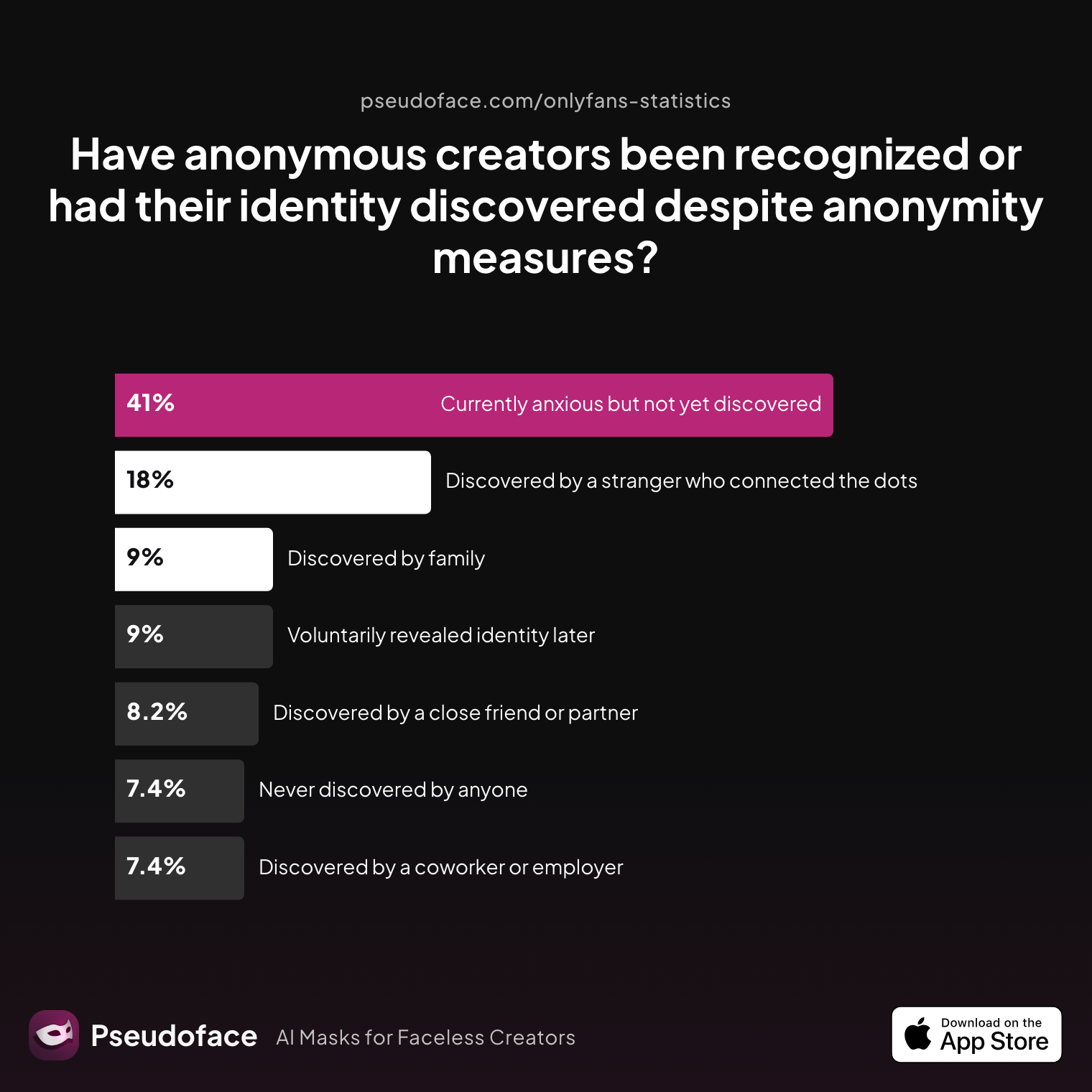
Which is why the discovery outcomes look the way they do:
| Answer | Percentage |
|---|---|
| Currently anxious but not yet discovered | 40.98% |
| Discovered by a stranger | 18.03% |
| Voluntarily revealed | 9.02% |
| Discovered by family | 9.02% |
| Discovered by a close friend or partner | 8.20% |
| Discovered by a coworker or employer | 7.38% |
| Never discovered, no ongoing anxiety | 7.38% |
True anonymity isn't measured by months online, but by what never happens: the confrontation, the friend request from back home, the accidental "are you…?" text. The truly bulletproof cases are rare — just 7% — and among creators who stayed anonymous, over 92% completed every checklist step. Skipping even one is how the other columns fill up. If the earnings side of this trade-off is what you're weighing, the data-deep companion is our guide to making money on OnlyFans without showing your face.
Anonymous, but With a Face: The AI-Face Option
Return to the most striking number in this guide: when anonymous creators name their primary privacy tool, face mask/blur wins at 49.63%. Half of the anonymous creator population is already solving privacy at the face itself — with masks that slip, crops that limit what they can shoot, or blurs that can sometimes be reversed.
There's a newer option in that same category: a consistent AI face — your faceless account, but with a face. A persistent AI-generated face, the same one in every photo and video, keeps the parasocial connection and algorithm-friendly content that hiding your face costs you, without your real identity appearing anywhere. Unlike a mask or a blur, a replacement face is baked into the content — there is no original face underneath to recover. That's what we build at Pseudoface: a real-time AI face for anonymous creators, applied live while you record, so the raw footage never contains your real face at all. If you currently shoot in a mask, the comparison is covered in our guide to wearing a mask on OnlyFans.
FAQ
Can you really stay anonymous on OnlyFans?
Yes — from the public, subscribers, and the people in your life, with disciplined separation of identity, devices, content, and payments. Not from the platform itself: OnlyFans always verifies your legal identity privately. 83% of anonymous creators say the trade-off was worth it.
Is OnlyFans anonymous for subscribers?
Largely, yes: creators never see your real name or payment details — only your chosen username. But OnlyFans and its payment processors know who you are, and your bank statement will show the charge (usually as "OFGP*" or a processor code, not "OnlyFans").
Will OnlyFans show my real name to subscribers?
No. Your legal ID, tax forms, and bank details are used only for private verification and payouts. Subscribers see your display name and content — nothing else.
How do I hide my OnlyFans from family and people I know?
Layer your defenses: geo-block your region, never link creator accounts to personal email/phone/socials, audit backgrounds for local clues, and keep creator activity off shared devices. Contact-sync "People You May Know" suggestions are the most common leak to people you know.
Can my employer find my OnlyFans account?
There's no directory HR can search. Risk comes from your own crossover: company devices or WiFi, a username near your real name, or shared-contact suggestions on social platforms. Your 1099 goes to you and the IRS, not your employer.
How do I get paid anonymously — will my bank statement say OnlyFans?
Payouts always trace to your verified legal identity — that's non-negotiable. Deposits on your own statement can be organized through a separate account, alias LLC/DBA, or third-party routing; subscriber-side charges appear as processor codes rather than "OnlyFans."
Does geo-blocking guarantee people I know can't find my page?
No. 54% of creators rate it "mostly effective but not foolproof" — VPNs bypass it, and 12.5% were discovered despite it. Use it as one layer, never the whole plan.
Do I need a second phone or separate device?
It's the single highest-impact upgrade: device IDs, IMEI numbers, and contact syncing link accounts even when emails are fresh. Only 20% of creators isolate both device and network; device/account separation is also the most-missed privacy step (26%).
What's the most common way anonymous creators get doxxed?
Platform linking errors — cross-recommendations and contact-sync between personal and creator accounts — cause 33% of exposures, followed by background details (21%) and file metadata (17%).
Can I make money on OnlyFans while staying anonymous?
Yes — typical anonymous creators earn $200–$900/month with real outliers above that, and the penalty versus face-showing accounts depends heavily on niche. Full benchmarks: making money on OnlyFans without showing your face.
How do I promote my OnlyFans anonymously?
Reddit and Twitter/X are the anonymous-friendly engines (over half of anonymous launches start on Reddit). The full playbook — subreddit selection, faceless verification, teaser strategy — is in our guide to promoting OnlyFans anonymously.
What if I already posted content with metadata or linked accounts?
Scrub what you control (delete and re-upload cleaned files, unlink socials, rotate emails), assume what's been downloaded is out there, and rebuild the weak layer properly. The remediation sequence is in the OnlyFans anonymity checklist.
Anonymity online isn't a toggle, it's a process. The only time your privacy stack fails is when you get comfortable enough to believe privacy "just happens." Set up every layer before launch, audit them on a schedule, and let the 92% completion rate of the never-discovered be the standard you hold yourself to.


