
TL;DR
Geo-blocking on OnlyFans and Fansly is a staple privacy tactic: as of early 2026, about 54% of anonymous creators have used geo-blocking—most often at the state level—to prevent accidental discovery by people they know. According to Pseudoface’s analysis of over 250,000 public Reddit threads from real adult content creators, geo-blocking delivers significant peace of mind, but only moderate real-world protection: over half rate its effectiveness as “mostly, but not foolproof,” since VPNs can and do bypass regional blocks. Geo-blocking is best seen as a way to reduce local risk, not as a total shield—especially for highly privacy-conscious, faceless creators.
How Common is Geo-Blocking on OnlyFans and Fansly? (By State, Country, Region)
For anyone concerned about anonymity as a creator, the first question is often: Am I alone in worrying about this? The answer is emphatically no. Privacy worries go hand-in-hand with faceless or “anonymous” creator strategy, but location-based blocking—geo-blocking by state, country, or region—has become the go-to first line of defense.
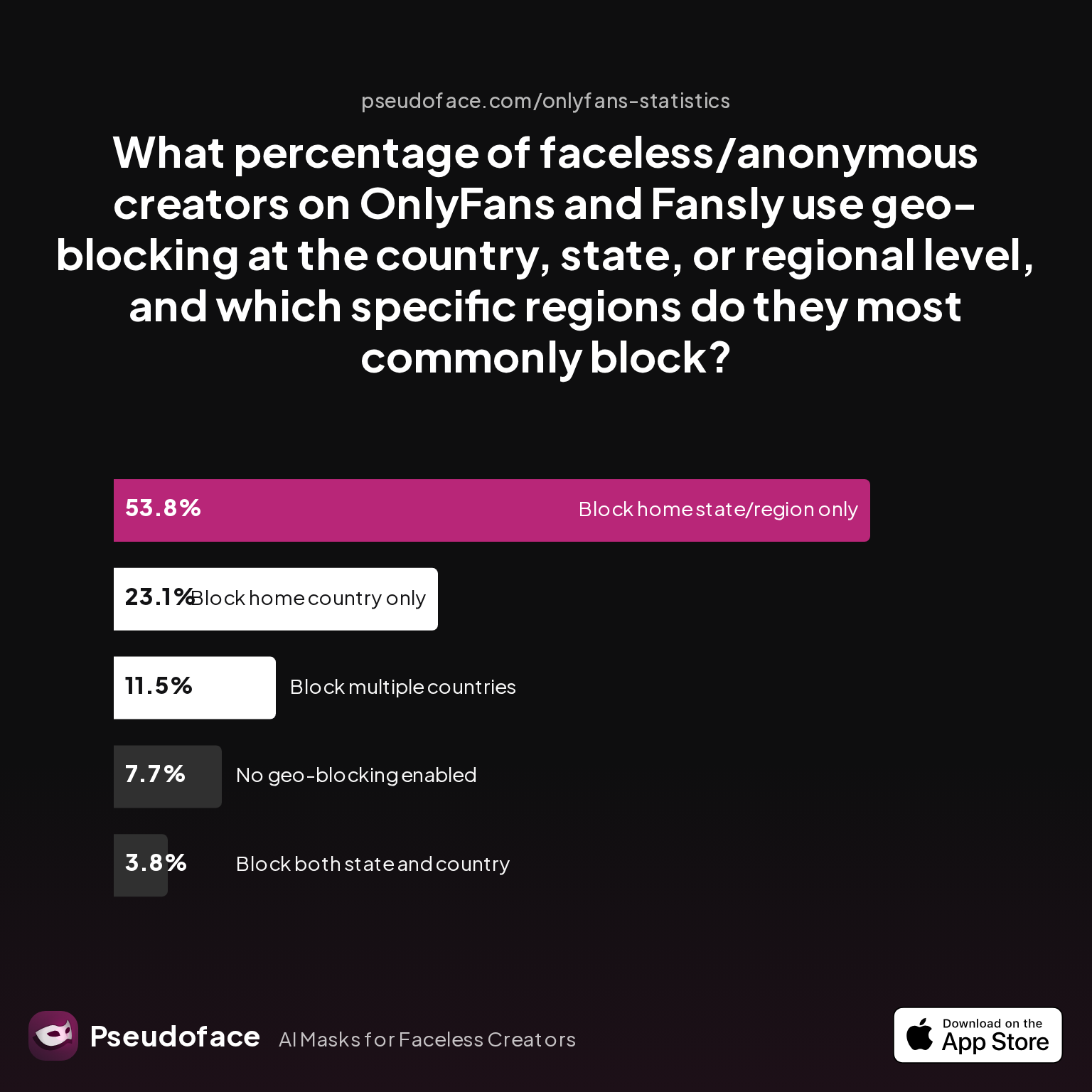
As of 2025-2026, geo-blocking adoption rates show just how common this step has become on both OnlyFans and Fansly.
| Answer | Percentage |
|---|---|
| Block both state and country | 3.85% |
| Block home country only | 23.08% |
| Block home state/region only | 53.85% |
| Block multiple countries | 11.54% |
| No geo-blocking enabled | 7.69% |
More than half—53.85%—of creators who aim to stay faceless choose to block just their home state or region, with another 23.08% blocking their entire home country. Only a small minority (under 8%) report not using any sort of geo-blocking at all. This is a striking, data-backed signal: if you’re considering blocking your home state or country, you are far from an outlier.
Why do so many take this step? The vast majority of Reddit testimonials frame geo-blocking as a practical, low-effort way to avoid accidental discovery—by a family member, coworker, or someone from your community. As one creator put it:
Open thread on Redditr/onlyfansadvice
u/missmae90
It is such a great feature! I live in the US and just blocked out my state the other day and it brings me peace of mind for sure.

Regional patterns are clear: U.S. creators are far more likely to use state-level blocking, while those elsewhere typically block their country outright—especially in smaller countries, where the risk of being recognized is higher.
It’s important to read these statistics directionally. This data is self-reported, and creators active on Reddit may be more privacy-focused than average. Still, the numbers reflect a strong and growing norm: geo-blocking is one of the most common “first moves” for faceless adult creators.
Now that you know how widespread geo-blocking is, let’s break down exactly how to set it up and what options you have by platform.
How to Geoblock OnlyFans by State (and Block Specific Locations)
Setting up geo-blocking on OnlyFans—or on Fansly—remains surprisingly straightforward. Whether you want to keep out an entire country or just your home state, both platforms provide simple, self-service tools. Yet the platform details and edge cases matter, especially if you hope to fine-tune control.
Blocking by Country vs. Blocking by State
On OnlyFans, location blocking is handled via the "Privacy and Safety" section of your profile/account settings. Here’s how it works as of 2026:
- Country blocking: Select one or more whole countries to block. Users physically located in those countries (based on IP detection) will be unable to access your public profile or subscribe.
- State blocking (US only): Select “United States,” and the interface allows you to pick one or more individual states to block—ideal for hiding your page from your home state without excluding the entire U.S.
A procedural Reddit walkthrough, corroborated by creator experiences, nails the state-blocking process:
Open thread on Redditr/onlyfansadvice
u/missmae90
You go to the same place you go to block a country, then select United States, then it will let you just pick individual states.
A separate, commonly asked question—especially among new creators—concerns whether you must first block the entire U.S. to block a single state. The answer, from trusted peer advice:
Open thread on Redditr/onlyfansadvice
u/Bogie81
You hit untied states and then by state. It doesn't block all the US. Just the states you pick
Country and Region Blocking on Fansly
Fansly offers similar controls, though the UX may differ. Regional blocks (by U.S. state, or non-U.S. region/country) are available in the account privacy settings. One practical caveat: Fansly includes a “radius” region block in some cases, allowing you to block within a custom mileage/kilometer radius in some European markets.
Both platforms block location based on a subscriber’s detected IP at the time they visit or subscribe. This “live” check, while simple, introduces some quirks—especially if a user moves, travels, or uses VPNs (on which more soon).
What You Can’t Block: City-Level, Exceptions, and Retroactivity
Neither OnlyFans nor Fansly allow blocking at the city or ZIP code level—limiting truly granular privacy. Some creators worry about extremely hyperlocal discovery, but right now, state or country is as targeted as it gets.
And if you’re trying to allow a friend in a blocked region to see your content? There’s no official “whitelist” function. One workaround is to temporarily unblock the region, let them subscribe, then re-enable the block. (This hack has been confirmed, but it’s clumsy and imperfect.)
Open thread on Redditr/onlyfansadvice
u/Moneyovermadness
Yes just unlock for a moment, let them in and then relock.
What Happens to Existing Subscribers After a Block?
Crucially, OnlyFans geo-blocks are not retroactive. Anyone who managed to subscribe before you enabled a block on their state or country will keep access, unless you manually remove them. This is a consistent creator complaint and a common privacy pitfall:
Open thread on Redditr/CreatorsAdvice
u/QueenOfEverything7
It's not retroactive, they will still be able to see your content
As a result, many privacy-conscious creators recommend setting up geo-blocks immediately on account launch—not after gaining traction and subscribers.
Once you’ve set up state or country geoblocks, the next big question is: how strong are these measures really—and what can bypass them?
How Effective Is OnlyFans Geoblocking at Hiding Your Page?
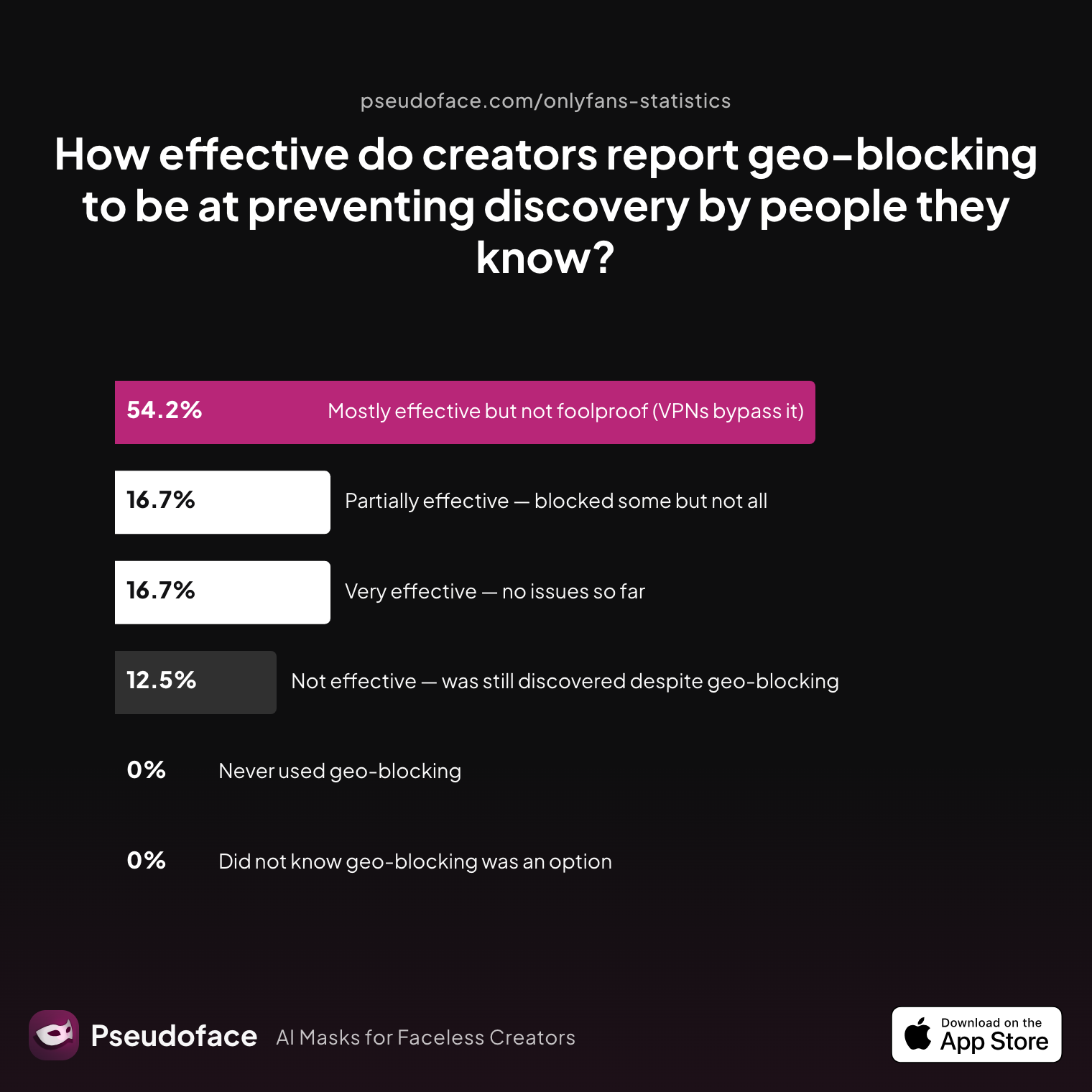
Blocking your home state or country is often described as a “peace of mind” fix, but does it actually stop people you know from finding your page? The data paints a nuanced but clear picture about real-world effectiveness—one colored by personal user stories, platform quirks, and technological workarounds.
| Answer | Percentage |
|---|---|
| Mostly effective but not foolproof (VPNs bypass it) | 54.17% |
| Not effective — was still discovered despite geo-blocking | 12.50% |
| Partially effective — blocked some but not all | 16.67% |
| Very effective — no issues so far | 16.67% |
Geo-blocking is “mostly effective but not foolproof,” according to 54.17% of creators using it. VPNs, proxies, and dynamic IP addresses can and do allow motivated people to view your blocked account if they know what they're doing. Still, a combined 33.34% report geo-blocks as “very” or “partially” effective, successfully preventing at least some accidental discovery—which aligns with the “accidental peace of mind” effect.
It’s important to interpret these stats with caution, as they are extracted from active Reddit discussions. This reflects the self-selection of privacy-minded creators, and potentially underrepresents creators who have left platforms due to failure of privacy controls (survivorship bias).
A smaller but significant 12.5% say geo-blocking failed outright—they were discovered by someone in their blocked location despite their precautions. Stories of unintentional discovery often link back to technical workarounds or rare OnlyFans/Fansly bugs, underscoring the partial nature of this privacy approach.
One user’s report is typical of geo-blocking’s peace-of-mind ⟶ imperfect protection reality:
Open thread on Redditr/onlyfansadvice
u/Sephorasmiles
I also blocked my country and get a subber from my blocked country. I don’t know how this could be 🤷🏼♀️
For the majority, geo-blocking stands as a strong first filter—reducing risk from casual browsers, local acquaintances, or accidental stumblers. But savvy coworkers or tech-fluent friends will not be stopped so easily. In practice, this means that geo-blocking is best treated as a “speed bump,” not an impenetrable wall.
With risks in mind, let’s dig into the most common way people get around your geo-blocks—and how worried you need to be about VPN/proxy circumvention.
How to Get Around OnlyFans Geoblock: VPNs, Proxies, and Real-World Bypass Rates
Every discussion about location-based privacy eventually reaches the same question: what’s stopping someone from using a VPN or proxy to pretend they’re in another state or country and bypass your block? The hard truth: not much. Both OnlyFans and Fansly rely on IP geolocation, which is easily manipulated with even basic privacy tools.
The lived experience of creators underscores this limitation:
Open thread on Redditr/Fansly_Advice
u/Cheap_Strategy_6702
yes. use vpn, it's easy. but you should know it means other people could also use vpn to get access to your page.
Technical users (and even some less-savvy ones, with tutorials everywhere) can route their connection through an approved state or country, invisible to OnlyFans or Fansly’s blocking system. For the small minority who truly wants to see your page from a blocked area, this is usually a mild annoyance, not a serious roadblock.
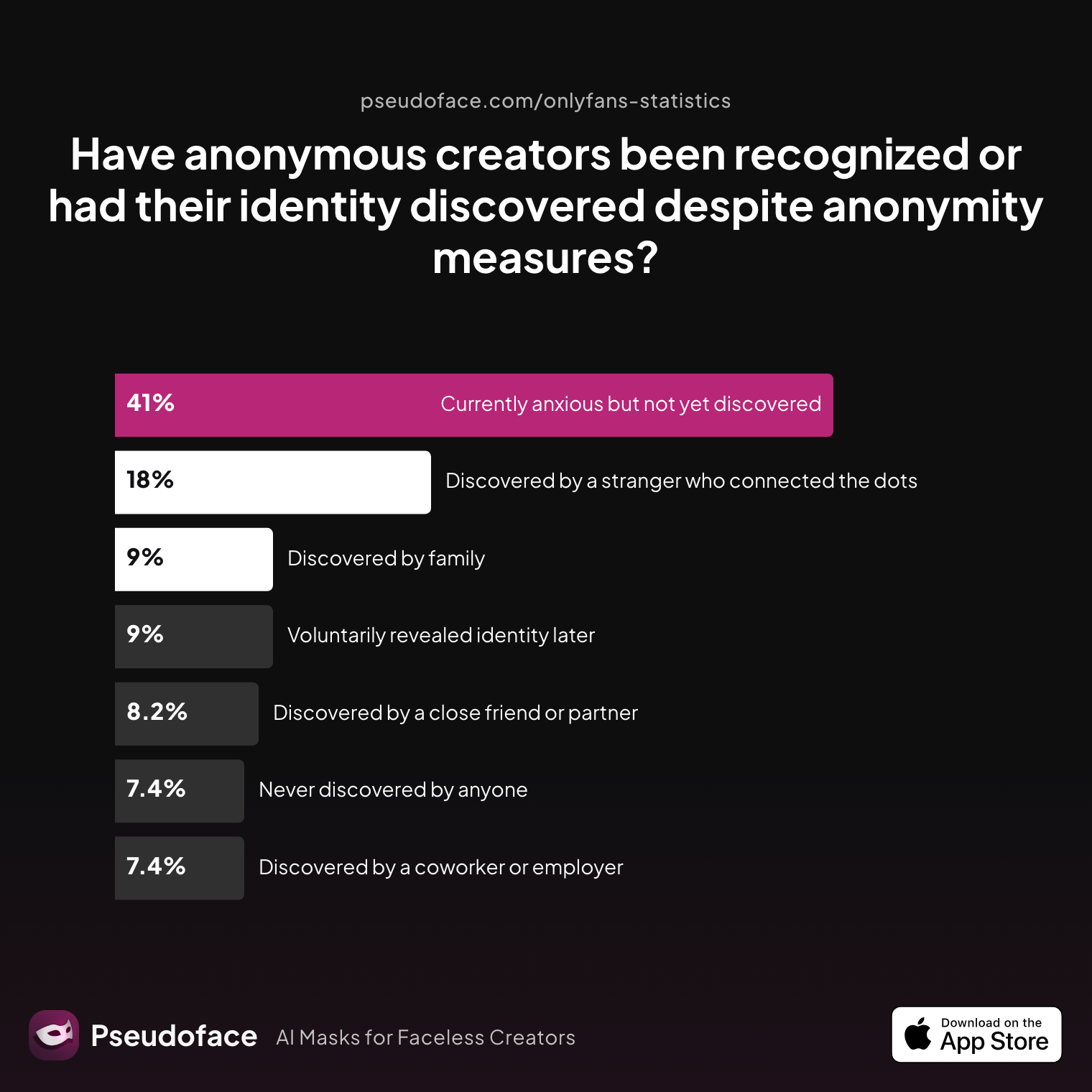
But what does this mean for the real-world risk of being discovered, even when using geo-blocking? The chart below brings creator anxiety—and actual slip-ups—into focus.
| Answer | Percentage |
|---|---|
| Currently anxious but not yet discovered | 40.98% |
| Discovered by a close friend or partner | 8.20% |
| Discovered by a coworker or employer | 7.38% |
| Discovered by a stranger who connected the dots | 18.03% |
| Discovered by family | 9.02% |
| Never discovered by anyone | 7.38% |
| Voluntarily revealed identity later | 9.02% |
About 18% of creators report being discovered by a stranger who “connected the dots,” and around 25% have been found out by someone close (friends, family, coworkers). It’s rarely through a simple location search—often there’s a “leak” somewhere else (social cross-promotion, a facial or tattoo match, or accidental metadata). Still, these numbers reinforce that geo-blocking is not invulnerable, and that some level of anxiety persists: over 40% remain “currently anxious but not yet discovered.”
One user’s story illustrates the ambiguous comfort of geo-blocking and the reality that circumvention is not rare:
Open thread on Redditr/onlyfansadvice
u/SmokyArcticFox
They can use VPN service to connect thru another state/ location
In practice, mass discovery by VPN-based bypass is uncommon among casual acquaintances, but becomes a lurking risk among anyone who might suspect your content exists—an ex, a nosy neighbor, a persistent coworker, or even a stranger who stumbles across you on a different platform and decides to investigate.
The takeaway: geo-blocking narrows your exposure, but does not provide strong protection against curious individuals who know how to use basic privacy tech. The more determined or tech-literate your would-be viewer, the weaker this defense becomes.
Understanding these limits, let’s compare platform approaches in detail—OnlyFans vs. Fansly—so you can make the smartest choice for your privacy goals.
OnlyFans vs. Fansly: Geo-Blocking Features, Location Precision, and Privacy Compared
Choosing a platform—OnlyFans or Fansly—shapes not only your discoverability but the precision with which you can hide from specific locations. Both now offer geo-blocking, but implementation differs, and the “privacy ceiling” isn’t identical for all creators.
| Feature | OnlyFans | Fansly |
|---|---|---|
| Country blocking | Yes (full country list) | Yes (full country list) |
| State/regional blocking | Yes (U.S. states only) | Yes (U.S. states, some non-US regions) |
| Radius blocking | No | Yes (select countries) |
| City blocking | No | No |
| Granularity | State or country | State/country + partial radius |
| Whitelist/Exceptions | No | No |
| Effectiveness vs. VPN | Similar (easily bypassed) | Similar (easily bypassed) |
| User satisfaction | Broadly high for basic privacy; frustration with lack of advanced controls | Slight edge among European creators (radius); US faceless creators mostly even |
Fansly does offer slightly more granular regional blocking in certain non-U.S. markets—especially parts of Europe where radius/area controls are being piloted. This can make a practical difference for creators with highly localized privacy needs. However, neither platform allows you to block city or zip code.
Reports from creators are consistent: for most U.S.-based anonymous creators, state-level blocking is the key feature, and both platforms implement it similarly. For some, this is sufficient; for those in smaller countries or with hyperlocal privacy worries, the differences may not move the needle.
On the practical privacy front, there’s no evidence—backed by either platform documentation or user outcome data—that Fansly’s blocking is materially more robust against VPN bypass. In both cases, IP-based region detection is trivially circumventable by someone moderately determined.
For those who need the utmost in location precision (e.g., wanting to block only within a certain urban radius), Fansly’s limited “region/radius” option may offer slightly more peace of mind, but it is not (as of 2026) a game-changer for U.S. creators.
Beyond geo-blocking, privacy-savvy creators often combine additional techniques—let’s see how this fits into a broader anonymity strategy.
Geo-Blocking as Part of the Anonymous Creator Privacy Stack
Geo-blocking functions best when it’s just one element in a broader privacy toolkit—the kind mapped out in our full guide to staying anonymous on OnlyFans. Creators who remain successfully anonymous seldom rely on location blocks alone; instead, they layer multiple protective steps to strengthen their overall defenses.
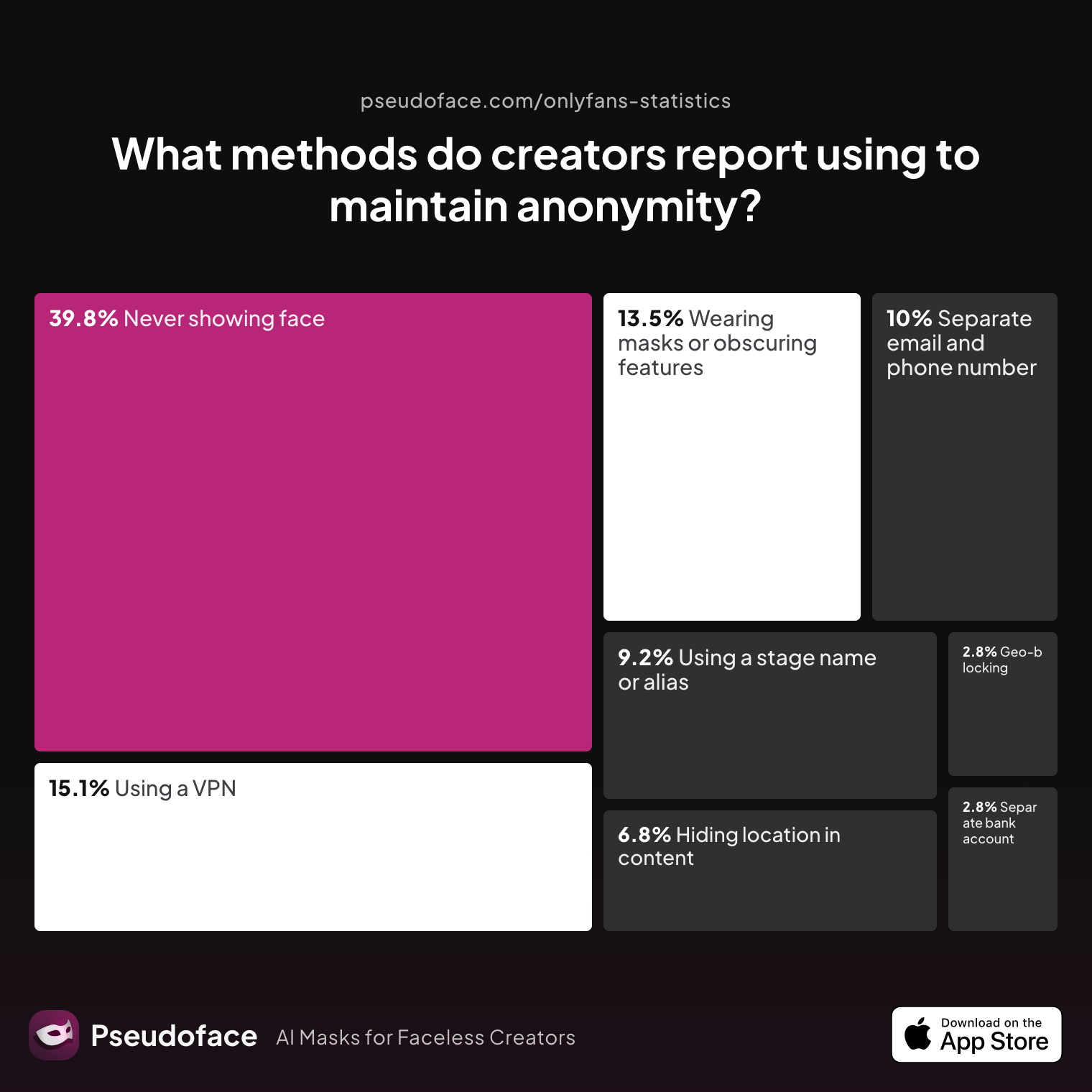
The collective wisdom from active adult creator communities reveals which tools are most widely used:
| Answer | Percentage |
|---|---|
| Avoiding location-specific details in content | 6.77% |
| Geo-blocking specific regions | 2.79% |
| Never showing face | 39.84% |
| Using a separate bank account or business entity | 2.79% |
| Using a separate email and phone number | 9.96% |
| Using a stage name or alias | 9.16% |
| Using a VPN or privacy tools | 15.14% |
| Wearing masks or obscuring identifying features | 13.55% |
Geo-blocking is just one of many privacy measures—used by around 2.8% of anonymous creators in the community. The most popular steps remain never showing a face (nearly 40%), using a VPN (15%), or employing masks and aliases (often together with other measures).
This “privacy stack” is what gives some creators greater peace of mind, and (data suggests) reduces the risk of slip-ups. Using just one technique (like location blocking) can lull you into a false sense of security, but a layered approach makes unintentional discovery much less likely.
Firsthand stories back this up. Many who were found out—as the “anonymous creator discovered” chart above shows—report that the leak typically happened due to weak or missing anonymity layers elsewhere: visible birthmarks, reused branding across platforms, accidental metadata, or the lack of true separation between “in real life” and online identities. Rarely is geo-blocking alone enough.
Open thread on Redditr/onlyfansadvice
u/PandorasPancakes
I just found out when I moved that one of my new neighbors subs to my account. Luckily he’s cool, but that can change to creepy way too quickly. 😅
If practical anonymity is your goal, combining geo-blocking with face-avoidance, metadata hygiene, and account separation should be your standard. For those most anxious about accidental exposure, how much peace of mind does geo-blocking really buy, and what’s the cost?
OnlyFans Hide from State: The Trade-off Between Privacy and Subscriber Growth
Blocking people in your home state or country can be a relief—but it locks out a chunk of your “potential sub” market. Is the peace of mind worth possible lost revenue or growth? Data and creator testimony clarify the trade-off.
Why Do Most Creators Choose Anonymity with Geo-Blocking?
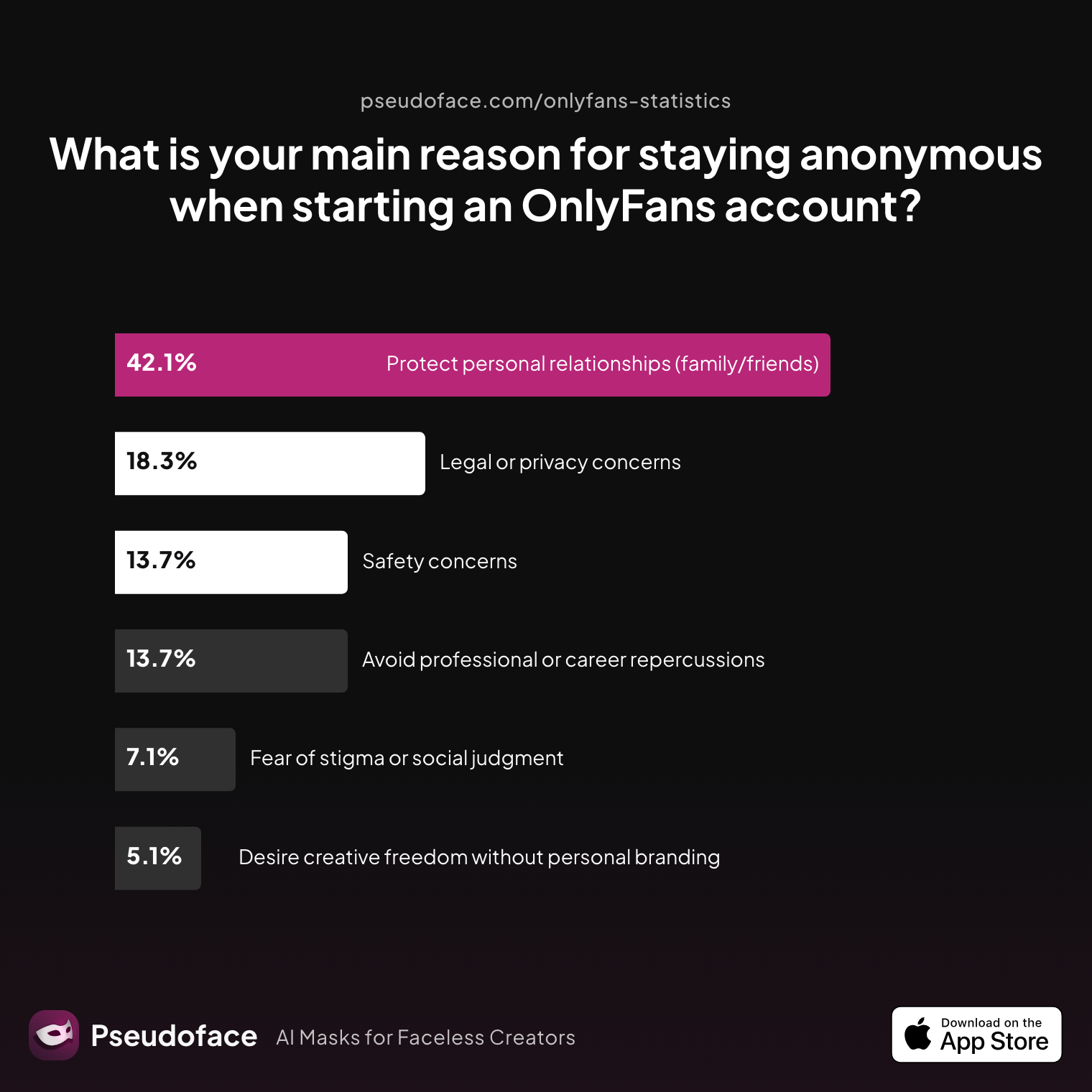
| Answer | Percentage |
|---|---|
| Avoid professional or career repercussions | 13.71% |
| Desire creative freedom without personal branding | 5.08% |
| Fear of stigma or social judgment | 7.11% |
| Legal or privacy concerns | 18.27% |
| Protect personal relationships (family/friends) | 42.13% |
| Safety concerns | 13.71% |
The single biggest driver (42%) for geographic anonymity is protecting personal relationships—outweighing even career and safety worries. For these creators, the risk of a hometown discovery outweighs almost any potential lost income.
That being said, for creators with substantial audiences or viral potential, blocking populous states or entire countries will result in fewer available subscribers, fewer PPVs, and a lower total addressable market. There is no way around this trade-off.
One Redditor captures the peace-versus-profit calculus succinctly:
Open thread on Redditr/onlyfansadvice
u/missmae90
It is such a great feature! I live in the US and just blocked out my state the other day and it brings me peace of mind for sure.
Each creator must choose comfort versus reach. For some, especially those who fear serious blowback in their careers or families, the sense of security trumps all. For others—typically those with fewer real-world exposure fears and more focus on maximizing income—the price of geo-blocking feels too high.
A rough “decision rule” from active creators:
- If being found by one or two people in your hometown or state would ruin your life, geo-block. Growth is worthless if the risks are existential.
- If you’re indifferent to local discovery—or already out to family/friends—geo-blocking may shrink your income for marginal peace of mind.
Now, let’s pull together the most searched-for real-world answers in a dedicated FAQ section around geo-blocking for anonymous creators.
FAQ: Geo-Blocking and Anonymous Creator Privacy
How do I geoblock OnlyFans by state or city in 2026?
You can block by country or by individual U.S. state in your OnlyFans privacy settings—city-level blocking is not available.
Go to your account settings > Privacy and Safety > Blocked Countries, then select "United States" and check the state(s) you want to block. As of early 2026, OnlyFans does not support blocking at the city or ZIP code level. Reports from Reddit confirm this step-by-step.
Can someone bypass an OnlyFans geo-block with a VPN or proxy?
Yes—VPNs or proxies make bypassing geo-blocks relatively trivial for anyone motivated to do so.
This is the biggest technical limitation of geo-blocking: the platform only checks IP location, so anyone who chooses a different state's server when connecting can view your otherwise blocked page.
Open thread on Redditr/Fansly_Advice
u/Cheap_Strategy_6702
yes. use vpn, it's easy. but you should know it means other people could also use vpn to get access to your page.
Is Fansly geo-blocking more effective than OnlyFans for hiding my content?
Fansly offers some additional granularity (with region/radius blocks in certain locations), but both platforms are equally vulnerable to VPN circumvention.
For U.S.-based creators, the privacy advantage is minimal; both allow state-level blocking, and neither blocks by city.
Will current subscribers from a now-blocked location lose access?
No—geo-blocks are not retroactive. Existing subscribers from a blocked state or country will retain access unless manually removed.
This is a frequent source of confusion and disappointment:
Open thread on Redditr/CreatorsAdvice
u/QueenOfEverything7
It's not retroactive, they will still be able to see your content
If I block my state, will I lose many potential fans or income?
Yes—blocking your state (or country) reduces your potential fan base and may decrease your earnings, especially if you live in a populous area.
This is the main privacy–profit tension: the more regions you block, the narrower your total subscriber funnel. Weigh your risk profile versus growth ambitions.
How do I know if geo-blocking is working on my OnlyFans page?
Most creators test geo-blocks using VPN-based test accounts, or ask friends in blocked regions to check access.
Remember, platform interfaces do not display your geo-block status to visitors, so outside verification is recommended.
What are the best additional privacy steps to use with geo-blocking?
Successful anonymous creators combine geo-blocking with face-hiding, unique usernames, fresh email/phone, and avoidance of location clues in their content.
Avoid naming your city, referencing local events, or leaving background cues. Meta-data scrubbing and VPN usage during content upload can further insulate your identity.
Are there any risks or red flags in using geoblocking on adult platforms?
The main risks include accidental leaks due to non-retroactive blocking, policy changes, and the false sense of security that can lead creators to neglect other privacy steps.
Keep watch for platform updates, monitor privacy forums, and never depend solely on geo-blocking for anonymity.
Does blocking my country or state violate any OnlyFans or Fansly terms of service?
No—both platforms explicitly offer location blocking as a user option, and there is no penalty for employing it for privacy.
Always review your platform’s privacy policy and support documentation to stay current.
Final Thoughts
Geo-blocking on OnlyFans or Fansly can be a meaningful privacy upgrade for faceless or anonymous creators, and is widely used—especially by U.S. and small-country creators. According to Pseudoface’s analysis of 250,000+ Reddit threads, blocking your home state or country is overwhelmingly described as “worth it for the peace of mind,” but the limits are real: VPN-bypass is trivial, non-retroactive blocking can leave privacy gaps, and the trade-off with growth is inescapable. For those whose anonymity is mission-critical—job, family, safety—geo-blocking is a strong first filter, but never a guarantee.
Don’t go it alone: combine location blocking with face-avoidance, metadata hygiene, and strong account compartmentalization—our OnlyFans anonymity checklist covers every layer—to build the only kind of anonymity that actually lasts in the real world.


