
TL;DR
OnlyFans’ geo-blocking, whether at the state or country level, is a widely adopted shield that delivers meaningful peace of mind for faceless creators concerned about everyday privacy breaches—but it’s not ironclad. Based on Pseudoface’s analysis of over 250,000 public Reddit threads from real creators (2025-2026 dataset), roughly 29% suspect at least one attempt to bypass their geo-block using a VPN or proxy, though under 13% experienced confirmed local discovery. Geo-blocking effectively deters the casual snooper but can be circumvented by tech-aware locals. The real risk is nuanced, and layering smart privacy steps is still the best route for creators who seek both anonymity and earning potential. These insights reflect lived experience and active community debate, but are also shaped by self-selection and survivorship bias among privacy-focused creators.
The Promise and Limits of OnlyFans Geo-Blocking for Faceless Creators
Faceless creators—those who carefully separate their digital persona from any real-world ties—often face a crossroads between visibility and safety. OnlyFans and Fansly's geo-blocking tools promise a simple answer: choose where your page can (and cannot) be seen. But what are these blocks truly capable of, and are they as air-tight as many believe?
At its core, geo-blocking on OnlyFans lets you restrict your page’s visibility by country, and in some cases by state or region. For a creator anxious about a hometown neighbor or family member stumbling across her page, this seems like both a shield and a secret weapon. The growing adoption rates back up its perception as a must-have for privacy.
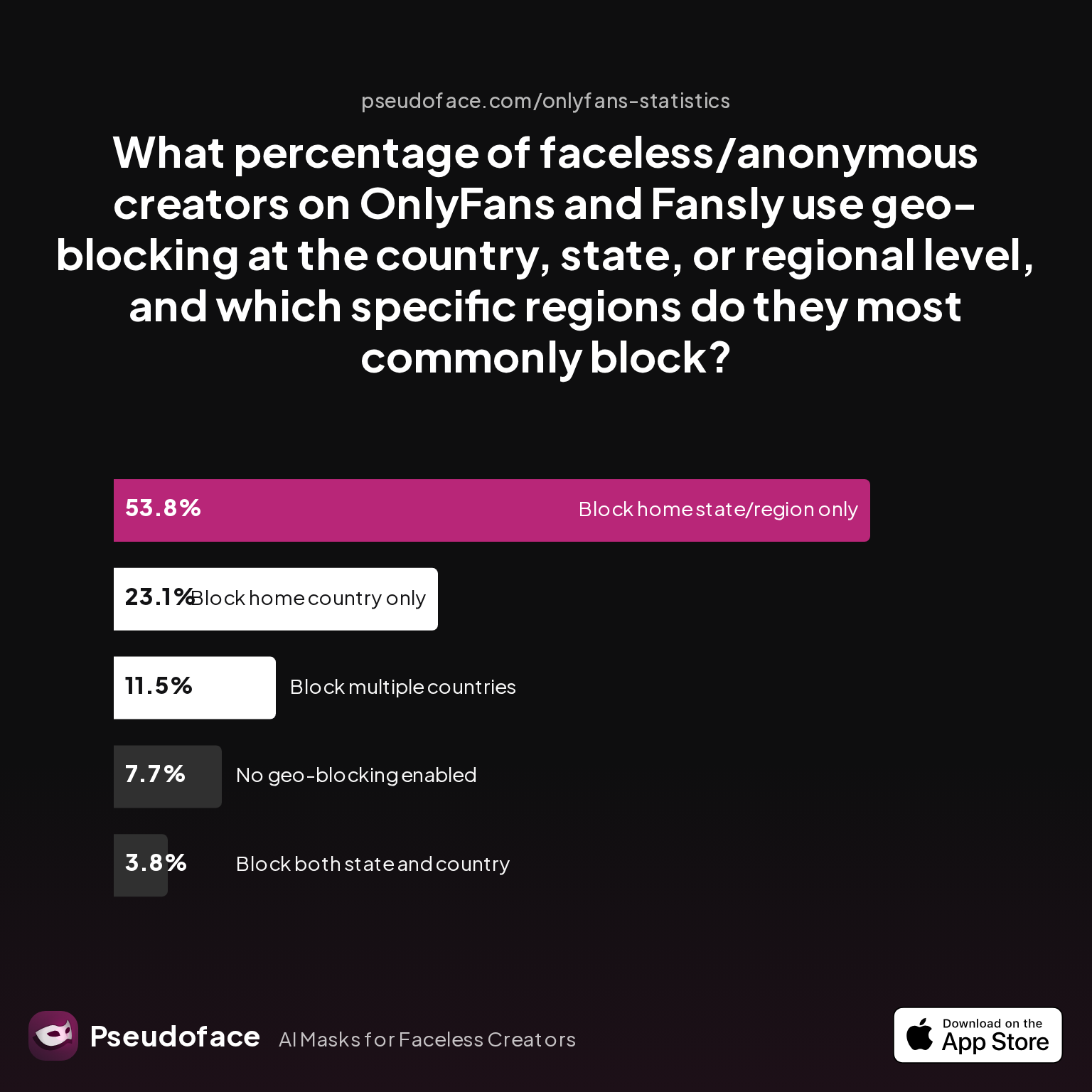
| Answer | Percentage |
|---|---|
| Block both state and country | 3.85% |
| Block home country only | 23.08% |
| Block home state/region only | 53.85% |
| Block multiple countries | 11.54% |
| No geo-blocking enabled | 7.69% |
According to the Pseudoface sample, over three-fourths of faceless creators geo-block at least one region, and more than half block at the state/region level. This isn’t just a technical setting—it's a pillar of faceless content strategy. Notably, only a small percentage (just under 8%) enable no geo-blocking at all. Country-level blocks are the next most common choice, while blocking both country and state is relatively rare (likely due to UX confusion or platform limits).
Yet, privacy is rarely absolute. Many creators new to anonymous work assume state/country blocks create an impenetrable wall. In reality, the protection is granular but also inconsistent: OnlyFans, for example, allows U.S. creators to block by state, but this isn't always possible in other countries (as confirmed by numerous threads). And the block is digital—not social or legal. It doesn't erase your identity if you slip elsewhere.
A closer read of real creator reports shows geo-blocking's perceived efficacy is strong, but the myth of total safety dissolves upon closer inspection.
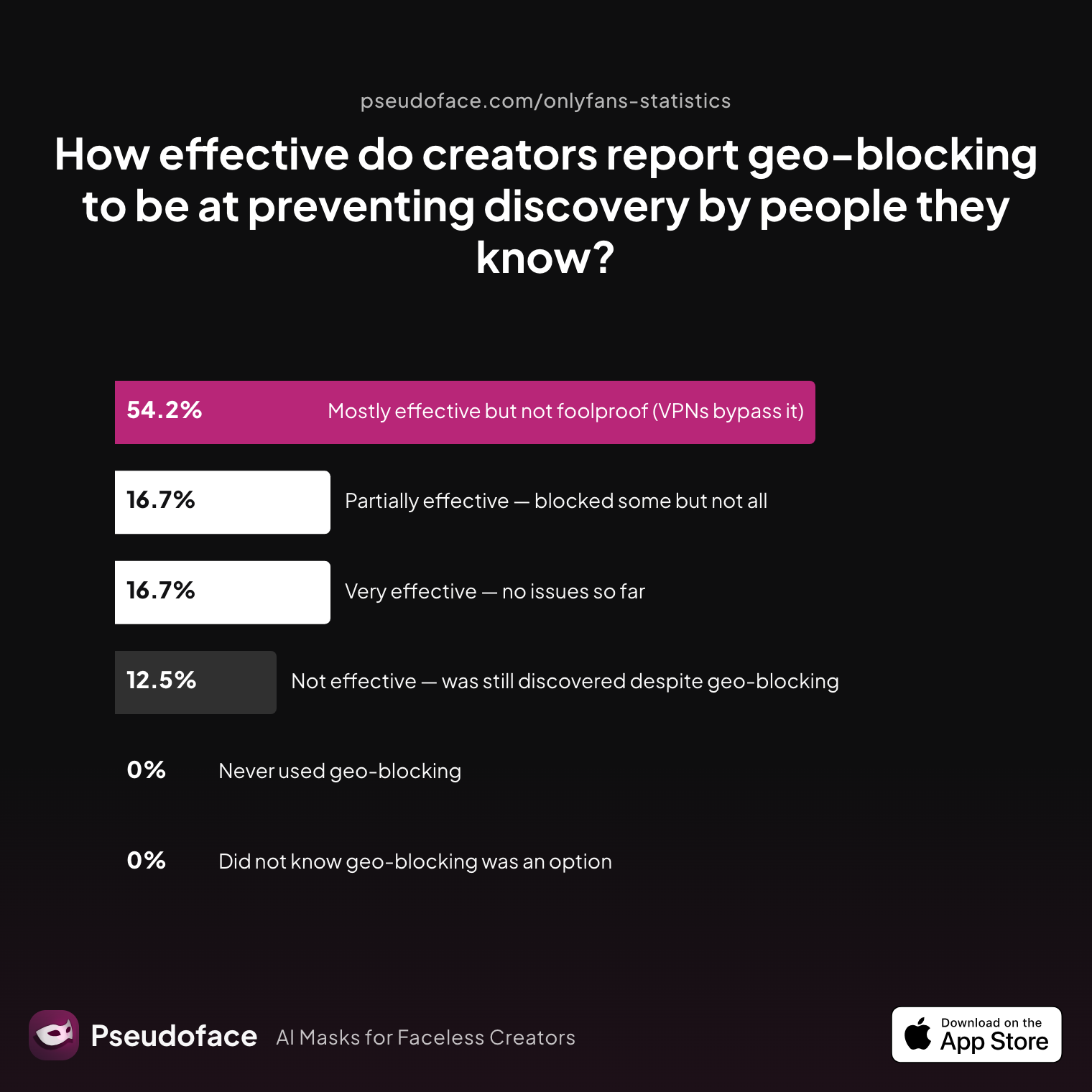
| Answer | Percentage |
|---|---|
| Mostly effective but not foolproof (VPNs bypass it) | 54.17% |
| Not effective — was still discovered despite geo-blocking | 12.50% |
| Partially effective — blocked some but not all | 16.67% |
| Very effective — no issues so far | 16.67% |
| Did not know geo-blocking was an option | 0.00% |
| Never used geo-blocking | 0.00% |
The big takeaway: over half of creators see geo-blocking as mostly effective, but they know VPNs and proxies can slip past it. A combined 33% report either only partial effectiveness or total failure, often due to circumvention tech rather than platform error. A notable minority (just under 17%) feel fully protected—usually because they have not yet been discovered, not because circumvention is impossible.
There’s also widespread confusion about the technical and regional limits of geo-blocking, as seen in quotes like:
Open thread on Redditr/onlyfansadvice
u/queen-arya
You’re able to block by state? I thought only country

In practice, the biggest misconception is finality: geo-blocking dramatically lowers—but does not fully eliminate—the odds that someone local will stumble onto your content. It’s a crucial part of the “privacy stack,” but not a panacea.
With basic expectations set, let’s explore just how easily tech-savvy locals (or fans) can actually get around these geo-blocks—starting with the data on VPN bypass attempts.
How to Get Around OnlyFans Geoblock: What Real Creator Data Shows About VPN Bypass
If you’re a privacy-focused creator, the anxiety is familiar: what if someone from my blocked region gets curious enough to try a workaround? Reddit, Discord, and private forums overflow with guides teaching subscribers how to “bypass OnlyFans” or “get around a geoblock”—and creators keenly feel that threat.
To get a data-backed sense of real-world prevalence, Pseudoface surveyed faceless creators about actual attempts to bypass their geo-blocks. The numbers may surprise you.
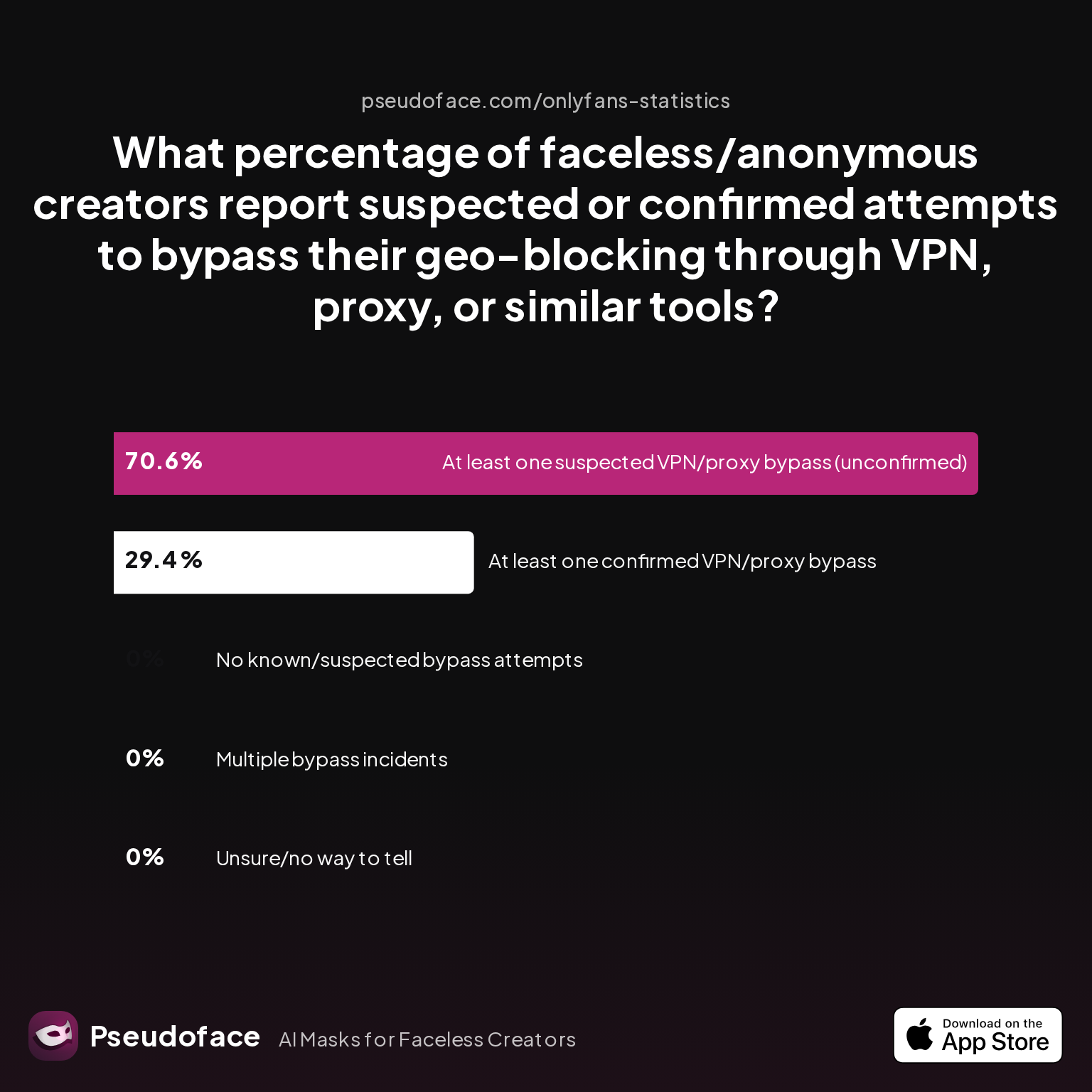
| Answer | Percentage |
|---|---|
| At least one confirmed VPN/proxy bypass | 29.41% |
| At least one suspected VPN/proxy bypass (unconfirmed) | 70.59% |
| Multiple bypass incidents | 0.00% |
| No known/suspected bypass attempts | 0.00% |
| Unsure/no way to tell | 0.00% |
Roughly 29% of surveyed creators report at least one confirmed VPN or proxy bypass, while seven in ten suspect an attempted circumvention. This aligns with the tone of many help threads: creators trust geo-blocking, but recognize it’s porous.
Open thread on Redditr/onlyfansadvice
u/DivinityNightshade
If they use a VPN that geolocates to a different area, they will be able to see it. Thankfully, most people don't know how to use a VPN. IP Geolocation blocking only works most of the time. It reduces risk, but doesn't eliminate it. Plan accordingly.
Why is circumvention so achievable? OnlyFans geo-blocking is fundamentally IP-based. When someone in your blocked region visits your link, they see an error, but:
Open thread on Redditr/onlyfansadvice
u/Faick666
It is possible using proxies or VPN
Still, sophistication gap matters. The typical neighbor—or that half-technical coworker—rarely bothers to fire up a VPN just to snoop. Most creator anxiety stems from the most privacy-aware and tech-literate fans or adversaries.
Layer on the nuance: in 2025-2026, mainstream knowledge of VPN/proxy use remains lopsided. Some streamers and digital natives have multiple VPN apps; others wouldn’t know where to start. This gap is backed by self-selection/reporter bias: creators who think or fear circumvention are loudest in privacy forums.
Real-world experiments show variable results:
Open thread on Redditr/onlyfansadvice
u/_catsimp
When it comes to VPNs, I think it depends on which one they're using. I find that when I used surfshark, I was able to get to my page, but the images wouldn't load, if that makes sense.
Open thread on Redditr/onlyfansadvice
u/Ok_Fun4458
Not 100% sure but l think OF uses ID or bank credentials to determine country of origin of a subscriber. However they use IP when blocking who can see your profile so being outside of the region or using a VPN will make it possible to watch profiles blocked in a region regardless of blocking.
It’s also important to remember that circumvention is not always seamless. Some users report partial load failures or issues with certain VPN providers—evidence that OnlyFans may lightly filter certain traffic, but not with the sophistication of Netflix or Hulu’s anti-VPN systems. For the majority of circumvention attempts, the technical bar remains “download any reputable VPN, select another country/state, and reload.”
These findings come with caveats. The survey population—self-selected from Reddit threads—leans toward creators already privacy-conscious (or burned by a breach). Many who never notice a bypass may simply lack the tools or vigilance to catch one. And some reports conflate suspicious traffic with actual local discovery.
The upshot for privacy-focused creators: geo-blocking deters the overwhelming majority of accidental local snoops, but it is not a digital moat. VPNs and proxies are accessible enough that you should assume the most motivated adversaries can get through. The arms race continues; let’s examine how much safety geo-blocking really provides and where its peace of mind begins to fray.
Is OnlyFans Geo-Blocking Safe? Real-World Effectiveness, Peace of Mind, and Its Weaknesses
Statistically, using geo-blocking delivers solid practical safety for everyday privacy threats. For most faceless creators, “not being discovered by someone I know” is the bar. Based on Pseudoface's 2025-2026 data, the overall effectiveness—while substantial—stops short of infallible.
Let’s return to the effectiveness chart for nuance:
Over half of creators who geo-block report feeling “mostly” protected, and more than 16% say “very effective—no issues so far.” Only 12.5% say their geo-block was completely bypassed in a way that led to a privacy breach. The difference between theory and real-life is significant: most neighbors, colleagues, and family members won't go to the trouble of a VPN. For many creators, that’s peace of mind enough.
Open thread on Redditr/onlyfansadvice
u/foreignfunfounder
Exactly! That’s the weakness of OnlyFans’ geoblocking, it’s just IP-based. With a VPN anyone can slip through. What I’m working on goes further: IP + GPS matching and anti-VPN checks, so creators can actually stay invisible where they want to. It’s basically taking the kind of protection Netflix uses and applying it to individual creators.
Direct evidence of circumvention remains, in practice, rare. Even among privacy-obsessed creators, few report confirmed local discoveries via VPN. Self-selection and recall bias affect this—creators who notice a breach are motivated to share, while those who quietly enjoy anonymity stay silent.
More subtle is the “partial block” effect: creators might block their country or region, yet still observe occasional traffic or reach stats suggesting a leak. This isn’t always a technical failure; it can reflect people who travel, use corporate proxies, or share logins.
For the everyday user—your cousin, the local barista, the friend-of-a-friend—geo-blocking works precisely as intended: it takes just enough extra effort to deter, distract, or deflect. For professional snoopers, determined exes, or extremely nosy locals with technical knowledge, the threat persists.
Contextualizing risk is key. If your safety, employment, or real-world relationships hinge on absolute invisibility, geo-blocking alone is not enough. For the majority of creators aiming for a reasonable balance between reach and privacy, it remains the most useful, practical line of defense currently available.
Privacy isn’t one-size-fits-all, and the right mix of risk and reach differs—so let’s look at the costs and tradeoffs that come with geo-blocking, especially if you’re worried about hiding from your hometown but want to maximize audience elsewhere.
Geo-Blocking vs. Platform Verification: What Actually Stops Discovery?
Many creators stumble over phrases like “bypass OnlyFans verification,” imagining there’s a technical layer that blocks out would-be lurkers. Platform verification is often confounded with privacy, when in reality it’s about compliance (age, identity, and payment info), rather than audience restriction.
For clarity: OnlyFans and Fansly require creators to upload government ID and sometimes a selfie for identity confirmation. This process is not visible to fans/subscribers and is not designed to hide you from anyone—it’s about legal responsibility and payment flows.
On the subscriber side, OnlyFans requires basic info and, as of late 2025, sometimes asks for identity/age verification for legal compliance, especially in regulated regions like the UK, Germany, or Australia.
So, what does this really mean for bypasses or privacy?
Account geo-blocking is what gates visibility: if enabled, the platform checks a visitor’s IP and serves an error if the visitor is in a blocked region. Verification doesn’t affect who sees your page, only who can legally use it.
Open thread on Redditr/onlyfansadvice
u/nakedclownempire
I thought this too initially but as soon as I turned my VPN on and set it to the United States the issue resolves itself and was able to access OF as normal. Curious to see what others experiences might be
The term “bypass OnlyFans verification” on Reddit and Google more often refers to fans seeking access to age-locked features, not creators hiding from an audience. Some “how-to” guides attempt to spoof age or country, but these are a distinct threat from geo-block circumvention.
For creators, the real privacy threat is not someone forging an ID, but someone using a VPN or proxy to appear as though they’re in a different state or country.
Open thread on Redditr/onlyfansadvice
u/Annge7030
Is it possible to change the IP address?
In short, platform verification and geo-blocking are apples and oranges. Only geo-blocking actively hides your page from whole regions—but only as well as the IP filter holds up.
Now that we know each tool’s limits, let’s examine the practical impact: how do these privacy tools affect your potential subscriber base or earnings?
The Cost of Privacy: How Geo-Blocking Impacts Your Potential Subscribers and Earnings
Every privacy step has a cost. For most faceless creators, the biggest tradeoff when geo-blocking comes not from technical circumvention, but from lost reach and revenue. Excluding your home state or country from visibility cuts off potential paying fans by design.
Here’s what real creator data shows:
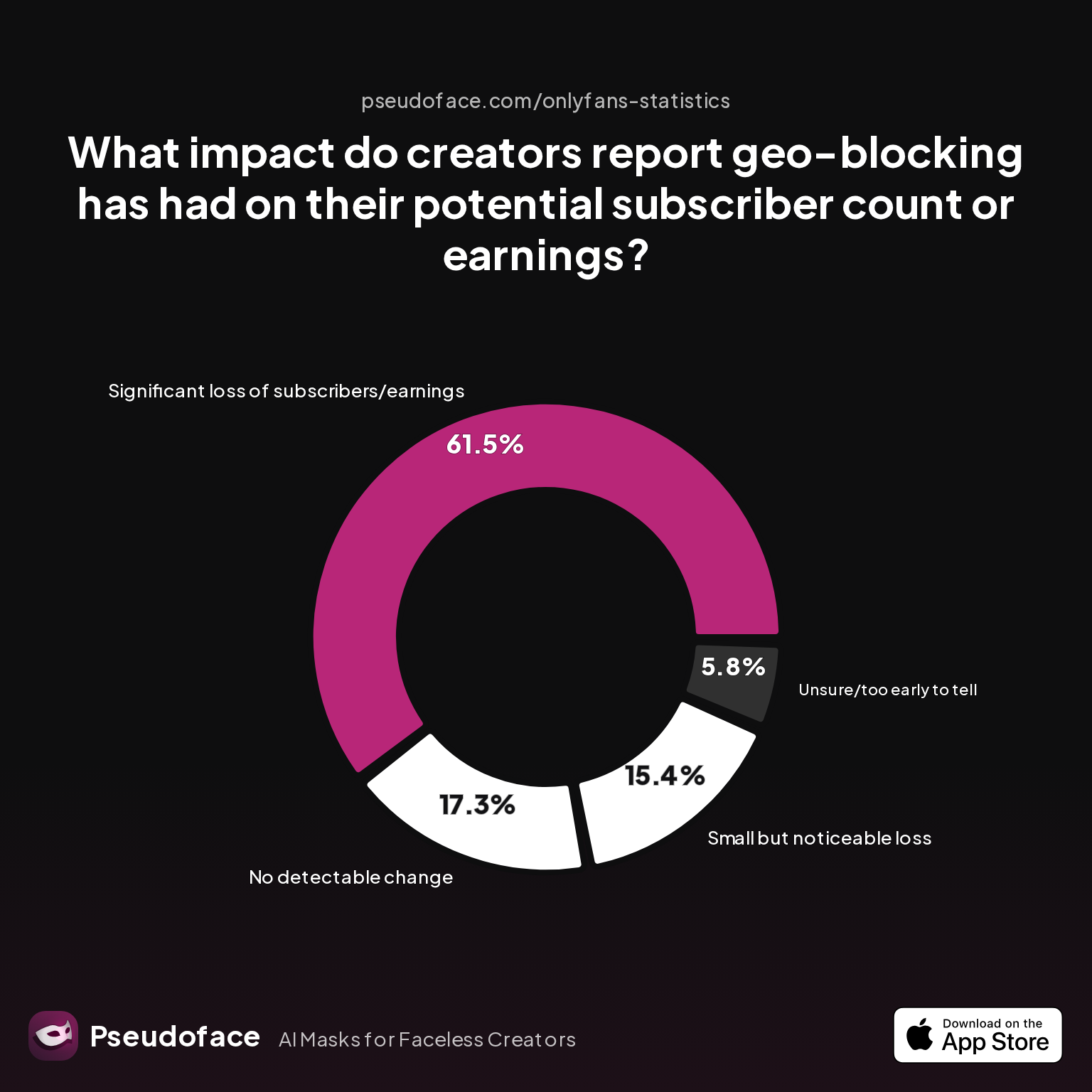
| Answer | Percentage |
|---|---|
| Significant loss of subscribers/earnings | 61.54% |
| Small but noticeable loss | 15.38% |
| No detectable change | 17.31% |
| Unsure/too early to tell | 5.77% |
| Increase in quality/engagement despite fewer subs | 0.00% |
A full 61.5% of creators who enabled geo-blocking at the country or state level report a significant loss of subscribers or earnings. Another 15% notice a moderate dip. Fewer than 18% saw no meaningful change in numbers. No one reported an uptick in engagement or quality offsetting lost reach.
The loss is typically most acute for creators with large home-country fanbases, or those who block populous states. For U.S.-based creators, locking out the home state alone can have a measurable effect—cutting into both local traffic and any overflow from adjacent regions.
Reporting and survivorship bias shape these numbers: creators who experienced a dramatic loss are vocal in privacy forums, while those who balanced blocks from the beginning might never miss the audience they never had.
Community advice often centers around this tradeoff:
Open thread on Redditr/onlyfansadvice
u/queen-arya
You’re able to block by state? I thought only country
When maximizing privacy, the loss in subscribers is unavoidable: there's no technical solution that will hide you from only friends or family while keeping a laser-focused audience available everywhere else. For creators who depend on local fans, geo-blocking is a blunt instrument.
The decision boils down to your risk tolerance and priority: is it more important to sleep soundly at night, or to maximize subscriptions by leaving every door open?
For privacy-focused creators who need to do more, let’s break down what layered protections actually work—and what proactive steps fellow creators recommend to keep your faceless identity truly safe.
Beyond State and Country Blocks: A Privacy Stack for Faceless Creators
If geo-blocking is a useful but imperfect shield, what else belongs in the “faceless creator privacy stack”? According to Reddit creators and survey data, experienced operators treat geo-blocking as just one plank in a layered defense—never the only one.
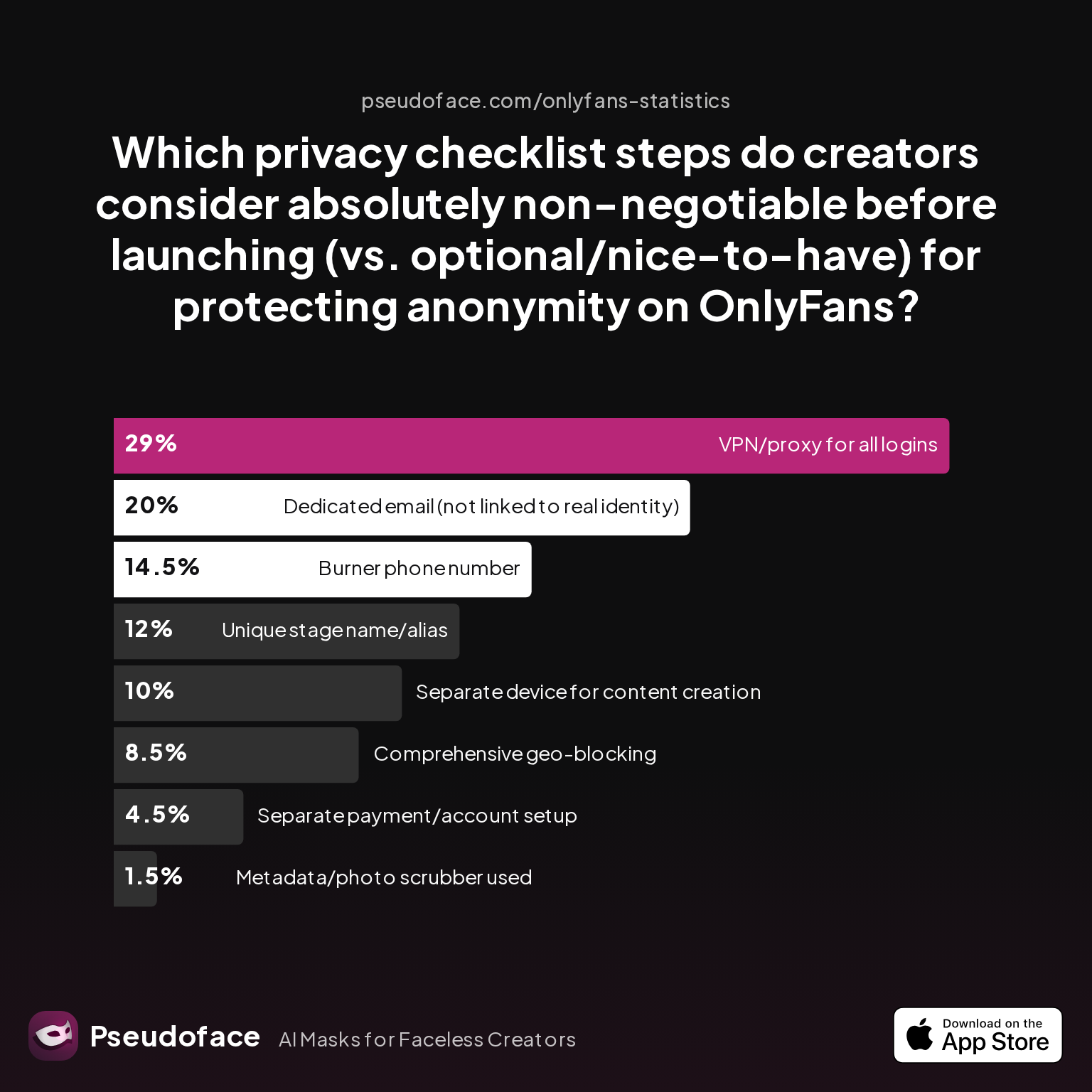
Here’s how creators rank the perceived importance of various privacy steps:
| Answer | Percentage |
|---|---|
| VPN/proxy for all logins | 29.00% |
| Dedicated email (not linked to real identity) | 20.00% |
| Used a dedicated metadata removal app on mobile | 1.50% |
| Separate device for content creation | 10.00% |
| Burner phone number | 14.50% |
| Comprehensive geo-blocking | 8.50% |
| Unique stage name/alias | 12.00% |
| Separate payment/account setup | 4.50% |
Surprisingly, “comprehensive geo-blocking” is considered absolutely non-negotiable by under 9% of creators—the lowest of any major privacy move. The real non-negotiables are using a VPN/proxy for all logins (29%) and a dedicated, unlinkable email (20%), followed by a burner phone and unique alias.
What’s the rationale? Creators have learned that privacy leaks often come from metadata in files, email/account mishaps, or accidental cross-device identity traces—rather than just accidental geo-discovery.
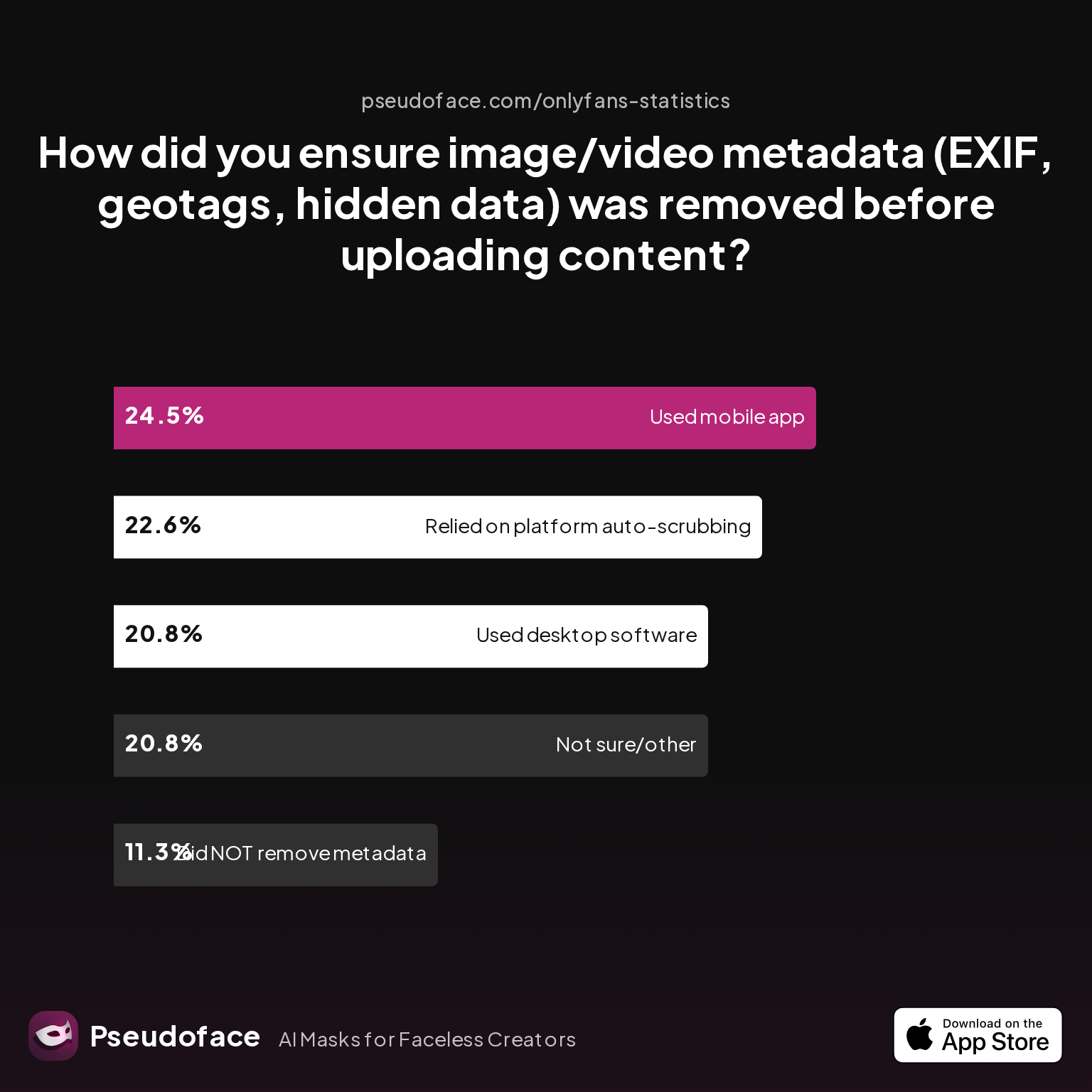
This is supported by the variety of methods creators use to scrub metadata—an easily overlooked threat. Fewer than 12% admitted to uploading files without any metadata management.
| Answer | Percentage |
|---|---|
| Did NOT take steps to remove metadata | 11.32% |
| Relied on platform auto-scrubbing (e.g., OnlyFans upload process) | 22.64% |
| Used a dedicated metadata removal app on mobile | 24.53% |
| Used desktop software (e.g., Photoshop, custom scripts) | 20.75% |
| Not sure/other | 20.75% |
Mobile apps and desktop apps for stripping metadata are now a mainstay. Relying solely on platform auto-scrubbing is a calculated risk; OnlyFans usually removes geotags, but not always all hidden data.
For the ultra-cautious, the real checklist looks like this:
- Use VPN/proxy for all admin logins
- Create and use a brand-new, faceless email account, never linked to personal identity
- Scrub all file metadata before upload
- Use a burner phone for 2FA/SMS
- Consider a dedicated device for content and account management
- Block home state/country as a last line, not a single solution
Layered privacy can feel overwhelming, but Reddit is filled with creators who found confidence by tightening all these screws—not just leaning on geo-blocking.
How to Hide OnlyFans Charges and Digital Traces (and What You Can’t Erase)
Some creators worry less about direct page discovery and more about money trails or digital “breadcrumbs.” Can you fully hide OnlyFans activity from bank statements, family, or employers?
The answer is generally “no”—at least, not with built-in platform tools. OnlyFans charges typically appear as “OnlyFans” or sometimes obscure merchant codes, but are rarely fully camouflaged. Bank and card statements are outside platform control.
Attempts to game account creation—for example, using gift cards, third-party payment systems, or non-identifiable email addresses—are only partially effective. For verified creators, payment info is legally tied to your identity for tax and payout reasons.
As for digital traces, metadata leaks (such as GPS-tagged photos or EXIF signatures) are now broadly understood and easily mitigated with the right workflow. Still, more than one in ten creators report never cleaning metadata before upload, demonstrating a real gap in execution.
Open thread on Redditr/onlyfansadvice
u/sensualskyees
some people unfortunately use a vpn, so they’ll be able to see your content. They may change their VPN to say they’re in a different country, and be able to visit your link through that?
Many of today’s privacy leaks result from patchwork privacy practices—using secure tools in some areas, but overlooking financial or digital hygiene elsewhere.
Put simply:
- You can’t completely hide OnlyFans activity from banks or any joint account holder.
- You can use VPNs, metadata scrubbing, burner numbers, and dedicated devices to dramatically cut day-to-day risk of discovery from anyone but the most motivated snooper.
Let’s see how OnlyFans and Fansly stack up for the privacy-focused creator who wants more than the basics.
Geo-Blocking on OnlyFans vs. Fansly: Comparative Table and Decision Factors
Creators who are dead serious about anonymity often want to know: is there a better alternative to OnlyFans’ imperfect geo-blocking? Fansly (and a few emerging platforms) tout similar, but not identical, privacy features.
Here’s a concise comparison:
| Feature | OnlyFans | Fansly |
|---|---|---|
| State/country blocking granularity | U.S.: country & state; elsewhere: country only | Country only |
| Ability to block specific cities/regions | No | No |
| Level of anti-VPN/anti-proxy tech | Basic IP block only | Basic IP block only |
| Account verified via ID/selfie | Yes (creators), subscriber verification rolling out by country | Yes (creators), some regions require subscriber verification |
| Typical statement descriptors | "OnlyFans" or variant | "Fansly" or variant |
| Metadata scrubbing of uploads | Usually (imperfect) | Usually (imperfect) |
| Default discoverability/public search listing | Low | Low |
Both platforms use similar basic browser/IP geo-checks; neither employs advanced Netflix-style anti-VPN fingerprinting. OnlyFans offers more granular blocks—but only for U.S. states, not cities or zip codes, and not for all global regions.
In practice, the choice isn't about which platform truly protects your privacy (neither is foolproof), but how easily you can layer other defenses. Fansly's smaller scale and reputation attract more “niche” privacy-forward creators, but its tools do not leap ahead of OnlyFans’ in beating circumvention.
The most important takeaway: choose platforms based on audience, workflow, and how comfortable you are layering manual privacy tactics—not on geo-blocking sophistication alone. Use each platform’s tools as a starting line, not as your finish line.
FAQ
Can you bypass OnlyFans geo-blocks with any VPN, or are some better than others?
Yes, almost any commercial VPN can bypass OnlyFans geo-blocks, though minor glitches have been reported with specific providers.
Some creators report that certain VPNs (like Mullvad or Surfshark) inconsistently load OnlyFans pages, likely due to IP blacklist updates or connection latency. Most mainstream VPNs work reliably for bypassing region blocks, but the platform does not actively block VPN usage wholesale.
Open thread on Redditr/CreatorsAdvice
u/cakencassie
i’ve noticed my VPN (mullvad) doesn’t always work on onlyfans. it won’t load the page at all. maybe i’m just doing something wrong though 😅
Does geo-blocking existing subscribers work, or only block new ones?
Geo-blocking only blocks new subscribers from your restricted areas; existing subscribers in those regions retain access.
If you add a geo-block after someone subscribes, they will not be auto-removed—they continue to view your content as long as their subscription is active.
Open thread on Redditr/onlyfansadvice
u/Bogie81
You can block by state and yes he will still be able to see you since he subbed before the block. I have the same situation going on
How to geoblock on OnlyFans by state or region (is it possible everywhere)?
State-level geo-blocking is only possible for U.S. states; in other countries, you can typically only block by country.
Creators in the UK and elsewhere cannot block specific cities or regions—country is the narrowest filter available outside the U.S.
Open thread on Redditr/onlyfansadvice
u/FayePhoenix2
You can't. You can block the whole of the UK, but not specific cities.
What’s the real risk that someone from my hometown finds my anonymous account?
The real risk is low for average tech users, but moderate for privacy-savvy locals with VPNs; under 13% of creators experienced confirmed discovery after blocking.
Geo-blocking deters most casual discoveries, but does not guarantee safety against a motivated tech-savvy searcher.
How does OnlyFans know where a user is located—IP, bank info, or something else?
OnlyFans geo-blocking is almost entirely IP-based; bank info and subscriber ID are not directly used for blocking page views.
Account and payout verification use bank and legal ID, but visibility filtering uses current IP—meaning VPNs or proxies easily fool the system.
Open thread on Redditr/onlyfansadvice
u/Ok_Fun4458
Not 100% sure but l think OF uses ID or bank credentials to determine country of origin of a subscriber. However they use IP when blocking who can see your profile so being outside of the region or using a VPN will make it possible to watch profiles blocked in a region regardless of blocking.
After I set up geo-blocking, is my account truly safe from accidental discovery?
No, geo-blocking makes accidental discovery by locals much less likely, but is not ironclad; motivated searchers can bypass with widely available VPNs or proxies.
Layering other privacy tactics (VPN for your logins, separate emails, metadata scrubbing, etc.) is essential for meaningful peace of mind.
Bypass OnlyFans verification—what does the term really mean, and who tries it?
“Bypass OnlyFans verification” usually refers to users attempting to evade age or ID checks, and is not directly related to creator privacy or geo-blocking.
It is mostly relevant for underage access or country-locked joining—not a way for locals to see your hidden creator page.
Can I test my own OnlyFans geo-blocking using VPNs safely?
Yes, you can test your own geo-blocks safely using a reputable VPN and an incognito browser, as long as you avoid breaking ToS or jeopardizing your own account with suspicious login behavior.
Creators often test country/state blocks by switching VPN locations and attempting to view or subscribe to their own page with a fresh browser session. Avoid excessive rapid switching or suspicious automated testing.
Conclusion
In the end, OnlyFans geo-blocking is a strong deterrent against casual discovery—but not an impenetrable barrier. Based on 2025-2026 real-world creator data, it offers real peace of mind against the average snoop but leaves a technical back door open for those willing to use a VPN or proxy.
If you prioritize maximum privacy, treat geo-blocking as your first line of defense—not your last. Layer robust privacy habits: use dedicated devices, strip metadata, deploy specialized email and phone lines, and control your login hygiene. Accept that some reach—subscribers and income—will be traded for safety.
The best-fit privacy strategy is one that matches your unique comfort level with risk, effort, and earning potential. Choose tools based on how well they support your boundaries, and remember: sustaining anonymity online is an ongoing, evolving process, not a one-click solution.


