
TL;DR
If you want to use a Snapchat filter for hiding your face in videos, you’re not alone. According to Pseudoface’s analysis of over 250,000 public Reddit threads from real adult content creators, most favor Snapchat Lenses and AR masks for quick, easy privacy—yet 84% cite limitations in video quality or accidental reveal. Based on 2025-2026 data, Snapchat filters work best for casual, low-stakes content: in-app video recording is stuck at 720p, and many face-masking filters can bug out, risking exposure. Editing tools and AR mask apps like CapCut and YouCut are gaining popularity for creators needing higher resolution and more reliable anonymity. Below, we detail which hiding styles work, what their pitfalls are, and how to navigate visual quality versus privacy—grounded in the self-reported wisdom of the creator community.
The Promise and Limits of Snapchat Face Filters for Anonymity
Snapchat face filters—those familiar Lenses ranging from cute animal faces to full virtual makeup—have become, by volume, the #1 tool for faceless creators seeking anonymity. Quick, easy, and free, they seem like a no-brainer. But if you dig past early enthusiasm, a complicated reality emerges—especially for anyone producing paid content or aiming for a polished, professional look.
According to Pseudoface’s large-scale analysis of 2025-2026 Reddit conversations, most creators say they have tried masking their face for at least part of their content. The most popular approaches cluster around filters and AR effects, with others sticking to basic blur or cropping tricks to cut their face out of frame entirely. But what actually gets used, and how does Snapchat fit in?
| Answer | Percentage |
|---|---|
| AI face replacement | 2.02% |
| Artistic filter (not AI) | 1.01% |
| Blur or pixelation | 22.73% |
| Cropping (framing out face) | 10.61% |
| Masks or physical cover | 36.36% |
| No regular face hiding | 27.27% |
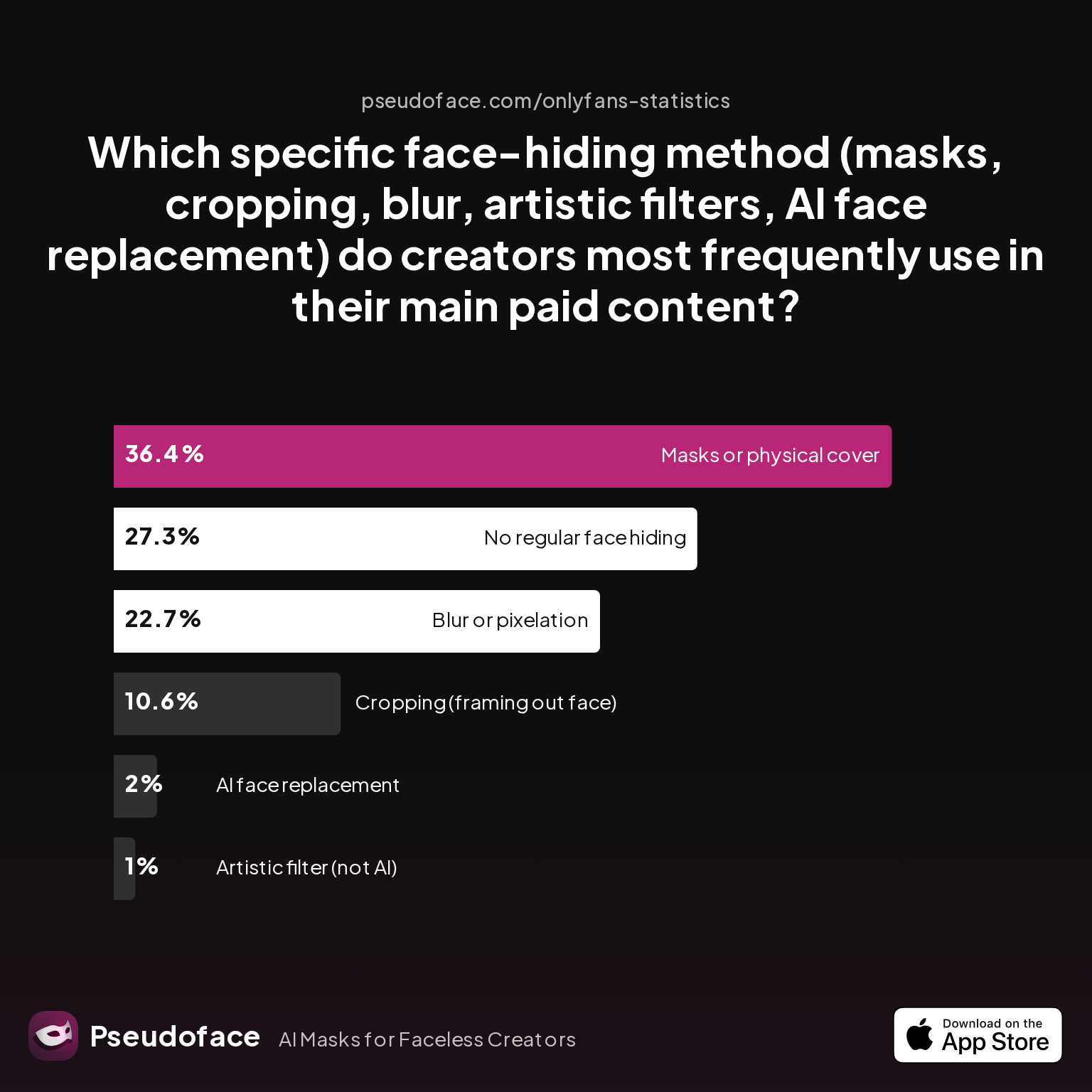
From the dataset: "Masks or physical cover" is the #1 method (36.36%), with blur/pixelation next (22.73%), and cropping trailing. Direct digital filters (Snapchat-style) appear less explicitly in the method list, but in qualitative Reddit testimony, many “masks” are in fact AR overlays, especially from Snapchat. This signals a subtle reporting bias: creators new to the practice will reach for popular, simple tools, even if they later seek more robust solutions.
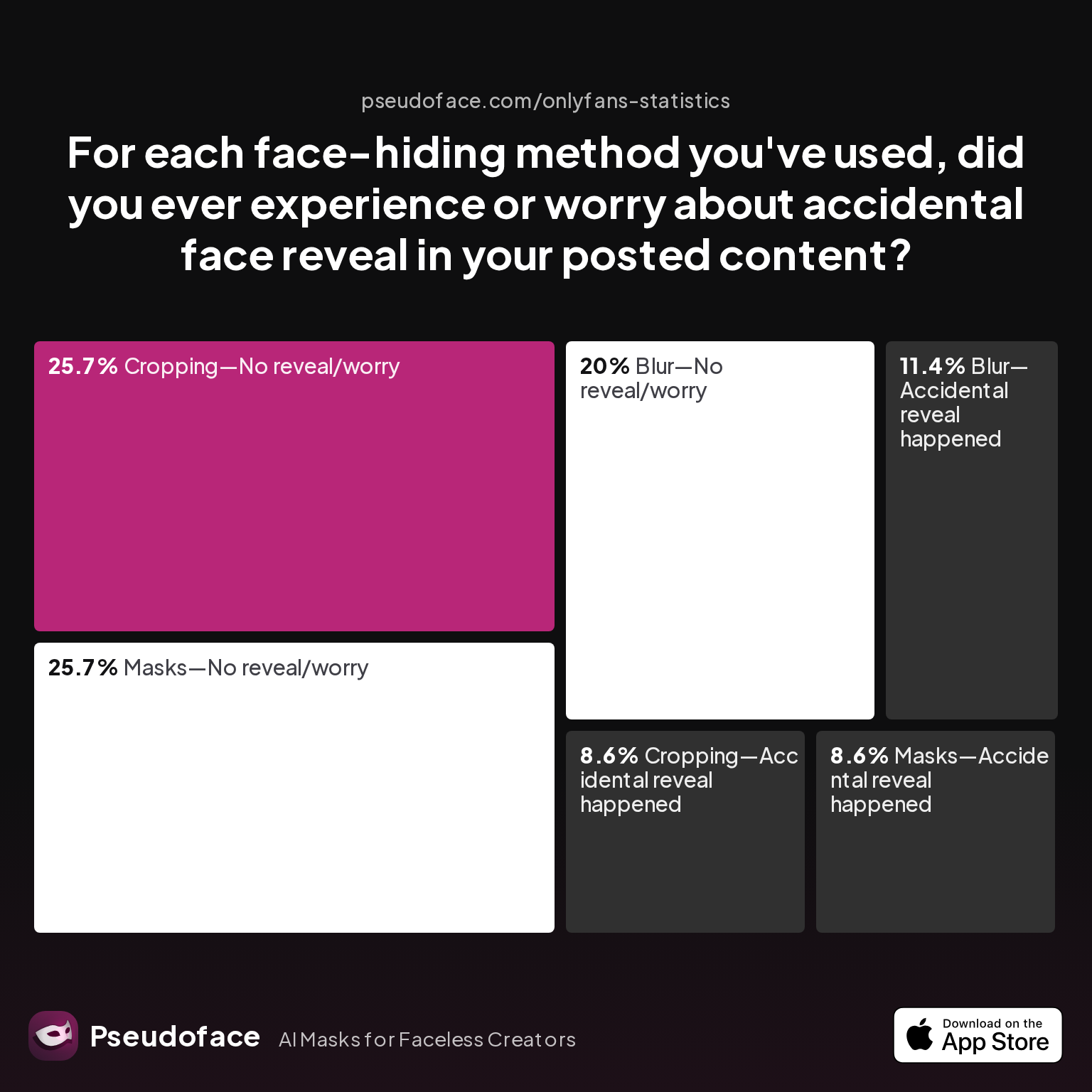
But comfort with a tool does not mean blind trust. The chief concern is accidental identity reveal—either from a glitchy filter, a moment of lag, or quality so low the mask fails to cover. The self-reported accidental reveal rate offers a sobering counterweight to the optimism around filters.
| Answer | Percentage |
|---|---|
| Blur—Accidental reveal happened | 11.43% |
| Blur—No reveal/worry | 20.00% |
| Cropping—Accidental reveal happened | 8.57% |
| Cropping—No reveal/worry | 25.71% |
| Filter—Accidental reveal happened | 0.00% |
| Filter—No reveal/worry | 0.00% |
| Masks—Accidental reveal happened | 8.57% |
| Masks—No reveal/worry | 25.71% |
At first glance: "Filter—Accidental reveal happened: 0%." But here’s where reporting bias strongly shapes the data. Because filters may not be explicitly called out (often reported under "masks"), and because a botched or glitched AR overlay may be reclassified as a "mask slip" or simply not posted at all (survivorship bias), these numbers read as best-case rather than complete truth. In discussion threads, reports of filters flickering, tracking failures, or being “less reliable when moving fast” are common.
The lesson for creators: Snapchat face filters are the fastest route to “good enough” anonymity for casual contexts, especially if you don’t mind 720p video or a cartoon-like look. But for anything high-stakes or paid, you need to understand—and anticipate—the technical limits and quirks that come with in-app reliance.
As we’ll see in the next section, not all Snapchat Lenses or filters offer the same coverage or reliability for privacy. Picking the right filter is step one, but knowing the best practices for keeping your real face private is what separates casual use from pro-level anonymity.
Face Hiding with Snapchat Filter: Which Lenses Actually Work for Privacy?
Once you’ve decided to experiment with Snapchat as your main face-hiding tool, the next question is—does the Lens you pick truly protect your identity, or could a bug or half-applied effect give you away? Data and subreddit discussions show substantial differences between filter families.
What counts as a “reliable” Snapchat face filter for privacy? Creators across 2025-2026 forums repeatedly recommend Lenses that fully AR-cover facial features—robot masks, animal faces, and some stylized makeup overlays. Types that only soften facial skin, beautify, or distort color are the most likely to leave identifying traits visible, especially under harsh, varied lighting.
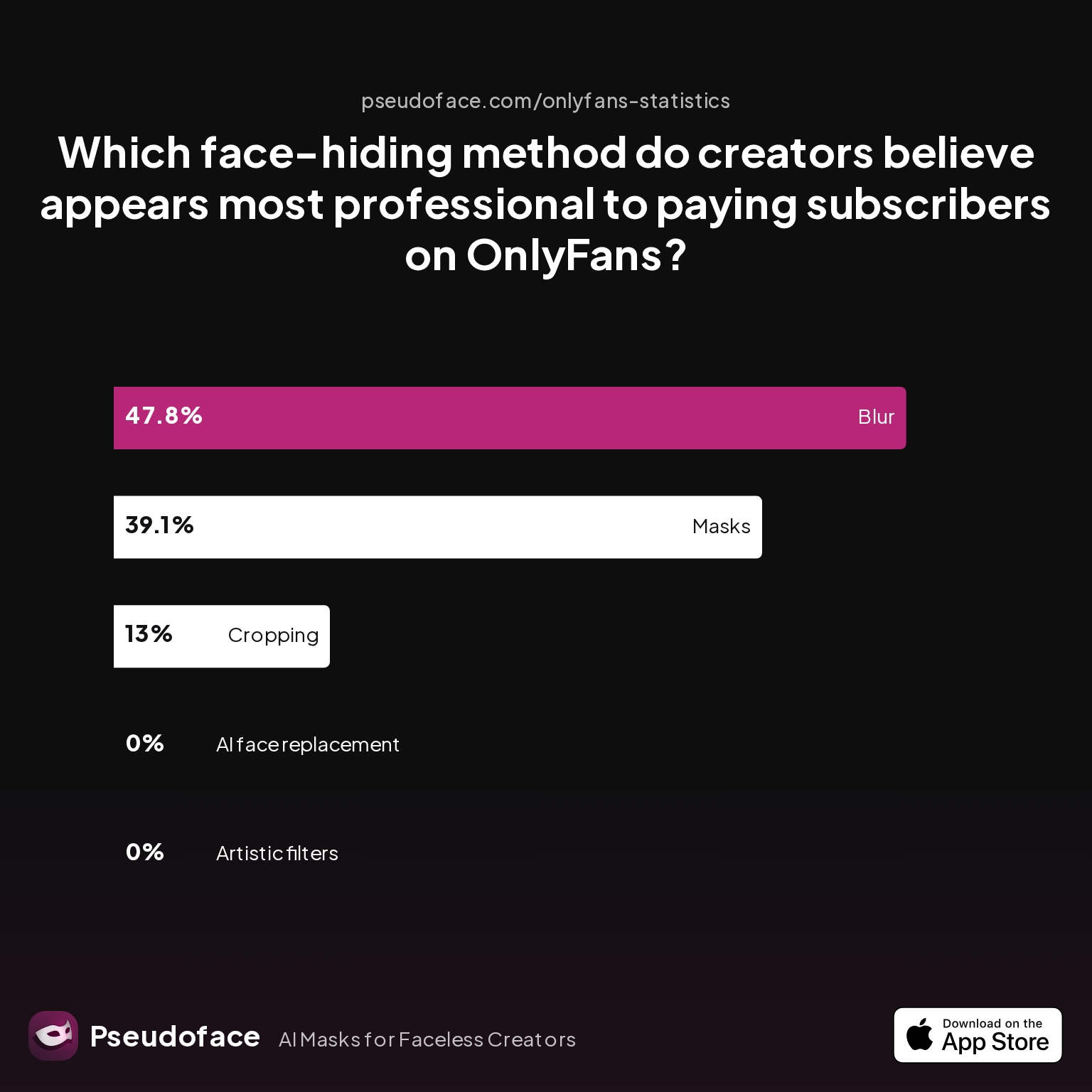
The real test is perceived professionalism. How do creators believe subscribers judge these methods when it counts?
| Answer | Percentage |
|---|---|
| AI face replacement | 0.00% |
| Artistic filters | 0.00% |
| Blur | 47.83% |
| Cropping | 13.04% |
| Masks | 39.13% |
"Blur" (47.83%) and physical or AR “Masks” (39.13%) are seen as the most professional by surveyed creators. AR overlays (especially ones that draw or paint a solid mask) are credited as “professional enough” for paid content, but stylized, shifting filters—like cartoon effects—aren’t taken as seriously by paying audiences.
In practice, highly-rated face-hiding SpongeBob Lenses, clown masks, and “doll face” filters are popular with OnlyFans/TikTok creators purely for their consistency. They completely obscure the real face—even if the effect sometimes looks cartoonish or uncanny—which keeps accidental leaks almost impossible. Beware, though: some beauty filters labeled as “makeup” simply reduce the appeal of face matching, without truly hiding identity, which can be risky for creators prioritizing privacy.
When in doubt, community recommendations focus on:
- Full-cover, static effect masks that don’t rely too heavily on AR tracking of lips or jaw movement.
- Double-checking the filter across all your key angles before committing to use.
- Avoiding stylized or “art” filters that shift or flicker, especially if switching lighting setups.
As one creator warned in a high-upvoted thread:
Open thread on Redditr/CreatorsAdvice
u/Moneyovermadness
You can apply a filter on Snapchat after the video is made… But it only works for three minute videos so that’s the only problem. I don’t know what was wrong with my face last week, but I literally looked horrible after I got done filming because of the lighting in my room… I went on Snapchat and put a soft make up filter over my seven minute video. First, I had to split it into three different partswith a video editing app… And then I did the filter in Snapchat and then put it back together afterwards. Yes, it was a lot of work, but was worth it in the end.

This illustrates both the dedication to protecting privacy and the workaround-heavy reality of using Snapchat’s filters in non-casual workflows. For those seeking pro polish and peace of mind, Snapchat is often just the first line of defense—not the whole solution.
Next up, we dig into the technical and aesthetic reasons why Snapchat’s video quality often disappoints creators aiming for a polished, pro look.
Why Snapchat’s Video Quality Falls Short (and What Creators Do About It)
Snapchat’s biggest practical downside, reported again and again by creators, is simple: in-app video recorded with most filters is capped at 720p (or 1080p on rare devices with edge-case workflows), and post-processing compression is relentless. Combine this with AR filter artifacts—glitches, flickers, odd shadows—and the result is content that rarely matches the standards of paid creators.
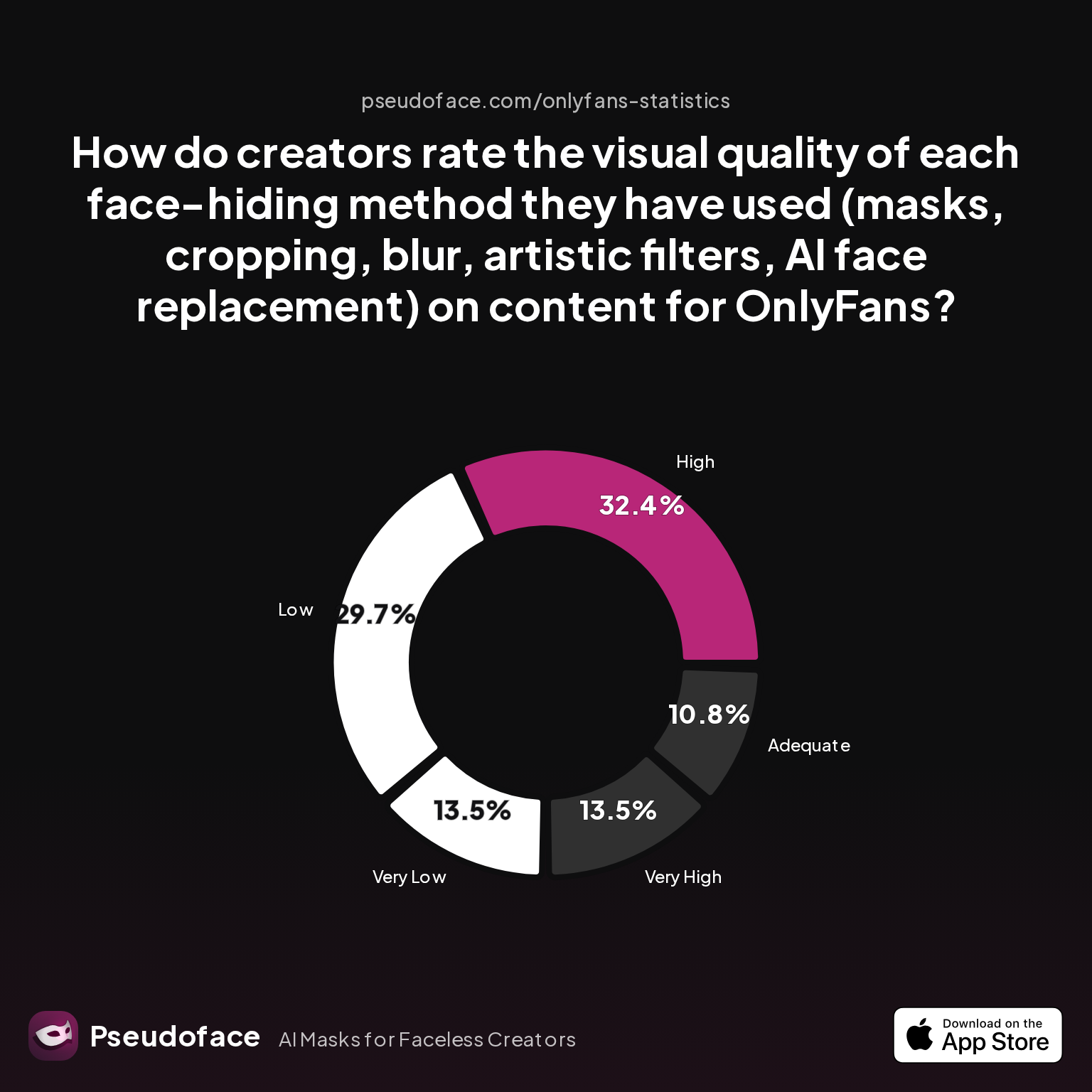
Looking again to the 2025-2026 Pseudoface dataset, the user experience with visual quality is telling.
| Answer | Percentage |
|---|---|
| Adequate | 10.81% |
| High | 32.43% |
| Low | 29.73% |
| Very High | 13.51% |
| Very Low | 13.51% |
Less than half of respondents rate the visual quality as “high” or “very high.” Over 43% put it at “low” or “very low.” What’s more, the most common complaints highlight factors that can’t be fixed by toggling settings: the AR tracking struggles with quick movements, lighting changes cause filters to slip (especially with multi-hue bulbs or daylight-through-windows), and overall, filtered video emerges looking flatter, less crisp, and easier for eagle-eyed subscribers to spot as amateur.
Reddit creators echo this frustration frequently.
Open thread on Redditr/CreatorsAdvice
u/audfox
CapCut lets you retouch and add makeup. You can export at 1080 and adjust the fps from 24-60. You can do a trial of the pro plan and delete it when you’re done.
Snapchat’s key limitations for pro creators:
- Video recorded in-app is processed at 720p—even if your camera is capable of 4K.
- Exported clips are highly compressed to minimize file size, losing dynamic range and detail.
- Filters misbehave under variable or “creative” lighting, common in home studios.
- AR masking tends to struggle with motion blur, rapid head turns, or shots blocked by hands/hair.
These realities shape not just quality, but privacy too: a filter that glitches mid-video could reveal identifying cues—even if only for a frame or two, which can be screenshotted by determined fans.
To combat these problems, many creators now use higher-res cameras or smartphones to record original footage in 1080p or 4K, then apply masking or AR effects in post-production via dedicated editing tools or third-party apps. It’s more work, but the jump in professionalism (and risk reduction) is stark.
Now, let’s look at the most practical workflow tweaks and filter alternatives outside the main Snapchat app, especially for higher-quality pre-recorded video.
Beyond Snapchat: Snapchat Filters Online, Custom Solutions, and AR Mask Apps
As issues with Snapchat’s quality and flexibility have become more widely discussed, 2025-2026 has seen an explosion of interest in Snapchat-style filters and AR masks that function outside of the main app. This includes solutions like web-based Snapchat filter clones, specialized mobile editing apps (CapCut, YouCut, FaceMagic), and even “manual” masking overlays that let creators composite face covers over high-res video.
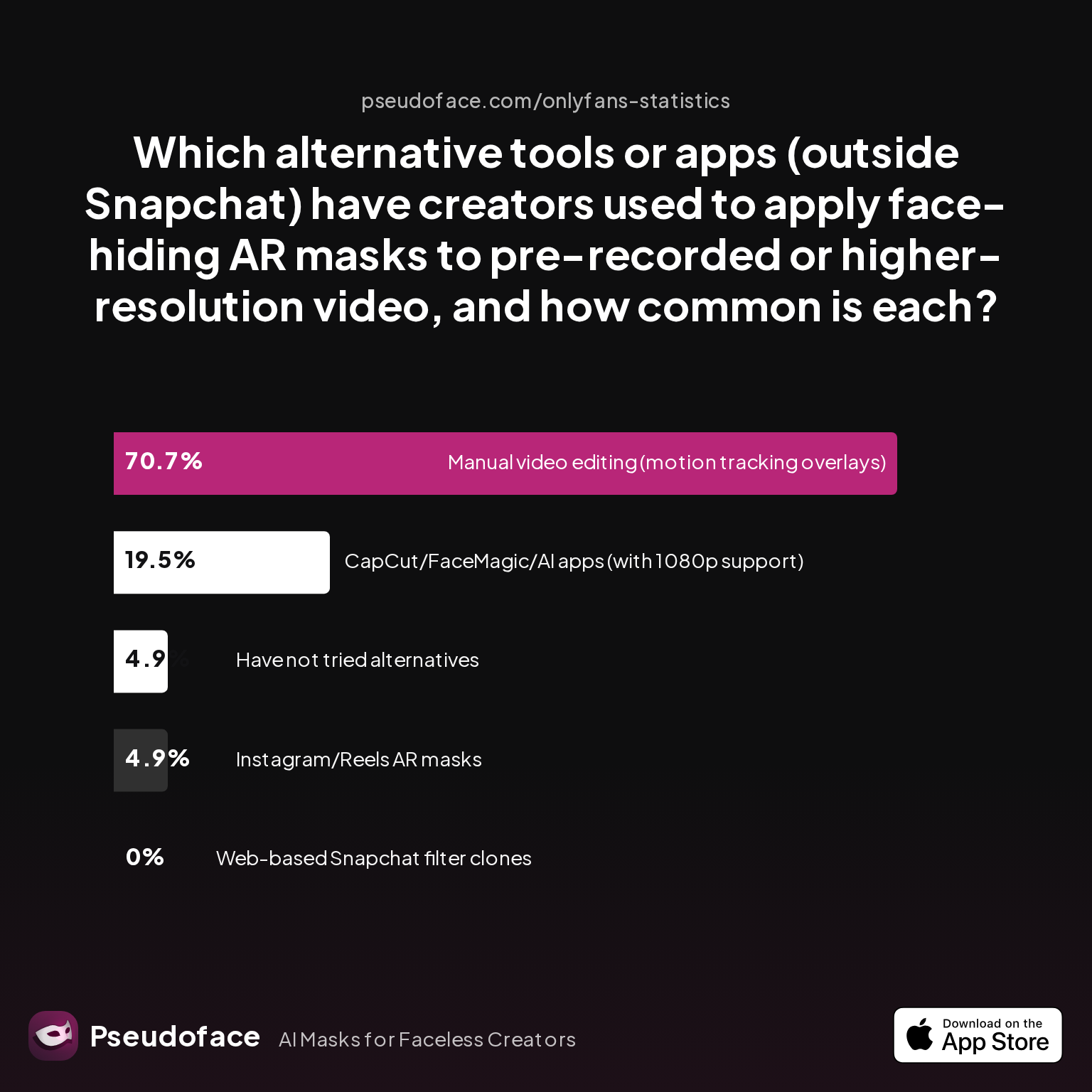
Recent survey data from Pseudoface highlights a dramatic shift toward manual and hybrid workflows:
| Answer | Percentage |
|---|---|
| CapCut/FaceMagic/AI apps (with 1080p support) | 19.51% |
| Have not tried alternatives | 4.88% |
| Instagram/Reels AR masks | 4.88% |
| Manual video editing (motion tracking overlays) | 70.73% |
| Web-based Snapchat filter clones | 0.00% |
A striking 70.7% of creators have used “manual video editing” (with overlays or tracking) to hide their face on pre-recorded or HD video. CapCut, FaceMagic, and similar AI-enabled apps are next at nearly 20%, valued for their ability to layer on makeup, blur, or even cartoon avatars at 1080p or higher res—something Snapchat in-app video simply can’t do.
No respondent in the dataset found web-based Snapchat filter clones useful; these tools are often buggy, poorly supported, or lack the AR face-tracking sophistication of Snapchat’s own engine. Instagram/Meta AR masks exist as a niche, but remain rare among paid adult creators.
This movement toward alternatives is mostly a product of three realities:
- The desire to post higher-resolution vids (for sales, not just stories).
- The need for better reliability—avoiding AR tracking failures or filter glitches mid-clip.
- Creative control: custom overlays and masks allow for unique branding, not just privacy.
Here’s how creators are using modern editors:
Open thread on Redditr/CreatorsAdvice
u/audfox
CapCut lets you retouch and add makeup. You can export at 1080 and adjust the fps from 24-60. You can do a trial of the pro plan and delete it when you’re done.
And for those comfortable with manual labor:
Open thread on Redditr/CreatorsAdvice
u/LollipopGothThot
I've used an app called YouCut. It's very useful for editing videos and adding emojis throughout the video.
The growth in manual editing overlays is due partly to AR’s limits: if a filter or mask can drift off your face due to rapid motion, simple frame-by-frame overlays (or AI-tracked masks) offer peace of mind, even if they take twice as long to edit.
Curious about custom Snapchat filters? Snapchat’s own Lens Studio allows technically-savvy users to build and test Lenses from scratch, including brand-name virtual masks, advanced AR elements, and privacy-centric blurring or de-personalization. However, importing these custom Lenses to mobile is time-consuming and requires a separate review process.
Above all, creators are finding their new workflow: record in the highest quality you can (your phone’s camera app, DSLR, etc.), then add masking in post, whether that’s through CapCut, YouCut, or a manual overlay in desktop editing suites like Premiere or DaVinci Resolve.
This leads into practical, step-by-step advice on how to use these tools—especially for faceless creators aiming for output that looks both anonymous and high-quality.
How to Use Snapchat Filters to Hide Face in High-Quality Video
For many creators, the true challenge isn’t just hiding your face—it’s doing it reliably and with production values that don’t scream “filter.” Achieving this means rethinking the old “record in Snapchat, post the output” workflow. Below, we break down how to combine the best of all worlds.
Step 1: Record raw video in maximum quality.
Use your camera’s native app (never Snapchat) for 1080p or 4K capture. Lock focus, set exposure, and ensure even, face-illuminating light—tracking/masking always works best with clear, well-lit faces (even if you’ll be hiding them later).
Step 2: Choose your editing platform.
If you want quick masking with minimal learning curve, use CapCut or YouCut on mobile:
- CapCut: Offers makeup overlays, blur, stickers, and some AR-style masking at 1080p export. Paid plans required for premium/export features.
- YouCut: Good for adding emoji or cartoon overlays, fast rendering, and easy trimming.
For greater control, use a desktop video editor (Premiere, Resolve) and add overlays or keyframed blur/mask effects for each clip. This “manual” approach is more time/labor intensive but gives unmatched precision.
Step 3: Apply AR masks, blur, or overlay.
- In CapCut/FaceMagic, apply AR or makeup effects as needed, or composite emoji/blur over the face.
- In desktop editors, motion-track your face and layer a static mask/topper atop your features for the entire clip.
- Test with different movement/angles: the more dynamic your head/body, the greater the need for manual keyframing or rechecking mask fit.
Step 4: Quality control.
Scrub through the full video: at every major movement, check for mask slippage or filter glitches. If a mask loses tracking momentarily, either cut the affected frames or adjust the overlay. For best results, export in 1080p or higher and monitor compression settings to minimize artifacting.
Common troubleshooting tips from Reddit:
Open thread on Redditr/CreatorsAdvice
u/Moneyovermadness
You can apply a filter on Snapchat after the video is made… But it only works for three minute videos so that’s the only problem. I don’t know what was wrong with my face last week, but I literally looked horrible after I got done filming because of the lighting in my room… I went on Snapchat and put a soft make up filter over my seven minute video. First, I had to split it into three different partswith a video editing app… And then I did the filter in Snapchat and then put it back together afterwards. Yes, it was a lot of work, but was worth it in the end.
And:
Open thread on Redditr/CreatorsAdvice
u/LollipopGothThot
I've used an app called YouCut. It's very useful for editing videos and adding emojis throughout the video.
Watch-outs:
- If Snapchat filters are used in post, video must be chunked into 3-minute segments before importing.
- AR masks (in any app) are imperfect with heavy hair movement, low light, or face occlusion.
- Always maintain a backup of raw unmasked footage, but keep it securely stored (never upload unmasked versions unless 100% confident in privacy management).
Bringing together these workflows ensures not just anonymous content, but content that viewers won’t reject for looking sloppy or amateur—a crucial emotional and financial consideration for any creator.
With technical workflow mapped out, the next section weighs audience reactions—what do subscribers think about filtered or masked content, and what emotional impact does faceless work have on creators themselves?
Faceless Creator Snapchat: How Subscribers and Creators Feel About Hidden Faces
For creators, the ultimate question isn’t just “Does this keep me anonymous?” It’s also, “Will my audience accept it?” The Pseudoface Reddit dataset reveals that reactions to face-hiding fall on a spectrum: some subscribers love the mystery, some comment neutrally, and a minority express dislike or suspicion. For creators themselves, comfort and emotional safety in their workflow is equally variable.
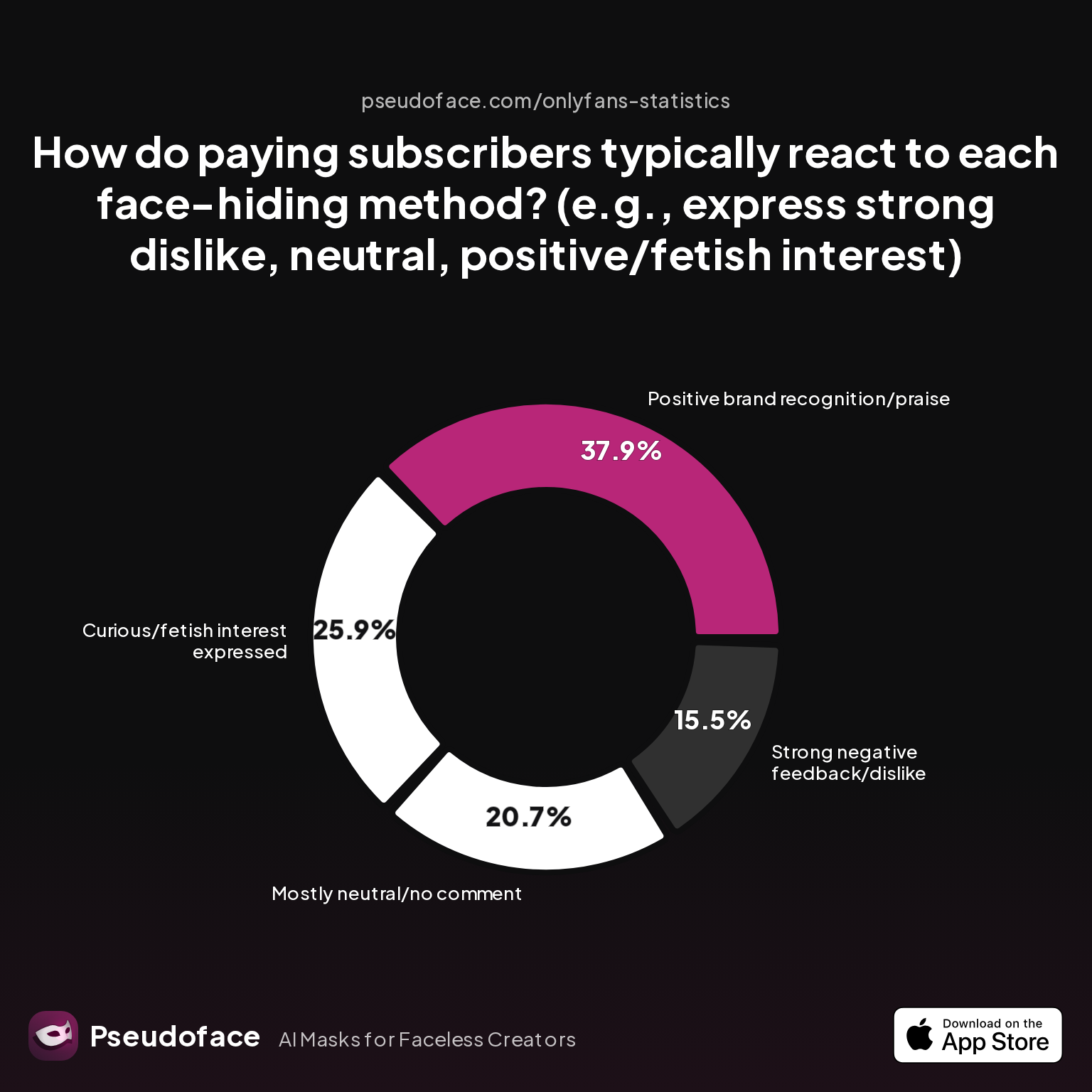
Subscriber reactions, as collected in the most recent Pseudoface chart, look like this:
| Answer | Percentage |
|---|---|
| Curious/fetish interest expressed | 25.86% |
| Mostly neutral/no comment | 20.69% |
| Positive brand recognition/praise | 37.93% |
| Strong negative feedback/dislike | 15.52% |
Nearly 38% of subscribers expressed explicit praise for masked/faceless content—often for branding, “mystique,” or the creator’s commitment to privacy. Around a quarter raised questions or even showed fetishistic appreciation for the hidden-face aesthetic, while a similar chunk were simply neutral. The dissatisfied minority (about 15%) disliked masked content, sometimes citing lack of “connection” or “authenticity.”
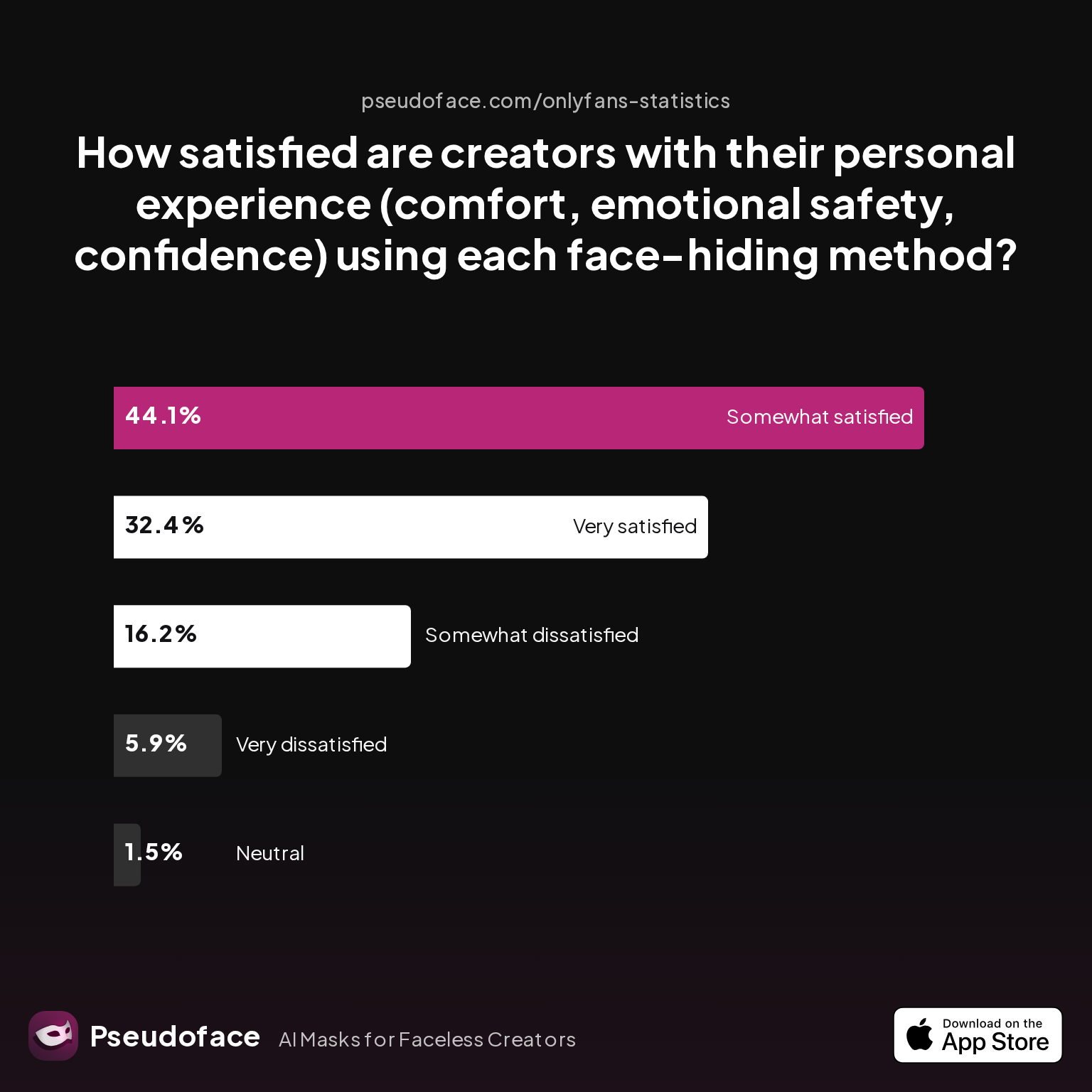
For creators, satisfaction with faceless workflows is generally high, but far from universal:
| Answer | Percentage |
|---|---|
| Neutral | 1.47% |
| Somewhat dissatisfied | 16.18% |
| Somewhat satisfied | 44.12% |
| Very dissatisfied | 5.88% |
| Very satisfied | 32.35% |
A full 76% report being “somewhat satisfied” or “very satisfied,” with only about 6% reporting significant discomfort. Qualitative posts suggest satisfaction correlates with perceived reliability—creators anxious about accidental reveals or filter glitches tend to feel more exposed, while those with tight workflows (manual overlays, careful editing) feel in control.
Reddit color illustrates this spectrum:
Open thread on Redditr/CreatorsAdvice
u/Moneyovermadness
You can apply a filter on Snapchat after the video is made… But it only works for three minute videos so that’s the only problem. I don’t know what was wrong with my face last week, but I literally looked horrible after I got done filming because of the lighting in my room… I went on Snapchat and put a soft make up filter over my seven minute video. First, I had to split it into three different partswith a video editing app… And then I did the filter in Snapchat and then put it back together afterwards. Yes, it was a lot of work, but was worth it in the end.
The takeaway: faceless workflows are not only viable but, when executed with care and understanding of tool limits, often celebrated by audiences. However, creators should pick the tradeoff they can live with: some loss of personal connection for real, bankable privacy.
Now, let’s see how the tradeoff shakes out side by side: how do Snapchat’s filters and masks really compare to modern AR masking apps in privacy, video quality, and workflow convenience?
Snapchat Face Filter vs. AR Mask Apps: Comparison Table for Privacy and Quality
With several ways to hide your face—Snapchat filters, AR mask apps, manual overlays—how do these options compare head to head? Below, we distill creator experiences and platform realities (per 2025-2026 Reddit self-reporting) in a single table.
| Feature/Factor | Snapchat In-App Filters | CapCut/FaceMagic/AR Mask Apps | Manual Mask/Overlay Editing |
|---|---|---|---|
| Video Quality Cap | 720p (sometimes 1080p, rare) | 1080p/4K export possible | Up to 4K (device/software) |
| Masking Method | Live AR filter, auto-tracking | AR overlay, retouch, blur | Emoji/graphic overlay, frame by frame |
| Typical Workflow Difficulty | Easiest, fastest | Moderate learning curve | Highest effort/time required |
| Accidental Reveal Risk | Low (but can glitch if moving/low light) | Low if manual review, varies with AR | Very low (if careful masking) |
| Pro “Look” Perception | “Casual/app” feel, less pro | Can appear pro with good preset | Most professional |
| Audience Reception | Neutral to mildly positive | Neutral to positive | Positive to “premium” |
| Anonymity/Stability | Unstable if filter bugs | Stable if mask is static | Most stable |
| Cost | Free | Free basic, paid pro | Software may be costly |
Note on methodology and bias: These findings are drawn from Pseudoface’s Reddit dataset; self-reporting, self-selection, and recall bias may shape which workflows are reflected and how “failures” are described. Nevertheless, the broader trend is clear: The higher your stakes (and your bar for video quality), the more likely you are to outgrow Snapchat for face hiding.
Putting It All Together: Recommendations for Face Hiding with Snapchat Filter
So, which approach should you actually use? Here’s what the data and community consensus suggest for 2026:
- For quick, casual, or low-risk content: Snapchat filters are still the fastest way to obscure your face and jump into creating. Choose full-coverage Lenses, test under all lighting conditions, and expect to live with lower (720p) resolution and some “app” aesthetic.
- For paid, portfolio, or HD creator work: Record first in your device’s Camera app at highest quality; add AR masking or overlays using CapCut, YouCut, or a desktop editor (Premiere, DaVinci). This approach takes more effort, but you’ll avoid filter bug-outs and can achieve a “premium” look.
- For branding or advanced privacy: Consider custom overlays or brand-focused mask design—not just borrowed Snapchat Lenses. Subscribers respond well to unique visual identity, and you’ll have more long-term control over your work.
- Always check for drift or glitch: Whatever your tool, step through your video frame by frame to spot mask failures. Trust, but verify—privacy is only as strong as your last export.
Experiment, iterate, and don’t be afraid to adapt as new tools arrive. Community wisdom is your compass, but your own risk comfort matters most.
FAQ
What is the best Snapchat filter for hiding your face on OnlyFans?
The most effective Snapchat filters for hiding your face provide full facial coverage, such as AR masks or cartoon overlays (e.g., “doll face,” animal masks), not soft makeup or light artistic filters. According to creator survey data, masks and solid AR overlays have the lowest reported rate of accidental reveal and the highest professionalism perception, but always test filters under your typical recording conditions to ensure real-world coverage.
Can you use Snapchat filters online or on pre-recorded videos?
You cannot apply official Snapchat filters to pre-recorded video directly online, but tools like CapCut, FaceMagic, and YouCut let you apply similar effects on HD videos after shooting. Web-based Snapchat filter clones exist but aren’t widely used due to reliability issues; most creators use mobile/desktop editing apps for this workflow.
How do I make a custom Snapchat filter for privacy?
You can use Snapchat’s Lens Studio to build and test your own masks, overlays, or anonymizing filters, then use them in the Snapchat app after a publishing process. This requires technical skill and time, but lets you create unique, branded looks and possibly stronger privacy compared to default filters.
Why does Snapchat video quality look so grainy or low-res?
Snapchat in-app recording is capped at 720p on most devices and heavily compresses videos, which degrades sharpness, color, and overall visual quality. Filters also flatten detail and can introduce glitches; for HD results, record first in your camera app and mask in post.
Are AR masks better than Snapchat for face hiding?
AR mask apps like CapCut, FaceMagic, and YouCut deliver higher video quality (up to 1080p/4K) and more editing control, making them better for professional or paid creator work; manual video editing offers the most precision and anonymity for high-stakes content.
Will a Snapchat filter ever accidentally reveal my face while recording?
While self-reported accidental reveal rates for filters are very low, AR tracking can bug out—especially with fast movement or poor lighting—so checking your videos frame by frame is essential before posting.
How do paying subscribers react to hidden-face content?
Most paying subscribers respond positively or neutrally to hidden-face content, with only about 15% expressing dislike. About 25% even express curiosity or fetish interest; strong branding and pro-level editing improve reactions.
Can I export Snapchat-filtered videos at 1080p or higher?
No, Snapchat in-app exports generally cap at 720p; for 1080p or higher, shoot in your device’s camera app and use third-party editors to apply masks in post.
What are the privacy risks of using face filters versus other anonymizing techniques?
Face filters and AR masks can fail if tracking glitches or lighting shifts, while manual overlays and cropping are more reliable but less flexible; always review footage thoroughly to catch and fix any reveal frames.
How do I troubleshoot Snapchat filter misfires or AR tracking glitches mid-video?
If you experience filter tracking issues, try recording with better, more even lighting, minimizing fast motions, and splitting long clips into shorter segments for post-processing or re-applying filters as needed.
For creators determined to balance real privacy with engaging, profitable content, Snapchat’s face filters are just the beginning. The best results come from blending new tools, careful review, and the hard-won wisdom of your creative peers.


