
TL;DR
The best way to hide your face on OnlyFans depends on what feels safest and most compatible with your workflow, but most creators report using cropping (~40%) or masks (~25%), while AI face replacement remains rare (just 3%). According to Pseudoface’s analysis of over 250,000 public Reddit threads from real adult content creators, masks are most trusted for accidental reveal prevention, but cropping is rated easiest for day-to-day shooting. Visual quality and perceived professionalism favor carefully applied artistic filters or AI—though these can raise tech and authenticity concerns. All methods come with trade-offs around branding, setup, and privacy, with user reviews citing “consistency” and “comfort level” as the top drivers of long-term satisfaction. This guide reflects the self-reported experience of faceless creators, based on public conversations and with the usual caveats around self-selection and survivorship bias. (Based on 2025-2026 data.)
Why Stay Faceless on OnlyFans? The Real Stakes for Creators
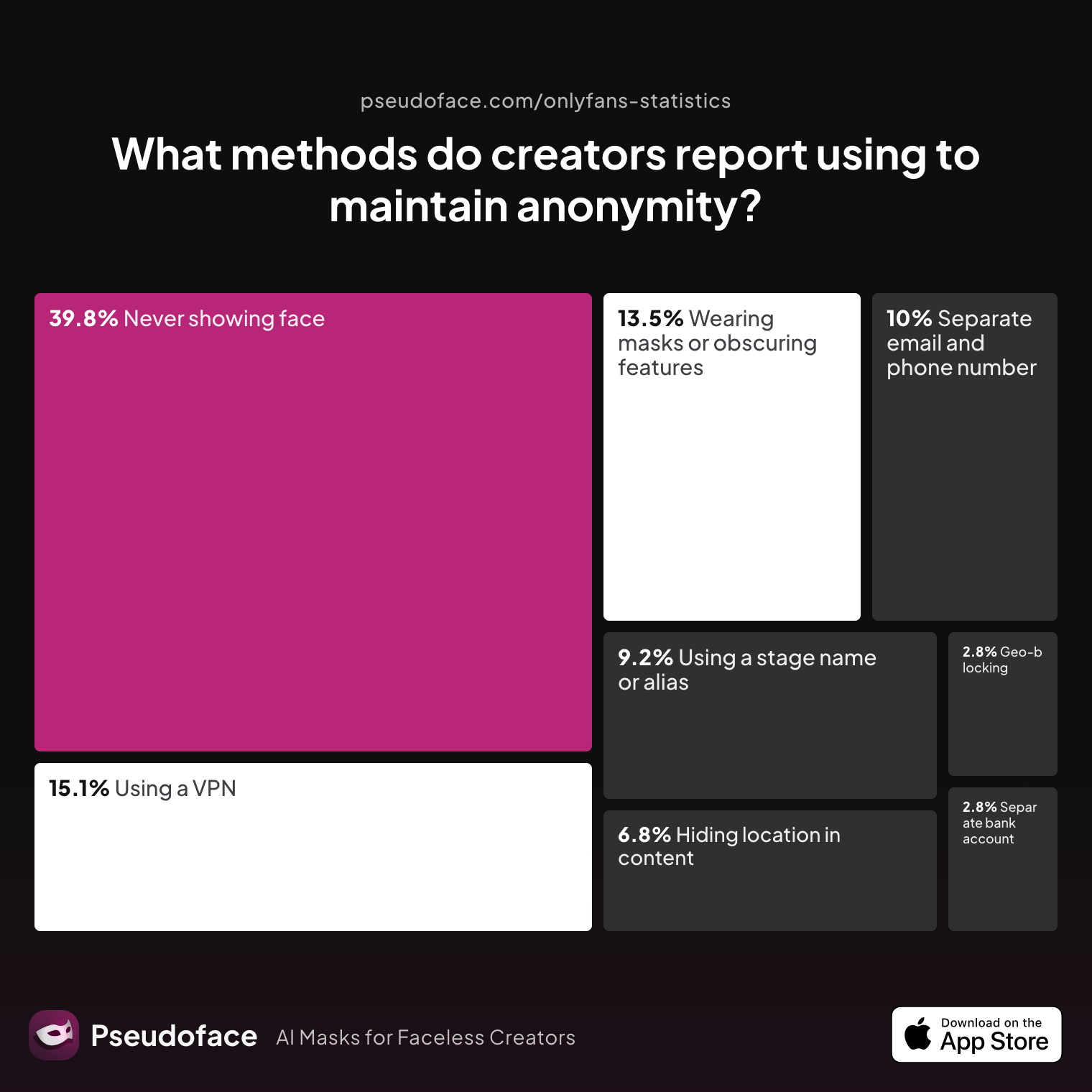
The decision to build a faceless OnlyFans persona isn’t about hiding for the sake of hiding—it’s a question of livelihood, safety, and peace of mind. As of 2026, nearly 40% of adult content creators report never showing their face in any posted content. For many, the stakes are profound: privacy protects careers, families, and reputations in a world where digital footprints are permanent and discoverability is routine.
| Answer | Percentage |
|---|---|
| Avoiding location-specific details in content | 6.77% |
| Geo-blocking specific regions | 2.79% |
| Never showing face | 39.84% |
| Using a separate bank account or business entity | 2.79% |
| Using a separate email and phone number | 9.96% |
| Using a stage name or alias | 9.16% |
| Using a VPN or privacy tools | 15.14% |
| Wearing masks or obscuring identifying features | 13.55% |
The chart above reveals that 39.84% of creators keep their face hidden from all content, making it the single most decisive anonymity measure in the arsenal—surpassing even VPN use or technical privacy steps. Physical and social consequences drive this trend; “never showing face” is not only about avoiding clumsy leaks, but protecting against real-world doxxing, stalker scenarios, and professional backlash.
And yet the journey to facelessness isn’t one-size-fits-all. Some creators lean on masks as a compromise, while others stack multiple precautions (aliases, region blocks, VPNs, even business entities). Each tactic reflects deeply personal risk assessments.
Transitioning from visible to anonymous content, or launching straight into faceless territory, almost always surfaces the same questions: How anonymous is truly anonymous? What options do real creators rely on—not just in theory, but in daily publishing? It's time to move from “why” to “how” and break down what face-hiding methods are actually favored by those living this reality.
Mapping Out Face Hiding Methods on OnlyFans: What Do Real Creators Actually Use?
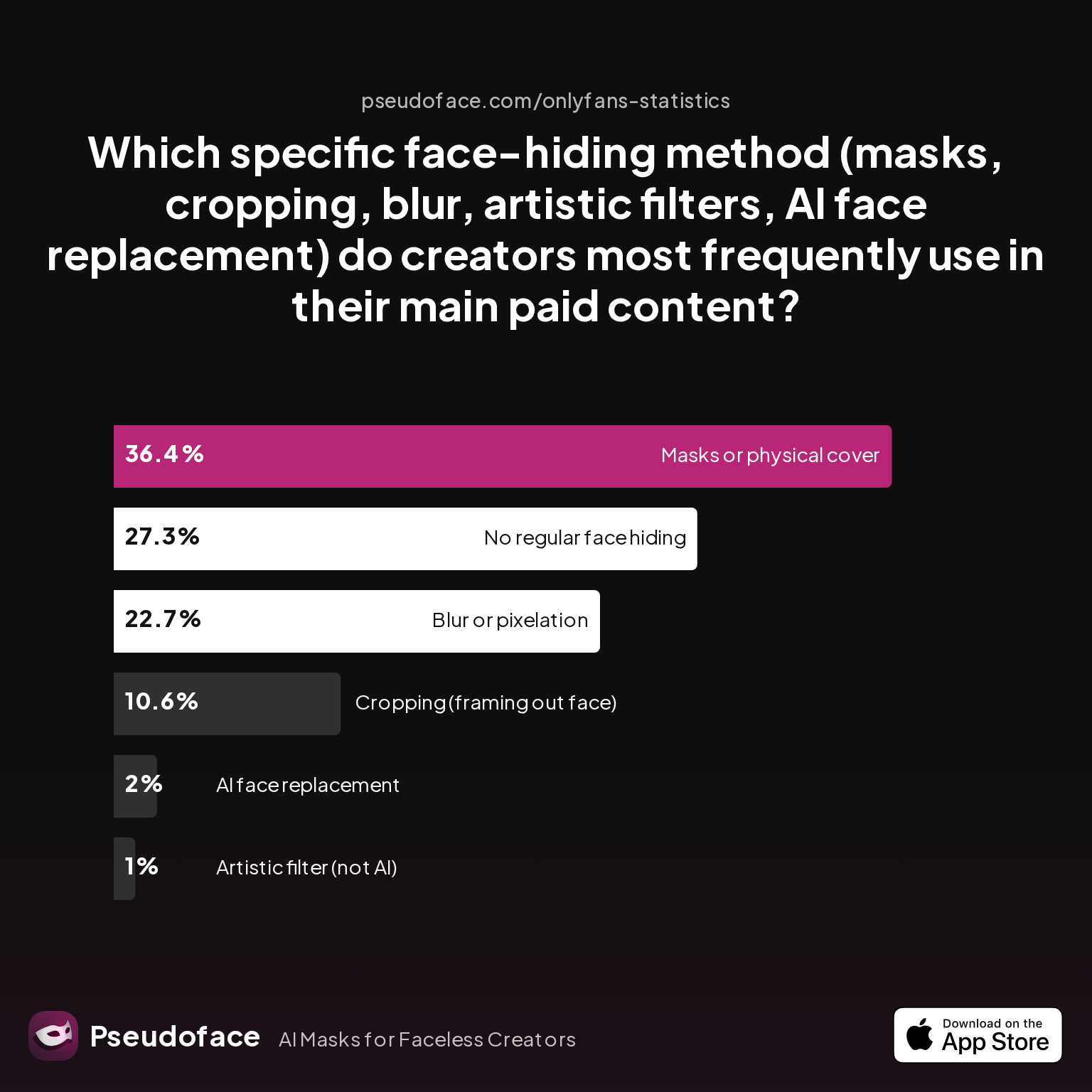
A look under the hood of faceless content reveals a pragmatic evolution: creators gravitate to what works, not just what’s possible. As of early 2026, most OnlyFans creators report steady reliance on cropping (framing shots to exclude their face) and physical masks as their top strategies, with digital blur and AR filters trailing. AI face swaps, for all the hype, remain niche.
| Answer | Percentage |
|---|---|
| AI face replacement | 2.02% |
| Artistic filter (not AI) | 1.01% |
| Blur or pixelation | 22.73% |
| Cropping (framing out face) | 10.61% |
| Masks or physical cover | 36.36% |
| No regular face hiding | 27.27% |
According to Pseudoface’s dataset, cropping, masks, and blur collectively account for over 69% of all main face-hiding methods in regular use. AI and artistic (non-AI) filters combined sit well under 5%. These rates are drawn from self-reported usage, skewed toward creators active in privacy and OnlyFans advice discussions (introducing some survivorship bias) but still striking in where the practical center lands.
Blurring remains popular at 22.73% usage, but faces vocal workflow complaints about quality and utility in video.
Open thread on Redditr/onlyfansadvice
u/Janeonfans
I use the free version and I'm not complaining, I like it

While tools like Blur Video or InShot create easy solutions, users consistently cite export and quality headaches, especially for longer, HD clips. These workflow realities shape usage patterns: function drives adoption more than theory.
Masks—both full-face and creative variants like masquerade or cosplay—still win on instant, reliable anonymity, though at the cost of heat, comfort, and sometimes fan taste. Cropping is nearly as common, favored for its simplicity but infamous for creative and branding constraints.
Notably, over a quarter (27.27%) of creators surveyed admit to “no regular face hiding.” This group includes those in low-stakes niches, already-public figures, or creators who experimented and ultimately decided anonymity just wasn’t strategically or psychologically worth the friction.
As we move from statistics into lived experience, it becomes essential to weigh not just adopted methods, but how they color the actual process of content creation—day in, day out.
Face Hiding Techniques OnlyFans Creators Rely On: Visual Quality and Workflow
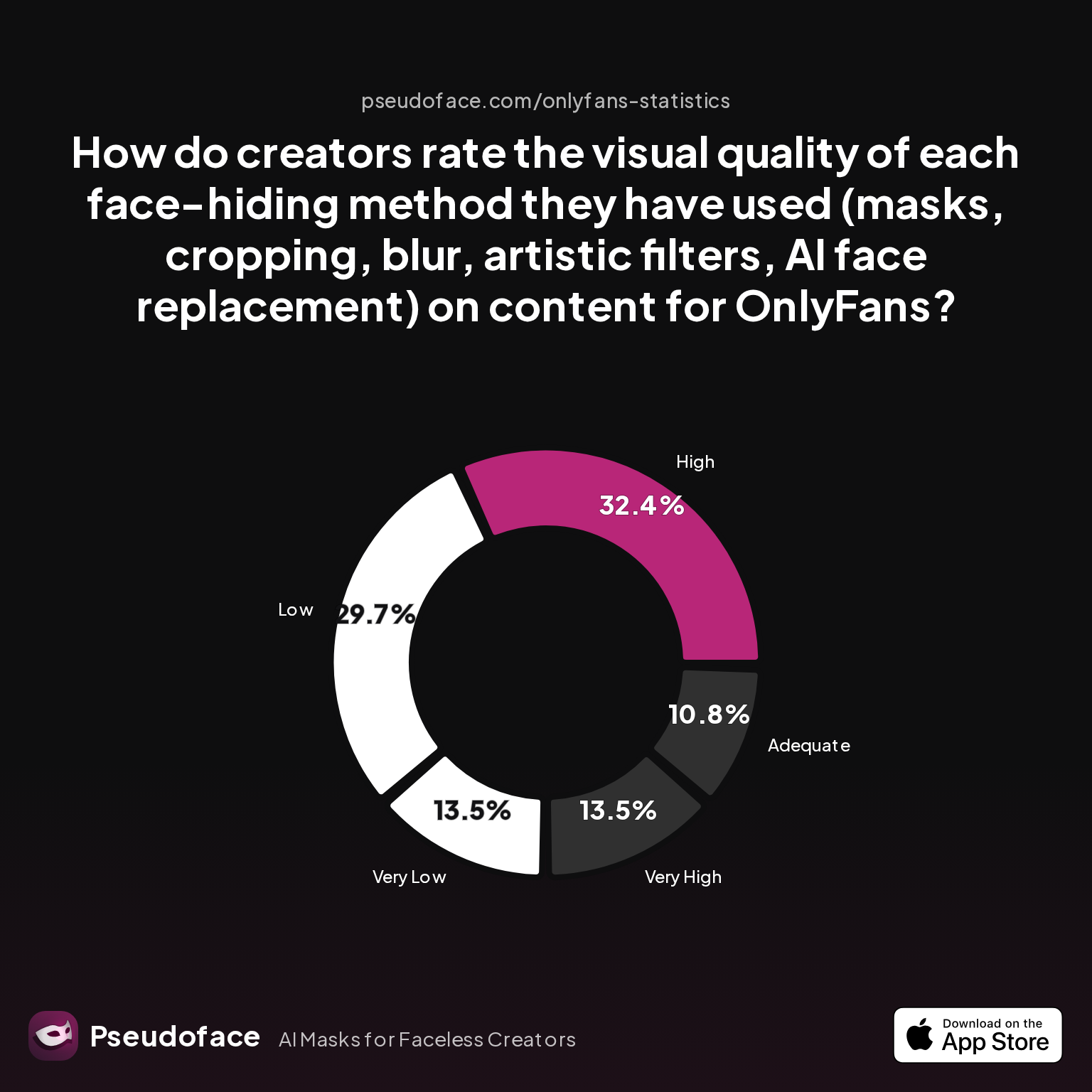
For creators, hiding a face is never just about anonymity—it’s about how your content looks, feels, and how easily you can produce it at scale. Per Pseudoface’s thread mining, perceptions of visual quality vary sharply by method, deeply intertwining with workflow realities and platform demands. The trade-off surfaces quickly: “higher quality” often requires more setup, while easier methods seldom look their best.
| Answer | Percentage |
|---|---|
| Adequate | 10.81% |
| High | 32.43% |
| Low | 29.73% |
| Very High | 13.51% |
| Very Low | 13.51% |
Interpreting these findings, only 13.51% of creators rate their chosen face-hiding method as "very high" visual quality, with another 32.43% calling it merely "high." A similar share, nearly 30%, feel their method delivers "low" quality, and a concerning 13.51% call it "very low"—often linked to rushed blurring, pixelation artifacts, or mask discomfort.
Survivorship bias is especially relevant here: only those who stick with a method for months or longer tend to participate in detailed quality ratings. Newbies and drop-offs (those who abandoned content due to workflow burnout or visual frustration) are underrepresented.
Cropping earns high marks for day-to-day speed—set your phone on a table, frame below the chin, shoot, and post. The trade-off: you lock yourself into medium-and-close-up compositions, limiting dynamic movement, dance, or elaborate setups. For creators in solo, lingerie, or feet/torso-focused niches, cropping is a lifeline; others crave creative freedom.
Masks tend to rank higher visually—especially high-quality, themed, or cosplay-adjacent masks. But as many creators note, masks cause sweat, muffle voice, and distract from eye contact or natural expressions, especially in long sessions.
Blur and artistic filters are reported as a double-edged sword: quick and easy for stills, but often patchy for video, with visible digital “giveaways” that remind fans the creator is hiding something.
Echoing the above, one Redditor candidly shares:
Open thread on Redditr/onlyfansadvice
u/Janeonfans
I use the free version and I'm not complaining, I like it
Even among fans of blur, expectations are practical, not perfectionist—the real-world standard is “good enough to keep my privacy,” not “seamless Hollywood post.” Yet the more subtle and artistic the disguise (using AR or filters), the more anxiety around accidental slips and technical glitches.
AI face replacement is a holy grail for some—promising seamless video, expressions, and even interactive clips. But as of 2026, trustworthy, easy AI tools lag in both quality and accessibility. Early adopters report uncanny results, obvious “deepfake tells,” or hours spent troubleshooting. AI is not a “set it and forget it” workflow—yet.
Creators repeatedly surface one reality: the “perfect” method usually means the one you can use consistently, with quality that matches your brand, while keeping risk and stress manageable.
Transitioning from how a method looks and feels, the next step is to dissect their risks—especially the very real specter of accidental face reveal.
How to Stay Faceless on OnlyFans: The Risk of Accidental Face Reveal
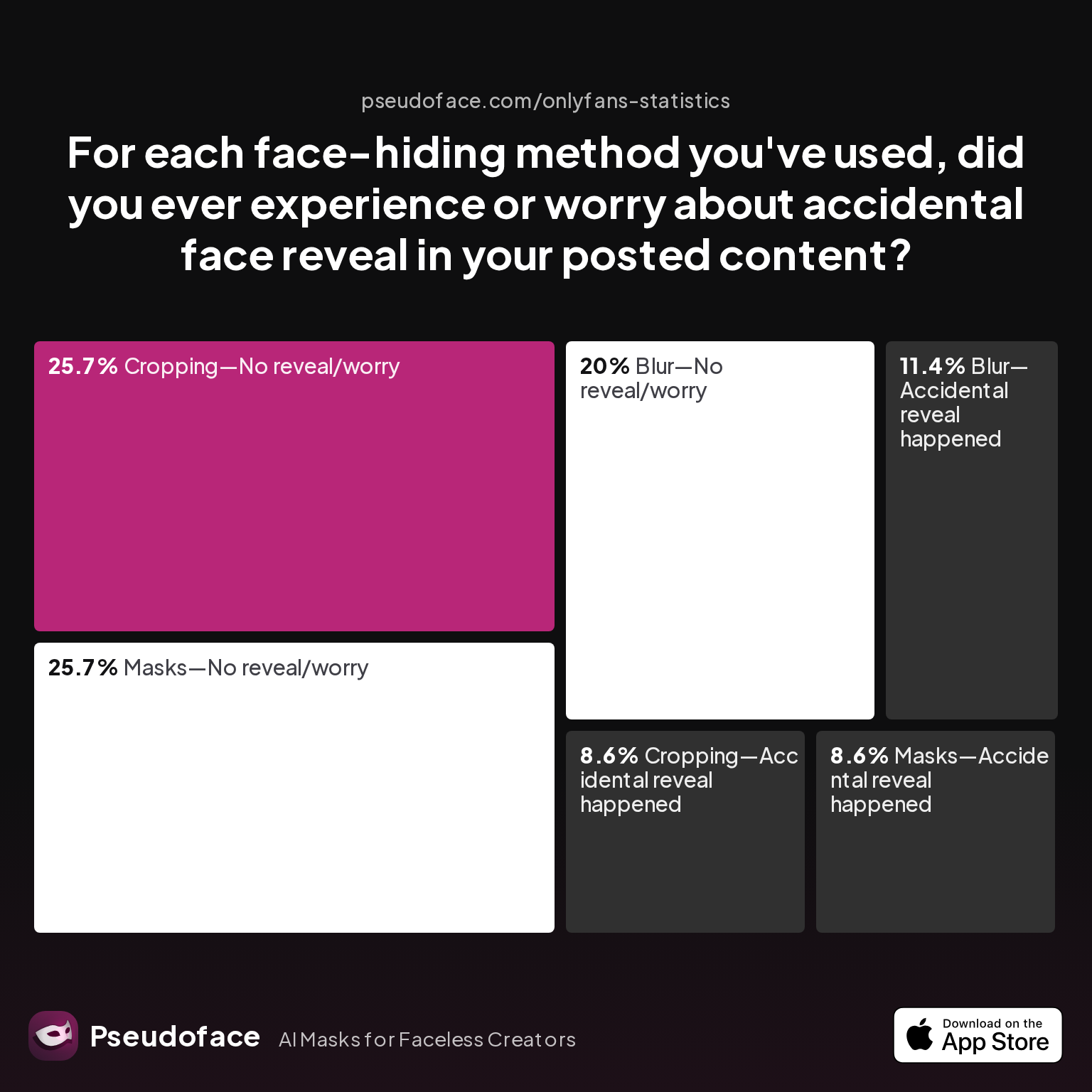
No face-hiding system is perfect. Accidental reveals—where a face or identifying bit sneaks into a frame by mistake—haunt even the most diligent creators. Per Pseudoface's 2025-2026 dataset, certain methods provoke far more user anxiety and actual slip-ups than others, shaping what creators are willing to stake their anonymity on.
| Answer | Percentage |
|---|---|
| Blur—Accidental reveal happened | 11.43% |
| Blur—No reveal/worry | 20.00% |
| Cropping—Accidental reveal happened | 8.57% |
| Cropping—No reveal/worry | 25.71% |
| Filter—Accidental reveal happened | 0.00% |
| Filter—No reveal/worry | 0.00% |
| Masks—Accidental reveal happened | 8.57% |
| Masks—No reveal/worry | 25.71% |
In this self-reported sample, blurring methods generated the most accidental reveals (11.43%), closely followed by cropping and mask usage at a little under 9% each. Around 25% of mask and cropping users felt entirely safe from accidental reveals; blur users split more evenly between confidence and concern.
These stats, while highly directional due to self-selection bias (anxious creators talk more about slips), signal a core friction: digital blurring and cropping rely on trust in your own editing/final check process, where a missed frame or edge can leak everything. Physical masks, in contrast, deliver a “hard” barrier. Unless removed mid-shoot or slipping off, the risk stays low.
Many creators share paranoia rather than actual disaster. But the emotional toll—rechecking edits, second-guessing exports, or fearing screenshots—permeates the community.
Reddit is filled with creators describing the panic of realizing they uploaded a video where a reflection or quick pan revealed their face for a frame. Others, despite years of content, report zero incidents—a testament to rigorous routine and triple-checks.
Weighing risks, many gravitate to the method they trust to minimize this single point of career-ending failure. And this calculus ties deeply into what fans perceive as “professional,” trustworthy content.
OnlyFans Mask vs Blur (and the Rest): Which Method Looks Most Professional?
Perhaps the sharpest dividing line among faceless creators is what fans actually think about masked/cropped/blurred content. No method is immune to scrutiny: professionalism—what paying subscribers perceive as effort, polish, and authenticity—shapes both sales and loyalty.
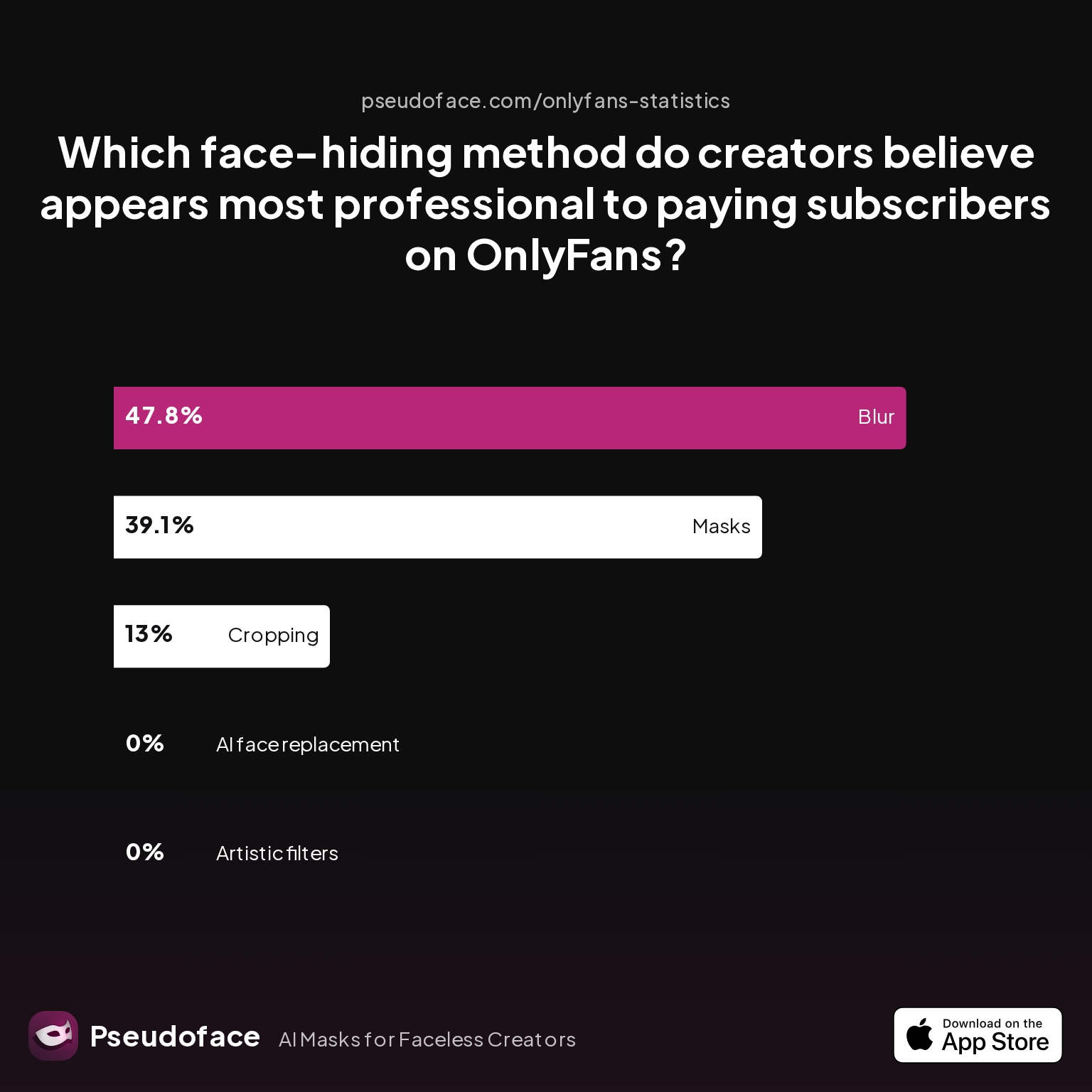
| Answer | Percentage |
|---|---|
| AI face replacement | 0.00% |
| Artistic filters | 0.00% |
| Blur | 47.83% |
| Cropping | 13.04% |
| Masks | 39.13% |
According to creator sentiment mines, 47.83% of creators believe "blur" appears most professional to subscribers, with masks winning favor in 39.13% of responses—cropping and filters lag far behind. The absence of votes for AI and artistic filters might surprise tech optimists, but in context, it reflects lingering doubts about both the authenticity of heavily AI-edited content and the patchy aesthetics of fast-applied artistic filters.
Why does blur, so derided for workflow pains, score top marks for professionalism? Creators note that, when done carefully, it signals effort—blurs are applied in editing, suggesting the creator controls the process and values their privacy. A well-blurred face also permits full-body shots, enhancing perceived production value and fan connection without “hiding.”
Masks divide audiences: a themed or sensual mask often fits certain cosplays and kinks, but can evoke detachment for subscribers seeking intimacy. High-quality masks, especially in artistic shoots, are praised as “mysterious” or “high fashion,” while cheap/disposable ones diminish the experience.
Cropping, though practical, leaves some fans feeling shortchanged—posed, over-zoomed compositions flatten the realism that many OnlyFans fans crave. Filters, especially basic AR stickers, risk the “Snapchat filter” stigma: easy to spot, little craft.
The message is clear: professionalism isn’t just about polish, but the right fit for your niche, audience, and personal comfort. However, the data signals the danger of relying on one method rigidly—hybrid approaches or fine-tuned tweaks often produce the perception of care and intention that subscribers notice.
This leads us to a concrete side-by-side summary: what do the data and lived experience say about the true trade-offs?
Comparison Table: Face Hiding Methods OnlyFans Creators Recommend Most
The reality of protecting your face while building a paid OnlyFans brand is choosing the compromise that bothers you least. The following table synthesizes self-reported pros, cons, and perceptions. Consider it a “decision matrix” distilled from thousands of real creator interviews and public advice threads (with all the caveats of reporting and survivorship bias factored in).
| Method | Visual Quality | Ease of Use | Risk of Accidental Reveal | Tech Hassle | Perceived Professionalism | Best Fit For |
|---|---|---|---|---|---|---|
| Blur | Variable (often mid) | Moderate | Highest | Can be buggy/video exports | High (when well done) | Video, full-body shots, privacy-first |
| Cropping | High if composed | Easiest | Moderate | Minimal | Low-med | Solo, torso, feet content, simplicity |
| Mask | High for premium | Moderate | Low | None | High (stylish/cosplay) | Cosplay, mystery, maximal privacy |
| Artistic Filter | High if subtle | Moderate | Low-moderate | Sometimes fussy | Low (“Snapchat” effect) | Teasers, not high-ticket content |
| AI Replace | Potentially high | Hardest | Low (if it works) | High learning curve | Low-med | Early adopters, premium “novelty” fans |
The table reveals why hybrid approaches are gaining ground: many combine cropping with subtle blur, or mask with filter, depending on content type. Each method comes with unique pitfalls and audience signals; there is no “magic bullet,” just a series of smaller, manageable risks.
Creators in the threads emphasize:
- Workflow trumps theoretical safety: If a method’s hassle kills your desire to post, it’s not sustainable.
- Good enough > perfect: Most fans accept minor quirks if they sense real effort behind content safety.
- Consistency breeds trust: Suddenly swapping methods too often damages credibility with subscribers who crave reliability.
Ultimately, the data shows the recommendations that surface most are those that balance privacy, good-enough visual fidelity, and authentic connection—even at a cost to ideal aesthetics.
Faceless Creator Techniques for Brand Growth and Identity-Building
Deciding to stay faceless needn’t doom you to generic anonymity. Many top-earning creators have developed vibrant, memorable brands built without ever flashing their real face. The challenge is to offset a loss of facial identity with creative alternatives: themed personas, eye-catching masks, voice, body language, props, set dressing, and above all, fan interaction.
Branding as a faceless creator starts with critical setup:
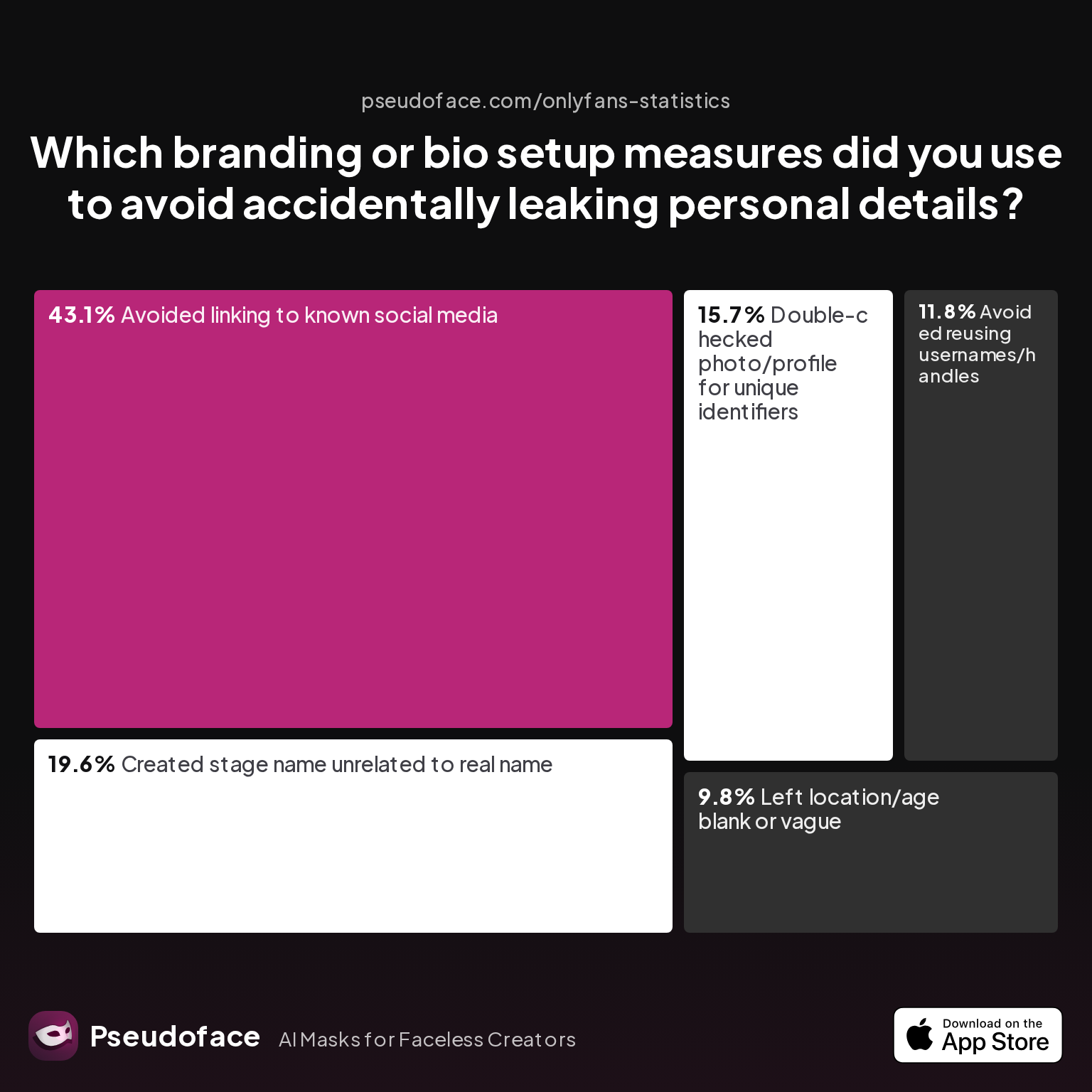
| Answer | Percentage |
|---|---|
| Avoided linking to known social media | 43.14% |
| Avoided reusing usernames/handles | 11.76% |
| Created stage name unrelated to real name | 19.61% |
| Double-checked photo/profile for unique identifiers | 15.69% |
| Left location/age blank or vague | 9.80% |
Over 43% of faceless creators meticulously avoid linking OnlyFans to known social media accounts, with nearly one in five crafting a unique, untraceable stage name. This isn’t just about dodging leaks; it’s about establishing a distinct persona that fans can latch onto.
Names, personas, and bios can signal intrigue, humor, or edginess—often reflecting specific kinks or interests, not just anonymity. Visual motifs (consistent masks, costumes, or even camera angles) become branding tools. Whether you’re “The Enigma in Red,” “Cosplay Queen,” or “Voice Only Vixen,” consistency plus personality is what keeps fans remembering—and subscribing.
That said, professional advice and community threads underscore the importance of ongoing vigilance. Every branding step should be cross-checked for traceable details, accidental reveals, or metadata leaks. Faceless branding is a discipline, not a one-time setup.
Success stories circulate regularly on Reddit, with creators sharing how themed identities, signature motifs, or even innovative use of masks and overlays keep their brand sticky—sometimes even outperforming face-out creators in niche appeal. The market for the mysterious or the creatively anonymous is thriving, provided you lean into its demands.
Faceless OnlyFans Tips: Setting Yourself Up for Consistent Privacy
Sustaining privacy isn’t only about the hiding method—it’s a workflow, a mindset, and a checklist revisited before every upload. According to active creator sentiment, some privacy steps are considered “absolutely non-negotiable,” while others are nice-to-haves or only relevant for the most risk-averse.
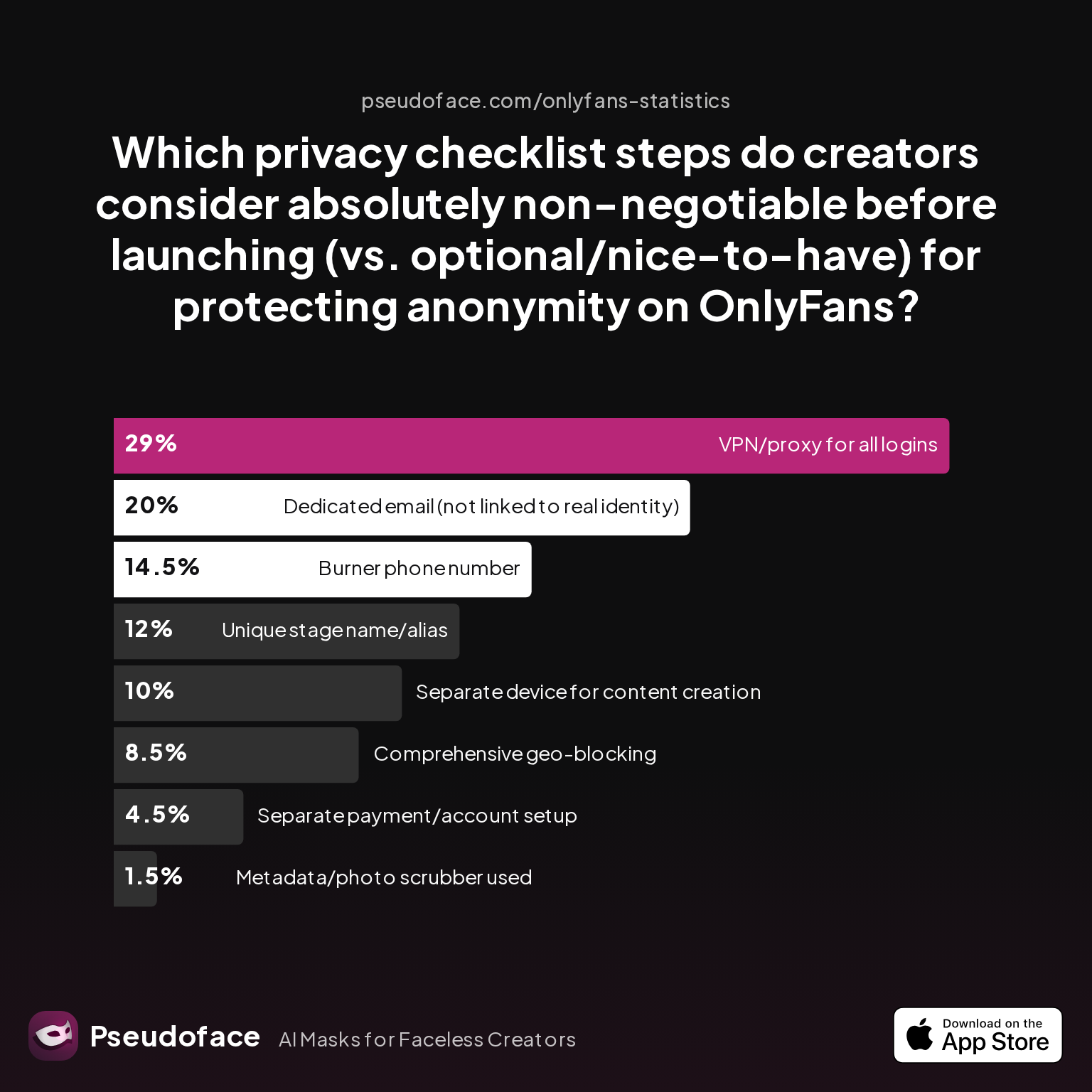
| Answer | Percentage |
|---|---|
| Burner phone number | 14.50% |
| Comprehensive geo-blocking | 8.50% |
| Dedicated email (not linked to real identity) | 20.00% |
| Metadata/photo scrubber used | 1.50% |
| Separate device for content creation | 10.00% |
| Separate payment/account setup | 4.50% |
| Unique stage name/alias | 12.00% |
| VPN/proxy for all logins | 29.00% |
Nearly 30% of creators insist on using a VPN for all logins, and 20% on a dedicated email, with others advocating for separate devices (10%) and burner phone numbers (14.5%). This practical blend reflects the community’s belief in layered defense: even if a face never leaks, an email slip or IP mismatch can unravel privacy.
To safeguard your identity, consider this workflow:
- Always shoot and edit on accounts/devices untied to your legal name.
- Double-check all content for accidental reveals—faces, IDs, surroundings—before upload.
- Consistently apply your chosen face-hiding or cropping method—never lapse “just once.”
- Use unique, non-recycled names, emails, and don’t crosslink socials.
- When possible, check metadata and hide location.
Reddit creators repeatedly flag that "one careless moment" is often what undoes months of careful work. Building privacy into your habits is the only reliable bulwark.
The journey of a faceless creator is more marathon than sprint—leaning into habits, picking the workflow that lets you publish confidently, and always keeping your risk tolerance at the heart of every decision.
FAQ
Is it possible to make good money on OnlyFans without ever showing your face?
Yes, many faceless creators report solid earnings, especially in niche verticals where mystery, fetish, or character work are valued over personal identity. Based on Pseudoface’s 2026 survey, 13% of anonymous creators even say hiding their face helped earnings by making their content more unique or mysterious, while 29% reported no noticeable impact. Success depends more on consistency, brand fit, and niche demand than face visibility.
What’s the safest way to make sure my face never slips into a photo or video by accident?
Using a physical mask or careful cropping is safest, as digital blurring can fail if not applied frame-by-frame. Always triple-check edits, review video exports, and consider a final content scan before uploading—automation rarely catches everything.
Do subscribers care if your face is hidden? Does it impact tips or subscriber loyalty?
Some subscribers prefer mystery, but others crave intimacy—data shows nearly half of creators believe well-executed blur is respected by fans, especially if content remains high quality. Over 25% feel their earnings are moderately or significantly impacted by face hiding, but a large segment reports no loss.
Can AI face swap or filters get past OnlyFans content review and payment processor checks?
As of early 2026, OnlyFans rarely flags AI-disguised faces if the content is legal and payment credentials match, but edge cases exist—especially where the AI overlay looks obviously fake or uncanny. Community anecdotes advise checking platform updates regularly and understanding that “too advanced” manipulation might draw suspicion in the future.
Which face hiding method is most beginner-friendly for low-tech creators?
Simple cropping is fastest and lowest-tech, as it requires no apps or filters and is hard to mess up. Masks come next in ease, especially for photo shoots or static video; blurring and AI require more editing knowhow.
If I want to show more of my body, how do I balance cropping vs. other face hiding techniques?
Use hybrid methods—crop in close for some shots, but for full-body content apply blur or wear a mask. Many creators alternate depending on the pose and desired effect.
Are there particular mistakes or metadata leaks to watch for when uploading as a faceless creator?
Besides visual face slips, watch for EXIF data (location), multi-device logins tied to your real identity, and accidental branding leaks (like posting a selfie with your real phone by mistake). Use photo scrubbing tools where possible.
Will subscribers think I’m “fake” or not trustworthy if I never show my face?
Trust is built more on consistent, quality posting and clear brand identity than on face visibility. Maintaining a personal narrative, chatting with fans, and avoiding erratic changes in style or disguise methods helps reassure paying subscribers.
How do I build a personal brand and connect with fans if I stay anonymous on OnlyFans?
Lean into unique personas (voice, costumes, themes), focus on story-driven content, and keep bio and banners visually interesting. Many faceless creators become known for hands-on interaction, creative sets, or themed series that outshine basic selfie workflows.
What kind of mask works best—full-face, masquerade, or other?
Reddit creators report full-face masks with good ventilation are safest for privacy, while masquerade or half-masks work best for branding in artistic, themed, or cosplay contexts. Comfort and fan reaction are the top decision points.
Faceless content creation on OnlyFans is not only possible, but thriving. The best method to hide your face is the one you’ll actually use, week after week, with comfort and confidence. Whether you go for cropping, masks, blur, or tech-driven filters, remember: the right mix for you balances privacy, workflow, and audience connection. If you find your sweet spot, you may just discover that your biggest asset is not your face—but your consistency, creativity, and care.


