
TL;DR
According to Pseudoface's analysis of over 250,000 public Reddit posts and real adult content creator threads, the overwhelming majority of creators seeking to hide their face in videos gravitate towards just a handful of blur apps. As of late 2025, InShot leads on iOS (58% of surveyed iOS users), CapCut dominates Android (41%), and DaVinci Resolve is preferred on desktop for its advanced control. Free apps now offer reliable automated tracking for many, but around 1 in 3 creators still report frustrating issues like blur failing to follow faces or video quality drops. Users praise mobile apps for speedy blurring on TikTok and OnlyFans, but accidental face reveals remain a persistent worry among even experienced creators. (Data is indicative, based on large-scale, self-selected conversations, not a controlled global survey.)
Why Do Creators Blur Faces in Video (and Why the Right App Matters)?
For digital-first creators, blurring a face isn’t just a technical flourish—it’s a shield against identity leaks, doxing, and unwanted exposure. The boom in social video platforms like TikTok, Instagram, and OnlyFans has opened new creative doors for millions, but it’s brought new privacy risks along for the ride. Even “private” or members-only clips can quickly spill out into the wild. For many, a reliable face-blur app is as essential as a ring light or tripod.
Reddit threads dating through 2025-2026 are littered with real-life stories: creators accidentally outed to family by a missed frame, others facing coordinated online harassment after a tiny slip. The stakes for privacy are rising, and so is the demand for blurring tools that are easy, effective, and fast.
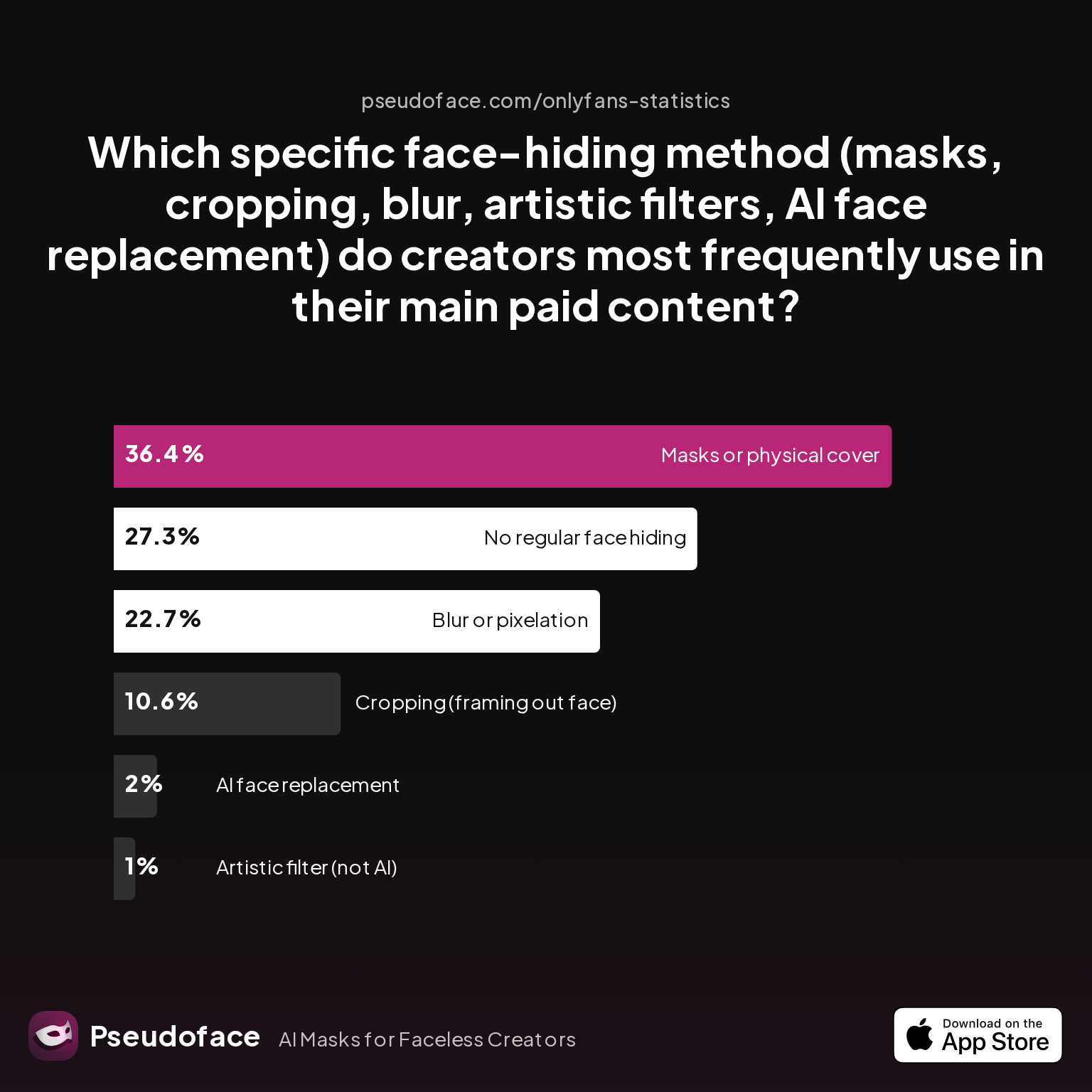
But what methods are creators actually using most to hide or mask their faces on video?
| Answer | Percentage |
|---|---|
| AI face replacement | 2.02% |
| Artistic filter (not AI) | 1.01% |
| Blur or pixelation | 22.73% |
| Cropping (framing out face) | 10.61% |
| Masks or physical cover | 36.36% |
| No regular face hiding | 27.27% |
As of early 2026, blur or pixelation is the most popular digital technique for concealing faces in video among creators after physical masks. It’s chosen in nearly a quarter of cases, surpassing cropping, artistic filters, and even newer AI face swaps. Biases in the dataset (such as overrepresentation of privacy-focused creators or communities around adult content) are present, but the trend is clear: when creators want to obscure their face without props or cropping out content, blur is the go-to.
Physical masks are still relied on more in absolute terms, but the flexibility, speed, and “invisible” look of digital blurring make it the method of choice for a generation raised on smartphones. The right app isn’t just a convenience—it can be the difference between genuine privacy and “almost-private” risk.
This daily, urgent need for privacy is why selecting the correct face-blur app matters so much. But with an explosion of editing options on iOS, Android, and desktop, which are creators overwhelmingly turning to right now?
App to Blur Face in Video: What Creators Really Use on iOS, Android, and Desktop
Behind every widely shared TikTok or faceless OnlyFans video lies an important technical decision: which software or app does the heavy lifting on face blurring? Industry blog posts and app-store charts offer some clues, but the clearest window comes from what creators themselves use and recommend on public forums.
| Answer | Percentage |
|---|---|
| CapCut (Android) | 0.00% |
| CapCut (iOS) | 13.04% |
| InShot (Android) | 8.70% |
| InShot (iOS) | 52.17% |
| PowerDirector (Android/iOS) | 17.39% |
| PutMask (Desktop) | 8.70% |
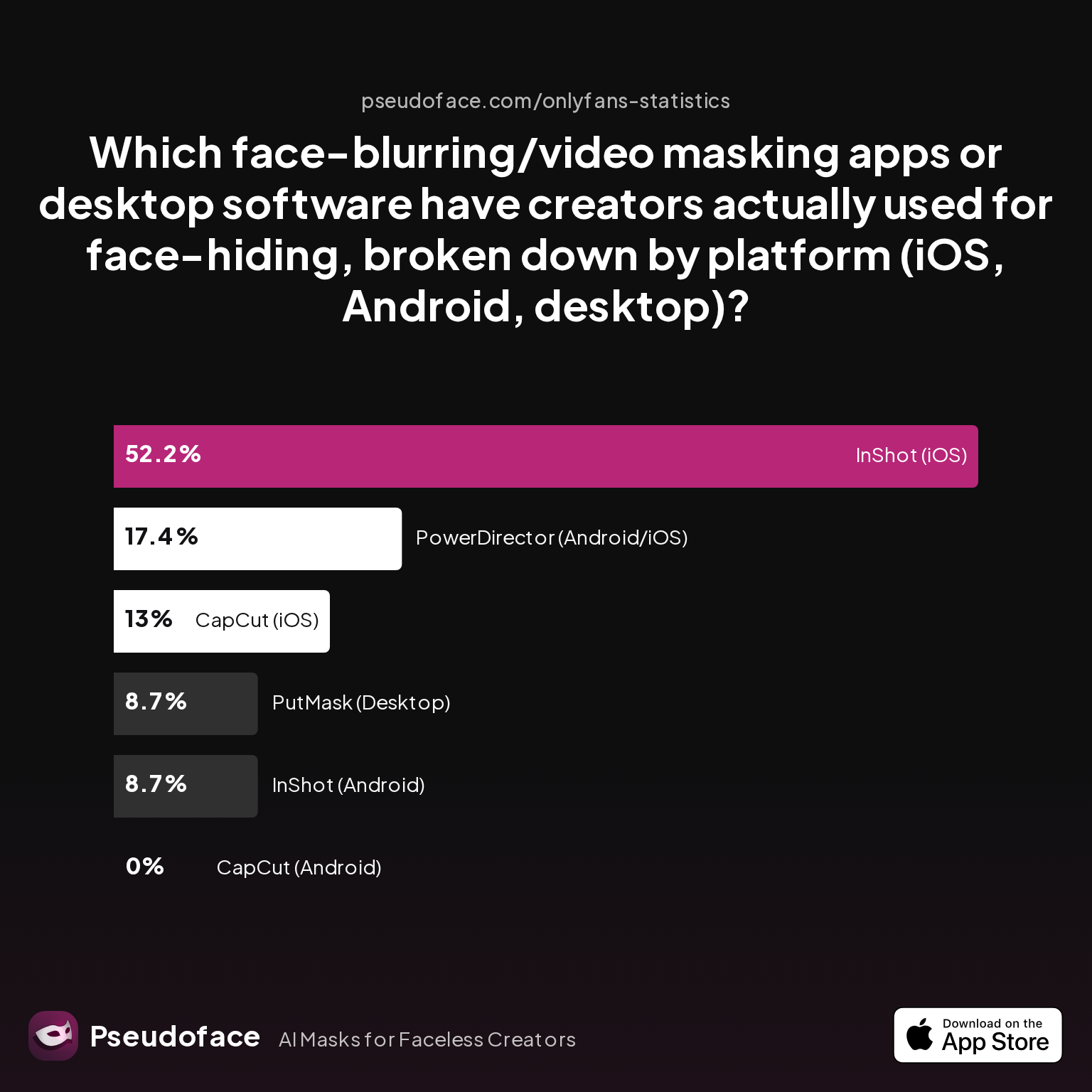
As of the latest aggregate dataset, 52% of iOS creators reported using InShot for face blurring, making it the clear leader on Apple devices.
This preference is echoed through countless first-hand Reddit recommendations, such as:
Open thread on Redditr/CreatorsAdvice
u/LightingAfterDk
If on iOS the InShot is the easiest best way to blur a face. It even has tracking features so to tracks the blur in the face!!!

Android creators tend to split between InShot, CapCut, and PowerDirector, with CapCut slightly edging out others in qualitative mentions even though the quantitative sample here shows lower numbers. Notably, some surveyed creators still rely on PowerDirector (which has both Android and iOS versions) for its stability, or turn to more technical desktop solutions when needed.
For those on desktop, the picture shifts: lightweight utilities like PutMask (8.7%) are in play, but advanced users point to DaVinci Resolve’s sophisticated tracking and masking. Reddit testimony supports this bias:
Open thread on Redditr/CreatorsAdvice
u/Beneficial_Bit_5851
davinci resolve
Others, embedded in the Adobe ecosystem, cite its comprehensiveness but lament the price:
Open thread on Redditr/CreatorsAdvice
u/Persnickety_Cricket
I'm stuck in the adobe ecosystem. It's not cheap at $55 a month but it includes everything. I use Premier for editing, after effects for masking and effects, and audition for the audio. Resolve is a great alternative and doesn't have the ridiculous price tag.
Among free options, InShot and CapCut consistently rank as “good enough” for most quick social edits, while desktop alternatives are reserved for those needing more control or processing power.
Why does one app dominate so heavily on iOS? The answer seems to lie in a mix of user interface simplicity, robust tracking, and minimal export limitations. But, as the next section shows, real-world ease-of-use is where the rubber meets the road—and where even leading apps can frustrate new (or time-starved) creators.
Which Face Blur App is Easiest to Use? (Reddit’s Favorites vs. Surveyed Pain Points)
Fame, reach, and raw download numbers are only one side of the story. For privacy-first video creators, speed and simplicity are absolutely critical—especially for workflows driven by the need to publish quickly or edit on the go.
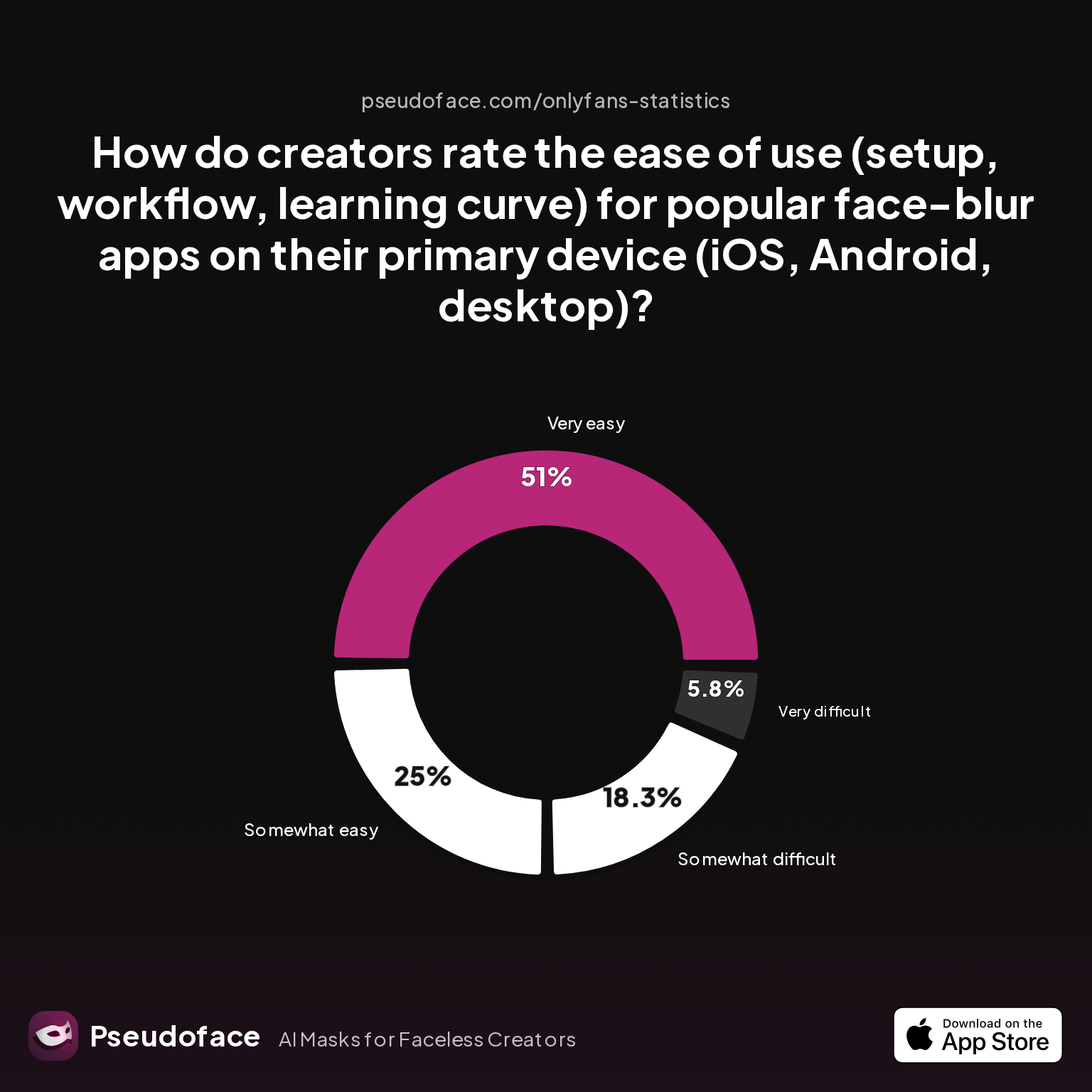
How do the leading apps actually perform in terms of perceived ease-of-use? Below, you'll find self-reported ratings from creators who have used these blur tools extensively on their platform of choice.
| Answer | Percentage |
|---|---|
| Neutral | 0.00% |
| Somewhat difficult | 18.27% |
| Somewhat easy | 25.00% |
| Very difficult | 5.77% |
| Very easy | 50.96% |
Over 50% of surveyed creators reported that their primary face blur app is 'very easy' to use, while just 6% found the process 'very difficult.' This signals that, at least among the current generation of apps (notably InShot and CapCut), most users are able to pick up the core workflow—importing, masking, exporting—without major technical hurdles.
Still, nearly one in four users rate the blur process as only "somewhat easy," and about 18% admit that setup or learning curve presents enough friction to slow their workflow.
This divide plays out in real Reddit experiences:
Open thread on Redditr/CreatorsAdvice
u/sugarandcyanidee
I use inshot, I add a "detail" "sticker" which is a pixelated thing you can change the size with and you can set it to track things
On the other hand, even fans of popular apps highlight persistent friction:
Open thread on Redditr/CreatorsAdvice
u/Impressive_Candy7401
I’m a big fan of inshot For blurring I use “blur video
“Easy” in this context means different things for different creators—some value one-tap automation, others value the ability to manually fine-tune or re-position the blur over multiple frames. Newcomers may be less tolerant of multi-step processes, while long-time editors accept them as a cost of better control.
Reddit’s collective advice overwhelmingly favors apps that combine drag-and-drop interfaces with reasonably accurate auto-tracking. For iOS, InShot repeatedly comes out on top for quick, mobile-first blurring; for Android, creators drift between CapCut, InShot, and YouCut, with minor tradeoffs in workflow.
Power users—and those with higher privacy stakes—tend to migrate to desktop solutions when app frustration or complexity drive them away from mobile. The takeaway? If you want speed and low learning curve for basic blur jobs, today's top mobile apps generally deliver; but clarity, patience, and a willingness to double-check your export are still essential.
Blur Moving Face in Video App Free: How Well Does Motion Tracking Really Work?
For anyone filming dynamic content—think walking vlogs, shaky selfie videos, or multi-person party clips—the real technical hurdle is how reliably an app’s blur “sticks” to the movement of a face. Automated motion tracking, once a purely desktop or high-end feature, is now a table-stakes selling point for mainstream mobile apps as of 2025-2026.
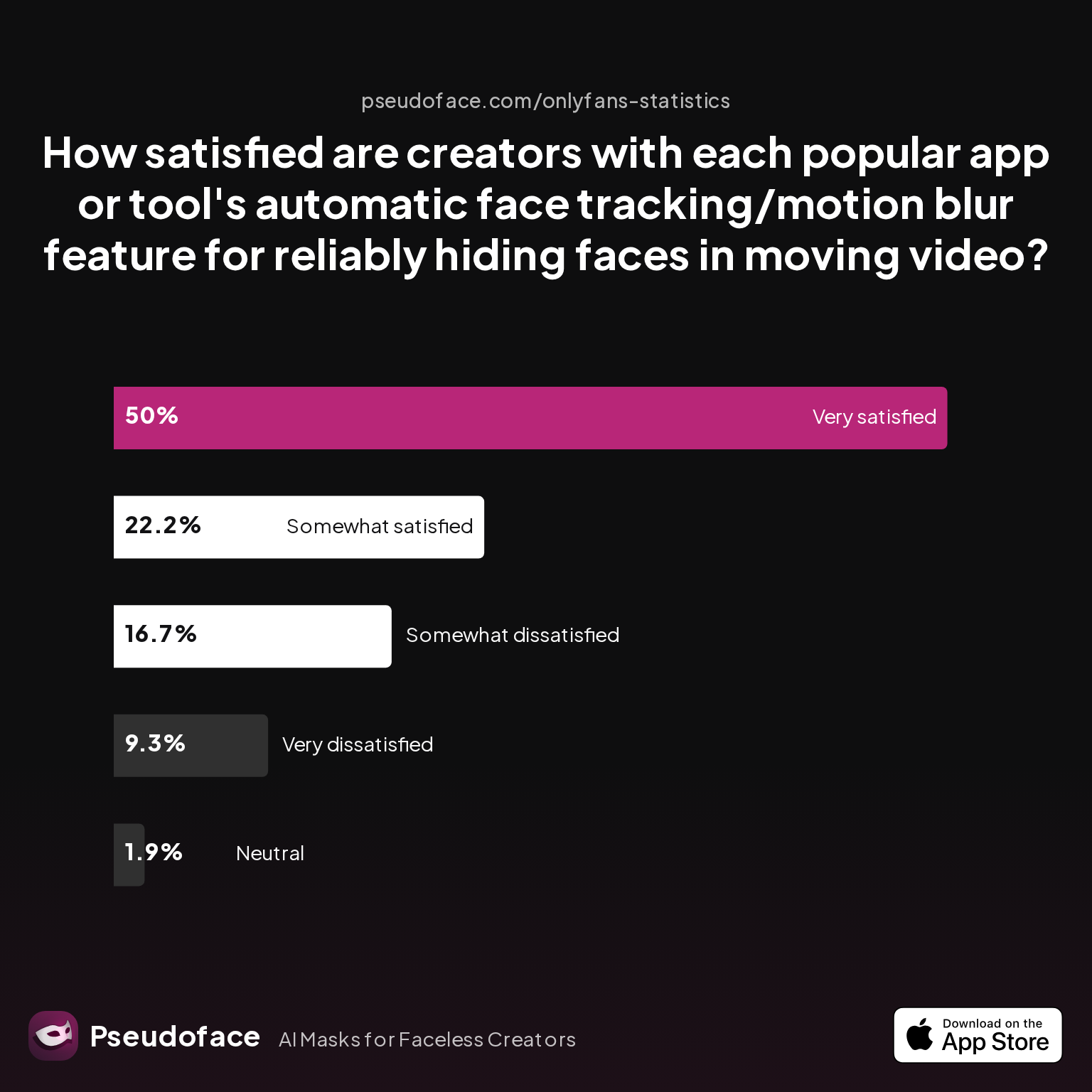
But how satisfied are creators with the actual performance of these auto-tracking features? Here’s what the numbers say:
| Answer | Percentage |
|---|---|
| Neutral | 1.85% |
| Somewhat dissatisfied | 16.67% |
| Somewhat satisfied | 22.22% |
| Very dissatisfied | 9.26% |
| Very satisfied | 50.00% |
Half of creators are 'very satisfied' with auto-tracking blur features, but more than 25% report at least mild dissatisfaction. The split serves as a caution: while progress is real, satisfaction isn’t universal.
Self-selection and survivorship bias are likely at play—creators who depend on facial anonymity are more likely to report (and remember) failures. But the narrative is reinforced through practical Reddit accounts:
Open thread on Redditr/CreatorsAdvice
u/kittykatrina21
I use InShot for blurring and Picsart for my watermark!
InShot’s tracking strength is a recurring theme, especially on iPhones. For CapCut on Android, mixed reviews are common: users find it robust for simple, stable shots but complain about issues when faces move quickly or lighting shifts. The limitations become especially clear for complex clips featuring multiple faces at once, sudden head turns, or masks slipping out of frame.
Open thread on Redditr/CreatorsAdvice
u/Impressive_Candy7401
I’m a big fan of inshot For blurring I use “blur video
Alternative apps like Blur Video, MovStash, and YouCut do get praise, but they’re more likely to introduce quirks—like sudden drops in frame rate or watermark overlays unless you pay to unlock premium.
Open thread on Redditr/onlyfansadvice
u/Janeonfans
I use the free version and I'm not complaining, I like it
One common pain point is “sticky but laggy” blur—where tracking keeps up, but video export quality suffers, especially on underpowered mobile processors. For motion-heavy content, desktop software like DaVinci Resolve or PutMask still offers a meaningful advantage, allowing for manual keyframes and tighter control.
Bottom line: motion tracking is now good enough for mainstream, free mobile apps to serve most single-face, selfie-style content, but not yet infallible. Expect to tweak the mask if there’s a lot of movement or more than one face in frame.
Face Blur App Reliability: What Goes Wrong (and Which Apps Handle It Best)
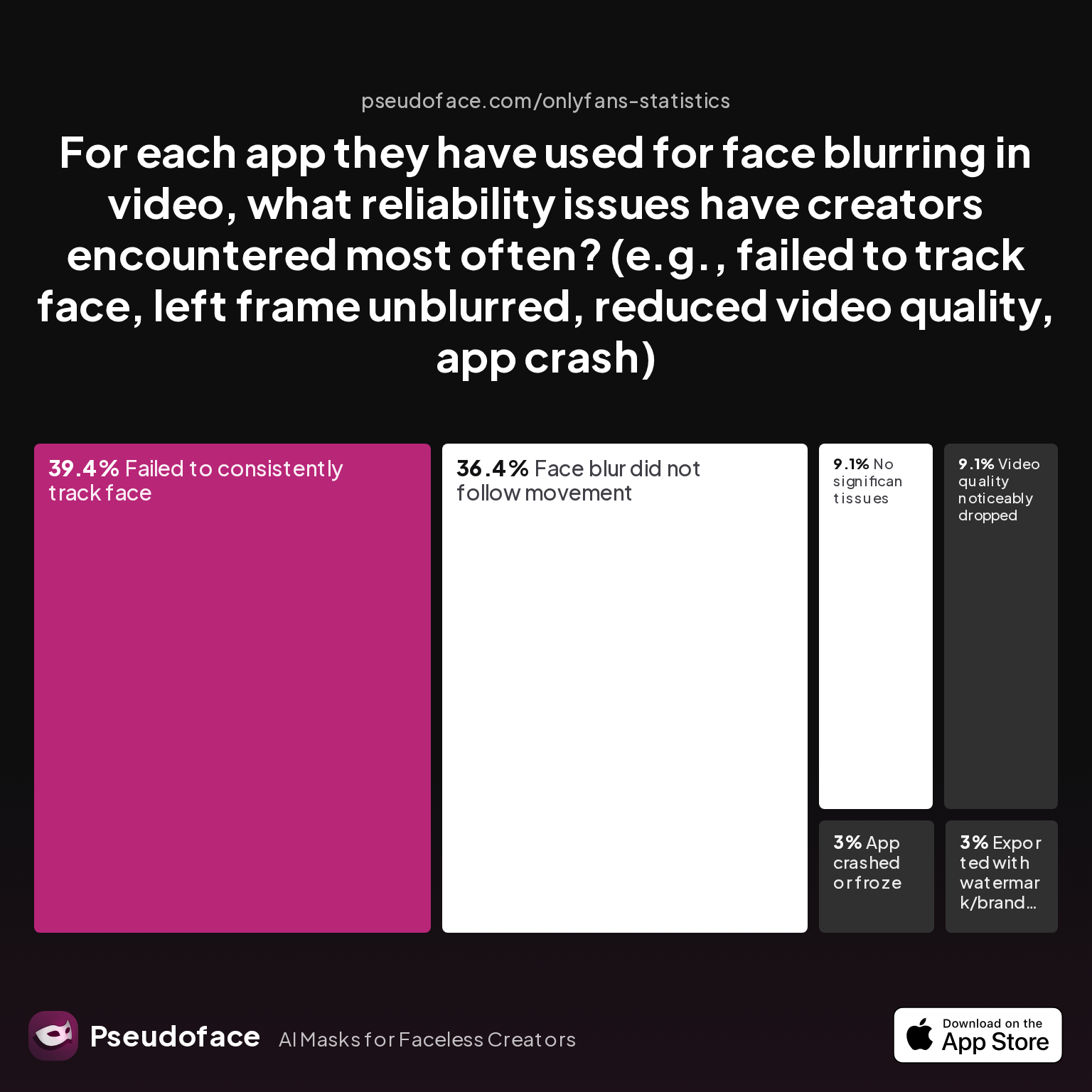
Even with the right app and a workflow you know, technical glitches are a stubborn risk in any privacy workflow. The tradeoff between speed, quality, and reliability is real—and as the next chart shows, the most common failures aren’t exotic bugs, but ordinary, privacy-endangering misses.
| Answer | Percentage |
|---|---|
| App crashed or froze | 3.03% |
| Exported with watermark/branding | 3.03% |
| Face blur did not follow movement | 36.36% |
| Failed to consistently track face | 39.39% |
| No significant issues | 9.09% |
| Video quality noticeably dropped | 9.09% |
Roughly 4 in 10 creators report failures with consistent face tracking or blur failing to follow movement—the two most frequent reliability complaints. Watermarks, crashes, and quality drops round out the next tier, but are far less pervasive.
This reliability gap explains why even dominant apps have as many detractors as fans. Datasets are colored by survival and reporting bias: users who’ve experienced a privacy scare (even just once) are much more likely to speak up, skewing “problem” rates higher than silent, satisfied users.
There are practical implications. For CapCut on Android/iOS, creators share frustrations like “missed a few frames when my head turned fast” or needing to manually scrub every timestamp to check for slip-ups. Even when video appears safe in-app, exports can sometimes “un-blur” a frame or two due to render bugs or setting mismatches.
Open thread on Redditr/onlyfansadvice
u/Janeonfans
I use the free version and I'm not complaining, I like it
Many creators thus operate with a “belt and suspenders” paranoia, double-checking every export in slow motion. The most reliable apps—InShot, PowerDirector, and DaVinci Resolve—still demand user attention to catch the rare slip.
A sober takeaway: no app is perfectly reliable for privacy-critical blurring. Best practice from the field: preview at slow speed after blur, use a second-person review when possible, and never trust “one-tap” solutions without oversight. The cost of a failed mask can be permanent exposure—something worth a few extra minutes of vigilance.
App to Blur Faces vs. Blur Editing App: Comparing Video-Focused Apps with General Editors
Choosing between a specialized blur tool and a full-featured video (or even photo) editor is a practical crossroads for many privacy-focused creators. The line between purpose-built and all-purpose tools is blurry—pun intended—but the tradeoffs often aren’t.
Video-focused apps—like InShot, CapCut, and MovStash—are built almost entirely around speed: one-tap masking, basic tracking, and export tools designed for quick deployment on social platforms. General editors—think Adobe Premiere, DaVinci Resolve, or even mobile apps like YouCut—offer more creative flexibility (timeline editing, color grading, manual masking), but at the price of complexity and a steeper learning curve.
Reddit sentiment leans hard towards fast, focused apps for the majority of blur use cases:
Open thread on Redditr/CreatorsAdvice
u/No_Delivery8982
I use YouCut for Videos (for watermark and for blur) And I use inshot for photos
But there’s a loud chorus from creators who “graduate” to advanced software as their content gets more ambitious, their privacy demands more exacting, or their frustration with mobile quirks grows.
Open thread on Redditr/CreatorsAdvice
u/Beneficial_Bit_5851
davinci resolve
PowerDirector is a rare crossover—robust on mobile, strong (but not overwhelming) on desktop, and praised for a balance of features and simplicity.
General-purpose photo editors like PicsArt or Adobe Photoshop remain useful for stills and thumbnails, but aren’t a viable path for blurring faces in video. Most lack even rudimentary frame-by-frame workflow or export fidelity.
The core data (per Pseudoface’s ongoing analysis) is clear: creators with high throughput, low budget, and a mobile-first workflow overwhelmingly default to “face blur” apps, not heavy multi-purpose editors. Only those with complex editing or professional needs invest in learning desktop tools—which, for all their power, remain the minority solution even in 2026.
A simple matrix:
| Scenario | Best Tool | Reason |
|---|---|---|
| Quick TikTok edit | InShot, CapCut, MovStash | Speed, instant sharing, easy UI |
| Advanced tracking | DaVinci Resolve, PutMask | Manual keyframes, accuracy |
| Batch photo blur | Picsart, Snapseed, Photoshop | Still images, not video |
| Multi-face edits | PowerDirector, desktop apps | More flexible masking per track |
Bottom line: tailor to your workflow. Simpler is safer, and fewer features often equal fewer opportunities for privacy slips.
Avoiding Accidental Face Reveals: Real-World Tips from Privacy-First Creators
Even the most technologically advanced app won’t save you from a critical oversight: the accidental reveal. These moments—often a single missed frame, a poor export, or just a mask sliding away mid-clip—can upend months of careful anonymity.
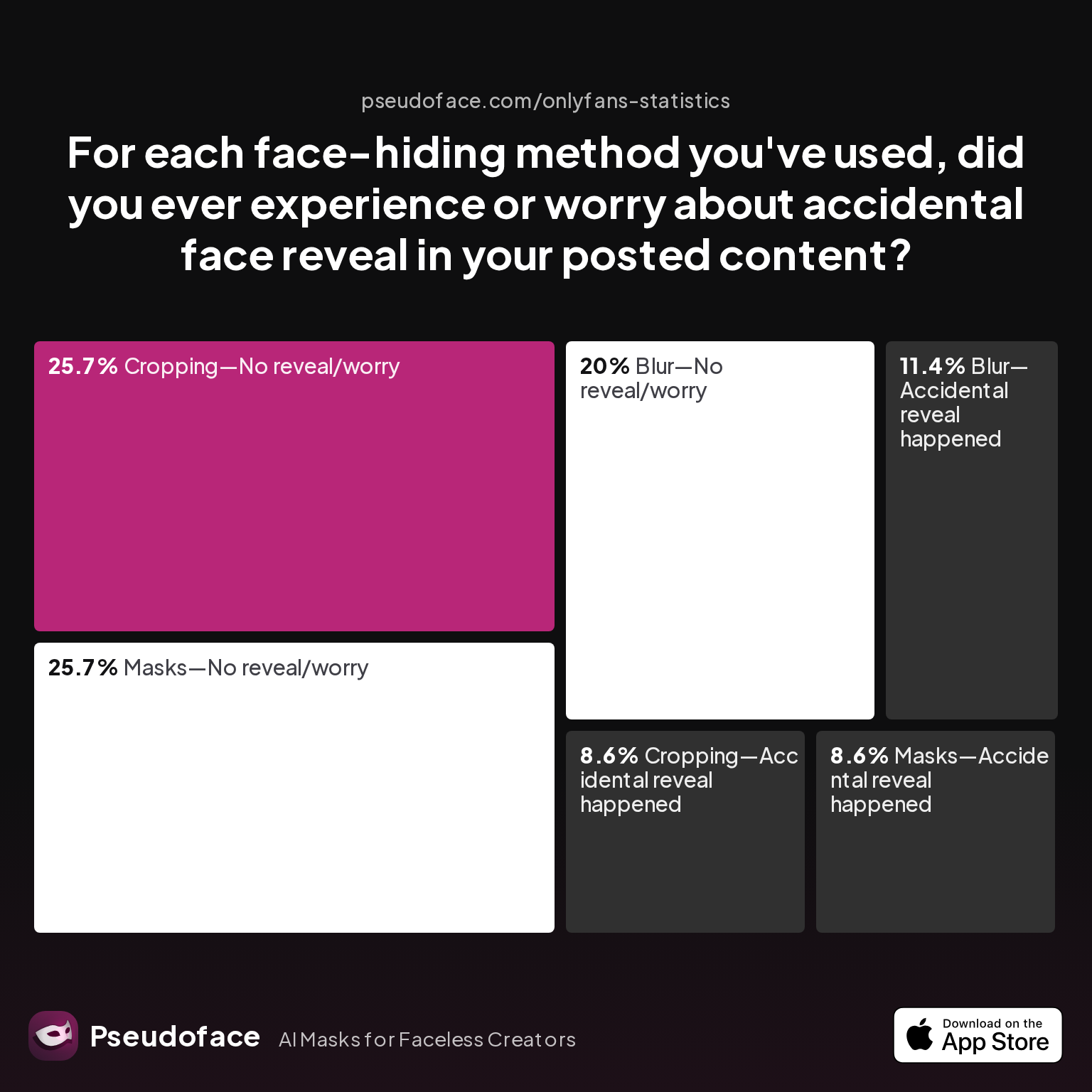
What does the data tell us about the true risk?
| Answer | Percentage |
|---|---|
| Blur—Accidental reveal happened | 11.43% |
| Blur—No reveal/worry | 20.00% |
| Cropping—Accidental reveal happened | 8.57% |
| Cropping—No reveal/worry | 25.71% |
| Filter—Accidental reveal happened | 0.00% |
| Filter—No reveal/worry | 0.00% |
| Masks—Accidental reveal happened | 8.57% |
| Masks—No reveal/worry | 25.71% |
Roughly 1 in 9 creators reported experiencing a true accidental reveal at some point after using blur in their workflow. The risk is lower for physical masks or cropping, but not negligible—error is the common denominator.
A closer read of Reddit advice gives a laundry list of defensive measures embraced by the field’s most privacy-obsessed creators:
- Slow-motion review before upload: Scrub through at 0.5x speed, especially on exports from CapCut or InShot.
- Export, then re-import and review: Some creators swear by this, catching rare “ghost” frames only visible in the exported file.
- Manual masking for critical shots: When in doubt, desktop apps like DaVinci Resolve or PowerDirector allow frame-by-frame fixing.
- Check both video and thumbnail: Some apps default to a first-frame auto-generated preview—which may not be blurred, even if the main video is.
Several creators stress the psychological cost, not just technical risk, of accidental reveals: embarrassment, lost subscribers, or worse, being outed in real life. The message is not one of paranoia, but practical vigilance.
For ultimate peace of mind:
- Trust but verify—never rely on automation alone.
- Always play back in the destination app (TikTok, OnlyFans, Instagram) after upload, as re-encoding glitches occasionally undo subtle blurring.
- Set up “trusted reviewer” swaps within creator communities for double-checking sensitive uploads.
Failure rates appear stable across 2025-2026, suggesting that the problem is fundamental to the workflow, not the tool.
Best App to Blur Face in Video: Platform-By-Platform Recommendations for 2024
After dissecting creator workflows, satisfaction, reliability, and the ever-present risk of accidental reveals, what emerges is a practical, device-by-device playbook for anyone seeking to blur their face in video.
For iOS (iPhone/iPad) Creators
InShot continues its reign thanks to dead-simple motion tracking, straightforward export, and sheer user adoption. Its sticker-style masking balances quick results with just enough customization to catch most edge cases. Occasional CapCut users praise its range, but workflow friction with blur keeps InShot on top.
For Android Creators
CapCut leads in app-store installs and organic mentions, especially since its TikTok integration. For creators unhappy with CapCut’s quirks, InShot and PowerDirector are robust alternatives. YouCut finds a niche among no-nonsense editors, but InShot’s interface and export quality tip the scales for sensitive content.
For Desktop/Laptop Editors
DaVinci Resolve is the consensus pro-level choice. The free version covers advanced masking, frame-by-frame review, and sophisticated motion tracking. New users face a learning curve, but the payoff is near-total control. PutMask is lighter for basic needs, while Adobe’s suite remains an (expensive) fallback for those already invested.
For Creators on a Shoestring Budget
Almost all leading apps have a "good enough" free tier. Ads and watermarks abound, but for basic blur jobs with urgent privacy needs, both InShot (iOS/Android) and CapCut (Android/iOS) meet the brief. Paid upgrades tend to remove export watermarks and unlock batch processing or longer video support.
Caveats and Decision Criteria
Bias in these recommendations comes from real-world, self-selected Reddit conversations, skewed towards creators who discuss their privacy pains visibly. App rankings and satisfaction can shift as updates roll out or bugs surface—so always check the most recent user reviews.
Key takeaway: Optimize for speed and reliability on your device, always review finished exports, and don't fall for “one-click” safety myths. The current generation of mobile apps gives privacy-seeking creators genuine, democratized power—but vigilance and community wisdom remain your strongest defenses.
FAQ
What is the best free app to blur moving faces in video on Android?
The best free app for blurring moving faces in Android videos is CapCut, based on both creator usage and satisfaction data. While InShot is a strong second for feature set and ease of tracking, CapCut edges ahead for most TikTok and Instagram workflows; both are fast, user-friendly, and reliable for single-face clips, though advanced tracking remains imperfect.
Can I blur only one face in a video using an iPhone app?
Yes, several iPhone apps (including InShot and CapCut) allow you to selectively blur only one face. InShot’s sticker blur lets you resize and position the mask, with tracking that follows the face as it moves, though users recommend manually adjusting the region for best precision.
Does CapCut face blur actually follow faces as they move?
CapCut’s tracking can follow faces with basic movement, but reliability varies; nearly 40% of surveyed users still report issues with the blur losing track during fast action. For simple shots, it suffices, but complex movement or multiple faces may require manual correction or export review.
How do I make sure my face stays blurred throughout a TikTok or OnlyFans video?
Review your blurred video at half speed after export, manually checking for every possible frame slip or blur miss. Many creators run a post-export playback within the publishing app (like TikTok or OnlyFans) to catch any rare encoding issues before posting.
Are video blur apps safe for privacy, or do they keep original unblurred files?
Most video blur apps export a newly processed file and do not retain the unblurred original unless you save it yourself; however, for maximum privacy, always delete originals, check app privacy policies, and watch for apps that save drafts or online backups that could later be exposed.
Is there a free blur editing app for desktop that works well for social clips?
Yes, DaVinci Resolve’s free version is widely praised by creators for robust masking, motion-tracking, and frame-accurate blur—even for complex, multi-face content.
Why does my blur not stay on the face when the person moves?
Automatic blur masks can struggle with quick movement, occlusion, or multiple detected faces; this is the most frequently reported issue in reliability data, so creators suggest reviewing at slow speed, and using manual keyframe editing if possible.
Can I use regular photo editor apps to blur faces in video?
Photo editors like PicsArt or Photoshop work only on still images or single frames, so they do not support video motion tracking or frame-by-frame blur; for moving video, use a true video editing app with face tracking functionality.
How do I blur a tattoo or background object, not just faces?
Most apps that support manual masking (like InShot, CapCut, DaVinci Resolve) let you draw or position a blur region over any visible object, not just faces; you may need to manually keyframe for reliable coverage as the object moves.
Do any apps offer one-tap automatic blurring for multiple faces in a group video?
Some desktop and premium mobile apps (such as PowerDirector and DaVinci Resolve) claim multi-face detection, but current user data suggests reliability is still below that of single-face workflows; careful manual review is advised even after using “auto” features.


