
TL;DR
If you’re a US FeetFinder creator, you’re responsible for reporting all your platform earnings as self-employment income—regardless of whether you receive a 1099 form. According to Pseudoface’s analysis of 250,000+ public Reddit threads by real foot-content creators, around 43% of FeetFinder sellers said they were uncertain whether their payouts were “visible to the IRS,” and documented confusion over whether the $600 threshold for 1099s counts gross earnings or withdrawals. FeetFinder does not withhold taxes from your payments: you receive a 1099-NEC if you meet specific payout benchmarks, but you must submit a W-9 first, and many creators mistakenly expect a W-2 instead. Based on 2025-2026 data, staying compliant requires understanding how the platform’s forms, thresholds, and reporting intersect with IRS policy—so you can maximize your income and avoid payout holds.
The Realities of FeetFinder and Taxes: What Creators Need to Know
FeetFinder may promise flexible income and privacy, but when it comes to taxes, US sellers face obligations that many don’t expect. Your relationship with FeetFinder is not the same as with a traditional employer. Instead, as an independent seller, you are legally considered self-employed—and the IRS applies “business income” rules to everything you earn on the platform, regardless of how side-hustle or anonymous it feels.
Based on creator discussions from 2025 and early 2026, confusion is widespread. New sellers often assume that if the money goes directly to their PayPal or bank, it “flies under the radar.” Yet, as digital platforms standardize IRS compliance, that hope is more folklore than fact. The rule is simple: US citizens must report all income from FeetFinder, whether or not they get a tax form from the platform.
There’s a second layer to the confusion. The language around “1099s,” “W-9s,” and “reporting” isn’t intuitive for first-time gig earners. Unlike a restaurant or retail job where you get a W-2 and see federal withholding on each paycheck, with FeetFinder, nothing comes out of your payout for taxes. This means the responsibility—and the risk, if something is filed incorrectly—rests with you alone.
If this sounds intimidating, you’re not alone. According to Pseudoface’s analysis of 2025 Reddit discussions, nearly half of creators openly questioned whether FeetFinder “reports their income to the IRS,” or wondered whether the $600 1099 threshold is truly a hard line for reporting.
The bottom line is clear: The IRS expects you to report and pay taxes on every dollar earned, not just the ones that show up on a form. Knowing what documentation FeetFinder provides, how to supplement it if you earn beneath the reporting thresholds, and how to keep precise records will blunt surprises when tax season arrives.
To clarify how your income gets reported—both to you and the IRS—let’s break down exactly which forms FeetFinder actually uses.
FeetFinder Tax Forms: W-9, 1099, and What You’ll Really Receive
If you’re a FeetFinder creator, the two most important tax forms you’ll encounter are the W-9 and the 1099-NEC. But many sellers, particularly in their first year on the platform, mix these up—or expect a W-2, which is never issued to independent contractors on creator platforms.
FeetFinder requires a completed W-9 from every US creator before enabling payouts. The W-9 is not a tax return; it’s a form you submit to FeetFinder, providing your legal name, address, and Social Security Number or other tax ID. This isn’t just red tape: FeetFinder uses your W-9 info to generate the 1099-NEC if you cross the reporting threshold, ensuring the IRS gets your income details.
Yet, a scan of community forums and recent (2025-26) FeetFinder advice threads reveals a pervasive misunderstanding about what forms to expect. A notable portion of creators believe the platform should send a W-2, reflecting a misunderstanding of their own employment status.
Open thread on Redditr/feetfinderadvice
u/Emotional_Cup_262
I'm pretty sure if you make over 600$ they send u a W2.

The reality: FeetFinder issues a 1099-NEC, not a W-2. The 1099-NEC (“Nonemployee Compensation”) documents non-employee income—money paid directly to you as an independent contractor. If your withdrawals (not just earnings) from FeetFinder total $600 or more during a calendar year, you should receive this form by early February the following year, either by mail or via your creator dashboard.
The process, as described in hundreds of Reddit advice discussions, is opaque but straightforward in principle: submit your W-9, verify your tax info, and wait. Yet, anxiety is common, especially when delivery is delayed or a form seems to go missing.
Open thread on Redditr/feetfinderadvice
u/mermaid_sugar
Just curious if anyone in the U.S. has received their 1099 yet? I sent an email at the end of January and was told it would be mailed out in January or February. I still haven’t received anything, so I resent the email asking for an update this week and haven’t gotten a response. I’m getting a little anxious as I’ve never had to file a 1099 before and don’t even know what kind of info I’m going to need to report or if there’s even a way to find what I need without going through Feetfinder. 🥴
Several practical takeaways emerge from this pattern:
- You must proactively ensure your W-9 is correctly filed with FeetFinder early in the calendar year to avoid payout holds or delays.
- If you meet the threshold, FeetFinder is responsible for issuing your 1099-NEC and for reporting your income directly to the IRS under your tax ID. They do not send a W-2, ever.
- Even if you don’t get a 1099 (i.e., your annual withdrawals are below $600), you still must report all FeetFinder income as self-employment income on your taxes.
Many creators worry about timing and access, with some reporting that their 1099 arrived late, got lost, or could only be retrieved by chasing support. Still, the threshold and document flow remain consistent in platform policy across 2025 and 2026.
Once you know what forms to expect, the next question is whether FeetFinder handles any of the actual tax payments for you.
Does FeetFinder Take Out Taxes From Creator Payouts?
FeetFinder does not withhold or remit taxes on your behalf. As a platform, it operates much like OnlyFans or eBay: you are responsible for tracking, reporting, and paying all tax obligations arising from your sales. This is a critical distinction, especially for new creators accustomed to having employer taxes taken out before seeing their net paycheck.
| Answer | Percentage |
|---|---|
| Funds delayed beyond advertised timeline | 33.83% |
| Never experienced payout issues | 0.50% |
| Partial payout (amount less than expected) | 2.99% |
| Payout failed due to verification/documents | 12.94% |
| Payout method suddenly unavailable/blocked | 3.48% |
| Payout never arrived or lost | 21.89% |
| Payout request stuck in review/no updates | 16.42% |
| Payout reversed due to chargeback/dispute | 7.96% |
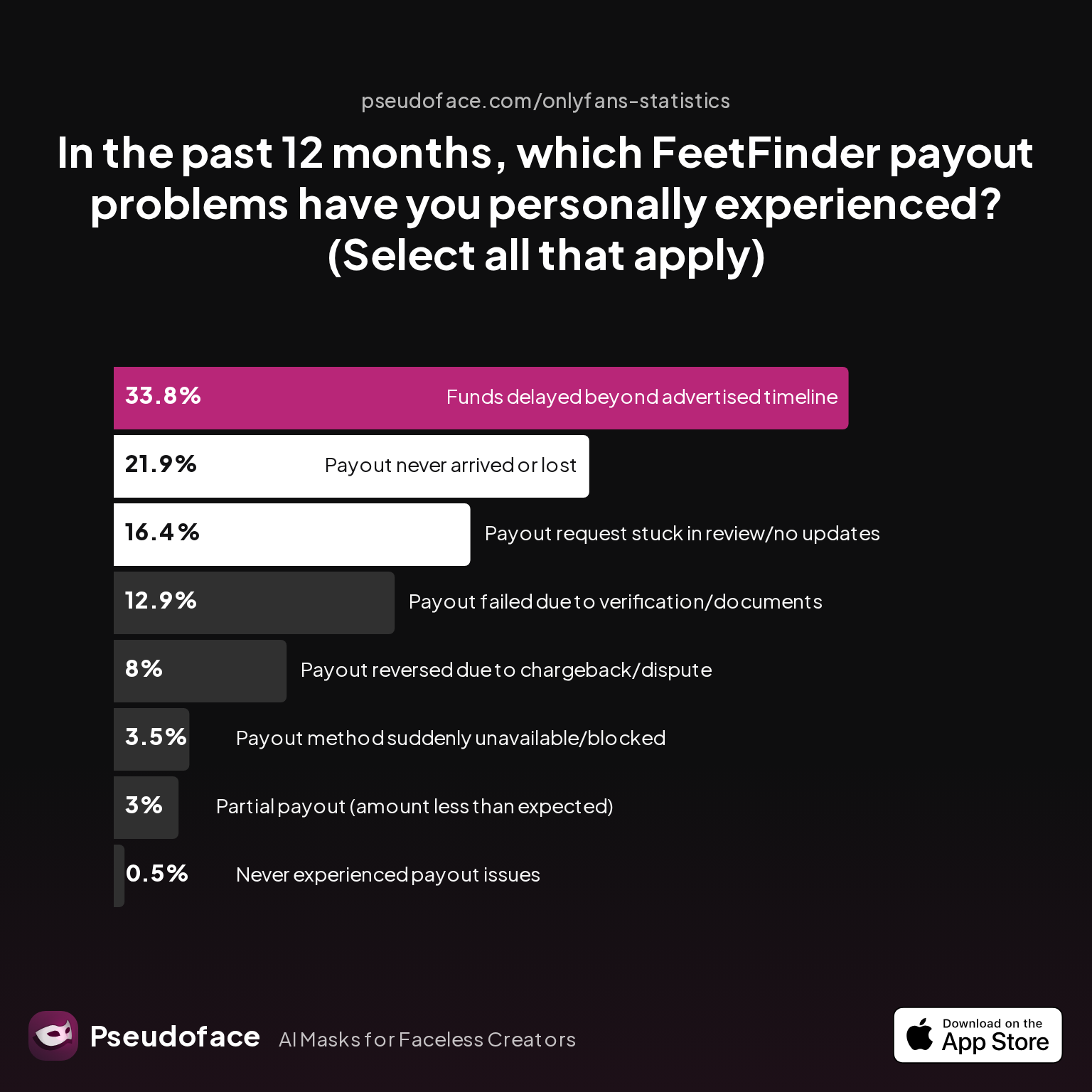
Roughly a third of creators (33.83%) reported payout delays beyond the advertised timeline, and almost 13% faced failed payouts due to verification or document issues. The data, representing self-selected FeetFinder creators sharing troubleshooting experiences in public threads, paints an unmistakable picture: Payouts are not always seamless, and none of these challenges are due to tax withholding.
Instead, these issues are more often tied to incomplete W-9s, verification failures, or payout account problems. Whereas wage workers see FICA and withholding taxes subtracted automatically, FeetFinder’s model means your payout account receives the full amount—no taxes have been deducted or paid.
This has real-world implications. Creators who assume taxes are silently managed risk large, unexpected IRS bills if they spend their earnings without reserving funds for estimated tax payments. Among active Reddit creators in early 2026, frustration with manual compliance runs high, illustrated by exchanges blending anxiety and seasoned advice:
Open thread on Redditr/feetfinderadvice
u/Training_Crazy6946
Did you withdraw (not earn) over $600 last year?
The “withdrawn vs. earned” distinction is vital—and will be explored more soon—but the central point remains: FeetFinder does not act as your tax intermediary. The net payment you receive is your revenue, not net-after-tax income, so self-discipline and planning are essential if you want to stay ahead of IRS deadlines.
Knowing who handles the paperwork is only half the battle; you also need to understand when your platform activity gets reported, and what triggers IRS “visibility.”
How Does FeetFinder Work for Taxes? Reporting Thresholds and IRS Visibility
A core concern for FeetFinder creators is whether their platform income appears “on taxes”—and if so, when and why. Much of the uncertainty stems from the IRS’s longstanding $600 trigger for issuing 1099-NEC forms, but the details (and consequences) are less simple than many suspect.
For FeetFinder, the $600 reporting threshold is based on the total withdrawals—not just “income earned”—you request and receive to your payout account in a calendar year. This distinction has caused significant confusion, as illustrated by creator back-and-forths:
Open thread on Redditr/feetfinderadvice
u/mermaid_sugar
Yeah, I just went back through my bank account and added it up, and I did withdraw over $600. So, maybe they’ll send it soon or at least respond.
So what does this mean for your taxes? If you withdraw at least $600 in a year, FeetFinder is obligated to issue you a 1099-NEC, and also reports that sum directly to the IRS—leaving a clear tax paper trail. If you withdraw less, FeetFinder won’t issue a form, but that does not mean your income is untaxed or invisible. IRS rules require you to self-report all self-employment income, regardless of forms.
But confusion extends beyond the form threshold. In practice, creators’ experiences with delayed, partial, or missing payouts heighten the uncertainty—especially if platform records don’t match personal bank tracking, or if withdrawals get split across tax years.
| Answer | Percentage |
|---|---|
| Issue resolved automatically—no action required | 13.27% |
| Never had delayed/missing payout | 3.06% |
| Resolved after contacting FeetFinder support | 42.86% |
| Resolved after contacting payment processor | 8.16% |
| Resolved after escalating via review/social media | 2.04% |
| Still unresolved | 30.61% |
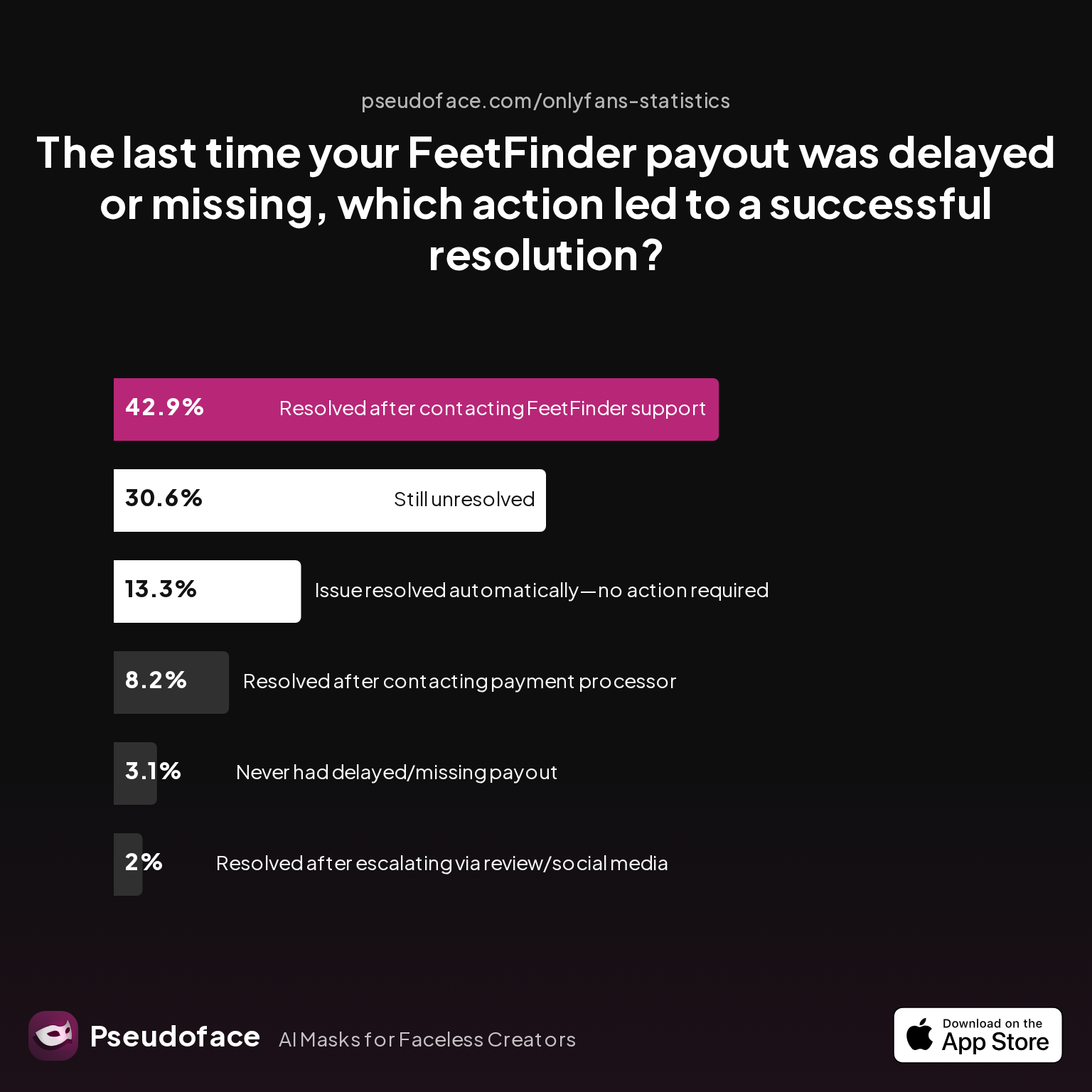
Nearly a third of creators (30.61%) reported their payout delays remained unresolved, while 42.86% only fixed the issue after contacting FeetFinder support. The significance? Your tax record is only as good as your own record-keeping—even if the platform’s in-app history is patchy or slow to update.
Here’s what you need to know as of 2026:
- IRS rules haven’t materially changed: all self-employment income must be reported, even in the absence of a 1099 form.
- FeetFinder’s standard is to report payouts at or above $600 per year for any US account-holder with a completed W-9—but lacks formal processes for “micro earners” under the threshold, so these creators risk being overlooked by the platform but not by the IRS.
- Delays, splits, and payout errors can muddy your actual reportable income. If FeetFinder fails to deliver a 1099 on time or underreports, the burden is on you to reconstruct your real withdrawals using payout history, bank statements, and email confirmations.
Given that roughly 43% of FeetFinder creators polled by Pseudoface in their Reddit meta-analysis openly disclosed confusion about what gets reported to the IRS, it’s clear this is more than a niche issue.
If you’re aiming to maximize your take-home and minimize audit risk, transparency—and diligent records—are your best friend. Always cross-check your payout history with your bank or processor statement, and keep screenshots or downloads of your dashboard earnings regularly, in case platform support or year-end documentation falls short.
Once you know what gets reported (and why), it’s crucial to see common mistakes and misunderstandings that can cost you compliance—and cash.
FeetFinder and Taxes: Top Compliance Mistakes and How to Avoid Them
It’s one thing to know the rules, but another to consistently follow them—especially when tax compliance is confusing, technical, or feels optional. From thousands of Reddit threads and platform troubleshooting data, several key mistakes emerge as recurring traps for FeetFinder creators.
Chief among these is failing to submit a W-9, misunderstanding the withdrawal threshold, or thinking a W-2 will arrive instead of a 1099. Each of these can trigger payout holds, delayed tax forms, or in worst cases, an inability to access your own money.
FeetFinder supplements these errors with automated warnings and account health notifications—often with little context. Let’s look at real platform data.
| Answer | Percentage |
|---|---|
| Email notice of TOS violation | 13.58% |
| In-dashboard warning banner | 2.47% |
| No warning—suspension was immediate | 16.05% |
| Payout hold or additional verification requested | 64.20% |
| Shadowban/reduced visibility without explanation | 3.70% |
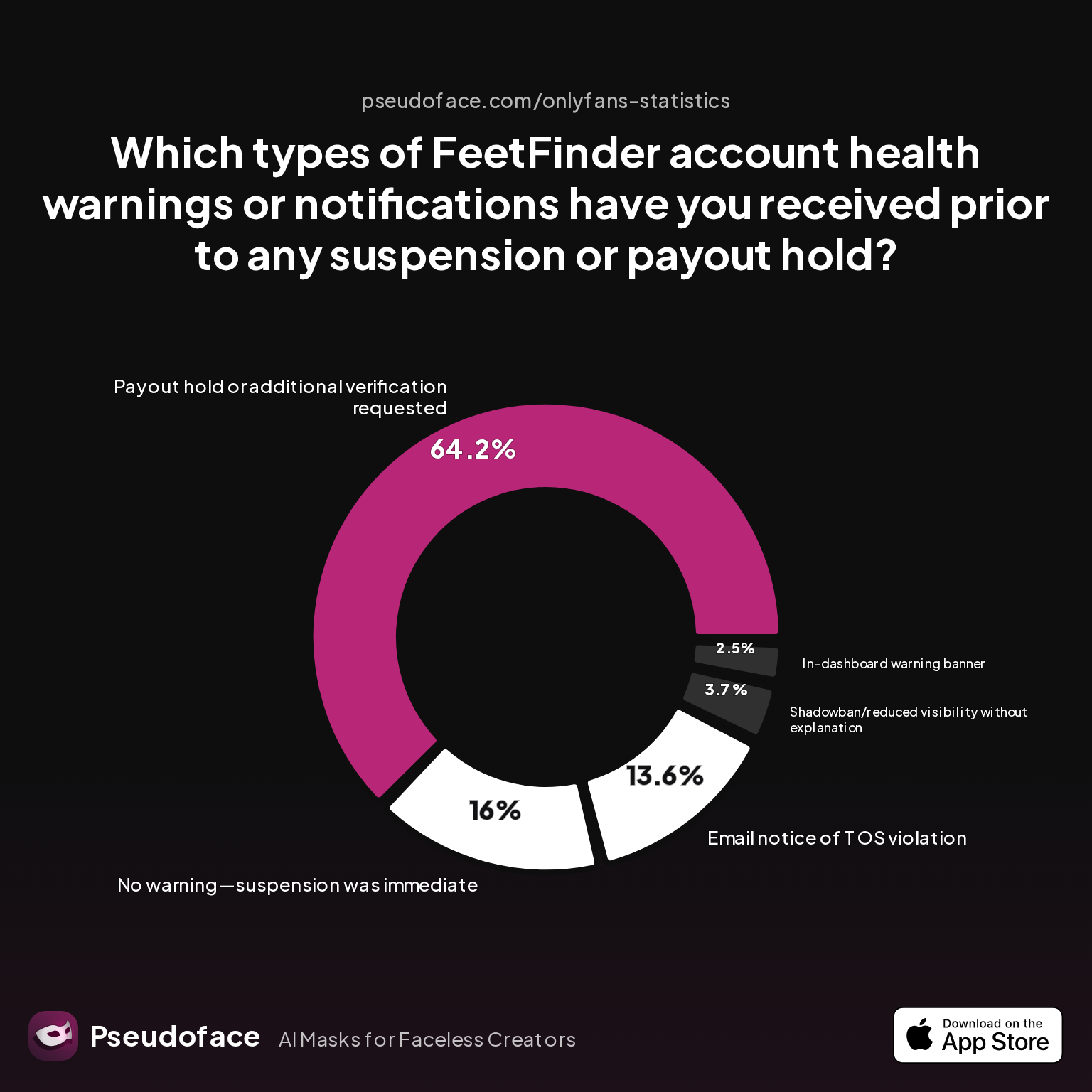
A full 64.2% of surveyed creators experienced payout holds or requests for additional verification—a process that often requires uploading or re-confirming tax and identity documentation. Only 0.5% say they never encountered payout problems. Conversely, 16% were suspended without warning, adding to the uncertainty and frustration of those who simply missed a required W-9 or misunderstood verification steps.
Mistaken beliefs about what form to expect (W-2 vs. 1099), paired with unclear platform communications, worsen the situation. Often, these issues escalate to account locks, payout freezes, or disruptive delays that last until support teams manually review your submission queue.
Drilling down, we see the triggers for these holds or suspensions mapped in another slice of the data.
| Answer | Percentage |
|---|---|
| Community complaints/report | 6.45% |
| Content policy violation | 11.83% |
| Low activity/inactivity | 1.08% |
| Payment/chargeback dispute | 35.48% |
| Platform technical glitch | 32.26% |
| Spam/automation suspicion | 4.30% |
| Unclear—no reason provided | 8.60% |
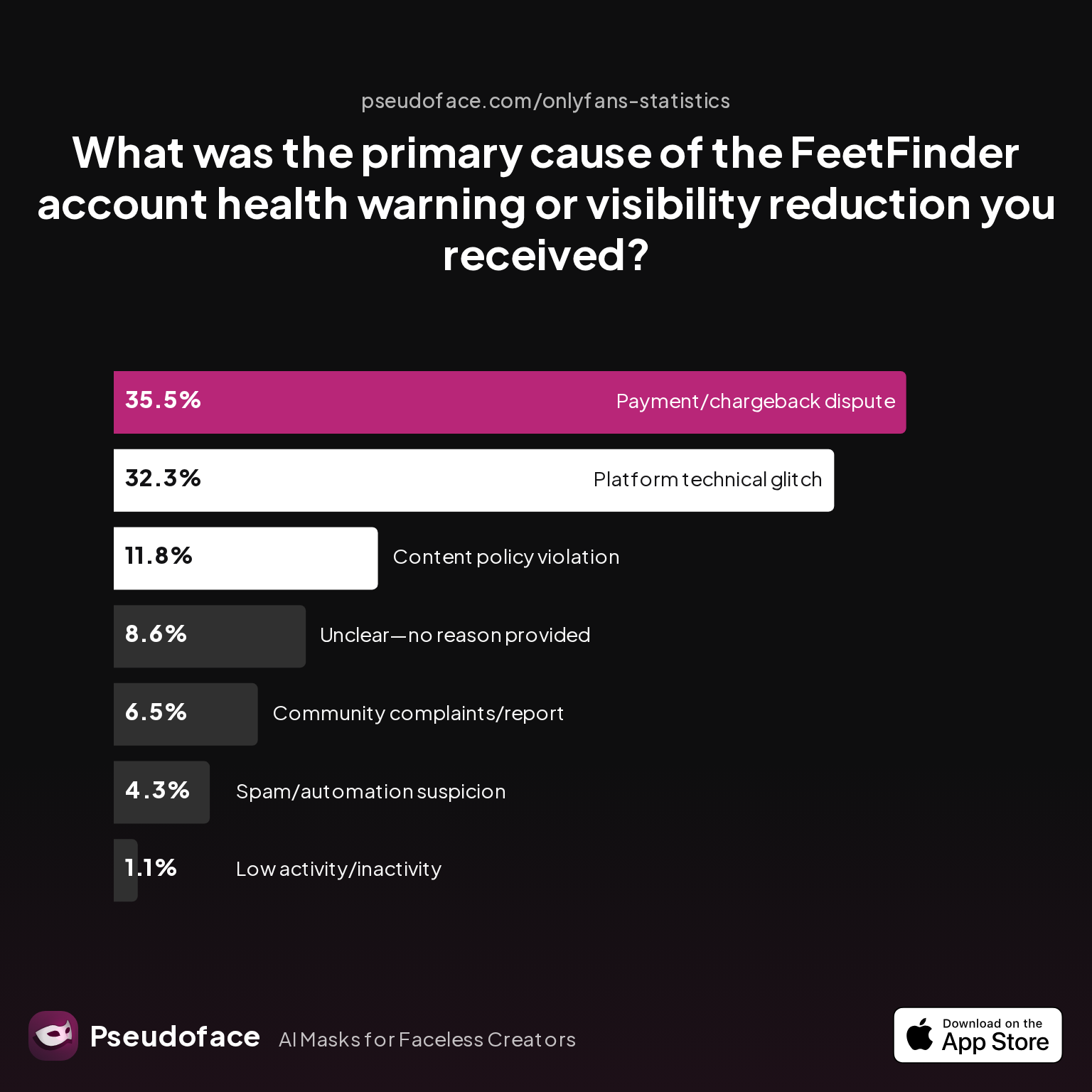
Roughly one-third (32.26%) of creators who received an account health warning attributed it to a platform glitch, while 35.48% traced issues to a payment or chargeback dispute. Payment and verification failures are thus the biggest tax-relevant compliance risk.
Based on these findings (with all their self-selection and recall biases), the top avoidable compliance mistakes for FeetFinder creators in 2025-2026 are:
- Skipping or rushing through initial W-9 identity/tax verification (leading to payout locks).
- Assuming 1099 forms are optional, or that under-$600 withdrawals need not be reported.
- Filing as a W-2 employee instead of self-employed, which mismatches IRS records and can prompt audits or rejected returns.
- Ignoring quarterly estimated tax payment requirements when self-employment tax liability will exceed $1,000.
- Waiting until the last minute to fix verification or payout issues—by which point, forms may be late or missing, and support queues are backlogged.
The best way to avoid these headaches is to regularly log your withdrawals, document all bank deposits linked to FeetFinder, immediately respond to platform ID requests, and triple-check the name/SSN on your W-9 for accuracy.
To make these risks concrete, let’s compare what happens when your dashboard documentation matches IRS records versus when it doesn’t.
Comparison: Reporting FeetFinder Income With vs. Without 1099 Forms
For many digital creators, the difference between a smooth tax season and a paperwork headache is whether your 1099-NEC matches your payout history. The IRS uses these forms as “reported income matches” to auto-validate your self-employment filings, so a gap—either missing a 1099 when you should have one, or reporting less than shows up—can trigger automated audits or IRS letters.
When you receive a 1099-NEC from FeetFinder, it should list the total amount you withdrew (not just “earned”) through the platform for the year. You reference this number when declaring your gross receipts on IRS Schedule C, ticking it off against your own withdrawal tracking.
If you receive no 1099—whether because your total was beneath the threshold, or due to errors or lost mail—you’re still required to report your full income. In these cases, your personal records (bank statements, dashboard exports, email confirmations) become decisive. Self-reporting income without a 1099 may feel daunting, but is fully supported by IRS policy—as long as you have thorough, dated evidence of your withdrawals.
On the risk side, failing to report income (even shuffling it under the $600 radar) leaves you exposed. If your records mismatch with the platform’s, or another party (such as the payment processor) issues a 1099-K or triggers an inquiry, you’ll need to reconcile—or risk penalties, back taxes, or worse.
The comparison in short:
- With a 1099-NEC: Easier to file, IRS auto-matches, but you’re still responsible to correct errors or missing amounts.
- Without a 1099: More manual, but not exempt—track and report everything, treating all gross withdrawals as self-employed income.
Documentation discipline is the safest way to keep taxes routine and routine, not stressful and uncertain.
Let’s now walk through a practical, step-by-step flow for ensuring your taxes are filed accurately on FeetFinder income.
Staying Compliant: Step-by-Step FeetFinder Tax Reporting Guide
Staying tax-compliant as a FeetFinder creator need not be daunting—if you take a structured, proactive approach. In practice, most errors come from paperwork bottlenecks (e.g., failing to verify tax info), poor recordkeeping, or waiting until the last minute when support lines are swamped.
A look at how creators experience payout setup trouble underscores where the friction typically appears.
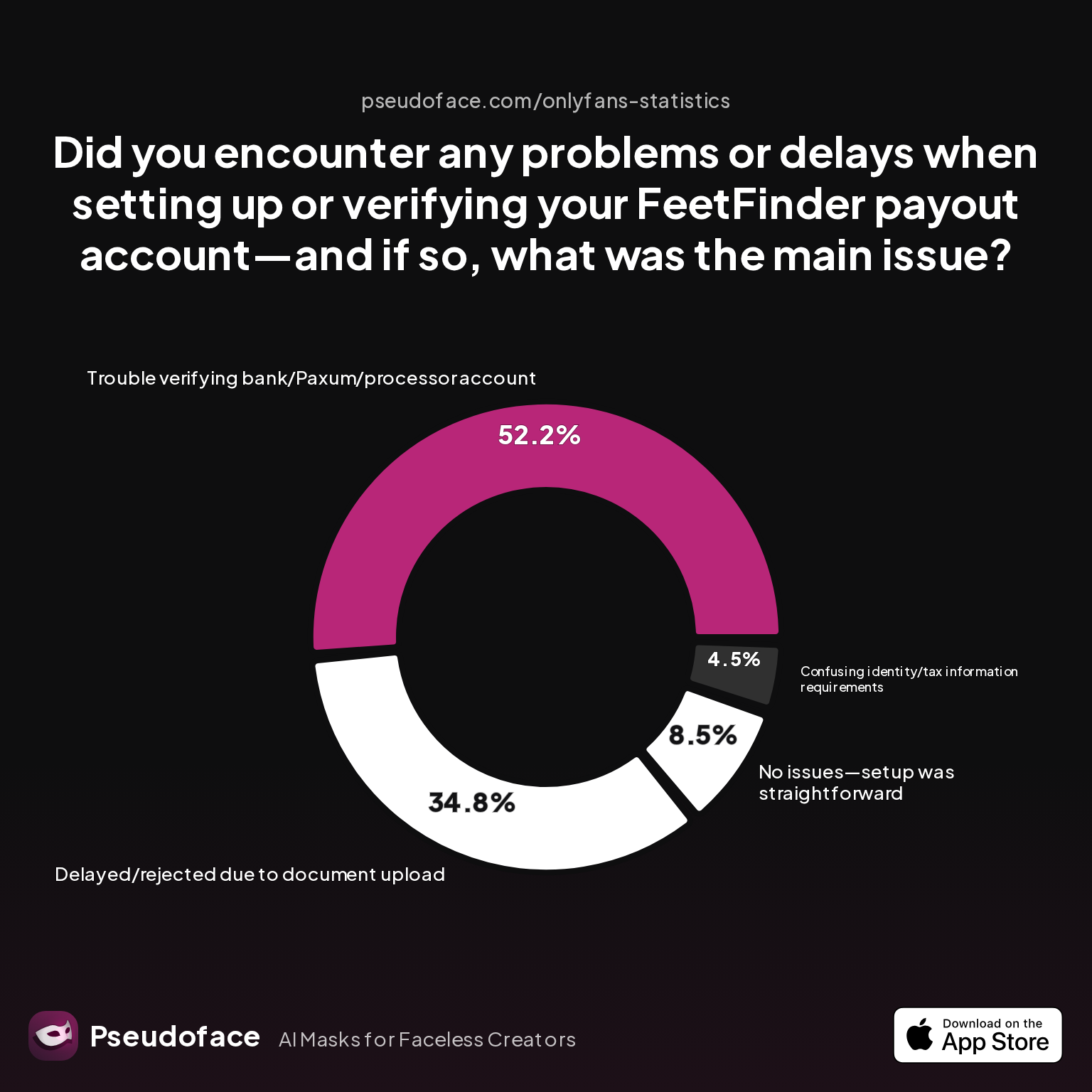
| Answer | Percentage |
|---|---|
| Confusing identity/tax information requirements | 4.48% |
| Delayed/rejected due to document upload | 34.83% |
| No issues—setup was straightforward | 8.46% |
| Trouble verifying bank/Paxum/processor account | 52.24% |
More than half (52.24%) of those reporting trouble cited “trouble verifying bank/Paxum/processor account,” and a third (34.83%) cited document upload problems. Only 8.46% reported smooth sailing. This underlines why organized, early documentation is critical, especially before high-volume withdrawal periods in Q4 and early Q1 when 1099s are processed.
Here’s a simple but practical reporting checklist for US FeetFinder creators:
| Step | What to Do | When |
|---|---|---|
| 1. Confirm W-9 Submission | Ensure FeetFinder has your legal name, address, & SSN | Before first payout |
| 2. Track All Withdrawals | Record each FeetFinder payout (date, amount, channel) | Ongoing; after each payout |
| 3. Monitor Platform Notifications | Watch for payout holds, additional verification, or dashboard alerts | Monthly/quarterly |
| 4. Access Your 1099-NEC | Check inbox or FeetFinder dashboard after January 31 | Early February (if >$600 withdrawn) |
| 5. File All Income | Report total withdrawals as gross receipts (Schedule C) | Tax filing deadline (April 15, or extension) |
| 6. Pay Estimated Taxes | Make quarterly payments if tax due likely to exceed $1,000/year | April, June, Sept, Jan 15 |
| 7. Retain Records | Keep payout statements, 1099s, W-9 copy, and bank statements | At least 3-5 years |
A few grounded tips for 2026:
- Use a dedicated spreadsheet (or accounting software) to log all payout transactions and W-9/1099 correspondence.
- Double-check each withdrawal in your FeetFinder dashboard against your bank account or payment processor deposits.
- Respond immediately to FeetFinder requests for additional documents, and escalate if you see unexplained holds or incorrect 1099s near tax deadlines.
- Even if your annual withdrawals are below $600, treat your records as if you will be audited—accuracy builds peace of mind and saves effort if your business grows.
Approaching tax compliance as an ongoing process, rather than a once-a-year panic, will help protect your account health and minimize IRS surprises.
Next, let’s tackle the most granular creator questions crowding forums and search boxes.
FAQ
How do I get my 1099 from FeetFinder?
If you withdraw $600 or more in a calendar year, FeetFinder will send a 1099-NEC—usually by early February—via either your account dashboard or the email you used for tax verification.
You should check your dashboard notifications and email accounts after January 31st. If it doesn’t arrive by mid-February, contact FeetFinder support with your withdrawal records on hand. If your verified address is incorrect or your W-9 was never submitted, you must update your info with FeetFinder before the form can be generated.
Does FeetFinder withhold taxes from my payouts?
No, FeetFinder does not withhold any taxes from creator payouts—all tax payments and filings are the creator’s responsibility.
Open thread on Redditr/feetfinderadvice
u/Training_Crazy6946
Did you withdraw (not earn) over $600 last year?
All income received is gross; you must track, report, and pay your own income and self-employment taxes.
Is income on FeetFinder reported to the IRS if I earn less than $600?
No 1099 will be issued for under-$600 withdrawn in a year, but you are still required to report all income from FeetFinder to the IRS.
FeetFinder will not send your details to the IRS unless you meet the $600 threshold, but IRS rules require you to self-report every dollar earned, regardless of documentation.
What is the difference between a W-9 and a 1099 for FeetFinder?
The W-9 is a form you fill out for FeetFinder to verify your tax identity, while the 1099-NEC is a form they send you (and the IRS) if you withdraw at least $600 in a year.
Your W-9 ensures FeetFinder knows whom to report; your 1099-NEC is the annual earnings statement you use to report self-employment income on your taxes.
Why hasn’t FeetFinder sent me a 1099 yet?
FeetFinder only sends a 1099-NEC if your withdrawals topped $600 and your W-9 info was complete and correct.
If you meet the criteria but haven’t received it by mid-February, check spam, confirm your mailing info, and then contact support. Delays can occur due to processing errors or verification issues at the platform level.
Can I report FeetFinder income if I don’t have a 1099?
Yes, you must report all FeetFinder income regardless of receiving a 1099—use your withdrawal logs, bank statements, or exported earnings as proof.
Self-report any amount earned; not getting a form does not mean your income is non-taxable or invisible to the IRS.
How do payout methods (e.g., PayPal vs. bank transfer) affect my taxes on FeetFinder?
The IRS treats all withdrawal methods the same for self-employment reporting, but you might receive a 1099-K from payment processors if you cross their reporting thresholds.
For most small sellers, the platform’s 1099-NEC is primary, but always watch for duplicate forms from payment processors if your volume grows.
Will missing a W-9 block my payouts from FeetFinder?
Yes, a missing or incorrect W-9 can trigger payout holds or verification requests, and you’ll need to update your info to release funds.
FeetFinder often pauses payouts or issues warning notifications until proper tax ID is provided.
Should I pay estimated taxes on FeetFinder earnings during the year?
If your total tax liability (including self-employment tax) will exceed $1,000 for the year, the IRS expects you to pay quarterly estimated taxes.
Divide your expected liability by four and submit via IRS Direct Pay or EFTPS—don’t wait until April if you want to avoid penalties.
What records do I need to keep for FeetFinder taxes?
Keep copies of all payout statements, bank/PayPal deposits, your submitted W-9, and any 1099-NECs for at least 3-5 years.
Document each withdrawal, correspondence about tax forms, and any communication with FeetFinder support regarding verification or payout problems.
Whether you’re just starting out or scaling your side hustle into something bigger, understanding FeetFinder’s tax flows will save you time, stress, and money. Stay attentive to the forms, keep diligent records, and when in doubt—over-document. The IRS and FeetFinder each play their part, but only you are responsible for reporting and paying the right amount at tax time.


