
TL;DR
Most privacy-conscious OnlyFans creators worry more about distinctive physical features—birthmarks, scars, and unusual piercings—than their actual face. According to Pseudoface’s analysis of 250,000+ public Reddit threads from real adult creators, about 62% actively cover non-tattoo marks, with over half combining makeup and digital edits. Roughly 40% of creators base their concealment decision on how rare their feature is, but experience shows many marks are far more common than you think. Based on 2025-2026 data, this guide details how creators judge risk, which concealment methods actually work, and how to keep sensitive features hidden over time. Data is drawn from large-scale, self-reported Reddit experiences—so while patterns are directionally strong, individual privacy strategies must be chosen case by case.
Judging Which Features Need Hiding: Is Your Mark Really Identifying?
Most new OnlyFans creators face the same anxious question: Is my scar, birthmark, or piercing truly unique—or is my worry out of proportion? Realizing not all marks carry the same risk is the starting point for any smart anonymity plan.
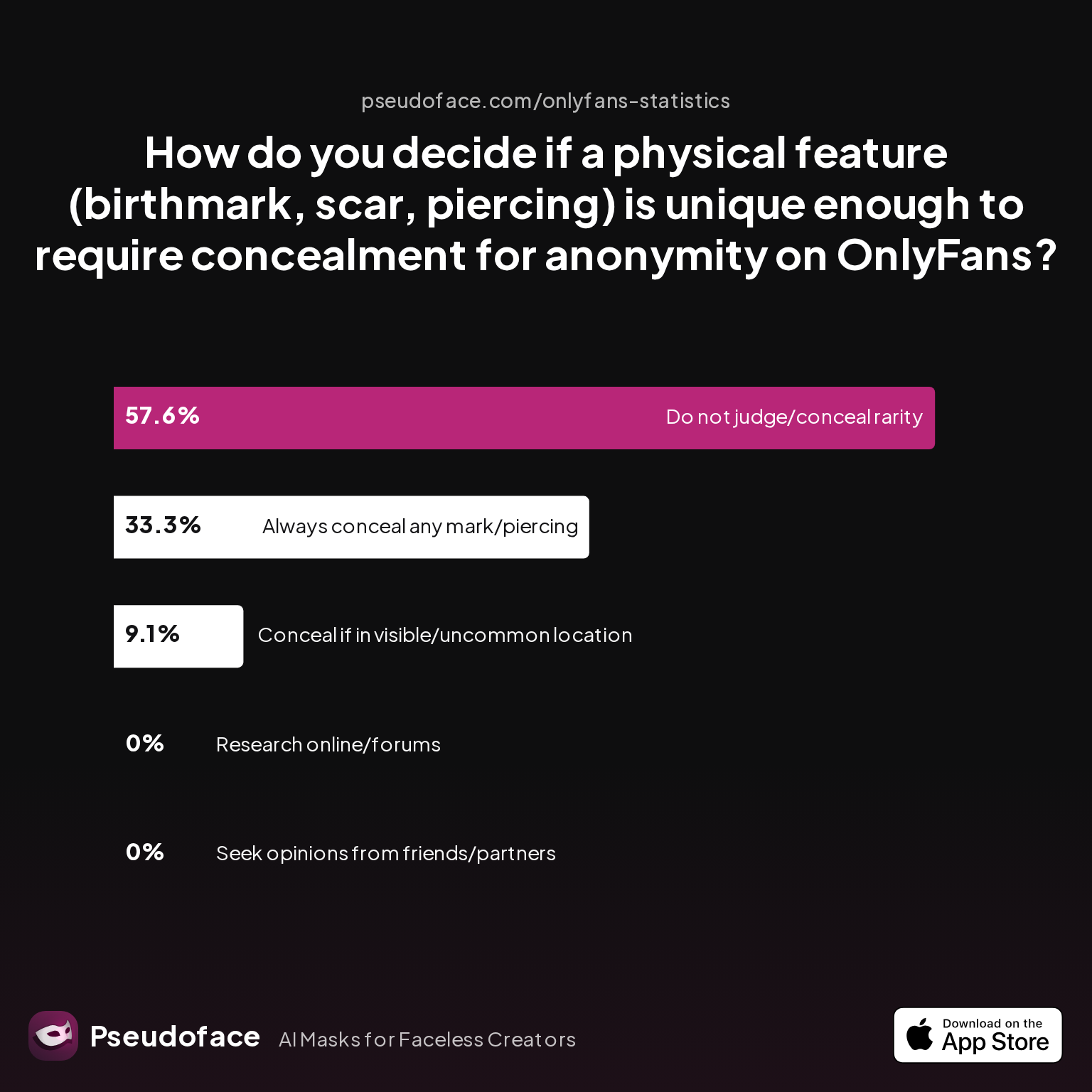
Many fear that even a faint scar or common piercing could give them away. Yet, a closer look at creator behavior paints a more nuanced reality. According to Pseudoface’s 2026 dataset, how creators decide which features to hide is far from uniform.
| Answer | Percentage |
|---|---|
| I always conceal any non-standard mark/piercing, regardless of size or location | 33.33% |
| I do not take steps to judge or conceal feature rarity | 57.58% |
| I only conceal if the feature is in a visible/uncommon location | 9.09% |
| I research online or in creator forums to judge feature commonness | 0.00% |
| I seek opinions from trusted friends/partners | 0.00% |
Over half of creators (57.6%) report taking no steps at all to assess or hide the rarity of their marks, reflecting either a comfort with risk or a belief that such features won’t threaten anonymity. Meanwhile, a significant one in three (33.3%) operate cautiously, always concealing non-standard marks regardless of size or spot, while just 9% attempt to distinguish between “everyday” and rare features.
These habits reflect both practical realities and deep-rooted anxieties. It’s tempting to treat any physical irregularity as a flashing red flag for exposure. In reality, the path to “identifiability” involves more than just having a visible scar or mole. Rarity—how common or uncommon a feature is—matters, but it’s just one piece of the puzzle.
But remember: These findings come from self-reporting in open forums. Survivorship bias shapes every statistic—those who suffered a slipup may have already left, and some voices get amplified over others. Use the chart above as a reality check, not a final verdict.
So how do you actually judge your own risk? Here’s a minimalist baseline from the data:
- If a mark is large, in an unusual spot (inner thigh, hip, unique navel area), or visually distinctive in shape or color, treat it as potentially risky.
- If it’s small, faint, or in a spot commonly covered by lingerie or typical shoot clothing, odds are it is not uniquely identifying unless paired with other clues.
Just as important, the data reveals very few creators (0%) actively research feature rarity online or check with peers—highlighting both fear of seeming “paranoid” and the absence of reliable comparison resources. If in doubt, erring on the side of covering is common, but most marks are less unique than our anxieties suggest.
As of early 2026, there are no universal “birthmark databases” or forensic mark-matching for adult content. Anonymity leaks almost always result from combinations of clues—location, tattoos, background—rather than a single spot.
With a clearer sense of which marks might out you, the next step is learning what concealment methods actually work—and how other creators use them.
How Creators Hide Scars, Birthmarks, and Piercings on OnlyFans: Real-World Methods That Work
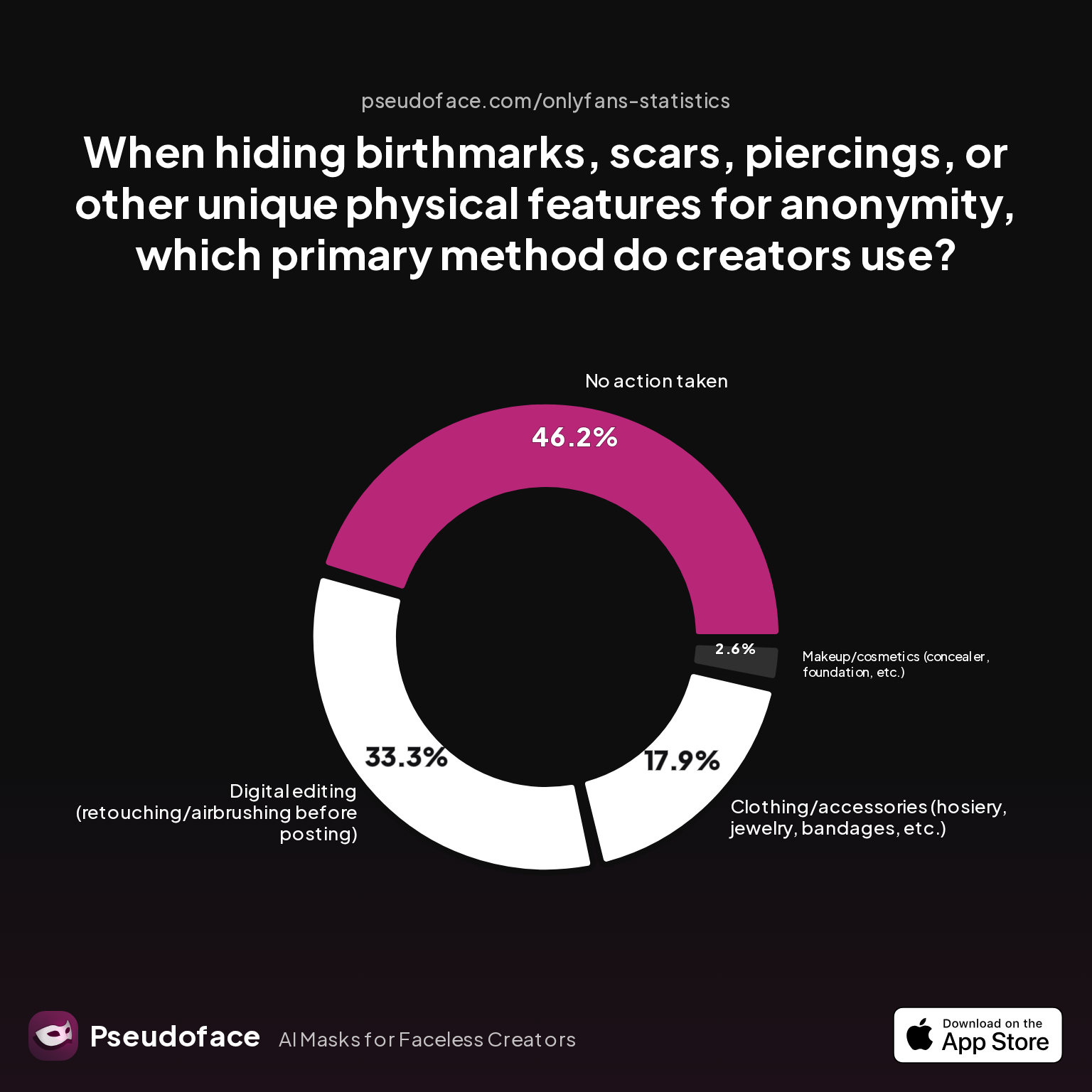
Once you’ve sized up your feature’s risk, the practical question is: How do other creators actually hide scars, birthmarks, and piercings? Is makeup enough, or are digital tools replacing old-school methods? Fresh data from Pseudoface offers a revealing snapshot:
| Answer | Percentage |
|---|---|
| Clothing/accessories (hosiery, jewelry, bandages, etc.) | 17.95% |
| Digital editing (retouching/airbrushing before posting) | 33.33% |
| Makeup/cosmetics (concealer, foundation, etc.) | 2.56% |
| No action taken | 46.15% |
| Physical removal (removing piercings before content) | 0.00% |
According to 2025-2026 data, just under half (46%) of creators take no action—either because they value speed, privacy, or believe their marks don’t matter. Of those who do conceal, digital editing (33%) is now the most popular strategy, outpacing both clothing/accessories (18%) and classic makeup (a surprisingly low 2.6%).
This tilt towards digital reflects the realities of content creation in 2026: simplicity, speed, and the growing power of easy-to-use editing apps. However, the numbers also reveal that, when marks demand “invisible” coverage, creators often end up layering techniques. Some will shoot with hosiery or a bandeau, enhance with makeup, and still finish with retouching apps.
Here’s how one veteran creator put it on Reddit:
Open thread on Redditr/onlyfansadvice
u/gracefulhaley
Try Dermacol. It’s a foundation that can completely cover tattoos

And another shared:
Open thread on Redditr/onlyfansadvice
u/gracefulhaley
Try Dermacol. It’s a foundation that can completely cover tattoos
These first-hand accounts echo the numbers: classic leg makeup and heavy-duty foundations remain a quick fix, especially for spots on the thighs, hips, and butt—areas most likely to be shown without full clothing.
But digital editing is now table stakes for any creator who wants absolute control. Retouching tools, from Facetune to AI-based blur and spot removal, dominate discussions in creator forums. The real-world workflow often comes down to:
- Physical quick fix for big marks or high-res shoots (makeup, stockings, jewelry)
- A digital sweep to catch anything missed, smooth inconsistencies, and guarantee trace erasure
It’s important to note why creators mix and match. Physical concealment isn’t always reliable: sweat, friction, or camera angles can expose what makeup tried to hide. Digital edits work, but require consistency and skill—the dreaded “editing halo” or smudged pixel can itself be a calling card for attentive viewers.
Choosing your method, as many creators will tell you, is about what feels doable under pressure. Long shoots push toward makeup and accessories; quick selfies tip toward apps. There is no shame in a hybrid workflow: real peace of mind comes from redundancy.
With this foundation, let’s put physical and digital strategies under the microscope to answer a recurring question—what actually keeps you safe in practice?
Comparing Physical and Digital Concealment: Which Approach Makes You Safer (and Why)?
If the last section emphasized "do what works for you," this one boils down to what actually works—given the ever-tighter scrutiny OnlyFans creators face in the age of HD cameras and social media sleuthing.
Physical methods—makeup, wardrobe hacks, strategic posing—offer immediacy and consistency. You see exactly what the camera captures. But these approaches fail when lighting changes, product rubs off, or a subtle movement exposes what you thought was hidden.
Digital concealment—editing tools, filters, AI-powered spot correction—offers flexibility after the fact. You can batch process, hide what you missed, and tweak every detail. The risks: obvious or inconsistent edits can stand out, batch automation can miss frames in video, and overdone corrections draw attention.
Here’s how leading approaches stack up for common types of marks:
| Method | Coverage Effectiveness | Speed | Risk of Error | Skin Tone Matching | Workflow Fit |
|---|---|---|---|---|---|
| High-coverage makeup (e.g., Dermacol, airbrush, leg concealer) | High (for mid sized/fair marks); can fail under sweat/friction | Medium | Medium | Good (if shade range available) | Best for photoshoots, static poses |
| Clothing/accessories (hosiery, straps, jewelry) | Variable; very reliable for most spots | Fast | Low | Irrelevant | Great for quick sessions, partial body shots |
| Digital editing (Facetune, Photoshop mobile, AI apps) | Very high (with skill); universal for skin tones | Slow (learning curve); Fast (with experience) | High (if clumsy); Low (if practiced) | Excellent | Best for high-stakes sets, batch content |
| Hybrid approach (physical + digital) | Highest | Slower | Lowest | Best | Gold standard for pros, repeat workflow |
Community satisfaction trends toward hybrid workflows, in which marks are dulled with makeup/accessories and cleaned up digitally before release. This reduces the chance of either method failing alone.
But there are trade-offs. Digital-only approaches risk inconsistency if you batch-edit content with shifting lighting or angles. Physical only? You’re trusting every shot to product staying power and the unpredictability of a self-run shoot.
What’s critical is workflow discipline. Many creators slip by leaning too hard on one technique, neglecting verification steps, or rushing edits due to fatigue or deadlines.
The upshot: Most creators are not strictly “team makeup” or “team Photoshop”—they’re quietly combining both.
If safety is your goal, favor redundancy: cover physically first, confirm on the viewfinder, then review and retouch before uploading. Especially for video, scan every segment for on-frame leaks, as missed frames are a top cause of accidental exposure.
With technique clarified, it’s time to dig into which specific products, apps, and tricks creators trust in real-world content production.
Product Picks: Makeup, Accessories, and Editing Apps to Cover Scars and Birthmarks on OnlyFans
Not all cosmetics or apps are created equal—results hinge on mark size, body location, skin tone, and workflow pace. Based on creator posts and peer scoring, here’s a comparative table and close-up on what actually works.
| Product/App | Type | Known For | Pros | Community Insights |
|---|---|---|---|---|
| Dermacol Foundation | Makeup | Extreme coverage (even tattoos) | Opaque, long-wear, suitable for most marks | “Can completely cover tattoos” – Reddit |
| Sally Hansen Airbrush Legs | Makeup | Spray-on leg/scar concealment | Very natural, quick, affordable | “Works wonders on thighs/butt” – Reddit |
| Body/Leg Concealer Sticks | Makeup | Portable targeted coverage | Easy for touch-ups, shade limitations | Good for small/mid marks |
| Sheer Tights/Stockings | Clothing | Leg/hip/butt concealment | Instant, reliable, hides faint marks | “Lingerie hacks” common, very quick |
| Decorative Jewelry | Accessory | Navel/torso marks/piercings | Double as styling cue, non-obvious cover | Risk: odd on some body areas |
| Facetune (Mobile) | Edit App | Spot/blur/retouch, anti-blemish tools | Easy UI, fast, non-pro look | Most common for mobile creators |
| Adobe Photoshop/Lightroom | Edit App | Pro-grade retouch, batch edits | Ultimate control, steep learning curve | Pros: power, Cons: complexity |
| TouchRetouch | Edit App | Fast mark/spot removal | Cheap, quick for batch, can be inconsistent | Best for background marks |
| AI Video/Photo Blur | Edit Tech | Batch spot removal, frame-based | Powerful on faces, variable on skin | Watch out for ghosting or detail loss |
Color match, undertone, and skin sensitivity are often-cited obstacles for creators with darker skin, vitiligo, or sensitive areas. Foundation and spray toners are most consistent if a local retailer allows in-person shade matching—otherwise, mobile editing wins for universality.
When it comes to piercings, most veteran OnlyFans creators prefer temporary removal before filming rather than digital concealment. However, for quick sets or visible holes/scarring, digital apps (especially Facetune or Photoshop’s Healing Brush) fill the gap.
Reddit recommendations back up these choices:
Open thread on Redditr/onlyfansadvice
u/gracefulhaley
Try Dermacol. It’s a foundation that can completely cover tattoos
Open thread on Redditr/onlyfansadvice
u/gracefulhaley
Try Dermacol. It’s a foundation that can completely cover tattoos
But as always, personal trial beats hearsay—sampling on your own body and lighting is essential.
If you’re shooting video, test makeup durability with test clips; for digital editing, check for “edit artifacts” frame by frame, as AI tools can leave smudges when the body moves.
For all product picks, creators agree: Workflow convenience is as decisive as absolute coverage. A $40 foundation is only worth it if you can blend it quickly and consistently, and an AI app is only savior if it doesn’t force you into hours of micro-edits.
Even the right product choice only goes so far—risk also depends on your consistency, habits, and environment. Let’s talk workflow and long-term practices to minimize slipups.
Consistency, Workflow, and Common Mistakes: Keeping Identifying Features Hidden Long-Term
No matter what makeup or app you use, the single biggest risk isn’t your scar showing once—it’s slipping up after weeks or months of careful work. Success as a “faceless” creator depends on routine, verification, and reacting fast if something gets through.
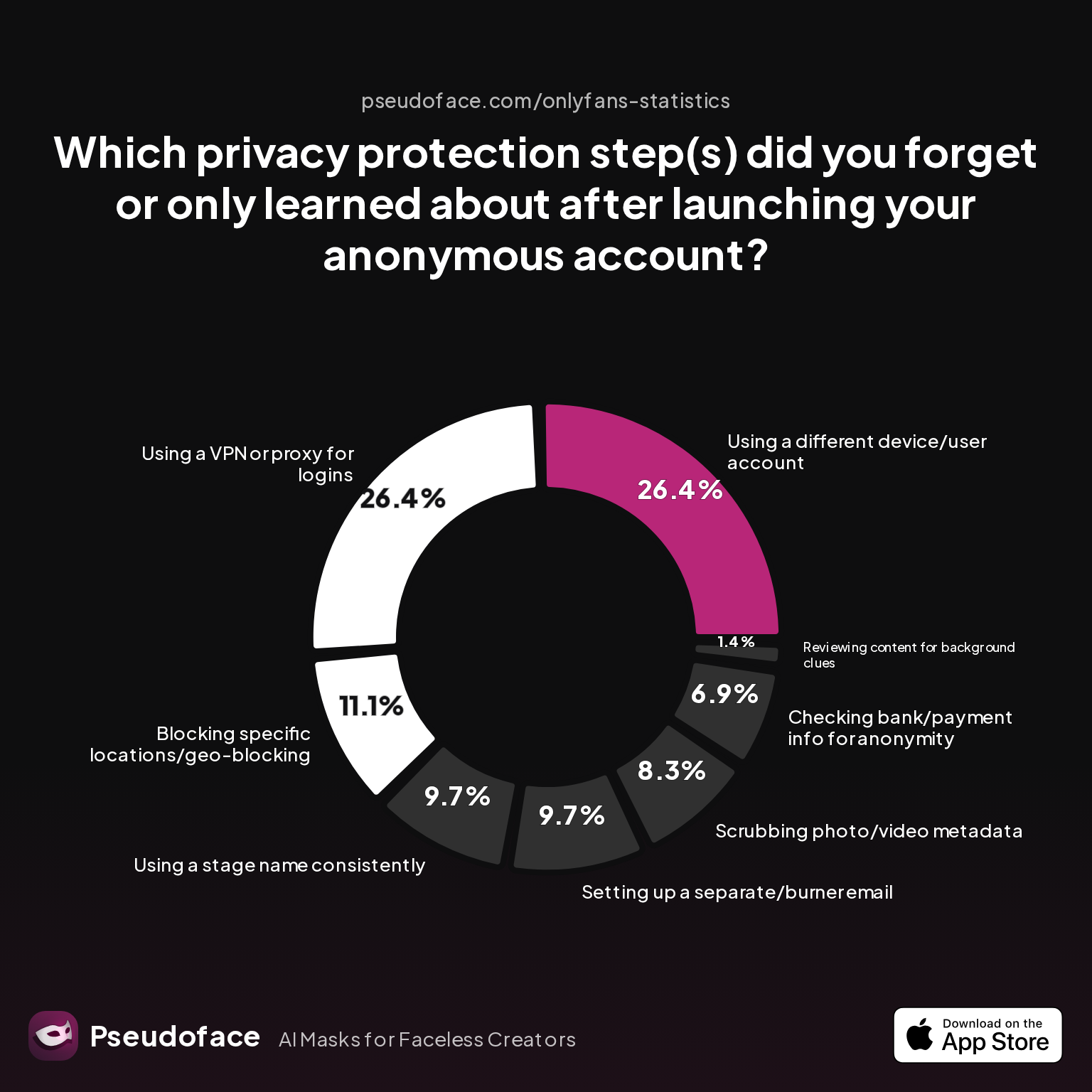
According to Pseudoface’s ongoing analysis, overlooked workflow steps and missed privacy basics underlie most leaks—not rare FBI-level forensics.
| Answer | Percentage |
|---|---|
| Blocking specific locations/geo-blocking | 11.11% |
| Checking bank/payment info for anonymity | 6.94% |
| Reviewing content for background clues | 1.39% |
| Scrubbing photo/video metadata | 8.33% |
| Setting up a separate/burner email | 9.72% |
| Using a different device/user account | 26.39% |
| Using a stage name consistently | 9.72% |
| Using a VPN or proxy for logins | 26.39% |
As of late 2025, over a quarter (26%) of creators admit to forgetting to use a separate device or VPN for content creation—giving away device fingerprints or risking doxxing. Although these aren’t strictly scar-related, the same kind of workflow slips routinely lead to visible mark leaks. Notably, reviewing content for background clues is rarely missed (only 1.3%), but consistent review for skin detail is less often discussed by name.
Common root causes for mark slipups:
- Reusing makeup routines hastily across different light or outfits, failing to adjust for shadows/exposure
- Relying on batch-applying digital edits, which may miss shots or frames
- Getting comfortable, then skipping final visual checks for each new set or session
- Not maintaining a master reference of which marks need covering, especially after weight loss, surgery, or trips to the dermatologist
Seasoned creators emphasize the importance of SOPs—standard operating procedures. Double-check before uploading, run everything through at least one separate viewing device (e.g., phone, laptop) to mimic subscriber experience, and maintain a running “anonymity checklist.”
If a leak does happen—spot becomes visible in a post—community wisdom is to delete, replace, or crop ASAP. If content is already widely distributed, the actual risk of recognition from a single small mark is typically low, as most “fan detective work” relies on obvious face/tattoo/voice clues rather than isolated scars or birthmarks. However, for peace of mind, some creators preemptively rotate content, adjust angles, or even vary concealment patterns to reduce the potential for unique mark matching.
Staying truly “faceless” is an act of sustained discipline, not a one-off fix. Small daily routines—review, retouch, and sometimes just breathe—add up to a robust privacy habit.
But beneath habits and toolkits lies an even deeper foundation: the creator’s approach to risk itself. How do successful OnlyFans models actually weigh the odds and live with their choices, day in, day out?
Building a Risk-Aware Mindset: How Top OnlyFans Creators Weigh Concealment Decisions
Product picks and workflows form the outer toolkit, but mindset—how you appraise, accept, and live with privacy risk—is the unseen backbone of any sustainable OnlyFans career.
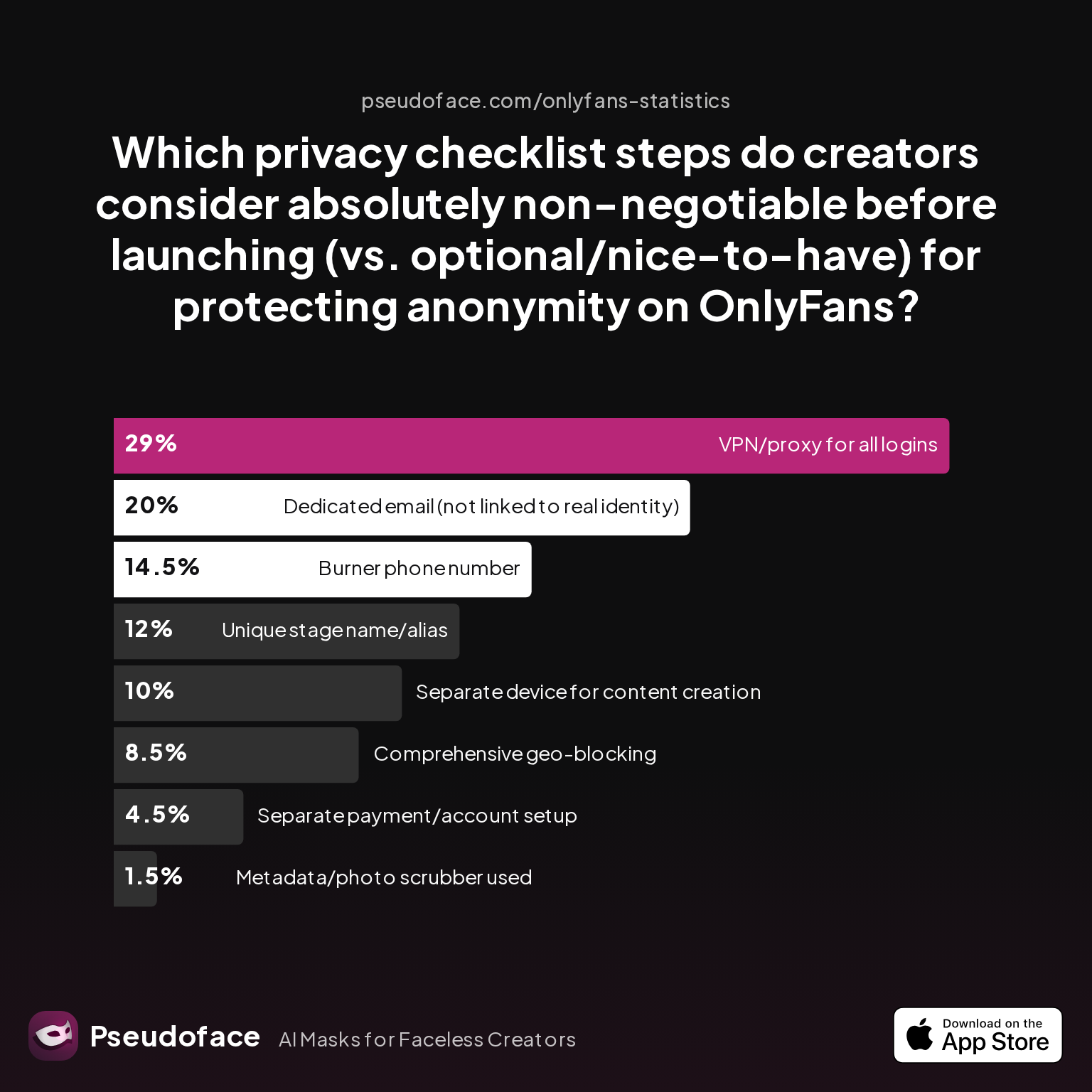
Recent Pseudoface data (2025-2026) reveals that although most creators focus obsessively on marks and physical features, top earners and long-term faceless models prioritize the risk hierarchy differently:
| Answer | Percentage |
|---|---|
| Burner phone number | 14.50% |
| Comprehensive geo-blocking | 8.50% |
| Dedicated email (not linked to real identity) | 20.00% |
| Metadata/photo scrubber used | 1.50% |
| Separate device for content creation | 10.00% |
| Separate payment/account setup | 4.50% |
| Unique stage name/alias | 12.00% |
| VPN/proxy for all logins | 29.00% |
Interestingly, “spot and scar” concealment doesn’t explicitly appear in these privacy priorities—suggesting experienced creators view marks management as a workflow detail, not a foundational privacy pillar. Instead, VPN use, account separation, and dedicated emails dominate the must-have list.
This doesn’t mean marks don’t matter. But, as even some of the most risk-conscious creators report, staying anonymous is not about fixating on any one feature, but about “risk stacking”: layering protections so that a single missed mark, a wardrobe slip, or an editing gap isn’t enough to out you.
Key mindset principles for faceless OnlyFans creators:
- Accept that 100% risk-free is impossible. Perfect concealment is an aspiration, not an achievable outcome.
- Prioritize layered, redundant protection: the more steps between your physical feature and your public persona, the less likely a slipup results in exposure.
- Don’t internalize every privacy horror story; focus on community- and data-backed risks, not just anxiety-driven edge cases.
- Build routines—don’t trust memory or adrenaline at upload time. Habits are your best privacy insurance.
Top creators describe a rhythm: recognize your real risk profile, build practical redundancies, accept that some “leakiness” is part of the job, and don’t let anxiety rule your process.
Armed with these strategies, you can step confidently into OnlyFans work while staying in control of your privacy. For quick reference, explore answers to the most pressing questions below.
Frequently Asked Questions
Q: Which makeup brands actually cover birthmarks and scars in adult content shoots?
Dermacol and Sally Hansen Airbrush Legs are the two most upvoted products among OnlyFans creators aiming for high-coverage concealment.
Dermacol, originally designed for theatrical use, is famed for its tattoo-blanking density, suitable for most skin tones with careful shade matching. Sally Hansen Airbrush Legs is loved for quick, natural coverage on thighs and butt. Always patch test for skin reactions, and trial under shoot lighting to prevent patchiness. Peer tips consistently recommend testing in advance and checking the blend against your real shoot scenario.
Q: How do I tell if my birthmark or scar is rare enough to identify me on OnlyFans?
Most creators do not actively judge feature rarity, but as a heuristic, marks that are large, unusually shaped, or in uncommon spots (like the inner thigh or lower abdomen) may pose greater risk.
If your mark is typical in size/color or sits under clothes in standard poses, odds are it is not uniquely identifying. There are no public databases for tracking such marks, and real exposures typically require someone who already knows you, not random fan sleuthing.
Q: What are the best apps for digitally removing piercings or scars from photos/videos?
Facetune (mobile), Adobe Photoshop (desktop), and TouchRetouch (app) are the most popular editing tools for batch spot removal in creator workflows.
Facetune offers rapid spot blur and blemish fixes; Photoshop is best for advanced users handling high-res content; TouchRetouch excels for small marks or quick edits. For video, newer AI tools can assist but require frame-by-frame review to avoid artifacts. Practice on test shots first, and always review edits on multiple devices.
Q: Has anyone been identified from a scar or birthmark on OnlyFans (not just tattoos)?
While rare, there are anecdotal cases where a uniquely large or oddly placed scar led to real-world identification, but these are almost always within circles where the viewer already suspects or knows the creator.
Community data suggest that most exposures arise from combinations of clues (background, tattoos, locations), not single marks. Mark paranoia is common but traceable doxxings from non-tattoo features are still outliers as of 2026.
Q: Is it safer to hide marks physically (makeup/clothes) or digitally (editing/AI)?
The safest approach is to combine both—physical methods reduce what the camera captures, and digital tricks erase whatever slips through.
Physical concealment works in real time, especially for video; digital edits give peace of mind for static content and batch correction. Most experienced creators blend methods for redundancy, since each has its own risks under pressure.
Q: How can I keep my concealment methods consistent so I don’t slip up on future shoots?
Develop a repeatable “shoot checklist” that includes both pre-shoot prep (physical/concealment) and post-shoot review (digital + cross-device preview).
Schedule periodic self-audits, save master references of sensitive marks, and perform a double-check before publishing each set or video. Community veterans advise against rushing and recommend treating every new shoot as a fresh risk environment.
Q: What should I do if I accidentally post content with a visible scar or piercing?
Immediately delete or crop the affected content, review for wider distribution, and assess the actual risk of recognition.
Move fast to limit exposure, then breathe—most accidental reveals do not result in real consequences unless other identifying details are obvious. Lean on peer support for emotional reassurance if panic sets in.
Related Reading: For more in-depth privacy strategies—including tattoo concealment, background anonymization, and voice protection—explore the adjacent guides in this series.
Most creators find that staying anonymous isn’t about one trick or tech, but the sum of ordinary, human-scale habits. With the right awareness and workflow, even uniquely marked bodies can blend into the faceless crowd—secure, empowered, and in control.


