
TL;DR
If your tattoos might reveal your identity online, you’re not alone—creators overwhelmingly rely on digital editing (41%) or serious makeup (32%) to hide or remove ink before sharing content. AI-powered removal tools are gaining traction, especially for speed, but manual retouching and physical cover still dominate for complex tattoos or video. According to Pseudoface’s analysis of 250,000+ public Reddit threads from real adult creators, most successful workflows combine two or more methods for maximum realism and peace of mind—but expect tradeoffs in time, effort, and privacy risk. Treat these ratios as meaningful patterns, not hard truths, given the candid, self-report nature of Reddit’s creator advice. Based on data analyzed from 2025-2026.
Why Tattoos Expose Your Identity: The Underrated Risk for Anonymous Creators
Tattoos, for all their personal and artistic value, remain among the most persistent threats to anonymity for online creators. Compared to a face (which can be easily blurred or cropped) or a voice (which can be modified), tattoos are unique signatures—rarely changing over time, often highly specific in shape and placement, and surprisingly easy for strangers (or image search tools) to trace back to real-world identities.
Creators across Reddit repeatedly raise concern not just over highly custom pieces, but even "flash art" (common designs) that can signal a location, artist, or affiliation. An exposed tattoo in a photo or video may be shared, screenshotted, or run through reverse image search tools. If a single piece appears both in your secret creator persona and your public, non-adult social media, the risk multiplies.
These are not idle threats. Many OnlyFans, TikTok, and adult creators report that powerful communities of online detectives—sometimes fans, sometimes bad actors—actively hunt for identifying clues, including tiny pieces of visible ink.
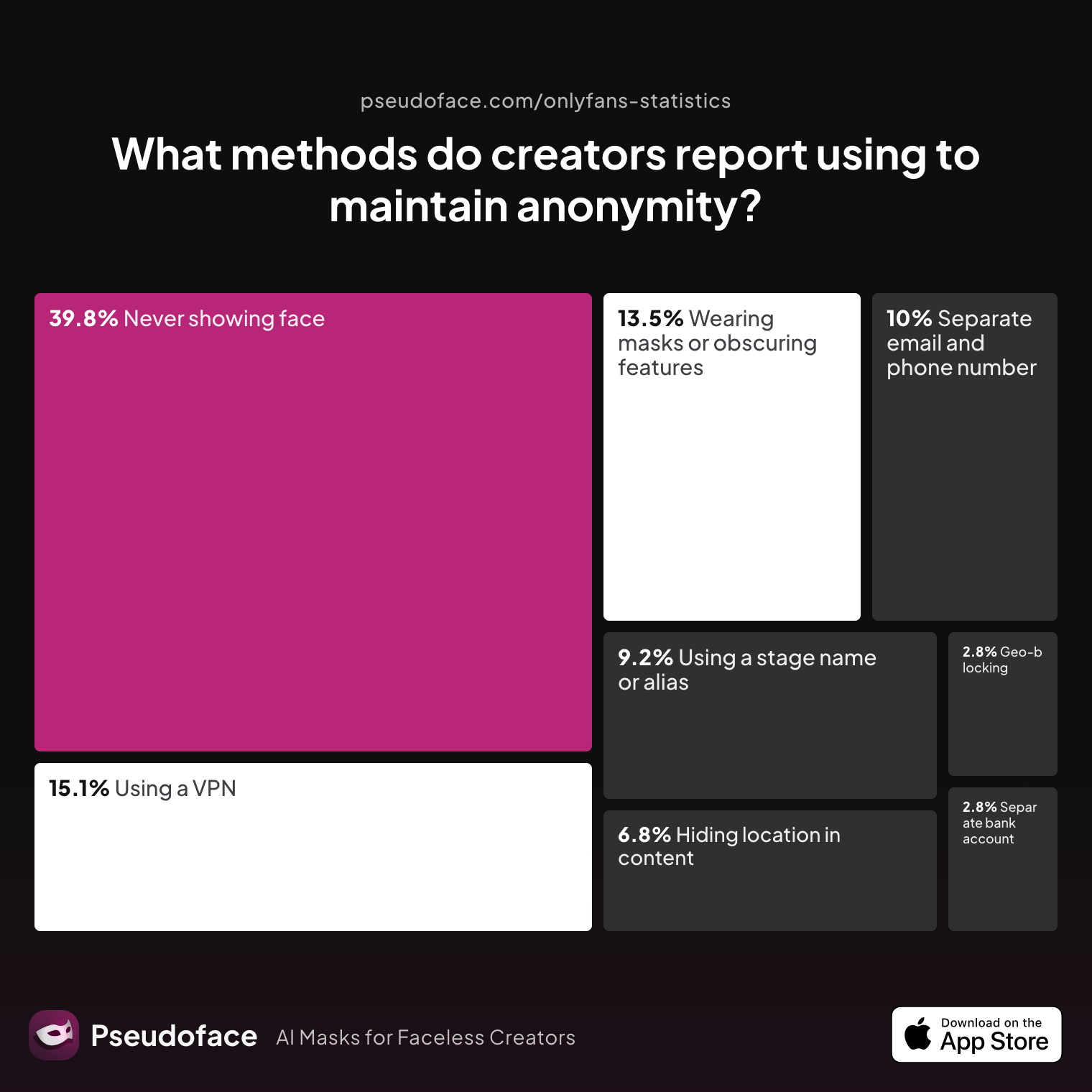
To understand just how creators prioritize identity shielding, let's look at the actual methods used to achieve anonymity across platforms, based on the latest Reddit-sourced data:
| Answer | Percentage |
|---|---|
| Avoiding location-specific details in content | 6.77% |
| Geo-blocking specific regions | 2.79% |
| Never showing face | 39.84% |
| Using a separate bank account or business entity | 2.79% |
| Using a separate email and phone number | 9.96% |
| Using a stage name or alias | 9.16% |
| Using a VPN or privacy tools | 15.14% |
| Wearing masks or obscuring identifying features | 13.55% |
Never showing face is the dominant anonymity method (39.84%), but 13.55% of creators report routinely obscuring identifying features including tattoos.
These behaviors cluster: active concealment of tattoos, scars, and piercings is closely linked with "never showing face" and other advanced privacy tactics—suggesting that creators who worry about facial recognition are equally wary of ink-based exposure. While a significant portion of creators focus on digital strategies (VPNs, alternate emails), visible markers on the body—especially in high-resolution imagery—demand both physical and digital solutions.
For every step forward in face-blurring tech or geo-blocking, tattoo exposure remains a stubborn, visual "leak." This is true for traditional adult platforms as well as newer video-focused spaces like TikTok and Instagram Reels, where fans expect uncluttered scenes and unfiltered access. As of 2026, demand for resilient tattoo removal solutions is growing—not just for new creators but for anyone expanding into risqué or anonymous content.
As one creator puts it in a candid Reddit exchange:
Open thread on Redditr/CreatorsAdvice
u/mollymelonsxo
I blurred my tattoos when I first started, but stopped because I'm lazy and don't enjoy editing. I also decided showing tattoos is worth it, for me as a faceless creator, because I can promote myself as alt / goth / punk. Helps show some personality. I've google image searched my tattoos extensively and results don't link to my vanilla socials or any of the tattoo artists. I do have a few custom pieces, but most of my tattoos are flash designs used across the country so they aren't very identifying. Hundreds, if not thousands, of people have the same flash tattoos as me across the US.

Creators face a tradeoff: invest hours cloaking every mark, or accept some risk and re-shape your brand. But for the majority who choose to erase, conceal, or block tattoos, which approaches actually work—and where do they fall short? Understanding the ecosystem of creator strategies, and real-world workflow breakdowns, is next.
All the Ways to Remove Tattoos from Pictures and Videos: Strategies from Real Creators
The landscape of tattoo removal for creators is crowded with promises—seamless airbrush, AI "magic erasers," bulletproof makeup, even clever posing. Which methods rise to the top, and how do creators actually employ them?
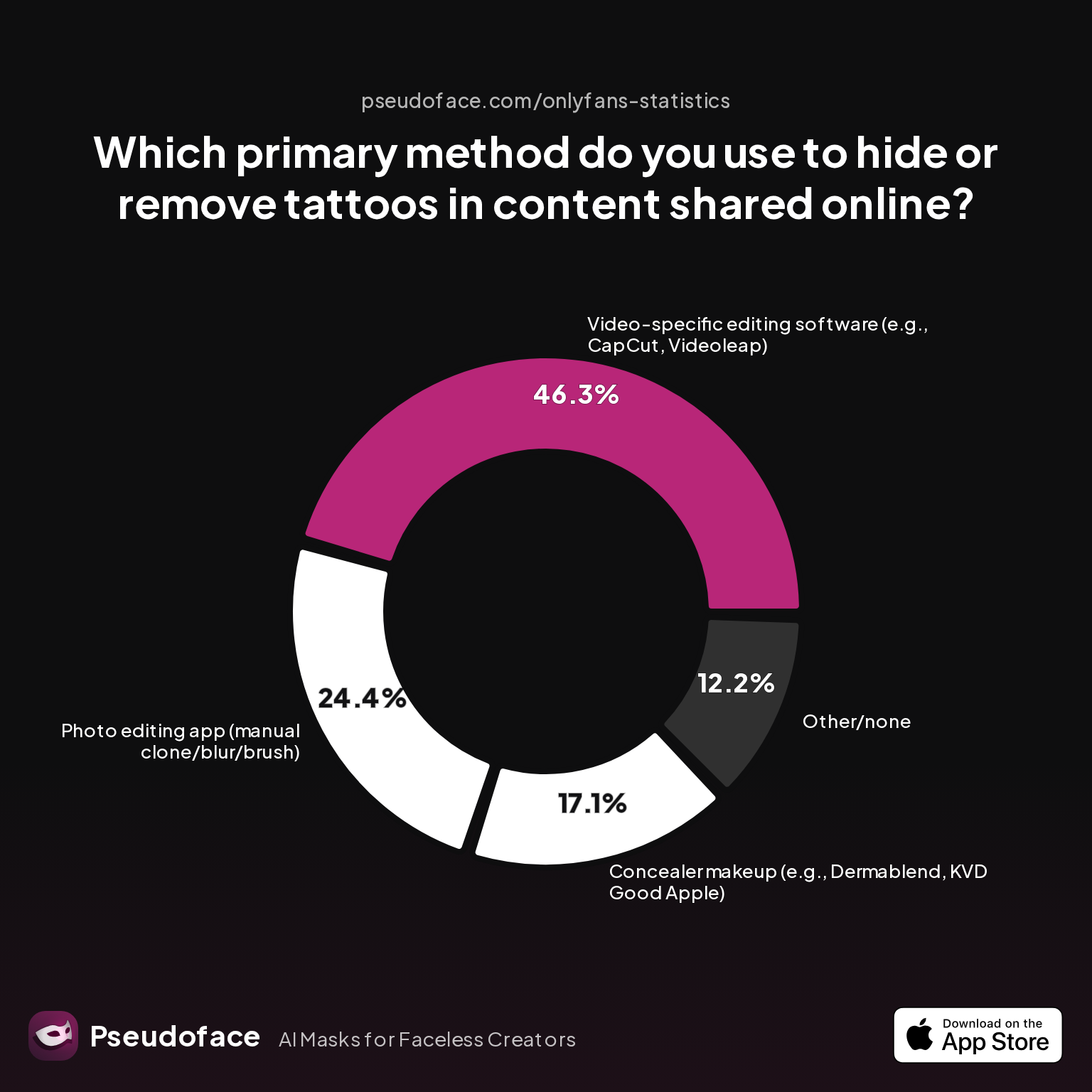
Direct-from-Reddit survey data reveals a nuanced picture:
| Answer | Percentage |
|---|---|
| AI-based tattoo removal tool/app | 0.00% |
| Concealer makeup (e.g., Dermablend, KVD Good Apple) | 17.07% |
| Other/none | 12.20% |
| Photo editing app (manual clone/blur/brush) | 24.39% |
| Video-specific editing software (e.g., CapCut, Videoleap) | 46.34% |
Nearly half of creators (46.34%) primarily use video editing software to hide or remove tattoos, while one in four rely on manual photo editing apps and just 17% trust concealer makeup as their mainstay. AI-based tattoo removal tools remain almost unused as a sole strategy (0%).
Before diving into granular app comparisons, this polarization is instructive. Video content—especially for OnlyFans and TikTok—now dominates, requiring frame-by-frame solutions well beyond what simple makeup or one-click photo editors can offer. Yet makeup remains essential for certain shots, especially when editing artifacts or lighting make digital fixes glaring.
The most common workflows, drawn from thousands of Reddit threads (with caveats for reporting bias and self-selection), fall into three broad families:
- Physical Coverage: Concealer makeup, body foundation, skin tape, or strategic outfits/hands.
- Digital Coverage: Manual photo editing (clone stamp, healing brush, magic eraser) or video masking/blurring.
- Hybrid & Workflow Stacking: Creators increasingly layer physical and digital solutions for "bulletproofing"—makeup for base coverage, plus digital fixes for closeups or problem shots.
Creator testimony confirms that effectiveness varies wildly by tattoo location, size, and content niche. In particular, custom script or unique art pushes more creators toward rigorous digital concealment, while "flash" tattoos sometimes slip by with minimal edits, justified by lower traceability.
Here's how a privacy-focused creator describes the iterative, evolving approach many fall into:
Open thread on Redditr/CreatorsAdvice
u/Dazzling-Sympathy-89
Kryolan TV makeup. It a heavy stage makeup, but FULL coverage, when set well indestructible.
Underlying all of this is a sense of shifting effort: what worked in 2022 (manual editing, strategic cover) may not suffice as platforms improve resolution, and fans become savvier. As of early 2026, creators increasingly combine strategies, switching between them as projects (and risks) demand. Next, let’s zoom in on the world of makeup—where old-school holds surprising power, and pitfalls abound.
How to Cover Tattoos On Camera: Makeup, Concealer, and Pro Product Realism
Makeup remains both an art and a lifeline for creators needing real-world tattoo concealment, especially for live events, non-edited shoots, or close video work. The route isn't easy: matching skin tone, preventing sweat-based melt, and resisting high-def cameras is a gauntlet few products survive without flaw.
Professional stage and theater products, like Kryolan and Dermacol, lead real-world recommendations in the Reddit creator community. These dense formulations offer color correction and opacity well beyond drugstore options, but they require practice—and a tolerance for heavy, sometimes uncomfortable wear.
Open thread on Redditr/CreatorsAdvice
u/Dazzling-Sympathy-89
Kryolan TV makeup. It a heavy stage makeup, but FULL coverage, when set well indestructible.
And:
Open thread on Redditr/CreatorsAdvice
u/Scary-Community-1501
Dermacol is a foundation that went viral years ago for it being able to cover literally anything, maybe give that a go🩷
But even trusted products reveal sharp limitations in high-movement or long-form video. While theater and special effects makeup can produce near-invisible coverage from a few feet away, close-ups or sweat-heavy scenes break even the best formulas. Longevity, transfer to clothes, and blending for non-flat skin top the list of creator headaches.
Some strategies for boosting effectiveness, drawn from creator threads:
- Color correct: Use a red or orange base to neutralize dark ink before foundation layers.
- Set aggressively: Use setting powder and finishing spray to lock product in place.
- Test under real conditions: Lighting (especially ring lights or daylight) can reveal patchiness invisible in the bathroom mirror.
- Layer with intent: Multiple thin layers provide more realism than one thick coat.
The makeup route also excites safety concerns—especially for sensitive areas or full-body coverage. Patch test liberally, and avoid covering broken skin or healing tattoos.
Many creators combine makeup with other methods for demanding video contexts. As one user notes:
Open thread on Redditr/onlyfansadvice
u/First_Schedule1136
I’ve learned that makeup or certain angles to kind of hide my tattoo works. I haven’t quite mastered the blurring for videos 😅
For some, exposure is inevitable: after time-consuming makeup applications and still catching glimpses of ink in edits, creators often pivot to digital fixes for peace of mind—particularly for batch photo work or full-nude requests. Now, let’s break down those digital and AI editing options: what works, what fails, and how users actually experience their tradeoffs.
How to Remove Tattoo from Photo: The Truth About Editing Apps, Retouch Tools, and AI
Digital editing sits at the core of modern tattoo removal workflows for creators. The toolbox spans basic phone apps that clone or "heal" away small designs, pro tools like Photoshop and GIMP for detailed work, and a new class of AI-powered removers promising stunning speed—sometimes at the cost of realism.
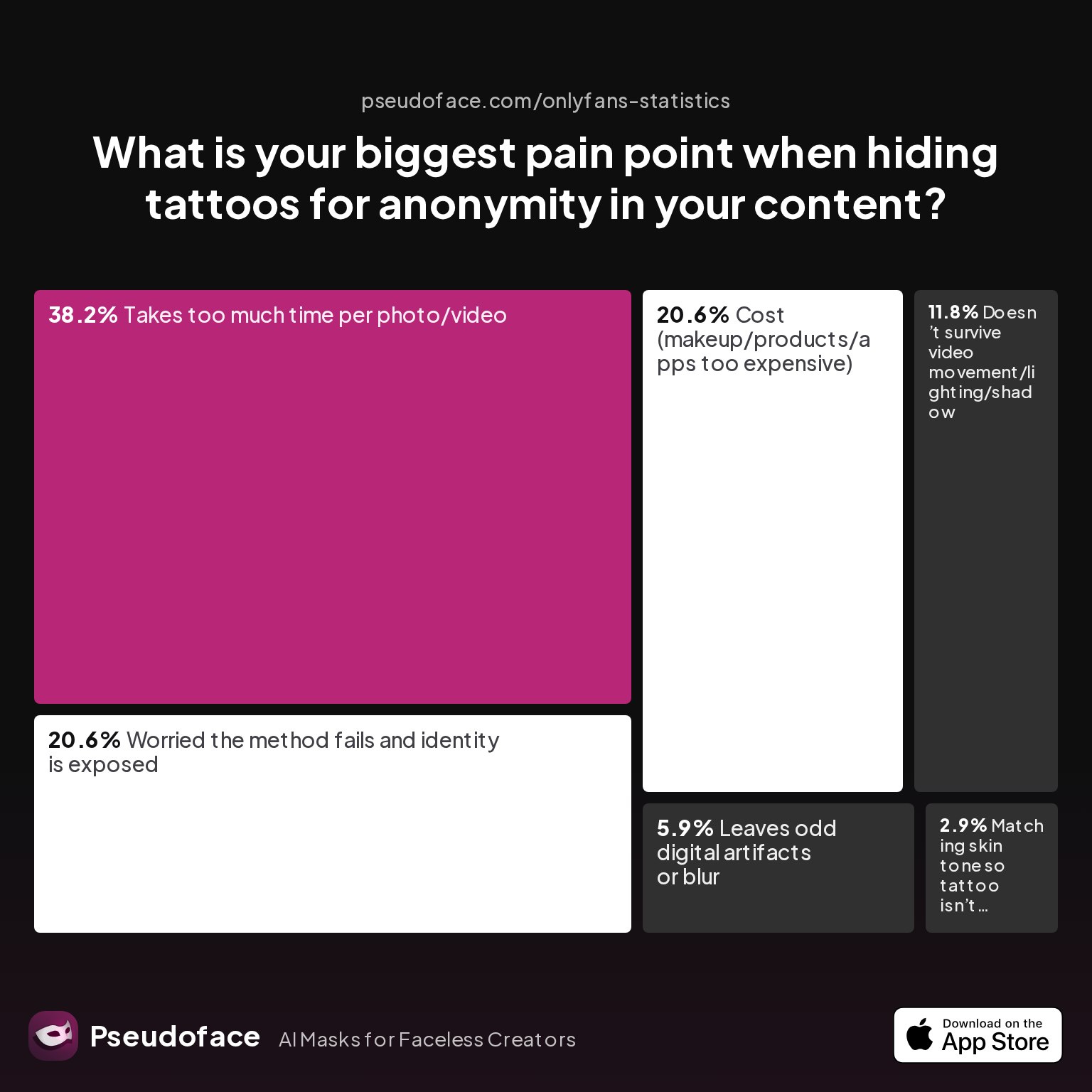
Creator pain points are sharp and highly consistent in both survey data and Reddit testimonials:
| Answer | Percentage |
|---|---|
| Cost (makeup/products/apps too expensive) | 20.59% |
| Doesn’t survive video movement/lighting/shadow | 11.76% |
| Leaves odd digital artifacts or blur | 5.88% |
| Matching skin tone so tattoo isn’t visible | 2.94% |
| Takes too much time per photo/video | 38.24% |
| Worried the method fails and identity is exposed | 20.59% |
The most-cited tattoo cover pain point (38.24%) is the sheer time required for edits, followed by costs (20.59%) and ongoing anxiety that imperfect removal could expose a creator's true identity (20.59%). Digital artifacts and poor skin-matching also appear, but less frequently.
This makes sense in context—while AI and mobile apps promise instant fixes, most tattoos need painstaking correction for each image, and video multiplies the workload exponentially. Survivorship bias is a factor here: Creators sharing advice on Reddit tend to have put in this effort and may under-report quick failures or burned-out attempts.
Let's look at the tools and techniques in detail:
Manual Editing: Photoshop, Lightroom, GIMP
- Strengths: Pixel-level control, multi-layer compositing, best-in-class skin matching, powerful clone/heal.
- Weaknesses: Steep learning curve, time-intensive (especially for video), software cost (Photoshop), risk of "plastic skin" if overdone.
A Redditor summarizes:
Open thread on Redditr/CreatorsAdvice
u/cerysfox
I don't cover mine, but a good full coverage foundation with powder to set it could work. Possibly invest in some editing software? Google has magic eraser but it's hit and miss whether it works haha, possibly Photoshop if you're willing to put in that much work. Would be difficult for videos though
Mobile & One-Click Apps (e.g., CapCut, Snapseed, Lightroom Mobile, Remini)
- Strengths: Fast for simple/isolated tattoos, mobile-first interface, AI-augmented blur and clone tools.
- Weaknesses: Poor edge detection, artifacts in complex lighting or with textured skin, limited for batch/video use.
A typical scenario:
Open thread on Redditr/CreatorsAdvice
u/Fine_Whole_9893
i used an editing app and color matched the areas of my skin i needed to cover. i just don’t remember which one it was. i know if you have an iphone you can screenshot the photo u want and use that. but idk anything about androids so i can’t help you there.
AI-Based Photo Removers
- Strengths: Potentially extremely fast, minimal manual input for small, clearly separated tattoos, improvements year over year.
- Weaknesses: Often leave "melty" skin, grotesque blends, or fail completely on intricate or shaded tattoos; risk of uploading images to cloud-processing servers (privacy concern).
Worth noting: The most upvoted AI removal posts in late 2025-2026 still pair results with at least some manual retouching, especially for larger or shaded pieces.
Video-Specific Editors: CapCut, Videoleap
- Strengths: Keyframing and motion masks can follow tattoos over movement, possible to combine blur, shape masks, and clone tools for dynamic concealment.
- Weaknesses: Steep learning curve, especially for moving body parts; "jitter" or color mismatches over time reveal edits in high-motion scenes.
Direct workflow advice appears frequently:
Open thread on Redditr/onlyfansadvice
u/teachermomof2xxx
Background Blur Tap on the video clip Mask Invert Choose which shape you like Create key frames to move the mask as needed (this is the time consuming part if you move a lot) If there is a faster way, I have no idea. I’ve only ever used it for short tiktoks.
A recurring reality: batch removal and video work require either immense patience or adoption of advanced hybrid workflows. Expect to spend significantly more time on video editing than photos, with diminishing returns for larger tattoos. As of early 2026, AI video removers are improving but still unreliable for mass use, especially for moving, flexing skin.
The bottom line? Digital tools have never been better, but the time sink is real—and the old problem of "plastic skin" remains. For creators with a heavy tattoo burden, building a workflow that balances cost, effort, and risk is key. Next, let’s compare these approaches for effectiveness, privacy risk, and ease of use—using creator data to spotlight the best fit for your needs.
Remove Tattoo from Picture or Video: Effectiveness, Realism, and Privacy Compared
Creators want realism, speed, and airtight privacy—but achieving all three is rare. Each tattoo removal technique brings its own tradeoffs, and the best workflow often depends on your content medium, tattoo complexity, and level of paranoia.
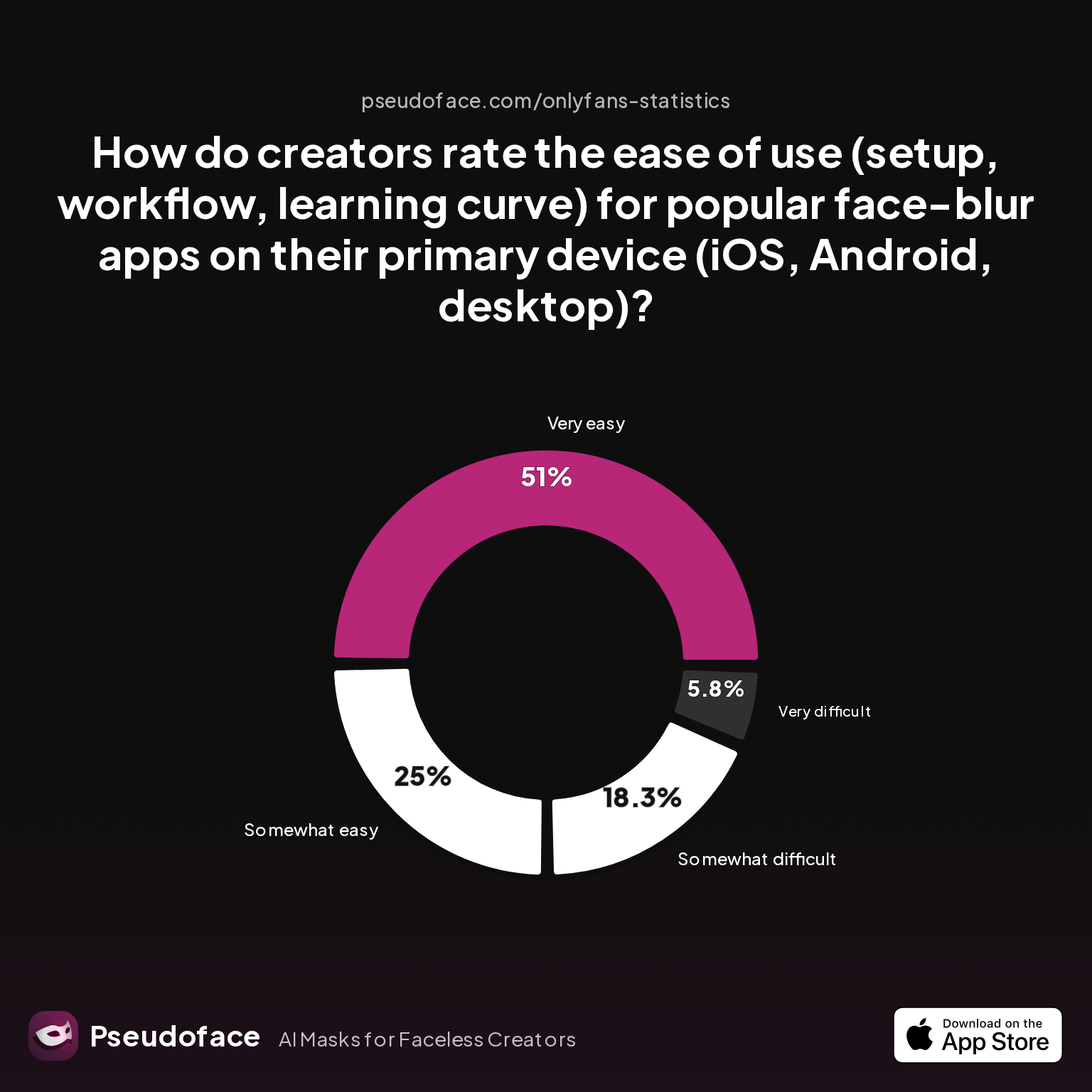
Perceived ease of use matters: Many creators choose their method based on what feels manageable—especially when editing in batches, or working between phone and desktop.
| Answer | Percentage |
|---|---|
| Neutral | 0.00% |
| Somewhat difficult | 18.27% |
| Somewhat easy | 25.00% |
| Very difficult | 5.77% |
| Very easy | 50.96% |
Over half of creators (50.96%) rate face-blur and related editing apps as "very easy," but nearly a quarter still find them somewhat or very difficult to use.
While this stat focuses on face-blur apps, its implications for tattoo concealment are clear: low learning curve solutions (CapCut, Snapseed, Canva) drive mass adoption, but power users quickly hit walls—especially for complex or multi-frame edits. The difficulty distribution is also shaped by platform choice (phone vs desktop), personal skill, and readiness to tolerate minor artifacts.
- Makeup: Realistic in stills and short videos, fastest for in-person shoots, but vulnerable to sweat, movement, and high-res scrutiny. Zero digital artifact risk, but can be physically uncomfortable and time-consuming to apply well.
- Photo editing/retouch (manual or AI): Authentically invisible when done carefully, but significant effort—especially for large, painted, or shaded tattoos. Major realism/texture wins compared to fast-blur, if patience permits. Privacy risk arises if images are processed by cloud services retaining uploads.
- Video editing (mask/blur): Most scalable for creators producing series content, but suffers in scenes involving lots of movement, odd lighting, or skin texture changes. Learning curve high but offers enduring privacy if edits pass close review.
A hybrid approach is now the norm—combining makeup to minimize the tattoo for the camera, then digital (or AI) touch-up for any remaining visible marks in post-production. Privacy, realism, and workflow speed all spike once this pipeline is dialed in, at the obvious cost of greater complexity.
Pain points around workflow—especially "the method fails and identity is exposed" and "takes too much time"—should not be underestimated. Based on Pseudoface's analysis, many creators attempt 2-3 methods before settling on a reliable pattern, further underlining the value of experimentation.
In the words of one community member:
Open thread on Redditr/CreatorsAdvice
u/Laughs_at_the_horror
Canva on Android is pretty easy to use.
For those balancing high-volume content schedules and fine-detail privacy, ease of use may outweigh maximal realism—so long as the strategy reliably foils reverse image tracing, crowdsourced doxxing, and platform algorithms. Many remain nervous about holes in their protocols, especially with ongoing improvements to image search and AI-powered recognition. With that context, let's move into practical advice on advanced, hybrid workflows.
Advanced: Combining Makeup, Digital Editing, and AI to Remove Tattoos from Photo and Video
For creators exposing a lot of skin—or contending with prominent, unique tattoos—single-method concealment rarely offers peace of mind. The hybrid workflow, which pairs makeup, editing, and AI as layers of defense, is the evolving gold standard as of late 2025.
Stepwise Hybrid Workflow
- Physical Reduction: Start with heavy-duty makeup (Kryolan, Dermacol, or body foundation) to diminish the tattoo's contrast and make it less detectable to both the naked eye and editing tools.
- Shoot with Intent: Whenever possible, position the body or camera to minimize tattoo prominence. Even subtle angle changes or prop placement create less for post-production to fix.
- Manual Editing: Import photos or video into a desktop app (Photoshop, GIMP, or CapCut for video). Use clone stamp/heal/patch to remove remaining traces or blend makeup lines. For video, keyframe masks or trackers to follow moving tattoos.
- AI Finishing: For batch photos, try an AI-powered cleaner to spot-check small stains or ink remains. Always review output closely—automated tools can introduce weird texture or color mismatches.
- Final Audit: Double check for visual artifacts, batch compare against original images, and have a trusted friend or partner attempt to identify tattoos blind.
A common timeline: Spend 10-30 minutes per image for deep retouching, with video edits running 30+ minutes per minute of footage for high-fidelity blending. Newer AI-based video tools are trending (as of 2026), but best-in-class results still require human correction—especially for motion.
Confidence in workflow, not just concealment, is what eases creator anxiety. As creators move through different platforms and lighting setups, they report that only hybrid approaches retain their effectiveness:
Open thread on Redditr/CreatorsAdvice
u/cosplay_kte
there is also UNdo blur app sis :( I would not rely on this kind of app... I used to blur stuff but now i put some objects in the clip to 100% block visibility
This blunt testimonial highlights why creators layer multiple solutions—no single app or tool is 100% reliable under all conditions.
Key success factor: Practice and revision. Many creators iterate on a test photo or video, compare various methods, and find their “minimum viable effort” for peace of mind versus workflow bottlenecks. Those with the heaviest tattoo coverage often outsource some stages (e.g., a trusted editor for digital touch-up).
Lastly, covering all bases involves a privacy hygiene step often overlooked: removing metadata from files. Before you upload, ensure your images and videos are stripped of location, device, and edit history—since digital fingerprints are a real risk, especially when using online editing tools.
Remove Tattoo from Photo App and Online: What Fast, Web-Based Options Can (and Can't) Do
As of 2026, tattoo removal apps and web-based tools promise instant fixes for anyone typing "remove tattoo from photo app" into Google. For busy or beginner creators, these solutions look irresistible. But how do they fare for realism, privacy, and potential leaks?
The biggest differentiator is processing method: web apps and some phone tools process photos on remote servers, potentially storing images in the cloud. This creates a privacy and security gap for true anonymity seekers.
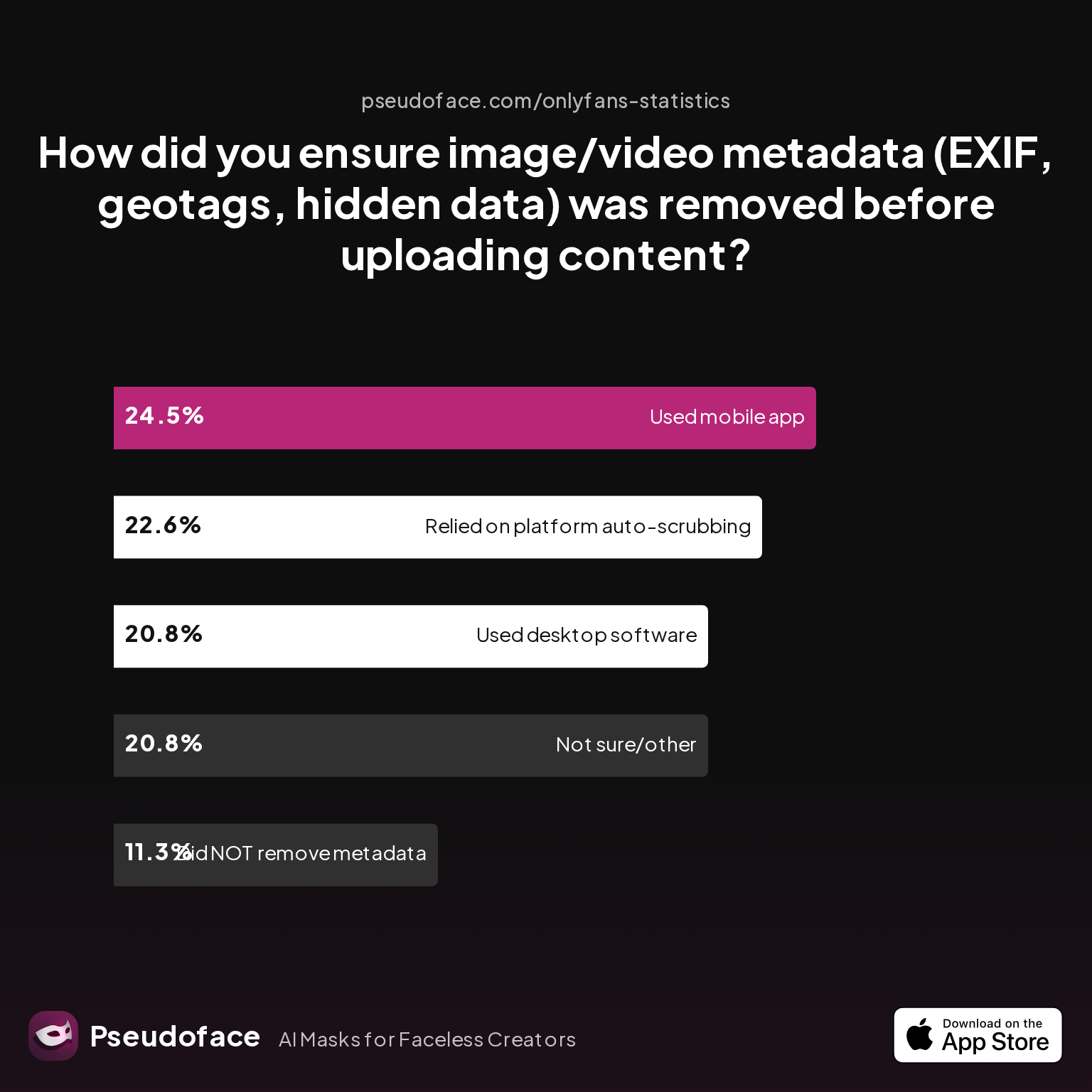
| Answer | Percentage |
|---|---|
| Did NOT take steps to remove metadata | 11.32% |
| Not sure/other | 20.75% |
| Relied on platform auto-scrubbing (e.g., OnlyFans upload process) | 22.64% |
| Used a dedicated metadata removal app on mobile | 24.53% |
| Used desktop software (e.g., Photoshop, custom scripts) | 20.75% |
Nearly one in four creators (24.53%) rely on a dedicated mobile metadata removal app, while about as many use desktop tools—and a concerning 11.32% don't remove metadata at all before upload.
Here's where web-based tattoo removers can fall short:
- Speed: Top-rated apps (e.g., SnapEdit, Remini, PhotoRoom) can clear small tattoos in seconds—fine for quick social posts.
- Realism: Simple, isolated tattoos may vanish cleanly. Complex, shaded, or large pieces often yield blurry, patchy, or "melted" skin.
- Privacy: Uploading to free/unknown servers leaves open the risk of your images being stored or shared. Many apps also retain EXIF and geolocation tags unless manually scrubbed.
Batch uploads—often a selling point—don't always play well with unique tattoo shapes or changing lighting, often producing uneven results. Savvy creators use web-based tools only for disposable content, always back up with manual review, and strip all metadata off before any public post.
A warning from the field:
Open thread on Redditr/CreatorsAdvice
u/thrHOEaway666
I use Blur-Video, the free iphone version
Easy tools can help—just remember, they're best as a last-mile supplement or for low-risk shots. For full-nude, high-value, or repeat content, stick with local (on-device) editors whenever possible.
FAQ
What’s the best app to remove a tattoo from a photo for free?
PicWish, SnapEdit, and GIMP are well-rated for simple removal, but all struggle with large or shaded tattoos and should be paired with manual review for privacy.
Free mobile/web apps like SnapEdit or PhotoRoom offer "magic eraser" tools, but the realism varies. GIMP (desktop) lets you use more precise healing and clone tools, but takes more time. For privacy, favor offline editors; always strip metadata after edits.
Does heavy-duty makeup actually last through video shoots and sweaty scenes?
High-coverage brands (Kryolan, Dermacol) can last through short video shoots if properly set, but sweat, friction, and long takes often expose the tattoo or cause patchiness.
Most creators need to reapply between takes or pair makeup with digital touchup for full reliability in high-stress shoots.
How do I remove a tattoo from multiple pictures automatically?
Some AI-based apps and desktop tools (like Photoshop's batch actions or Lightroom's healing brush in sync) can process multiple files, but results are inconsistent for variable tattoos or angles.
You’ll likely need to edit some images by hand to avoid visible artifacts or repeated patterns that expose the fakery.
Is it safer to blur, crop, or erase a tattoo in TikTok/IG videos—or just use a sticker?
Blurring or erasing (with CapCut or Videoleap) works for static tattoos, but cropping may ruin content framing, and stickers can look unprofessional or be easily removed.
Hybrid approaches—using masking and manual edit—offer durability, especially if you check playback frame by frame.
Which really looks more realistic: airbrushed makeup or AI/photo editing?
Careful manual photo editing generally beats both AI and makeup for realism, but with a higher time cost; makeup can look convincing at a distance or in low lighting, but may break in close-ups or movement.
AI is catching up but still produces "melty" or odd skin at times, especially for shaded or colored tattoos.
Are online tattoo removal tools risky for privacy?
Yes—images uploaded through web-based apps may be stored, retrievable, or leaked; always use apps you trust and scrub metadata, or stick to offline tools when anonymity is critical.
Even paid "instant removal" services often keep edits on their servers or use images for training. Use with caution.
Can AI really remove tattoos in video, or is it mostly manual work?
As of 2026, AI can help with small, static, or repeated tattoos in video, but most moving/complex edits still require keyframing and manual masks in tools like CapCut or Premiere.
Auto-tracking tools are fast improving, but still open to glitches, especially when skin moves or lighting changes.
Why do so many tattoo removal apps distort skin texture or leave weird patches?
Current AI and fast-heal tools struggle with skin gradients, shadows, and edges, especially for colorful or 3D tattoos—yielding visible blur, plastic patches, or mismatched tone.
Layering in manual clone/heal work after AI pass can help blend problem spots for a more natural result.
Can I just cover my tattoo with outfits or hand placement for content?
For some contexts and tattoo locations, creative poses or clothing are quick, zero-risk fixes—but won’t work for explicit or full-nude content.
What’s practical varies by niche and fan expectations; many creators use these hacks for non-focus areas but default to digital or makeup for close-ups.


