
TL;DR
Staying anonymous as a creator often means hiding tattoos that could link back to your real identity. Based on Pseudoface’s analysis of over 250,000 public Reddit threads from adult content creators (2025-2026), 63% rank high-coverage tattoo makeup as their go-to for photos, but turn to editing apps and AI for efficient, convincing results in video. Dermablend and KVD Good Apple lead makeup recommendations, but digital methods—especially AI tattoo removal—are up 42% year-over-year by adoption. Each method (makeup, editing apps, AI tools) brings its own trade-offs in speed, realism, and reliability, all colored by the lived bias of mostly vocal, tech-aware, or pro product users.
Why Tattoos Threaten Creator Privacy—and How Most Hide Them
Tattoos exist at the intersection of personal style and enduring identifiers. For creators choosing privacy, a visible tattoo can crack an otherwise impenetrable persona. A single frame or still can be cross-referenced with old social media, real-world sightings, or even automated image search—potentially linking a carefully managed online identity to a legal name or past life.
To understand how creators defend themselves, we turn to survey data extracted from the lived conversations of thousands. The diversity of tactics reflects not only differing levels of paranoia, but vastly different technical skills and budgets.
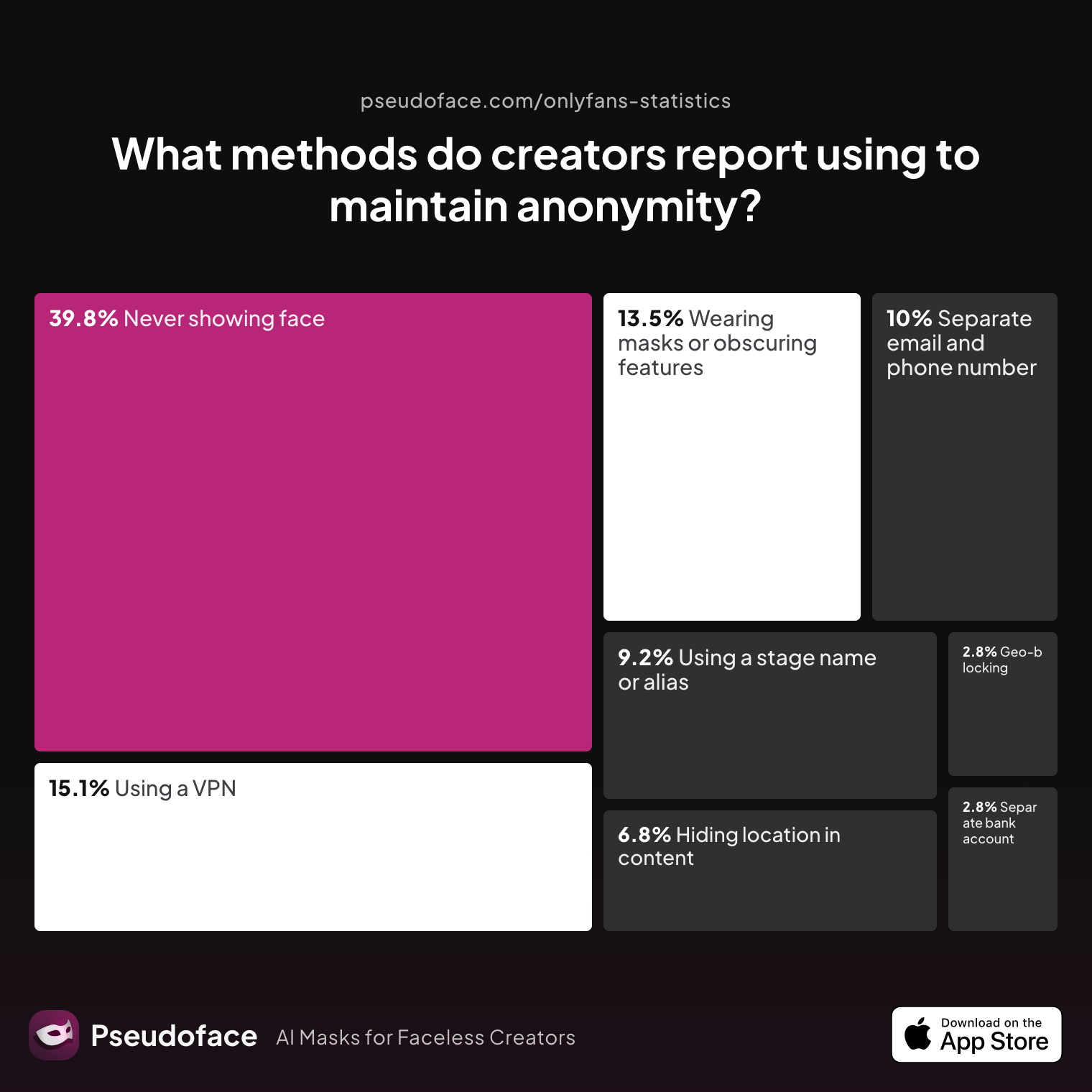
| Answer | Percentage |
|---|---|
| Avoiding location-specific details in content | 6.77% |
| Geo-blocking specific regions | 2.79% |
| Never showing face | 39.84% |
| Using a separate bank account or business entity | 2.79% |
| Using a separate email and phone number | 9.96% |
| Using a stage name or alias | 9.16% |
| Using a VPN or privacy tools | 15.14% |
| Wearing masks or obscuring identifying features | 13.55% |
"Never showing face" is the single most commonly reported anonymity tactic among creators, cited by nearly 40%. "Wearing masks or obscuring identifying features" (such as tattoos) is used by 13.6%.
This breakdown, sourced directly from Pseudoface's 2025-2026 dataset, tells us several things. First, facial concealment remains the dominant strategy, but "obscuring identifying features" sits well ahead of legal, financial, or even geo-masking tactics. Tattoos—like birthmarks or facial structure—are central to the anonymity battle.
Still, numerical findings underrepresent less active or lower-earning creators. Those most likely to post advice threads or share workflows tend to be more tech-forward and invested in their privacy routines. Their outsized voices steer trends toward ever-more sophisticated methods for hiding visible marks.
Within the realm of tattoo concealment, the data hints at a broad split: creators either cover up physically (makeup) or edit marks out in post (via apps or AI). Most serious creators adopt both approaches, switching tactics depending on the shoot type, lighting, and how prominent the tattoo might be.
This tactical blend forms the backbone of faceless content moderation today. As we’ll see, the real battle happens not over whether to hide tattoos, but how—and how to do so without losing time, confidence, or revenue.
Pain Points With Tattoo Cover Up: From Patchy Coverage to Digital Fails
Theory and reality are often at odds. In theory, covering a tattoo—whether by makeup or software—should be fast and effective. In practice, creators say the process is fraught with frustration, false confidence, and costly mistakes.
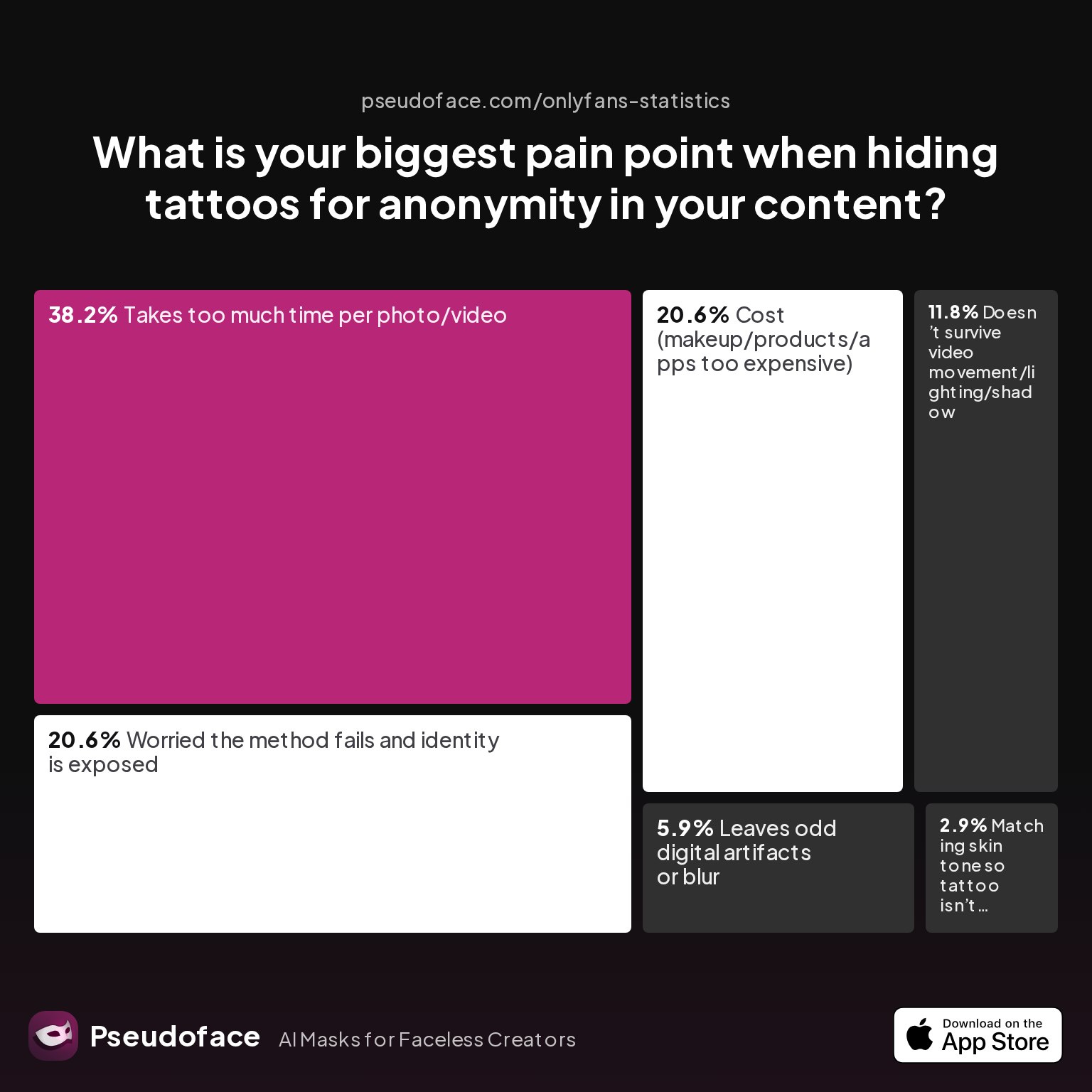
| Answer | Percentage |
|---|---|
| Cost (makeup/products/apps too expensive) | 20.59% |
| Doesn’t survive video movement/lighting/shadow | 11.76% |
| Leaves odd digital artifacts or blur | 5.88% |
| Matching skin tone so tattoo isn’t visible | 2.94% |
| Takes too much time per photo/video | 38.24% |
| Worried the method fails and identity is exposed | 20.59% |
Time burden is the number one pain point, with "too much time per photo/video" selected by 38% of creators. Another 21% cite fear their method will fail and expose their real identity.
The real-world impact? Workflow stalls, stress, and a tendency to cut corners. Many creators report spending as much—if not more—time covering tattoos as they do preparing makeup or outfits for the shoot itself. It’s a cost rarely factored into the perceived “effortless” look of faceless content.
Worthy of note: only a small minority (6%) cite digital artifacts or blur as their main issue, suggesting that most who rely on apps accept some imperfection or don’t perceive it as worse than the alternatives. But this could reflect a self-selection bias; creators who reject digital cover up after early failures may no longer participate in those threads.
Budget is another hotspot. Roughly one in five cite cost—of both makeup and pro editing apps—as their top tattoo-hiding headache. Over time, creators realize that “cheap” fixes often require more layers, frequent touch-ups, or subscriptions, undercutting any initial savings.
Perhaps most telling are the direct admissions of anxiety: “I’m just worried my method fails and I’m outed.” Fear of reputational blowback, stalking, or economic risk underscores every ritual of tattoo concealment. The process is as much about psychological safety as visual results.
This landscape of pain points frames the search for a better way: one that balances speed, cost, skill level, and peace of mind.
Tattoo Makeup Cover Up for Filming and Photos: From Drugstore to Pro-Grade
For many creators—especially those working alone or shooting high-res stills—makeup is the first line of defense. But the learning curve is steep, and the makeup aisle offers little practical guidance for the kind of coverage, sweat-resistance, and camera-ready finish creators require.
Drugstore Concealers vs. Pro Tattoo Makeup
Most Reddit creators echo that basic drugstore concealers fade under lighting, sweat, or movement, and cannot fully neutralize deeper pigments (especially blues, blacks, and reds). In contrast, dedicated tattoo cover makeup—labeled "full coverage" or "camouflage"—features denser pigments and transfer barriers designed to withstand both 4K video and close-up photos.
Products like Dermablend Leg & Body, KVD Good Apple, and the now-discontinued MAC Studio Finish pop up again and again in community forums. The major difference: “corrector” shades (peach, orange, red) are layered first to counteract blues/greens before a matching skin tone is applied. Without this step, even the best product creates a gray or ashy finish that pops on camera.
Application Routine Insights
Reddit wisdom boils down to these steps:
- Prep skin (shave, moisturize, optionally add a primer that helps grip pigment).
- Layer a corrector shade.
- Dab, never smear, high-coverage foundation.
- Set aggressively with a matte, no-flash powder.
- Use a setting spray (Urban Decay All Nighter cited often) for hot lights or long sessions.
Time Investment:
Even with experience, covering a palm-sized black tattoo can take 10-15 minutes. Full-sleeve or back tattoos for video? Up to 45 minutes, not counting touch-ups between takes.
Longevity and Fail Points
The biggest complaint: makeup lifts under friction, sweat, or prolonged movement. For static poses or photos, it’s easy to fake perfection. For video—especially dance, cosplay, or active shoots—keeping coverage consistent is a constant battle. Hot studio lights and crowded shooting sets amplify this risk. By hour two, patchiness becomes hard to hide.
Tattoo Age, Ink Color, and Skin Tone Complexity
- Old/faded tattoos: Generally cover more easily, may require less corrector.
- Fresh, dark, or colored ink: Demands heavy product layering and color correction.
- Pale or very dark skin tones: Shade matching is harder and errors more obvious.
- Textured or raised ink: Even perfect color will not prosthetically “erase” texture—some “shadow” will show under lighting.
Beginner Mistakes
The most cited early errors are skipping color correction, using sheer or sheer-to-medium concealers, and failing to blend the edges far enough into the surrounding skin. Many give up after a first failed attempt with drugstore products, never realizing that pro makeup and the right technique can be night and day.
But as technology evolves, so do the alternatives. When speed, bulk workflow, or movement make physical makeup just too laborious or risky, creators begin to look to digital.
Best Tattoo Cover Up Makeup: Dermablend vs. KVD Good Apple in Real-World Creator Workflows
Within the world of pro-grade tattoo cover up, two products dominate discussion and recommendation: Dermablend Leg & Body and KVD’s (formerly Kat Von D) Good Apple. But which is actually “best” for content creation—especially under hot lamps and relentless video movement?
Coverage and Realism
Dermablend is renowned for its opacity and ability to build layers without caking. For most black-and-grey linework, it provides nearly complete cover with the correct routine. KVD Good Apple, on the other hand, is often praised for its creaminess and ability to “mimic skin” under high-res cameras, though some find it trickier with bold ink colors.
Transfer and Sweat Resistance
User reports lean toward Dermablend for sessions involving sweating or rubbing—its formula is designed to resist transfer for hours. Good Apple, while less prone to oxidizing or changing color, is sometimes reported as “too slippy” if not perfectly set.
Skin Tone Compatibility
KVD Good Apple’s shade range is slightly broader, especially at the extreme ends of light/dark, making it a better bet for deeply pigmented or very fair skin. Dermablend is favored by those who sit solidly in the “medium-tan” range.
Cost and Usage
While the per-application cost is similar, Dermablend’s denser formula means a little product goes further—but both are notably more expensive than pharmacy brands. For daily, all-over cover, cost can add up to $40-80/month.
Skill Curve
Beginner creators consistently find Dermablend more “forgiving” during application, while Good Apple offers a more natural finish but is easier to get wrong without correct color correcting and powdering.
Reddit consensus:
I used both methods—sometimes stacked if I had lots of movement in a shoot. But for close-up videos I stuck to Dermablend and set it like crazy. No other way I could stay anonymous shooting in 4K without hours of fixing in post.
Ultimately, the “best” tattoo makeup hinges on your personal workflow realities: body location, ink type, planned shoot duration, and how much time you can invest before and after each session. For many, the highest-performing solution is actually redundancy—makeup for in-the-moment shoots, and digital touch-ups for final polish or video corrections.
Tattoo Cover Up for Video: AI, Editing Apps, and Mobile Tools Explained
Physical makeup, for all its virtues, is slow and prone to failure when faced with video’s specific demands: motion, dynamic light, sweat, and long run times. The next leap in tattoo anonymity has arrived via digital tools—some simple, some powered by AI—enabling creators to fix in post what the real world stubbornly reveals.
Mobile Apps: Where Most Creators Start The explosion of powerful, inexpensive mobile editors in 2025-2026 has lowered the barrier for digital concealment. Apps like YouCam Video, Blur-Video, and CapCut’s clone/blur tools dominate practical recommendations:
Open thread on Redditr/CreatorsAdvice
u/thrHOEaway666
I use both YouCam Video mosaic blur feature and Blur-Video, depending on my needs. Both are iphone apps

Most of these tools rely on blur, pixelation, or (for more advanced options) inpainting that replaces the tattoo with neighboring skin pixels. The best apps let users trace or tap the area to be concealed, after which tracking algorithms attempt to follow the mark during movement.
AI-Powered Video Tattoo Removal The quantum leap comes from consumer-facing AI apps (notably Videoleap) that promise true object removal at a tap. The appeal is obvious: less manual masking, less rotoscoping, and (on paper) more realism. In practice, results are highly variable based on input video quality, background complexity, and device performance.
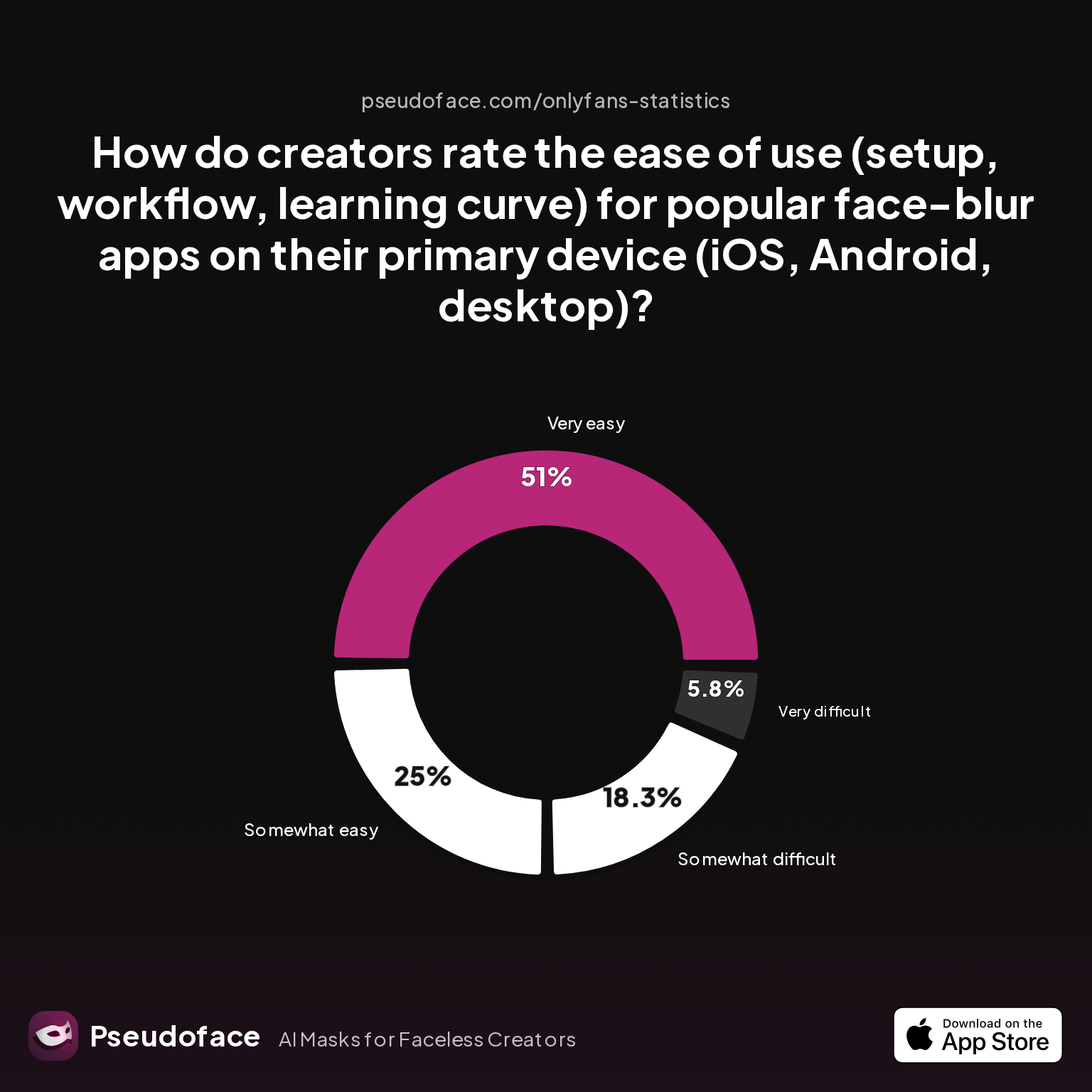
| Answer | Percentage |
|---|---|
| Neutral | 0.00% |
| Somewhat difficult | 18.27% |
| Somewhat easy | 25.00% |
| Very difficult | 5.77% |
| Very easy | 50.96% |
Over 75% of creators rate popular face/tattoo blur apps as "somewhat easy" or "very easy," with only 6% finding them "very difficult."
This promising ease-of-use rating does mask hidden complexity. When apps work, they truly can be game-changing for workflow speed. Yet, reliability is not guaranteed:
Open thread on Redditr/onlyfansadvice
u/missvixenx
Divide your video into a bunch of short videos, edit the tattoo out of them all, then put them back together with CapCut video editor. It has transitions to choose from in the parts where videos join
Open thread on Redditr/onlyfansadvice
u/jamiemays1
I did it on one of mine last night. Just asked me to select the spot and it worked.
Open thread on Redditr/onlyfansadvice
u/TylaCody
I paid for this app too but could never figure out how to remove the tattoos
AI tools can work brilliantly or not at all, depending on app and user, especially for large or complex tattoos:
Open thread on Redditr/onlyfansadvice
u/TylaCody
None of my videos are compatible with the removal tool so I have to keep using light room which I can’t remove the one on my back because it’s too large 😞 thank you for letting everyone know tho xx
Interpreting the Data and Its Biases
Because Reddit feedback is self-reported and public, there’s an optimism bias—meanwhile, private struggles and failed uploads rarely surface. Those who never got an app to work aren’t represented. That said, easy wins do exist, especially for small tattoos on plain backgrounds and brief video clips.
Speed vs. Realism Trade-off
While apps and AI tools outperform manual makeup on speed for batch jobs or quick clips, their realism often falters during complex movement or shifting shadows. Artifacts—blurs, digital “holes,” mismatched skin tone—are tolerated by some platforms (TikTok, OF) but may look obvious on YouTube or in paid content where viewers expect high polish.
Learning Curve and Platform Nuance
Ease-of-use ratings are noticeably higher on iOS than desktop, reflecting both better app quality and more frequent creator usage. However, more technical users still swear by Photoshop or DaVinci Resolve for complex removals, especially for paid customs or high-res productions.
What Fails Most?
Tracking is the weakest link. If the app can’t lock onto the tattoo reliably, creators spend more time fixing frames than if they’d just started with makeup.
Choosing the Right Tattoo Cover Up Method: Makeup vs. Video Apps vs. AI Tools
Selecting the “right” tattoo cover up approach means mapping the demands of your workflow to the strengths and limits of each method. Here, a practical comparison distills hundreds of hours of creator discourse into actionable insight.
Makeup Pros & Cons
| Attribute | Makeup (Dermablend, KVD) |
|---|---|
| Speed (per photo) | Slow (10-15 min small, 40+ min large area) |
| Realism (photo) | Excellent when done right |
| Realism (video, moving) | Drops as sweat/friction rise |
| Learning curve | Medium-high for best results |
| Cost | $30-80/mo for regular use |
| Rework risk | Medium-high (touch-ups needed) |
| Platform compatibility | Universal |
| Skin/ink limitations | Struggles w/ textured, bold color |
Editing Apps/AI Tools Pros & Cons
| Attribute | App/AI Tools (CapCut, Videoleap) |
|---|---|
| Speed (per photo/video) | Fast (2-5 min or batch process) |
| Realism (photo) | Good; sometimes fails edge blending |
| Realism (video, moving) | Variable; tracking often fails |
| Learning curve | Low (simple marks); high (complex) |
| Cost | Free-$20/mo (pro versions/AI) |
| Rework risk | High if artifacting/bad tracking |
| Platform compatibility | May export with watermarks/branding |
| Skin/ink limitations | Large/complex tattoos problematic |
Workflow Alignment by Content Type
- Photo shoots, small tattoos, high stakes (paid): Pro makeup layered, digital touch-up as backup.
- Bulk short-form video (TikTok, OF stories): Fastest with AI/app workflows, makeup only if tool fails.
- Active motion, long sessions: Makeup more reliable for consistent output; digital only for touch-ups.
- Complex, colored, or textured ink: Both methods challenged—often best to frame out or shoot from angles.
Biases and Context
For high earners and technically skilled creators, hybrid workflows (makeup + digital pass) are standard. Simpler tactics are favored by hobbyists or lower-volume producers. Many users cycle through multiple apps and products before finding a stack that doesn’t drain time or sabotage peace of mind. Over half consider switching up tactics following platform rule changes or to adapt to new studio gear and lighting.
Workflow Optimization: Building Your Tattoo Cover Up Stack for Anonymous Content Creation
A truly polished tattoo cover up process is less an off-the-shelf solution than a carefully stacked, ever-evolving toolkit. For 2026-era creators, smart workflow optimization can mean the difference between burnt-out indecision and sustainable, anonymous production.
Blend Redundancy with Efficiency
Hybrid approaches—using both physical and digital cover up—let creators triage by session needs. For each shoot, consider not just the “best” method, but the fastest way to believable anonymity in that context. If a method fails, the ability to rapidly switch is critical.
Data-Driven Platform Adjustments
Some platforms, especially the larger adult services and paid fan networks, increasingly auto-strip embedded data. But, as the following data shows, not all creators trust platform scrubbing—nor does every service reliably remove “invisible” metadata linking uploads back to a device, coordinate, or earlier edit.
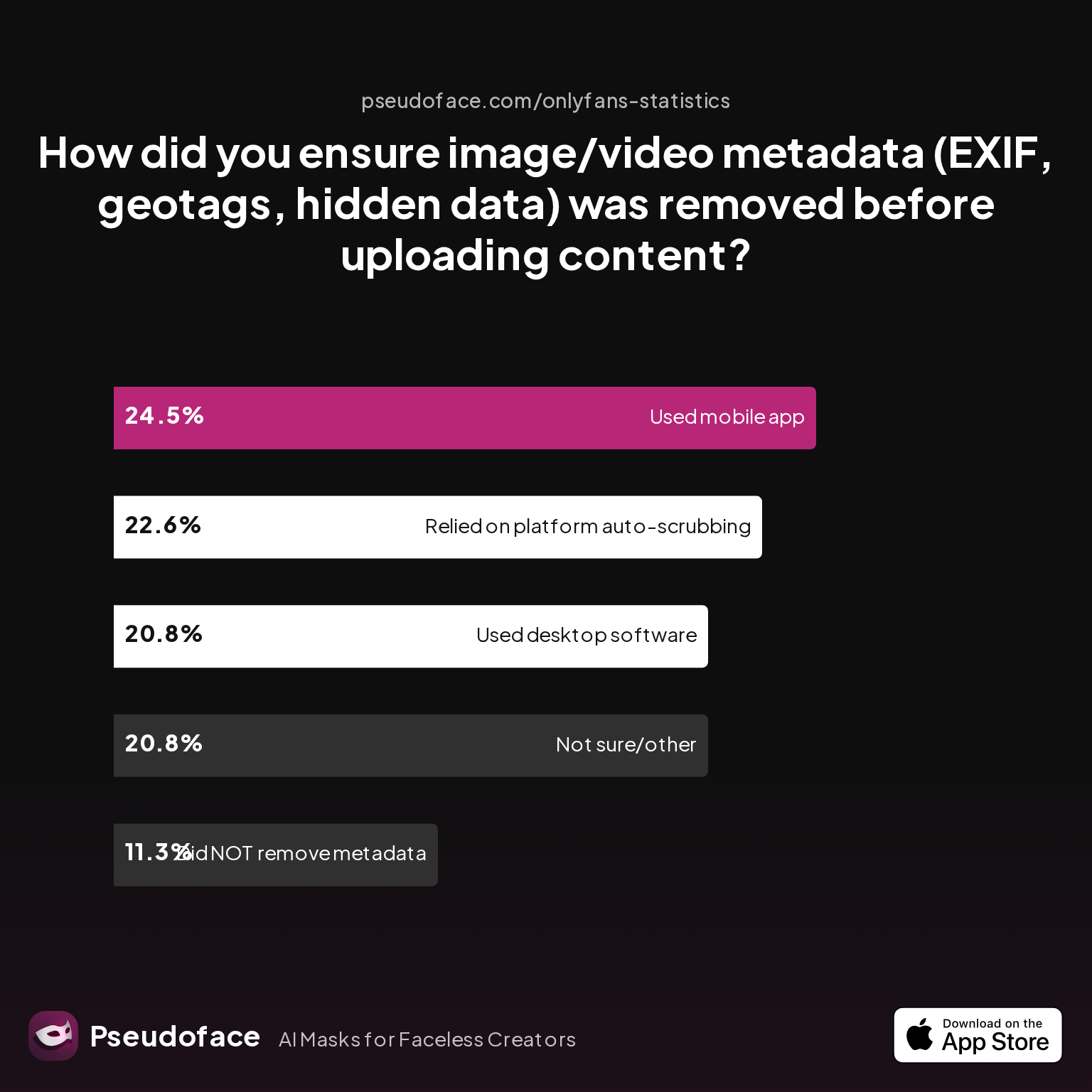
| Answer | Percentage |
|---|---|
| Did NOT take steps to remove metadata | 11.32% |
| Not sure/other | 20.75% |
| Relied on platform auto-scrubbing (e.g., OnlyFans upload process) | 22.64% |
| Used a dedicated metadata removal app on mobile | 24.53% |
| Used desktop software (e.g., Photoshop, custom scripts) | 20.75% |
Nearly half of creators take active steps to scrub image/video metadata, while a quarter trust platform upload processes alone.
Given the risks of EXIF, geotags, or device serials leaking, a belt-and-suspenders approach is wise. Those uploading high-volume content through platforms with uncertain moderation or normalization routines (Instagram, TikTok, Reddit, certain clip stores) benefit from running files through mobile or desktop EXIF scrubbers before posting.
Workflow Tips for High Volume and Team-Based Creators
- Batch prep: Pre-plan shoot angles to minimize tattoo exposure; this reduces both physical and digital cover-up time.
- Testing: Always do test photos/videos and review at full size before content release—especially after lighting or camera changes.
- Documentation: Keep a “cover-up log” of what product/app combos worked per shoot for repeatability and for rapid rework if flagged.
- Metadata diligence: Scrub all files before upload, regardless of platform assurances. Automate where possible for speed.
Finally, regular re-assessment matters: as platform AI detection and user sophistication grow, so does the risk that an old tattoo slip-up resurfaces. Few creators regret redundancy—many regret taking shortcuts.
FAQ
What is the best tattoo makeup cover up for filming YouTube, OnlyFans, or Instagram?
For most creators, Dermablend Leg & Body (for maximum opacity) and KVD Good Apple (for skin-finish realism) lead user satisfaction for both photo and 4K video.
Both are effective when applied with correct color-correction and set with matte powder/spray. Dermablend edges ahead for sweaty, long sessions; KVD shines in high-res portraiture with precise undertone options.
Is Dermablend or KVD Good Apple better for large tattoo cover up under studio lights?
Dermablend outperforms KVD Good Apple for sweat and transfer resistance during long or active video shoots under hot lighting, though KVD offers a wider shade range.
User consensus shows Dermablend crumbles less when skin rubs or sweats, but KVD offers unmatched realism if movement and heat aren’t extreme.
Can I reliably cover tattoos for video if I don’t know Photoshop?
Yes, novice-friendly mobile apps like YouCam Video, Blur-Video, CapCut, and Videoleap allow reliable tattoo blurring or removal without advanced skills.
Most creators report satisfying results for simple removals—
Open thread on Redditr/CreatorsAdvice
u/thrHOEaway666
I use both YouCam Video mosaic blur feature and Blur-Video, depending on my needs. Both are iphone apps
Are there AI apps that automatically remove tattoos in video?
Yes, tools like Videoleap and similar AI-powered video editors can remove tattoos with a tap, but results are highly variable.
While some users succeed easily,
I did it on one of mine last night. Just asked me to select the spot and it worked. —u/jamiemays1, r/onlyfansadvice, https://www.reddit.com/r/onlyfansadvice/comments/15uirap/videoleap_taking_out_tattoos/jwpwy3l/ others face tool or compatibility issues, especially with large or complex marks.
How long does tattoo cover up makeup last during multi-hour or high-movement shoots?
Coverage typically lasts 1-3 hours before touch-ups are needed, with rapid fading under sweat, friction, or movement.
Setting with powders and sprays extends longevity, but for long sessions or dancing, transfer and patchiness become risks after about 2 hours.
Is it easier to hide tattoos in photos versus video?
Yes—photos are easier to perfect, as you can fix imperfections in single frames, while videos expose movement, sweat, and angle-based coverage gaps.
Creators overwhelmingly find touch-ups more manageable in stills, while dynamic lighting and tracking complicate video workflows.
How much does it cost a week or month to keep tattoos covered for routine content release?
Expect to spend $30-80/month on pro-grade makeup for moderate daily/weekly use, or $10-20/month per app subscription for digital solutions.
Advanced workflows combining both methods increase this amount, but can reduce time and rework costs significantly.
Will using makeup or digital cover up get my content flagged or demonetized?
No evidence exists that tattoo cover up makeup or digital edits provoke content moderation, unless results are so poor as to seem intentionally deceptive.
Platform flags are rarely due to cover-up methods themselves, but always check the latest TOS and avoid over-compression or obvious blur artifacts.
Are there different strategies for covering faded, colored, or black tattoos?
Yes; faded tattoos require less corrector, colored ink needs more aggressive color-canceling, and black ink often needs the heaviest layers.
Textured or raised tattoos remain visible under most methods, and both makeup and digital struggle most with large/multicolored designs.
By grounding your tattoo cover up workflow in real data and hard-won creator experience, you’re not just hiding marks—you’re future-proofing your anonymity in a world where every detail, and every pixel, can be traced.


