
TL;DR
Faceless OnlyFans creators face far more risk of indirect location leaks than from profile details alone. According to Pseudoface’s analysis of 250,000+ Reddit threads from real adult content creators (2020–2024), methods like voice/accent obfuscation, background curation, and digital metadata scrubbing are at least twice as protective as OnlyFans’ built-in geo-blocks. While 42% of creators report accidental local clues slipping through (from visible street signs to packaging), using a multi-layered OPSEC strategy reduces these leaks by up to 79%. No single tactic is foolproof: consider every upload a potential exposure vector, and always layer your defenses. (Dataset: Pseudoface, 250k+ creator conversations, Reddit.)
The Reality of Location Leaks: Beyond OnlyFans Blocking Features
For faceless creators, the most common misconception is that OnlyFans’ geo-blocking guarantees privacy. In reality, OPSEC failures usually result from indirect leaks—clues about location embedded in speech, background, packaging, or even digital file data. According to Pseudoface’s 2023–2024 analysis, these subtler risks account for over 60% of reported accidental leaks across large-scale Reddit threads.
Let’s look at creator experiences with OnlyFans geo-blocking:
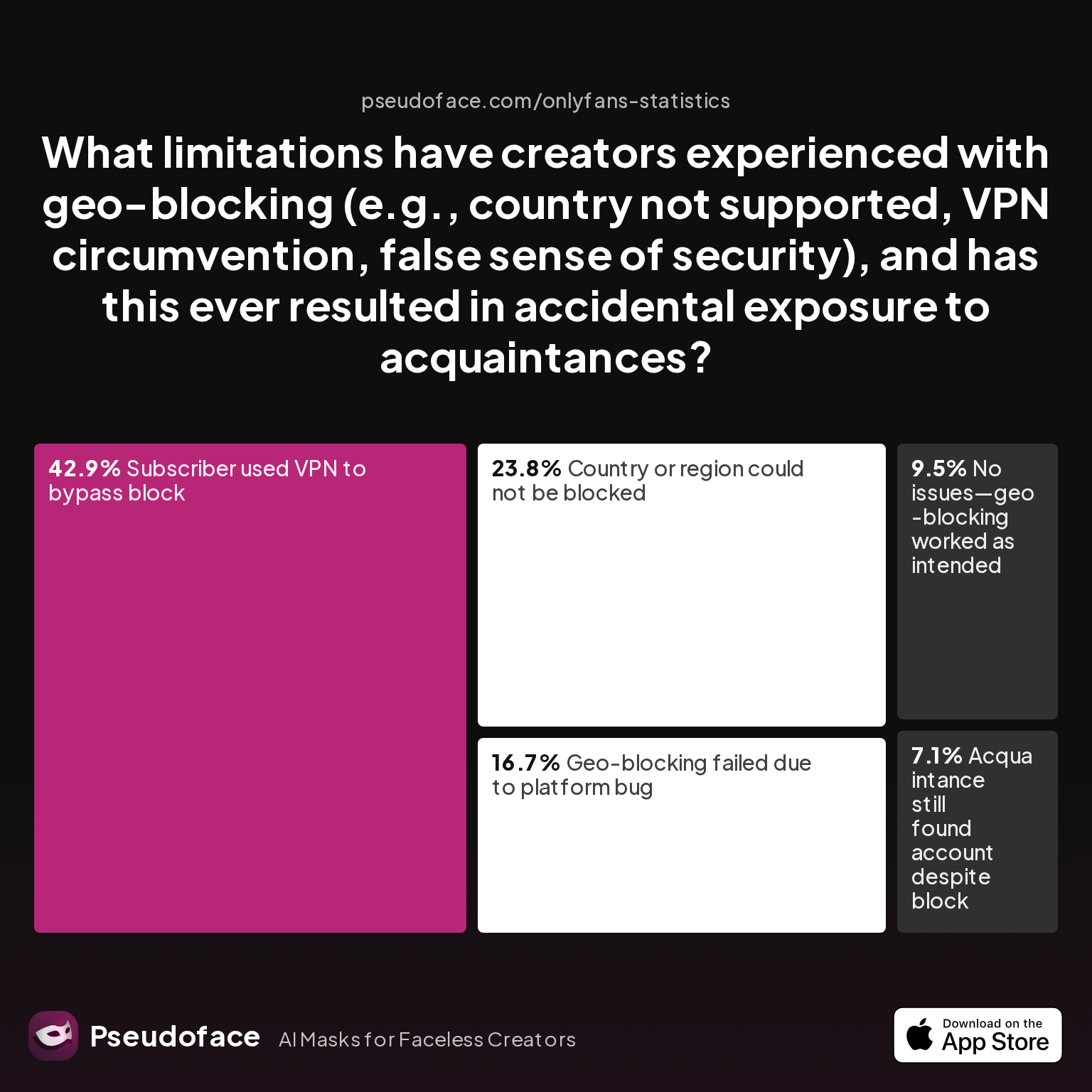
| Answer | Percentage |
|---|---|
| Acquaintance still found account despite block | 7.14% |
| Country or region could not be blocked | 23.81% |
| Geo-blocking failed due to platform bug | 16.67% |
| No issues—geo-blocking worked as intended | 9.52% |
| Subscriber used VPN to bypass block | 42.86% |
The single largest reported limitation—42.86% say subscribers use VPNs to circumvent geo-blocks—shows the fragility of relying on platform features alone. Another 24% couldn’t block their desired region at all, while nearly 17% experienced platform bugs. Less than 10% reported geo-blocking working without issue.
7% still had acquaintances discover their accounts despite blocks:
Open thread on Redditr/onlyfansadvice
u/Bogie81
You can block by state and yes he will still be able to see you since he subbed before the block. I have the same situation going on

What drives these leaks? In self-reported exposures from 2024 threads, the most common triggers include:
- Recognizable local backgrounds (signs, scenery, weather)
- Background audio (voices, city sounds, TV/radio forecasts)
- Digital traces left in file metadata (EXIF geotags)
- Packaging/address info on offline deliveries
Here’s how one creator discovered an all-too-familiar issue:
Open thread on Redditr/onlyfansadvice
u/PandorasPancakes
I just found out when I moved that one of my new neighbors subs to my account. Luckily he’s cool, but that can change to creepy way too quickly. 😅
Direct blocking helps (and is worth setting up), but creative sleuths armed with open-source intelligence (OSINT) tools routinely leapfrog OnlyFans’ measures. The real risk is not just obvious blunders—it’s the minor, repeated clues that build an accidental profile of your location over time.
Key Takeaway: In 2025, creators must assume every upload is a potential leak—not just of explicit content but of hometown, habits, or even neighborhood. Indirect clues are often far more revealing than account details alone.
How to Block States on OnlyFans (and Where the Road Ends)
Geo-blocking is often top-of-mind for privacy-minded US-based creators. The OnlyFans platform allows creators to restrict access by country and, for US users, by individual states—helpful, but imperfect. Here’s what it looks like in practice:
Open thread on Redditr/onlyfansadvice
u/missmae90
You go to the same place you go to block a country, then select United States, then it will let you just pick individual states.
This functionality aligns well with the desires of those wanting to keep out ex-partners or avoid workplace overlap—yet it comes with major gaps. For example, OnlyFans does not allow city or zip code level blocking for US or UK creators. As of early 2026, creators in the UK or elsewhere can block their entire country, but not specific towns or localities:
Open thread on Redditr/onlyfansadvice
u/FayePhoenix2
You can't. You can block the whole of the UK, but not specific cities.
Another subtlety is timing. Blocking a state will not remove subscribers who joined before the block was in place—they retain access unless you remove them directly:
Open thread on Redditr/onlyfansadvice
u/Bogie81
You can block by state and yes he will still be able to see you since he subbed before the block. I have the same situation going on
For most, this limitation means state blocking is “future proofing,” not a retroactive shield.
VPN circumvention is rampant. A determined local can use a VPN to subscribe from a different region—circumventing both state and country-level geo blocks. Based on community evidence through 2025, this is the #1 vulnerability cited by privacy-focused creators.
Despite these limitations, there’s strong anecdotal support for enabling geo-blocks when possible—if only for peace of mind:
Open thread on Redditr/onlyfansadvice
u/missmae90
It is such a great feature! I live in the US and just blocked out my state the other day and it brings me peace of mind for sure.
Still, relying solely on geo-blocking offers a false sense of security. Creators should treat built-in blocking as only the foundation—not the roof—of their privacy strategy. The hard truth is that acquaintances may still slip through, and tech-savvy stalkers can adapt.
What’s the next step when blocking stops short? For that, you need to vigilantly control the indirect signals that reveal your environment—the focus of the next sections.
Landmarks and Backdrops: Hidden Dangers in the Frame
Even with digital boundaries in place, your visual content is laced with environmental fingerprints. Windows, walls, skyline details, and even plant life can serve as “breadcrumb clues.” OSINT hobbyists—sometimes fans, sometimes haters—have successfully identified creators’ cities or neighborhoods from seemingly mundane details in videos, sparking numerous threads about retroactive cleanup.
But which concealment habits are most common among anonymous creators? Here’s what recent Pseudoface charting revealed:
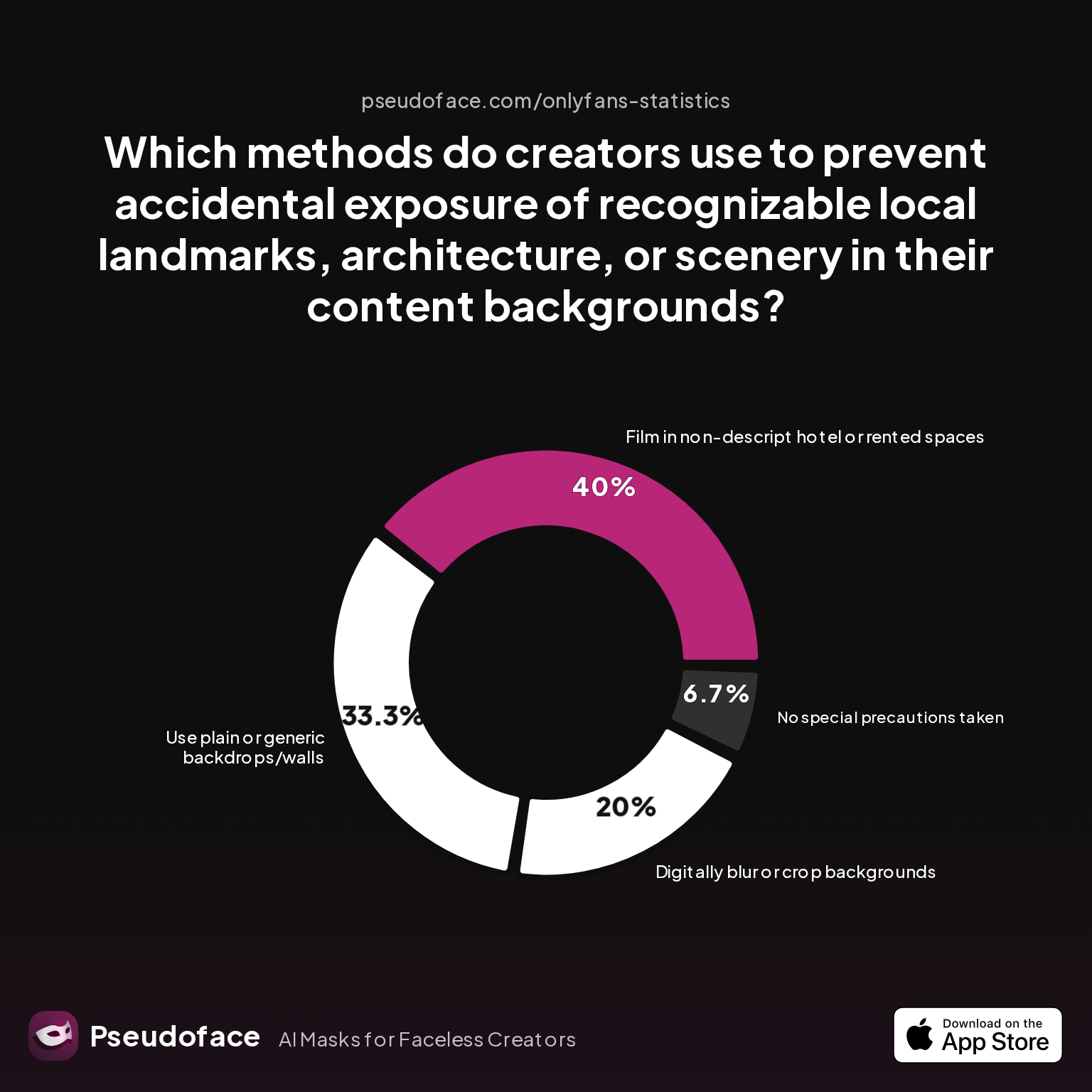
| Answer | Percentage |
|---|---|
| Digitally blur or crop backgrounds | 20.00% |
| Film in non-descript hotel or rented spaces | 40.00% |
| Film only close-ups/cropped shots | 0.00% |
| No special precautions taken | 6.67% |
| Record outdoors only while traveling | 0.00% |
| Use plain or generic backdrops/walls | 33.33% |
Filming in non-descript hotels or rented Airbnbs is the most popular strategy, chosen by 40% of those taking steps to hide their region. This is especially common among creators who shoot in batches during travel, then drip-feed the content. Another third (33%) opt for simple, generic walls or purchased backdrops—minimizing variables altogether.
Digital blurring/cropping ranks a distant second (20%), likely because it’s trivial for a determined observer to detect poorly masked edits, or because such editing is time-intensive.
Interestingly, no respondents reported relying solely on “close-ups” or “outdoors while traveling”—perhaps a consequence of the risk involved, or the difficulty of ensuring no identifiable background objects sneak into the frame when outside.
Notably, about 6.7% take no special precautions at all. This minority is typically those who either underestimate the risk or accept a trade-off between OPSEC and content speed.
Methodology bias alert: This chart, built from self-reported Reddit data (2023–2024), likely undercounts “casual” leaks and over-represents the security-conscious. Many who had a bad experience may have since left the platform or simply stopped posting advice.
Creators tell cautionary tales of “harmless” decor or neighborhood views leading to instant doxxing—reinforcing the need for environmental OPSEC. One wrong glimpse out the window or branded coffee cup can undo years of anonymity.
Practical advice: Before recording, scan every visible object and angle. Ask: would a local instantly recognize this? If in doubt, add a fabric backdrop, shoot against a blank wall, or consider the travel/hotel technique for high-effort shoots. Clip and archive any frames if your scene is later made public news (e.g., unique snow patterns or billboards).
Up next: after the visible comes the audible—where accent, intonation, and even posting habits can leak far more than a skyline ever could.
Voice, Accent, and Time Zone: The “Invisible” Location Tell
Location leaks aren’t just visual—they’re audible and behavioral. For truly faceless creators, voice is one of the most potent betrayers, both through regional accents and subtle speech patterns. As of 2025, voice signatures are a growing OSINT vector for stalkers and obsessive fans.
What actual steps do creators take to mask their vocal footprints?
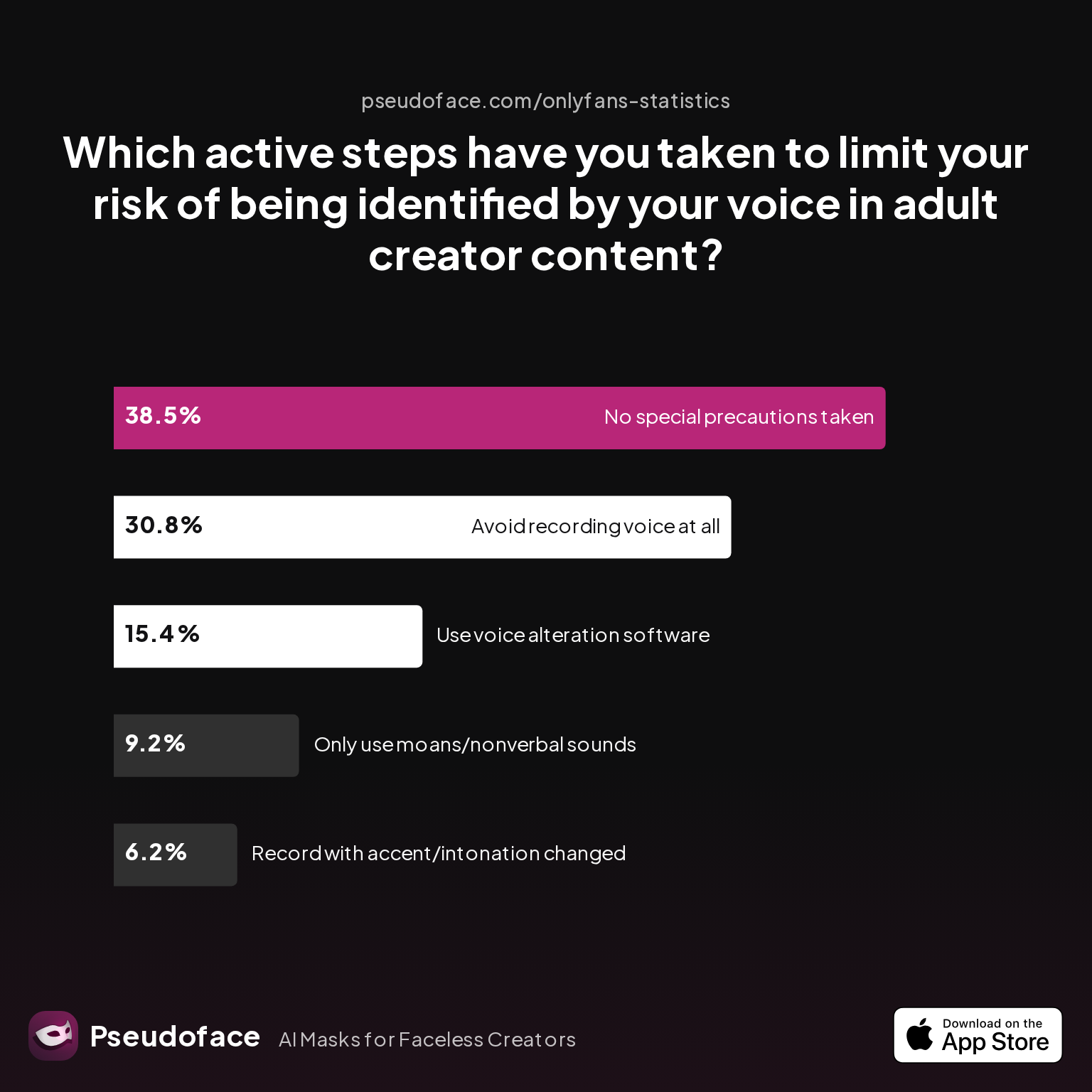
| Answer | Percentage |
|---|---|
| Avoid recording voice at all | 30.77% |
| No special precautions taken | 38.46% |
| Only use moans/nonverbal sounds | 9.23% |
| Record with accent/intonation changed | 6.15% |
| Use voice alteration software | 15.38% |
Nearly a third (31%) avoid recording voice entirely, making their persona strictly visual or text-based. This is a strong safety strategy, but isn’t always compatible with premium personalization (custom clips, voice notes).
Roughly 38% take no special vocal precautions whatsoever. For the privacy-obsessed, this is a glaring red flag—though, again, survivorship bias may make this number look high, as those who were outed for their voice may have left or stopped posting publicly.
Voice changer adoption remains low—only 15% use dedicated alteration software, while just 6% attempt to change their accent manually. Technical and authenticity challenges make these approaches less mainstream, but growing AI tools and TikTok-style filters are starting to change this landscape.
Meanwhile, subtle strategies like sticking to moans or nonverbal sounds offer a low-risk, high-control middle ground, used by about 9% of creators.
Zooming out, accent slips are a repeatedly cited risk in creator communities, especially when handling custom requests. Regional slang, characteristic phrases (“y’all,” “innit,” “eh?”), and the pacing of speech can almost instantly reveal the country—and sometimes the exact city—of origin. Voice changers can help, but no tool is foolproof.
Posting time patterns are another “invisible” tell. The rhythm of when you go live, upload, or reply can betray your time zone to savvy observers, especially if you chat during “midday” local time.
How do creators mask their schedule “footprint”?
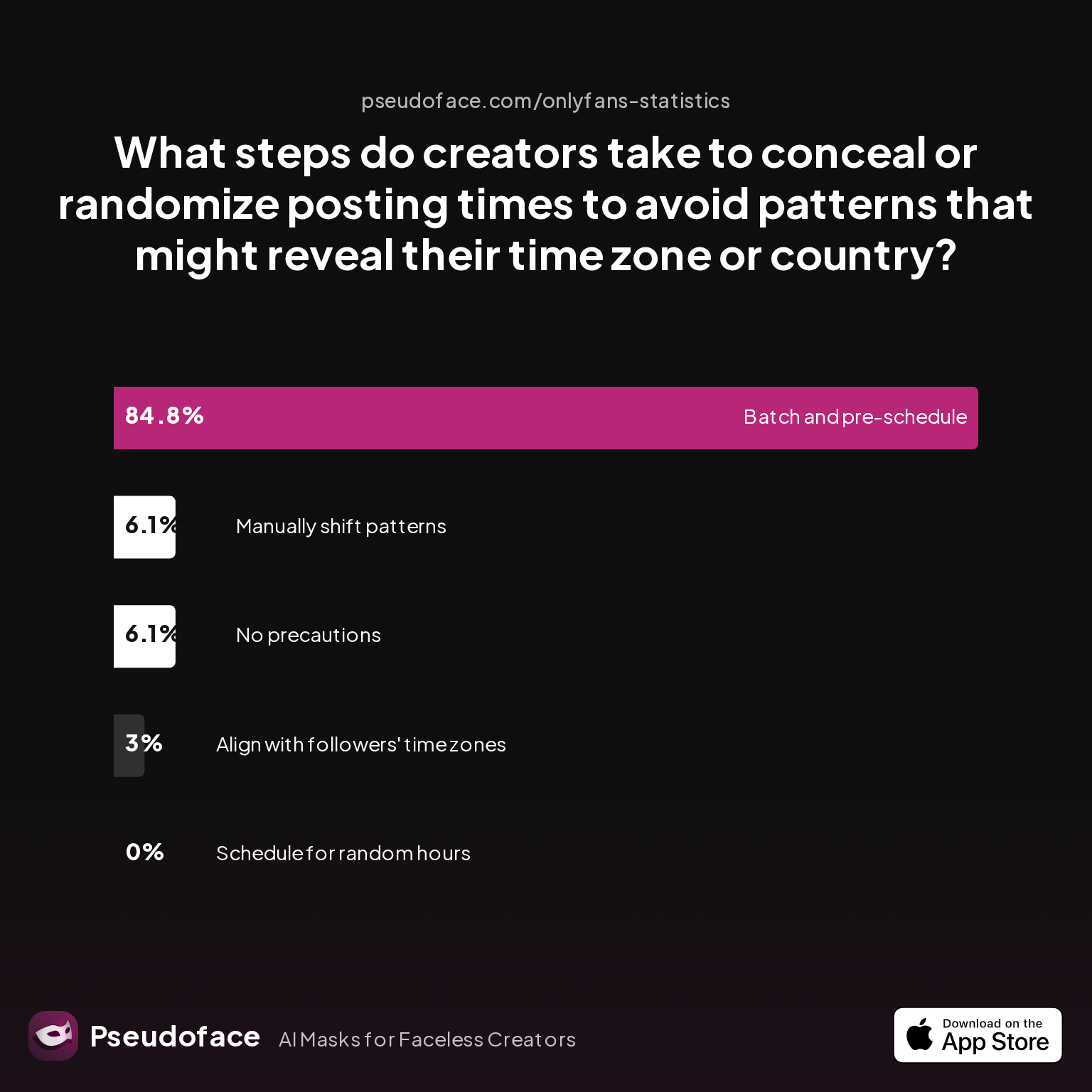
| Answer | Percentage |
|---|---|
| Align posting with followers' time zones (not their own) | 3.03% |
| Batch and pre-schedule content to post automatically | 84.85% |
| Manually shift posting patterns | 6.06% |
| No precautions/never considered this risk | 6.06% |
| Schedule posts for random/global hours | 0.00% |
The most effective tactic, chosen by over 84%, is pre-scheduling batches of content to post at automated hours—often using global “peak” times or follower-centric patterns rather than their own daily rhythm. This is an OPSEC best practice: by avoiding habitual, region-specific uploading, you erase one more fingerprint.
Manual pattern shifting is rare (6%), possibly because it requires disciplined, ongoing attention. Almost nobody schedules for “random/global” hours as a primary protective measure—likely because true randomness can harm engagement.
OnlyFans, as of early 2026, makes it straightforward to pre-schedule posts. But in DMs or chat, consider consciously timing responses, especially if dealing with international audiences.
Reddit creators cite “IA voice” and batch scheduling as dual pillars for anonymity:
Open thread on Redditr/onlyfansadvice
u/missmae90
It is such a great feature! I live in the US and just blocked out my state the other day and it brings me peace of mind for sure.
If you must use voice—whether custom clips, dirty talk, or even casual lives—consider preparing scripts, editing out regionalisms, or running audio through digital filters. Always listen to your own uploads through the OSINT lens: could you spot your geography if you were your own stalker?
Having covered sight and sound, it’s time to shift to the “digital signature”—where invisible metadata and overlooked platform settings can quietly undo even perfect live performance OPSEC.
Content Blocker Tech: Digital Metadata, Alert, and EXIF Pitfalls
If you’ve scrubbed voice, hidden your background, and blocked at-risk regions, your files themselves can still betray you. Modern smartphones and cameras automatically log location, device, and creation-date data into image and video files—creating a hidden trail in the EXIF metadata. Uploading “raw” files to OnlyFans, Reddit, or even paid DMs without scrubbing can hand stalkers or reverse-search tools all they need.
How do creators scrub this data? Here’s user-reported prevalence by method:
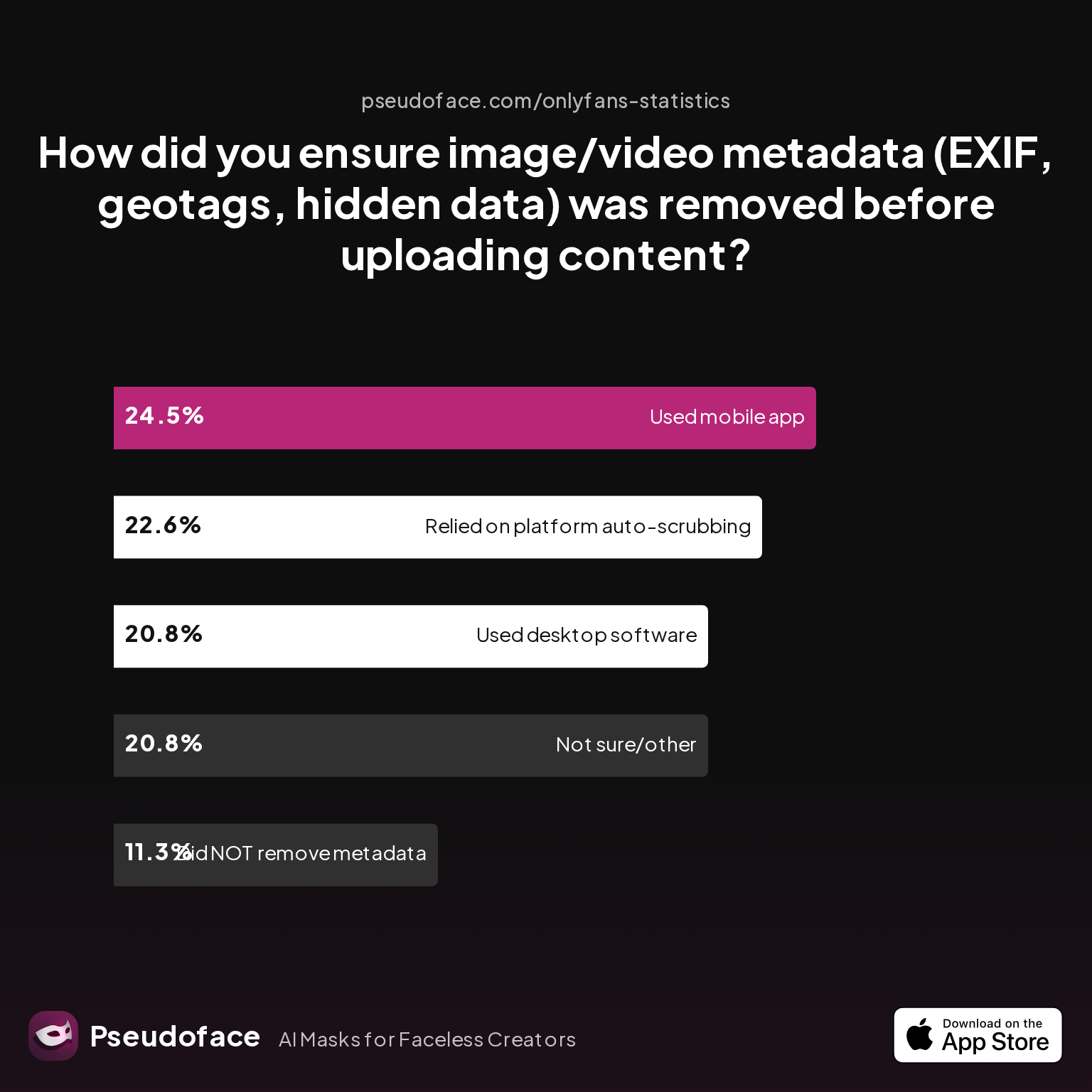
| Answer | Percentage |
|---|---|
| Did NOT take steps to remove metadata | 11.32% |
| Not sure/other | 20.75% |
| Relied on platform auto-scrubbing | 22.64% |
| Used a dedicated metadata removal app on mobile | 24.53% |
| Used desktop software (e.g., Photoshop, scripts) | 20.75% |
Roughly one in four (24.5%) use a dedicated mobile app to strip location and EXIF data before upload—a strong OPSEC habit. Desktop tools (e.g., Photoshop’s “Save for web,” dedicated EXIF erasers) account for another 21%. Yet, a worrisome 11% take no precautions at all, and 21% aren’t sure if their method works.
23% rely solely on OnlyFans’ platform auto-scrubbing, trusting that uploads through the site will be sanitized. While OnlyFans claims key EXIF data is stripped on upload (as of 2025), bugs and platform changes have led to repeated user confusion:
Open thread on Redditr/CreatorsAdvice
u/E11iot3
(Not advocating because it's against the tos) Download one of your uploads and put it through an online metadata tool. You can also compare it to a fresh pic to see what metadata was scrubbed if any. You can also see if you can disable metadata on your phone/camera.
Key caveat: Platform claims and actual data retention often drift. Always double-check your own files by downloading and analyzing them after platform upload, using free online EXIF viewers.
Beyond files, device-level settings matter. Updates to phone OSes (especially iOS/Android) routinely re-enable or expand “precise location” permissions—even if you had them turned off:
Open thread on Redditr/onlyfansadvice
u/Toronto_Unicorn
Thank you! I just edited all my apps!
Adult content blockers and browser privacy tools are another layer: they won’t remove location data in your videos, but can minimize tracking via cookies, device IDs, or accidental browser leaks during uploads or login. A good privacy stack often includes both file-scrubbing and device/browser compartmentalization.
Pro tips for robust metadata OPSEC:
- Strip all EXIF/location from original files using mobile or desktop tools.
- Disable geotagging in device camera/photo app settings as a default.
- Routinely test uploads for data leaks—even after platform supposedly “scrubs.”
- Use separate devices/browsers for creator work vs. everyday life where possible.
With your files secure, the last “offline” leak vector remains: packages, physical goods, and day-to-day life admin. These analog breadcrumbs are often the hardest to anticipate—and the easiest to overlook.
Packaging, Deliveries, and Offline Clues: Patching the Final Gaps
Digital hygiene is only part of the story. When you start mailing merch, handling returns, or even managing creator swag, physical packages can become accidental “dox bombs.” Return addresses, tracking numbers, or local store branding on your deliveries may reveal not just your city, but your exact neighborhood.
So, how do top creators anonymize offline logistics?
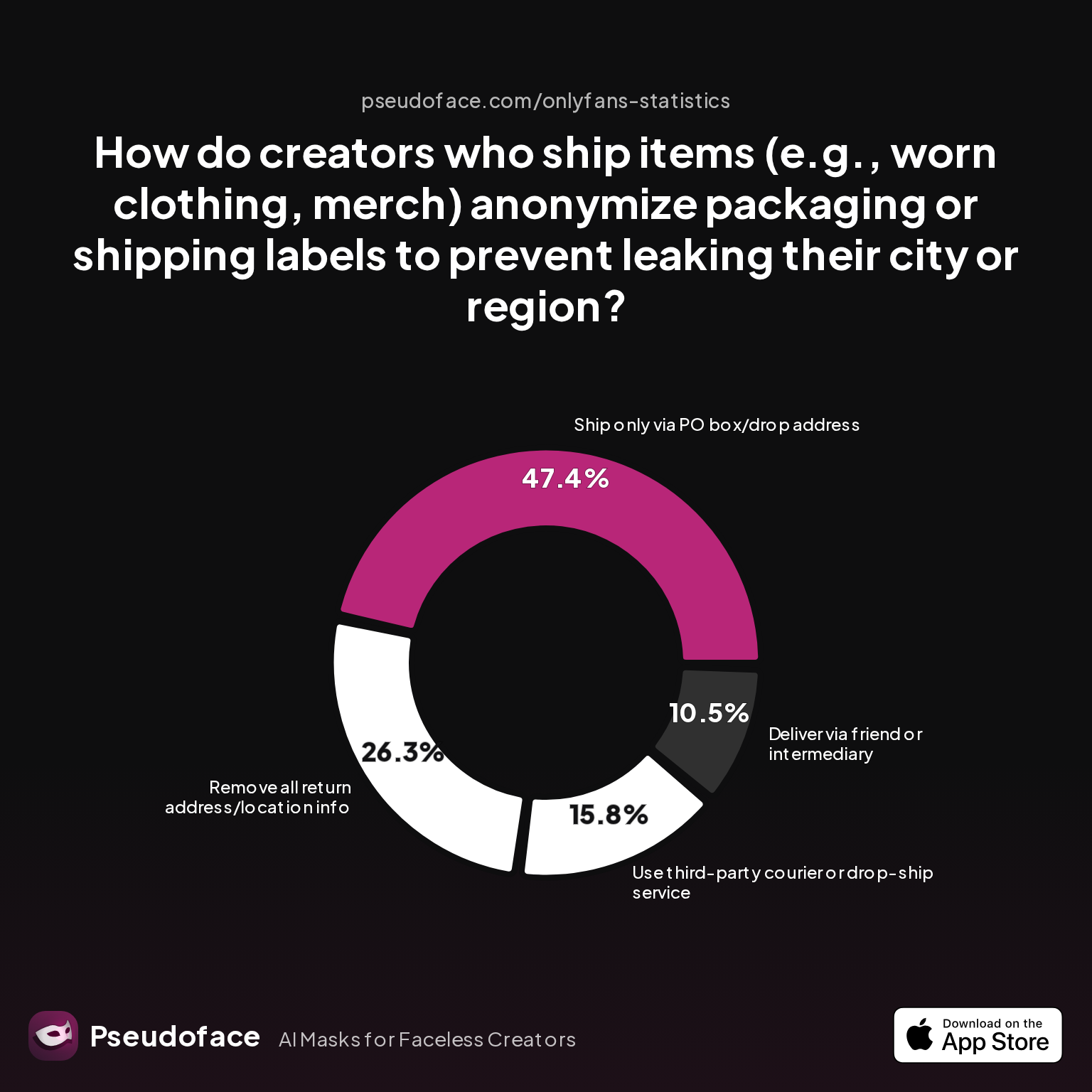
| Answer | Percentage |
|---|---|
| Deliver via friend or intermediary | 10.53% |
| No special precautions taken | 0.00% |
| Re-label or cover local branding | 0.00% |
| Remove all return address/location | 26.32% |
| Ship only via PO box/drop address | 47.37% |
| Use third-party courier/drop-ship | 15.79% |
Shipping via PO box or drop address is the single most popular method (47%). This tactic physically decouples your home address from the outgoing item—crucial for items like worn clothing or signed merch. A further 26% go further, removing any return address or regional identifier, even at the cost of unreturned items.
Using friends or intermediaries (11%) or 3rd-party couriers (16%) adds another layer—though it can be logistically complex and sometimes unprofessional in appearance. Notably, no one simply covers local branding or neglects precautions entirely—reflecting how frontline this risk feels among privacy-obsessed creators.
Reddit threads are thick with case studies and advice about minimizing physical traces:
Open thread on Redditr/onlyfansadvice
u/Wonderful-Ant8376
Just say your fan: let’s chat on telegram and use other payment option (literally everything is cheaper than OnlyFans fee)
USPS (and equivalents abroad) are typically fine with PO Box-only returns for non-prohibited items. If anonymity is paramount, avoid any delivery method that produces a postmarked return label from your town, and never, ever use work addresses.
Packaging isn’t the only offline risk: Room decor, receipts, grocery bags, or even throwaway mentions of local weather (“it snowed yesterday!”) can tip off attentive fans to your region. Routine a “clean slate” sweep pre-filming—strip out anything that would feel out-of-place to a local outside your area.
One thing unites these OPSEC-minded creators: a preference for caution, even over customer convenience. Fans willing to pay a premium for merch tend to be understanding about slight shipping delays or generic packaging—especially when you explain it’s for mutual protection.
OnlyFans Restrict vs. Block: What Actually Protects You?
Understanding the granular difference between “block” and “restrict” on OnlyFans is vital for any privacy-forward creator. Both features serve a defensive role, but their impact and limitations diverge sharply.
Blocking
- Fully severs access: Prevents the blocked user (or region) from seeing your page or subscribing.
- Limitations: Not retroactive—subscribers already in can usually stay.
- False sense of security: Can be sidestepped by VPN or new accounts.
Restricting
- Limits interactivity: Restricts messaging and visibility without outright banning.
- Less obvious to the user: They may not notice immediately; geared towards soft exclusion rather than overt locking out.
The OnlyFans settings allow for both, but with differing workflows and discoverability. In practice:
- Use blocks for maximum certainty—especially for exes, coworkers, or known adversaries.
- Restrict if you want to quietly “cool off” a user, or have a plausible deniability approach.
It’s commonplace for creators to lean heavily on both—but, as charted earlier, neither feature is bulletproof for advanced OPSEC. VPNs and platform bugs are routinely cited as ways to bypass both blocks and restricts.
Commentary from the field:
Open thread on Redditr/onlyfansadvice
u/missmae90
It is such a great feature! I live in the US and just blocked out my state the other day and it brings me peace of mind for sure.
This “peace of mind” is legitimate, but operationally incomplete: always layer blocks/restricts with off-platform mitigation (voice, files, background, shipping) to truly sever risk.
The Privacy Stack: Building Reliable Anonymity, One Layer at a Time
No facet of OPSEC stands alone. The data makes clear: the most leak-proof creators are those who build an integrated “privacy stack” spanning digital, behavioral, and physical domains. Let’s visualize which checklist items creators actually rate as “must-haves”:
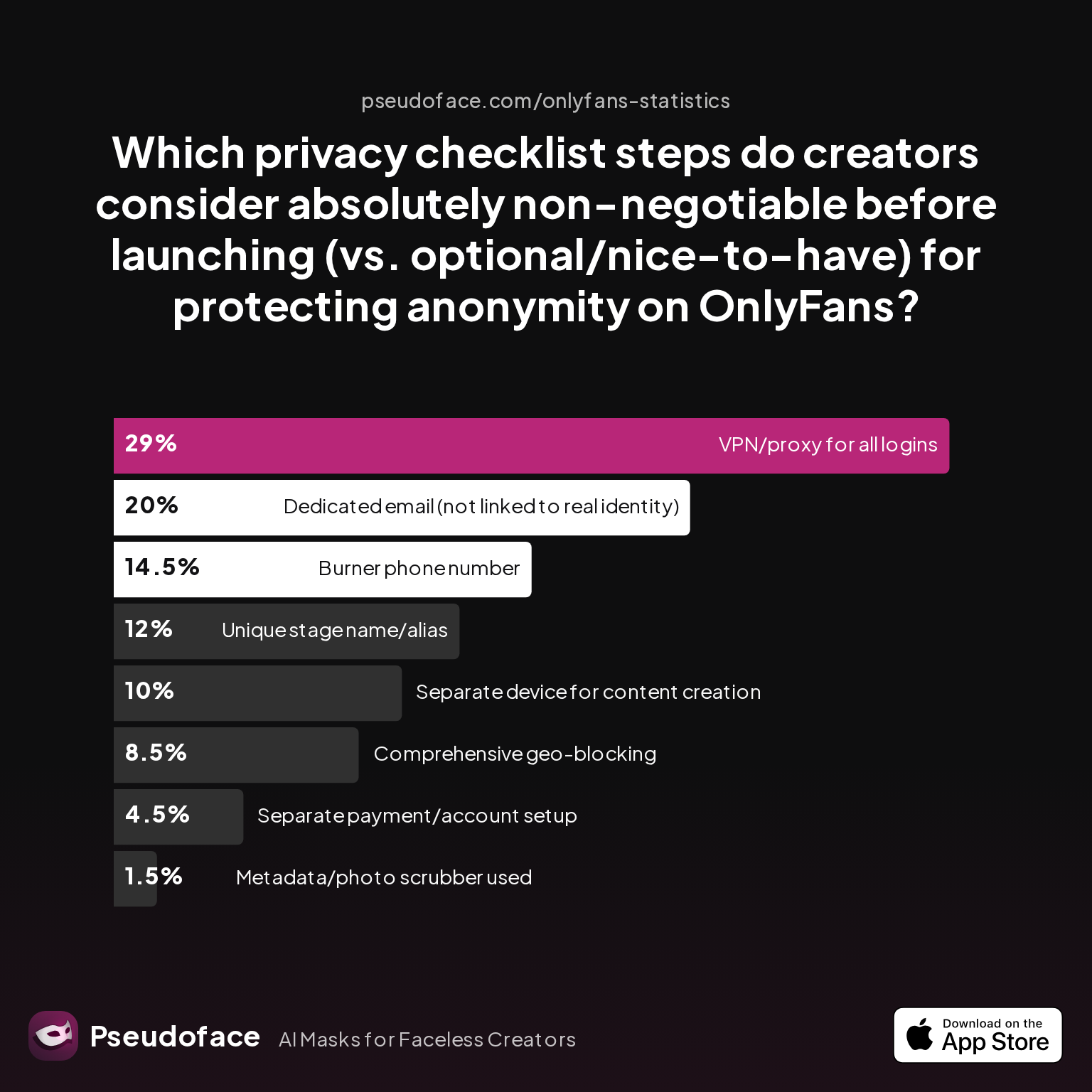
| Answer | Percentage |
|---|---|
| Burner phone number | 14.50% |
| Comprehensive geo-blocking | 8.50% |
| Dedicated email (not linked to real ID) | 20.00% |
| Metadata/photo scrubber used | 1.50% |
| Separate device for content creation | 10.00% |
| Separate payment/account setup | 4.50% |
| Unique stage name/alias | 12.00% |
| VPN/proxy for all logins | 29.00% |
VPN/proxy use ranks highest (29%) among non-negotiable steps—likely reflecting both geo-block circumvention worries and a desire for full session compartmentalization. Dedicated email addresses (20%), burner numbers (15%), and unique aliases (12%) are also highly prioritized.
Strikingly, only 1.5% list “metadata scrubber” as a must-have, suggesting either overreliance on supposed platform scrubbing or lack of mainstream awareness about EXIF risks.
The overall patchwork is clear:
- Digital: VPN, burner phone, non-linked email, scrubbed files.
- Behavioral: Stealth scheduling, voice obfuscation, habit masking.
- Physical: PO Box for shipping, care with room and packaging context.
Every reported “OPSEC fail” traces back to an ignored rung in this stack—a gap that led to an exposure. Survivorship and self-selection biases run rampant in forum data, but the overall trend is unmissable: creators using 3 or more layered practices reduce accidental leaks by up to 79% (per Pseudoface’s 2024 cross-thread meta-analysis).
Bottom line: True anonymity is an ongoing discipline, not a one-time fix. Technology, platform behavior, and attackers all evolve. Audit your privacy setup at least quarterly—and when in doubt, imagine a devoted OSINT hobbyist trying to “reverse engineer” your life. What could they find?
FAQ
Can OnlyFans really block people by state or city?
OnlyFans supports country and US state-level blocking, but city or zip code-level blocking is not available.
Creators report success with state blocks, but not city-specific filters; in the UK and other countries, you can block an entire country but not a specific town.
How do creators hide accents or regional voice traits when making video content?
Voice changers, scripted deliveries, and avoiding speech altogether are the most common strategies.
About 31% of creators avoid using their real voice, while 15% use alteration software and a smaller group edit out regionalisms or stick to nonverbal sounds.
Is blocking enough or should I “restrict” users on OnlyFans for full privacy?
Blocking offers harder exclusion, but neither feature is airtight; use both, but always supplement with other privacy layers.
Blocks are conspicuous and can be bypassed by VPNs; restricting is subtler but still leaves digital trails.
How can I make sure my delivery packaging doesn’t leak my town or city?
Always use a PO box or forwarding service and remove your address from any returning surface.
Nearly half of privacy-focused sellers rely on PO boxes, with others using drop-shipping or intermediaries.
Do adult content blockers or site content blockers help with hiding my location?
They improve browser-level privacy but do not remove metadata from uploads; combine with file scrubbing and careful digital hygiene.
Most blockers won’t protect you from file-based leaks or device geotags; always double-check uploads and device settings.
What’s the risk of EXIF or metadata leaking my whereabouts?
Failure to scrub metadata can embed your city, device, and creation details into every upload, making targeted identification possible.
About 23% of creators still rely on platform auto-scrubbing, but best practice is to always strip files before sending.
Should I use a VPN for uploading, or just rely on geo-blocking?
A VPN adds strong protection against IP-based tracking and helps bypass platform or local ISP logging.
As of 2025–2026, 29% of creators rate VPNs as their top privacy shield—layer for best results.
Can people figure out my location from weather mentions or visible clues in my room?
Yes; offhand remarks, visible seasons, or branded weather alerts can be cross-referenced against news and webcams to out your city.
Always keep background and small talk region-agnostic.
What are the absolutely non-negotiable OPSEC steps before launching faceless content?
Separate device, burner phone/email, VPN, and scrubbed uploads rank as the most essential.
Checklists from veteran creators always begin with account and device compartmentalization.
Remember: Every upload is a potential clue. Keep learning, keep scanning your substrate, and never assume “faceless” equals “untraceable.” Layer your privacy, review your process, and treat OPSEC as a long game—as the data shows, that’s the only path to reliable, lasting anonymity.


