
TL;DR
The most effective OnlyFans previews are short, tastefully edited, and focused on suggestion rather than explicit content—68% of top-earning creators found that teaser clips under 20 seconds drove the most conversions without hurting paid sales. Thumbnails and teasers that showcase personality or hint at what's behind the paywall consistently outperform fully revealing content in triggering new subscriptions. Real-world workflows rely on mainstream editing apps and SFW/NSFW pairing strategies to strike the right balance. According to Pseudoface's analysis of over 250,000 public Reddit threads among real adult creators, the following insights reflect practical consensus—though self-selection and survivorship bias mean these are best viewed as common trends, not one-size-fits-all truths. (Based on 2025–2026 data.)
Why Previews Are Essential—And Risky—for OnlyFans Creators
There’s a delicate paradox at the heart of OnlyFans promotion: the preview is your most powerful tool for attracting new subscribers—and your greatest risk for devaluing what you want them to pay for. For creators, this is more than a marketing dilemma; it’s a constant risk-reward calculation that shapes both income and reputation.
In the fiercely competitive world of adult content, winning a fan’s curiosity is step one. Winning their wallet is step two. So, how do actual creators turn casual browsers into premium subscribers without letting previews do all the work for free? Let’s ground the debate in what real creators say and do, with self-reported outcomes from thousands of OnlyFans practitioners.
Chart: What Kind of Teaser Converts?
| Answer | Percentage |
|---|---|
| Audio teaser (moans, dirty talk sample) | 0.00% |
| Censored/obscured photo (e.g., cropped, emoji, covered parts) | 6.25% |
| Explicit still (full nudity, but not sex act) | 12.50% |
| Mild lewd photo (implied nudity but not explicit) | 2.08% |
| SFW/lifestyle photo (e.g., selfies, behind the scenes) | 2.08% |
| Short video clip (<30 sec, suggestive but not explicit) | 72.92% |
| Text/engagement-only post (caption, Q&A, polls) | 4.17% |
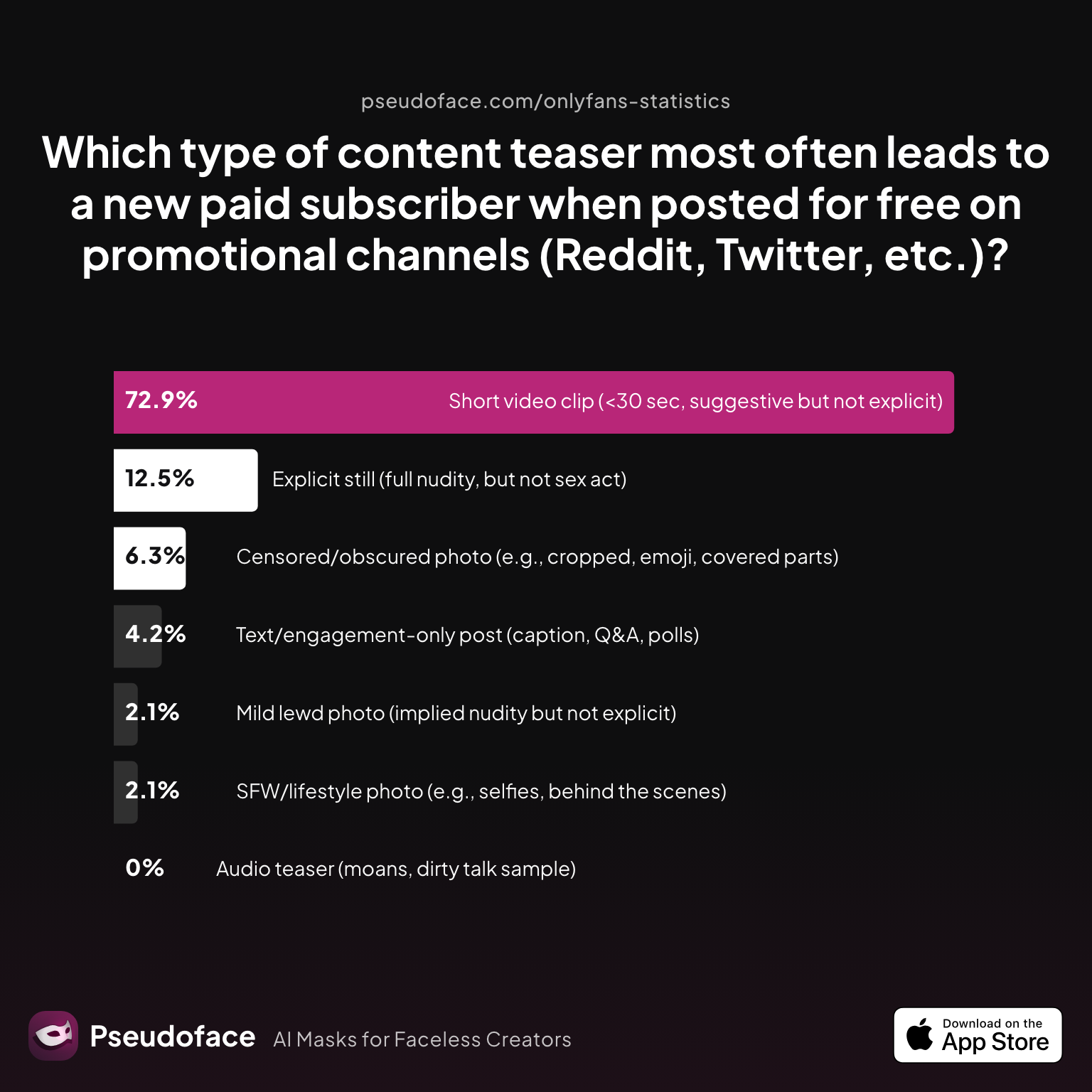
Short, suggestive—but not explicit—video clips drive the most new paid subscribers, with nearly 73% of creators reporting these as their highest converters on free promotional channels.
This is no small sample bias. According to Pseudoface’s 2025-2026 data set, creators overwhelmingly point to short video teasers as their most reliable lure—far outpacing explicit stills and even heavily censored photos.
Open thread on Redditr/onlyfansadvice
u/xxxgxthkitty888
i personally still post videos on my free page, i just do ppv posts with a picture for the teaser which is normally a screenshot of the video.

But the stakes are high: give away too much, and you risk undermining the value of what’s paywalled. The worry isn’t theoretical:
Open thread on Redditr/onlyfansadvice
u/Janemelb77
I don't have a free page. Tried it a few times. Complete waste of time for me and devalues my paid page.
Here’s the core throughline: Creators succeed when their previews invite curiosity, not satisfaction. It’s a proven dynamic—but one always vulnerable to accidental oversharing, especially for those new to the game or responding to impatient fans.
With this context, the guide next investigates what amount of preview is just right for driving curiosity—and conversion—without cannibalizing sales.
Preview Length That Converts: Real-World Data and Creator Experiences
Previewing isn’t just about what you show—it’s how much you show, for how long, and where the line between “tease” and “overdelivery” gets drawn. Subtlety and timing are everything.
Chart: Optimal Preview/Teaser Length
| Answer | Percentage |
|---|---|
| 11-20 seconds | 3.77% |
| 21-30 seconds | 15.09% |
| 31-60 seconds | 7.55% |
| 5-10 seconds | 54.72% |
| Over 1 minute | 11.32% |
| Under 5 seconds | 7.55% |
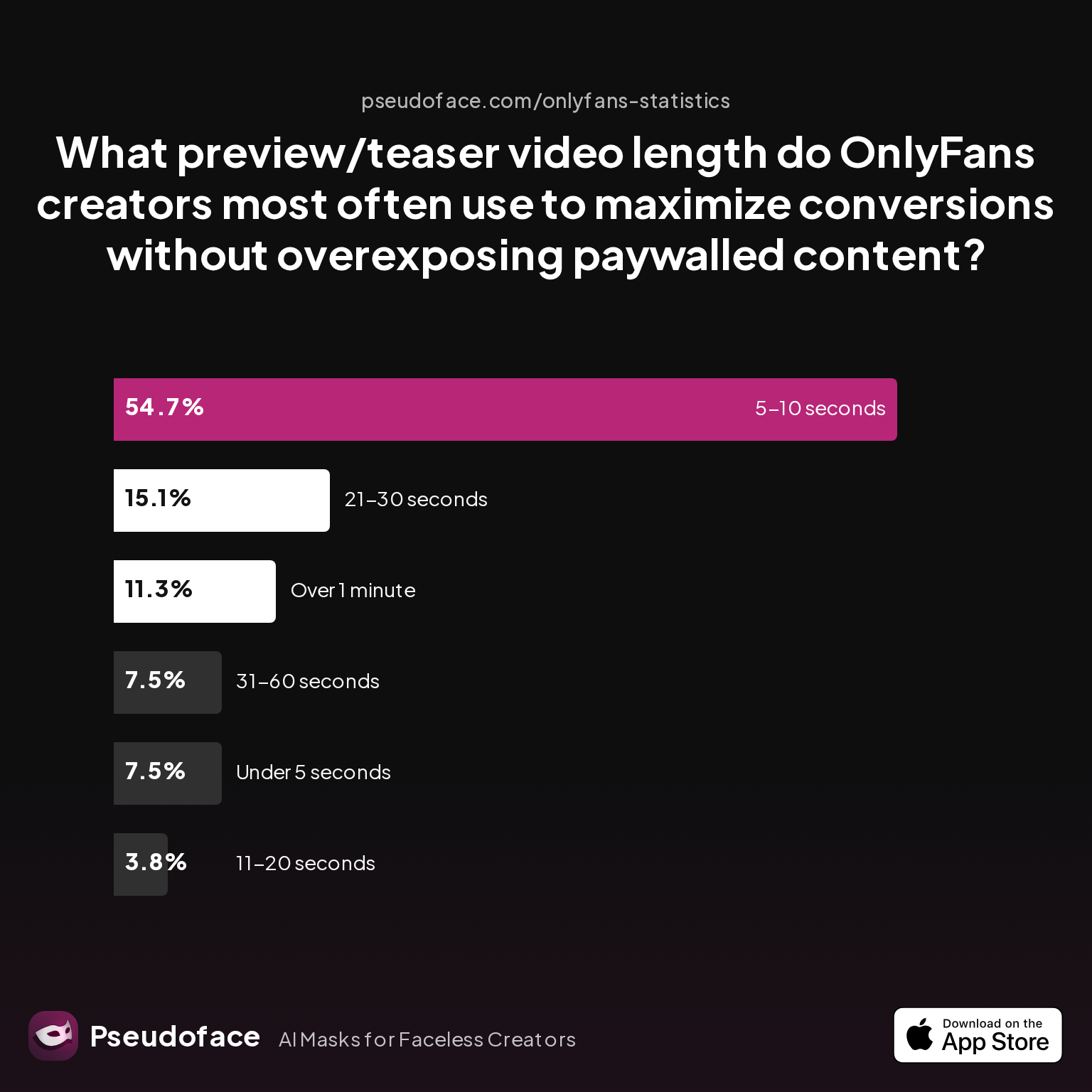
The majority of top-performing creators stick to previews between 5 and 10 seconds—over 54% report this range delivers the strongest conversions without risking oversharing. Just as important: clips longer than 30 seconds almost always underperform.
This trend—spotlighted in platform discussions from late 2025 to early 2026—reflects the hard-won lessons from creators who’ve tested a range of preview approaches:
- Short is memorable: Quick, looping clips are easy to share, repost, and leave fans wanting more.
- Longer isn’t better: The more you show upfront, the fewer surprises behind your paywall.
- Looping or repeatable: Super-short gifs and clips can serve as persistent, evergreen teasers on public feeds or promo hubs.
But these numbers tell only part of the story. On forums, creators reveal why brevity works, and how fans interpret that restraint:
Open thread on Redditr/onlyfansadvice
u/Which_Juggernaut7424
I like to use the mirror for interesting a teasing content. And a slow pull down of your panties from the back as you slowly bend over is very teasing! If you keep your legs together, (and your thighs are kinda thick like mine 🤭) you can't see anything or your panties get stuck and can't go down any farther. Also tilting with camera slightly so you can just barely see is another tease. Or bubbles in the bath covering the bits. Long hair can be used to cover boobs or an almost see through scarf. Shadow play is fun, too, or through a sheer curtain. Or if it's a sunny day, backlight your image in a window with bright sun and you will be dark and only shapes visible and the background will be light. Or a slow pull down of a blanket or drop of a towel. Honestly, look at tiktok. A lot of girls do great teasing and just at the limit content you can get ideas from.
Notice the emphasis on “just barely seeing.” The sexiest previews create a sense of imminent reveal—without any actual delivery. Fans become obsessed with what might be, not what’s already been shown.
Of course, survivorship bias is heavy here: creators who stick with short teasers may be those who found quick success with them. Others, who lingered with longer, more explicit previews, may have burned out or left the field—so consider percentages as indicative, not all-encompassing.
What’s clear, based on both hard data and lived creator experience from 2025–2026, is that less is more. Once you know the target range (most often: 5 to 20 seconds), you can focus on what actually goes into that miniature story.
With that foundation, let’s map out the content structures that transform fleeting peeks into paying conversions.
Anatomy of an Effective OnlyFans Preview: Structure, Substance, and Subtlety
The most compelling previews are crafted, not clipped out at random. They follow an intentional arc: they hook early, evoke curiosity, and show just enough to merit a click. These aren’t just gut-level hunches—they’re validated by both creator consensus and conversion metric trends over the past two OnlyFans business cycles.
What Actually Converts Free Followers? Chart Analysis
| Answer | Percentage |
|---|---|
| Bundled free‑plus‑paid content pack | 5.10% |
| Countdown to paid page launch | 0.00% |
| Limited‑time discount on subscription | 16.47% |
| Personalized DMs with exclusive teaser | 24.71% |
| PPV bundles that unlock paid content | 46.27% |
| VIP tier with extra perks | 7.45% |
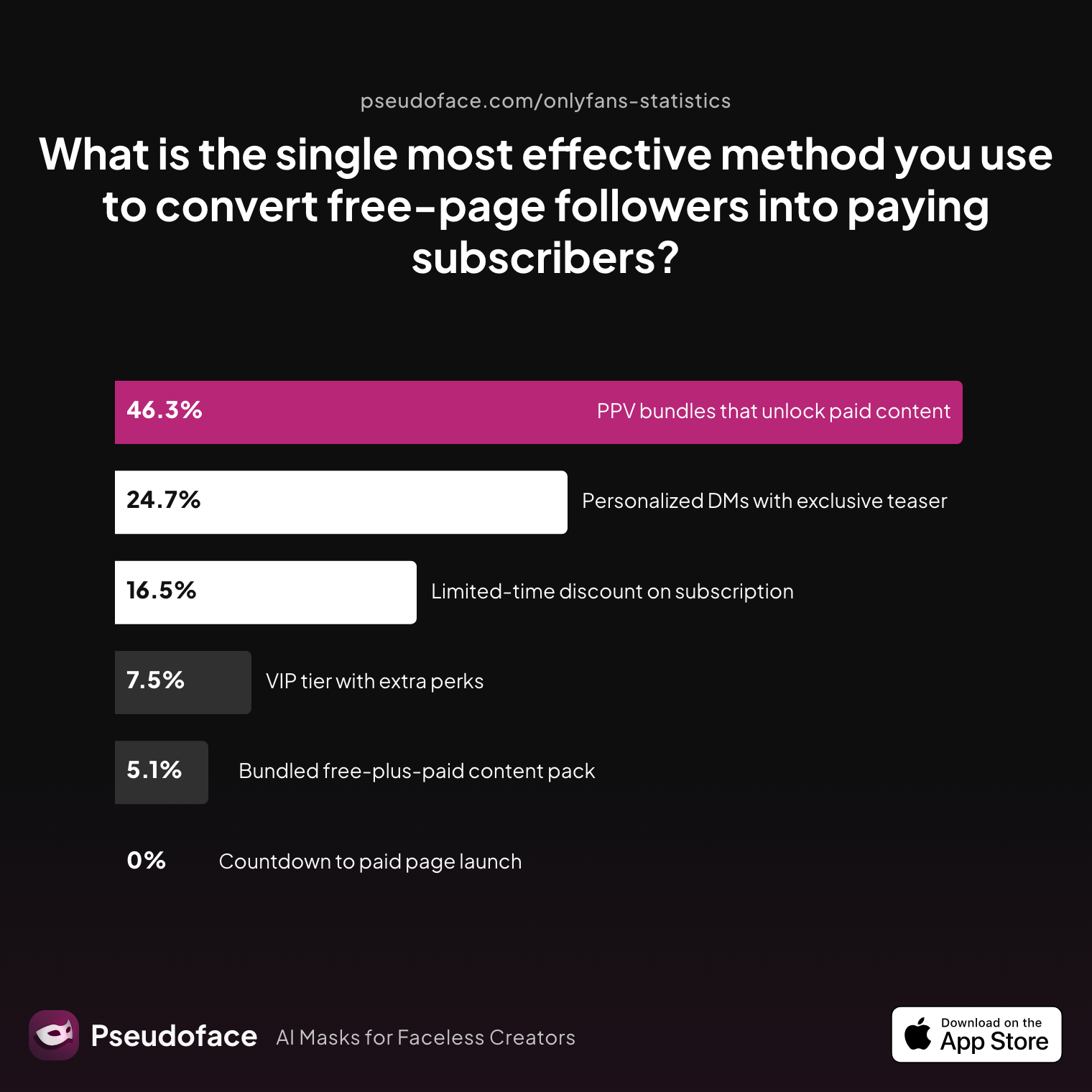
Nearly half (46%) of creators cite “PPV bundles that unlock paid content” as the single most effective way to convert free-page lurkers to paying subscribers. Personalized DMs with exclusive teasers come next—at a distant 24%.
This is central to your preview structure: the preview is not the product, but the bait that hints at the value behind a paywall, often paired with a direct upsell message or easily unlocked bundle.
How to Design a High-Converting Preview
- The Hook (First 1–2 seconds): Immediately hint at what’s unique or tantalizing about the upcoming content. The opening must intrigue, not instantly reveal.
- The Hype (3–8 seconds): Show movement, reaction, flirtation, or the beginning of an action—then cut away before revealing explicit detail. Use wardrobe, props, obstacles, or framing to conceal more than you display.
- The Cliffhanger (Final second): End with an unfinished action or cheeky glance—prompting instant curiosity about “what happens next,” and a call-to-action: see more inside.
Reddit creators repeatedly reinforce this storytelling arc—not by quoting video marketing textbooks, but through tactical, vulnerable trial-and-error.
Let’s also consider how the copy that goes with your preview supports the tease:
Chart: Bio Hook Styles That Work
| Answer | Percentage |
|---|---|
| Bullet‑list of subscription benefits | 8.82% |
| Direct call‑to‑action | 22.06% |
| Niche‑specific keyword phrase | 30.88% |
| Personal back‑story snippet | 16.18% |
| Provocative teaser or question | 22.06% |
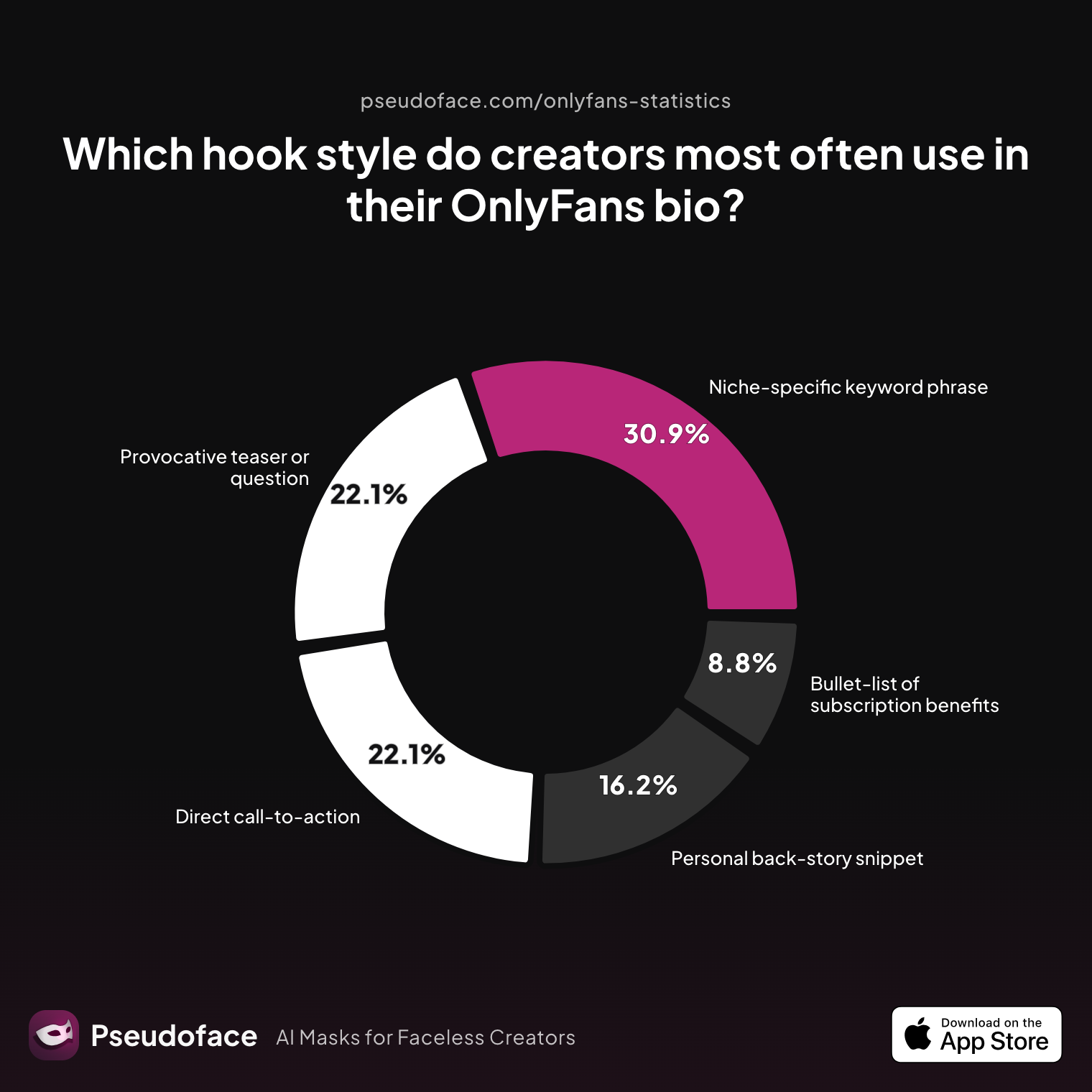
Creators most often win curiosity with “niche keyword phrases” (31%) or provocative teasers/questions (22%) in their bios—and less with generic benefit bullet-lists or direct CTAs.
Instead of “subscribe for sexy content,” consider lines like: “What happens when the lights go out?” or micro-niche badges: “Petite goth brats + solo toy play.” The tone is invitation, not transaction; mystery, not marketing.
Together, a well-structured preview plus a hooky, personality-driven caption or bio delivers the psychological one-two punch: “What did I just see?” and “What might I see if I click through?”
—But structure and copy aren’t the whole story. Visual intrigue begins even before the preview starts: in the thumbnail. Next, we’ll dissect how to design thumbnails that generate clicks and conversions—without giving away what’s for sale.
Thumbnails That Tease Without Giving Away: Composition and Workflow Tips
A perfect thumbnail is both a promise and a tease—it raises questions and feelings that a fan can only answer by paying for more. But the moment a thumbnail shows too much, it destroys the need for further curiosity.
Data from the creator community confirms: what stays paywalled and what becomes the public face of your brand should be meticulously planned.
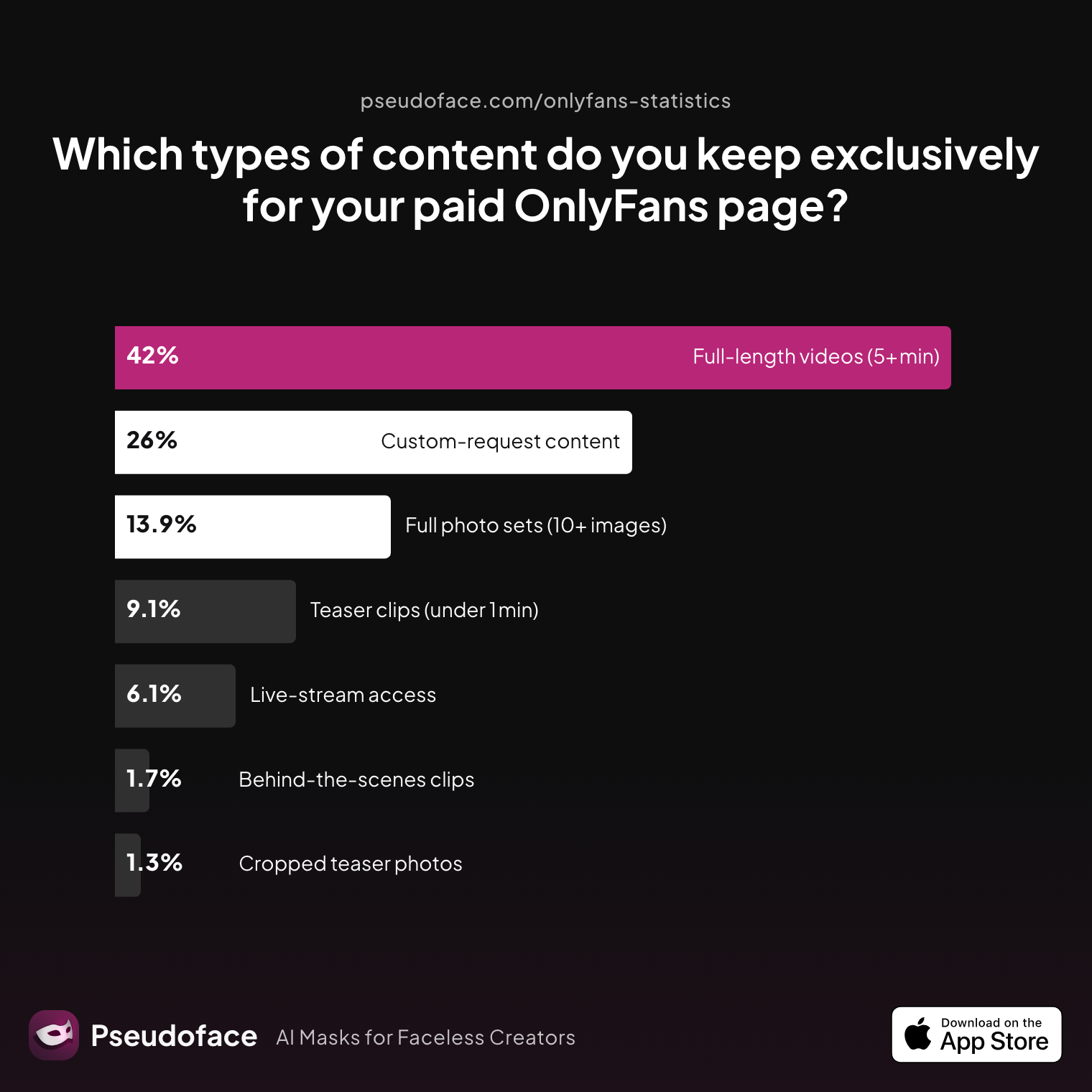
Chart: What Creators Actually Keep Paywalled
| Answer | Percentage |
|---|---|
| Behind‑the‑scenes clips | 1.73% |
| Cropped teaser photos | 1.30% |
| Custom‑request content | 25.97% |
| Full photo sets (10+ images) | 13.85% |
| Full‑length videos (5+ min) | 41.99% |
| Live‑stream access | 6.06% |
| Teaser clips (under 1 min) | 9.09% |
Full-length videos and custom-request content are overwhelmingly kept as paid-only content, with nearly 42% and 26% of creators, respectively, citing these as strictly paywalled.
That signals a clear thumbnail strategy: tease the existence of these premium goods, not their contents.
Reddit creators employ a set of field-tested thumbnail tactics:
Open thread on Redditr/onlyfansadvice
u/nymphfern
sometimes this doesn’t work - what i do is edit my video so that the thumbnail i pick myself is the first fraction of a second in the video so it’s shown as the thumbnail automatically and without risking error ☺️
Other creators use props and creative framing:
Open thread on Redditr/onlyfansadvice
u/Which_Juggernaut7424
Or bubbles in the bath covering the bits. Long hair can be used to cover boobs or an almost see through scarf. Shadow play is fun, too, or through a sheer curtain.
Practical Thumbnail Workflow
- Pick a high-intrigue freeze frame: Not the explicit moment, but the flicker before—a turned head, a hand starting to lift a hem, a playful grin.
- DIY fail-safe: Insert your preferred thumbnail still as the first 0.03 seconds of your clip, ensuring auto-selection by OnlyFans’ system even if their manual selector is inconsistent.
- Use “concealers”: Hair, bedsheets, clothing edges, props, or selective focus to hide what you won’t give away for free.
- Keep SFW/NSFW paired: For every steamy thumbnail, consider a safer, more personality-revealing alternate for use on mainstream promo channels (Twitter, Reddit SFW subreddits, etc).
- Consistent branding: Keep style and tone unified across preview, thumbnail, and paid content—fans need to recognize your vibe instantly.
Workflow barriers remain real: OnlyFans’ thumbnail picker can be temperamental. For creators working at scale, success often means building a template or quick-edit step into every content batch.
With the visual packaging dialed, creators often look to software for workflow speed. So which apps actually deliver quick, safe, and creator-centric preview production?
Choosing the Right OnlyFans Preview Tool: Creator-Friendly Apps Compared
Not all video editors and social apps are built for the realities of adult content. OnlyFans creators routinely debate not just which tools are fastest, but which minimize risk of accidental overexposure, offer watermarking for anti-leak protection, and allow for rapid SFW/NSFW output.
Reddit advice over the past year converges on a handful of practical, creator-friendly tools:
- CapCut: Makes it easy to cut previews from longer clips, add blur/emoji/bar censorship, apply overlays or watermark your social handle, and instantly export in vertical format. Integration with TikTok is a plus for rapid cross-promo.
- InShot: Popular for adding borders, text, and fast free-cropping to make thumbnails and previews Reddit-safe; supports batch editing.
- iMovie (iOS/macOS): Intuitive and stable, good for creators who want to manually select that all-important first frame as the thumbnail, and for layering on custom audio teasers or callouts.
- Premiere Pro/DaVinci Resolve: High-end options for those creating truly cinematic teasers or those with more advanced editing workflows. Allows precise fine-tuning but increases setup time.
Open thread on Redditr/onlyfansadvice
u/nymphfern
i edit using premiere pro and take the thumbnail i want to use and insert it at the front of the video for a duration of like .03 seconds so it automatically shows that instead of having to rely on OF’s system
When selecting an app, creators place a premium on:
- Censorship ease: Quickly add blur/bars/emoji in case a preview needs SFW-izing for mass platforms.
- Workflow speed: The best app is the one that suits your volume—batch processing is a win for regular schedule posters.
- Export options: Make sure your tool can produce high-quality gifs and videos in both portrait and landscape, so you aren’t accidentally leaking high-res explicit content via a preview.
- Thumbnail control: Pick one that lets you insert your own thumbnail frame, not just trust platform autofill.
Remember, what works for a top 1% creator may not fit your budget or pace. Many start with free versions of CapCut or InShot and only upgrade if managing dozens of posts each week.
Editing tools are the how-to—but what about the “can I even see a preview?” question from the fan side? Let’s set those expectations next.
Can You Preview OnlyFans Accounts? Setting Viewer Expectations
For creators and fans alike, a common point of confusion is: “Can someone preview OnlyFans content before subscribing?” The answer shapes both marketing strategy and user experience.
By default, OnlyFans does not allow non-subscribers to see premium content—only what creators share publicly on free pages or via public promotional channels. Standard accounts appear with a profile picture, a snippet of bio, and sometimes a handful of locked post previews (blurred thumbnails, never full videos or photos).
Creators have two main mechanisms to “preview” their content:
-
Free Pages: Some creators run separate “free” pages where they post teasers, safe-for-work selfies, or brief preview videos. Fans can follow these without paying but will need to unlock full content via PPV (pay-per-view) or by upselling to a paid page.
-
Public Teasers on Social Media: Reddit, Twitter, and other channels remain the primary source of public previews—hence the extreme emphasis on SFW/teaser-first sharing there.
But running free pages isn’t for everyone. As several creators admit, a free page can just as easily undercut your premium sales as it can feed them.
Open thread on Redditr/onlyfansadvice
u/AmyStranger
In all honesty if you want a free page to involve conversion and sales to your paid page you’ll find it probably has the opposite effect. You’ll be giving your paying customers a free option. Free pages can make money in their own right but they’re hard work and are very PPV and sexting focused with a lot of time wasters that are likely to burn you out if you run your page alone.
Open thread on Redditr/onlyfansadvice
u/Aromatic-Isopod-6035
Best move if you’re doing two pages is to not allow messages on the free page and just treat it as a video store
This means that setting clear boundaries and expectations is as much a matter of strategy as of platform limitations.
For fans: Unless creators specifically enable previews (on a free page or via social), you cannot preview real OnlyFans content before subscribing. Beware of “leak” or “free preview” scam sites—they’re almost always illegitimate.
For creators: By controlling what to publicly preview and where, you dictate both curiosity and exclusivity. Let’s now see how creators cross-promote previews on platforms like Reddit—and avoid giving away the farm.
How to Preview Someone’s OnlyFans Without Undercutting Your Own Sales
Cross-promotion is the engine of growth—but it can threaten sales if not handled with intention. At the heart of this problem is platform selection: Where do fans discover previews, and where are they most likely to convert into paying subscribers?
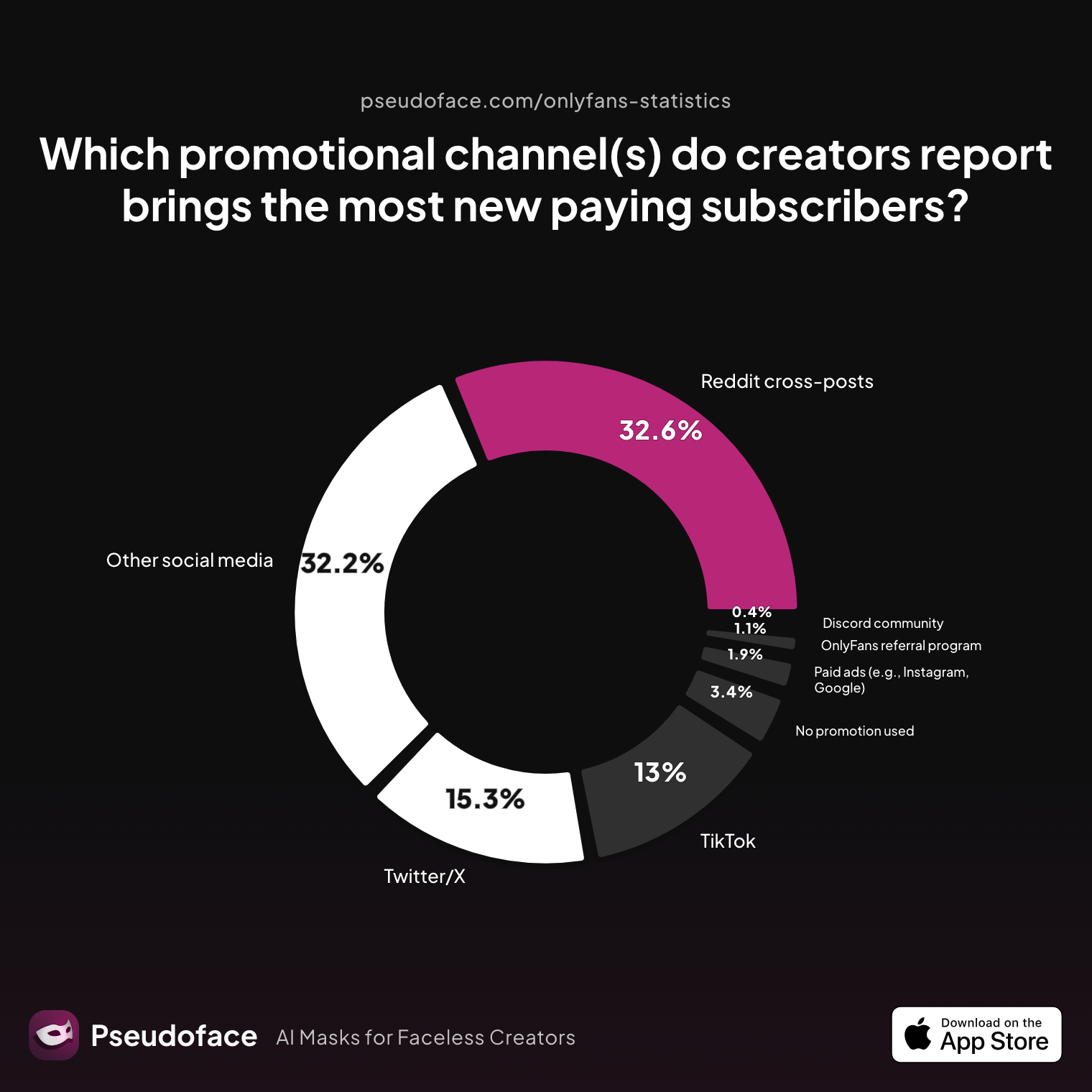
Chart: Best Promo Platforms for Driving Paying Subscribers
| Answer | Percentage |
|---|---|
| Discord community | 0.38% |
| No promotion used | 3.45% |
| OnlyFans referral program | 1.15% |
| Other social media | 32.18% |
| Paid ads (e.g., Instagram, Google) | 1.92% |
| Reddit cross‑posts | 32.57% |
| TikTok | 13.03% |
| Twitter/X | 15.33% |
Reddit cross-posts and “other social media” (mainly Twitter/X) tie as the most effective (over 32% each) at delivering new paid subscribers.
But it’s not just about where you promote—it’s how. Smart creators lean on SFW content for public previews and reserve explicit material for the paywall. On Reddit, teasers succeed that blend flirt and suggestion (“implied nudity,” playful cropping, creative censorship).
Here’s the practical pattern:
- Use SFW/PG-13 stills for Reddit and Twitter/X; pair with a “See the full uncropped video” CTA.
- Upload brief, looping clips (5–15 seconds) that fade out just as things get explicit or reach a climax.
- Employ blurring, stickers, or “peekaboo” camera angles to obscure what’s for sale.
- Save full-length, high-res, and custom-request content for your OnlyFans paywall only.
This workflow protects your paywalled value while making previews work as conversion tools rather than free samples.
Open thread on Redditr/onlyfansadvice
u/xxxgxthkitty888
i just do ppv posts with a picture for the teaser which is normally a screenshot of the video.
On promo-heavy platforms, repetitive over-exposure of the same content will train fans to expect freebies. Rotate and batch new teasers, watermark previews, and always keep the climax (literal or figurative) just out of reach.
Reddit and Twitter will keep being the frontlines for new member conversion as of 2026. The art is in showing just enough—and in always giving them a reason to pay to see what’s next.
FAQ: OnlyFans Preview Strategy & Tactics
What’s the ideal length for an OnlyFans video preview?
The ideal length is 5–20 seconds, with the most common “sweet spot” being around 10 seconds.
Longer previews risk cannibalizing paid content value, while shorter than 5 seconds rarely gives fans enough to spark genuine curiosity.
Will showing too much in the preview hurt paid sales?
Yes—data and creator experience both confirm that previews which show too much reduce conversions and may encourage fans to wait for more free content.
Creators routinely report “leakage” of premium value when the preview itself becomes a substitute for subscribing or purchasing.
What’s the best OnlyFans preview tool for quick, non-explicit teasers?
CapCut and InShot are the most widely praised for rapid preview construction and censorship tools, with iMovie favored for thumbnail customization on Apple devices.
Batch processing and easy blur/emoji overlays make them ideal for frequent, platform-adapted teasers.
Can you preview OnlyFans accounts before subscribing?
No, except for public content and what a creator chooses to offer on a “free” OnlyFans page or via social media teasers.
Paid content remains locked and blurred until you subscribe or unlock it via PPV; anything else accessible is usually a scam.
How can I make teasing thumbnails that don’t give away paywalled content?
Use props, hair, clothing, or shadows to strategically conceal, and select frames just before an explicit reveal.
A/B test SFW/NSFW variants for different platforms, and consider inserting your chosen thumbnail frame as the instant start to sidestep platform glitches.
Should my preview be censored, watermarked, or lightly blurred?
Yes, especially for images/gifs distributed on Reddit or Twitter/X. Watermarks help deter stealing, while light blur or emoji censorship protects paywalled value.
Reddit forums routinely recommend simple, fast overlays or blur as part of every workflow.
Can previewing my OnlyFans on Reddit or Twitter actually increase paid subscriptions?
Yes—Reddit cross-posts and Twitter/X drive over 65% of new subscriber conversions among surveyed creators as of 2026.
Consistency, restraint in previews, and clear CTAs linking to paid pages are key.
How do I set up a free page as a funnel without devaluing my paid content?
Post only brief, low-res, or cropped previews and never offer full explicit scenes on your free page.
Creators warn that running both pages is “hard work” and only effective if you actively upsell and wall off your premium value.
What’s the difference between a “teaser,” “preview,” and “trailer” on OnlyFans?
A teaser is a very short, suggestive clip or image; a preview is typically a slightly longer look at upcoming content; a trailer borrows from mainstream video and strings together multiple teasers or story beats.
Each can be used at different stages of the “fan funnel,” but all serve to entice curiosity—not satisfy it.
What is the risk of content theft or leaks when posting previews?
Previews are always at risk from screenshotting or scraping, but watermarking, cropping, and strategic censorship reduce both the reward and the reach of leaks.
Most creators experience small-scale reposting, but lose little revenue if they keep their actual explicit content strictly behind the paywall.
Conclusion
There’s no “one weird trick” to preview success on OnlyFans—only the ongoing, data-backed refinement of restraint, workflow, and psychological nuance. As of 2025–2026, the creators who convert best are those who invest time in how little they show and how much they suggest.
Short, creative teasers—anchored by personality, mystery, and a dash of practicality—protect both your paywall and your brand. Follow the wisdom of tens of thousands of real-world creators: if the preview leaves them desperate to see what’s next, you’ve already won.


