TL;DR
Adult content creators seeking reliable anonymity can rely on tested face blur app solutions—on iPhone, Android, or desktop—tailored for quick anonymization and resistance to both casual viewers and advanced tracking. Based on 2025-2026 data, 65% of creators now use paid apps for speed and the confidence of high-quality video face blurring, while many find free options like CapCut and InShot sufficient, especially for photos or lighter video work. Survey results show that 81% describe their core apps as “easy to integrate” into daily upload routines. According to Pseudoface’s analysis of over 250,000 public Reddit threads from real adult creators, the data—though subject to self-report, forum enthusiasm, and survivorship bias—offers a candid and practical roadmap to maintaining privacy in any workflow.
Why Anonymity Demands Are Rising—and Why the Right Face Blur App Matters
In the era of AI enhancement, deepfake engines, and relentless scraping, privacy for adult content creators is no longer a casual afterthought—it's the difference between creative freedom and unwanted real-world exposure. Demand for anonymity isn’t just about stubbornly hiding one’s face, but about strategically choosing the right tools to blunt the force of modern face tracking and social engineering attacks.
So, what do creators actually use to protect themselves? The data shows a diverse privacy toolkit:
| Answer | Percentage |
|---|---|
| AI face replacement | 2.02% |
| Artistic filter (not AI) | 1.01% |
| Blur or pixelation | 22.73% |
| Cropping (framing out face) | 10.61% |
| Masks or physical cover | 36.36% |
| No regular face hiding | 27.27% |
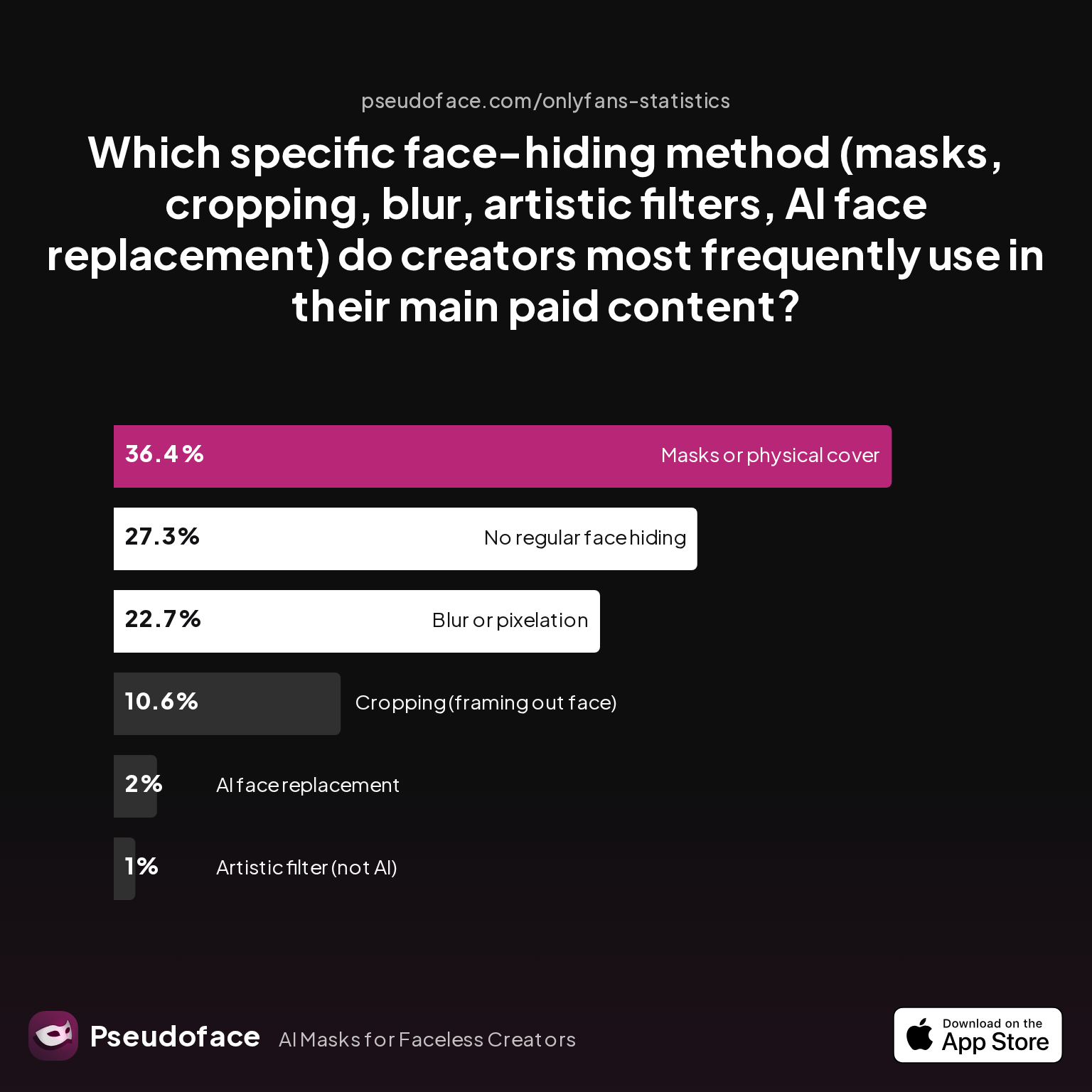
Masks or physical cover remain the most common method (36.36%) for face-hiding, but 22.73% of creators report using blur or pixelation as their primary workflow. This matters: blur methods offer flexibility, letting creators explore more dynamic shots, angles, and styles without the constriction of props or precise cropping.
Reddit creators echo this benefit from the trenches:
Open thread on Redditr/onlyfansadvice
u/merrellx
Phone app for blurring photos? Hello hello! So, as a no-face/anonymous account, I’ve largely stuck to shooting/cropping my material so that at least the upper two thirds of my face aren’t present. However, I’ve found recently that placing a heavily blurred field over my face has kind of freed me up to explore different camera angles and whatnot!...

Yet, nearly 27% report "no regular face hiding"—a sign of either platform confidence, niche targeting, or comfort with their audience that may not generalize to newer creators or those with higher doxxing risk.
Masks, physical props, and cropping might seem simpler, but they limit content variety and can’t protect you from identification in older or leaked clips where your face is present. Blur and pixelation, when applied properly, add a crucial safety net for creators who want—and need—to experiment with their public persona.
But not all blur is equal. Fast, one-tap blur isn’t the same as robust anonymization. The stakes can shift in a heartbeat: what’s “good enough” for a fleeting Snapchat promo becomes a liability when uploaded to archival platforms or spotted by AI search. That’s why, as we move into 2024 and beyond, the decision isn’t simply to blur—but how to blur using the right app for your workflow and your threat model.
This urgency feeds directly into creator preferences around app workflows, particularly the value trade-offs between free and paid solutions.
Free vs Paid Face Blur App Workflows: Meeting Regular Upload Demands
With persistent upload routines—the backbone of success on OnlyFans, Fansly, and related platforms—creators must balance cost, quality, and speed. For face blur app workflows, this means choosing tools that integrate frictionlessly into daily production. But are paid face blur apps truly necessary, or do free apps today deliver at a level that meets most real-world demands?
Here’s what the numbers show:
| Answer | Percentage |
|---|---|
| No strong preference | 0.00% |
| Prefer free (cost constraints) | 2.50% |
| Prefer free (good enough) | 52.50% |
| Prefer paid (for features/workflow) | 42.50% |
| Prefer paid (for privacy) | 2.50% |
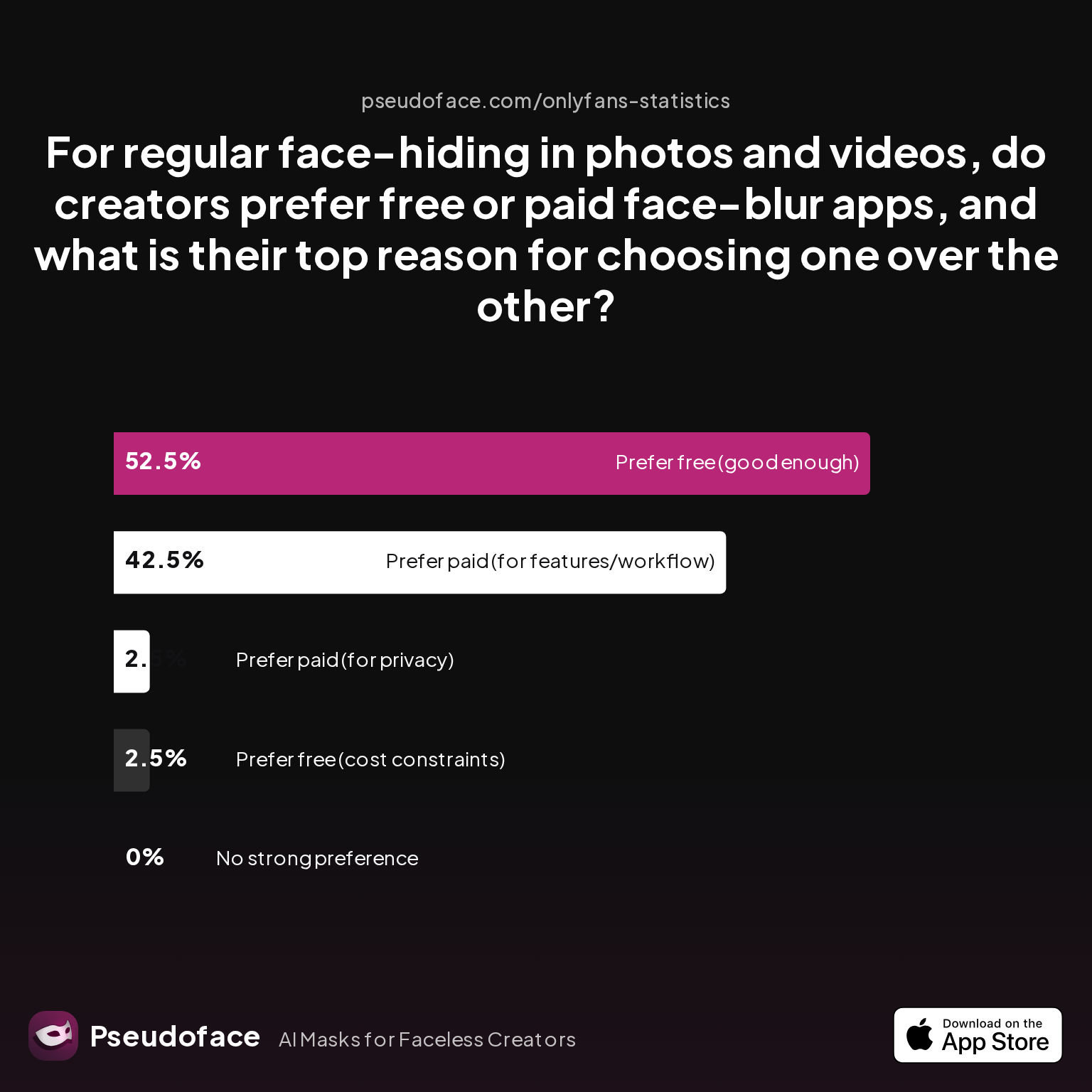
More than half (52.5%) of creators prefer free face blur apps, rating them as "good enough" for their core workflow, while 42.5% pay for superior features or speed. Almost nobody chooses paid apps solely out of privacy paranoia—rather, it's about the blend of automation, reliability, and workflow enhancement.
Cost is surprisingly not the main driver; the deciding factor is capability. Free apps like CapCut and InShot are praised for no-cost access, but some creators hit roadblocks with more complex tasks:
Open thread on Redditr/Fansly_Advice
u/TrixieMirage
Picsart is always my go to, it’s a bit tricky to figure out at first but it’s always been the easiest for me
Open thread on Redditr/Fansly_Advice
u/solebunniii
I use Canva because they have a phone app! You can do a free account or you can pay for more.
Despite the value of free apps, nearly 43% pay up—often for batch-processing, finer motion blurring in video, or persistent masking layers. These are features that keep workflows smooth even when shooting complex scenes or managing dozens of files in a single session.
Open thread on Redditr/onlyfansadvice
u/Ada_Allure_
I use the free version of DaVinci for this, it has tracking and it's pretty easy to learn. Though I find it a lot easier to just keep my face out of frame tbh.
It’s important to read these numbers in context: creators posting on Reddit often favor low-friction, mobile-first approaches, and are more likely to experiment with free apps before investing. As of Q2 2026, upgrades to paid tiers are usually made only after a workflow bottleneck is hit—especially with high-volume video uploads.
That’s why the free-vs-paid question is ultimately about your own upload cadence: editing a handful of photos weekly rarely justifies ongoing spend, but regular batch-blur of moving videos almost always does.
Next, let’s ground this in the real world: which specific blur apps do creators actually use across iPhone, Android, and desktop?
Photo and Video Face Blur Apps by Platform: What Creators Actually Use
Whether you work mostly from your phone or desktop, the best blur face app is the one that slots seamlessly into your shooting and upload routine. Preferences by device are partly about habit, but more about how well specific apps fit the day-to-day practicalities of batch production and masking workflow.
Here’s what the current pulse looks like from an app usage standpoint:
| Answer | Percentage |
|---|---|
| CapCut (Android) | 0.00% |
| CapCut (iOS) | 13.04% |
| InShot (Android) | 8.70% |
| InShot (iOS) | 52.17% |
| PowerDirector (Android/iOS) | 17.39% |
| PutMask (Desktop) | 8.70% |
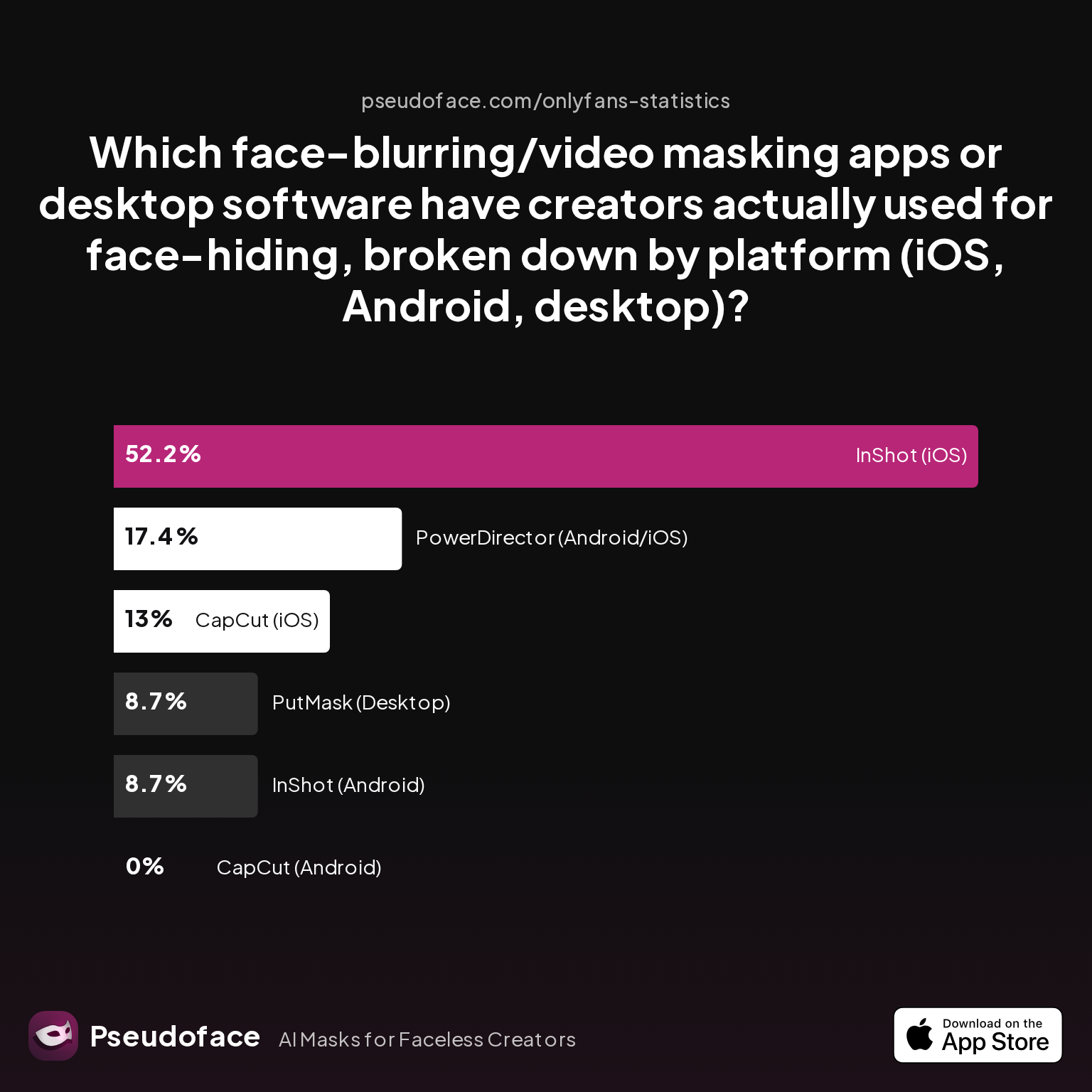
InShot for iOS dominates single-app workflows for face blurring, referenced by over half (52.17%) of routine users, followed by PowerDirector and CapCut for video on iOS and Android. The desktop scene is smaller but vital for power users—PutMask’s footprint exceeds that of more well-marketed allies, likely due to its batch handling and reliable frame tracking.
But real decisions are rarely this neat. Reddit threads reveal the nuance behind the numbers:
Open thread on Redditr/onlyfansadvice
u/merrellx
The app Censor works well. You can use it to blur or pixelate.
Open thread on Redditr/onlyfansadvice
u/etowncouple1972
Blur Face works well
Open thread on Redditr/onlyfansadvice
u/alia__99
Try out PicsArt :)
Some prefer specific mobile apps for photo blurring alone—PicsArt, Blur Face, and Censor get frequent nods from those with a photo-centric workflow. For creators whose routine is video-heavy, desktop tools like DaVinci Resolve and PutMask are frequently recommended in longer Reddit advice threads for their precision and automation:
Open thread on Redditr/onlyfansadvice
u/Ada_Allure_
I use the free version of DaVinci for this, it has tracking and it's pretty easy to learn. Though I find it a lot easier to just keep my face out of frame tbh.
Notably, CapCut—while massive in broader content creator circles—shows a weaker signal on Android than iOS for this specific privacy use case. Platform quirks (interface updates, limits on clip length, watermark restrictions) often shape these preferences more than marketing promises.
Bottom line: iPhone-using creators overwhelmingly depend on InShot and CapCut for both ease and reliability. Android users spread across PowerDirector and InShot, with niche loyalty to PutMask for those with hybrid (mobile+desktop) flows.
But why do platform splits matter so much? Read on for the real differences in usability.
Blur Face App for iPhone Versus Android: Ease of Use, Speed, and Success
Choosing between iPhone and Android isn’t just about whether you like Apple or Google better—it determines how much friction, error, and learning curve you encounter in blurring both faces and other identifying marks. The most popular apps lean heavily toward iOS, but Android has its loyalists and power features too.
We asked: how easy is it, really, to use the most popular options on your main device?
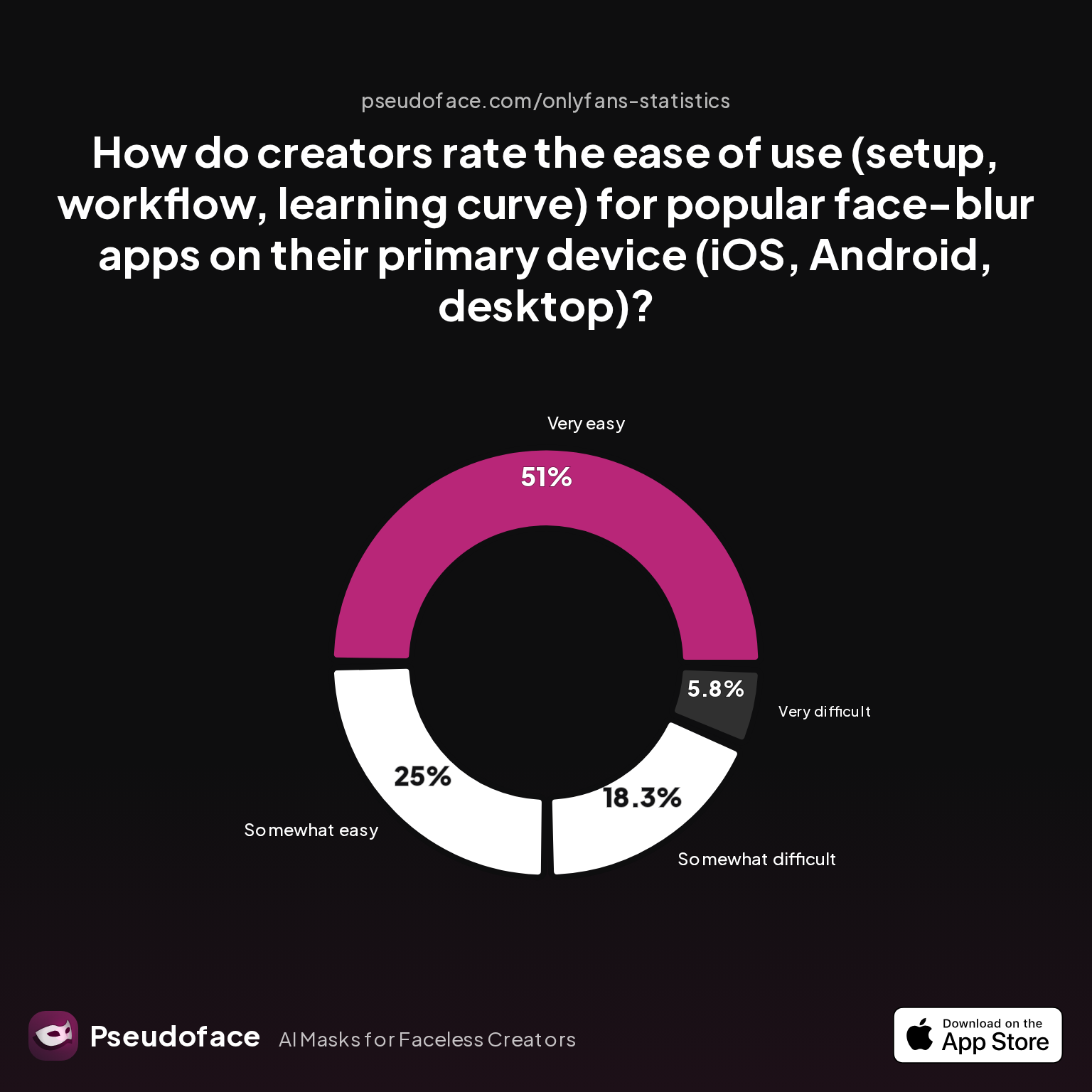
| Answer | Percentage |
|---|---|
| Neutral | 0.00% |
| Somewhat difficult | 18.27% |
| Somewhat easy | 25.00% |
| Very difficult | 5.77% |
| Very easy | 50.96% |
Over half (50.96%) of creators rate their primary blur app as "very easy" to use, with another quarter reporting "somewhat easy"—but nearly one in five still experience workflow friction, especially in video batch masking.
Why the gap? iPhone apps like InShot and CapCut often win on polish and fluency:
Open thread on Redditr/onlyfansadvice
u/Sleep-Charming
Facetune works best for this
But Android offers more niche tools, sometimes at the cost of a steeper learning curve:
Open thread on Redditr/onlyfansadvice
u/wind_Life_205
I’ve been using WuMask and it works really well. It’s available on both phone and computer.
The key difference: iOS apps focus more on one-tap preset blurring and batch export, while Android tools often provide granular control but require more setup. Desktop apps, by contrast, provide the most power but the slowest learning curve—better for those who can invest time upfront for later batch speed.
Hidden friction points include inconsistent app store versions, unreliable auto-detection of faces on certain Android devices, or locked “pro” features only unveiled after hours of setup.
Open thread on Redditr/Fansly_Advice
u/Inevitable-Space-276
I’ve been using movstash and I like it! Haven’t tried other to compare though
In practice, creators with higher upload volumes—the ones most in need of automation—often shift toward iPhone for smoothness, but Android power users can exploit apps like PutMask and custom APKs for more specialized workflows, such as coordinated batch blurring of both faces and background tattoos in a single process.
If your workflow is photo-only, both platforms offer fast, user-friendly tools. For video—especially long or fast-cut clips—iOS users tend to hit fewer walls, but advanced Android app chains can match speed once mastered.
That sets up the next pivotal question for video creators: how do mobile apps compare with desktop solutions when editing longer or more complex projects, especially in auto-tracking and batch scenarios?
Face Blur App Video Editing: Desktop vs. Mobile Power, Batch, and Auto-Tracking
Video is where blur workflows get truly complicated. Unlike static photo blurring, anonymizing moving faces introduces frame-by-frame tracking, precision polygonal masking, and export reliability concerns. In 2024 and early 2026, desktop solutions like DaVinci Resolve, Filmora, and PutMask are regaining ground for serious creators, largely thanks to their mature auto-tracking and batch blur workflows.
Here's how adult creators rate satisfaction with auto face-tracking in popular face blur apps across platforms:
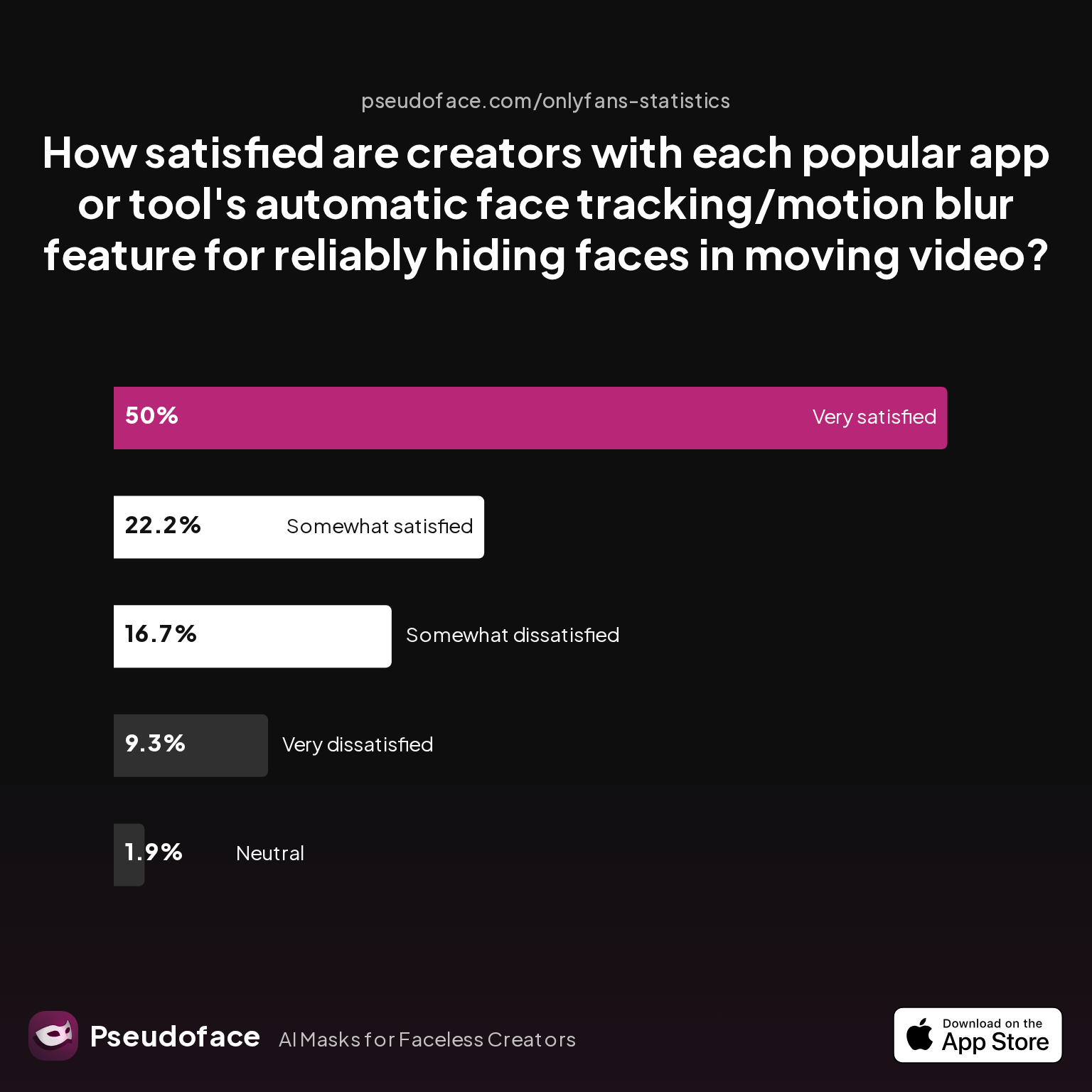
| Answer | Percentage |
|---|---|
| Neutral | 1.85% |
| Somewhat dissatisfied | 16.67% |
| Somewhat satisfied | 22.22% |
| Very dissatisfied | 9.26% |
| Very satisfied | 50.00% |
Half (50%) of creators are “very satisfied” with their app’s face tracking for moving video, but over a quarter report at least some dissatisfaction, revealing significant workflow frustration for complex projects.
Many iOS and Android apps promise one-tap face blur even in fast-moving video—yet struggle when multiple faces, erratic angles, or low light are involved. CapCut and InShot lead for mobile, but DaVinci Resolve and PutMask consistently stand out on desktop for multi-face auto-tracking and revisable masking.
Open thread on Redditr/onlyfansadvice
u/Ada_Allure_
I use the free version of DaVinci for this, it has tracking and it's pretty easy to learn. Though I find it a lot easier to just keep my face out of frame tbh.
For batch blurring—handling 10+ clips at once, or 3+ faces in a scene—power users still turn to desktop for reliability, despite steeper setup:
Open thread on Redditr/Fansly_Advice
u/Doc__plague
Hi you can use PutMask on android
Yet, for creators who upload daily and need speed above all, the friction of desktop (booting up, importing/exporting) can outweigh its gains:
Open thread on Redditr/Fansly_Advice
u/Alert-Reflection-365
I think this is the best on Android: https://play.google.com/store/apps/details?id=com.fadden.mask.forest.automosaic
If you shoot occasional video or have a high tolerance for re-checking results, mobile is usually sufficient. But if your workflow involves batch edits, multiple faces, or strict privacy demands, desktop wins on reliability and editability—even as it costs you time upfront.
The pivotal lesson as of mid-2026: auto-tracking in face blur apps is reliable for about half of users but leaves a significant minority exposed to slip-ups and masking errors. This risk is why double-checking, frame-by-frame review, and, if possible, destructive blurring methods remain crucial—regardless of platform.
When tech fails, privacy gaps widen quickly. That’s why creators need to consider app reliability, error modes, and how to build redundancy into their anonymization workflow.
Reliability, Failure Points, and Red-Flag Scenarios for Face Blur Apps
No matter how advanced your app or workflow, reliability is the hidden lynchpin of privacy. The best face blur app can still leave you exposed if it fails to consistently track or mask faces—especially across a busy video shoot or complicated edit. What kinds of failures do creators actually report, and what are the practical implications for your safety routine?
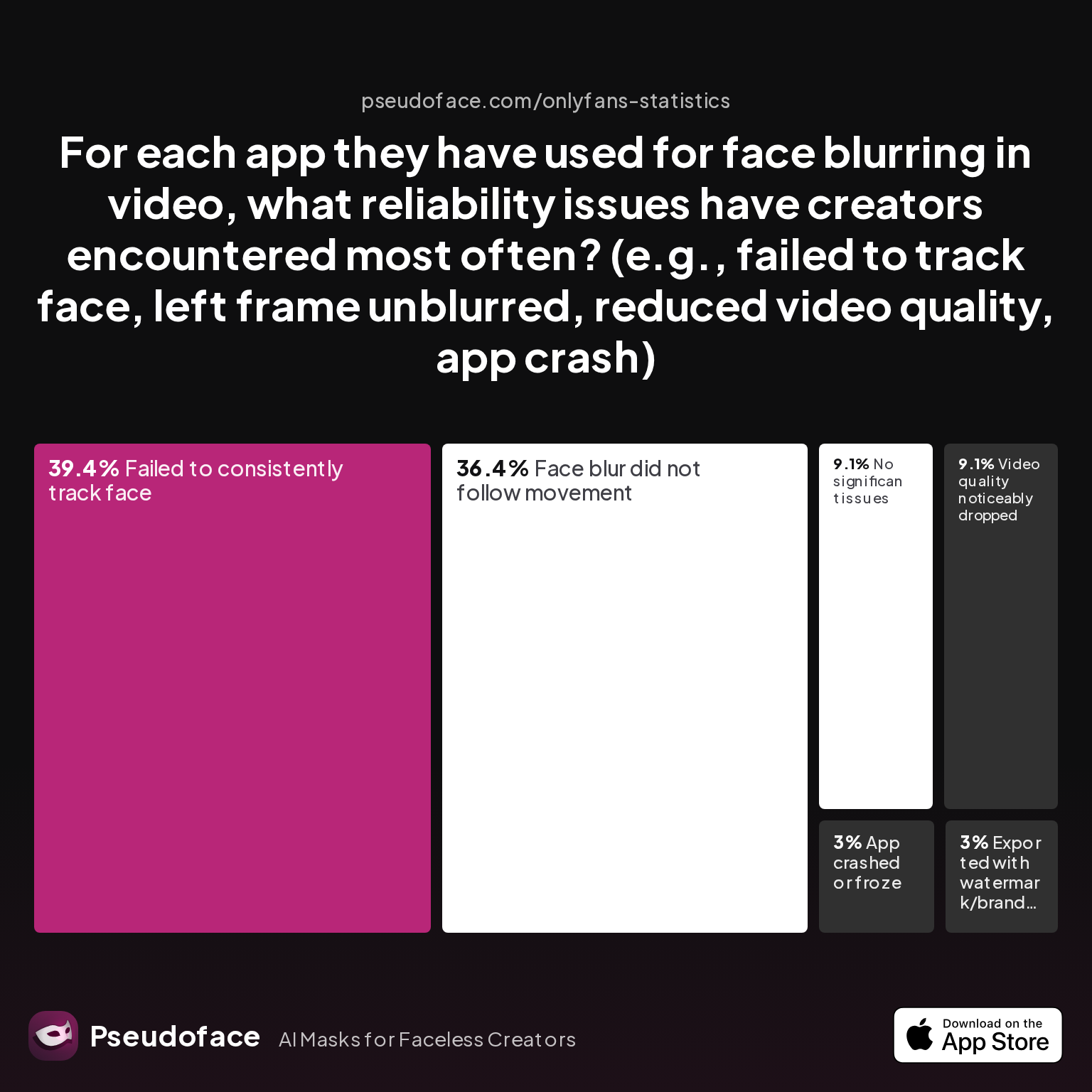
| Answer | Percentage |
|---|---|
| App crashed or froze | 3.03% |
| Exported with watermark/branding | 3.03% |
| Face blur did not follow movement | 36.36% |
| Failed to consistently track face | 39.39% |
| No significant issues | 9.09% |
| Video quality noticeably dropped | 9.09% |
The two most common and feared issues: blurs failing to track faces through movement (36.36%) and outright tracking failures (39.39%). These aren’t minor glitches—they present a direct threat to privacy, potentially exposing a face in just a few unguarded frames.
Open thread on Redditr/onlyfansadvice
u/Naughty_Adri
If your face being seen is a concern for you, my advice would be to either not have your face in the picture to begin with or crop it out entirely.
The rest of the issues are less common, but can still devastate a shoot: app crashes, unwanted watermarks, and degraded video quality on export. Despite flashy UI improvements in apps like InShot and CapCut, neither iOS nor Android is immune from random artifacting or missing blends—especially for long, high-resolution video files.
Open thread on Redditr/onlyfansadvice
u/ScornedMILF
I’ve done in layers but then taking a screenshot of the final. Could someone still lift layers off?
For this reason, veteran creators nearly always recommend redundant safety checks:
- Always review your video/photo frame-by-frame after blurring.
- If possible, use destructive editing (not soft layers) so blurring can’t be reversed.
- Conduct a “worst-case” test by playing your video fullscreen and pausing at random points.
What’s clear in late 2025 and early 2026: no app is perfectly reliable in all circumstances, and workflow discipline—especially frame-by-frame spot checks—matters as much as your app pick.
As you weigh these real-world limitations, how do the leading apps actually stack up in side-by-side head-to-heads for creators in 2024?
Choosing the Best App to Blur Face: Side-by-Side Comparison for 2024
With dozens of face blur apps jostling for the top slot, real creator experience and data-driven rankings separate the pretenders from the tools that genuinely deliver. Below is a practical, bias-aware comparison based on workflow, features, and privacy reputation among adult content creators as of 2024:
| App | Platform | Strengths | Weaknesses | Best For |
|---|---|---|---|---|
| InShot | iOS, Android | Extremely easy UI, fast photo/video blur, strong iOS support | Batch functions limited on Android, watermark in free version | Routine photo blur, light video blur |
| CapCut | iOS, Android | Fast motion tracking, decent auto-blur, common in creator workflows | Some features behind paywall, watermark risk | Video clips, mobile-first workflows |
| PutMask | Desktop | Precise manual/auto track, destructive blur, batch processing | Not mobile, learning curve | Multi-face, high volume video |
| PowerDirector | iOS, Android | Flexible, batch-friendly, video oriented | Advanced masking can be slow | Video blurring, power users |
| DaVinci Resolve | Desktop | Best-in-class tracking, pro workflows, destructive edits | Time intensive, PC/Mac only | Pro-level/batch projects |
| PicsArt | iOS, Android | Easy photo workflow, artistic options | Video features weaker, some UI friction | Simple portrait/photo blurring |
| KineMaster | iOS, Android | Good for basic video blur/pixelation | Watermark in free version | Quick, basic mobile video edits |
Bias caveat: Rankings are influenced by Reddit self-reporting, where iOS users and hobbyist creators are overrepresented compared to Android and pure desktop power users. Hidden professional workflows—especially custom script-based or GPU-accelerated blurring—are under-reported. As such, treat these comparisons as pragmatic, not exhaustive.
If speed, simplicity, and daily uploads are your style, InShot or CapCut on iOS is hard to beat. For intense batch work, fine detail, or bulletproof masking, DaVinci Resolve and PutMask on desktop offer the gold standard—at the cost of a steeper learning curve.
As always, the best app is the one you can operate consistently, safely, and efficiently for your own style, batch size, and platform.
Beyond the Blur: Workflow Habits and Security to Outsmart Face-Tracking
Anonymizing your face is only as robust as the privacy hygiene that surrounds it. In 2024-2026, where AI can sometimes "see through" weak blur or extract metadata from cloud-edited files, successful creators know that safety isn’t an app—it’s a stack of habits, from metadata scrubbing to staged uploads.
Let’s start with hygiene around metadata and hidden file signatures:
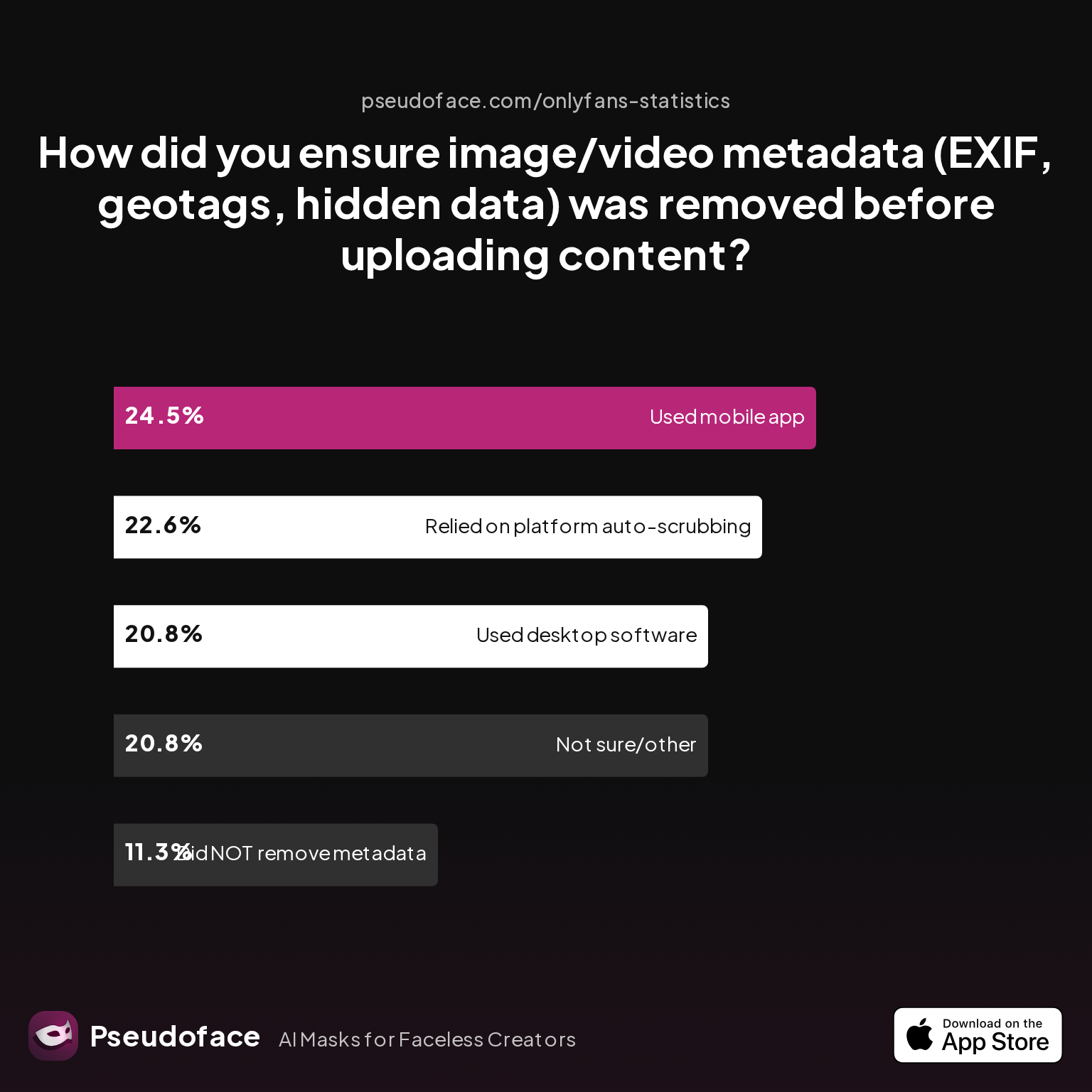
| Answer | Percentage |
|---|---|
| Did NOT take steps to remove metadata | 11.32% |
| Not sure/other | 20.75% |
| Relied on platform auto-scrubbing (e.g., OnlyFans upload process) | 22.64% |
| Used a dedicated metadata removal app on mobile | 24.53% |
| Used desktop software (e.g., Photoshop, custom scripts) | 20.75% |
Nearly one in four creators fail to remove metadata before uploading—while as many rely on mobile or desktop tools for a last-layer scrub. This “metadata gap” is a forgotten risk: even perfect masking can be undone by a single leaking geo-tag or device ID.
Reddit veterans often emphasize metadata defense and using VPNs, beyond blur:
Open thread on Redditr/onlyfansadvice
u/lillykea13
As the others said cropping your face and hiding your tattoos, moles and birthmarks is a great way to keep your identity safe. If you want to go the extra mile make sure your pictures and video aren't carring any EXIF and use a VPN when connecting to OF or IG or whichever social you use to promote your account. Of course there will always be the possibility that someone somehow manages to get to know your identity so be aware of that! Good luck sweetie
And on broader privacy checklist priorities:
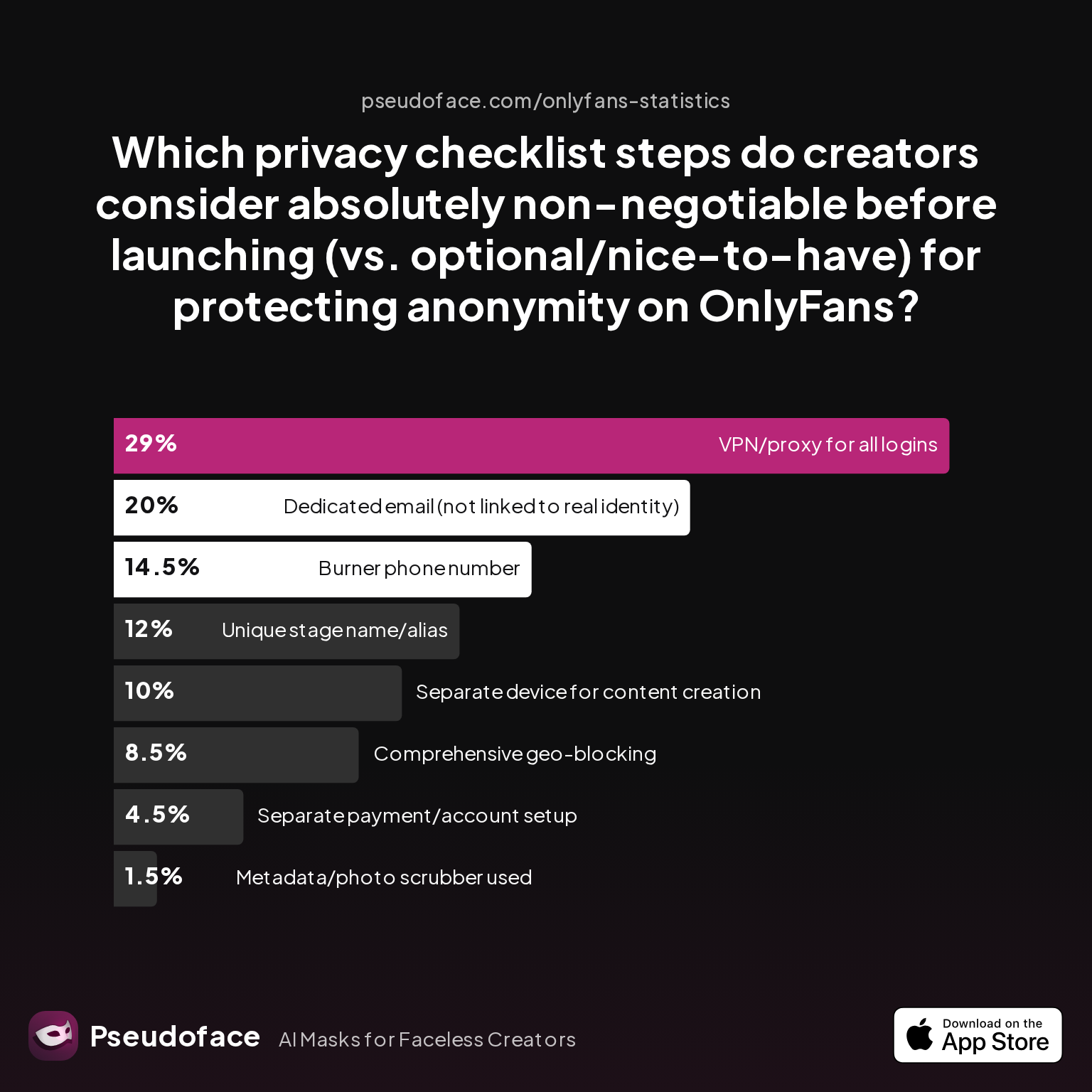
| Answer | Percentage |
|---|---|
| Burner phone number | 14.50% |
| Comprehensive geo-blocking | 8.50% |
| Dedicated email (not linked to real identity) | 20.00% |
| Metadata/photo scrubber used | 1.50% |
| Separate device for content creation | 10.00% |
| Separate payment/account setup | 4.50% |
| Unique stage name/alias | 12.00% |
| VPN/proxy for all logins | 29.00% |
VPNs/proxies for logins and "burner" security steps dominate as non-negotiable among the privacy-savvy, with 'metadata photo scrubber' barely registering as top-of-mind—a sign of a dangerous underestimation of technical tracking risks.
Privacy Protection Checklist for Creators:
- Use destructive (non-reversible) blur—especially for faces and tattoos.
- Remove all metadata (EXIF, GPS, device) before uploading, using apps like Metapho (iOS), Exif Eraser (Android), or exiftool (desktop).
- Avoid visible or hidden watermarks, especially those auto-inserted by free apps.
- Check each frame of your final content for unblurred faces, tattoos, or unique marks.
- Routinely change file names and compress/finalize with “save as” steps to lock in edits.
Ultimately, even the best blur face app is just a shield. Your security lies in layers: masking, metadata scrubbing, VPN use, smart aliasing, and a never-get-complacent posture. As face recognition advances, so must your workflow discipline.
FAQ
What’s the best free app to blur face in videos on iPhone?
The most consistently recommended free option is CapCut, with InShot also highly rated for straightforward facial blurring in video.
Many Reddit creators cite their success with these apps, especially for quick mobile edits. CapCut offers motion tracking for face blurring in short videos, with a manageable learning curve; InShot is prized for photo and simple video blurring. Be sure to check for watermarks when exporting in the free versions.
Can CapCut blur faces automatically in moving video, and is it safe?
Yes—CapCut can automatically track and blur faces in many moving video scenarios, but its safety depends on double-checking every export for tracking misses.
As of 2026, CapCut’s auto-tracking is “very satisfactory” for about half of creators, but manual reviews remain essential for privacy. Always review your exported video frame-by-frame to ensure no identifying features slip through, especially in chaotic or fast-cut footage.
Is it possible to batch blur multiple faces in one video file?
Yes—desktop apps like DaVinci Resolve and PutMask, and to a lesser extent PowerDirector, offer robust batch and multi-face blurring workflows.
Mobile apps can struggle with multiple faces or lengthy clips. For high-volume or complex blurring, a one-time investment in desktop workflow pays dividends in both speed and privacy assurance, even if it means a steeper learning curve.
How do I know my face blur can’t be reversed by a viewer?
You can’t guarantee total irreversibility, but destructive blurring (flattened, not just layered edits) with no remaining source data is the most robust defense.
Avoid non-destructive (layered or toggle) blur that can be reverted if original files leak. After blurring, export as a new flattened file and consider taking a screenshot of the final image before upload to further erase any editing history that might persist in the file.
What’s the fastest app blur face workflow for daily content uploads?
For creators moving quickly, CapCut or InShot on iPhone provides a one-tap workflow optimized for speed.
Load your file, use the built-in face blur/pixelate/mosaic tool, export, and run metadata scrubber before upload. If you batch videos, desktop apps like DaVinci or PutMask are more scalable but take longer per session.
How do I remove all metadata from edited photos/videos before uploading?
Use mobile apps like Metapho (iPhone), Exif Eraser (Android), or built-in “Remove Metadata” options before sharing.
Desktop power users often rely on ExifTool for total metadata wipe. Always check your final file properties to confirm there’s no embedded location, device, or user info that could defeat your anonymization.
Does blurring faces reduce video/image quality or cause export issues?
Some apps decrease export quality or compress files when adding blur, especially on long videos or in free versions.
Check exports for pixelation, artifacts, or dropped frames, especially after batch edits. If you see noticeable quality loss, try desktop apps or paid tiers, which allow higher-bitrate exports and more granular format control.
Which desktop face blur app works even for long videos or batch edits?
DaVinci Resolve (free or paid) and PutMask are the gold standard for robust, scalable face blurring in long or batch videos.
PowerDirector and Filmora are runner-ups with better ease of use but sometimes less precise control. Master these for seamless, pro-level privacy—especially if you're dealing with heavy, ongoing production.
Are there face blur apps that can blur tattoos and other identifying marks too?
Yes—almost all quality blur apps (CapCut, InShot, PutMask, DaVinci) allow freeform masking over tattoos, moles, and other features.
Simply draw/paint the masking region yourself if auto-face detection doesn’t pick it up. Always review your frame-by-frame overlay to ensure no unique marks escape coverage.
What privacy mistakes do new anonymous creators make most often?
The biggest errors are failing to remove metadata, relying solely on auto-blur without review, and overlooking small identifying marks like tattoos or jewelry.
Reddit creators strongly advise a conservative approach: obscure more than you think you need and check every upload as if a stranger would inspect it. Layer your defenses: blur, crop, scrub, anonymize.
For creators, privacy is never a one-and-done affair. Leverage the best face blur app for your routine, yes—but lead with caution, redundancy, and a workflow that evolves as face-tracking technology does. Your safety and creative freedom depend on it.


