The AI face for faceless creators
An AI face for your OnlyFans
Your faceless account, with a face. The same AI-generated face in every video — recognizable to your fans, unrecognizable to your boss, your coworkers, and reverse image search.
Record with the camera auto-blurring your face live as you shoot; your consistent AI face is applied to the video in processing, and what you publish never shows your real face. Built for creators who can't afford to be recognized — teachers, nurses, corporate employees.


14,800+ AI masks made by 5,900+ creators
After reading some mixed reviews I decided to give the app a try and I’m so glad I did! The tutorial does take a while and it’s not cheap, but given how much extra I’m now earning for my content it’s well worth the time and effort…
“Do you show your face on OnlyFans?”
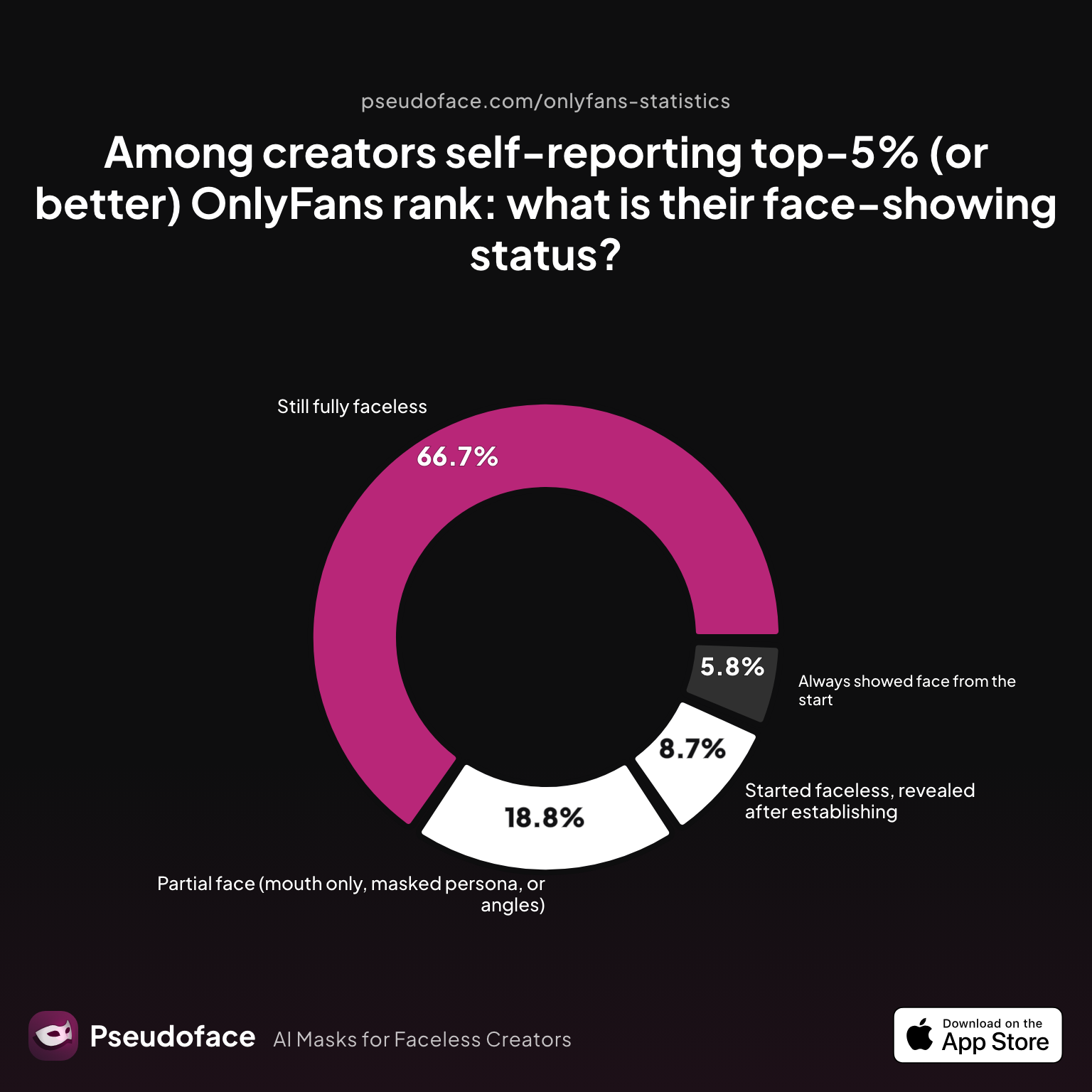
It's the most-asked question in creator communities, and the data cuts both ways. In Pseudoface's analysis of 250,000+ public creator threads, 67% of self-reported top earners never show their face — staying faceless clearly doesn't cap your income.
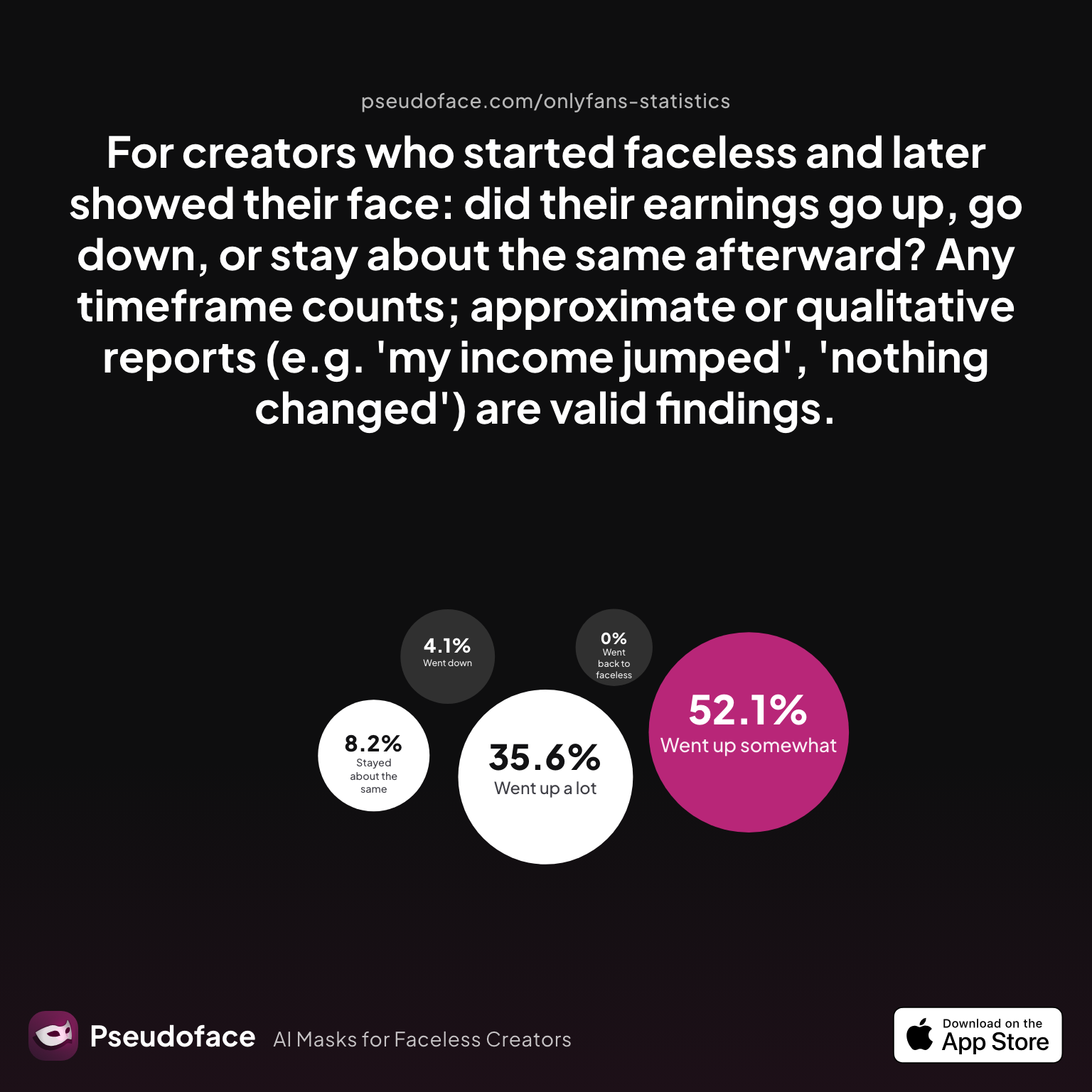
And yet: among creators who eventually did a face reveal, 88% report earnings went up. Faces convert. Fans connect with expressions, eye contact, and a persona they can recognize — that's the trade faceless creators have always had to make.
An AI face dissolves that trade-off: your persona gets the face that converts, and you keep the anonymity that protects your career. Both samples are small and self-reported — the full breakdown is in our data deep-dive on faceless vs. showing your face.
How the AI face works
How the AI face works
Record with live blur
Pseudoface's camera auto-blurs your face live as you shoot — or auto-crops to frame it out entirely — so you can record naturally instead of performing to a bare lens.
Create your pseudoface
Generate the AI face that becomes your persona's identity. It belongs to no real person — and it stays yours, unchanged, across everything you publish.
Process and publish
Your AI face is applied to the video in processing — not a live filter that can slip mid-frame, but a face rendered into the footage before anything is published.
Why not just blur, crop, or wear a mask?
Every faceless creator already uses one of these — masks lead, then blur, then cropping:
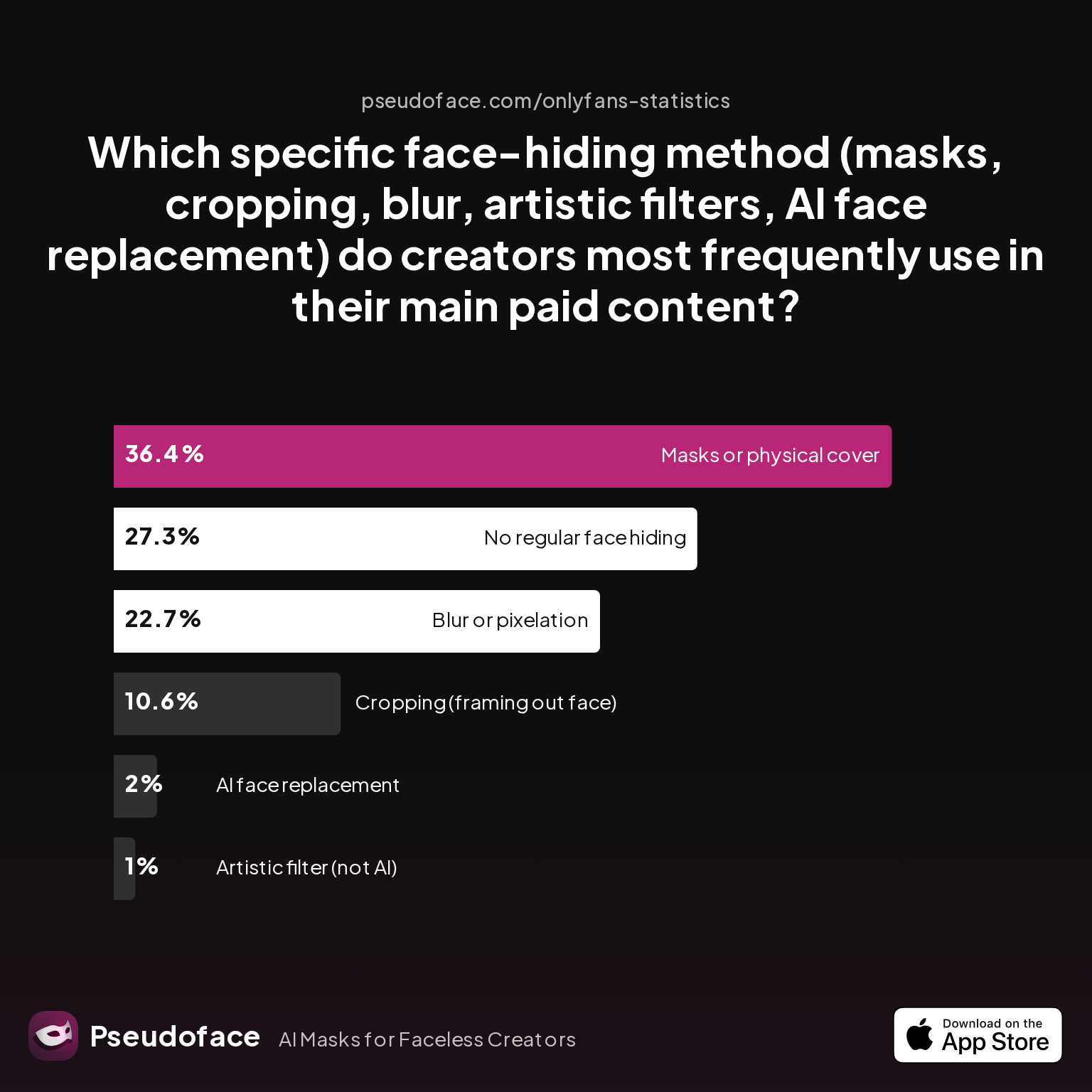
They all share one problem: they hide your face by removing the thing fans connect with. Blur and filter effects carry a second risk the privacy community warns about constantly — edits applied on top of footage can be undone or slip, while an AI face is baked into the published video itself: what fans receive has no blur to reverse and no original face underneath. And a mask protects you physically but deadens expression. An AI face is the only approach that adds something: a face fans can bond with, that carries zero link to your identity. Full comparison in masks vs. cropping vs. blur.
There is an iPhone app called Pseudoface, that does exactly what you describe: it hides your face but makes it look real. The developer is great, small team but they are very responsive.
Made for creator content — including the content other tools refuse
Most mainstream face-swap tools prohibit adult content outright in their terms of service — the exact content OnlyFans creators make. Pseudoface is built for adult creators: your own face, your own content, your own consent. That consent line is what separates an AI face from a deepfake — you're not putting your face on someone else or someone else's face on you without permission; you're giving your own persona an identity that can't be traced back.
On the platform side: OnlyFans requires your real, unmasked face exactly once — at identity verification. After that, what appears in your published content is up to you. The rules, and what creators actually do, are covered in our guides to staying anonymous on OnlyFans and making money without showing your face.
This app is amazing and innovative. I use it to remain anonymous online with my content creation. The developers are so nice and responsive. … I had an issue and the developer addressed it immediately. Now the app works perfect! Great work!!
Frequently Asked Questions
Yes. OnlyFans requires a clear, unmasked selfie once, at identity verification — after approval, your published content can use any face covering or replacement you choose. An AI face in your content does not violate the platform's terms; the only place your real face is required is the one-time KYC check.
No — and that's deliberate. The live camera features are automatic face blur and auto-crop, which hide your real face while you record. The AI face itself is applied to your video in processing after you shoot. Live filters are exactly what slips mid-frame; a face applied in processing doesn't.
Yes — that's the point. Your AI face is a persistent identity, not a one-off swap: the same face appears in every photo and video you process, so fans recognize your persona the way they'd recognize any creator's face.
No. A deepfake puts someone else's real face onto a body without their consent. A Pseudoface is an AI-generated face that belongs to no real person, applied to your own content with your own consent. You're not impersonating anyone — you're giving your persona a face that can't be traced back to you.
Yes — in our survey data from 250,000+ creator threads, around one in five fully faceless creators report over $10,000/month, and 67% of self-reported top earners never show their face. Fans buying personality, body, and consistency is well documented; the face-reveal debate is about the margin, not viability.
Your persona is your brand — many creators are open about using an AI face as a privacy measure, and audiences in the faceless-creator niche are used to masks, crops, and blurs. An AI face simply gives that same audience something better to connect with than a black bar or the back of a head.


14,885 masks used by 5,954 creators
Stop being faceless
Multiply your income and your fan base while keeping your identity safe



Which one would you subscribe to?