
TL;DR
Most OnlyFans creators receive their payouts within 1–5 business days after requesting a withdrawal, but roughly 1 in 5 report experiencing delays beyond a week—especially around holidays or the start/end of the month. Bank transfers are standard but not always fastest; instant and wallet-based payouts are growing in reliability, yet still run into platform hiccups. “Processed” on OnlyFans means funds have left their system, but it doesn’t guarantee instant arrival in your account. Based on 2025–2026 findings from Pseudoface’s analysis of over 250,000 Reddit conversations among real adult creators, this guide distills practical data and hands-on troubleshooting tips—so you set realistic expectations and avoid the most frustrating payout pitfalls.
How OnlyFans Payouts Really Work: Understanding the Timeline
For creators, money sitting in a digital limbo is more than an irritation—it can make or break rent, bills, and peace of mind. To demystify how long OnlyFans payouts actually take, we need to look past the marketing literature and into the lived experience of creators navigating both platform policy and real-world bank delays.
The “official” process: Once your subscriber payments hit the seven-day pending window and clear fraud checks, you request a payout via OnlyFans. The platform then “processes” the withdrawal—sometimes instantly, but more commonly within 24–72 hours for routine transfers. After this, it’s over to the payout rails (the bank, or chosen e-wallet), where the money journeys anywhere from a few hours to several days to hit your actual account.
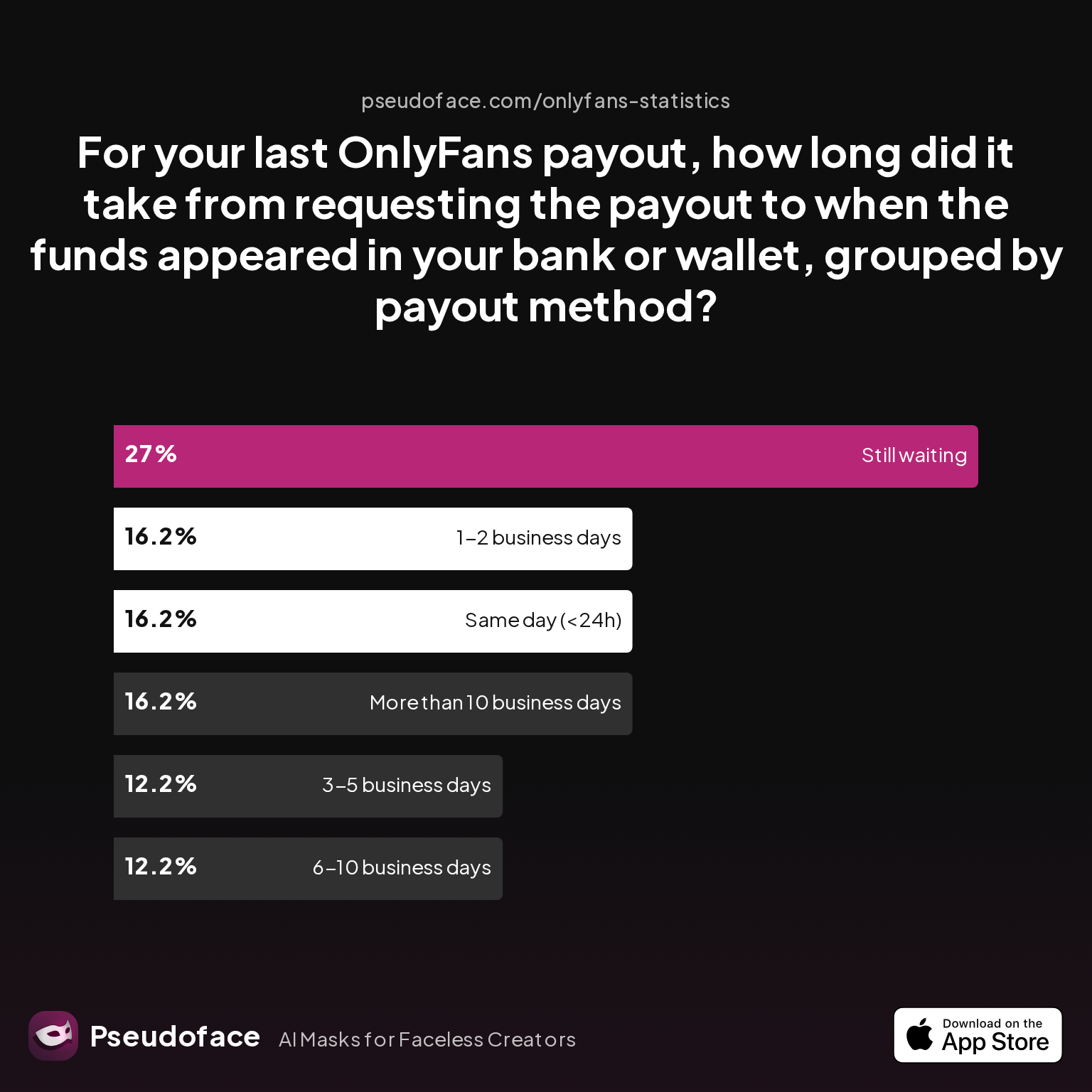
But what does this look like for real creators? Here’s the latest breakdown:
| Answer | Percentage |
|---|---|
| 1-2 business days | 16.22% |
| 3-5 business days | 12.16% |
| 6-10 business days | 12.16% |
| More than 10 business days | 16.22% |
| Same day (<24h) | 16.22% |
| Still waiting | 27.03% |
The data, as of early 2026, is both reassuring and perplexing. A combined 44.6% of creators report payouts landing in their account in under five business days—a majority get paid on time. But the “still waiting” group (27.03%) and the 16% whose payments take over 10 business days signal significant headaches.
Interpreting this, we need to address self-reporting bias (creators actively dealing with delays are more likely to respond), but the direction is clear: while almost half enjoy speedy payouts, a substantial minority wait more than a week or face outright limbo. Holiday slowdowns, bank quirks, and platform verification hurdles often trigger these extended waits.
What about holds for new creators? OnlyFans enforces a security “cooldown” (usually seven days for new earnings, but in practice up to 21 days for brand new accounts facing initial review). Many Reddit threads confirm this as more than a theoretical hiccup:
Open thread on Redditr/onlyfansadvice
u/Iamlittlesoup
At first, there's a 21 day waiting period.

This lines up with a wider experience: for established accounts, a reasonable expectation is 1–5 business days… unless you’re the unlucky 1 in 4 caught by delays.
The takeaway is sobering yet actionable. Most will get paid quickly, but plan for the possibility of longer holds—particularly in your first month, after major ID/account changes, or around public holidays.
With this backbone defined, let’s dig deeper into how your payout method plays a role—and what can go wrong.
Choosing the Right OnlyFans Payout Method: Which Gets You Paid Fastest (and Most Reliably)?
Not all payout methods are created equal. While OnlyFans automatically suggests a standard bank transfer (ACH in the US, SEPA or BACS in Europe/UK, wire for many international creators), alternative rails—like e-wallets (Skrill, Paxum) or “instant” payout options—promise reduced wait times and, occasionally, fewer headaches.
US, UK, and Canada: The default for most is direct bank deposit. In the US, ACH typically means 1–2 business days after processing; in the UK, it’s similar via faster payments. Canadian creators, however, often hit an extra hurdle: an intermediary processing partner (“Payana” or similar) can hold things up, and Reddit is flush with stories of lengthy waits compared to US or UK peers.
Open thread on Redditr/onlyfansadvice
u/Yaelnextdoorvip
One of mine took 16 days, def not what I agreed to lol
Open thread on Redditr/onlyfansadvice
u/snabooptypop
Payouts can take up to 10 business days. That is all OF will tell you when you reach out to them during that time. There’s nothing you can do. You agreed to that time frame when you signed up.
E-wallets (Skrill, Paxum): Some creators migrate to these services because international bank transfers can be sluggish, especially outside North America and Western Europe. Once set up, payouts can hit your wallet in as little as 24 hours—though then you’ll need to move funds to your bank, incurring possible extra fees or delays. Still, some users report more reliability (especially in regions with restrictive banks) using these options.
Open thread on Redditr/onlyfansadvice
u/irinaxd111
use payoneer its way better
That said, e-wallets sometimes present extra onboarding snafus and may carry compliance friction or higher minimums.
Instant/Express Payouts: When available, these are marketed as “same day” withdrawals for a fee. For US creators, this usually requires linking a debit card supporting instant settlements. While Reddit reports for these are positive in terms of speed, the feature is far from universal—both in availability and in consistency.
All methods have trade-offs:
- Bank Transfers: Familiar, no extra setup, but can hit snags with account mismatches or slow intermediary processing (especially for Canada and some EU countries).
- E-wallets: Often faster post-processing, but require extra steps to access local funds.
- Instant Payouts: Fastest but not always available or reliable, and may cost extra.
Regional nuances: As of 2025–2026, most US/UK creators report less friction and shorter delays, while Canadian, Australian, and select EU creators are more at risk of extended waits thanks to banking rails and extra compliance checks.
Once your preferred method is set up, the next mystery is when payouts actually hit—and what happens when they don’t. The next section covers the reality of “processed but not in bank” headaches.
When Does OnlyFans Payout? From Scheduled Transfers to “Processed but Not in Bank”
Even among seasoned creators, one of the most confusing moments is seeing a payout marked as “processed”—but no sign of cash in their bank. This status update should mean OnlyFans has sent the funds, but, thanks to both platform quirks and third-party banking delays, money can still spend days in limbo.
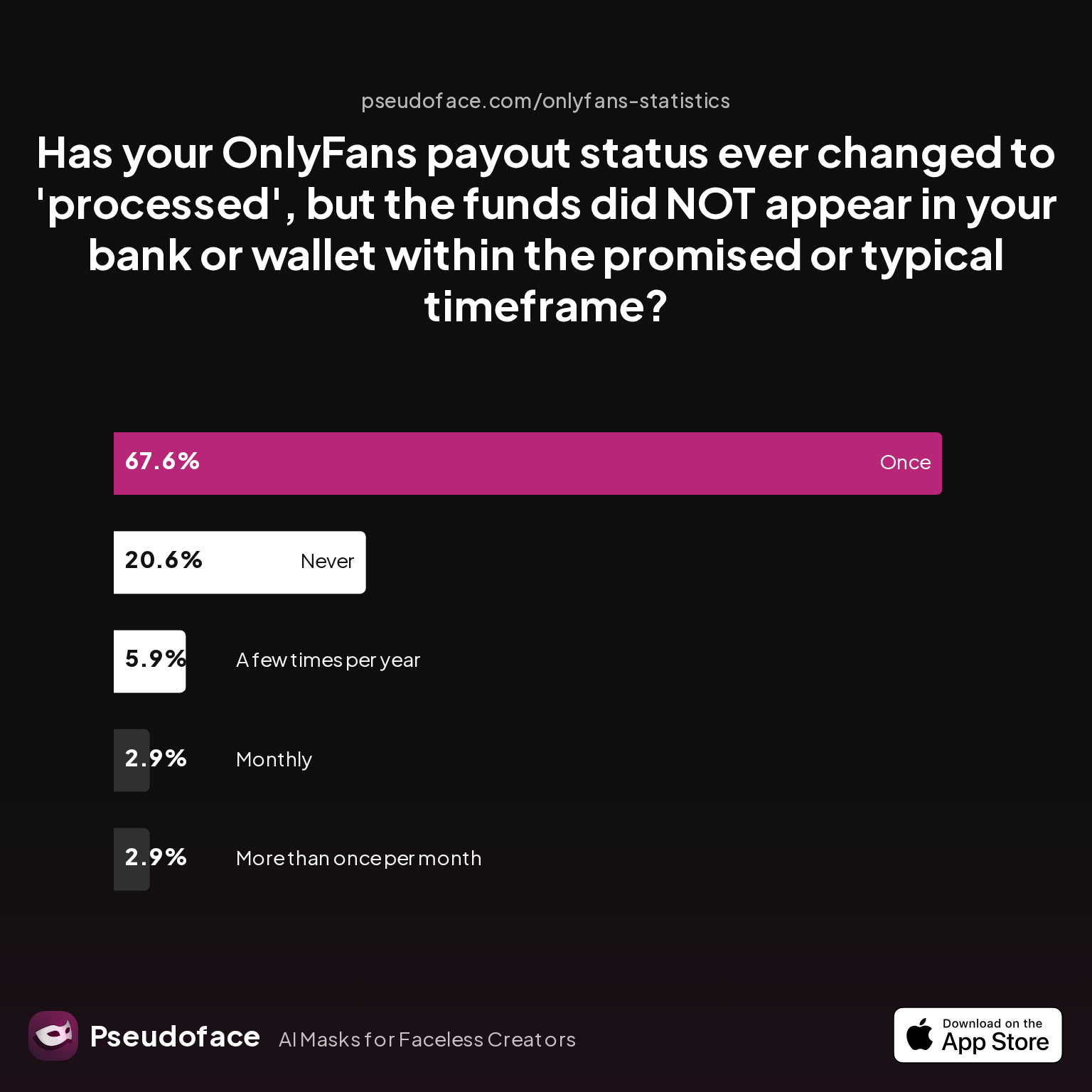
Here’s how often creators hit this dreaded state:
| Answer | Percentage |
|---|---|
| A few times per year | 5.88% |
| Monthly | 2.94% |
| More than once per month | 2.94% |
| Never | 20.59% |
| Once | 67.65% |
A striking 67.65% of creators say they have experienced at least one payout being “processed” but not appearing in their bank or wallet within the promised time. Fewer than 1 in 5 say this never happens.
That’s not a platform failure every time—a time lag is often due to:
- Non-business days and banking holidays (especially if a payout is processed late Thursday or Friday)
- Bank-specific batch processing; some only credit new deposits once daily, especially smaller or credit union banks
- Compliance checks (if the payment triggers new verification or “random” audit flags)
Reddit’s real-world stories reinforce this. Here’s a typical account from an international creator:
Open thread on Redditr/onlyfansadvice
u/Haiiileyp7
This happened to me last week, except I took it out early Thursday morning (around 6am) and the money was in my account Tuesday night. Don’t stress too much some weeks it takes a couple more days (especially over the weekend, remembering Monday for us is Sunday for them). If it’s not in your account by tomorrow morning I’d be questioning it
The practical upshot: “Processed” is best viewed as “sent from our system,” not “available to spend.” Weekends and holidays don’t count as business days for most banking partners, and international transfers can add even more uncertainty.
To summarize, while most payouts should show up soon after processing, a non-trivial fraction stretch far longer. If you frequently find payouts stalling, odds are it’s a bank slow-down, not always a platform bug—but repeated or unexplained delays deserve more scrutiny.
Delays are more than a technicality—let’s look at what actually causes payments to stall or fail.
Why Your OnlyFans Payout Is Delayed: Most Common Issues (and the Rare Edge Cases)
Many creators hope following the rules means predictable, timely payments. But, as thousands of threads prove, even the savviest run into unexplained or persistent delays. The causes fall into two main camps: frequent, fixable obstacles, and rare but disruptive outliers.
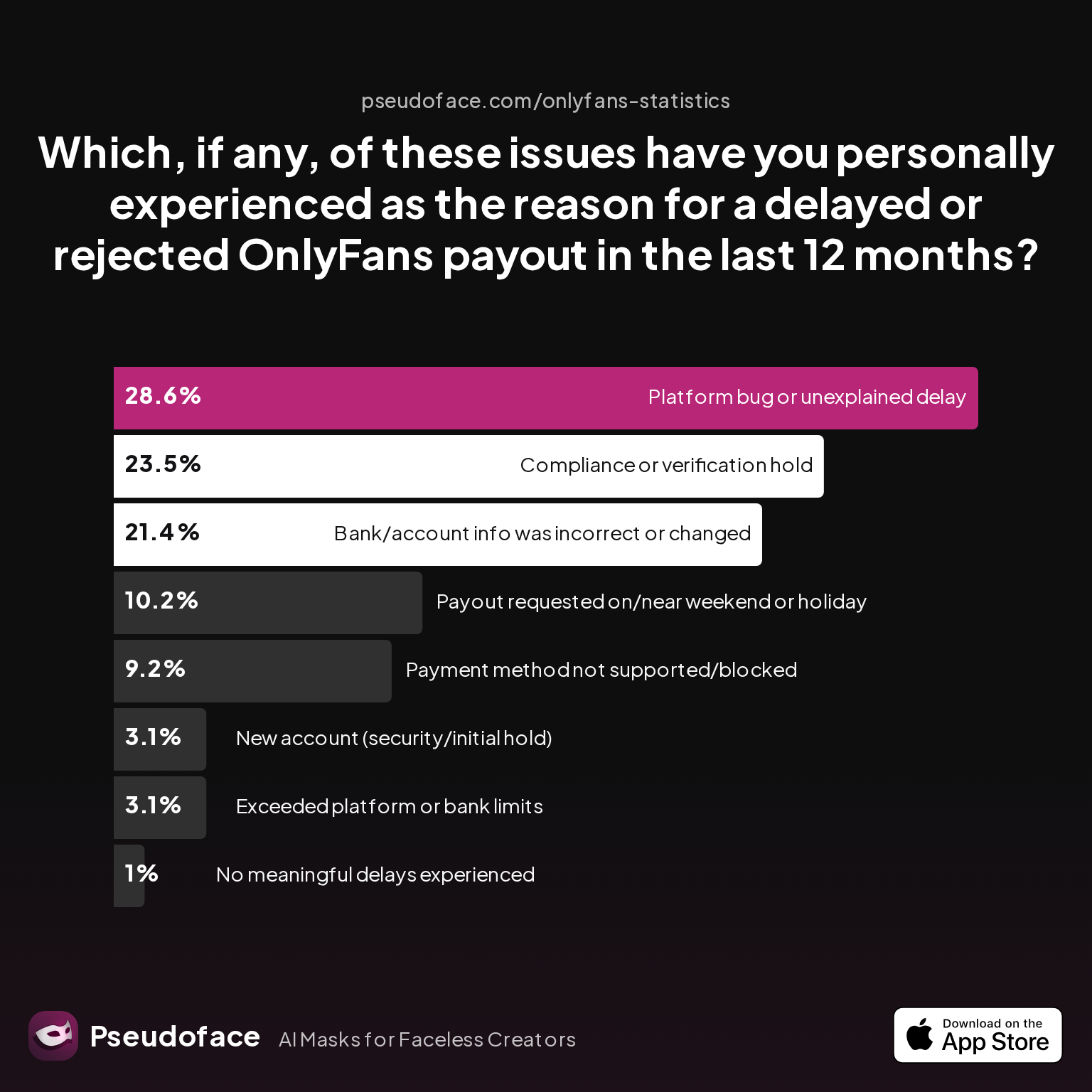
Let’s break it down:
| Answer | Percentage |
|---|---|
| Bank/account info was incorrect or changed | 21.43% |
| Compliance or verification hold | 23.47% |
| Exceeded platform or bank limits | 3.06% |
| New account (security/initial hold) | 3.06% |
| No meaningful delays experienced | 1.02% |
| Payment method not supported/blocked | 9.18% |
| Payout requested on/near weekend or holiday | 10.20% |
| Platform bug or unexplained delay | 28.57% |
Platform bugs and “unexplained delays” are the single most-cited reason for payout issues, affecting over 1 in 4 creators in the last 12 months.
Open thread on Redditr/onlyfansadvice
u/xxarisx
Mine has been like this for the past 3 weeks. It’s extremely annoying
Close behind are:
- Compliance and verification holds (23.47%): Whenever documentation is outdated (expired ID, changed address), OnlyFans may freeze payouts without warning.
- Bank/account info issues (21.43%): Mismatched or outdated account numbers, or switching banks, often cause delays—sometimes triggering a full payout rejection.
- Weekends/holidays (10.2%): As expected, requesting a transfer late in the week can easily spill the payout into the following week.
Initial account holds (3.06%) are rare but hit every new creator at least once. Payout limits and unsupported methods are edge cases, but especially for creators outside the US/UK, these snags may be more common than the stats suggest (due to under-reporting).
A revealing detail: Only 1% say they've never hit a meaningful delay. For everyone else, some friction is part of the journey.
Open thread on Redditr/onlyfansadvice
u/Aaliyah0may0
I’ve noticed personally when I do payouts around the end/beginning of the month they take longer. I’m assuming a lot of people just do the monthly payouts so it’s more to handle then?
When interpreting these stats, remember that people who experience problems are more likely to share stories; minor delays may go unreported, while severe or repeated issues get more attention. But the overall message is consistent: banking and compliance hiccups, platform-side bugs, and inconvenient timing (bank holidays, start/end of month) are the biggest culprits.
So how does OnlyFans stack up against its competitors?
OnlyFans Payout vs. Other Content Platforms: How Do Timelines and Reliability Really Compare?
Payout frustrations aren’t unique to OnlyFans. In a creator economy where switching platforms is as simple as copying a link, payment reliability and speed are major drivers of migration.
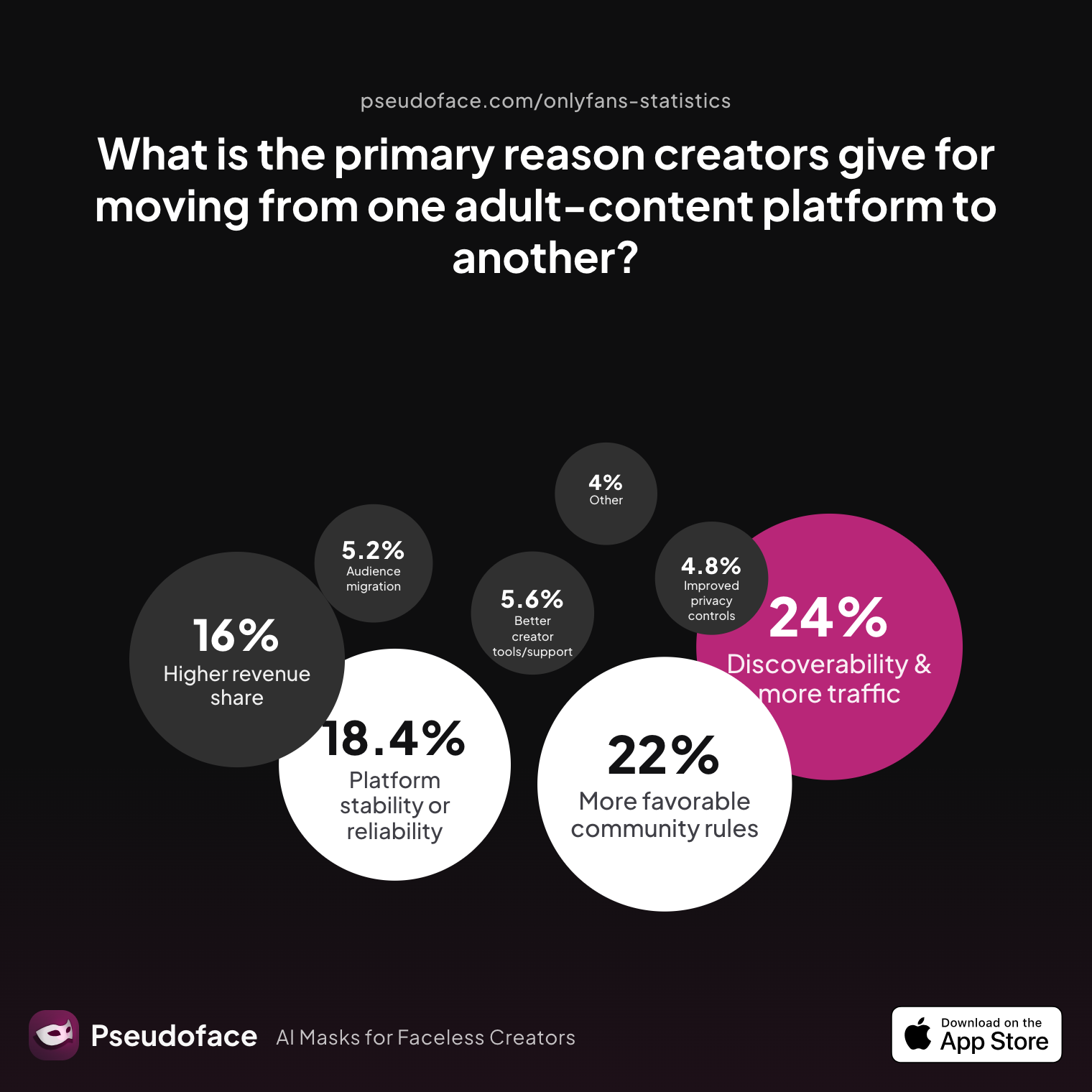
Here’s what creators themselves cite as their main reason for leaving a platform:
| Answer | Percentage |
|---|---|
| Audience migration | 5.20% |
| Better creator tools/support | 5.60% |
| Better discoverability/traffic | 24.00% |
| Higher revenue share | 16.00% |
| Improved privacy controls | 4.80% |
| More favorable community guidelines | 22.00% |
| Other | 4.00% |
| Platform stability or reliability | 18.40% |
Platform stability or reliability—including payout regularity—is the key reason for nearly 1 in 5 creators to switch platforms.
The current payout speed and reliability pecking order, as reported by creators and summarized across 250,000+ Reddit threads, looks like this (as of late 2025):
- Fanvue, ManyVids, and other specialized clip platforms are often praised for predictable, on-schedule payouts—especially for US/EU bank setups.
- OnlyFans is still the largest and most internationally compatible, but its scale leads to more support bottlenecks and higher exposure to banking compliance friction.
- Wallet-based networks (e.g., Paxum, Payoneer) are gaining traction among international creators because they sidestep some bank-specific pitfalls—at the expense of extra processing steps and (occasionally) less transparency.
Some creators even maintain active accounts across multiple platforms, choosing to route payouts based on method reliability and recent support reputation.
Still, OnlyFans continues to improve platform stability incrementally, but for creators who cannot afford payment uncertainty, diversification remains the smartest hedge.
Many creators capture the payout journey through screenshots for proof and dispute backup—next, we explain when and why to do this, with caution on privacy.
Using OnlyFans Payout Screenshots: When, Why, and Red Flags
In the trenches of payout troubleshooting, proof is essential. When a payment stalls or fails, OnlyFans support (and your receiving bank) often require evidence—a document trail showing dates, status, and the amount in question.
Best practice: Take a clean screenshot of your payout page with clear timestamps and transaction references. Before sharing, mask nonessential identifiers—especially email, balance, or transaction IDs not relevant to your specific support ticket.
Most users share screenshots as attachments when contacting OnlyFans support or, if escalating, with their bank’s dispute team. However, oversharing can backfire: posting screenshots publicly (e.g., on Reddit or Twitter) exposes you to privacy risks, account impersonation, and even TOS violations.
A common privacy misstep flagged in Reddit advice: failing to blur your email address, balance, or personal data in screenshots.
Open thread on Redditr/onlyfansadvice
u/queen-arya
You can only cashout if you have $20 or more
Here the quote highlights a basic but often-missed detail frequently visible in payout screenshots—reminding us that even “routine” details can become evidence in sorting out disputes and verifying eligibility.
When collecting screenshots, always:
- Capture the payout status (“processed,” “pending,” or “failed”), with date/time clearly visible
- Blur any information not needed for your claim
- Never post full payouts screenshots publicly—only use in direct communications with support or your bank
While a payout screenshot won’t solve a systemic issue, it is often the fastest way to cut through boilerplate support barriers and get moved up the response queue.
Advanced Troubleshooting and Pro Tips: Getting Your Payouts On Time
Even with ideal setup and method selection, hiccups can (and do) happen. Here are battle-tested troubleshooting strategies, surfaced from thousands of creator discussions, to help resolve or avoid payout issues:
If your payout is late or missing:
- Check payout status: Is it “pending,” “processed,” or “failed”? Only escalate if it’s “processed” and you are past the bank’s stated wait window.
- Confirm bank or wallet details: Even minor changes (new card, updated phone number) can trigger delays.
- Review account verification: Expired ID, mismatched info, or address changes are top causes of compliance holds.
- Factor in timing: If you requested payout around a weekend, month’s end, or bank holiday, add 1–2 extra business days before escalating.
- Collect proof: Screenshot your payout history (see above), and, if possible, extract a transaction log from your bank or wallet.
Open thread on Redditr/onlyfansadvice
u/snabooptypop
Payouts can take up to 10 business days. That is all OF will tell you when you reach out to them during that time. There’s nothing you can do. You agreed to that time frame when you signed up.
Pro escalation: If a payout is missing for over 10 business days:
- Contact OnlyFans support with screenshots, payout ID, and a written explanation (avoid vague complaints, give concise details).
- Reach out to your bank with the transaction reference, request a trace, and ask if any payments have been held or rejected on their end.
- Experiment (long-term) with a different payout method; many creators keep both bank and wallet options on file as a redundancy.
Strategic advice: Whenever possible, avoid scheduling large payouts near holidays or month’s end, when system loads are heaviest. For new creators, accept that your first payout may take longer (21 days in some cases), but later payments speed up—unless account changes trigger another review.
While delays are never a joy, creators with proactive habits—accurate info, regular screenshot evidence, and calmly persistent escalation—report far faster resolutions.
Many readers still have platform-specific doubts—let’s anticipate them in our dense, user-centric FAQ section.
Frequently Asked Questions: OnlyFans Payout Edition
Q: How long does OnlyFans payout take for new creators vs. established accounts?
A: For brand new accounts, OnlyFans usually enforces a 7–21 day hold on your first payout; after that, routine payouts typically arrive within 1–5 business days. New creators consistently report a “greyed out” payout button during the first week, with full withdrawal access coming only after the initial security window.
Q: What does “OnlyFans payout has been processed but not in bank” actually mean?
A: “Processed” means OnlyFans has sent the payment, but the receiving bank or e-wallet has not yet finalized the deposit. In most cases, this is a temporary hold—typically 1–3 days for banks, longer if a weekend or holiday intervenes, or if the payout triggers a compliance review.
Q: Does OnlyFans payout to Cash App, PayPal, or other non-bank options?
A: OnlyFans does not support direct payouts to Cash App or PayPal. Workarounds (like transferring to a supported wallet, then cashing out via PayPal) exist but carry risk—unsupported methods are more likely to be delayed or blocked.
Q: What should I do if my OnlyFans payout is late or missing?
A: First, double-check your OnlyFans payout status and bank details, then wait the full 10-business-day window. If still missing, contact OnlyFans support with transaction evidence, and contact your bank to request a payment trace. If several payouts in a row stall, consider switching payout methods.
Q: Are OnlyFans payout times different in the US, UK, or Canada?
A: Yes. US and UK creators typically report the fastest payouts (1–3 business days); Canadian creators regularly experience longer waits (up to 10+ business days), mainly due to third-party processing partners.
Q: Can you withdraw from OnlyFans instantly? How reliable is this option?
A: Instant payouts are available for some US creators with eligible debit cards, but availability and reliability vary. When offered, most receive funds within minutes to hours; however, instant payouts remain unavailable in many regions and sometimes experience platform-level outages.
Q: What is the OnlyFans minimum payout?
A: The minimum payout threshold is $20 (USD) or equivalent. If your balance is below this, the cashout button will remain disabled until you reach the required amount.
Q: Are there times of the month or year when payouts are slower?
A: Yes. End of month, start of month, and major holidays often see slower payouts due to system load and bank closures. Planning around these periods can reduce frustration.
Q: Does OnlyFans ever reverse or reject payouts after “processing”?
A: While rare, reversals can occur due to incorrect bank info, compliance flags, or platform errors. In such cases, OnlyFans will typically re-credit your balance and notify you of the error.
Q: Are payout screenshots safe to share or use as evidence in disputes?
A: Screenshots are essential for dispute resolution but should be shared only with support or your bank—and always with sensitive personal info (email, full balance) blurred or masked.
Whether you’re waiting for your first payout or troubleshooting a stubborn delay, the reality is this: most creators get paid on time, but friction—be it from banks, holidays, or platform quirks—is an inescapable part of the OnlyFans ecosystem. With the right mix of practical expectations, early troubleshooting, and a dose of patience, you can minimize drama and maximize payout peace of mind. If all else fails, keep your documentation organized, escalate calmly, and remember: missing payouts are rarely personal—they’re usually policy, and (with effort) fixable.


