
TL;DR
To reliably set up and post on Fansly, creators should start by uploading a balanced bundle of photo and video content, set clear tiered access, and intentionally leverage built-in features such as scheduled posting, FYP previews, and advanced permissions. According to Pseudoface’s analysis of over 250,000 public Reddit threads from real adult content creators, more than 80% use at least three of Fansly’s main features (FYP, tiered posting, permissions, scheduling) in their first month, with scheduled posts and FYP previews cited as core growth tools. The fastest early growth comes from frequent, tier-aware posts with strong preview images. Data is self-reported and subject to survivorship and platform-specific bias, but consistent themes and clear peer advice offer actionable strategies to minimize setup friction and maximize early revenue. (Based on 2025-2026 community trends and data.)
Getting Started: Setting Up Your Fansly Account and Content Foundations
Every journey on Fansly starts with signup, but the real groundwork is laid in the moments immediately after onboarding—long before you make your first official post. New creators often underestimate these opening stages, yet the data is clear: your initial content bundle and page design shape both algorithmic visibility and subscriber appeal.
The Fansly signup workflow is straightforward: enter your details, verify identity, and configure payout settings. Still, many creators stumble in assembling that all-important first wave of content. Determining what and how much to upload as you open your account is a top area of debate throughout public forums.
What Does a Strong Fansly Launch Bundle Look Like?
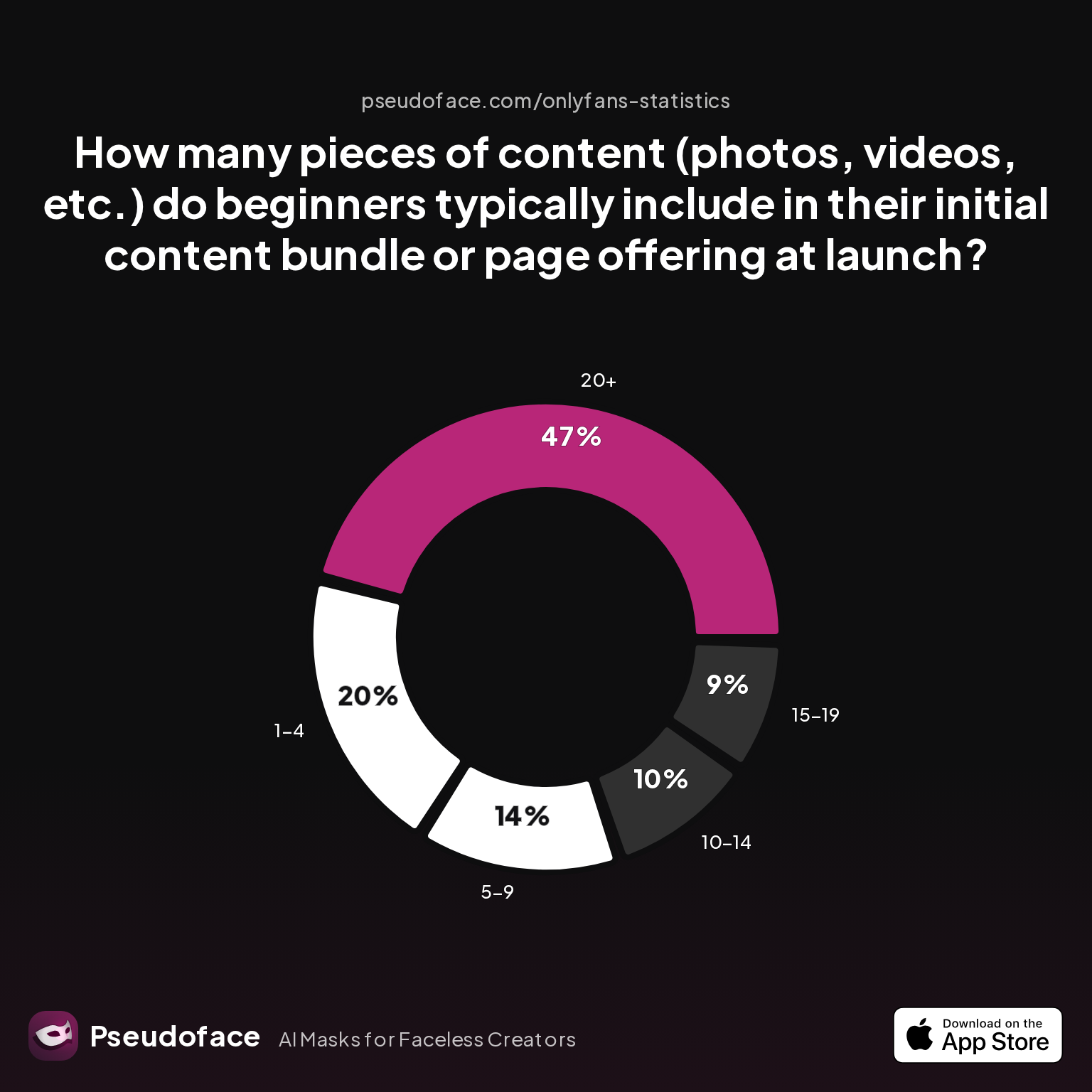
Self-reported creator data, drawn from more than a quarter-million Reddit threads, paints a surprisingly decisive picture:
| Answer | Percentage |
|---|---|
| 1-4 | 20.00% |
| 10-14 | 10.00% |
| 15-19 | 9.00% |
| 20+ | 47.00% |
| 5-9 | 14.00% |
Nearly half of new Fansly creators launch with bundles of 20 or more unique posts. While a smaller cohort (one in five) starts with only 1-4 posts, the dominant strategy is to front-load the page—giving early subscribers not only a sense of value, but also signaling activity to Fansly's recommendation systems.
This distribution is shaped by peer learning and platform expectations, but it's important to interpret with care: those with more content at launch are likelier to survive, and thus likelier to report, tilting the numbers. Nevertheless, the evidence is strong that a "bare page" underperforms out of the gate.
Photo/Video Proportions: What Do Successful Creators Upload First?
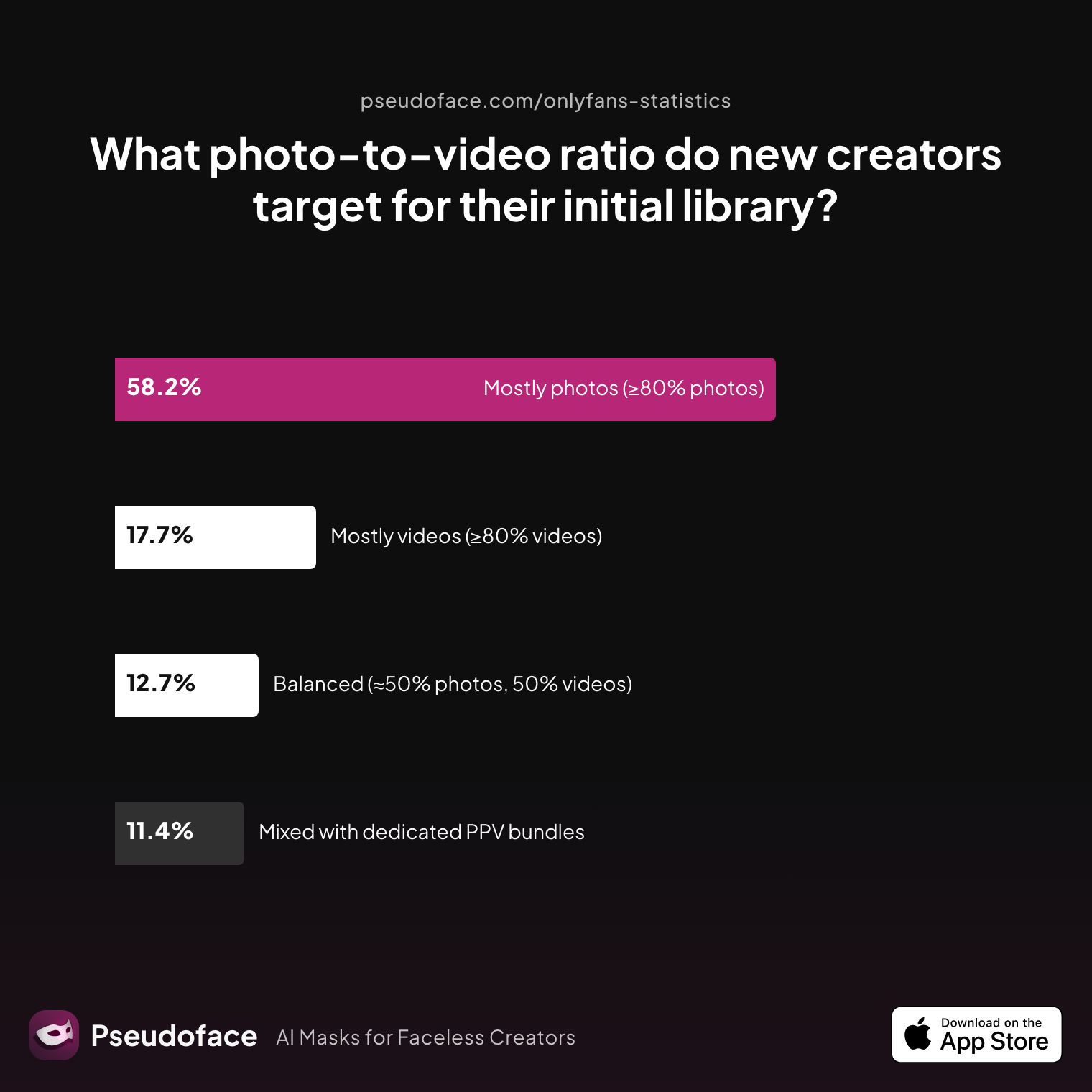
Once you have your core post count, the next crucial question is media balance. Should you frontload with photos, or is a substantial video offering necessary? Here, too, peer narratives converge.
| Answer | Percentage |
|---|---|
| Balanced (≈50% photos, 50% videos) | 12.66% |
| Mixed with dedicated PPV bundles | 11.39% |
| Mostly photos (≥80% photos) | 58.23% |
| Mostly videos (≥80% videos) | 17.72% |
Most first-time Fansly creators (over 58%) launch with a photo-dominant bundle in 2025-2026. An additional 18% open with video-heavy pages, and roughly one in eight choose a strict "fifty-fifty" split. This pattern has a logic: photos are easier to batch create, faster to upload, and less likely to trigger technical snags—making them the backbone of a time-pressed launch.
Creators planning premium up-sells will often supplement their main wall with “mixed” bundles, where certain video or high-value images are kept behind pay-per-view (PPV) paywalls, or offered in exclusive tiers. Notably, about a third of new creators build in at least some premium (bundled) or paid video content from launch.
Inline confirmations abound in public advice:
Open thread on Redditr/Fansly_Advice
u/thrHOEaway666
Fansly has full tutorials and walk through on their site that explain how to use it

Official guidance helps demystify upload workflows, but peer conversations consistently point to pitfalls and practical solutions for creators aiming to launch with impact.
Seeding Your Wall: Quantity and Quality for Those First Subscribers
Launching with at least 10-20 pieces of content—mixed for both visual interest and monetization flexibility—is the norm. If your page feels “lived-in” from day one, you’ll signal reliability, benefit from first-week FYP exposure, and activate the Fansly recommendation algorithm.
With your wall now primed and your content menu seeded, you're ready to discover exactly how to create that first post, every variation of media, and what each option on the Fansly posting interface really means.
How to Make a Post on Fansly: Step-by-Step Workflow for Photos, Videos, and Text
Having set your foundational content, stepping through your first Fansly post is a lot less intimidating—but the details matter. Fansly's post interface looks deceptively simple, but unlocking its full power (and avoiding early missteps) requires a clear understanding of how text, photos, galleries, and video behave.
Posting Workflow: Screen-by-Screen
Step 1: Navigate to the Post Composer
You can initiate a post from your dashboard's main feed. Choose the "+" button or the prominent "Create Post" call-out. Here, you’ll find a blank canvas: text box, photo/video gallery, and scheduling/publishing options.
Step 2: Add Content
- Text-Only: Simply type out your post—note character limits, and be aware that extended stories or explanations may need to be split over multiple posts due to Fansly's current character cap.
- Photos & Galleries: Click the image icon. You can select single images or multi-photo sets. Drag to reorder as needed. Galleries are ideal for bundles, since permissions can be set per-image or per-bundle.
- Videos: Select the video icon. Multiple formats are supported, but upload speed will depend on file size and network strength.
Common Issue:
First-time creators often overlook the save-as-draft and post-preview options. These tools help you double-check permissions and FYP eligibility before sending your post live.
Step 3: Assign Permissions & Tiers
Before pressing "publish," click into advanced options where you can:
- Set post/asset access (free, sub wall, or specific tier)
- Lock specific photos/videos as PPV
- Enable paid DMs for certain content (highly recommended for time management)
Missteps are common:
Open thread on Redditr/Fansly_Advice
u/harmonycorrupted
You mean make some pics in a set only available to one tier? And the others available to a different tier? You will have to upload those pics separately. You don't have to create separate posts. To give you an example: Select some pics you want to make available to Tier A (upload new or add from vault), set the right permissions, then click "upload". A bundle will be created in the post. Then, click upload new/from vault again and select the media you want to make available to Tier B. Set the right permissions for that media, click upload. You will see two bundles in the post now and the correct permissions will be applied when you'll post :)
How Often Should You Post? The Cadence of Early Growth
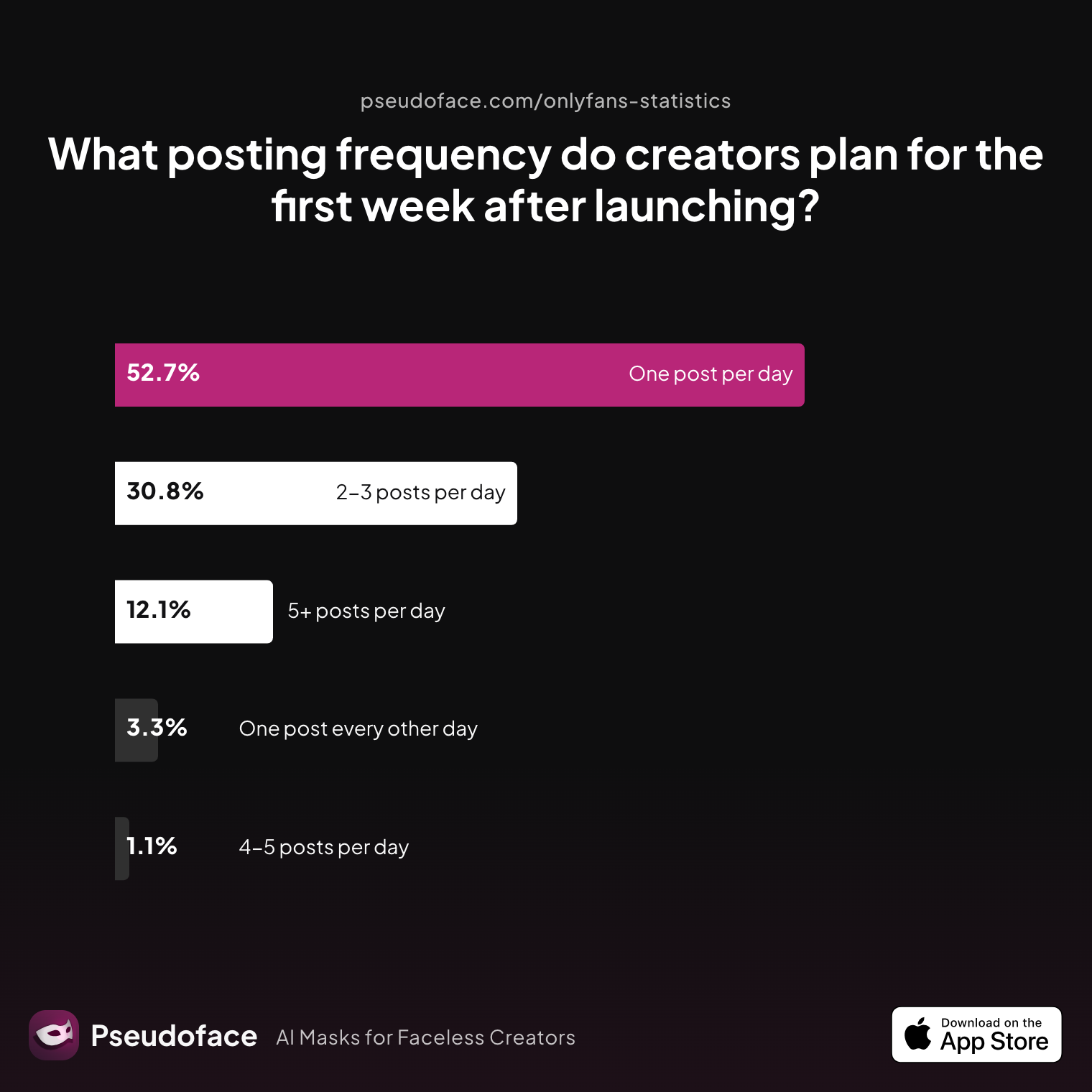
Take nothing for granted when it comes to posting frequency. Peer data suggests the majority of successful early-stage creators are ambitious in their cadence:
| Answer | Percentage |
|---|---|
| 2‑3 posts per day | 30.77% |
| 4‑5 posts per day | 1.10% |
| 5+ posts per day | 12.09% |
| One post every other day | 3.30% |
| One post per day | 52.75% |
Over 95% of creators report posting at least once per day in their first week, with one in three posting two or more times daily. This high frequency isn't just for show: the FYP (For You Page) algorithm rewards both consistency and volume, especially during launch.
It bears noting that data is skewed: stronger, more active creators post more, and thus are overrepresented in survey pools. But the direction holds—if you want to maximize early reach, a daily cadence is your minimum baseline.
Open thread on Redditr/Fansly_Advice
u/SashaAlex4u
Well, I don't think you should upload every single content you have from OF to Fansly. Fansly FYP works really well if you post 3 to 4 times a day, and add at least 5 hashtags and maximum 10. So if I were you I would schedule my content posting 4 times a day, so you would be uploading on average 28vids/pics a week. I don't think you should upload every single thing you have on OF, because mainly I think it will be a waste of time. You will be uploading too old media, I would select my most sold/my favorite ones and upload both there on this schedule, this way you will be able to soon be on track with the same schedule you have with your current OF and just select the most favorite ones.
Tackling Common Hazards: Media Uploads, Permissions, and Errors
Uploading multiple types of content in one post? Remember that each gallery or video bundle can be individually permissioned—but the grouping logic can be confusing. Always double-check which tier sees what, especially when mixing free previews with paid media.
For textual content, there are limitations—long stories are often best split into series or offered via linked PDFs/Docs, as confirmed by user discussions.
Once you’ve mastered media uploads and permissions, layering in wall and tier control is your next skill-up. Understanding these options is essential for both revenue growth and content protection—a subject our next section tackles head-on.
Publishing with Impact: How to Post Content on Fansly Using Tiers, Permissions, and Bundles
One of Fansly’s defining strengths is its detailed control over who can see (or purchase) each piece of your content. Creators quickly discover that simple walls give way to multi-layered value ladders—unlocking more revenue and subscriber flexibility.
Decoding Tiers and Permissions: What Are Other Creators Actually Using?
How many layers is too many? Is a single “subscriber wall” enough, or do advanced creators run multiple paywalled, custom, and PPV (pay-per-view) gates?
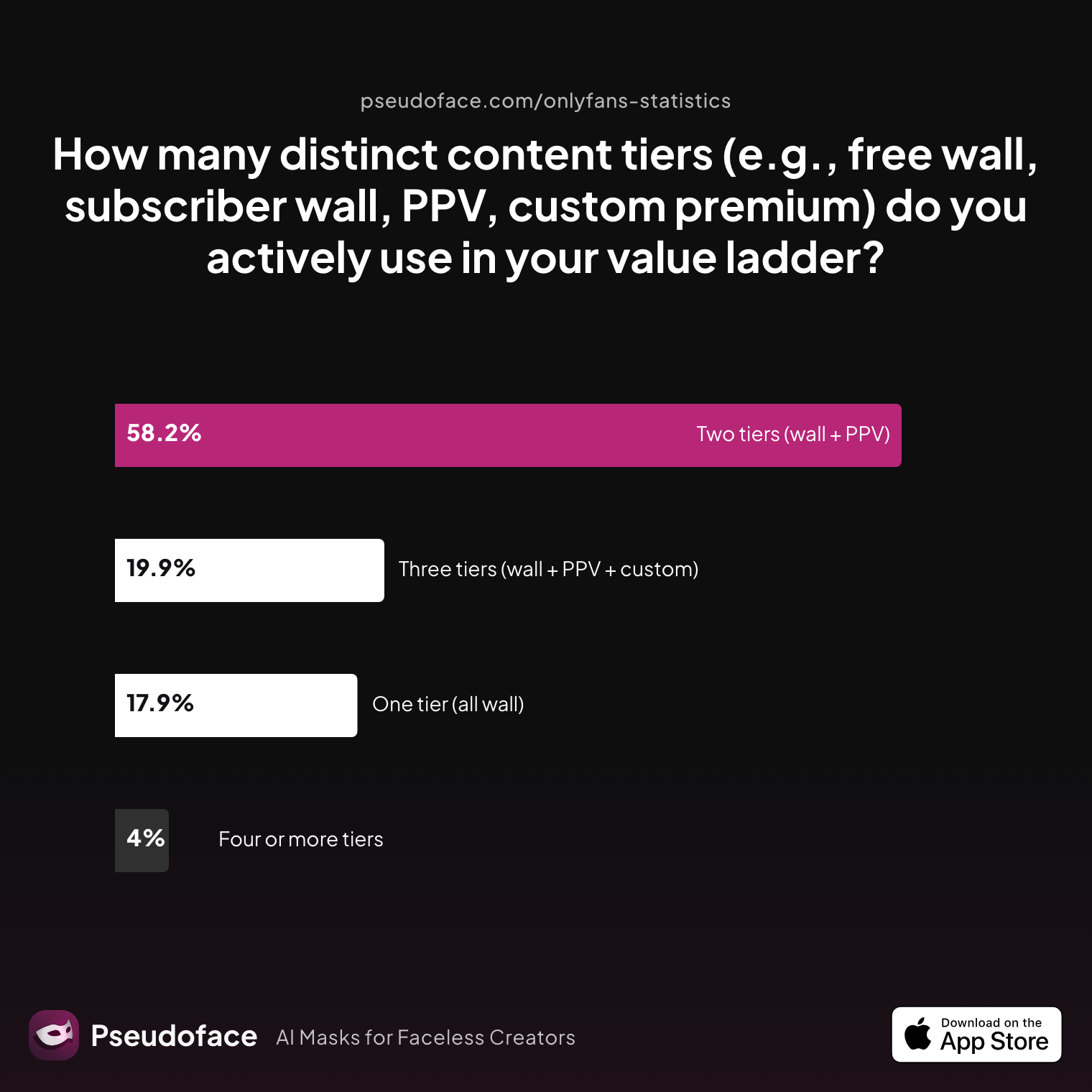
Creator reporting provides a telling distribution:
| Answer | Percentage |
|---|---|
| Four or more tiers | 3.98% |
| One tier (all wall) | 17.93% |
| Three tiers (wall + PPV + custom) | 19.92% |
| Two tiers (wall + PPV) | 58.17% |
Nearly 80% of creators actively use at least two distinct tiers or permission levels. The dominant model? A basic paid wall plus a PPV tier, with nearly 1 out of 5 adding a custom “premium” tier for the highest-value or most explicit content. Only a minority of new creators choose an “all wall” (single-gate) structure—often to their own detriment.
Survivorship bias is a factor here: advanced tier users stick with the platform longer, so these strategies rise to the top in advice threads. Still, beginners are best served by planning at least a two-tier setup from the outset.
How Tier/PPV Design Drives Subscriber Growth
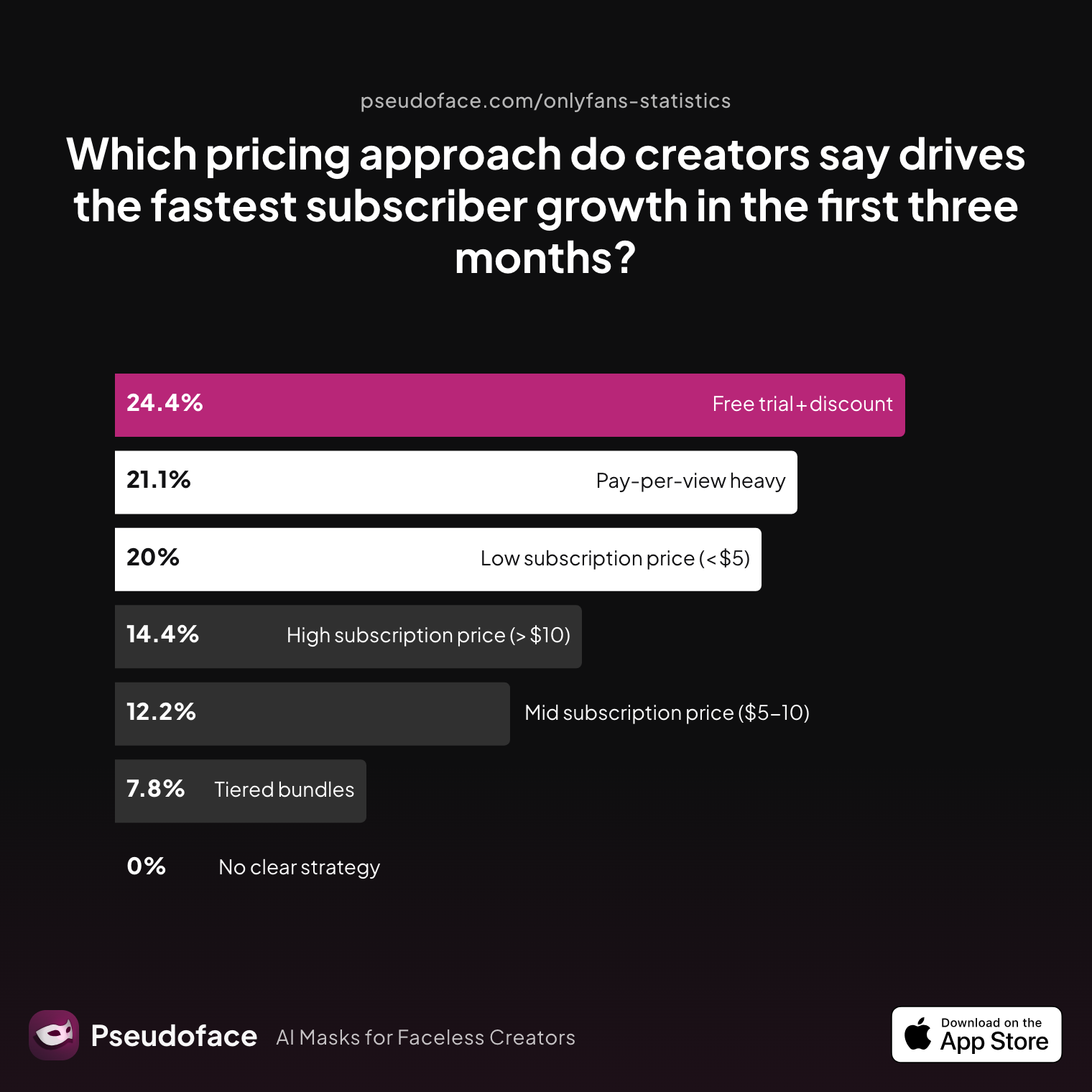
With so much flexibility, the pressing question is: what actually works for earning more? Pricing and structuring experiments abound, but self-reported peer data clusters around a handful of “fastest growth” archetypes:
| Answer | Percentage |
|---|---|
| Free trial + discount | 24.44% |
| High subscription price (> $10) | 14.44% |
| Low subscription price (under $5) | 20.00% |
| Mid subscription price ($5‑10) | 12.22% |
| No clear strategy | 0.00% |
| Pay‑per‑view heavy | 21.11% |
| Tiered bundles | 7.78% |
The most rapid early subscriber growth is associated with discounted access (free trial or coupon) and either low-priced subscriptions or frequent, appealing PPV offers. Around 1 in 4 creators rely on discount trials to “fill the room,” while one in five double down on PPV-heavy strategies. Only a minority pursue a high-price wall-only approach; these tend to be experienced creators with strong brand pull or niche content.
This has a major implication for new creators: flexibility and experimentation far outpace rigid, high-price strategies—at least for initial account momentum.
But what does this mean in actual workflow? Use bundled posts to layer in PPV up-sells alongside your core wall, and experiment with periodic free or low-cost trials to spike subscriber inflow.
How Permissions and DMs Shape Earning Power and Save Energy
Even in 2026, many creators still run into confusion (and needless risk) around default DM and message permissions. The community advice is blunt:
Switching DMs to paid or minimum spend is repeatedly cited as a top time-saver and boundary tool.
Open thread on Redditr/Fansly_Advice
u/EvaHallOFmilf
I just switched my DM's to paid or they have to have spent a minimum to DM me. It's cut down on my time wasters drastically!!
Open thread on Redditr/Fansly_Advice
u/DillyDaisy_
dont let them dm you if they are not paid subs, i turned off following alltogether and it saves so much time and lets me focus on spenders :)
Staying intentional with your menu of tiers, bundles, and messaging access is the key to both sustainable income and managing creator burnout. With your access ladders defined, the next unlock is reach—and that’s where Fansly’s FYP system comes into play.
Unlocking Reach: How to Post on Fansly FYP for Visibility and New Subscribers
Fansly’s For You Page (FYP) is the primary engine for new audience discovery, especially for accounts building their subscriber base in 2025-2026. Understanding the mechanics of FYP visibility—what posts qualify, how previews work, and which settings influence reach—is essential to driving growth.
Core FYP Mechanics: What Goes Public?
Posts appear on the FYP if they include a free preview or are deliberately marked public. The more engaging your preview (in imagery or teaser), the better your odds of capturing new followers or paying subs. Eligibility hinges on preview settings: without a free preview, your post remains hidden from broader Fansly exploration.
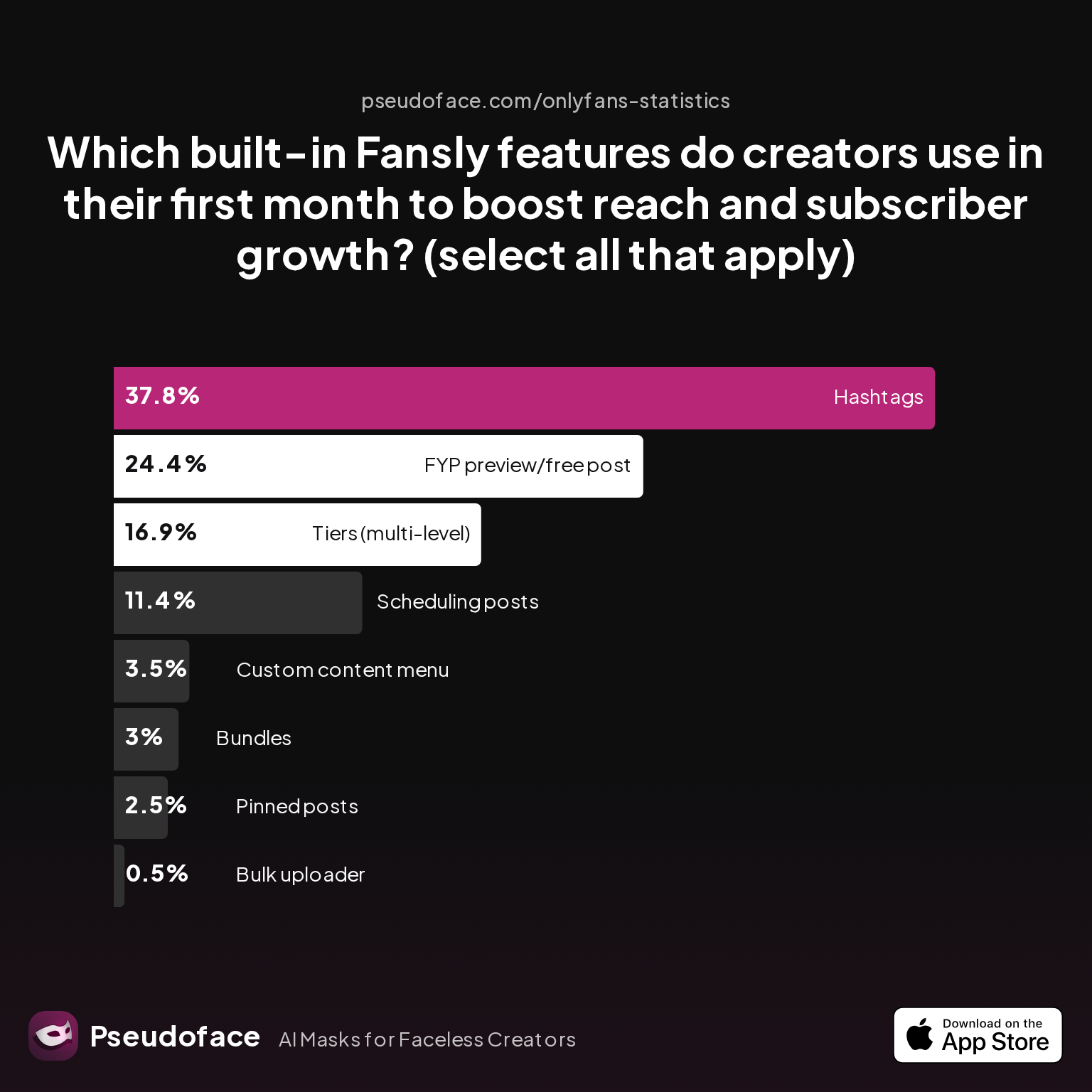
Many creators use built-in tools to maximize this exposure:
| Answer | Percentage |
|---|---|
| Bulk uploader | 0.50% |
| Bundles | 2.99% |
| Custom content menu | 3.48% |
| FYP preview/free post | 24.38% |
| Hashtags | 37.81% |
| Pinned posts | 2.49% |
| Scheduling posts | 11.44% |
| Tiers (multi-level) | 16.92% |
Roughly one in four creators uses FYP-focused previews and settings in their first month, while hashtags (nearly 38%) are the most widely adopted visibility lever. Multi-level tiers—crucial for wall/preview orchestration—are also a major tool in the new creator’s arsenal.
Open thread on Redditr/Fansly_Advice
u/Vixxxy4_4
You have the option to pin to your timeline or and/or walls, and content has to have a free preview to be eligible for FYP
Open thread on Redditr/Fansly_Advice
u/SashaAlex4u
Yes, exactly!!! If you post on FYP 3-4x a day, on schedule (post regularly at the same time, it also helps the algorithm), the algorithm will help you boost. So you can post on your walls and add a free preview, that's the FYP. Since you already have lots of content from your OF, you can use those, so you won't have to produce new content right now to be posting 3-4x a day.
The FYP is not a pure meritocracy; algorithmic factors like engagement, post timing, and preview quality (especially for video, as we’ll discuss next) all interact. And while FYP reach is powerful, it’s seldom self-sustaining—a consistent posting schedule and strategic hashtags sustain visibility in between algorithmic surges.
Practical FYP Tips for Creators
- Always include a free preview or public-facing frame in posts you want seen by non-followers.
- Use hashtags liberally (5-10 per post is the norm for FYP optimization).
- Schedule your FYP-eligible posts for consistent release times, as regular timing appears to favor algorithmic boosts.
From here, the biggest variable creators face is media format complexity—especially when transitioning into video. Let’s turn to what’s involved in posting and optimizing Fansly videos.
Mastering Media: How to Post Videos on Fansly (and Avoid the Common Pitfalls)
Uploading video is the most technically demanding (and most frequently searched) aspect of Fansly posting mechanics, and causes the most rookie frustration. The workflow is different enough from photo posting that even OnlyFans veterans trip up. Here’s what you need to know, and watch out for.
Stepwise Video Upload: Platform Flow
-
Prepare Your Video:
Trim, compress, and format your video to fit within Fansly’s size and length limits. MP4 is the most reliably compatible format. Larger uploads can lag—if you repeatedly fail, try compressing further. -
Initiate Video Post:
In the post composer, select the video icon, upload your file, and wait for the platform to process. Avoid navigating away until complete, as interruptions can trigger failed uploads. -
Set Permissions:
Just like images or galleries, you can assign videos to a specific tier, make them public/free, or lock as PPV. -
Thumbnail & Previews:
Perhaps the most cited issue: you cannot pick your video’s thumbnail from any arbitrary frame. Fansly currently uses the opening frame as the preview image, unlike OnlyFans, which lets you select a custom frame.
Open thread on Redditr/Fansly_Advice
u/babyxscarIett
Make a thumbnail or screenshot the most flattering part and make it the first frame of the video
In other words: to present your best face in discovery feeds or the FYP, start your video with your intended thumbnail image (either as a short still or a staged intro second).
Practical Video Posting Caveats
- Preview & FYP: Preview images for videos are pulled from the opening frame, so if you want to catch attention on the FYP or subscriber feeds, you MUST “bake in” a strong thumbnail.
- Length & Quality: Clips longer than a few minutes may struggle with slow uploads or incomplete processing, especially on mobile networks.
- Mobile Posting: Fansly does support video uploads from mobile devices, but reports of processing lag and failed uploads are more frequent than for desktops.
- Editing: Consider prepping video in an external editor to add intro stills, compress, and assure highest possible first-frame quality.
These quirks are often the focus of peer workarounds and debate. With the core post workflows covered, scaling your presence (without burning out) means mastering Fansly’s suite of scheduling and bulk-upload tools.
Scheduling, Bulk Upload, and Consistency: Fansly Posting Power-Tools in Practice
Consistency is the single most cited “secret” among sustaining, growing creators on Fansly. Without regular uploads, both subscriber engagement and FYP reach dwindle. Maintaining a daily, or near-daily, cadence is tough without automation—which is where Fansly’s built-in scheduler and bulk uploader come into play.
Scheduling Posts: Creator Experience and Platform Details
Fansly’s schedule-and-forget tool allows you to create multiple posts, set future release times, and choose time zones for each. This is a significant help for creators working across schedules, overlapping “IRL” work, or trying to optimize for audience time zones.
Open thread on Redditr/Fansly_Advice
u/Alert-Theory5824
At the scheduler you can pick time zone so it doesn’t matter where you are it will post as per that time zone
Peer consensus suggests batch uploading—creating weeks’ worth of posts in advance, each scheduled for prime hours—frees up creators and supports algorithmic consistency (FYP boost for regular schedules is frequently reported).
Bulk Upload Tool: Value and Limitations
The platform’s bulk uploader allows creators to add large caches of existing photos and videos rapidly, assigning them to vaults, galleries, or queued posts. While adoption is still low among absolute beginners (the learning curve and risk of “flooding” content is real), it becomes indispensable for creators with existing catalogs or cross-platform migrations.
Staying Consistent: Peer Practice
Among creators posting 1-3 times daily, many report filling their schedules a week or more in advance. This allows time for DM upsells, requests, and more deliberate content curation.
Syncing Your Uploads With Audience Demand
Scheduled posting isn’t just about time management; it also lets you analyze what hours/days drive the most engagement and adapt accordingly. Some use spreadsheets or analyses to compare engagement rates by time slot.
For those migrating archives from other platforms, bulk upload plus staggered scheduling provides a buffer against content droughts and lets you focus on new material or custom requests.
With Fansly's in-app tools, your ability to post consistently and scale content volume is no longer limited by “free time” or busy weeks. This is especially powerful when contrasted with other platforms—a subject our next section explores in detail.
Fansly Posting vs. OnlyFans and Others: Feature-by-Feature Comparison
Many Fansly creators arrive after months or years on OnlyFans or other rival platforms. Those transitioning are often laser-focused on: (a) whether Fansly’s tools will enable the same (or better) growth and (b) what workflow differences matter most when it comes to posting, structuring, and scaling content.
Structural Differences: Content Walls, Tiers, and Message Access
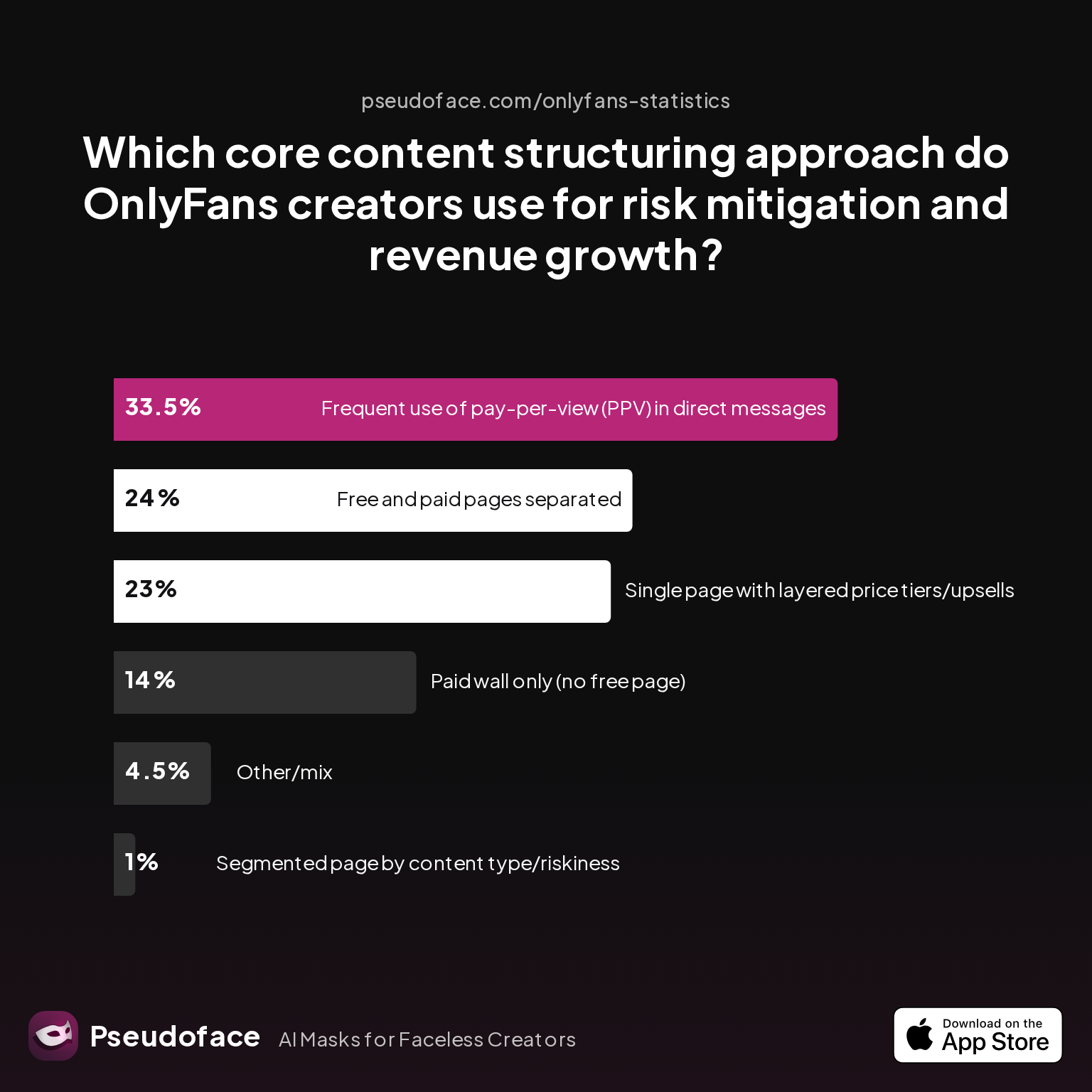
Surveyed creators report a split in how they structure their pages for income and risk management—patterns that inform posting strategy:
| Answer | Percentage |
|---|---|
| Free and paid pages separated | 24.00% |
| Frequent use of pay-per-view (PPV) in DMs | 33.50% |
| Other/mix | 4.50% |
| Paid wall only (no free page) | 14.00% |
| Segmented page by content type/riskiness | 1.00% |
| Single page with layered price tiers/upsells | 23.00% |
One in three OnlyFans creators rely on frequent PPV in DMs, and 23% adopt layered price tiers—both strategies that fansly also supports, but with easier-to-implement tier and bundle logic. Meanwhile, page segmentation (separate free/paid walls) is less common, but more easily managed on Fansly thanks to advanced permissions and flexible public/free preview settings.
Practical Differences in Posting Features
| Feature | Fansly | OnlyFans |
|---|---|---|
| Public post/FYP | Yes, essential for discovery | Limited public posts |
| Tiered subscriptions | Yes, multi-level and easy to customize | Yes, but less granular |
| Built-in scheduling | Yes, with time zone selection | Yes, but basic |
| Bulk upload | Yes, built-in | No |
| Preview control | Thumbnail is first frame (manual workaround needed for video) | Customizable thumbnail for videos |
| Hashtags/discovery | Widely used, FYP integration | Minimal external reach |
| Advanced permissions | Per-post and per-media, highly granular | Per-post, less flexible |
Fansly’s content permissions, FYP exposure, and posting tools are more granular and creator-friendly than OnlyFans in 2025-2026, but video preview control and DMs are stiffer to master.
On both platforms, learning the subtleties of tiering, audience management, and bulk scheduling mark the difference between stalls and surges in subscriber growth. Creators making the switch are strongly advised to keep workflows “platform-adaptive,” leveraging strengths unique to each.
Fansly Posting: FAQs for New and Migrating Creators
Q: How do I get my posts onto the Fansly FYP (For You Page)?
A: To appear on the Fansly FYP, posts must include a free preview and be marked eligible for public discovery in advanced post settings.
Only posts with an unlocked (public/preview) media frame show up on FYP, so always include a face-forward teaser, and add 5-10 hashtags for best results.
Q: Can I post videos on Fansly directly from my phone, and what formats work best?
A: Yes, you can upload videos from your phone; MP4 works best and files should be compressed if uploads fail.
While Fansly supports mobile uploads, experiences of failed processing are more common vs. desktop. Always test a short clip before batch uploads and start your video with a thumbnail-worthy first frame.
Q: What do the different post permission settings actually do on Fansly?
A: Post permissions determine who can see (or buy) your content—choose free, subscription-only, specific tier, or pay-per-view for each media set or post.
Advanced options allow you to set message permissions to minimum spend, saving time and focusing income on real buyers.
Q: What’s the ideal content bundle to launch with for fastest early growth?
A: The most common high-growth launch bundle is 20+ mixed-media posts with a photo bias and bundled premium video.
Data suggests pages launched with at least 20 posts, mixing 80% or more photos with some videos and PPV media, capture faster FYP/inbox engagement and drive higher early signups.
Q: What’s the difference between Fansly’s walls, tiers, and bundles?
A: Walls limit content to subscribers, tiers set different subscription levels with varying access, and bundles group paid content for sale/upsell outside of standard wall.
| Type | Function | Use Case |
|---|---|---|
| Wall | Gated content (sub-only or free tier) | Baseline exclusivity, basic paid “membership” wall |
| Tier | Multiple price points with different unlocked content | Satisfy varying budgets, offer “VIP” or premium-only perks |
| Bundle | Paid, one-time or ad hoc content package | High-value up-sell, package deals, custom collections |
Q: How can I schedule posts or post in bulk on Fansly—and does this affect FYP reach?
A: Use the post scheduler to set future release times and manage time zones; bulk uploader lets you queue galleries or archives for gradual release.
Consistent, scheduled posting (especially 1-3x per day) keeps you visible on FYP and in follower feeds—many creators report algorithmic boosts for regular timing.
Q: Can my fans bookmark or like my posts on Fansly, and does this affect my reach?
A: Yes, fans can bookmark and like posts; these visible engagement metrics increase algorithmic reach and FYP presence.
Creators often encourage fans to engage, as spikes in likes/bookmarks appear to correlate with tighter placement on the FYP.
Q: How do I handle pricing, subscription tiers, and PPV (pay-per-view) to maximize income?
A: Start with at least two tiers: one affordable “entry wall” and one premium or PPV-heavy tier; experiment frequently and adapt based on demand.
Creators leveraging free trials or low-cost entry paired with PPV or premium bundles see the fastest early growth—avoid setting prices too high before demand justifies.
Q: What common mistakes do new creators make when setting up or posting on Fansly?
A: Failing to include FYP-eligible previews, posting too infrequently, leaving DM permissions unrestricted, and mismanaging tier access are the most common and costly rookie errors.
Check your preview settings before publishing, set DM limits, and don’t be afraid to schedule posts well in advance.
Q: Is it better to start with high or low subscription prices on Fansly?
A: Data supports launching with lower subscription prices or free trials to boost signups, then layering in PPV or bundles as demand grows.
High walls work only for established creators—a free or low-price entry point fuels discoverability and maximizes FYP/subscriber inflow, especially in your first three months.
Final Thoughts
Fansly offers new creators a toolkit that’s broader and deeper than most platforms: tiered permissions, scheduled publishing, bulk uploading, and built-in visibility features like FYP and hashtags.
While the interfaces are accessible, true mastery—and income—come by understanding the interplay of walls, tiers, feature toggles, and posting cadence. Real-world peer data shows that creators who front-load content, experiment with tiered access and pricing, and use FYP-eligible previews enjoy earlier and bigger growth spikes. Missed DM settings, infrequent posting, and failing to think strategically about page structure are the top early stumbling blocks.
Remember: the competitive edge doesn’t come from a single “secret,” but from layering best practices—solid launch bundle, consistent posting, strategic permissions, and regular engagement checks. And with Fansly’s evolving features, staying active in public forums and creator communities will keep you ahead of the latest platform shifts.
For newcomers and those migrating from other platforms, focus on fast iteration, be ready to schedule and batch your work, and above all, maintain a lean workflow that fits your real life.
Ready to launch? Your first twenty posts matter more than your next hundred—so make them count, seed your wall for FYP exposure, double-check your permissions, and schedule like you mean it.
Want to keep up as Fansly’s posting tools and discovery systems evolve? Subscribe to Pseudoface’s newsletter for ongoing data drops and tactical walkthroughs, or share your experience with other creators to move the community forward.
Guide based on Pseudoface’s survey data, 2025-2026 trends, and public Reddit creator discourse. Quotes reprinted for educational and documentation purposes; see original thread links for full context and creator profiles.


