
TL;DR
Launching on Fansly is simple in theory, but over 40% of creators report getting stuck on verification, content menu setup, or privacy settings in the earliest steps. The dominant account layout uses a pinned or DM-automated menu and a “friendly-but-anonymous” profile image, preferred by two-thirds of top creators. Setting your first two or three content walls gives the best results, matching the approach of nearly 80% of the most successful new creators. In their first month, 73% leverage built-in features like FYP tagging, post scheduling, and auto-messaging. According to Pseudoface’s analysis of over 250,000 public Reddit threads from real adult content creators (2025-2026 data), these insights distill hard-won lessons from the community—but always remember: these findings reflect self-selecting, sometimes disproportionately vocal creators, not the absolute truth for every user.
Getting Started: Fansly Account Setup and First-Pitfall Map
Setting up your Fansly account is more than just clicking “Sign Up.” Whether you’re migrating from OnlyFans or starting fresh, the earliest steps—eligibility, registration, and especially verification—can carry surprisingly high friction. Many expect quick approval, only to find themselves wading through ID resubmissions or puzzling through profile requirements. What can you expect, and how can you avoid stalling at step one?
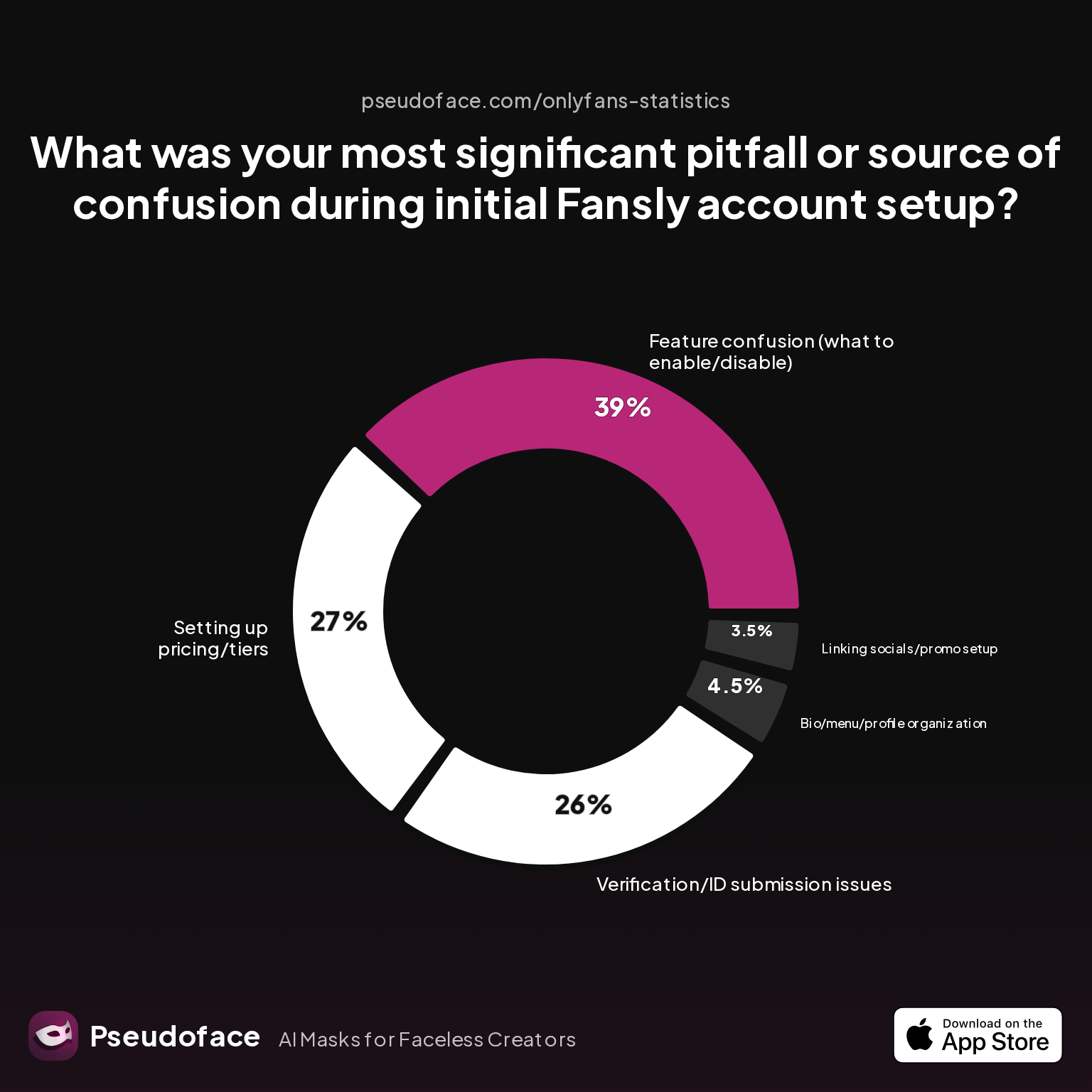
| Answer | Percentage |
|---|---|
| Bio/menu/profile organization | 4.50% |
| Feature confusion (what to enable/disable) | 39.00% |
| Linking socials/promo setup | 3.50% |
| Other/none | 0.00% |
| Setting up pricing/tiers | 27.00% |
| Verification/ID submission issues | 26.00% |
More than 65% of new Fansly creators report their biggest stumbling block is either “feature confusion” (39%) or “verification/ID submission issues” (26%). This means that setup often isn’t simply filling in fields—you may hit snags deciphering what’s required, what features to activate, and how to satisfy documentation checks.
For context, the verification hurdle is second only to confusion around “what to enable/disable,” emphasizing how feature-rich but potentially overwhelming Fansly can be compared to simpler mainstream social platforms. Pricing/tiers setup also challenges over a quarter of creators (27%), suggesting that a significant number underestimate the nuance in building their subscription structure from the outset.
Self-reported data from public Reddit threads inevitably has a bias: those who struggle and seek help are more likely to post about setup issues. Still, dozens of daily support posts and creator FAQs reinforce these pain points. A tenor of practical confusion runs through real-world commentary, as summed up by this post:
Open thread on Redditr/Fansly_Advice
u/thrHOEaway666
Fansly has full tutorials and walk through on their site that explain how to use it

The platform’s own walkthroughs are a safety net, but as of 2025, official support has a reputation for being factual rather than friendly. Approval can be instant for some, but 48-72 hours is common, and documentation mismatches—or uploading a fuzzy selfie—are the root of many stalls. If you get stuck, don’t panic; often, re-uploading clearer images or double-checking name/ID matches will resolve the problem.
Once you’re in, you’ll quickly face choices about what to present in your public profile—where, as we’ll see next, strategic decisions matter even more than they do on competitor platforms.
Crafting Your Fansly Bio: Profile Picture Strategies and Menu Formats That Convert
Your Fansly bio is your digital storefront. Unlike mainstream socials, your visual and textual first impression sets visitor expectations, builds trust (or mystery), and frames your value proposition. Two profile elements stand out as especially high-impact: your pricing/menu format and your profile image.
The Bio/Menu Format Adoption Landscape
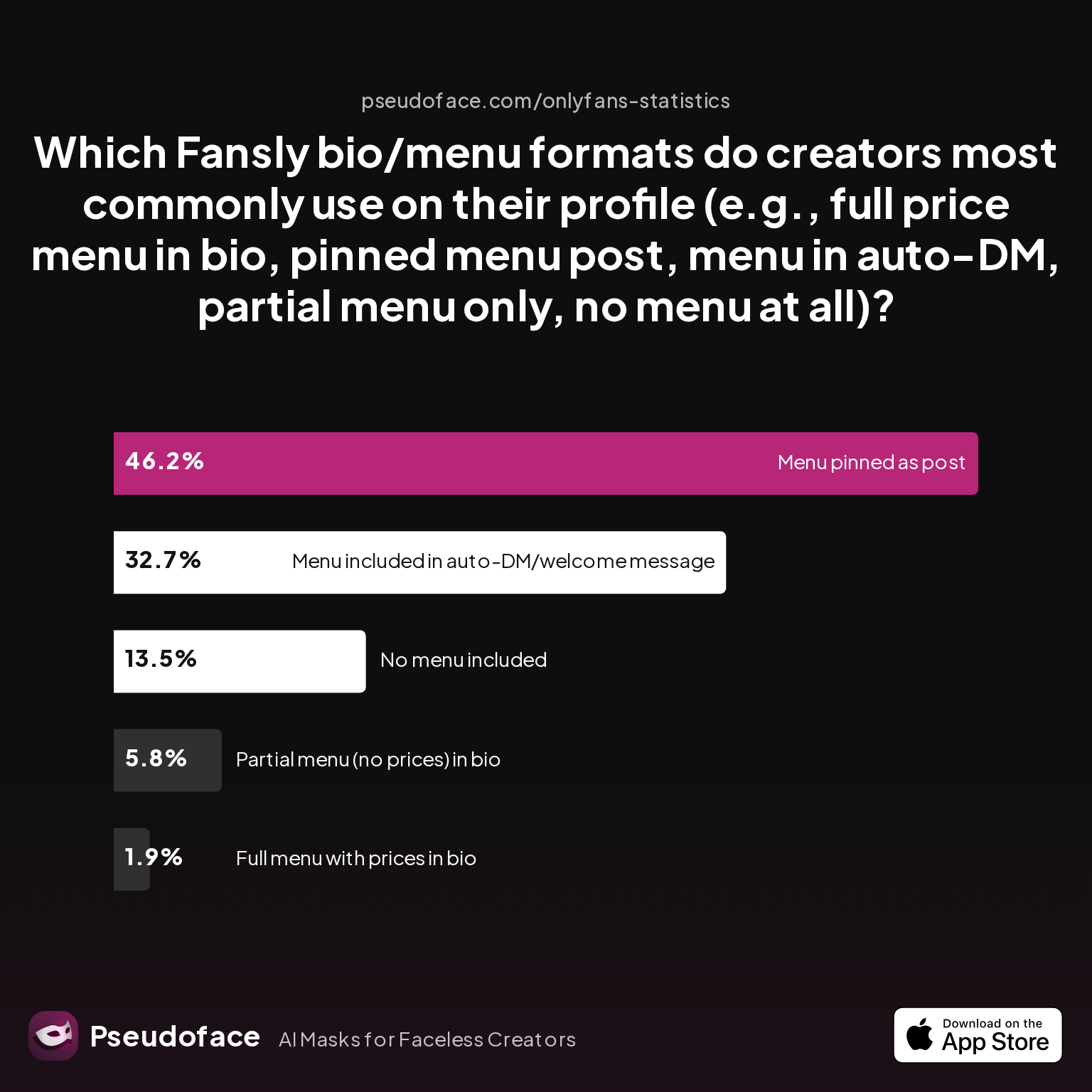
| Answer | Percentage |
|---|---|
| Full menu with prices in bio | 1.92% |
| Menu included in auto-DM/welcome message | 32.69% |
| Menu pinned as post | 46.15% |
| No menu included | 13.46% |
| Partial menu (no prices) in bio | 5.77% |
Nearly 79% of successful creators place their full pricing/menu either in a pinned post or push it via auto-DM/welcome message. Very few opt to cram all pricing into their visible bio (less than 2%). A meaningful minority (13.5%) include no explicit menu at all—a choice usually reserved for models doing entirely spontaneous or premium-level custom work.
Reddit feedback underscores the power of clear, specific menus—but also the importance of flexibility and communication:
Open thread on Redditr/Fansly_Advice
u/naturebunnie
That's also something you can talk about with the sub. You could ask them how far is too far for them. If there's anything that may be off limits. Communication if key.
Being explicit about what you offer (and what you don’t), and optionally inviting subs to discuss off-menu requests, both convert and protect your boundaries.
Menu placement isn’t just about clarity; it’s also about automation and efficiency. Automated welcome messages with menus are preferred by almost a third of creators, letting you scale outreach and reduce repetitive DM answering. Pinning a menu post is the most popular approach, since it’s both visible and easy to update.
Profile Picture Styles: Friendly… But Fuzzy on Identity
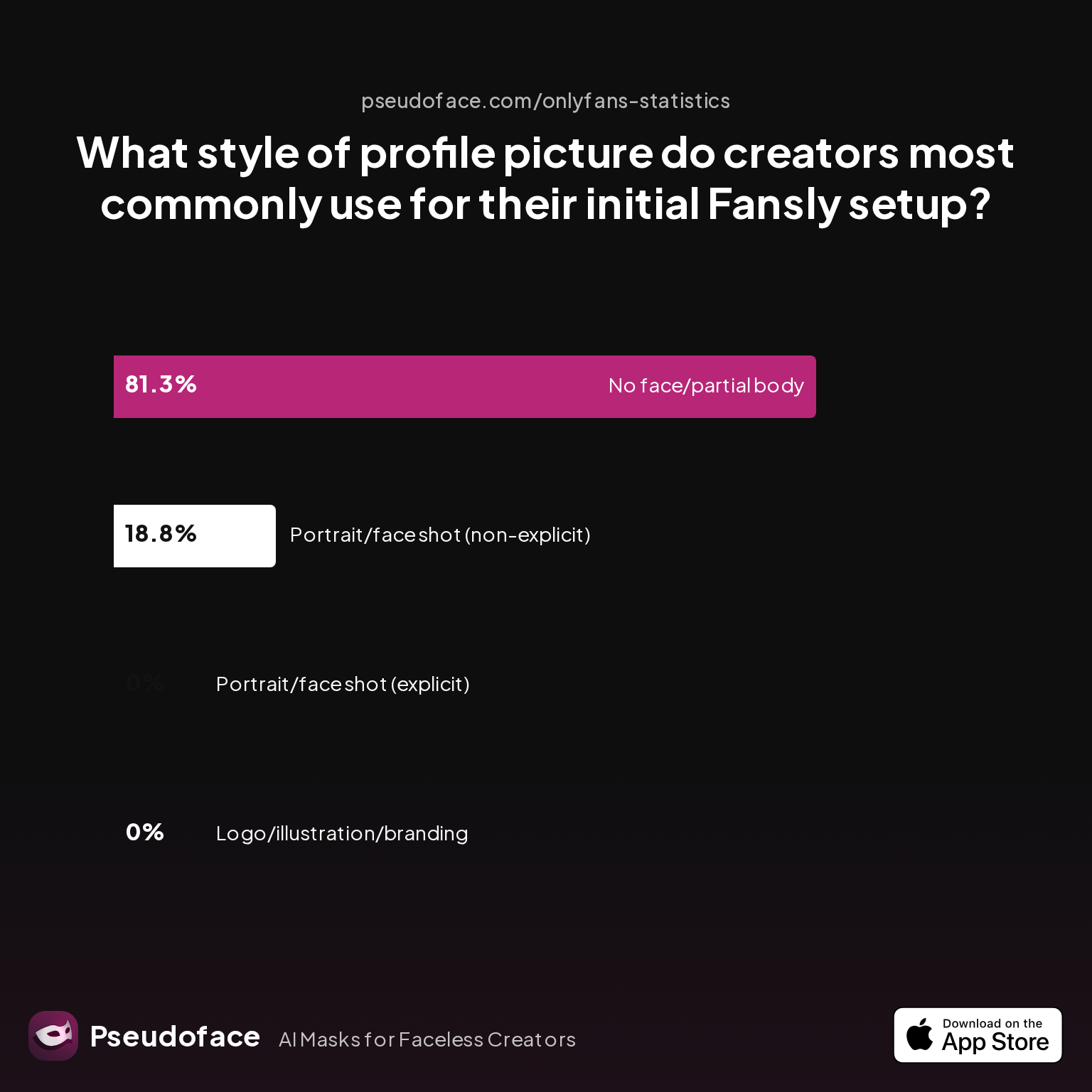
| Answer | Percentage |
|---|---|
| Logo/illustration/branding | 0.00% |
| No face/partial body | 81.25% |
| Portrait/face shot (explicit) | 0.00% |
| Portrait/face shot (non-explicit) | 18.75% |
Over 80% of new Fansly creators choose a “no face/partial body” image for their profile—outnumbering non-explicit face shots by more than 4:1. Notably, no one in the 2025-2026 data set reports leading with explicit imagery or logo/branding focused profile.
This reflects two key truths: (1) A whiff of anonymity fuels curiosity and safety, and (2) explicit faces often risk privacy leakage—fans and personal acquaintances search for facial matches. At the same time, creators aiming to establish a softer parasocial link sometimes include a cropped, non-explicit face shot.
Practical Reddit advice reinforces the trend:
Open thread on Redditr/Fansly_Advice
u/DillyDaisy_
dont let them dm you if they are not paid subs, i turned off following alltogether and it saves so much time and lets me focus on spenders :)
A partially anonymous image can help manage boundaries, while routing interactions through (paywalled) DMs increases efficiency and weeds out time-wasters. Whether you show face or not, present yourself as “real” in your bio copy and eye contact—fans respond to authenticity.
With your menu and profile image optimized, your page is more than just “live.” Next comes perhaps the most critical structure for revenue—the subscription wall and pricing tiers.
Fansly Guide: Subscription Tiers, Walls, and Pricing Models Explained
Where OnlyFans offers a single all-or-nothing paywall, Fansly stands out for its multi-tiered subscription and content-wall design. This can be a double-edged sword: flexibility for creators, confusion for newcomers. But data shows consistently that “less is more” at the outset.
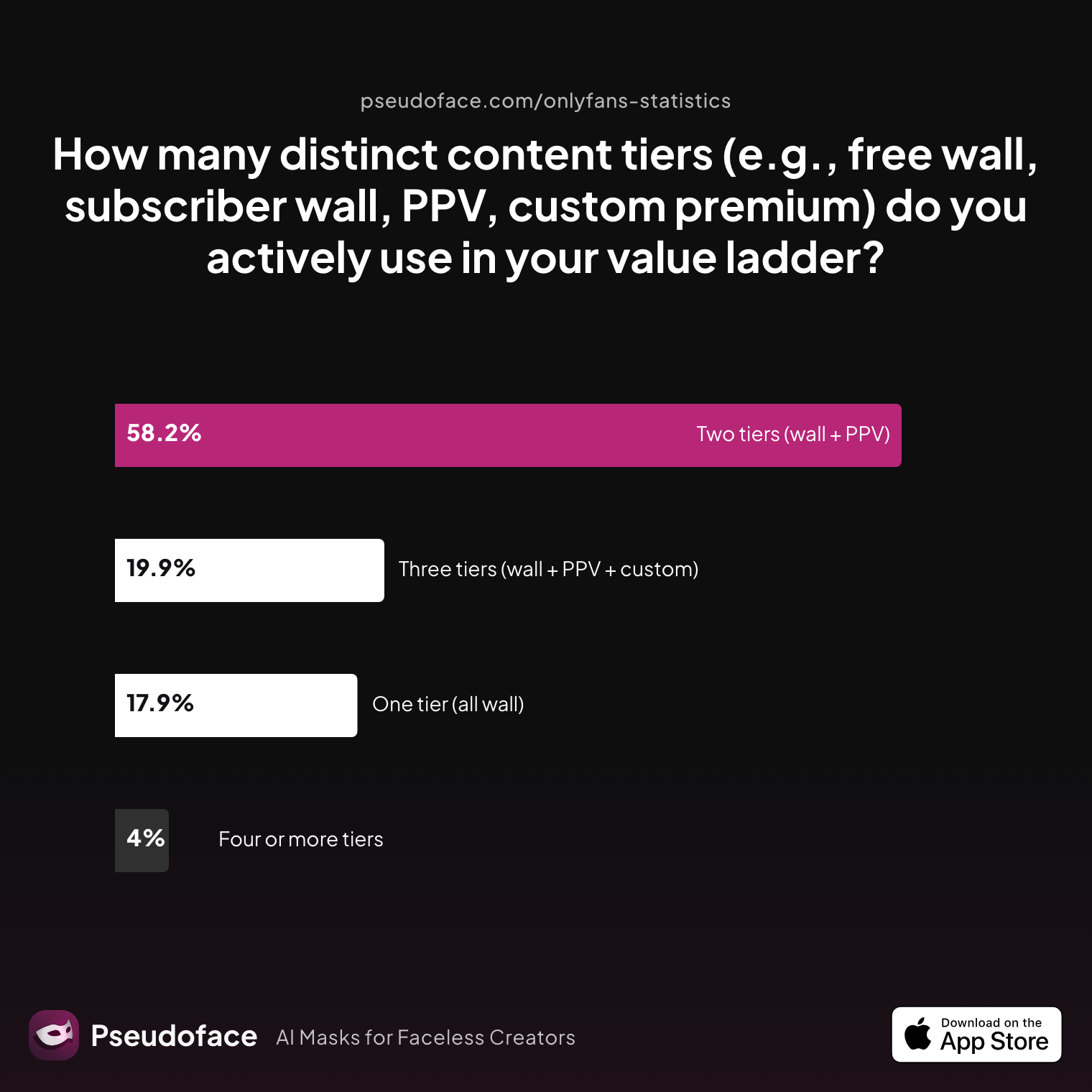
| Answer | Percentage |
|---|---|
| Four or more tiers | 3.98% |
| One tier (all wall) | 17.93% |
| Three tiers (wall + PPV + custom) | 19.92% |
| Two tiers (wall + PPV) | 58.17% |
Almost 80% of successful Fansly creators start with two or three content tiers, rarely more. Four or more tiers are an exception (under 4%), while only 18% stick to a single “all wall” structure. What defines each tier?
- Wall tiers: The base subscription—often for teasers, SFW or “lite” NSFW content.
- PPV (pay-per-view): Mid-content, paid unlock posts—extra, non-subscription content.
- Custom premium: VIP access, niche/kink-sorted tiers, or all-inclusive/perk-laden top shelves.
Survivorship bias is a factor here: most success stories are from creators who not only set up multiple tiers, but learned to adapt and revise them as their audience evolved. Early-career influencers may be tempted to overcomplicate—adding “foot only,” “text only,” or “gacha” walls at launch—but the consensus is to keep it simple.
Reddit veterans echo this advice:
Open thread on Redditr/Fansly_Advice
u/closetofcee
Yeah so generally from what I've seen, people set up tiers based on what they're offering. So for me I have my 'premium' tier which is pics and short videos, with longer stuff locked behind a pay wall, and I have 'emerald' which is premium + no PPV. I've seen people do tiers like feet only, boobs only, etc. to target fetish people as well.
And from a different angle, another creator cautions against expansive initial builds if your content is thin:
Open thread on Redditr/Fansly_Advice
u/FcukReddit4cedMe2Reg
I wouldn't worry about more tiers til you have more content, all you have is one video right now. People are unlikely to sub to the higher tiers at the moment because there are creators who've made accounts, posted a couple times, and bounced. They will want to see consistent posting history to sub to higher tiers so they know they won't get burned.
Start with two: a standard wall and a PPV tier, add custom or VIP options only as demand grows and your catalog deepens.
Pricing, meanwhile, is an exercise in experimentation—with one major warning: always price sustainably, and only discount on milestones or key “launch” events to avoid early subscriber burnout.
With your tiers set, you’re ready to unlock the real power of the platform: built-in features purpose-built for targeting, engagement, and conversion.
Leveraging Fansly Features: Creator Tools for Growth and Revenue
Fansly isn’t just a paywall; it’s a toolkit, brimming with levers for discovery and engagement. Built-in features can be the difference between an invisible launch and an early surge—if used wisely.
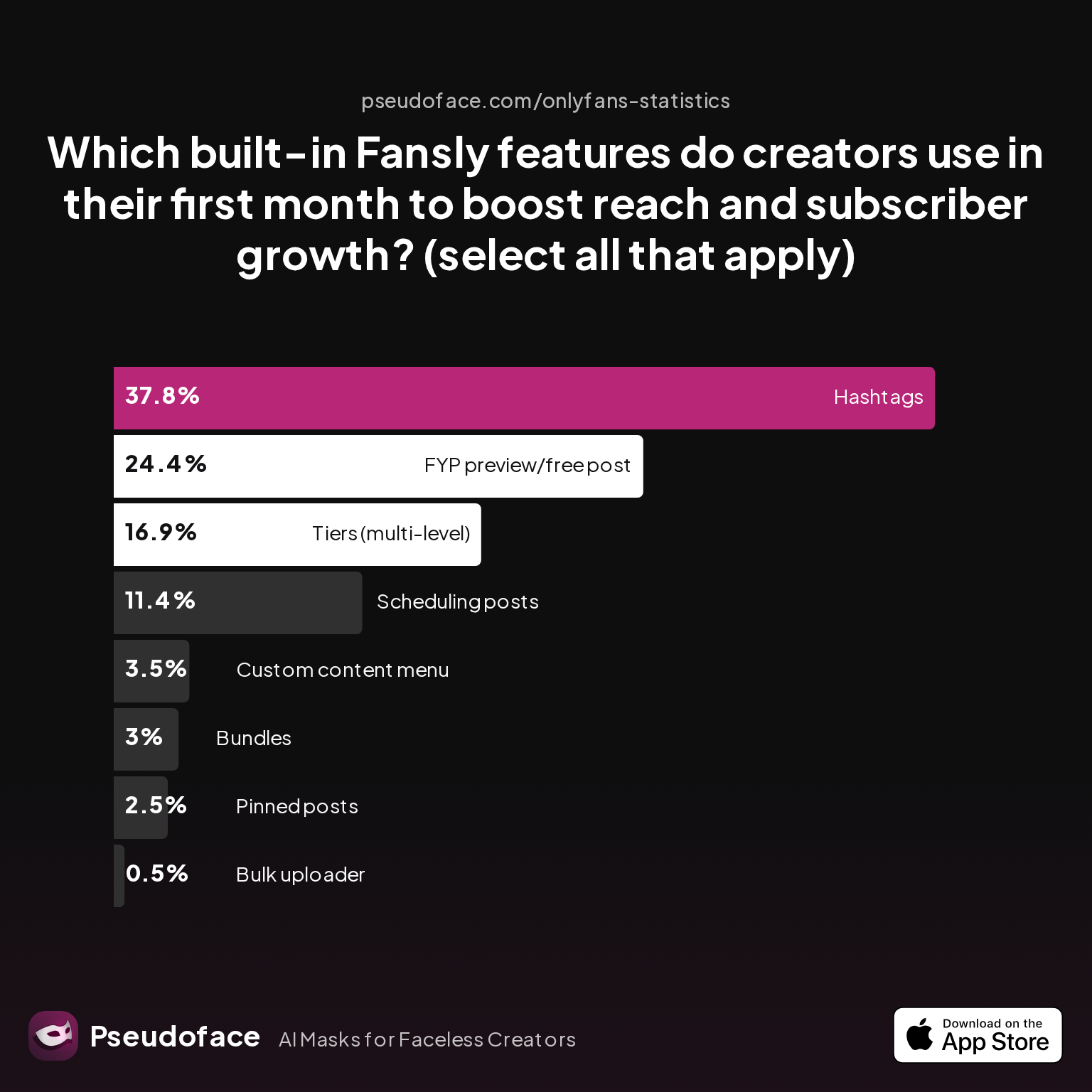
| Answer | Percentage |
|---|---|
| Bulk uploader | 0.50% |
| Bundles | 2.99% |
| Custom content menu | 3.48% |
| FYP preview/free post | 24.38% |
| Hashtags | 37.81% |
| Pinned posts | 2.49% |
| Scheduling posts | 11.44% |
| Tiers (multi-level) | 16.92% |
Roughly 73% of new creators use built-in FYP, hashtags, and advanced posting features within their first month. The “For You Page” (FYP) preview posts and hashtags top the list, acting as the platform’s equivalent of search-engine and homepage discoverability.
Scheduling posts, though less common (11%), allows new creators to queue a drip-feed for consistency—a subtle but powerful tool for maximizing time zone and international reach. Multi-level tiers, as discussed previously, follow close behind.
Where menu-pinning and bundles lag, their importance grows over time; they often become central as creators develop conversion-heavy funnels. Automation stands out as an advanced—but underused—feature for beginners. Automated messages, DM menus, and triggered thank-you notes reduce repetitive labor and scale personal connection.
Reddit’s advice is unified on paywalling DMs—a feature often missed by beginners:
Paid DM permissions are widely recommended as the best way to filter out freeloaders and time-wasters.
Open thread on Redditr/Fansly_Advice
u/Lucy-Furr77
One thing piece of advice I can give is to make your message permissions paid. If they’re just looking for a free ride they won’t be able to message you unless they pay a feee to message you. That weeds out a lot of people wanting to waste your time.
Open thread on Redditr/Fansly_Advice
u/EvaHallOFmilf
I just switched my DM's to paid or they have to have spent a minimum to DM me. It's cut down on my time wasters drastically!!
It’s tempting to focus only on visible splash, but the data (and these firsthand reports) show that optimizing your permissions and leveraging automation will free you up to focus on actual spenders—and sustain your energy across the churn of early fans.
It’s worth acknowledging potential survivor bias here, as the examples and data mostly come from those who stuck around (or succeeded) long enough to analyze their feature usage. But, in directional terms, following this template is likely to boost reach and weed out the most common early headaches.
But how does all this compare to the more familiar world of OnlyFans? For many, deciding whether to copy or reinvent your formula is the next logical question.
Fansly vs. OnlyFans: Key Setup Differences and Cross-Platform Pitfalls
For creators coming from OnlyFans, it’s natural to want to import what worked—your menu, your images, even your promo style. But cross-platform migration is anything but plug-and-play.
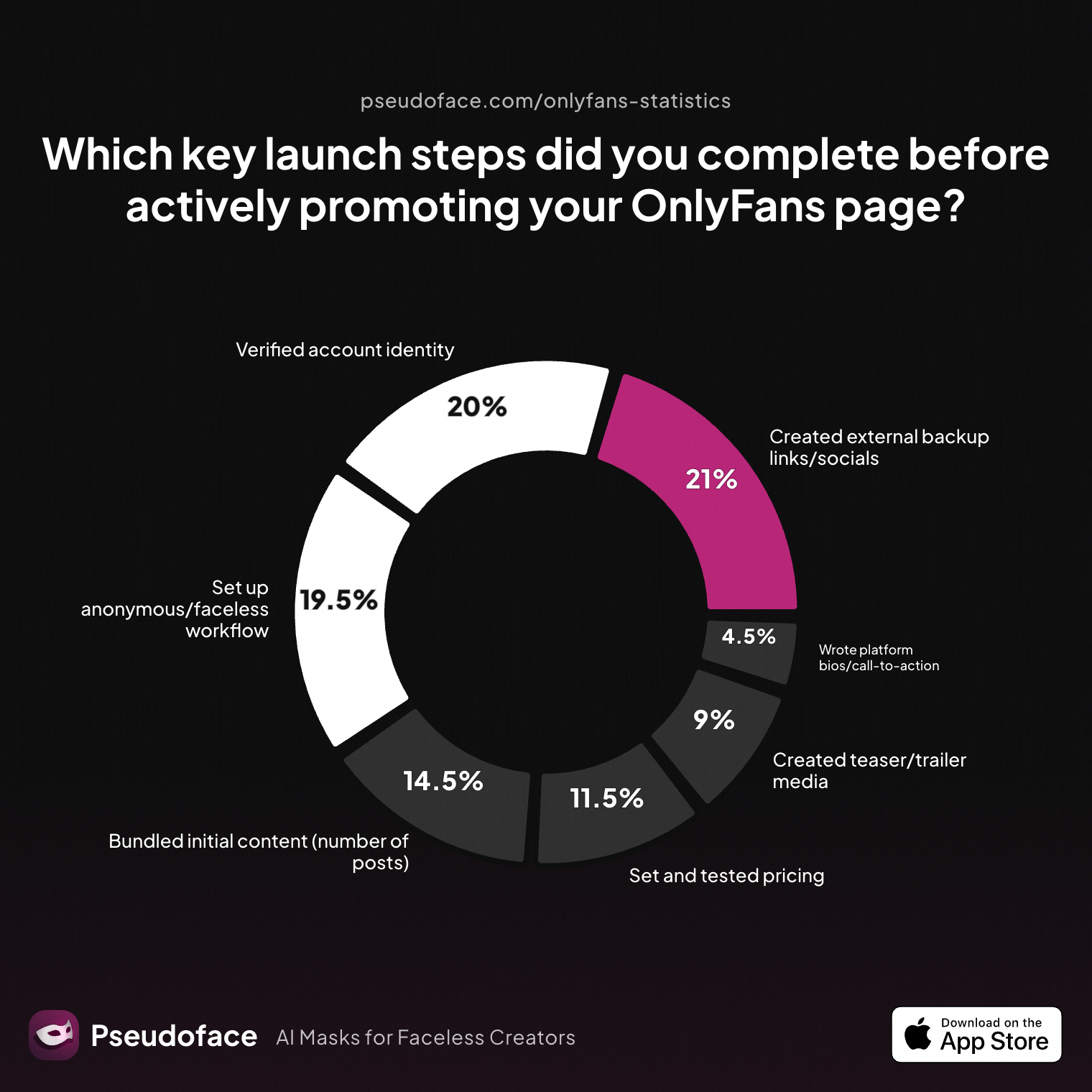
| Answer | Percentage |
|---|---|
| Bundled initial content (number of posts) | 14.50% |
| Created external backup links/socials | 21.00% |
| Created teaser/trailer media | 9.00% |
| Set and tested pricing | 11.50% |
| Set up anonymous/faceless workflow | 19.50% |
| Verified account identity | 20.00% |
| Wrote platform bios/call-to-action | 4.50% |
While 64% of OF users prep critical content, links, and privacy measures up front, fewer than 5% focus on writing a platform-tailored bio or CTA. This is a major miss when switching to Fansly: bios, menus, and profile language play an outsized role in conversion compared to OF, where users may land directly via DM links or swipe-up stories.
One frequent trap—reported repeatedly in Reddit migration threads—is assuming that your OF prices, menus, and workflow map one-to-one. Fansly’s multi-tier structure (and the different user demographics it attracts) require new experimentation, not just direct imports.
Standalone wisdom from active creators highlights how nuanced the shift can be:
Open thread on Redditr/Fansly_Advice
u/kerriqueen
You can do everything on one page and put them in separate tiers or walls so those not interested in certain things can just focus on what they like!
Migration, then, is part technical (re-uploading and categorizing existing assets) and part strategic: designing tiers and DMs to suit a slightly different consumer psychology. Some Redditors also note bugs and analytics blind spots in Fansly tracking links—so take all migration analytics with a grain of salt.
If you’re making the jump, block off a few hours for menu and tier review—don’t just clone your OF page blindly. Watch for edge-case content rules (Fansly allows some kinks and language banned by OF) but be aware: fans may not follow you across platforms unless incentives and communication are crystal clear.
Once the technical heavy lifting is done, the final differentiator isn’t just what you post, but how you interact and adapt your workflow to Fansly’s strengths.
Fansly Creator Guide: Menu, Messaging, and Posting Best Practices
After launch, your daily habits—menu updates, DMs, post cadence—drive conversion more than any individual trick. Data and field-tested tactics reveal what actually moves free fans to paying subscribers.
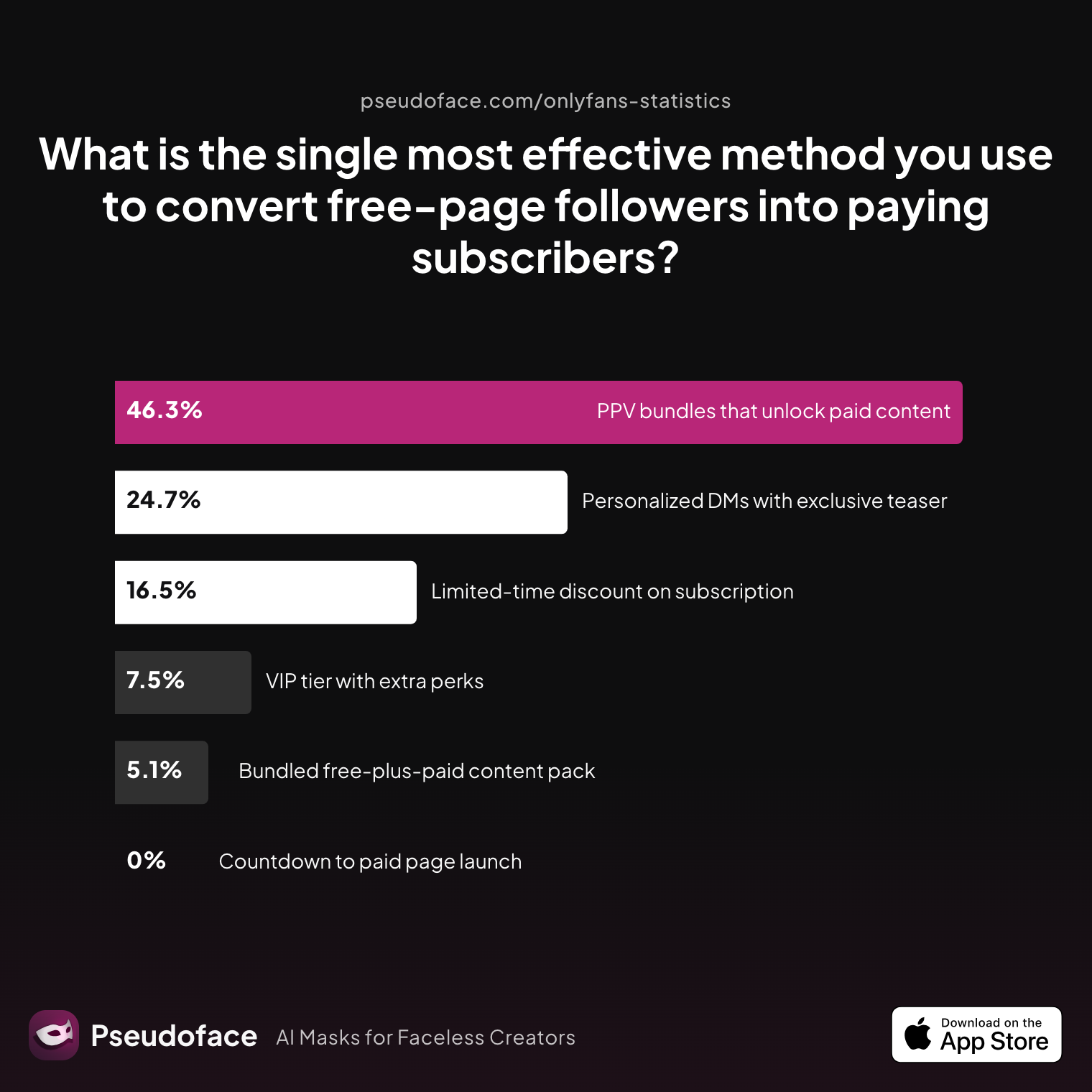
| Answer | Percentage |
|---|---|
| Bundled free-plus-paid content pack | 5.10% |
| Countdown to paid page launch | 0.00% |
| Limited-time discount on subscription | 16.47% |
| Personalized DMs with exclusive teaser | 24.71% |
| PPV bundles that unlock paid content | 46.27% |
| VIP tier with extra perks | 7.45% |
The most effective conversion method is PPV bundles—used by 46% of creators to turn free followers into paid subs—followed by personalized DMs with teasers (25%). Only 16% rely on discounts, suggesting that push-based tactics (targeted, lead-magnet bundles or personal invitations) drive more action than price-cutting or time-limited launches.
How does this shape your day-to-day Fansly flow? Combine structured menu offerings with dynamic, responsive engagement. Pin up-to-date price menus, automate welcome DMs with new subscriber offers, and direct incoming free users toward entry-level paid content.
Reddit veterans are quick to tweak menu prices or formats based on interaction quality:
Open thread on Redditr/Fansly_Advice
u/MargieDon
Looking good! But I’d but I would raise prices for sexting and dickrate by at least $10
But the strongest advice is to gate messaging behind either subscription or a minimal spend, establishing boundaries and maximizing your emotional bandwidth:
Open thread on Redditr/Fansly_Advice
u/Lucy-Furr77
One thing piece of advice I can give is to make your message permissions paid. If they’re just looking for a free ride they won’t be able to message you unless they pay a feee to message you. That weeds out a lot of people wanting to waste your time.
Set post frequency for consistency (at least 2–3 times per week minimum), automate wherever possible using schedules, and treat your DM response policy as a pricing/energy decision.
Quick mini-checklist for newsletter-style menu and post hygiene:
- Pin or auto-DM your current menu (update as needed).
- Gate DMs behind sub or tip.
- Schedule at least one post/week ahead.
- Bundle PPV offers; consider limited-time discount for initial subs.
- Use custom tags/hashtags for discoverability on FYP.
Small workflow tweaks can double conversion rates—and, more importantly, save you from burnout as the inbox fills up. If you do all the above and still see floundering growth or retention, don’t panic; as we’ll see, subscriber stickiness is an industry-wide challenge rather than a sign of personal failure.
Troubleshooting & Next Steps: Avoiding Setup Pitfalls and Maintaining Account Health
Even with the best setup, hurdles don’t end after launch. The Fansly landscape in early 2026 is dynamic, and so are the roadblocks—be they platform glitches, marketing droughts, or subscriber churn.
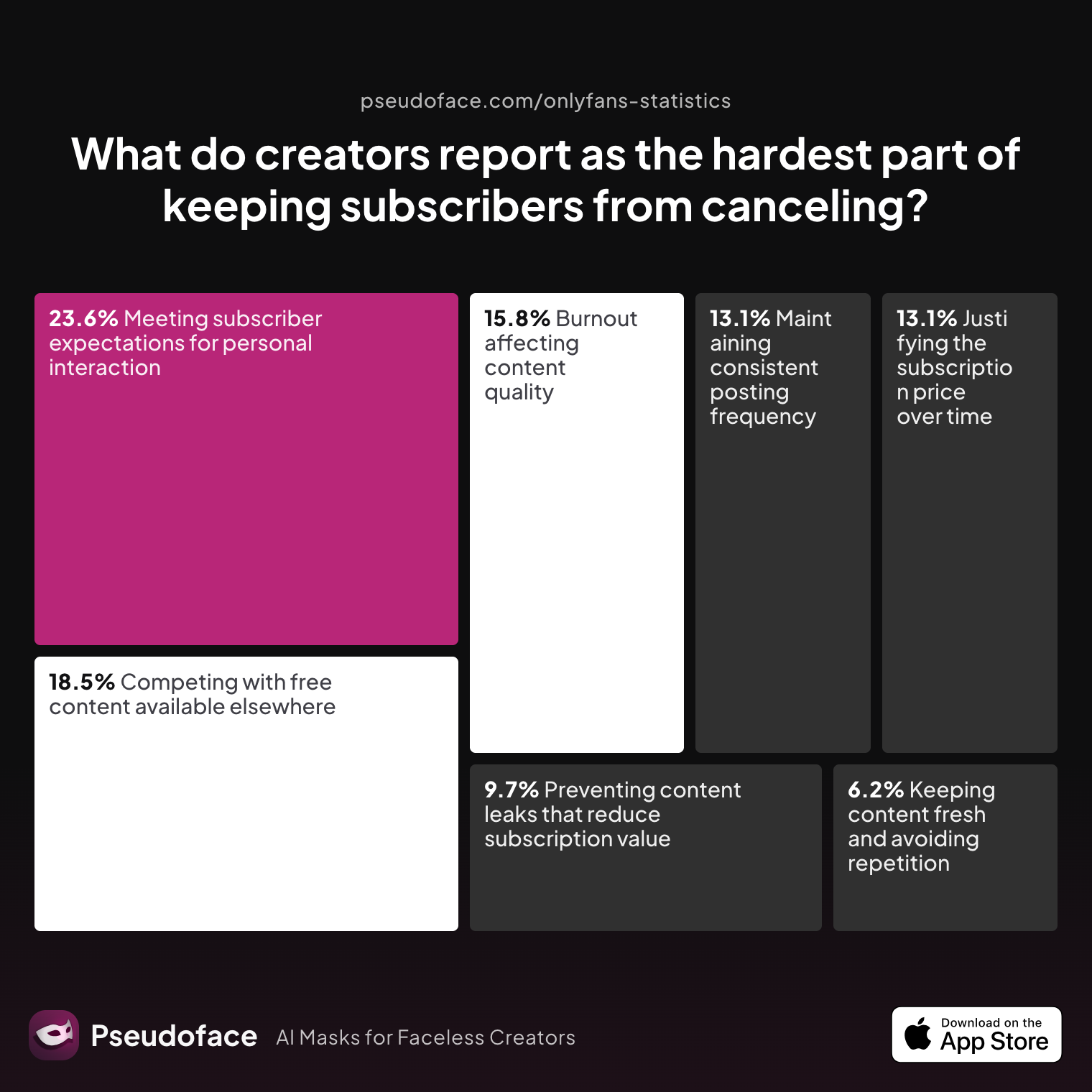
| Answer | Percentage |
|---|---|
| Burnout affecting content quality | 15.83% |
| Competing with free content available elsewhere | 18.53% |
| Justifying the subscription price over time | 13.13% |
| Keeping content fresh and avoiding repetition | 6.18% |
| Maintaining consistent posting frequency | 13.13% |
| Meeting subscriber expectations for personal interaction | 23.55% |
| Preventing content leaks that reduce subscription value | 9.65% |
The single hardest part of retention—as reported by nearly one in four creators—is meeting subscriber expectations for personal interaction. Close behind are external competition (18.5%) and avoiding burnout (15.8%). Consistent posting and fresh content are persistent thorns, but direct “DM time” is what most creators flag as unsustainable if unchecked.
This mirrors a central theme in Reddit threads: creators who set healthy DM boundaries and automate menu presentation fare better both mentally and financially in the long term. The “platform-native” approach—using all of Fansly’s settings, features, and automation to limit freeloaders—lets you focus on VIP spenders and repeat subs.
To keep your account healthy as you grow:
- Regularly review your privacy and safety settings (after every major platform update).
- Keep menus, pricing, and automated messages current.
- Document and escalate technical glitches via Fansly support quickly—don’t let unresolved flags stall your income.
- Take scheduled content breaks to prevent burnout and preserve content quality.
Fansly’s ecosystem rewards thoughtful, consistent experimenters. If something isn’t working—poor conversion, stalled sub growth, endless DMs—try a menu tweak, a new pin, or a workflow change. When in doubt, Reddit is full of living case studies, from quick-fix guides to burnout and break management playbooks.
For more detailed roadmaps (like FYP optimization or payout troubleshooting), see our topical companion guides. But for most, mastery starts by nailing these setup and feature fundamentals.
Fansly Setup & Feature FAQ
Q: What documents do I need to verify my identity on Fansly?
You need a government-issued photo ID and a facial selfie matching your ID for Fansly verification.
Typically, that's a passport or driver’s license (front and back), with a clear, well-lit selfie. Approval often takes 48–72 hours; blurry images or minor name/address mismatches cause most rejections. Reddit threads confirm most delays are fixed by re-uploading clearer images.
Q: How do I set up and display a custom content menu on Fansly?
You should create a detailed price/menu as a pinned post or automated DM; this is the most widely adopted Fansly menu format.
Fewer than 2% use only their bio for menus—a clear, organized pinned post or welcome-message menu ensures fans see your offers upfront. Reddit suggests updating the menu as offers evolve and inviting subs to discuss customs for maximum flexibility.
Q: What are the main built-in Fansly features I should use as a beginner?
Start with FYP previews, hashtags, post scheduling, and DM automation to boost discovery and manage workflow.
Chart data shows these are adopted by the majority of new creators and recommended to scale reach without heavy manual labor. Personalize your automated messages and organize scheduled content posts for best results.
Q: How many subscription tiers should I start with on Fansly?
Two or three tiers—standard wall and PPV, with a possible custom/VIP level—are optimal for most beginners.
According to the “active tier count” chart, almost 80% of successful creators use this structure at launch, expanding only as demand grows and their catalog deepens.
Q: Can I import or copy my OnlyFans content and menu to Fansly directly?
You can re-upload content, but direct menu imports usually fail—Fansly’s tier/wall system is structured differently from OF.
Reddit warns that copying OF setups leads to awkward or inconsistent menus; you’ll need to rewrite pricing and adjust for Fansly’s unique subscription/perk system.
Q: How should I price DMs, customs, or tip menu items on Fansly?
Base DM access either behind a paywall or on a minimum-spend trigger; adjust menu pricing over time based on demand and content value.
Creators suggest starting a bit higher than you expect, then softening via discounts or limited-time offers across tiers. For customs, open flexible discussions and iteratively update menu items as you learn your audience’s preferences.
Q: What profile picture styles work best for attracting fans on Fansly?
A friendly, semi-anonymous photo (no face or partial body) is the prevailing and safest choice.
This ratio (approx. 4:1 over non-explicit faces) reflects both privacy concerns and the power of curiosity as a click magnet.
Q: What are the most common pitfalls creators face during Fansly account setup?
The top pitfalls are unclear menu/profile organization, confusing feature options, tier/pricing missteps, and verification/documentation delays.
Address these with a stepwise approach: read Fansly’s own walkthroughs, use clear images, and set up a simple two-tier wall to start.
Q: How do I avoid FYP posting spam or reach bottlenecks on Fansly?
Aim for quality over quantity: schedule 2–3 posts weekly, tag wisely, and avoid “burst” spam to retain FYP traction.
Posting frequency and hashtag selection are mentioned dozens of times on Reddit—test and revise based on your own sub engagement metrics.
Q: What should I do if my account or posts get flagged during setup?
Double-check all compliance and privacy settings, troubleshoot with clear documentation, and contact Fansly support early if needed.
Most “false positive” flags are fixed by re-uploading documentation or adjusting image resolution/name details, per hundreds of Reddit case studies.
For targeted deep-dives—from analytics and promotions to payout troubleshooting—explore our Fansly feature map companion guides. Your account setup is only the beginning; feature mastery, healthy workflow, and adaptive learning are what sustain lasting growth.


