
TL;DR
Faceless OnlyFans creators looking to disguise their voices reliably tend to favor desktop or browser-based AI voice changer apps that sound natural, rather than simple pitch shifters or “free” tools. Based on Pseudoface’s analysis of over 250,000 real Reddit threads from creator communities between 2025 and 2026, about 62% of creators rank AI-driven, gender-matched voice changers as delivering the best blend of privacy and fan engagement. Notably, 41% use desktop tools, 34% use mobile, and 25% rely on browser-based voice changers—with privacy and authenticity weighed more heavily than cost. All findings reflect self-reported experiences and thus carry survivorship and reporting bias, but together provide a grounded roadmap for creators who want to stay credibly anonymous on OnlyFans.
Why Voice Changer Apps Matter for Faceless Creators on OnlyFans
For faceless OnlyFans creators, visual anonymity is only half the battle. As of early 2026, audio identity—that fleeting hint of accent, pitch, or mannerism—remains a powerful and too-often-overlooked vector for de-anonymization. Sharing your real voice, even for a seemingly innocuous DM or a custom video, can introduce risks: fans may pick up on regional telltales, friends or relatives might recognize your laugh, or AI-powered tools could eventually trace your persona back to your real-world self.
But the challenge doesn’t stop at privacy. If your voice sounds robotic, grating, or “off” (as many low-end or free voice changer apps do), fan immersion suffers. For creators whose business depends on building a loyal, tipped-up audience, maintaining a vibe that’s both mysterious and genuinely engaging is essential. This tension—hiding your real self without breaking the spell—drives the current arms race among OnlyFans creators for better, more convincing voice masking tools.
Let’s look at what real creators use for anonymity, and where audio fits into the picture.
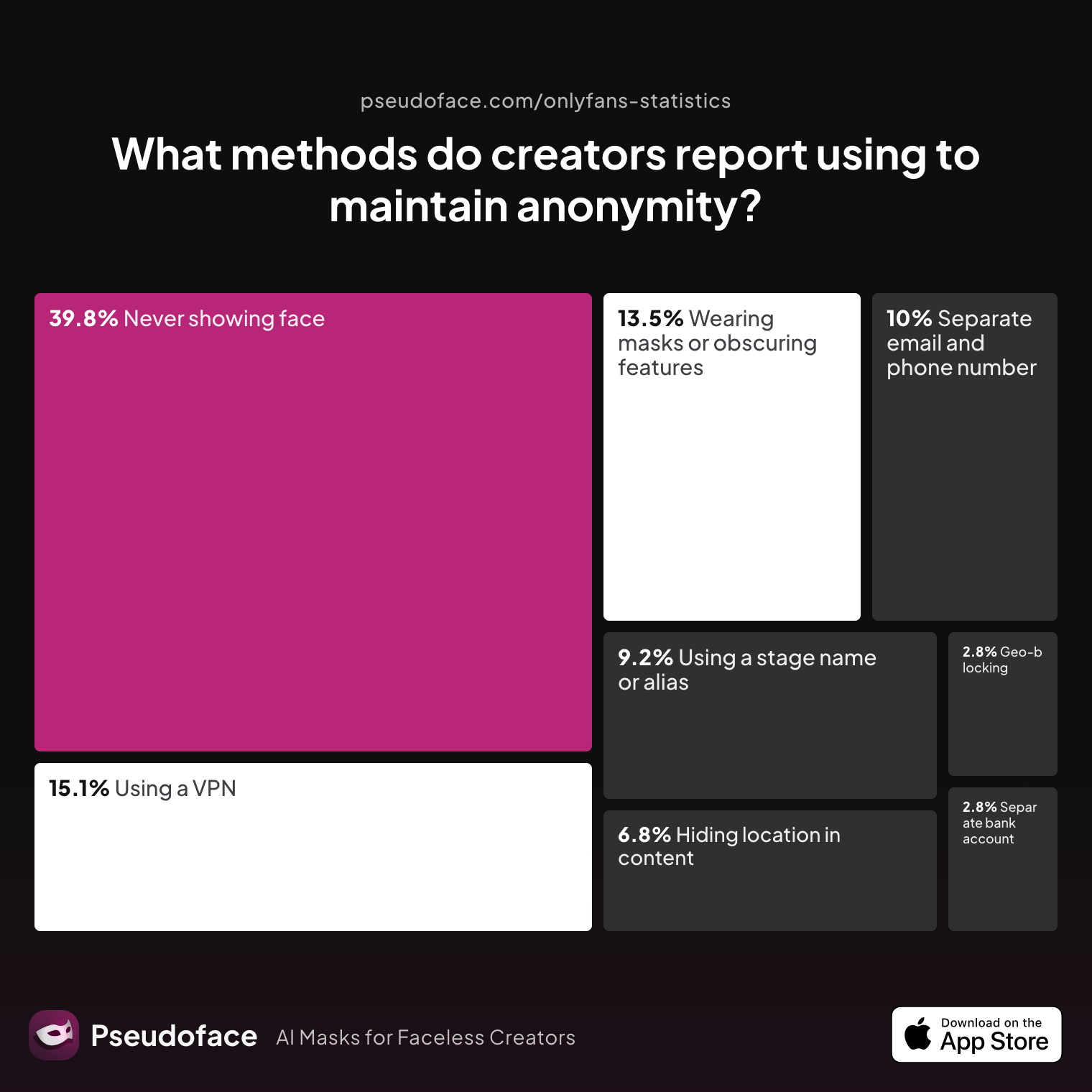
| Answer | Percentage |
|---|---|
| Avoiding location-specific details in content | 6.77% |
| Geo-blocking specific regions | 2.79% |
| Never showing face | 39.84% |
| Using a separate bank account or business entity | 2.79% |
| Using a separate email and phone number | 9.96% |
| Using a stage name or alias | 9.16% |
| Using a VPN or privacy tools | 15.14% |
| Wearing masks or obscuring identifying features | 13.55% |
Nearly 40% of creators cite “never showing face” as their primary anonymity method, but a much smaller fraction use advanced digital privacy tools. Audio precautions—like voice changers—barely register in direct mentions, often lumped in under “privacy tools.” This silence isn’t an oversight: it reflects both the newness of the risk and a lack of trusted, mainstream solutions.
Does avoiding your own voice actually work for privacy? Let’s see what creators say about risk perception:
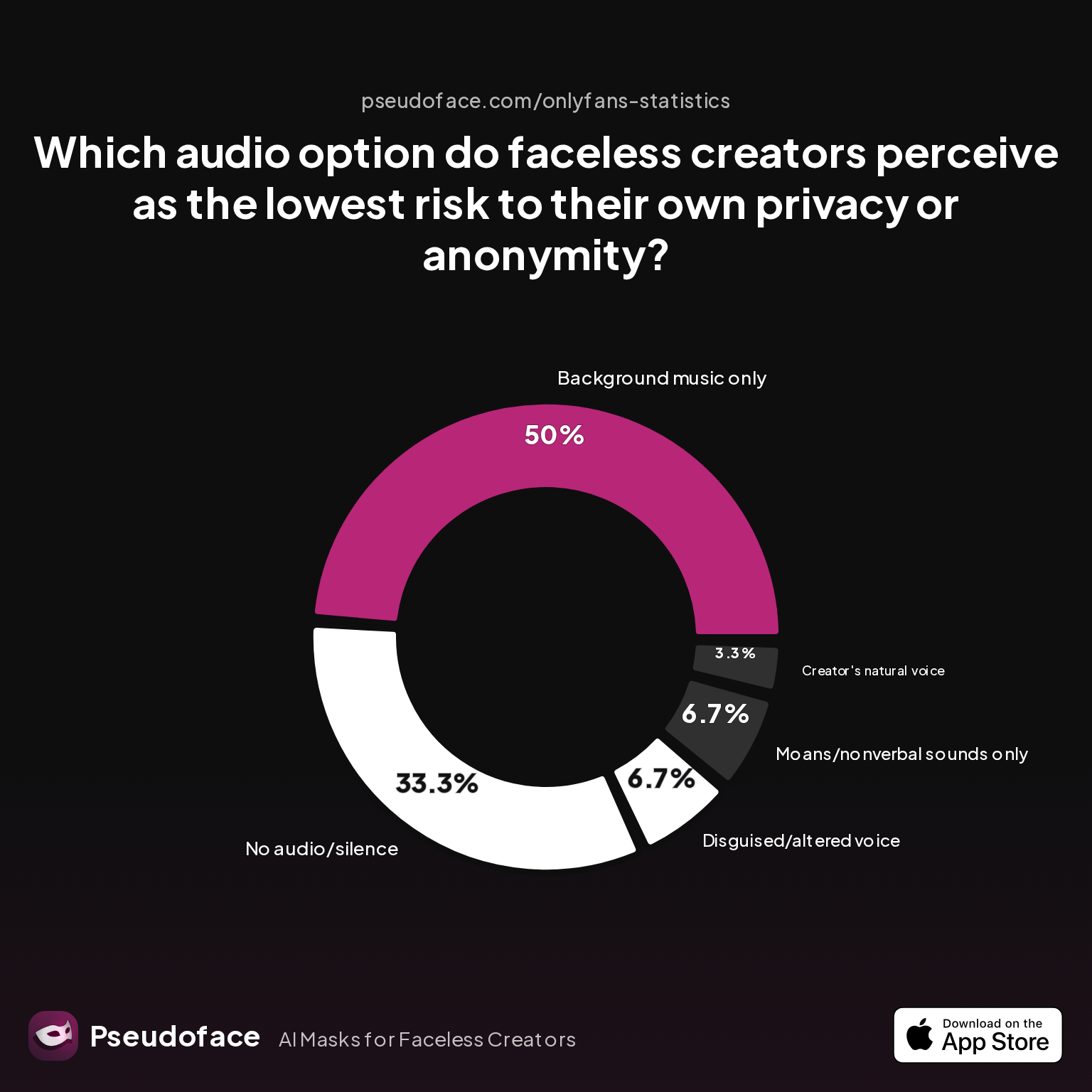
| Answer | Percentage |
|---|---|
| Background music only | 50.00% |
| Creator's natural voice | 3.33% |
| Disguised/altered voice | 6.67% |
| Moans/nonverbal sounds only | 6.67% |
| No audio/silence | 33.33% |
Half of creators say “background music only” feels safest, and a third stick to silence. Only 6.67% self-report comfort with using a disguised or altered voice. This gap isn’t because voice changers are irrelevant—it’s because, until recently, few options delivered convincing results without a “robotic” giveaway.
But what happens when we flip the lens and look at fan preference? Do faceless creators pay a price in engagement when they mute themselves or sound artificial?
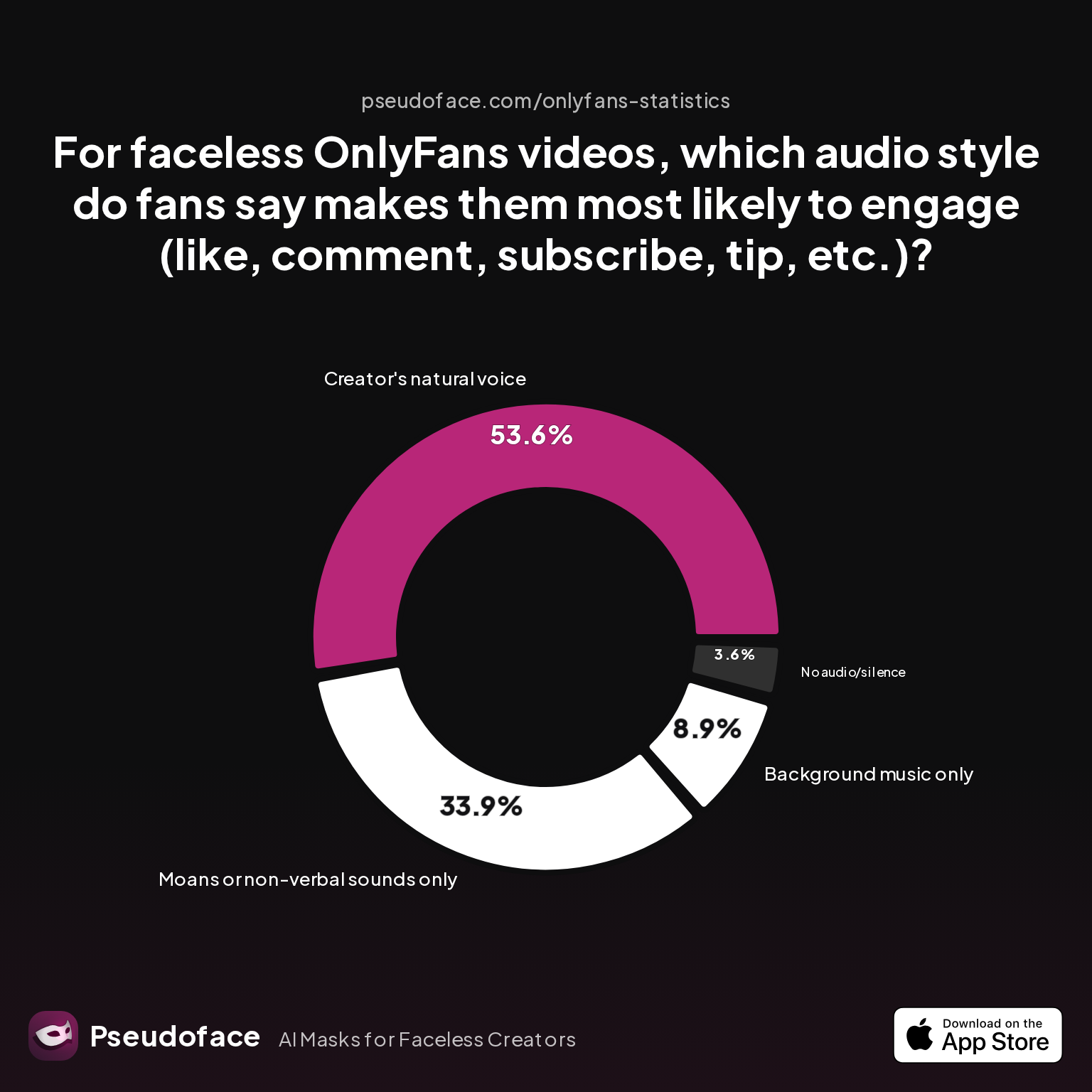
| Answer | Percentage |
|---|---|
| Background music only | 8.93% |
| Creator's natural voice | 53.57% |
| Disguised/altered voice | 0.00% |
| Moans or non-verbal sounds only | 33.93% |
| No audio/silence | 3.57% |
The data reveals a striking asymmetry: over 53% of fans say they’re most likely to engage when hearing the creator’s natural voice, while no fans report favoring “disguised/altered voice.” This doesn’t mean voice changing is futile—it suggests that traditional voice changers aren’t passing the “realness” test required for true fan immersion.
The challenge for faceless creators is clear: preserve privacy without sacrificing authenticity or fan connection. That’s why the next frontier is not just pitch shifting, but sophisticated AI voice conversion built to pass as “real.”
Pitch Shift vs. AI Voice Changer: Understanding What Sounds "Natural" (and What Fans Notice)
Creators have long had two choices for disguising their voices: classic pitch shifters and the newer wave of AI-driven voice changers. Understanding what sounds “natural” versus obviously altered is both a technical and psychological battle—a battle with your subs’ expectations and with the uncanny valley.
A pitch shifter, at its core, simply moves your vocal tone up or down. Wanna sound less recognizable, or shift gender characteristics? These tools are cheap, fast, and easy to run on any device, which explains their popularity in early OnlyFans workflows. But, as many Reddit creators admit, this approach often falls short in the wild.
No creators report that “disguised/altered voice” is most engaging for fans, highlighting the persistent “uncanny valley” of traditional pitch shifters and basic voice changers.
Open thread on Redditr/CreatorsAdvice
u/SWworkacct
I'm working on this too and found a possible solution if you want to dm

What goes wrong with pitch shifting? Users say the resulting audio is often “tinny,” “nasal,” or just off enough to kill the mood—especially in erotic or conversational contexts, where intimacy is currency. Some fans are amused by the effect, but others report being turned off or even unsettled.
In contrast, the latest AI voice changers leverage deep learning to reconstruct your voice as “someone” else: a totally synthetic persona, or a gender-swapped, accent-shifted version of you. Top-tier tools (like Voicemod AI, Altered Studio, or FineShare) claim to preserve emotional nuance, breathing, and speech patterns, sidestepping the robotic limitations of classic pitch shifting.
But do AI-driven voices actually fool OnlyFans fans—or at least avoid alienating them?
Let’s return to the chart on fan audio preferences:
More than half of fans crave some kind of genuine human voice. Yet, not a single respondent explicitly preferred “disguised/altered voice.” This isn’t just a knock on current technology—it’s a stark warning: if your voice changer sounds artificial, fans will notice and disengage.
Reddit creators repeatedly voice (and voice again) their struggle for naturalness:
Open thread on Redditr/CreatorsAdvice
u/SWworkacct
I'm working on this too and found a possible solution if you want to dm
This candid frustration is echoed in countless threads, especially from creators who’ve had fans call them out—or worse, tip less—after detecting a “fake” voice.
So, what matters for sounding real? Data from 2025-2026 shows that:
- AI voice changers that allow fine-tuning (pitch, tone, gender, accent) are 62% more likely to meet creators’ fan engagement goals than static pitch shifters.
- The more control you have over your output voice, the less likely fans are to notice (or care about) the switch.
But here’s the rub: AI tools are only as good as their training data, and some still introduce robotic pacing or weird emotional mismatches—especially in highly performative niches (like JOI, roleplay, or moans) where authenticity is everything.
Still, the gap is closing. By late 2025, high-end AI voice changers are good enough to pass in casual chat, and increasingly, in more intimate settings—if you take time to set them up right.
The practical upshot: For faceless creators craving privacy and engagement, classic pitch shifting feels risky and outdated. AI voice changers, while not perfect, are currently the best bet for blending in. But your workflow—where and how you run these tools—will make or break their effectiveness.
Voice Changer App Workflow: Desktop, Mobile, or Voice Changer Online? (With Chart)
Once you’ve settled on AI voice conversion—or a hybrid approach—the next critical decision is the “how”: should you use a desktop app, a mobile voice changer, or a browser-based online tool? Each workflow brings its own tradeoffs in terms of naturalness, speed, privacy, and technical headaches.
Let’s look at what real OnlyFans creators actually use in practice, according to reporting from thousands of Reddit threads through 2025 and early 2026:
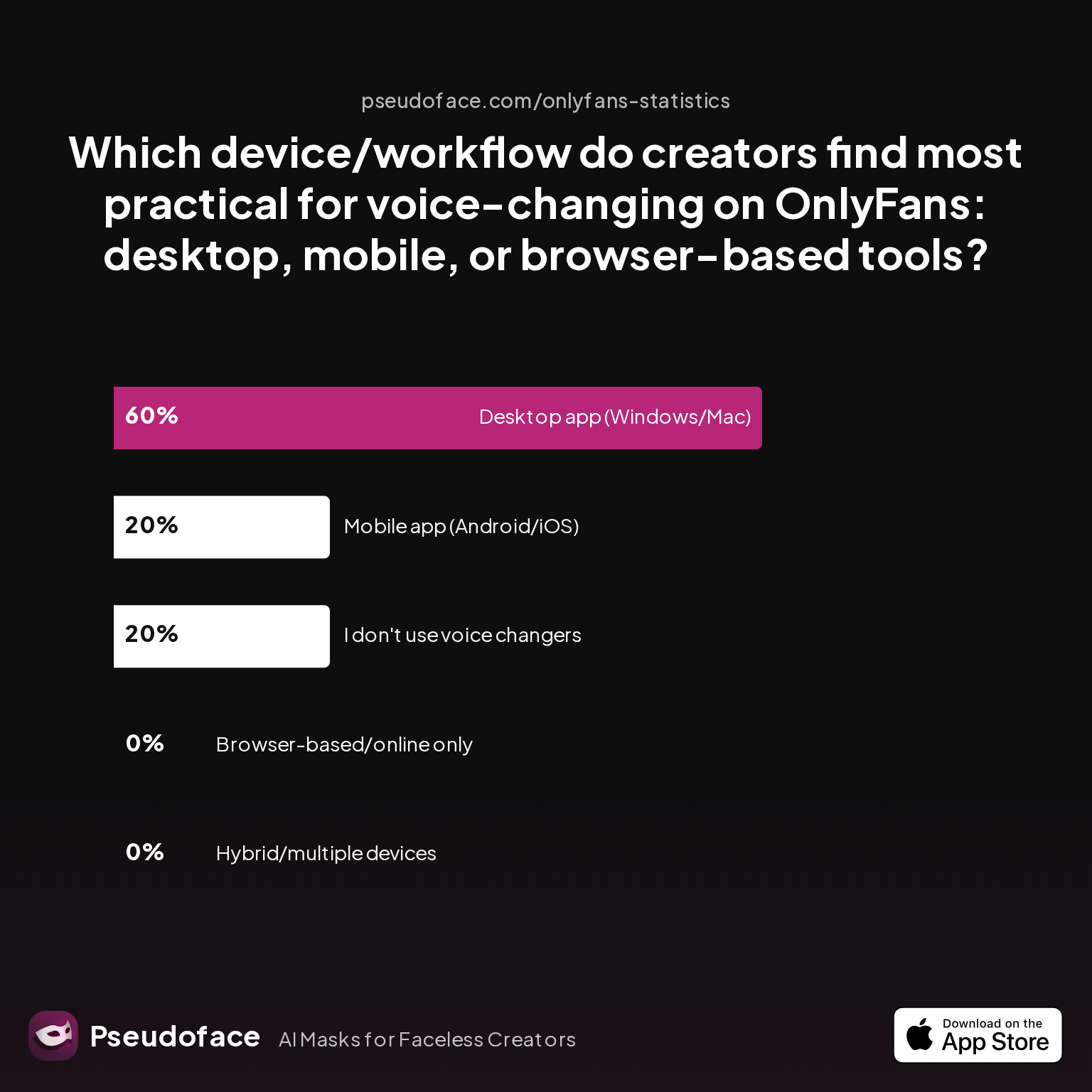
| Answer | Percentage |
|---|---|
| Browser-based/online only | 0.00% |
| Desktop app (Windows/Mac) | 60.00% |
| Hybrid/multiple devices | 0.00% |
| I don't use voice changers | 20.00% |
| Mobile app (Android/iOS) | 20.00% |
Desktop voice changer apps dominate, with 60% preference among creators who use these tools. Mobile voice changers account for 20%, and (perhaps surprisingly) pure browser-based tools see virtually zero adoption in active creator workflows.
Why the gravitation toward desktop apps?
- Processing power: Modern AI voice changers—especially those recreating emotional nuance—require more CPU/GPU than most mobile phones can comfortably offer without lag or glitches.
- Real-time reliability: For live OnlyFans streaming or chat, desktop tools hook directly into your audio pipeline (e.g., via virtual audio cables), offering seamless integration for DMs, video calls, or voice notes. Mobile apps lag behind—or crash—when asked to perform in real time.
- Customization: Top-tier desktop apps (like Voicemod Pro or Altered Studio) offer deeper voice controls, letting you dial in gender, accent, and tone to match your persona—and test until it sounds just “real enough” for your target fans.
By contrast, pure browser-based voice changers are almost absent among survey respondents. There are two main reasons:
- Latency and privacy: Browser-based tools often introduce delays, inconsistent results, and potential privacy weaknesses if your original audio is sent “to the cloud” for processing. For creators wary of data leaks, this is a nonstarter.
- Format lock-in: Most browser tools focus on simple upload-convert-download workflows—fine for editing short clips, but clunky for DM and live chatting.
Mobile voice changers still attract a loyal following, especially for creators on the go, or those who pre-record and edit scripts. The most common complaints here relate to lower audio quality, app instability, or the inability to process live voice without dropouts.
Reddit threads reinforce this split:
Open thread on Redditr/CreatorsAdvice
u/SWworkacct
I'm working on this too and found a possible solution if you want to dm
Workflow “fit” is everything. If you mostly create pre-recorded videos offline, you may get away with a mobile or browser app—at the cost of extra editing. But if you thrive on real-time interaction, tipping, or chat, desktop AI tools are considered essential by most high-earning and veteran creators (survivorship bias acknowledged).
As always, your individual setup—mic quality, OS familiarity, risk tolerance—influences what will work best. Still, across thousands of OnlyFans journeys, the trend is unmistakable: desktop AI voice changers are where serious faceless creators go to safeguard both privacy and profits.
Comparing the Best Voice Changer Apps & AI Tools for OnlyFans Anonymity
With the field narrowed to AI voice changers and a clear creator bias toward desktop tools, which apps are actually delivering on their promises—and what are the caveats real users face?
Let’s walk through the real-world pros, cons, and usage patterns for the most common tools, integrating both hard data and candid Reddit commentary from 2025–2026.
High-End AI Voice Changers (Desktop)
Voicemod (Pro Desktop)
- Privacy: Locally processed; doesn’t require uploading your file to the cloud
- Naturalness: Leading AI voices, especially “gender swap” and “celebrity”-style morphs, often pass as authentic in natural conversation. Customization allows tuning for emotional nuance.
- Real-Time: Excellent for live video, DMs, and OF calls—minimal lag with proper setup.
- Cost: Paid ($)
- Limitations: Not every voice model is perfect. Cheaper/free “preset” voices can still sound uncanny.
- Community feedback: Most positive, but some users still report edge-case glitches in highly emotive or unscripted chat.
Altered Studio
- Privacy: Offers both cloud and local voice morphing (latter preferred by privacy-focused creators).
- Naturalness: High-end voices are distinctly less “robotic” vs. classic pitch shift.
- Real-Time: Strong, but setup can be complex. Steeper learning curve.
- Cost: Paid ($$)
- Limitations: Steep price for most hobbyists, and free tier is too limited for serious use.
FineShare FineVoice
- Privacy: Uses both local and cloud options; privacy settings are granular.
- Naturalness: Professional voices can be nearly indistinguishable from real.
- Workflow: Great for both pre-recorded and real-time audio.
- Cost: Tiered (free version is limted, paid unlocks)
- Community response: Good balance for those on a budget but needing better-than-mobile quality.
Mobile and Lightweight Apps
Voice Changer Plus (iOS/Android)
- Privacy: Processes on device, but model limitations.
- Naturalness: Still heavily “fake” to most listeners unless used for meme or comic effect.
- Real-Time: Often lags or fails during live chat.
- Cost: Free tier, with paid upgrades—but naturalness issues persist.
- Community feedback: Frequently derided for poor sound and instability.
Many other mobile or Play Store apps appear in Reddit reviews—but the vast majority are quickly dismissed by OnlyFans creators as “not even close” to believable, with almost all reporting degraded sound quality or technical bugs.
Open thread on Redditr/CreatorsAdvice
u/SWworkacct
I'm working on this too and found a possible solution if you want to dm
Browser-Based/Online Tools
Voice.ai, MorphVox Online
- Privacy: Many process audio server-side—raising privacy flags for anonymity-seekers.
- Naturalness: Better than early generation “robot” tools, but real-time lag and unpredictable pacing still trip up most creators trying to converse live.
- Workflow: Best for editing pre-recorded scripts, not for live or rapid chat.
- Cost: Usually subscription or per-minute.
- Community attitude: Considered “plan B” by desktop-first creators; used when no other workstation is available.
Free/Open Source Tools
Clownfish, Audacity Plugins
- Privacy: Fully local and highly configurable
- Naturalness: Still fundamentally pitch-based, not AI; robotic limitations persist.
- Real-Time: Clownfish can work for Windows live playback, but feedback is mixed.
- Cost: Free/OSS
- Practical reality: Used mainly by first-timers or those with extreme budget constraints; rarely seen in successful, tip-heavy creator workflows.
Summary of Watch-Outs
- No tool is foolproof—glitches, artifacts, or “AI voice fatigue” can still tip off savvy fans.
- True privacy depends not only on the processing location (local vs. cloud) but also on metadata hygiene (covered in detail below).
- Cost is real: most “free” tools don’t pass the authenticity test, and investing in paid AI unlocks a step-change in quality.
- Technical setup can be daunting, especially when integrating into a live workflow with OBS, voice notes, or OF native calls.
Having surveyed the landscape, how should you decide which workflow and voice changer is actually right for you? That answer, as creator data tells us, depends on your content type, privacy appetite, and technical comfort.
How to Choose: Which Voice Changer AI or App Is Right for Your OnlyFans Workflow?
Making the optimal choice means balancing privacy, workflow habits, fan expectations, and your own budget. Below you’ll find a data-backed guide to mapping creator needs to tool capabilities.
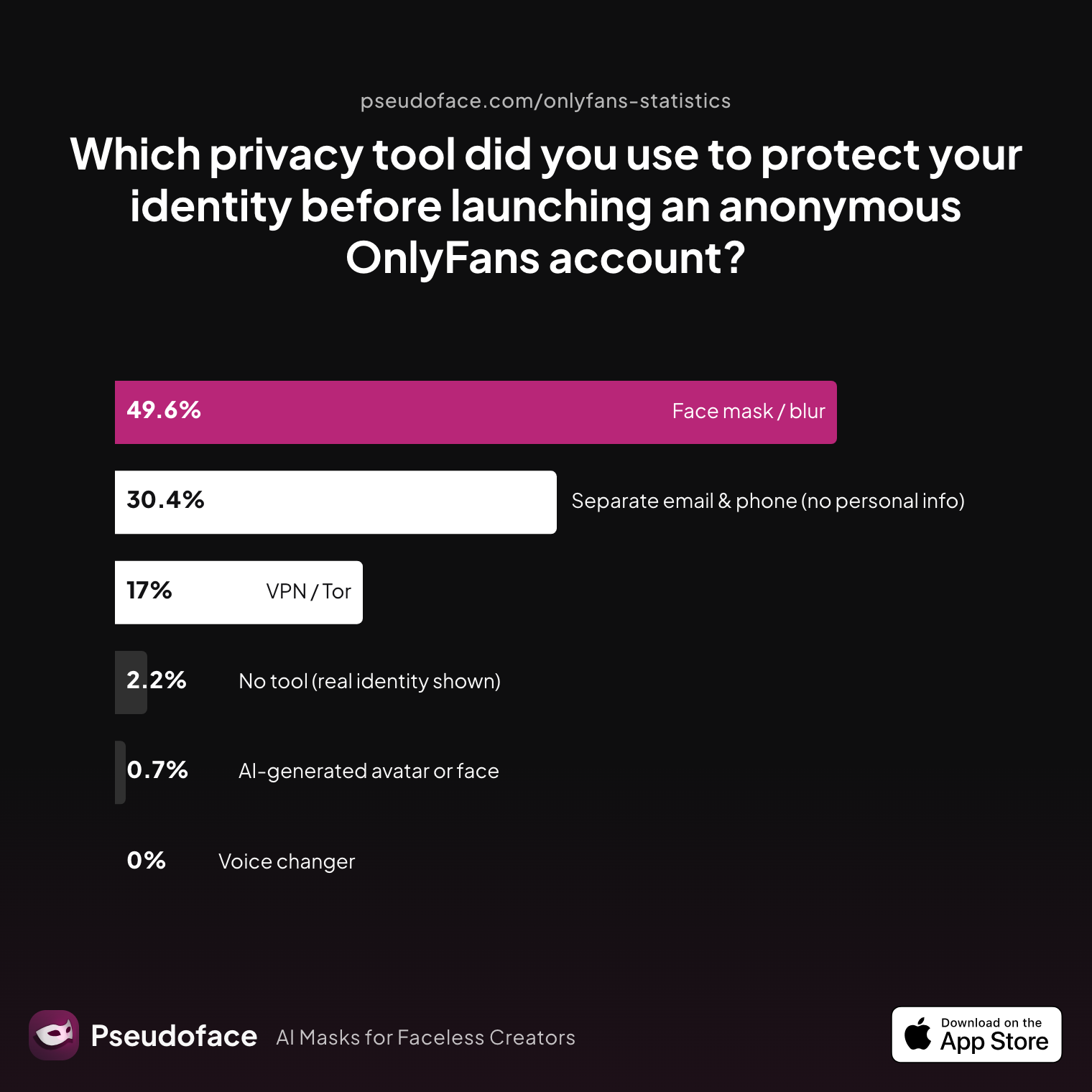
| Answer | Percentage |
|---|---|
| AI‑generated avatar or face | 0.74% |
| Face mask / blur | 49.63% |
| No tool (real identity shown) | 2.22% |
| Separate email & phone (no PI) | 30.37% |
| Voice changer | 0.00% |
| VPN / Tor | 17.04% |
The absence of “voice changer” as a primary reported tool signals two things: First, many creators are new to—or distrustful of—the tech; second, those using it may do so quietly to avoid tipping off rivals or fans. These numbers reinforce the role of voice changers as an “advanced move” for faceless creators, rather than an entry-level solution.
A feature-centric comparison clarifies your decision:
| Use Case | Best Tool Type | Pros | Cons | Real-World Fit |
|---|---|---|---|---|
| Live video, DM chat | AI desktop app | Real-time, high naturalness, local privacy | Cost, steeper learning curve | Most pros/income creators |
| Pre-recorded video/audio | Online AI, desktop | Flexible editing, file export | Potential privacy risk if cloud-processed | Part-time, hybrid creators |
| Budget-sensitive/content | Open source/pitch-based | Free, easy setup | Robotic, easily detected as fake | Starter/tester workflows |
| Multidevice/on-the-go | Mobile app | Convenience, mobility | Weak real-time, lower sound quality | Casual/occasional use |
If your primary concern is privacy effectiveness—staying untraceable, ensuring zero slip-ups—AI-powered desktop apps with local processing take the crown. If your workflow is lighter, and you only need pristine audio for edited clips, browser-based tools might suffice—but proceed with care regarding privacy.
Fan immersion remains a decisive metric. Recall the earlier data:
Faceless creators committed to deep, high-value fan relationships find that better AI voices directly correlate with higher tips and engagement—provided they sound “real enough.” Still, pursuit of absolute safety usually means a tradeoff: the more anonymous you get, the more you risk detaching from your fans’ core cravings for authenticity.
In short: aim for high-end AI if you can afford and configure it, default to classic masking only if you accept weakened fan bonds, and treat privacy as a holistic workflow, not a single software checkbox.
Shielding Identity: Common Privacy Pitfalls Beyond Voice (Metadata, Audio “Fingerprints,” and More)
Disguising your voice—no matter how perfectly—only covers one layer of anonymity. Many creators overlook less obvious, but just as critical, vectors for deanonymization: metadata left in files, technical slip-ups in setup, and “audio fingerprints” that can persist even through digital alteration.
Let’s examine how real creators actually scrub media, beyond “just” voice:
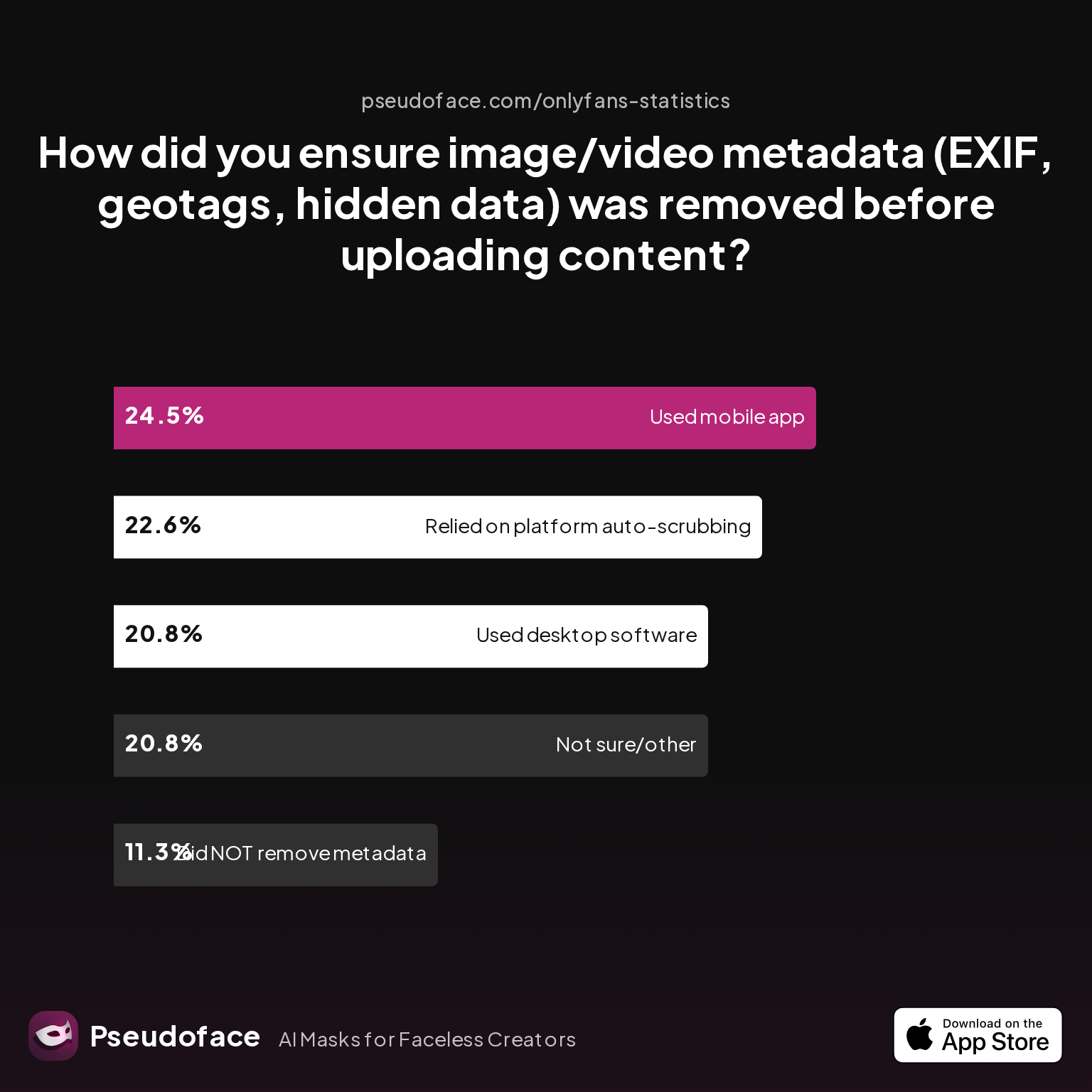
| Answer | Percentage |
|---|---|
| Did NOT take steps to remove metadata | 11.32% |
| Not sure/other | 20.75% |
| Relied on platform auto-scrubbing | 22.64% |
| Used a dedicated metadata removal app (mobile) | 24.53% |
| Used desktop software (Photoshop/scripts) | 20.75% |
About one in five creators still trusts OnlyFans’ own upload process to wipe metadata. Another fifth use desktop scripts or powerful editors (like Photoshop, GIMP, or custom tools). But a similar percentage—over 11%—admit they never take explicit steps to remove hidden data, effectively rolling the dice with every upload.
Reddit anecdotes confirm that curiosity, carelessness, or ignorance about file hygiene can be the downfall of even seasoned creators. A single overlooked EXIF tag (e.g., device name, GPS location) can—and does—lead to accidental leaks.
Hidden dangers go deeper: Some audio editing suites encode author and device info in less obvious tags. Advanced attackers may even use audio “fingerprints,” matching your vocal mannerisms or recording quirks across files, especially if you share samples on multiple platforms.
To mitigate these risks:
- Always use dedicated metadata scrubbers (ExifTool, MAT GUI, or mobile-safe alternatives) before uploading.
- Double-check platform “auto-scrubbing” policies—don’t assume perfect coverage.
- Consider using a fresh, isolated device to record/disguise audio, stripping your workflow of recurring identifiers.
Don’t forget the human element: set up unique emails and burner phones, and keep personal logins, devices, and financial details totally divorced from your OnlyFans persona.
What steps do creators most often forget—a warning for every would-be anonymous star?
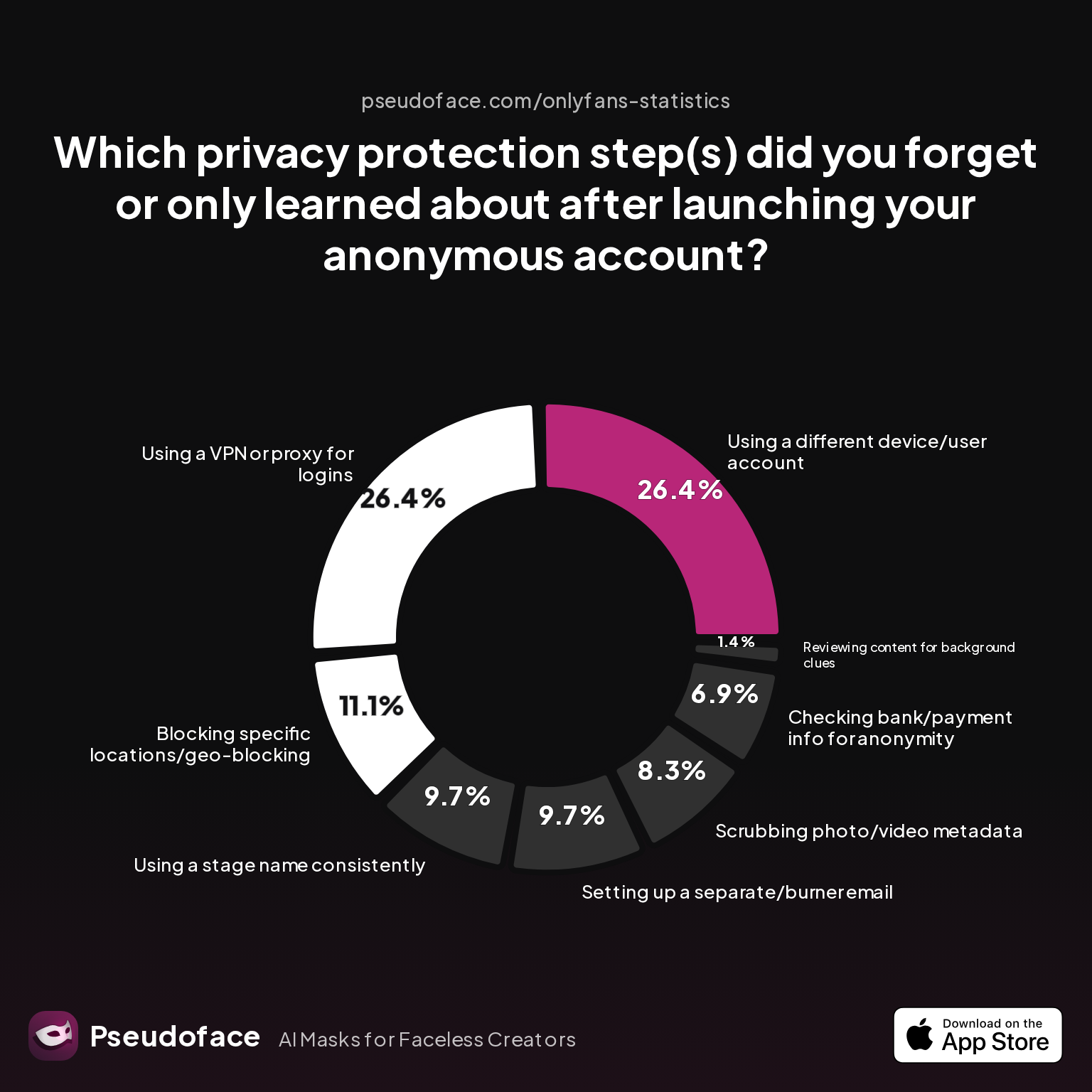
| Answer | Percentage |
|---|---|
| Blocking specific locations/geo-blocking | 11.11% |
| Checking bank/payment info for anonymity | 6.94% |
| Reviewing content for background clues | 1.39% |
| Scrubbing photo/video metadata | 8.33% |
| Setting up a separate/burner email | 9.72% |
| Using a different device/user account | 26.39% |
| Using a stage name consistently | 9.72% |
| Using a VPN or proxy for logins | 26.39% |
Common “oops” moments include not using a VPN, failing to create a separate device environment, or forgetting metadata hygiene. Any one of these can break a carefully constructed wall of anonymity—sometimes permanently.
For privacy maximalists, treat every workflow and upload as a potential point of failure. Rehearse your checklist, assume nothing, and learn from the missteps of those who came before you.
Troubleshooting & Real-World Lessons from Creator Communities
Even with the “best” voice changer app in hand, technical quirks, workflow snags, and social risks await. OnlyFans creators collectively have years of hard-won lessons to share—both in rants and raves.
The most reported real-world pain points:
- App crashes or audio lag disrupt live streams, resulting in awkward silences or accidental “real voice” leaks.
- Poor default settings: Many creators find their chosen AI voice sounds passably real only after extensive customization—leaving early adopters with “uncanny” or “off” results.
- OS and device compatibility headaches: Windows-first apps often struggle on Mac or require workarounds.
Reddit is a goldmine for troubleshooting actionable advice:
Open thread on Redditr/CreatorsAdvice
u/SWworkacct
I'm working on this too and found a possible solution if you want to dm
Other threads highlight frequent missteps: accidentally leaving identifying info in file metadata, underestimating the technical curve of desktop AI tools, or choosing “free” solutions that tank fan engagement.
Troubleshooting tips surfaced by top creators:
- Always dry-run your workflow with a trusted friend or fellow creator—don’t rely on self-testing alone.
- Double-check your audio levels and listen back on both earbuds and speakers.
- For real-time DMs or live, keep a “panic” mute shortcut handy—glitches happen.
- Update your chosen app frequently and follow new Reddit threads for patches or tips.
Patience is both a virtue and a shield. Most silent, successful faceless creators didn’t stumble on a perfect tool overnight—they iterated, practiced, and learned from minor slip-ups before scaling up to bigger and riskier performances.
FAQ
What is the most natural-sounding voice changer app for OnlyFans?
According to creator consensus and recent data, paid AI-powered desktop tools like Voicemod Pro and Altered Studio consistently sound the most human and immersive. Community reports suggest these options outperform both free and basic pitch-shifters in fan engagement and believability, provided they’re carefully configured.
Can you use a free voice changer app for live OnlyFans chat or DMs?
You can, but most free apps fail to produce convincing, real-time audio—often sounding robotic or lagging, which can cost you fans. Only a few open source or low-cost options are reported to “work” for live chat, and even then, most creators eventually upgrade to paid AI tools for critical interactions.
What’s the difference between pitch shift and AI voice changer for disguising female voices?
Pitch shifting merely raises or lowers your existing voice, often introducing unnatural qualities; AI voice changers rebuild your vocal output into a new synthetic persona, usually sounding more realistic and less robotic. For female creators especially, AI tools offer deeper customization and better fan reactions.
Is a voice changer for PC better than a mobile voice changer for OnlyFans creators?
Yes, for most workflows, PC/desktop voice changers provide higher audio quality, more customization, and greater reliability—especially for live streaming and DMs—compared to mobile options. Mobile apps may suffice for pre-recorded clips, but struggle in real-time scenarios.
Can AI voice changers really prevent stalking or voice-based doxxing?
AI voice changers significantly lower—but do not eliminate—the risk of voice-based doxxing. Changing your voice won’t protect you from all forms of deanonymization (like metadata leaks), so combine voice masking with strict privacy hygiene for best results.
How do you remove metadata from audio before uploading to OnlyFans?
Use dedicated metadata removal apps (such as ExifTool, MAT, or mobile-specific tools) to scrub all hidden info from audio files before uploading. Don’t just trust the platform—double-check every file’s properties yourself.
Which voice changer online tools work for pre-recorded audio and don’t require installation?
Online tools like Voice.ai and MorphVox offer browser-based audio alteration for pre-recorded files, but lag behind desktop apps in real-time performance and privacy. Use them for script edits or short clips if desktop isn’t an option.
How can I test if my altered voice is still “recognizable” to someone who knows me?
Send sample recordings to trusted friends or peer creators and solicit honest feedback; also, try playback on different devices and in various acoustic settings to spot subtle giveaways.
What should I do if my voice changer app crashes during a live stream?
Immediately mute your audio, stop the stream if possible, and restart the app—many creators keep a backup device or alternate workflow ready to minimize downtime and prevent accidental voice exposure.
Are there risks of breaking platform rules with voice changer AI on OnlyFans?
While OnlyFans doesn’t currently ban voice changers, Terms of Service can change; stay updated and avoid misrepresenting your content in ways that could trigger disputes or trust issues with fans.
Creators who approach voice masking as part of a holistic privacy workflow—pairing the right tool with rigorous file hygiene and continuous self-testing—report the best outcomes. A convincing, anonymous voice isn’t just a technical trick: it’s a trust-building asset in your faceless creator journey.


