
TL;DR
Privacy-conscious creators on OnlyFans can use minor beauty filters and makeup with relatively low risk, but heavy facial alteration—like AI face swaps or full masks—significantly increases chances of being flagged during both identity verification and ongoing content review. According to Pseudoface’s analysis of over 250,000 public Reddit threads from real adult content creators (2025-2026 dataset), the most common causes of OnlyFans face verification failure are face covering, blurred features, and mismatches between account images and ID. Reported success rates for verification dip below 30% for creators attempting face swaps or untagged facial obfuscation. Face re-verification and takedowns spike after visible appearance changes or use of unreliable editing apps. These findings reflect lived experience but are heavily shaped by survivorship and self-selection bias—“what works” is directional, not guaranteed, and unpredictability remains a fact of life for faceless creators.
OnlyFans Face Verification: How the System Works for Faceless and Filtered Creators
When you sign up or need to confirm your identity on OnlyFans, the platform demands more than a simple picture. It’s a biometric system—software compares your face in a selfie (often with your government ID visible) to both your ID photo and your previously-verified looks. The goal: stop impersonation, underage content, and financial fraud, ticking boxes for global KYC (Know Your Customer) laws. But the same strictness that protects the platform makes life tricky for creators who value privacy, rely on beauty filters, or change their appearance for personal or professional reasons.
The tension crops up fast for faceless or heavily filtered creators. On paper, OnlyFans requires an “unaltered, clearly visible face, with no filters, masks, or digital editing” for verification. The challenge: many creators justifiably fear doxxing, stalkers, or lost future job prospects if their real face is attached to adult content. Blunt policy meets nuanced reality in every blurry, shadowed, or AI-altered photo that gets bounced back.
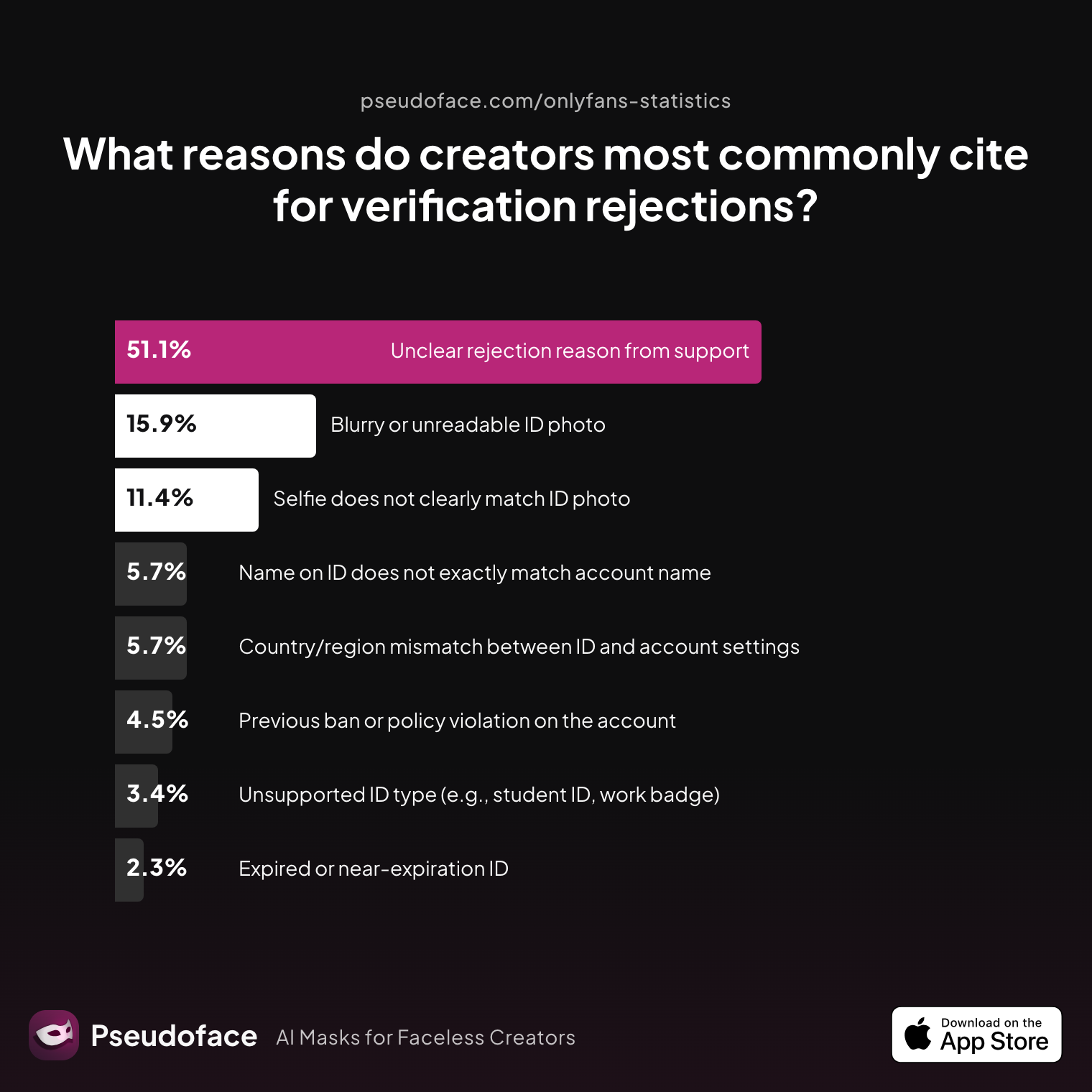
Let’s get concrete: what actually causes face verification to fail?
| Reason | Percentage |
|---|---|
| Blurry or unreadable ID photo | 15.91% |
| Country/region mismatch between ID and account settings | 5.68% |
| Expired or near‑expiration ID | 2.27% |
| Name on ID does not exactly match account name | 5.68% |
| Previous ban or policy violation on the account | 4.55% |
| Selfie does not clearly match ID photo | 11.36% |
| Unclear rejection reason from support | 51.14% |
| Unsupported ID type (e.g., student ID, work badge) | 3.41% |
Over half of creators cite “unclear rejection reason from support”—a revealing signal that OnlyFans’s verification system is both rigid and opaque. The remaining top complaints center on image quality (“blurry or unreadable ID photo” at about 16%) and facial mismatch with the ID (11%). It’s worth stressing: even if you perfectly mirror your legal ID, if your selfie looks obviously edited or your appearance has significantly changed since your last successful verification, algorithms may still reject you.
Yet, paradoxically, many who eventually pass verification admit to using light makeup or minor beauty filters—a mismatch between official rules and real-world enforcement. Practical enforcement is inconsistent and, as countless Reddit threads show, often comes down to luck, timing, and the current “strictness” of the automated system.
This foundational layer—Officially Zero Tolerance versus Creators’ Adaptive Tricks—sets the stage for every faceless creator’s risk calculation. Having established these policy lines and gaps, let’s move from theory to practice: what face-hiding and -altering methods do OnlyFans creators actually use, and how prevalent are they in the wild?
How Creators Hide Their Faces: Filters, AI, Swaps, and Masks in the Real World
Despite OnlyFans’s strict wording, the reality for creators is nuanced. The desire for anonymity is so strong that many experiment with disguises—digital and physical—before, during, and after entering the platform. Surveying actual adoption rates offers a clearer picture of the underground norms within the OnlyFans ecosystem.
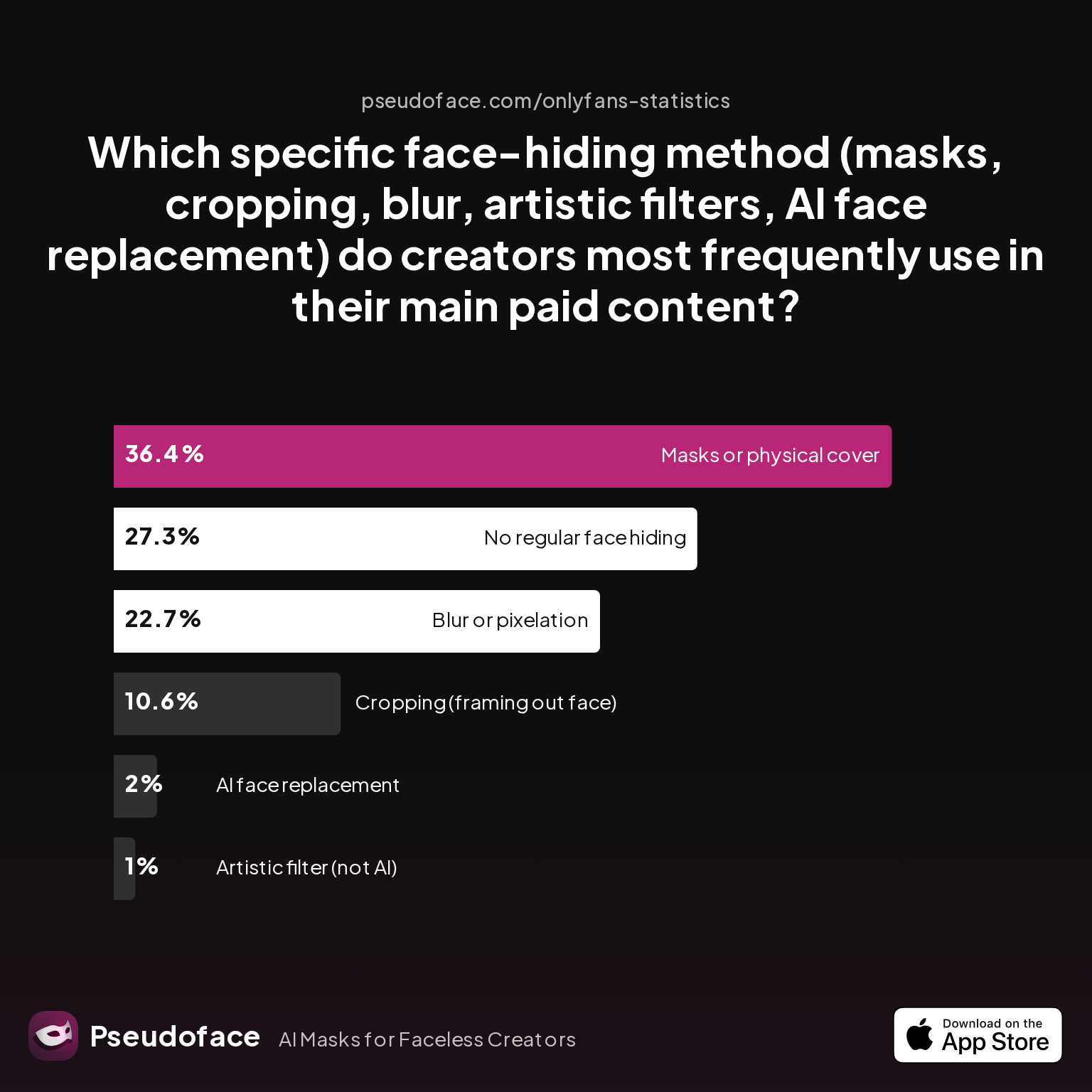
First, let’s look at which methods dominate among creators aiming to stay unrecognizable:
| Method | Percentage |
|---|---|
| AI face replacement | 2.02% |
| Artistic filter (not AI) | 1.01% |
| Blur or pixelation | 22.73% |
| Cropping (framing out face) | 10.61% |
| Masks or physical cover | 36.36% |
| No regular face hiding | 27.27% |
Physical masks and coverings (over 36%) lead the pack, likely due to their straightforwardness and perceived safety. Face blurring or pixelation comes next, favored by nearly a quarter of creators, followed by cropping. AI-driven face replacement and heavy artistic filters remain rare, likely reflecting both technical barriers and fear of platform detection. Still, over one in four creators simply embrace platform rules and risk by showing their faces, perhaps relying on light makeup or minimal digital touch-up.
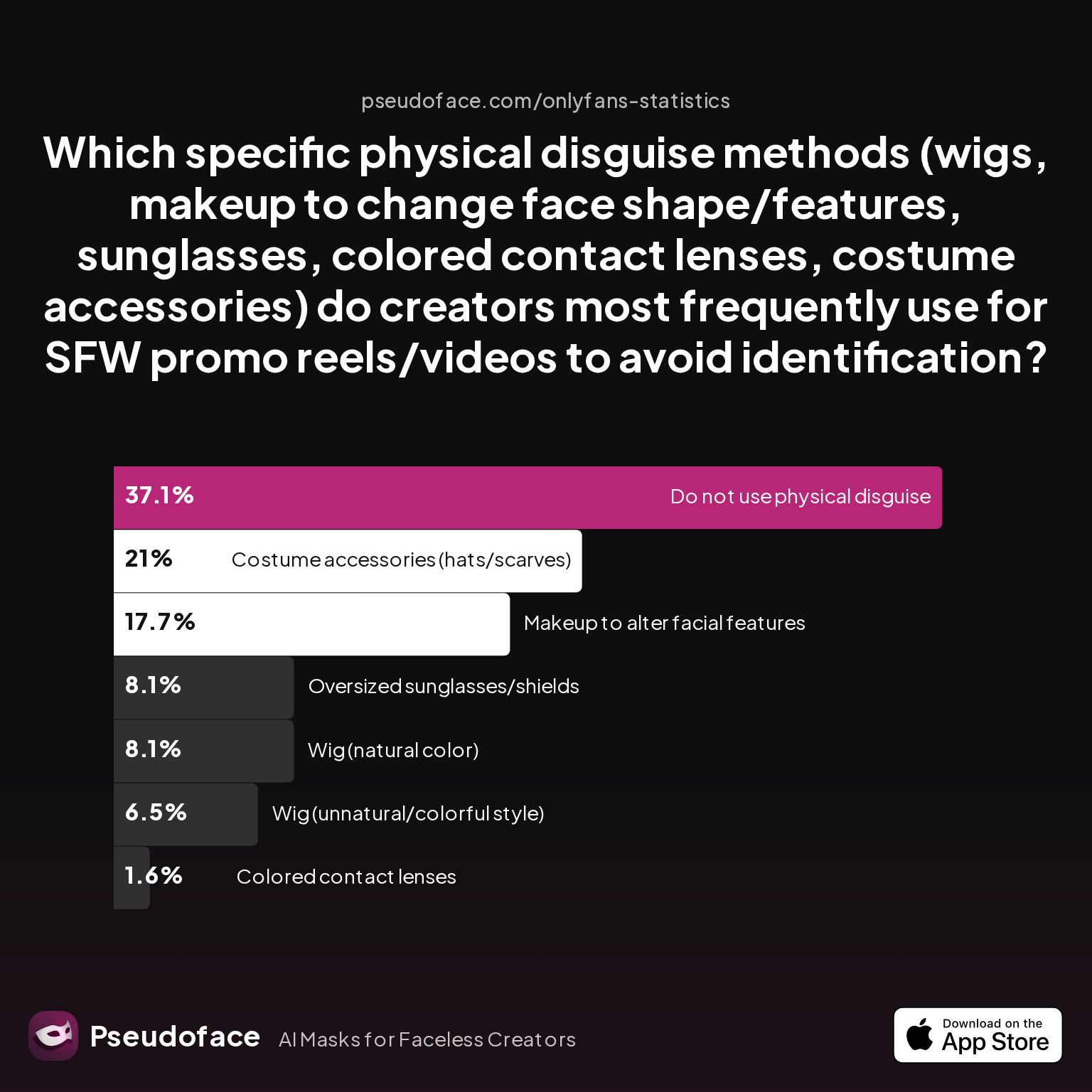
Now, among those who do choose disguise, what are the subtler tools of the trade?
| Method | Percentage |
|---|---|
| Colored contact lenses | 1.61% |
| Costume accessories (hats/scarves) | 20.97% |
| Do not use physical disguise | 37.10% |
| Makeup to alter facial features | 17.74% |
| Oversized sunglasses/shields | 8.06% |
| Wig (natural color) | 8.06% |
| Wig (unnatural/colorful style) | 6.45% |
Softer disguises—wigs, makeup to alter features, and accessories—are prominent. Nearly 21% reach for costume accessories, and almost 18% use makeup beyond basic beauty edits to shift facial recognition. Sunglasses and wild-colored wigs, however, remain less common—likely reflecting OnlyFans’s demand for visible, unobstructed eyes and reluctance to approve high-obstruction disguises.
The big picture, as of late 2025, is that while overt, full-face AI swaps are uncommon, a majority of creators still use some form of camouflage—whether a blur, a clever crop, or a well-placed scarf. Combining this with the high volume of forum posts dedicated to tips, tricks, and troubleshooting, it’s clear: the battle for privacy is waged method by method, each with different trade-offs.
So among all these approaches, which actually trip up OnlyFans verification the most? The next section gets into the granular failure points—where even experienced creators routinely hit walls.
OnlyFans Face Verification Not Working? The Most Common Failure Points
Rejection is a fundamental part of the OnlyFans face verification journey—so common that entire Reddit communities exist solely to troubleshoot the pain. According to Pseudoface’s synthesized analysis, OnlyFans rejects initial face verification or asks for resubmission in well over 40% of first attempts among privacy-seeking creators. But why?
Much of the frustration arises because the platform’s “what counts as a proper selfie” standards are enforced case-by-case, often by automated systems with human review as a backup. While classic blunders—like submitting an expired ID or having your name mismatched—are recognized culprits, the most stubborn, time-wasting denials come from the gray zone of filtered, blurred, or appearance-altered photos.
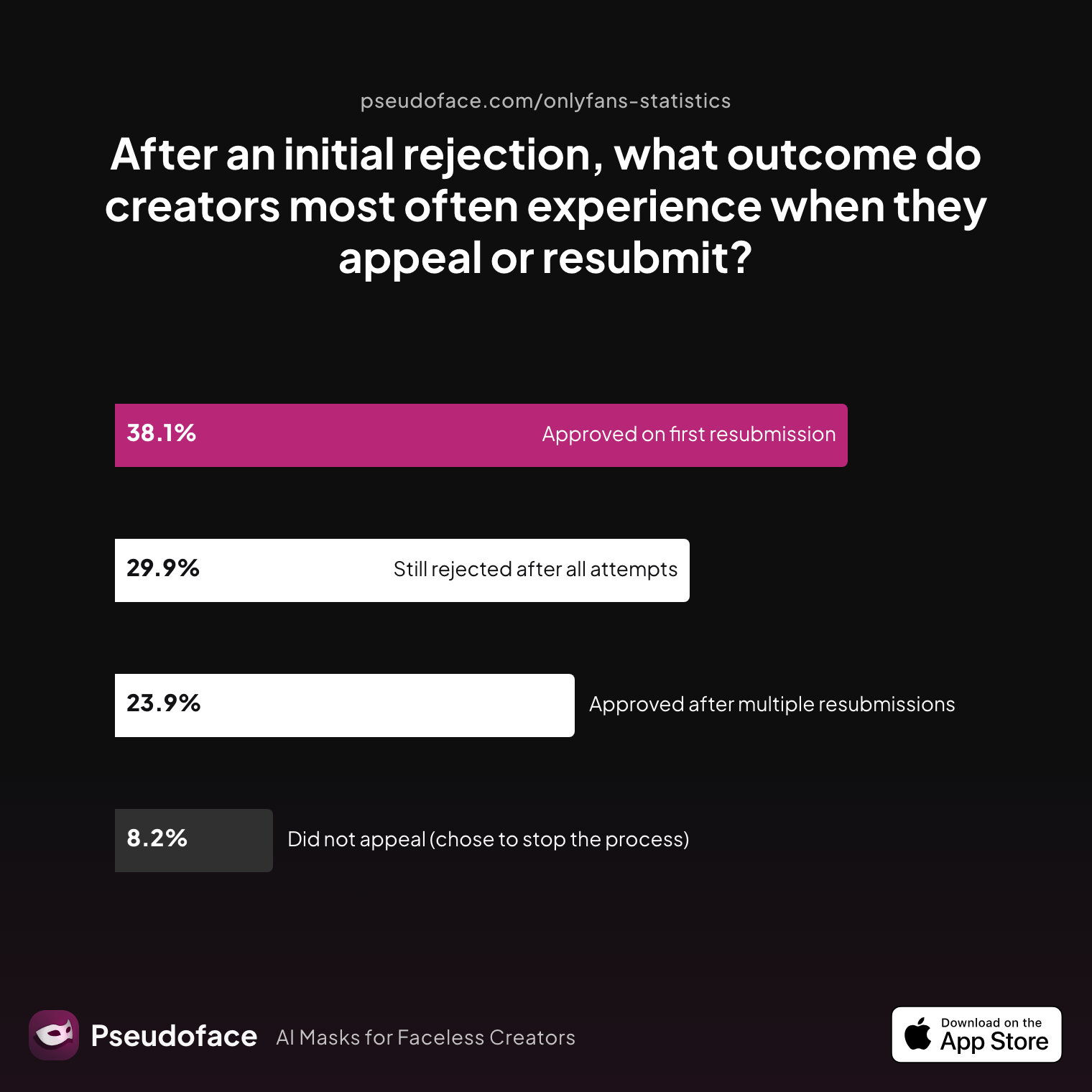
Let’s see what happens when creators try, try again after rejection:
| Outcome | Percentage |
|---|---|
| Approved after multiple resubmissions | 23.88% |
| Approved on first resubmission | 38.06% |
| Did not appeal (chose to stop the process) | 8.21% |
| Still rejected after all attempts | 29.85% |
Roughly 62% of creators do manage to pass after one or more tries, but nearly 30% are still locked out even after appeals—an attrition rate that’s especially high among faceless and filter-heavy applicants. Only about 8% give up altogether after initial denial. Keep in mind: this is self-reported from online forums, meaning those most motivated to “make it work” are likely overrepresented—survivorship bias suggests more might quietly leave the platform after a fiasco.
The majority of rejections stem from unclear photo requirements rather than obvious rule-breaking. Consider this testimony, which encapsulates the grind:
Open thread on Redditr/onlyfansadvice
u/blacktiger_of
I got refused 7 times. I emailed and they explained to me what was wrong: My phone focused on my face and blurred my ID. I took the selfie with another cell phone, using the back camera, flash and approaching the ID of my face, so everything was in the same focus and it worked. Do not edit, crop or rotate the photo. Keep it the way it is. As for the second reason, if you intend to post content with someone else, you need to have a completed and signed consent form. I post content myself, so I didn’t need it. When in doubt, take new photos and send them by email, when the notice arrives that you were denied. They will explain to you what is wrong.

Open thread on Redditr/onlyfansadvice
u/blacktiger_of
I got refused 7 times. I emailed and they explained to me what was wrong: My phone focused on my face and blurred my ID. I took the selfie with another cell phone, using the back camera, flash and approaching the ID of my face, so everything was in the same focus and it worked. Do not edit, crop or rotate the photo. Keep it the way it is. As for the second reason, if you intend to post content with someone else, you need to have a completed and signed consent form. I post content myself, so I didn't need it. When in doubt, take new photos and send them by email, when the notice arrives that you were denied. They will explain to you what is wrong.
Beyond filters, even something as minor as camera focus or background mishaps can torpedo your verification. Forum regulars stress: don’t crop, don’t filter, don’t compress—just take the cleanest, clearest shot possible, ideally with the phone’s rear camera. High-resolution, evenly lit, and feature–identical to your ID is the path of least resistance.
But for those determined to protect their identity by any means—using AI swaps, masks, or aggressive blurring—the reality is even harsher. Self-reported success rates for heavily edited or obscured photos drop under 30%, and repeat rejection is almost the default. It’s a numbers game, and algorithms aren’t getting any looser as of 2026.
Frustrated creators, however, don’t give up easily. Community threads routinely share step-by-step revision strategies, even as a stubborn minority report they never got in after all. But a returned rejection is no mere hiccup: each failed attempt can draw further scrutiny and, eventually, lockouts.
This churn between creator ingenuity and platform suspicion gives rise to a secondary challenge—automatic re-verification requests. That’s where we turn next.
OnlyFans Face ID Re-Verification: Why You Might Have to Reverify Every Time
For a growing share of OnlyFans creators in late 2025 and early 2026, face ID verification isn’t a one-off ordeal—it’s a recurring, sometimes near-constant, platform headache. Automated systems increasingly demand fresh face matches whenever a creator’s appearance changes noticeably or when other trust “signals” fluctuate, like device swaps or suspicious login patterns.
Why does this happen? Several algorithmic triggers come into play:
- Major appearance changes: Drastic switches in hairstyle, heavy new makeup techniques, facial hair, or signs of recent cosmetic procedures.
- Device or location change: Logging in from a new phone, computer, or geographic location often triggers a “verify you are you” prompt.
- Uploading content that looks different: Significant change in facial features between verification selfie and content, even via artistic editing or filters, can confuse review bots.
- Prior flagged content: Being flagged once for any Terms of Service issue (even unrelated to your face) makes future checks far more sensitive.
Self-reported rates on Reddit suggest re-verification rates are highest among those who combine privacy tools—mask use, intermittent face swaps, or frequent tweaks to visual presentation. And because OnlyFans rarely spells out exactly why you’re being made to verify again, creators’ threads are awash with both practical fixes and rumors.
Blockquote color from the trenches reveals the confusion:
Got delisted due to a 3rd party being present but it was just me 😡 I’m thinking either it’s because a mask i had on or that my foot was behind my head and looked like a 3p idk
Open thread on Redditr/onlyfansadvice
u/greenstrawberry_
Try tagging yourself. That can sometimes work for the false flags
Even the suggestion of a second party (real or algorithmically misidentified) can loop you into re-verification hell. Many complain of “being asked over and over” for new selfies, no matter how carefully they match their ID. Some risk getting locked out of uploading altogether; others enter a “Reddit troubleshooting circuit”—taking new selfies in better lighting, with less makeup, reverting to more natural hair, hoping to align with the previous approval benchmark.
For faceless creators and those exploring multiple appearance personas, this unpredictability becomes a fact of life. If you’re frequently being re-verified, the best you can do is minimize visible difference between your verified selfie and new content, and avoid obvious “face swaps” or highly stylized edits. Still, OnlyFans reserves the right to demand repeated proof, and as their AI gets more stringent, the margin for error keeps shrinking.
This brings us to the heart of every content creator’s anxiety: what actually gets flagged during ongoing content review? Let’s break down the risks for filters, swaps, masks, and more.
What Actually Gets Flagged: Filters and AI Face Swaps in OnlyFans Content Review
The shifting border between “creative anonymity” and “platform policy violation” is most evident once your approved account starts publishing. While some creators may squeeze through initial verification with tweaks, the real test comes when uploading new or updated content. OnlyFans, facing mounting regulatory pressure in 2026, increasingly leans on AI-driven moderation to identify synthetic, highly altered, or disguised faces—not just at sign-up but across all content uploads.
The rise of AI face swapping and generative tools brought new risks. How often do creators see these strategies succeed or backfire?
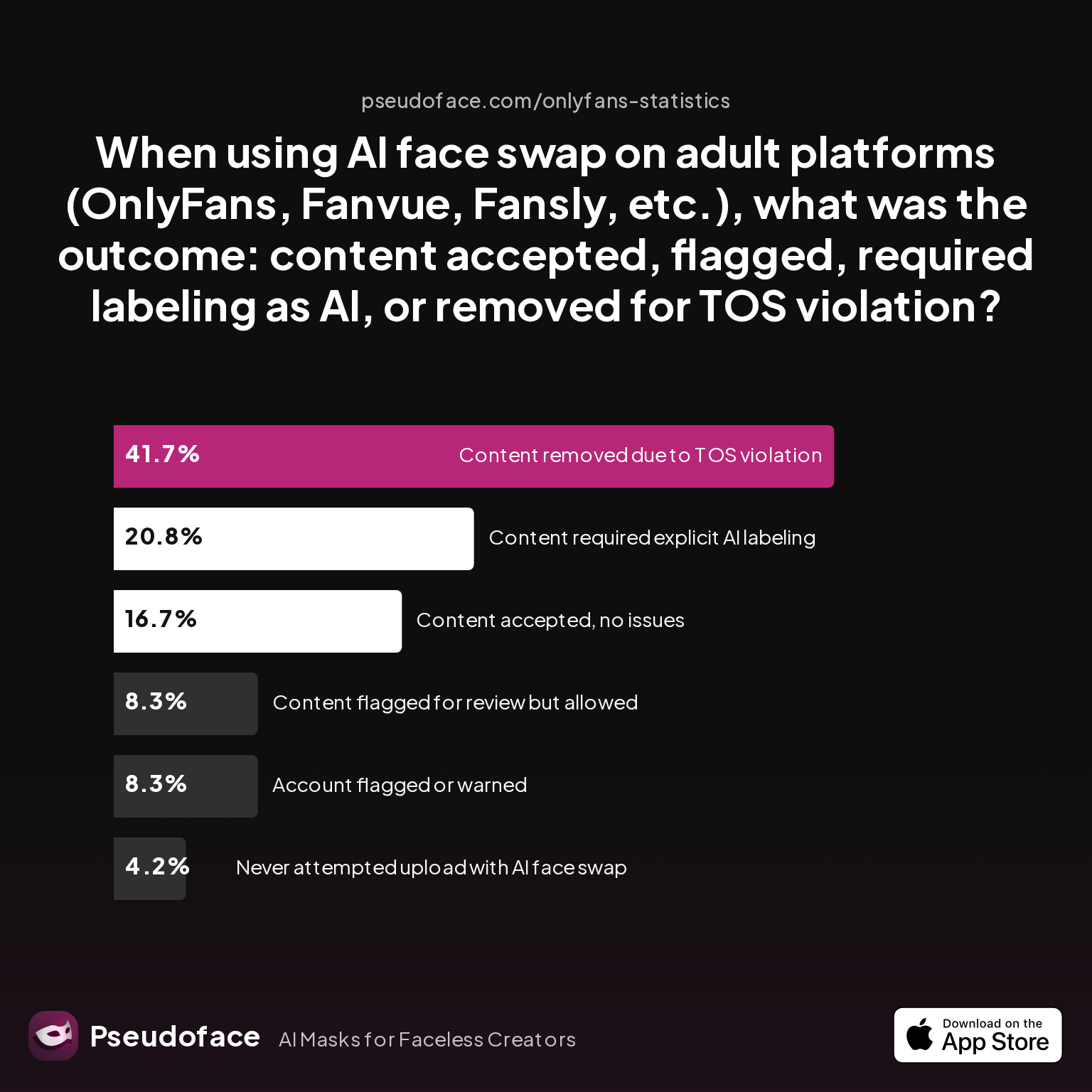
| Outcome | Percentage |
|---|---|
| Account flagged or warned | 8.33% |
| Content accepted, no issues | 16.67% |
| Content flagged for review but allowed | 8.33% |
| Content removed due to TOS violation | 41.67% |
| Content required explicit AI labeling | 20.83% |
| Never attempted upload with AI face swap | 4.17% |
Over 40% reported outright removals due to Terms of Service violation when uploading AI face swapped content. Only 1 in 6 saw “no issues.” Roughly 21% could keep content if it was explicitly labeled as synthetic or AI-altered—evidence that OnlyFans is edging closer to a policy split: allow AI if disclosed, otherwise reject or penalize. Another 8% faced warning/flagging for account risk.
Bear in mind: these outcomes reflect active experimenters—so called “AI face swap OGs”—and not the full creator community. Platform policies (and their enforcement strictness) shift with new legal and PR threats, so current trends may not predict tomorrow’s rules exactly.
What’s behind these tough stances? Policy concern data paints a clear ethical and compliance picture:
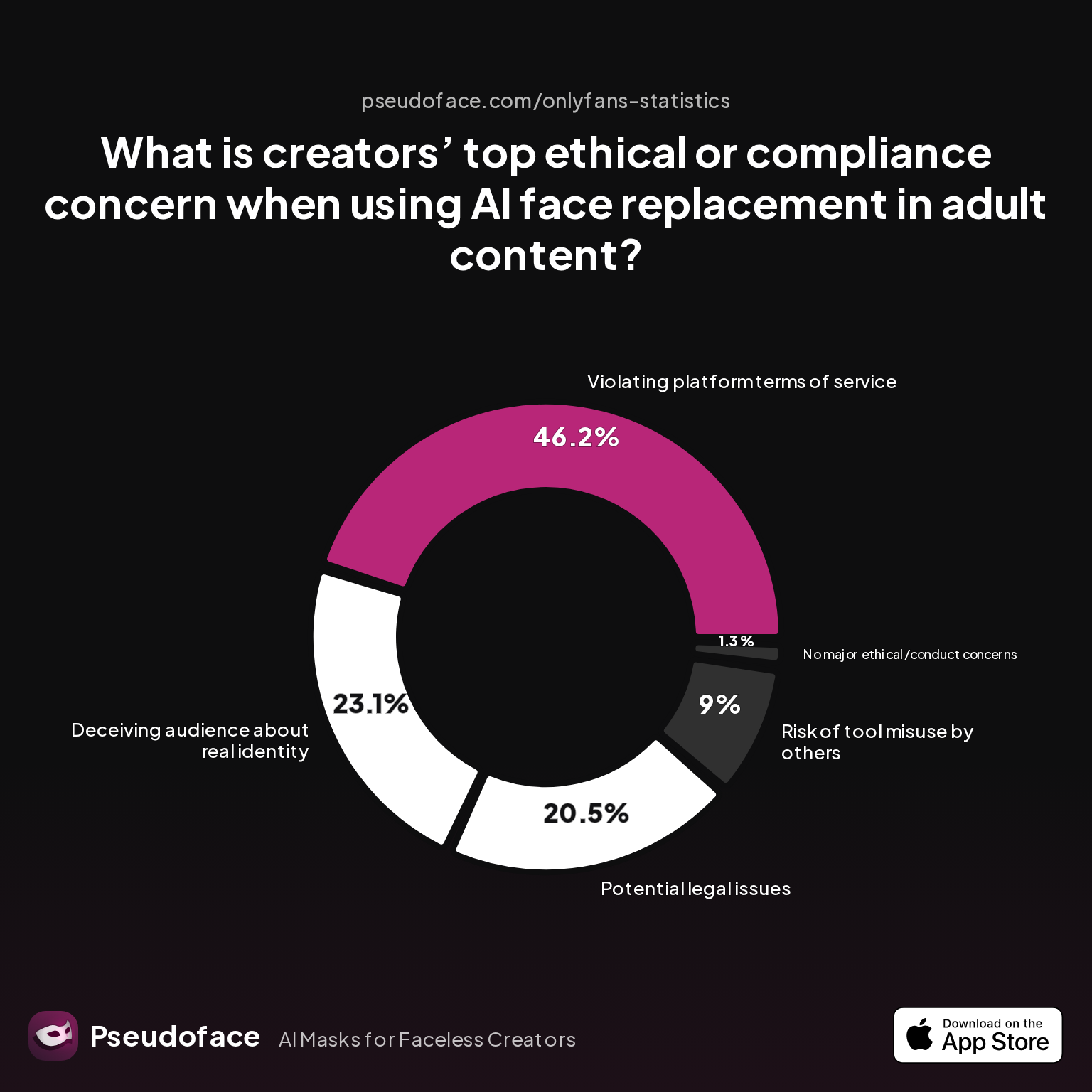
| Concern | Percentage |
|---|---|
| Deceiving audience about real identity | 23.08% |
| No major ethical/conduct concerns | 1.28% |
| Potential legal issues | 20.51% |
| Risk of tool misuse by others | 8.97% |
| Violating platform terms of service | 46.15% |
Nearly half of creators see violating OnlyFans’s Terms of Service as the overriding worry with AI face alterations. Legal ambiguity (“potential legal issues,” 20%) and deceiving the audience (23%) are significant, but it’s the platform’s enforcement, not just moral qualms, driving operational caution.
Pulling back from the AI frontier, even basic blurring or face-hiding apps can trigger moderation snags. How well do these apps actually work in practice—and do they protect against accidental reveals? Let’s dig into those reliability statistics.
Face Blur, Mask, and App Reliability: How “Safe” Are Popular Face-Hiding Methods?
For those wary of AI face swaps but still aiming to protect their identity, more creators lean on face blurring apps or simple masks. But even these “low-tech” options have pitfalls, especially when it comes to software reliability and the risk of accidental de-masking.
First, let’s examine the reliability complaints reported for common face blurring apps:
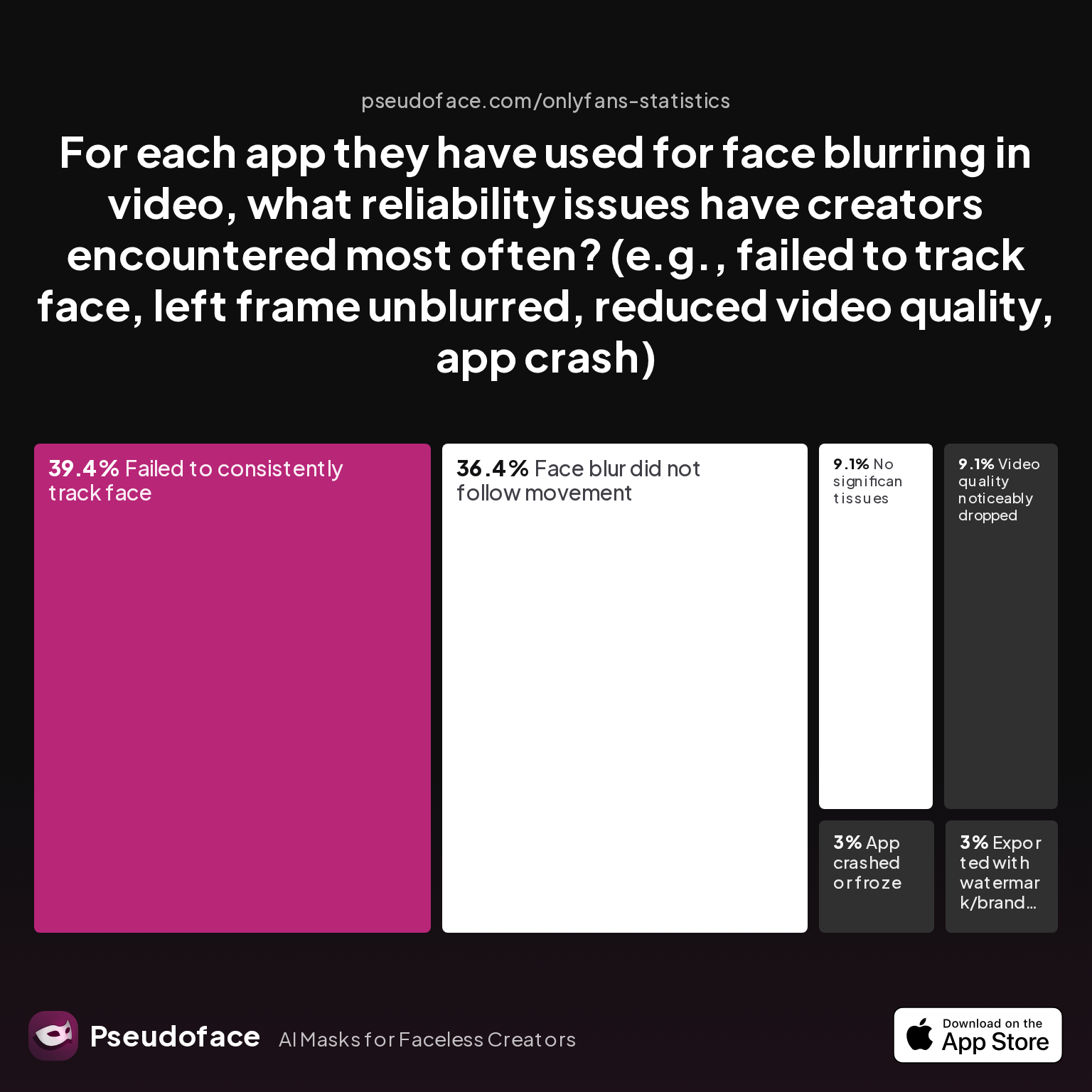
| Issue | Percentage |
|---|---|
| App crashed or froze | 3.03% |
| Exported with watermark/branding | 3.03% |
| Face blur did not follow movement | 36.36% |
| Failed to consistently track face | 39.39% |
| No significant issues | 9.09% |
| Video quality noticeably dropped | 9.09% |
The big headline: unreliable tracking is rampant. About 75% of complaints center on face blurs “not following movement” or “failing to consistently track face,” leading to unprotected frames and accidental exposure. Only 9% report a seamless experience.
How often does this unreliability turn into actual accidental de-anonymization? Let’s look at accidental face reveal rates for blurring, cropping, masking, and filters:
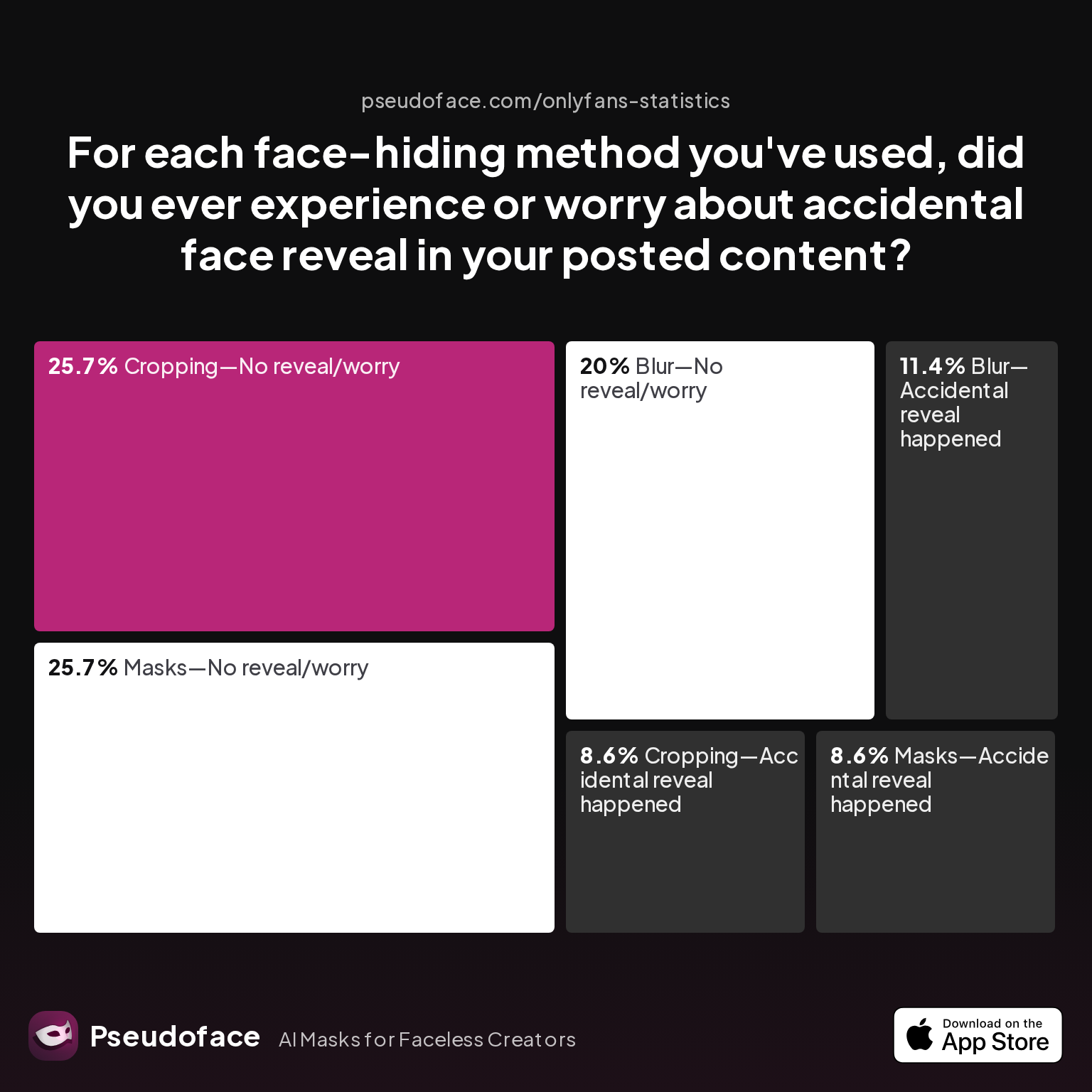
| Method–Outcome | Percentage |
|---|---|
| Blur—Accidental reveal happened | 11.43% |
| Blur—No reveal/worry | 20.00% |
| Cropping—Accidental reveal happened | 8.57% |
| Cropping—No reveal/worry | 25.71% |
| Filter—Accidental reveal happened | 0.00% |
| Filter—No reveal/worry | 0.00% |
| Masks—Accidental reveal happened | 8.57% |
| Masks—No reveal/worry | 25.71% |
Remarkably, blurring teams up with accidental reveals at a non-trivial rate—just over 11%. Cropping and masks also have measurable failure rates (each around 8.5%), typically due to shifting frames in video, poorly positioned masks, or unplanned movements. Filters and AI face swaps, while offering stronger technical anonymity, are subject to detection and TOS takedown risk, as described above.
In practical terms, no solution is bulletproof: face blur apps often lag or miss frames, physical masks can slip, and cropping can let in an edge of the face. Even the most risk-averse creators need to review every frame of their uploads, especially in video.
For those weighing “what’s safest,” the data tilts toward minimal, non-AI digital filters (if detectable but not misleading to the system), paired with checking every video for leaks. But nothing beats robust, careful editing and conservative manual review—for all but the most daring or tech-savvy creators.
OnlyFans Face Verification Reddit Wisdom: Lived Workarounds, Flags, and Survival Bias
Numbers tell half the story; lived wisdom, passed between creators, rounds it out. Veins of community advice pulse through Reddit, charting both breakthrough wins and stubborn failures in OnlyFans’s identity gauntlet.
Stories repeat: multiple rejections, incremental adjustments, and finally, learning what the system really wants.
Open thread on Redditr/onlyfansadvice
u/tomarlow77
i was refused soo many times. i basically got my face as close to the camera as possible without any of it being obscured and put the idea like below my chin. that worked!
Open thread on Redditr/onlyfansadvice
u/tomarlow77
i was refused soo many times. i basically got my face as close to the camera as possible without any of it being obscured and put the idea like below my chin. that worked!
Community consensus, as of early 2026:
- Lighting is critical. Poor light = fail.
- Don’t crop, edit, or filter. Even the mildest tweak can trip an automated flag.
- Revert to “natural” appearance if denied. Unusual makeup, new hair color, or obvious disguises often mean automatic resubmission.
- If you’re stuck, email support. Sometimes human review overrules the algorithm.
While the above reflects what works for survivors, survivorship bias is strong—silent dropouts rarely post tales of frustration, so aggregate “it worked for me!” stories may skew optimism. Still, practical patterns emerge: the “safest” route is clear, untreated photos matching your ID, with as little creative editing as possible. Anything else is a calculated roll of the dice, and many creators do eventually walk away when those odds run thin.
Legal and practical debates in the community now revolve not just around what’s possible, but what remains viable long-term as OnlyFans clamps down further. As AI moderation ramps up, old tricks risk expiration, and every new tool or app faces a shrinking window of safety.
Light Filter vs. AI Face Swap vs. Mask: Which Face Alteration Is Least Likely to Cause Trouble?
Let’s break down, side by side, the real-life risk and reliability of three dominant face alteration strategies as of 2026:
Light Beauty Filters:
Light, non-obvious digital touch-ups are still the least likely to get flagged during both verification and content review if applied moderately. While officially not allowed for verification photos, some creators pass by keeping changes within “natural” range—no skin color changes, no reshaping features, no cartoon effects. These survive mostly due to human fallback review and imperfect algorithms, not because they’re clearly permitted.
AI Face Swaps:
AI-generated face replacements have the lowest verification and content review pass rate and the highest risk of content takedown (41% reported outright removal, as above). Even when content is accepted, explicit AI labeling may be required. A growing portion of creators now avoid these for main account verification or core content uploads, restricting use to off-platform marketing or pseudonymous side accounts.
Physical Masks:
Masks land in the middle ground. For content, they’re allowed so long as the creator has already fully verified their real face with the platform. For verification, they’re an automatic fail—eyes, nose, and jaw must be fully visible. For ongoing uploads, mask use rarely triggers removal unless it triggers multi-party or impersonation flags. However, misreads do happen: “delisted due to a 3rd party being present” when only a masked creator appears is a top complaint.
The data and stories suggest a spectrum: slight beauty edits are “barely tolerated,” masks are “content-safe but verification-unsafe,” and AI face swaps are “high flag/high fail” in both phases.
For the privacy-minded, the best blend is probably a conservative approach—natural appearance for verification, modest disguise for content, never crossing the line into full digital or physical face obfuscation where detection is likely.
Navigating the Next Steps: What to Do If Your Face Verification or Content Review Fails
Platform flag? Verification denied? Here’s what creators report works best, stepwise, drawn from a mix of successful appeals, bitter failures, and months spent in OnlyFans’s support inbox:
- Stop, reset, and review OnlyFans’s exact feedback. Is the issue image quality, mismatch, or suspected editing?
- Take new, natural-light selfies matching your government ID. Use the rear camera. Avoid all edits and filters. Hold your ID so all text and features are clear and unblurred.
- Double check platform settings and linked accounts. As one Redditor found, even having a linked private Instagram (versus public) can create mysterious blocks—It’s not always about your face alone!
- Contact support via email if auto-rejections persist. Multiple users succeeded only after clear, proactive communication.
Open thread on Redditr/onlyfansadvice
u/peachygirl40
i was refused so many times i thought it was because of my ID, turns out my instagram i linked was private! go through, check everything. my partner signed up just making an account and i tag him- we have never signed release forms (someone pls tell me if this is rlly bad). if you have an older phone, try using the back camera to take a photo or getting someone else to take it for you! GL girlfriend
Open thread on Redditr/onlyfansadvice
u/peachygirl40
i was refused so many times i thought it was because of my ID, turns out my instagram i linked was private! go through, check everything. my partner signed up just making an account and i tag him- we have never signed release forms (someone pls tell me if this is rlly bad). if you have an older phone, try using the back camera to take a photo or getting someone else to take it for you! GL girlfriend
If you are denied after all reasonable revisions, and your content is flagged for appearance modification, it’s risky to escalate further with more altered images. Consider reverting to fully natural shots—anything else is likely to burn another verification attempt. Remember, repeated failures may permanently block the account.
For content takedowns:
- Review flagged content against your past face, mask, or filter usage.
- Appeal with an acknowledgment that you understand platform rules—many creators see better outcomes when expressing willingness to comply, rather than debating the system.
- In true emergencies (e.g., accidental reveal after mask error), consider taking the account fully private while you triage leaks and reset your approach.
Being “too creative” with disguise is, by 2026, a risky game—community wisdom suggests erring on the side of boring consistency, however frustrating. If you must keep your face hidden, accept that platform unpredictability is now a permanent hazard, not a bug.
FAQ: OnlyFans Face Alteration, Verification, and Content Review
Why does OnlyFans keep rejecting my face ID verification?
The most common reasons are blurry photos, filters or edits, mismatched appearance from your ID, or ambiguous facial features. Based on 2025-2026 data, over 50% of creators never receive a clear reason, leading to repeated resubmissions.
Can I pass OnlyFans face verification with a light beauty filter?
Officially, no—filters are not allowed. However, some creators report success with subtle, natural-looking edits if skin tone and features are identical to their ID; enforcement varies, and there’s always a risk of rejection.
Does OnlyFans allow AI face swaps or deepfake faces for account verification?
No—face swaps or deepfake images used for verification almost always result in rejection or account suspension. In content uploads, AI face swaps sometimes slip through if explicitly labeled, but over 40% of attempts result in content takedown.
What masks or physical coverings are allowed for OnlyFans verification photos?
None. Eyes, nose, and jaw must be fully visible for ID/selfie verification. Masks may be used in content only after account approval, but they sometimes cause false “multiple person” flags.
Why am I being asked to re-verify my face ID every time I upload new content?
Automated triggers include significant appearance change, device or location switching, and prior flagged content; these checks are designed to confirm the original account holder hasn’t changed.
What’s the best way to recover or appeal a denied OnlyFans verification?
Start by submitting a new, unedited, well-lit selfie that clearly matches your ID. Use the rear camera and follow platform prompts exactly. If repeatedly denied, email support for human review; roughly 62% of creators eventually succeed after one or more tries.
If I change my appearance (hair color, weight, makeup), will OnlyFans reject me?
Minor, temporary changes (hair color, light makeup) usually don’t cause problems, but extreme alterations in face shape or style can trigger re-verification or denial, especially if a new selfie doesn’t closely match your ID.
Are there any third-party apps or tools that consistently pass OnlyFans verification?
No off-the-shelf face blurring or filter apps guarantee success; many creators report issues with these apps failing to track faces or degrading image quality, sometimes leading to accidental reveals.
How do accidental face reveals happen in masked/blurred content and can I avoid them?
Most accidental reveals happen when blurring apps fail to consistently cover the face, or masks/cropping slip in video content. The safest approach is meticulous frame-by-frame review before upload.
Is there a difference in OnlyFans’ enforcement of these rules between regions or devices?
Anecdotally, yes—some creators report stricter review processes or longer response times in certain regions, and browser/device changes can trigger additional verification requests.


