
TL;DR
Deactivating or deleting your OnlyFans account is a big move that reshapes your digital presence, subscriber base, and creative future. Based on Pseudoface’s synthesis of over 250,000 real Reddit threads by adult content creators (as of early 2026), most creators who permanently delete have weighed privacy, burnout, and branding—while about 24% of those who attempt deactivation/reactivation succeed, and many face mixed results with subscriber retention when restarting. There is no true "pause" button on OnlyFans: understanding the difference between deactivation (temporary), deletion (permanent), and creative workarounds is crucial before acting. This guide clarifies what happens with each option, gives step-by-step instructions, and interprets the real platform and mental health impacts so you can shape a comeback—or a clean slate—on your own terms.
Deciding to Step Away: Why Creators Delete, Deactivate, or Pause Their OnlyFans Account
The decision to leave OnlyFans—or even just pause output—is rarely about a single frustration or event. For many creators, especially those building a brand and a livelihood on the platform, stepping away comes after mounting stressors, shifting goals, or changes in privacy needs. Understanding what is driving creators to make such a move is key to choosing the next right step for your own account.
Let’s establish the landscape of motivations with broad, up-to-date data:
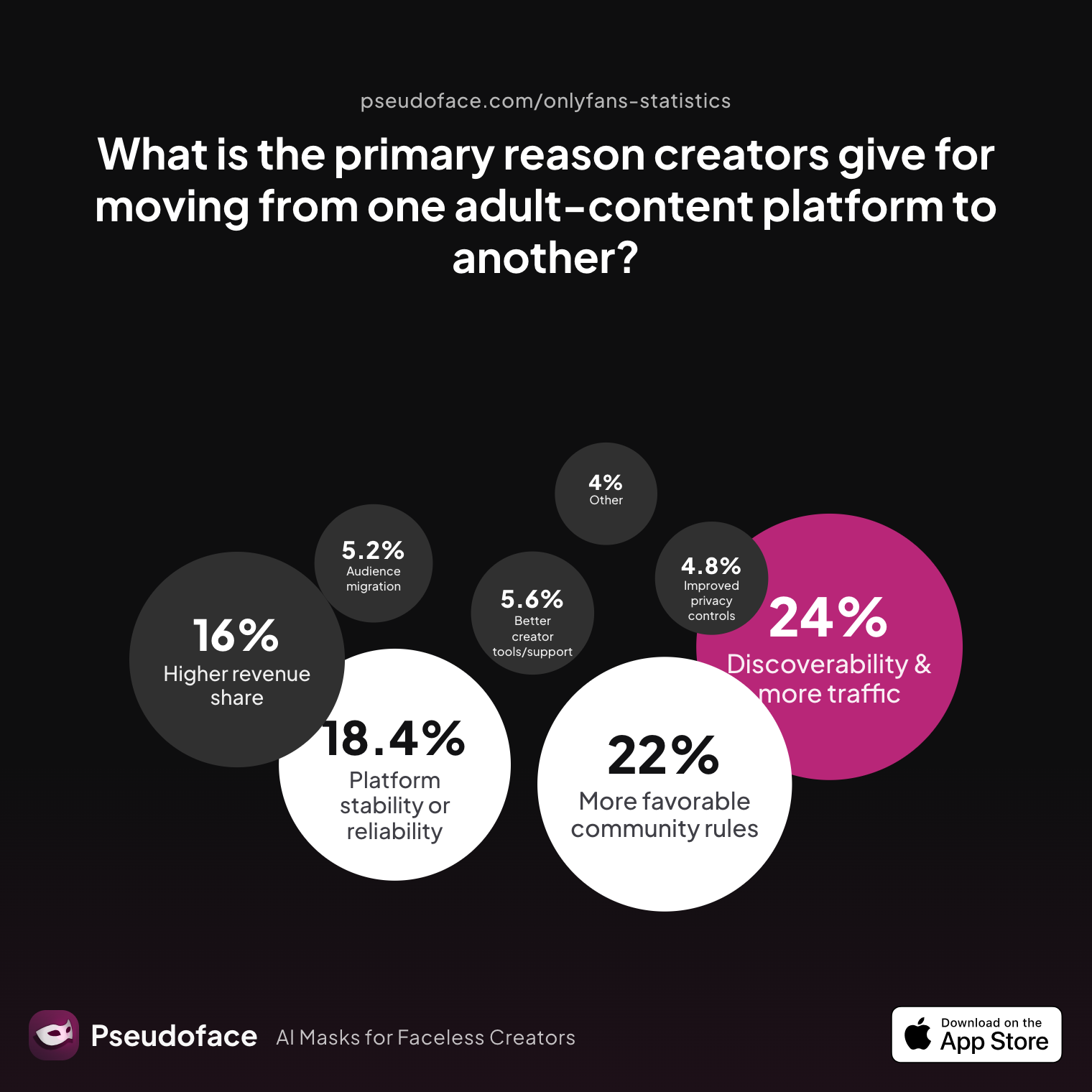
| Answer | Percentage |
|---|---|
| Audience migration | 5.20% |
| Better creator tools/support | 5.60% |
| Better discoverability/traffic | 24.00% |
| Higher revenue share | 16.00% |
| Improved privacy controls | 4.80% |
| More favorable community guidelines | 22.00% |
| Other | 4.00% |
| Platform stability or reliability | 18.40% |
What do these numbers tell us? The data, drawn from Pseudoface’s large-scale, self-reported Reddit thread analysis, shows that nearly one in four creators cite better discoverability or traffic as their primary reason for leaving—or pausing—on OnlyFans, with another fifth motivated by more favorable guidelines elsewhere. Revenue share splits, platform stability, and improved privacy also drive substantial churn. Factors like burnout, harassment, or mental health stress (discussed later) rarely appear as a single top-line "reason," but they often underlie these more tangible drivers such as rules, income, and discoverability.
This nuance surfaces in the following real creator testimony:
Open thread on Redditr/CreatorsAdvice
u/TooSweetCaroline
Second manyvids for selling physical items. I know a lot of OF creators stick with OF as their only platform but if you have the time and patience to put your content on other sites like manyvids, IWC, loyalfans…..etc you’ll not only have multiple streams of income but when you get banned or deleted you aren’t at a complete loss. My friend uses Instagram for all her sales details but I just prefer using MV because it’s a sex worker friendly site on top of them making it super easy to sell stuff.
Behind these moves is often a complex interplay of creative fatigue, platform policy changes, and personal need for control over content and community reach. It's not unusual for creators to feel boxed in by the limitations of OnlyFans' tools or support, pushing them toward a break—or a full exit. For others, a privacy scare or the desire to wipe digital footprints motivates a more permanent departure.
No matter your why, the big question is: What exactly happens to your content and subscriber base when you take action—and how permanent are your choices? That’s what we’ll address next.
What Actually Happens: Delete, Deactivate, Disable, or Pause? OnlyFans Account Actions Explained
Creators looking to step away from OnlyFans inevitably run into a frustrating wall of jargon and ambiguous options. What’s the difference between deleting, deactivating, disabling, or "pausing" your account—as described by OnlyFans, and as understood by its community?
Here’s the reality, as of 2026:
-
Deletion is permanent. When you delete your OnlyFans account, all your profile data, posts, messages, and subscriber connections vanish forever. You can’t log back in. Your content, unless previously saved by subscribers, is gone for good.
-
Deactivation (as in, taking your account offline temporarily) isn’t a clearly labeled platform feature for creators. Some use "deactivation" to mean removing content, setting subscription prices high to deter new signups, or disabling renewals so all subscriptions expire naturally. These are workarounds, not true suspensions of your account.
-
Disabling is not an official user-facing option. However, your account may become "disabled" if support locks it due to rule violations or verification problems. This is not a reversible, routine creator action.
-
Pausing is also a misnomer. OnlyFans offers no native "pause" button for creators. The closest equivalents are:
- Setting your subscription price to the maximum,
- Turning off subscription renewals so the account goes dormant,
- Deleting (unpublishing) all or most recent content,
- Archiving posts (which, per community consensus, does not fully hide them from subscribers—archived content is accessible via your archive tab).
These nuances lead to frequent confusion, as echoed in real creator experiences:
Open thread on Redditr/CreatorsAdvice
u/glamzmel
I don’t think so. The only way to somewhat “hide” old posts is to archive them on OF. That being said, your subscribers can still access them through the archived tab on your profile.
Key insight: True deletion means permanent loss of content and subscriber data, with no return. Archiving and other pseudo-pauses are mostly surface level; subscribers and OF’s backend retain access to much of your legacy unless you systematically delete posts.
Some creators attempt to "hide" their account by changing display details, removing profile pictures, and scrubbing posts. However, unless you actually delete posts or the account itself, elements of your brand or content may persist—risking confusion, privacy leaks, or a half-frozen digital footprint.
What happens to your subscribers? If you fully delete, they lose access immediately. If you simply "pause" or set your page to non-renewable, subscribers remain until the end of their billing cycle and then are not renewed unless they choose to come back (which rarely happens without prompting). Only permanent deletion triggers an immediate cutoff, while pseudo-pauses slowly bleed away your subs as their terms expire.
The process isn’t just technical; it’s fraught with emotional and branding stakes, too. Before taking action, it’s important to weigh which method best matches your reasons for stepping away—and what future flexibility you might want.
With the functional options mapped, the next question is: What do returning creators actually do after a break—and which paths yield the best outcomes?
Restarting vs. Wiping: What Returning Creators Do After a Break
It’s a common scenario: After time away—sometimes weeks, sometimes years—creators consider relaunching on OnlyFans. Should they revive their existing page, delete their content and start over, or build an entirely new account from scratch?
Let’s ground the discussion with recent creator insights:
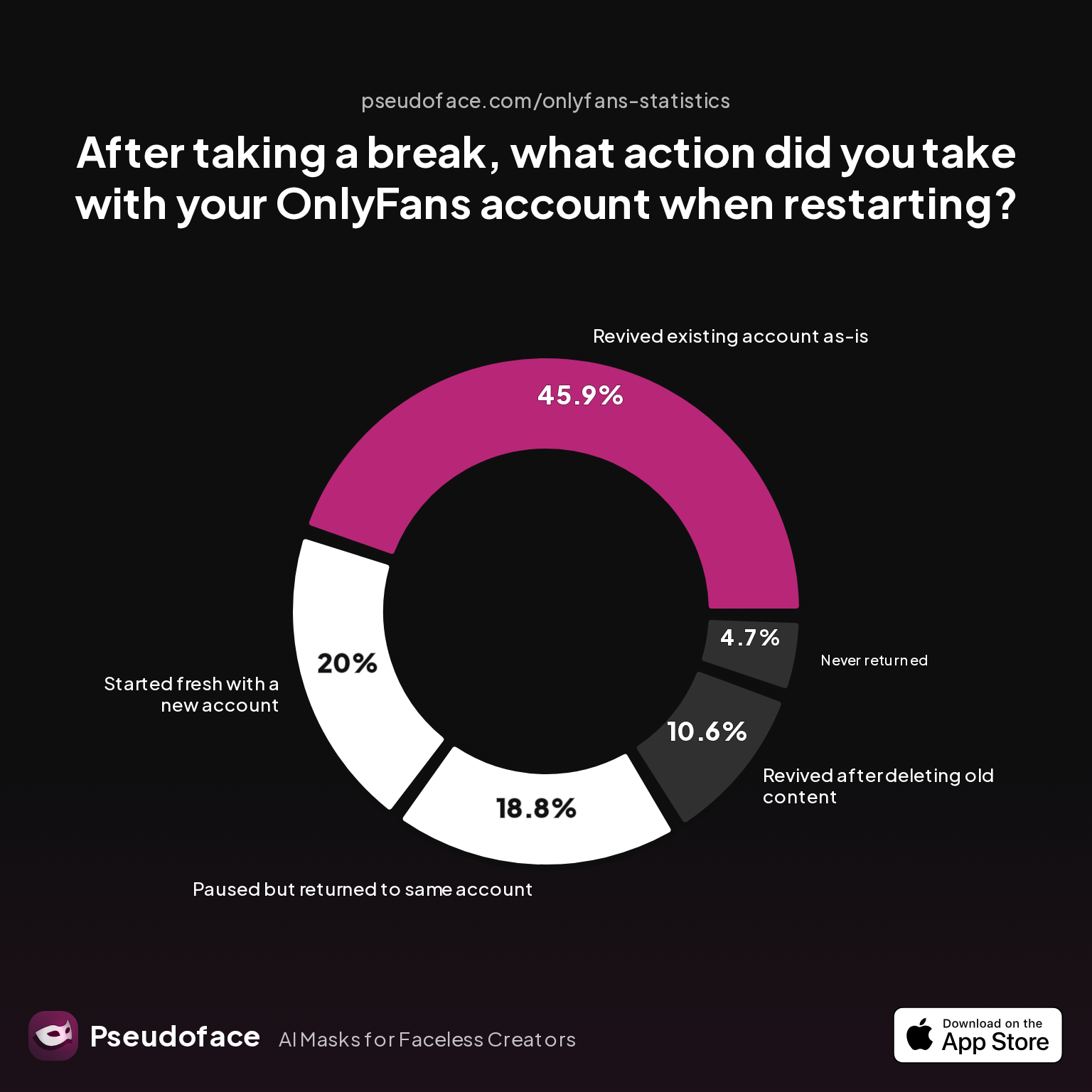
| Answer | Percentage |
|---|---|
| Never returned | 4.71% |
| Paused but returned to same account | 18.82% |
| Revived after deleting old content | 10.59% |
| Revived existing account as-is | 45.88% |
| Started fresh with a new account | 20.00% |
Nearly half of break-takers simply revive their old account as-is. About one in five start fresh with a new OnlyFans profile—cleaning the slate for a new personal or brand era. Another 10% attempt a middle ground, returning after deleting old content but keeping the same follower infrastructure.
Key finding: Most returning creators remain loyal to their existing account, valuing retained subscribers and historic visibility over the psychological relief of starting over.
But does wiping your past content actually “reset” your brand or reputation? Reddit testimonies show mixed feelings:
Open thread on Redditr/CreatorsAdvice
u/ManagementWonderful4
I did the same and took myself down 1k likes. Unfortunately it's permanent I do believe. Not 100 but pretty sure
This is a recurring regret: Deleting past posts is irreversible, erasing engagement and metrics that helped drive your ranking on the platform. Some creators experience immediate freedom in cleansing their content library, only to mourn “vanity metrics” like likes or old tips that buoyed their rep. Others feel a crucial sense of closure and privacy gain; especially those wanting to change their niche or persona.
Survivorship and self-selection biases are both at play in these figures—those dissatisfied with their restarts are less likely to share positive outcomes online, and vice versa. But directionally, the data suggests creators lean toward minimizing risk by reviving rather than deleting, unless there’s a compelling privacy or rebrand motive.
Why do some creators start over? Rebranding, shaking persistent stalkers, or breaking from a troubled account history were the most commonly cited reasons. However, a clean start usually comes at the cost of zero subscribers and a multi-month ramp to regain even a fraction of past earnings and reach.
With this perspective on real-world tendencies, let’s get practical with exact instructions for each possible account action.
How to Deactivate My OnlyFans Account (or Delete/Remove It): Step-by-Step for Desktop and Mobile
Clarity on process is essential: a misstep can mean loss of content, locked-out accounts, or unintended subscriber notifications. Here’s what to do, using up-to-date OnlyFans platform steps for both desktop and mobile. Self-reported stumbling points from creators are flagged, and caveats are woven in per latest community evidence (2025-2026).
A. Deleting Your OnlyFans Account Permanently
On Desktop/Web:
- Log into your account at onlyfans.com.
- Click your profile avatar in the top right, then select Settings.
- Within Settings, click on Account (left menu).
- Scroll to the bottom. Next to “Account Status,” click the Delete Account button.
- You will be prompted to confirm your email/password and complete a captcha. Input required info.
- Click Delete Account to finalize.
Heads up:
- All your content, DMs, and subscriber data are queued for deletion; some users report seeing a message that some data stays in OnlyFans’ system for up to 30 days, but it’s not accessible or visible to users or the public.
- The process is irreversible. Once completed, you cannot reactivate or retrieve your posts.
Open thread on Redditr/CreatorsAdvice
u/greenstrawberry_
Once they remove content even onlyfans itself can’t re-access the content.
On Mobile Browser (iOS/Android):
- Open onlyfans.com in your preferred mobile browser.
- Tap the hamburger icon (☰) or avatar icon—location varies across browsers.
- Go to Settings > Account.
- Scroll down, tap Delete Account.
- Confirm using the provided authentication (email/password, captcha).
- Tap Delete on the prompt.
Common stumble points:
- Many users accidentally think “archiving” or “removing all content” deletes the account. It does not.
- If you have active subscribers with ongoing paid periods, OnlyFans may require you to zero out renewals and wait for these periods to expire before finalizing deletion.
B. "Deactivating" (Pausing/Disabling) Your OnlyFans Account
Because OnlyFans offers no real “pause” feature, here are the commonly used community workarounds:
1. Set Subscription Price to Maximum:
Go to Settings > Subscription Price and raise it as high as allowed ($49.99 as of 2026), deterring new signups.
2. Turn Off Subscription Renewals:
In Settings, turn off the option for existing subscriptions to auto-renew. This lets current subscriber periods run out without new charges.
3. Archive or Delete Content:
Systematically archive or delete posts if privacy is a concern. As noted before, “archived” is not truly private—subscribers can still access via the archive tab.
4. Update Profile Status:
Change your bio to communicate your hiatus, and remove external links you no longer control. Some creators swap out their profile image and display handle for anonymity during a break.
Mobile navigation quirks:
- Menus sometimes lag or mislabel on mobile browsers. Many users report confusion finding the right sidebar; double-check the desktop process first for orientation.
Open thread on Redditr/CreatorsAdvice
u/mrmann123
It won't give them their money back. You can send them your PPV content for free in messages if you want to "make things right".
C. Deleting All Content, Not Account
Some seek a reset without deleting the account. In this case:
- Manually delete or archive each post from your feed.
- Remove media from your profile gallery.
- Consider updating your username or display name (note: true OF handles can’t always be recycled to a new account if later deleted).
- Reset bio and external links for a clean page.
Remember: Deleting posts is permanent—likes, comments, and historic engagement are erased and cannot be restored.
Archiving is NOT deletion; subscribers can still access archived content. True removal requires full deletion of each post.
Can You Reactivate Your OnlyFans Account? Data on Comebacks and Platform Limitations
Once a creator deactivates or deletes their account, the possibility—and practicality—of reactivation becomes a real worry. Can you come back? What actually happens if you try? Let’s take a data-led approach to the realities of OnlyFans account resurrection (as of 2025-2026):
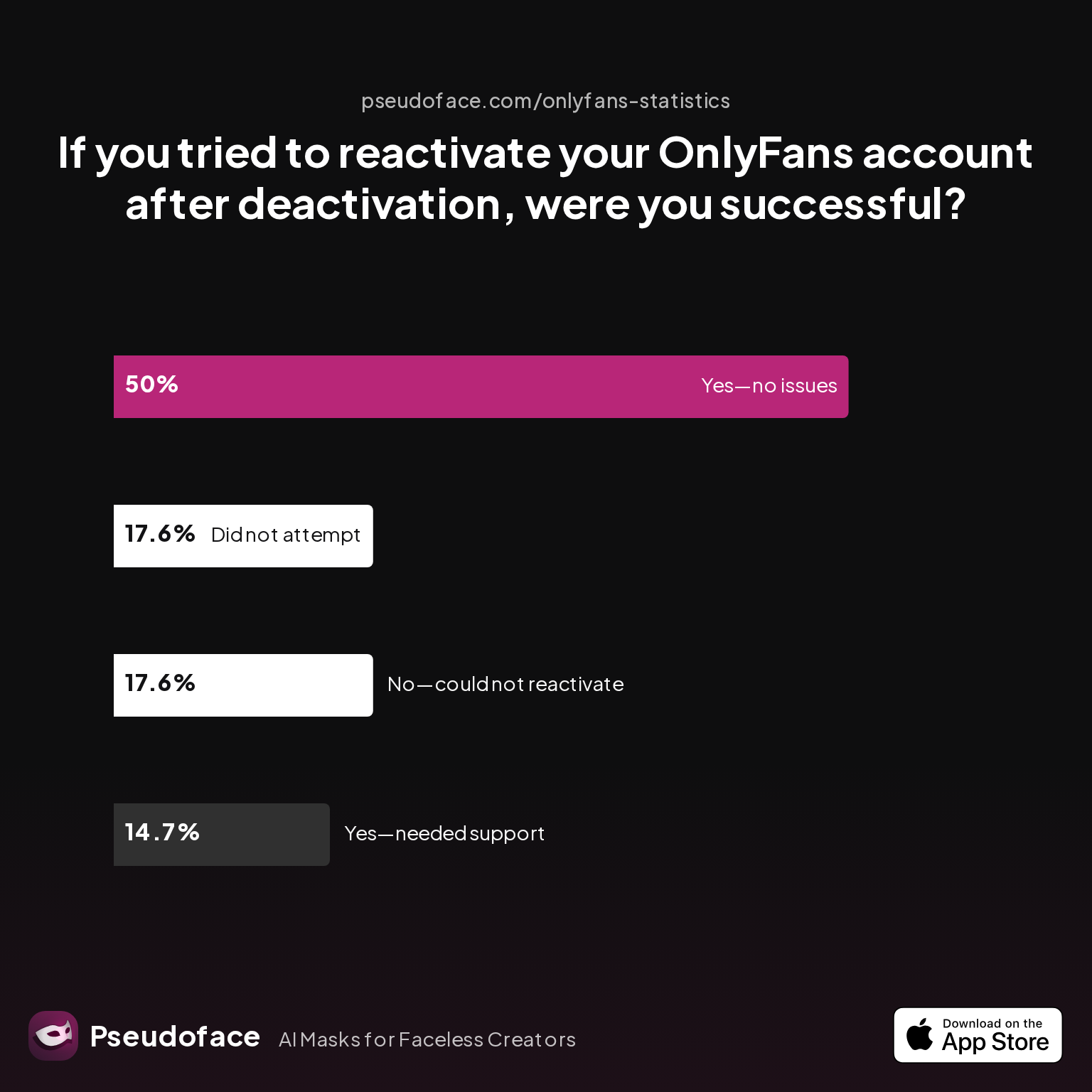
| Answer | Percentage |
|---|---|
| Did not attempt reactivation | 17.65% |
| No—account could not be reactivated | 17.65% |
| Yes—no issues reactivating | 50.00% |
| Yes—required customer support | 14.71% |
Key finding: Of those who attempt to reactivate, about 65% succeed (half without issue, the rest with OnlyFans support intervention), while nearly 18% cannot recover their account.
Why might someone fail at reactivation? Most often it’s due to:
- Permanent deletion (true deletes can’t be undone),
- Conflicts with reused email/username,
- Account bans due to Terms of Service violations,
- Lack of clear platform pathway (e.g., logins disabled by system, no recovery prompts).
Survivorship and reporting biases matter here: Users with successful reactivations or traumatic losses are disproportionately vocal, but these numbers still directionally illustrate risky odds.
When accounts are restored, subscriber bases rarely rebound quickly. Many users have moved on, canceled subscriptions, or lost trust in the creator’s reliability. Those who retained their old follower list usually did so by only "pausing" (never deleting).
Open thread on Redditr/CreatorsAdvice
u/ManagementWonderful4
Unfortunately it's permanent I do believe. Not 100 but pretty sure
If you require the same old email/username: Most creators report that OnlyFans does not allow reusing email addresses or display names tied to deleted accounts. This policy, while designed for fraud prevention, can be frustrating for those seeking a fresh slate.
As of the current platform build, OnlyFans does not provide a formal path for restoring fully deleted accounts or content. Pausing or setting a page to dormant (without deletion) is the only safe way to temporarily step away without burning bridges.
The Impact of Removing Your OnlyFans Account: Burnout, Brand Resets, and Mental Health
At the heart of any platform exit—temporary or permanent—are the emotional, mental, and branding ripples that follow. The effects go beyond lost posts or stats, seeping into confidence, community, and future plans.
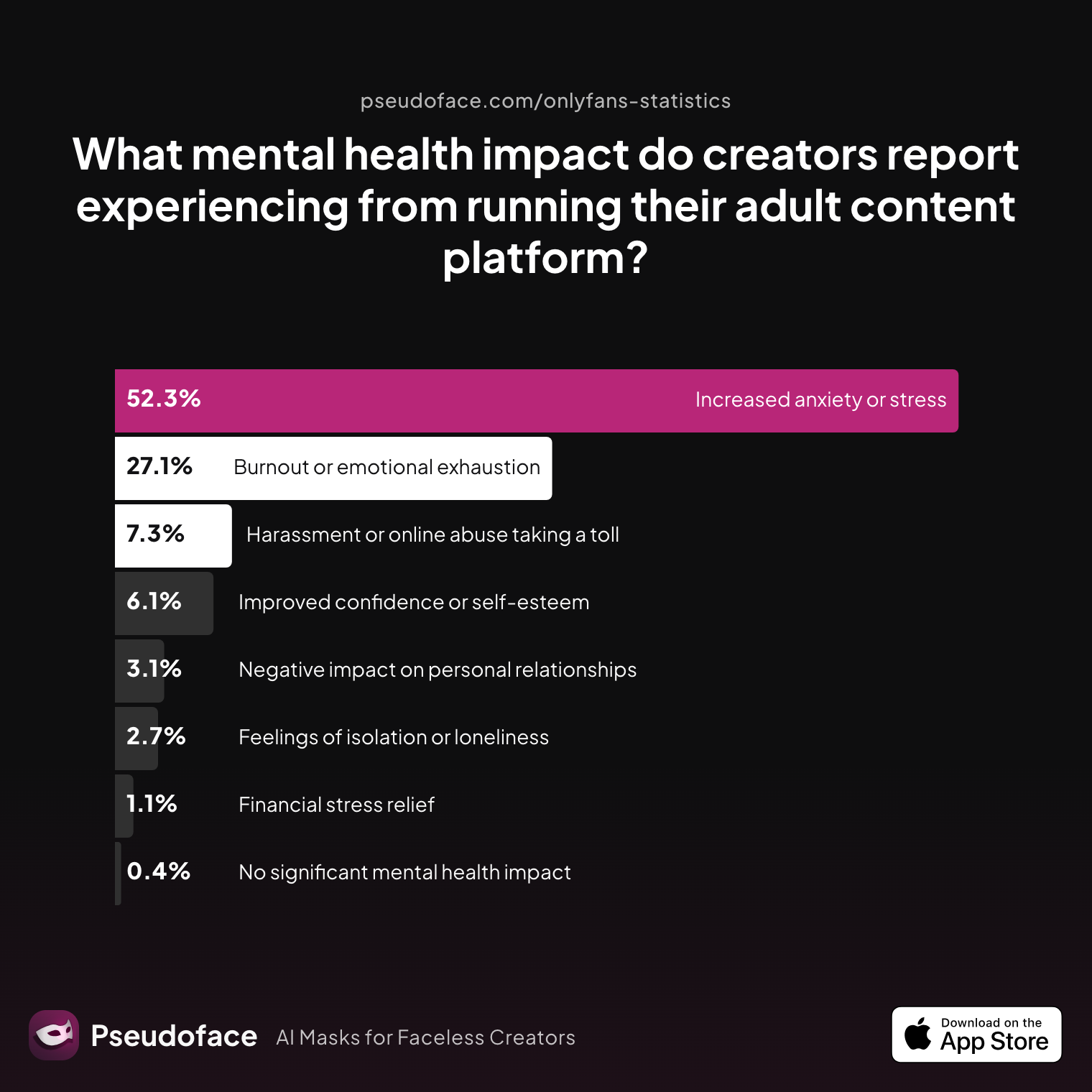
The aggregated mental health impacts for creators, whether stepping back or deleting, are stark:
| Answer | Percentage |
|---|---|
| Burnout or emotional exhaustion | 27.10% |
| Feelings of isolation or loneliness | 2.67% |
| Financial stress relief | 1.15% |
| Harassment or online abuse taking a toll | 7.25% |
| Improved confidence or self-esteem | 6.11% |
| Increased anxiety or stress | 52.29% |
| Negative impact on personal relationships | 3.05% |
| No significant mental health impact | 0.38% |
Increased anxiety or stress is the most common mental health impact reported by creators (over 52%). Burnout affects more than a quarter, while only a tiny minority say quitting or breaking brought “no significant mental health impact.”
Context and caveats matter: Those most affected by burnout and anxiety are likelier to participate in Reddit conversations, so these figures likely overstate the universal risk—but they do serve as an important warning for anyone contemplating a full reset or hiatus.
Open thread on Redditr/CreatorsAdvice
u/Conscious-Stable2146
I've found that in the last couple weeks people who have been subbed from the start have started buying more content aswell, it's slowly picking up and I enjoy it which is the main thing.
Some creators find that stepping away—and even losing their legacy account—sparks improved confidence, a sense of new beginnings, and relief from the stresses of constant engagement. Yet this is a minority. The dominant themes are regret over lost connections, financial instability, and challenges in regaining old momentum.
Branding-wise: Deleting an OF account means erasing digital reputation, which is hard-won and not easily rebuilt. But for creators needing a privacy reset or uncontaminated start (especially after drama, stalker issues, or niche changes), the cost may be worth it.
If you’re weighing this decision, prioritize your mental health and consider staged exits (pseudo-pauses) instead of total deletion—unless your privacy or safety is genuinely at risk.
Delete OnlyFans Account vs. Deactivate vs. Pause: Which Action Is Right for You?
Navigating the crossroads between deletion, deactivation, and makeshift pauses is a deeply individual process. Here’s a structured comparison to guide your next step:
| Action | Permanence | Content Removal | Subscriber Impact | Rebrand Potential | Can Return Easily? |
|---|---|---|---|---|---|
| Delete Account | Permanent | All content/data erased | All subscribers lost | Total reset | No |
| "Deactivate"/Pause (workaround) | Temporary | None or partial (as you choose) | Retain subs or let lapse | Minimal; old brand remains | Yes, immediate |
| Delete Content Only | Permanent for posts | Posts erased, account remains | Subscribers stay | Strong reset | Yes, only with clean page |
Choose deletion if: You want an irreversible break, a total privacy reset, or are certain you’ll never return.
Choose a pause (pseudo-deactivation) if: You want to step away safely, preserve the option to come back, and retain your brand/community ties.
Choose content wipe if: You want a brand refresh, but wish to keep your page, handle, and followers.
Real creators often articulate the complexity of this choice best:
Open thread on Redditr/CreatorsAdvice
u/Conscious-Stable2146
I've been doing my free page for 3 months now. It works well for me, there's no pressure for people to pay but they still do buy the occasional ppv or custom content. I don't focus on the money side of things, just doing what I enjoy and then every now and then posting ppv content. I've found that in the last couple weeks people who have been subbed from the start have started buying more content aswell, it's slowly picking up and I enjoy it which is the main thing.
Your decision should be guided by your own privacy, branding, and mental health priorities—rather than pressure to fit a one-size-fits-all mold.
FAQ
How do I delete my OnlyFans account permanently?
To delete your account forever, go to Settings > Account on desktop or mobile web, scroll to “Delete Account,” confirm via email/password, and finalize on the prompt—your data and content will be irreversibly erased.
Is deactivating your OnlyFans account permanent?
No, “pausing” via workarounds is temporary and reversible, but true account deletion is permanent and cannot be undone; deactivation is only pseudo-deactivation unless carried out as a full delete.
What happens to subscribers if I delete my OnlyFans account?
All subscribers are immediately cut off from your content and receive no further billing; there are no refunds by default, as confirmed by user experiences.
Open thread on Redditr/CreatorsAdvice
u/mrmann123
It won't give them their money back. You can send them your PPV content for free in messages if you want to "make things right".
Can you pause an OnlyFans account instead of deleting?
Not officially—OnlyFans has no built-in pause, but you can use workarounds like maxing your subscription price, turning off auto-renewals, and archiving all content.
If I delete my account, can I reuse the same username or email for a new OnlyFans page?
No, deleted account handles/emails are typically locked and unreusable for new accounts as of 2026, per creator reports and platform policy.
How do I deactivate OnlyFans account on my phone?
Open onlyfans.com on mobile, tap the menu, go to Settings > Account > Delete Account, then confirm via email/password and finalize—navigation is slightly wonkier than on desktop but functionality is identical.
Will deleting my OnlyFans page also remove all my posted content from the platform?
Yes, once deleted, all your content is queued for erasure; neither you nor platform support can retrieve it after the process completes.
What’s the difference between disabling and deleting OnlyFans account?
“Disabling” often means OnlyFans restricts your page for TOS breaches (not user-initiated), while “deleting” is a permanent, user-triggered removal of all content and access.
Can I return to OnlyFans under the same account if I regret deleting?
No, permanent deletion cannot be reversed, and most attempts at reactivation or handle reuse are blocked according to user reports and the latest large-scale data.
How does removing my OnlyFans account affect my brand if I want to start over?
Complete deletion eliminates your following, likes, historic sales, and reputation; staged pauses or content wipes allow for selective resets without incurring the same depth of loss.
In summary:
Whether you seek a break, a clean start, or just a little breathing room, act with clarity. OnlyFans provides no safety net or forgiveness on deletion. Make the move that supports your well-being, privacy, and brand ambitions—and remember, thousands of creators have navigated these crossroads before you, leaving a breadcrumb trail of insight and support to guide your next chapter.


