
TL;DR
Batch filming OnlyFans content reduces creator overwhelm by 68%—most who switch say stress and time pressure drop noticeably. The majority of creators batch-shoot every 1–2 weeks, then use OnlyFans’ built-in scheduling and content calendars to maintain daily or near-daily posting consistency. While 44% still identify filming and editing as the biggest time sink, batching enables more creators to avoid burnout, uphold boundaries, and improve output quality. According to Pseudoface’s analysis of over 250,000 public Reddit threads from real adult content creators (2025–2026 data), this guide distills firsthand peer strategies and workflow templates into actionable steps for solo OnlyFans creators who want efficiency without sacrificing sanity.
Why Batch Content Creation on OnlyFans Works (Backed by Data and Real Creators)
Before launching on OnlyFans, most new creators are anxious and uncertain—not just about content ideas, but about privacy, confidence, and the realities of sustaining a posting routine. The data show that this anxiety is not unfounded, but also that batch content creation directly addresses some of the biggest pain points.
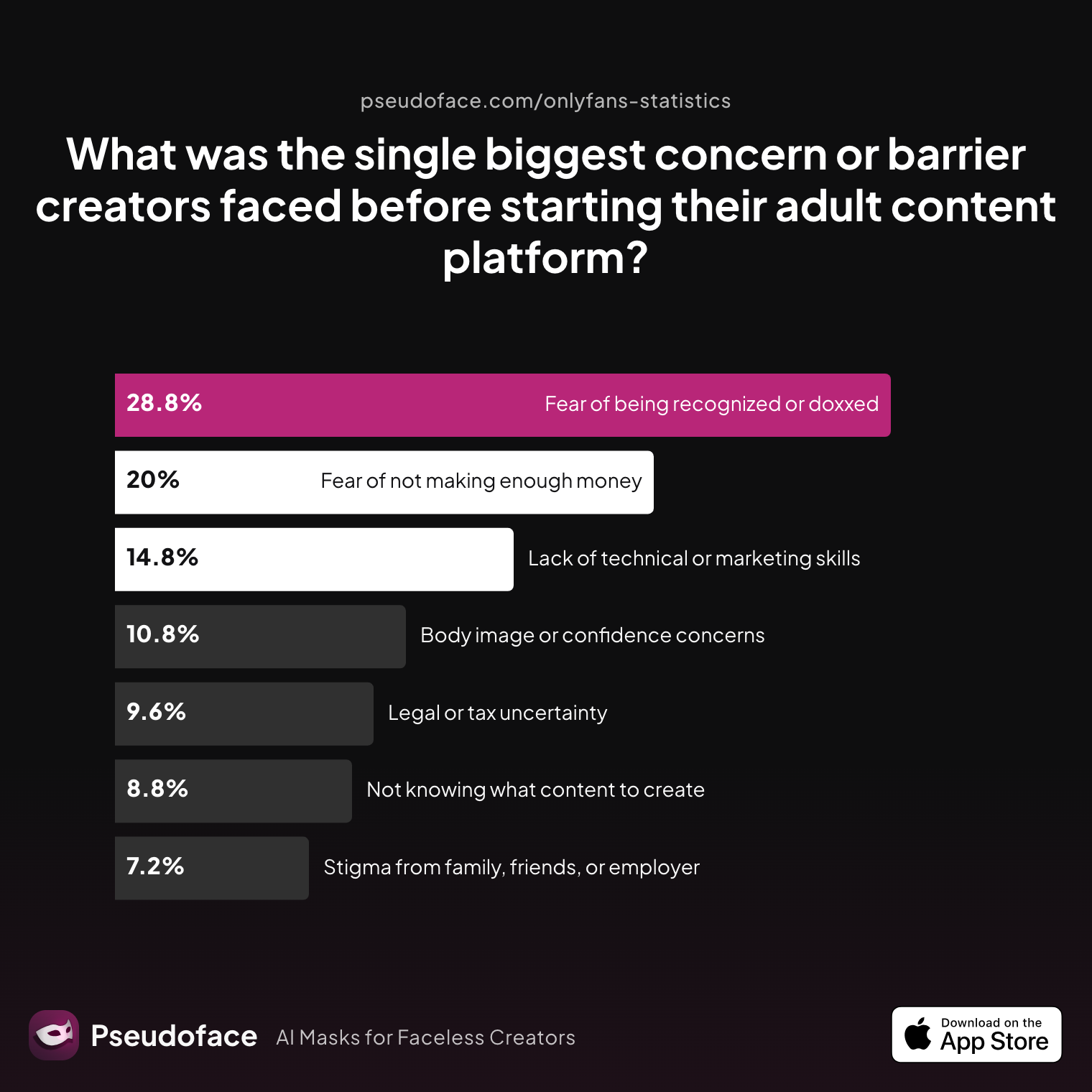
| Answer | Percentage |
|---|---|
| Body image or confidence concerns | 10.80% |
| Fear of being recognized or doxxed | 28.80% |
| Fear of not making enough money | 20.00% |
| Lack of technical or marketing skills | 14.80% |
| Legal or tax uncertainty | 9.60% |
| Not knowing what content to create | 8.80% |
| Stigma from family, friends, or employer | 7.20% |
Nearly 29% of creators report fear of being recognized or doxxed as their main barrier—a concern best tackled with a deliberate plan for staying anonymous on OnlyFans—while another 20% worry about income viability and 14% about lacking technical or marketing skills. When the emotional load is this high before launch, it’s no wonder that creators seek any workflow that promises structure and predictability.
But initial fears rarely match the realities that emerge after a creator starts. Here’s what most say actually stands in their way:
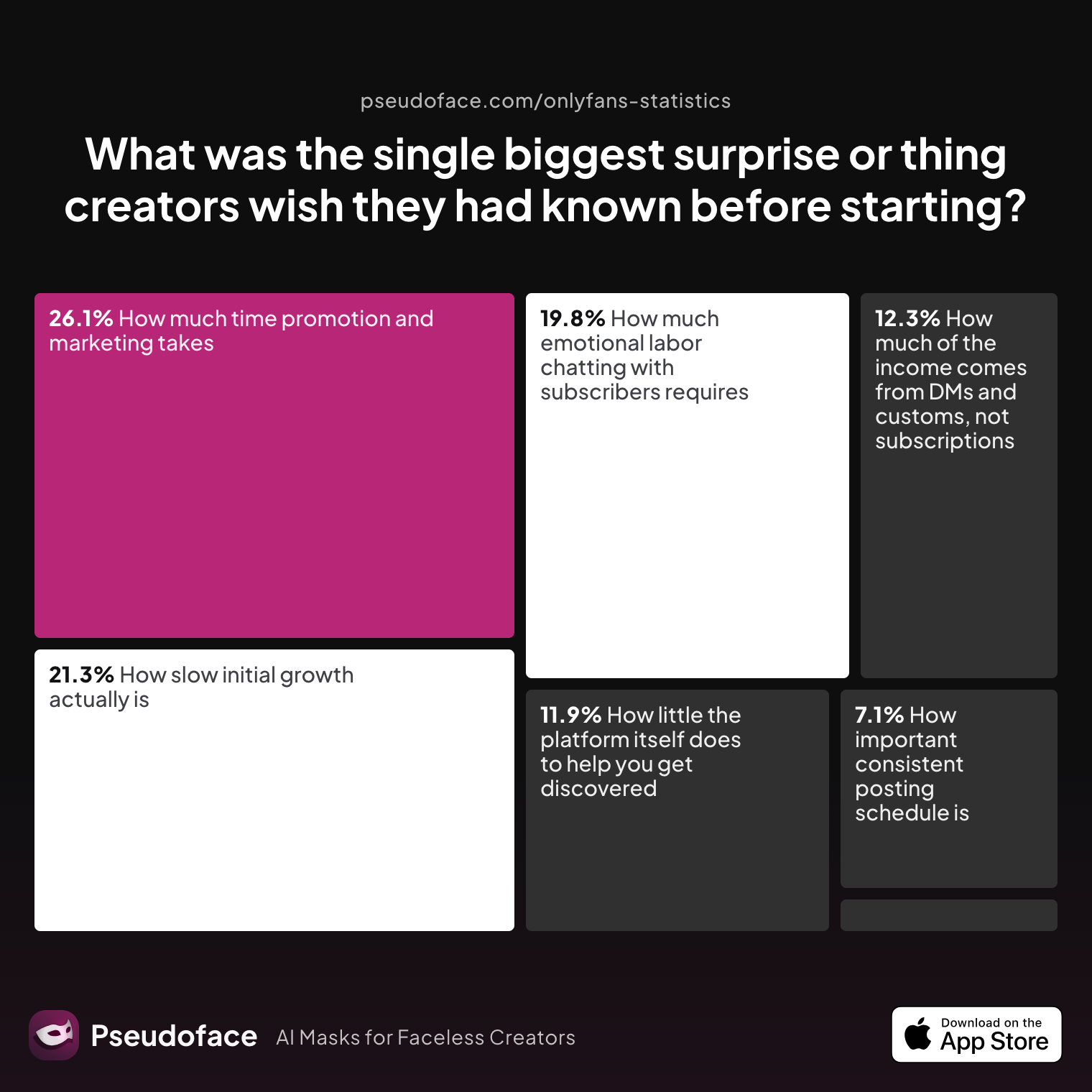
| Answer | Percentage |
|---|---|
| How important consistent posting schedule is | 7.11% |
| How isolating it can feel without a creator community | 1.58% |
| How little the platform itself does to help you get discovered | 11.86% |
| How much emotional labor chatting with subscribers requires | 19.76% |
| How much of the income comes from DMs and customs, not subscriptions | 12.25% |
| How much time promotion and marketing takes | 26.09% |
| How slow initial growth actually is | 21.34% |
The #1 biggest surprise for new creators is how much time promotion and marketing actually takes (26.1%), while almost as many (21.3%) are shocked at the slow pace of growth. Consistent posting—a key to building audience trust—is more crucial than most first-timers imagine.
Batch filming emerges here as more than a time hack; it is a practical answer to these systemic pressures. New and seasoned creators describe the sense of relief that comes from seeing a week (or a month) of scheduled posts ready to go, freeing them from daily content anxiety.
Open thread on Redditr/CreatorsAdvice
u/nurse_cherxo
I film and edit a bunch of content at once that I can schedule out for at least a week at a time. Also makes me less stressed when I see all my schedules filled out y'know. I use native schedulers where I can. For reddit, I use fangrowth. Hard to be consistent otherwise!

Overwhelm, burnout, and inconsistency are endemic on OnlyFans. Batch filming stands out—again and again in both data and real creator narratives—as an engine for sustainability and peace of mind. The rest of this guide will show how and why, moving from the high-level debate to hands-on tactics for building a batch-based workflow.
Batch Filming vs. Daily Filming: What Actually Saves Time and Sanity?
If you search OnlyFans creator forums or ask in Discords, the workflow debate is always alive: Should you make and post content daily, or block out time to batch-create several shoots at once? The quantitative and qualitative evidence, as of early 2026, points consistently toward batching for most creators—especially those working solo.
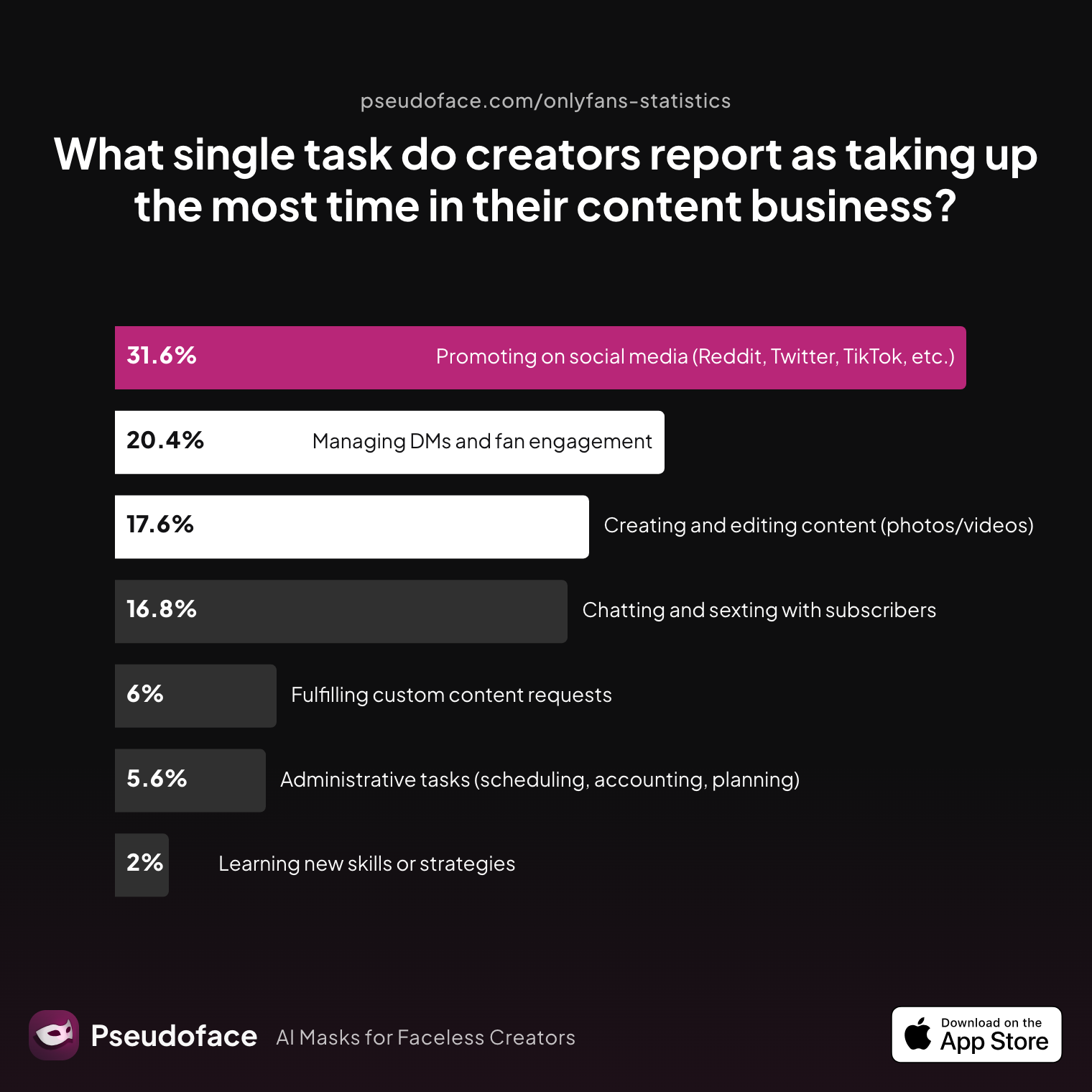
| Answer | Percentage |
|---|---|
| Administrative tasks (scheduling, accounting, planning) | 5.60% |
| Chatting and sexting with subscribers | 16.80% |
| Creating and editing content (photos/videos) | 17.60% |
| Fulfilling custom content requests | 6.00% |
| Learning new skills or strategies | 2.00% |
| Managing DMs and fan engagement | 20.40% |
| Promoting on social media (Reddit, Twitter, TikTok, etc.) | 31.60% |
Creating and editing content is the biggest time sink for 44% of creators (combining creating/editing and DMs/engagement), but promotion takes the largest single share at 31.6%. This sheds light on why batching content is so valuable: it centralizes effort, leaving more time for engagement and marketing—the keys to growth.
Open thread on Redditr/onlyfansadvice
u/avaloncreations
So my daily schedule consists of waking up early, making promo content, posting it on Reddit and Twitter, and then spending the rest of the day seeking out new potential subscribers and customers and responding to any DMs. When it comes to actual content making, I do all of my content for OnlyFans all at once on Sundays. I write down all the content I wanna do for each day, and I make it all in a span of like 2-3 hours. I post pictures every day (bundles of 5 pictures), and videos 3 times a week on Tuesday's, Thursday's and Sunday's. I schedule it all after making it and then I'm chilling for the rest of the week, basically
It is important to recognize that these statistics reflect self-selected, forum-active creators—there is survivorship bias in whose advice gets promoted and which workflows are praised. Some who burn out or quit daily content posting simply leave, skewing the visible wisdom in favor of batchers.
To clarify, let’s look at a snapshot comparison of the two approaches:
| Batch Filming | Daily Filming | |
|---|---|---|
| Setup time (makeup, lighting, props) | Consolidated, less frequent | Repeated daily, higher cumulative |
| Creative focus | Session-based, less switching | Fragmented, context switches daily |
| Posting flexibility | High (schedules/queues) | Low (must film or scramble each day) |
| Burnout risk | Lower with boundaries | Higher due to perceived endlessness |
| Consistency | Easier to maintain | Highly dependent on daily mood/energy |
Most creators who batch film can post daily or near-daily, but spend far fewer total hours in “creator mode” each week. They’re left with more bandwidth for messaging subscribers, organizing promos, and taking true time off—advantages that blunt the relentless pace social platforms demand.
Yet, some creators find daily filming suits their personality or helps them stay spontaneous. It’s the “no system” approach that usually correlates with inconsistency, missed posts, and stress. If you want to save both time and mental resources, the data-backed answer is clear: batching is the starting point for a sustainable content business.
Building a Batch Filming System for OnlyFans Creators
Batch filming isn’t just about doing everything at once; it’s about building a repeatable system that minimizes setup, reduces decision fatigue, and compounds your creative output—even when you’re working solo, with limited props and gear. To get there, you need not just intent, but infrastructure.
Peer data and threads highlight several essential elements—often overlooked when beginners set out:
- Creating an idea bank so you’re never scrambling for what to shoot
- Prepping outfits, props, and lighting to minimize session friction
- Setting a realistic goal (e.g., “shoot 7 main feed sets + 3 PPV teasers”)
- Organizing files systematically for quick post-production and scheduling
But above all, what do experienced creators say is most critical?
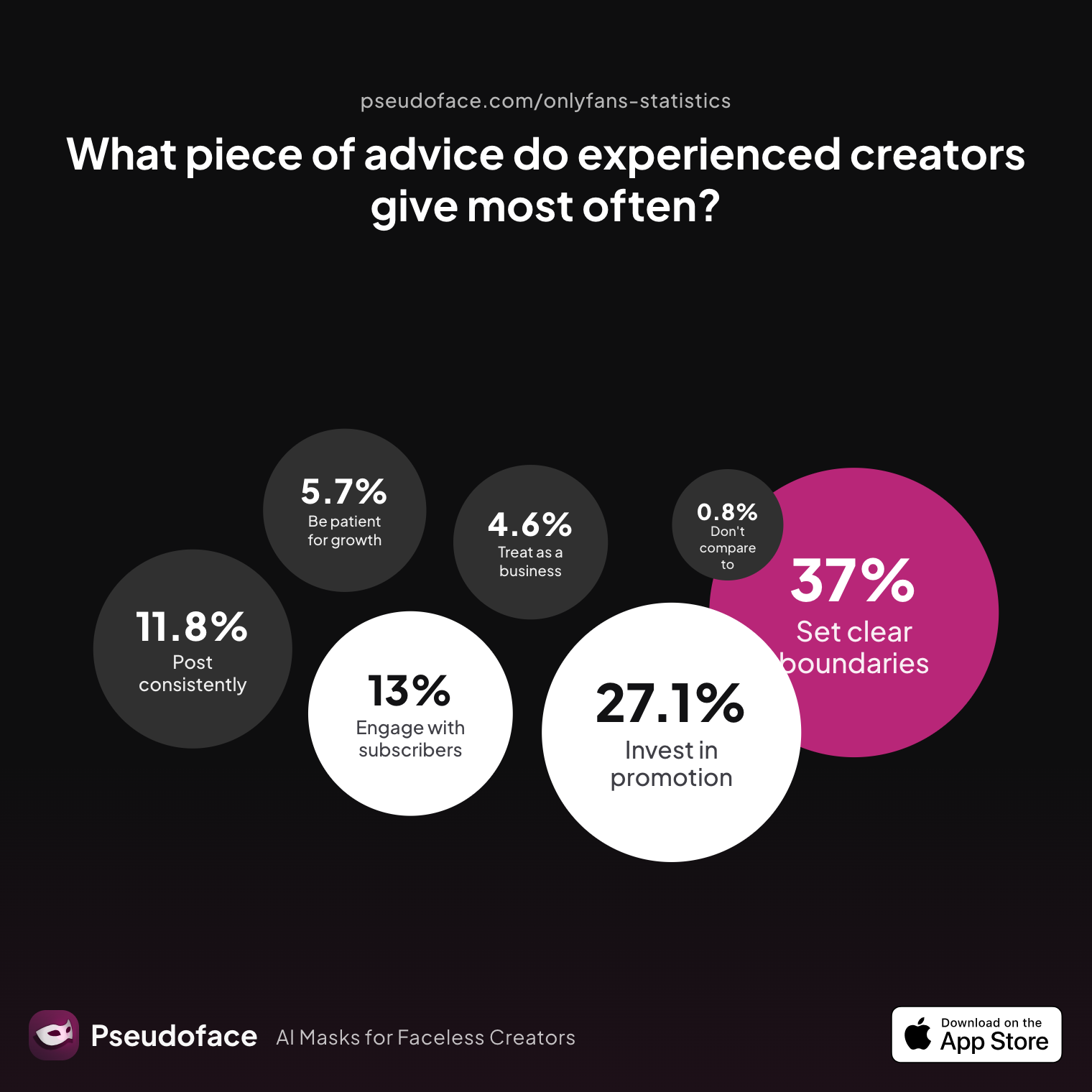
| Answer | Percentage |
|---|---|
| Be consistent — post on a regular schedule no matter what | 11.83% |
| Be patient — real growth takes months, not days | 5.73% |
| Do not compare yourself to top creators | 0.76% |
| Engage genuinely with your subscribers and build relationships | 12.98% |
| Invest heavily in promotion, not just content | 27.10% |
| Set clear boundaries early and stick to them | 37.02% |
| Treat it like a real business from day one | 4.58% |
Setting clear boundaries early (37%) and investing in promotion (27%) are the most cited advice, far outpacing technical tips. Batching is boundary-setting in action: it protects your energy, keeps the “content always due” monster in check, and lets you say no to unsustainable demands.
Open thread on Redditr/CreatorsAdvice
u/Daizy_Chain
I’m only able to film a couple weeks during the month, so I create as much as I can and queue it up for the month. I make sure it’s scheduled to update daily. 👍🏻
How do real creators approach their batch setup? Start simple:
- Idea Bank: Use a notes app, Notion, or even a spreadsheet to jot every concept. Assign a rating for time/effort needed. Every session, pick a “menu” that fits your mood and resources.
- Prep Session: Block off 30–60 minutes before your shoot window to lay out outfits, check your gear, and tidy the filming area. Keep a checklist of props and backup batteries.
- Batching Goals: Define a session target in numbers (“10 sets” or “20 short clips”) or content type (mix of main-feed, PPV, customs). Adjust to your energy—over-committing leads to burnout.
- Systematic Storage: Use date- and theme-titled folders (e.g.,
2026-03_Boudoir_Set03) to keep files organized for upload and queuing.
Creators warn that over-planning can paralyze just as surely as no planning. The sweet spot is knowing what you’ll film, having essentials ready, but staying open to the vibe of the shoot day.
Open thread on Redditr/onlyfansadvice
u/charleighdevine
On my paid: at least 1-2 photos a day, 1 strip tease video a week and 1-2 PPV videos a week Free 1-3 pics or locked posts a week! I don't sell much there and generally use it to promote my paid! My shoot schedule is once or twice a week and I do 3-4 outfits every time! Then throughout the week when I'm posting I can throw in a few pics I took same day here or there and it doesn't feel like as much work!
Batching isn’t about a rigid assembly line—it creates structure so you can focus on creativity and business, not daily scramble. Next, we’ll turn to how you can map this flow into an actionable content calendar.
Content Planning and Scheduling: The OnlyFans Content Calendar Guide
Once your batch sessions are in motion, the critical next step is translating content into a steady, predictable release schedule. This is what separates creators who “have enough for a week or two” from those who never miss a post and maintain subscriber loyalty.
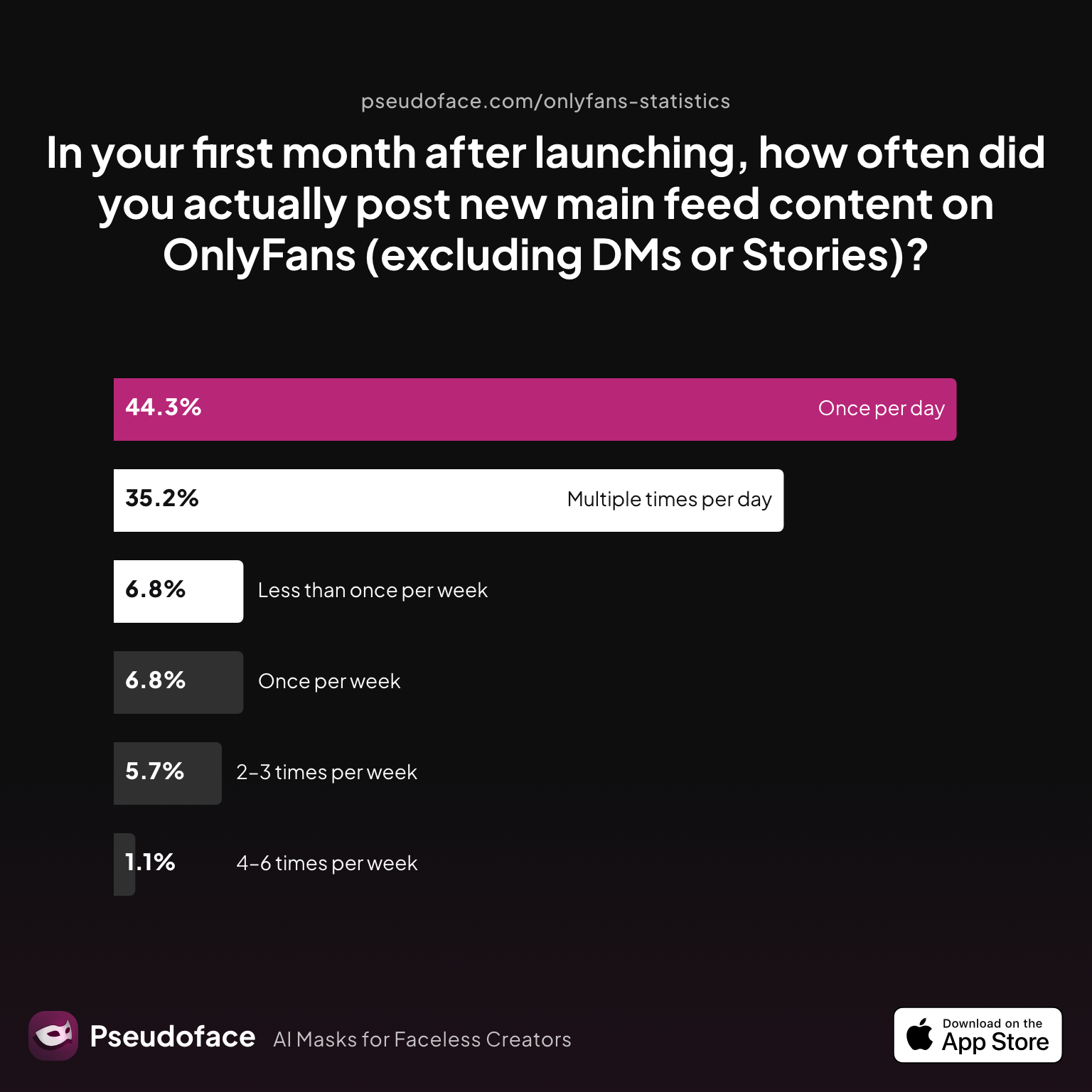
But what does actual posting frequency look like for new OnlyFans creators?
| Answer | Percentage |
|---|---|
| 2–3 times per week | 5.68% |
| 4–6 times per week | 1.14% |
| Less than once per week | 6.82% |
| Multiple times per day | 35.23% |
| Once per day | 44.32% |
| Once per week | 6.82% |
Over 79% of new creators posted every day or multiple times per day in their first month. This underscores the pressure for relentless consistency—but also marks a pronounced risk of early burnout if you try to shoot content on the fly rather than queuing up output.
However, the data also reflect self-selection bias: those active and sharing tend to be more motivated and organized, while those who can’t sustain this frequency may post less—and eventually quit, becoming invisible in retrospective surveys. For most creators, sustaining true daily filming is not realistic, but batching makes it possible to mimic that consistency.
Creators map their content using several approaches:
- Digital Calendars: Google Calendar, Notion, Trello, or content-specific tools let you drag, drop, and reschedule effortlessly. Templates abound in creator communities and on Etsy.
- Physical Planners/Whiteboards: For tactile thinkers, color-coded wall calendars make completed posts visible—and missing posts obvious.
- Hybrid Method: Tracking planning digitally but crossing off uploads and DM sends on physical sheets for extra dopamine hits.
Open thread on Redditr/CreatorsAdvice
u/AdRoutine486
I schedule a month ahead now if I can and I tend to mix it up week by week
Open thread on Redditr/CreatorsAdvice
u/nurse_cherxo
I film and edit a bunch of content at once that I can schedule out for at least a week at a time. Also makes me less stressed when I see all my schedules filled out y'know. I use native schedulers where I can. For reddit, I use fangrowth. Hard to be consistent otherwise!
Advanced planners mix main-feed content, PPV, and DM scripts into layered calendars, reducing the risk of a dry spell or last-minute catch-up. The best system is the one that helps you see at a glance: what’s ready, what’s scheduled, and what still needs shooting or uploading.
A word of caution: These creator-reported habits often reflect aspirational or peak planning mode, not unbroken routines. Many share templates and bullet journal spreads that might feel overwhelming to adopt wholesale. Start with the simplest calendar that you’ll actually use—and expand as your comfort grows.
How to Schedule Posts on OnlyFans: Platform Best Practices and Pitfalls
Once your content is mapped out, efficient scheduling is the linchpin between vision and execution. OnlyFans’ built-in tools streamline this process, but are not without quirks or limitations. Understanding how to batch-upload and queue posts is what turns your hard-earned content into hands-off consistency.
Native Scheduling on OnlyFans
On OnlyFans’ post composer, you can queue up photo sets, videos, locked and unlocked content, or DM messages to send at a chosen day and time. Most creators find the interface intuitive, but note a few common surprises and frustrations:
- Posts can be set to drop at fixed times—or you can upload a batch, set them to post every X hours or days, and let the system handle the rest.
- Queued DM mass messages are especially valuable for coordinating launches, sales, or seasonal campaigns.
Open thread on Redditr/CreatorsAdvice
u/azuri_aster
On OF there is also an option to just upload a bunch of posts into a queue & have it auto post every 6, 12, 24 or 48 hours instead of selecting the specific day for each post
- New subscribers are auto-added to scheduled mass DM sends if the message hasn’t already left the outbox (a frequent point of confusion).
Open thread on Redditr/onlyfansadvice
u/ruby_spice_
i think it does include new fans because i just checked a mass message i had scheduled yesterday, and a few new subs i had gotten since i scheduled were included on the send list
Open thread on Redditr/onlyfansadvice
u/Miss_poison_ivy
This was the reason I never scheduled mass messages cos I didn’t know if new fans would get it
Despite improvements, OnlyFans’ platform queue isn’t infallible. Occasional downtime and stuck “processing” errors still require manual checks.
Open thread on Redditr/onlyfansadvice
u/WhispyWhispWhip
According to OnlyFans support, they are aware of it and said that it's due to an unscheduled maintenance on OnlyFans. They're working on fixing it.
Third-party tools (often browser-based scripts, paid dashboards, or scheduling plugins) offer more advanced features—like visually mapping out future drops or syncing cross-platform posts—but come with risk: privacy, account safety, and potential for policy conflicts. As of 2025–2026, most creators recommend starting with OnlyFans’ own tools, then gradually trialing feature-rich solutions with strong reputations and no history of security issues.
Why This Matters:
72% of surveyed creators say reliable scheduling and automation is make-or-break for sticking to a content plan. Automating as much as possible lets you focus on engagement, custom requests, or even take proper days off—core benefits batch filming was meant to provide. The next section details tool options and hands-on workflow shortcuts.
Tools and Templates for Solo Creators: Batch Filming Guide and Workflow Shortcuts
Modern OnlyFans creators are spoiled for workflow tools, both free and paid. Whether you love the tactile feel of a planner, swear by Notion boards, or just want a low-maintenance Google Sheet, there is a resource that matches your style and scale.
Feature Comparison of Popular Content Planning and Scheduling Tools:
| Tool | Type | Scheduling | Content Mapping | Security | Cost |
|---|---|---|---|---|---|
| OnlyFans Native Queue | Built-in | Yes | By post only | High | Free |
| Notion Calendar | Template | Manual | Yes | High | Free/$ |
| Google Sheets | Template | Manual | Yes | High | Free |
| SocialPilot | 3rd-party SaaS | Yes (for socials, not OF) | Yes | Moderate | Paid |
| Etsy/Downloadable Templates | Docs/Printable | Manual | Yes | High | $ |
| Airtable | Spreadsheet/Database | Manual/Automated | Yes | High | Free/$ |
Creators widely report that starting simple is better than wrestling with complex paid dashboards. Notion and Google Sheets are flexible (with tons of free OF-focused templates), while built-in OF scheduling is the safest baseline.
Open thread on Redditr/CreatorsAdvice
u/AdRoutine486
I schedule a month ahead now if I can and I tend to mix it up week by week
Practical workflow shortcuts include:
- Using template checklists for gear/props to speed up setup before each batch
- Organizing folders by date, set/theme, or planned drop so assets are easy to find and queue
- Creating “idea banks” using Notion databases or even paper sticky notes—especially helpful for neurodivergent creators or those prone to executive dysfunction
Peer advice emphasizes that the best system is the one you’ll consistently revisit. Overbuilt automations tend to break (or get ignored); if a system feels natural after a couple of batch sessions, keep using it. Only add bells and whistles (like custom content CRM or advanced tagging) when basic tracking feels second nature.
Burnout Prevention and Sustainability: Protecting Your Energy While Staying Consistent
Behind every OnlyFans "success story" are the unseen hours: setup, repeats, editing, and also the relentless expectations for creators to always be "on." Burnout is rampant—yet, batch filming stands out not just as a productivity aid, but as a shield protecting your creativity and wellbeing.
| Answer | Percentage |
|---|---|
| Burnout or emotional exhaustion | 27.10% |
| Feelings of isolation or loneliness | 2.67% |
| Financial stress relief | 1.15% |
| Harassment or online abuse taking a toll | 7.25% |
| Improved confidence or self-esteem | 6.11% |
| Increased anxiety or stress | 52.29% |
| Negative impact on personal relationships | 3.05% |
| No significant mental health impact | 0.38% |
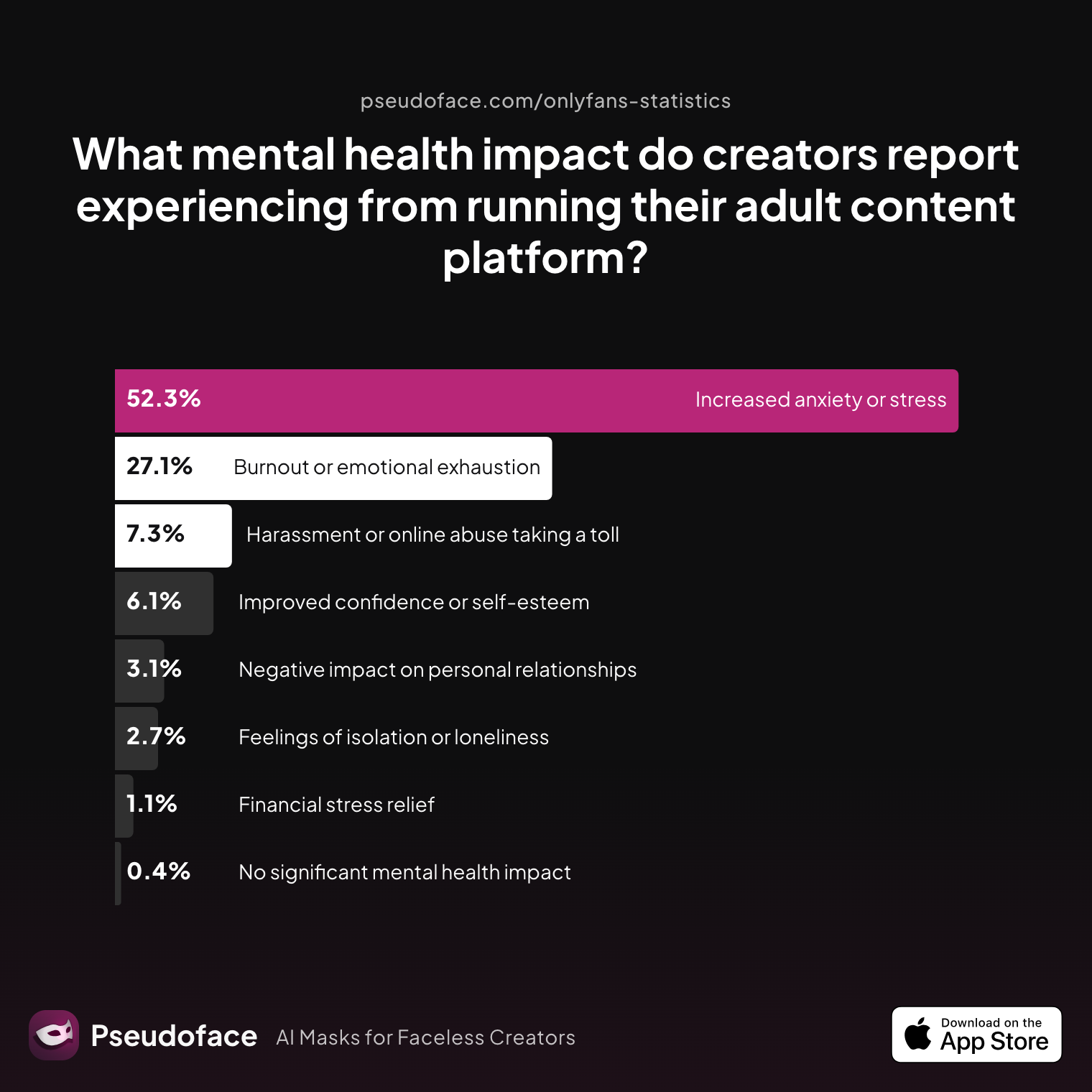
Over 52% of creators report increased anxiety or stress, and 27% cite burnout or emotional exhaustion. This is not just a numbers game—mental health support, boundaries, and realistic posting expectations are survival tools. It's crucial to recognize bias: creators who burn out may leave the platform (and, therefore, the sample), meaning the true rates may be even higher.
Open thread on Redditr/onlyfansadvice
u/wondrous_willow
I made strict boundaries on my page, and also for myself. For example I don’t chat with my fans because that burns me out the most. I also have 4 yrs worth of content on my page so I don’t feel the need to post everyday now. I also take weekends off just like everyone else does, I think majority of us feel we need to be present 24/7 but that is not realistic nor feasible. Find out what exactly is taking the most energy out of you and make boundaries around it. You don’t have to do it all. If you have enough money you could hire an assistant. Hope this helps a bit, prioritize your mental health 💛
Batching alone won’t eliminate the emotional rollercoaster, but it is a lever for rebalancing pressure. The best practices surfaced from hundreds of real creator stories include:
- Session pacing: Build in breaks, hydration, and snack time; consider “shoot blocks” with 5-minute movement resets
- Boundaries: Limit interactions outside your available hours; don’t turn every day into a possible shoot day
- Strategic scheduling: Plan true days off and commit to not logging in—even if posts are auto-dropping.
- Re-evaluation: Every few months, review your stress levels. Does your batch system need downsizing, more help, or a schedule change?
Burnout often hides in “just one more DM” or “I’ll film again tomorrow.” Successful batchers recognize that preservation, not maximum hustle, is the foundation for lasting OnlyFans careers.
FAQ
What’s the simplest way to start batch filming for content creators on OnlyFans?
Most creators begin by picking 2–3 “looks” and filming content with their phone in natural daylight, changing outfits and backgrounds within the same session.
This setup minimizes gear needs and decision-making. Real creators frequently recommend using very basic scripting or shot lists to avoid freezing up and to pace themselves through the batch. Don’t aim for cinematic production—focus on volume and variety.
How do I schedule content on OnlyFans without third-party tools?
Use the platform’s native “schedule post” feature when uploading; you can queue posts to publish on specific dates or at set intervals.
Batch-upload your finished content from desktop or mobile. You can also use the queue function to auto-post at regular intervals, freeing you from daily logins. Double-check previews and final time zones, as OF sometimes resets the display depending on your device.
Which OnlyFans scheduling tools are safest for solo creators?
The safest choices are OnlyFans’ own built-in scheduler and queue functions; third-party tools like SocialPilot are widely used for social promo, but not direct OF uploads.
Third-party dashboards and browser plugins should be vetted carefully for privacy, as using unofficial software might violate OF’s policies. If you expand to multi-platform, prioritize integrations (like Google Sheets or Notion) that never require your OF login.
How can I avoid burnout when batch filming content for OnlyFans?
Batch filming helps most when paired with strict session limits, regular breaks, and rest days where you neither film nor interact.
Top creators suggest planning actual days off, journaling stress triggers, and only adding complexity (e.g., live customs) once your system feels under control. Don’t conflate quantity with sustainability—quality-focused batching yields more satisfaction over time.
What kind of content calendar or template works best for new OnlyFans creators?
Google Sheets is the most adaptable and free; Notion offers more flexibility and ready-made community templates; paper wall calendars are best for visual/tactile creators.
Digital options ease automation and rescheduling, but many stick with printable grids from Etsy or simple planners for mental clarity. Your optimal solution is the one you’ll keep updating, not the fanciest one.
How many posts should I aim to batch film in a session as a beginner?
The average peer-reported session goal is enough content for 7–10 days—usually 5–10 shoots or sets, depending on your niche and energy.
More important than chasing a number is being realistic about your limits. Focus on building a small backlog you can sustain rather than overextending and risking creative exhaustion.
What’s the best time of day to schedule posts on OnlyFans for maximum engagement?
Early morning in your largest subscriber’s time zone (“when people check their phones”) is the consensus—though polling your audience for local times gives the best result.
Engagement peaks reportedly cluster around wake-up and post-work hours. Use OnlyFans’ audience insights and experiment for a month, then refine timing as you gather feedback.
How do I organize my files and ideas to make batch content creation on OnlyFans easier?
Use date-labeled folders for each session, with subfolders for main feed, PPV, and social promo. Name files consistently by type and date.
Some creators adapt “second brain” setups in Notion to tag ideas, scripts, and shoot progress—especially helpful for creators with ADHD. Paper index cards or sticky notes work for tactile planners.
What are the biggest pitfalls beginners face in batch filming for content creators?
Key traps are underestimating setup time, running out of phone or camera storage, failing to organize files up front, and overplanning to the point of paralysis.
Most of these are solved by upfront checklists and gradually building complexity as you get comfortable with session flow.
Batch filming is not a one-size-fits-all answer, but the evidence is overwhelming: For new and returning OnlyFans creators, a batch filming and scheduling system is the surest route to less stress, better consistency, and a far better shot at long-term sustainability. Start small, adapt often, and let your system work as hard as you do.


