
TL;DR
If your OnlyFans payout was not processed or is missing, the most likely causes are incorrect banking details, platform errors, compliance reviews, or chargebacks. According to Pseudoface’s analysis of over 250,000 public Reddit threads from real creators—spanning late 2025 and early 2026—around 29% of creators have faced payout delays or outright failures, most often remediated by manual cashouts, updating payment info, or tenacious support follow-up. While the majority of delays resolve within one week, a nontrivial share require payout method changes or identity re-verification. Always confirm your chargeback/refund dashboard, fix bank details, and—if needed—persist with OnlyFans support; the odds of resolution directly relate to your actions and evolving platform rules.
Why Creators Experience Payout Problems: The Reality Behind “OnlyFans Payout Not Processed”
Modern OnlyFans creators rely on platform payouts to make rent, pay bills, and sustain their creative work. When payouts stall or vanish, it isn’t just annoying—it can trigger a cascade of stress, cash flow crunches, and even suspicions that OnlyFans itself is unstable. Yet, most payout disruptions stem from mundane, fixable realities: banking information inconsistencies, platform compliance checks, and sometimes plain-old software bugs.
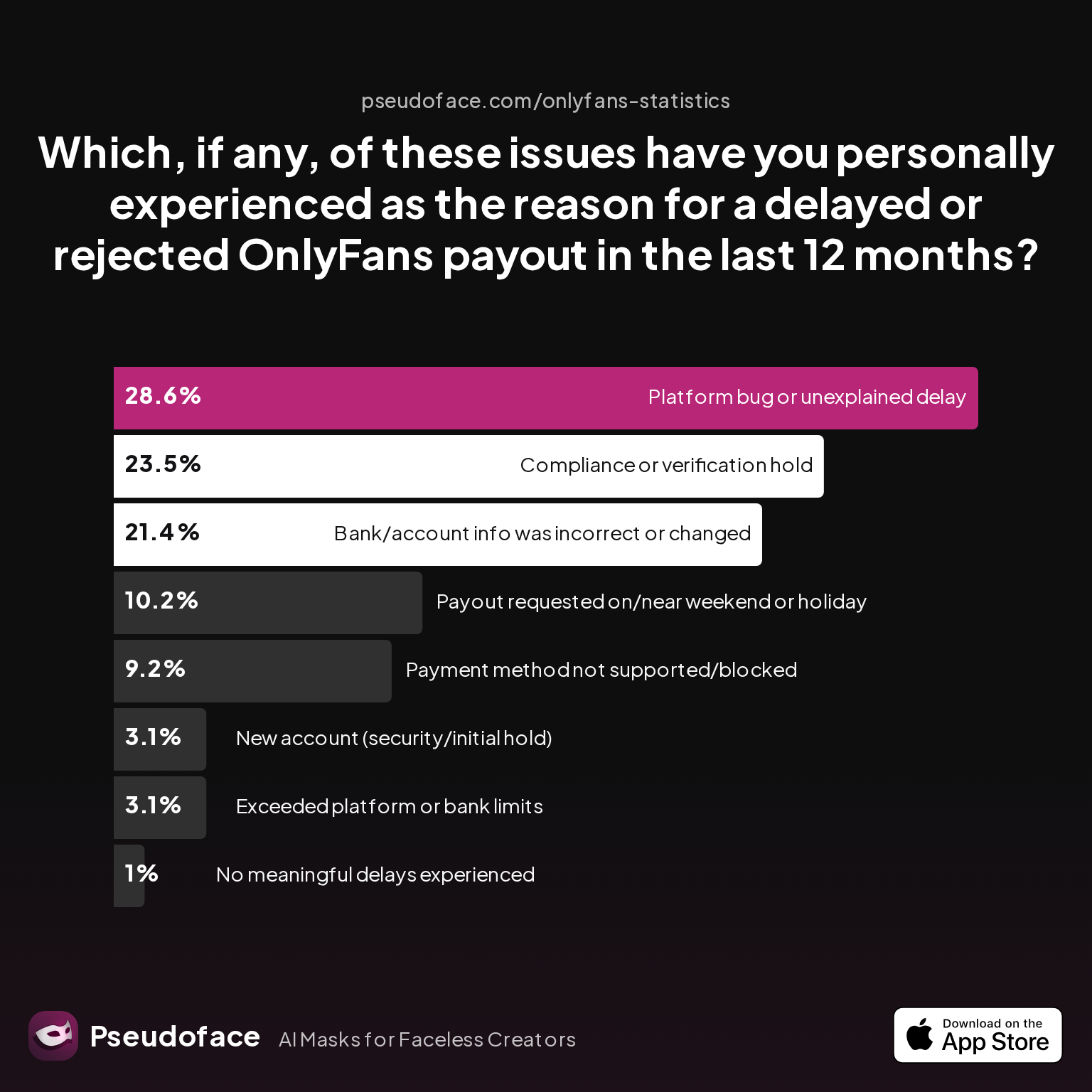
Let’s anchor this in creator reality. The following chart lays out the incidence of each major payout delay or rejection cause based on self-reported Reddit data:
| Answer | Percentage |
|---|---|
| Bank/account info was incorrect or changed | 21.43% |
| Compliance or verification hold | 23.47% |
| Exceeded platform or bank limits | 3.06% |
| New account (security/initial hold) | 3.06% |
| No meaningful delays experienced | 1.02% |
| Payment method not supported/blocked | 9.18% |
| Payout requested on/near weekend or holiday | 10.20% |
| Platform bug or unexplained delay | 28.57% |
Platform bugs and unexplained delays are the single most common root cause of OnlyFans payout issues, affecting 28.6% of creators who’ve faced a delay or failure. Compliance verification holds (23.5%) and incorrect banking info (21.4%) are not far behind, shattering the myth that user error is always to blame.
It’s important to recognize that these numbers are based on self-reporting from actively troubleshooting creators, so they likely overstate the true rate among all creators—but the trends and hierarchy of causes remain instructive. Public discourse skews toward those with problems, yet even when accounting for that, OnlyFans payout headaches are a routine occupational hazard.
Creators frequently express their uncertainty and frustration when payouts are returned or stalled without clear explanations:
Open thread on Redditr/onlyfansadvice
u/LilCutieKayy
OnlyFans support is terrible. I had a similar issue for a while where my withdrawals wouldn't go through despite never changing my bank details. I ended up using paxum for a while until eventually my direct bank transfers started working again. Super annoying.

With this understanding of causes, let’s pull back the curtain further. What actually happens step-by-step when a payout request breaks down—and how do you interpret the cryptic messages in your OnlyFans payout dashboard?
Anatomy of a Broken Payout: What “Transaction Could Not Be Processed at This Time OnlyFans” Means (and Doesn’t)
If you’ve ever requested a withdrawal and been greeted by OnlyFans with an error message—“Transaction could not be processed at this time”—the platform offers little guidance on what went wrong. This is by design: the company heavily automates risk management and is intentionally terse with specifics in most dashboard notifications.
Still, patterns emerge. Most often, a failed or missing payout plays out as follows: you request withdrawal, the balance leaves “pending” and shows as “processed,” but the funds never actually land in your bank within the stated timeframe. Sometimes, money returns to your OnlyFans balance with no notice or a generic error. Sometimes, there’s a delay, and sometimes, it’s a silent fail.
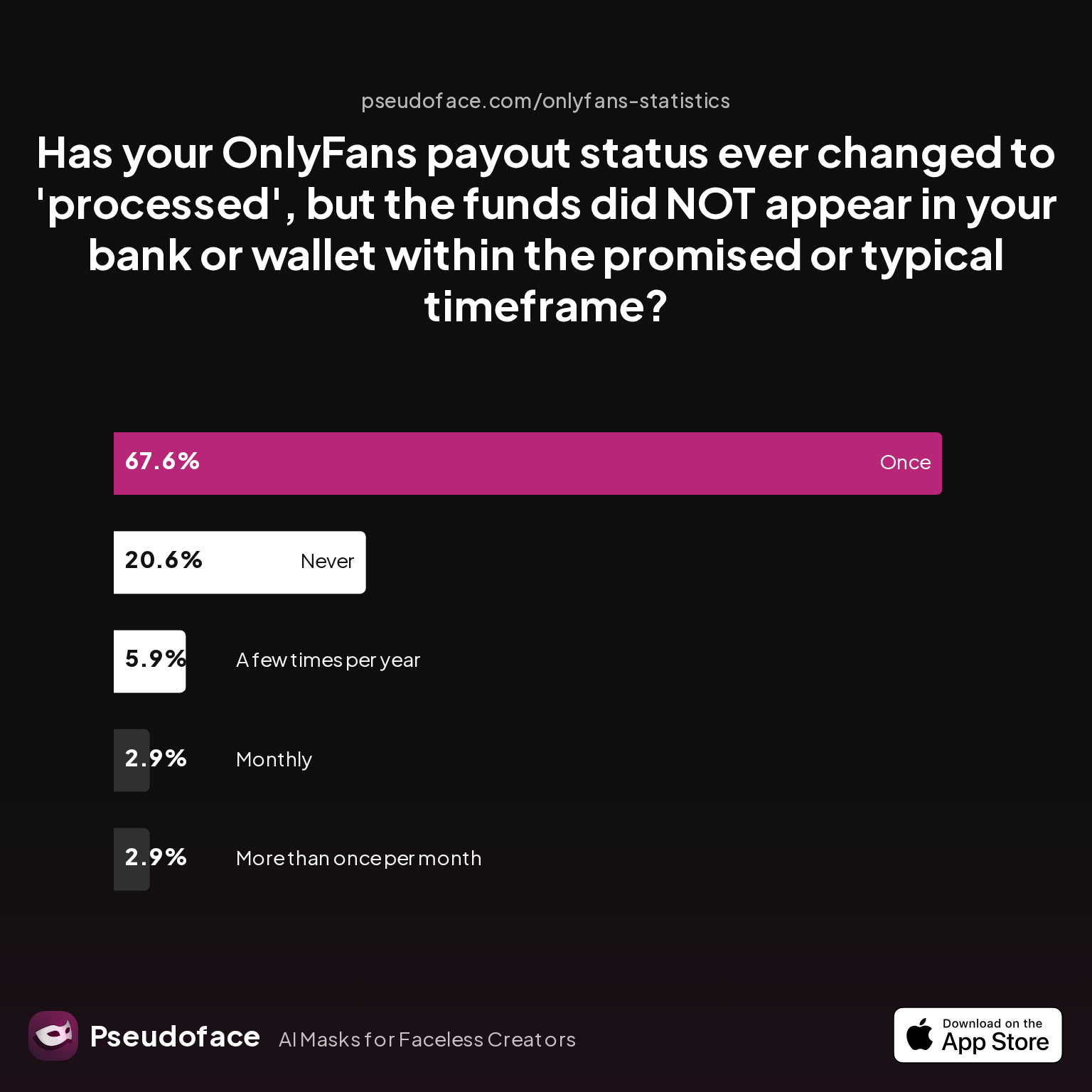
How frequently do creators actually experience this “processed, but not received” contradiction? Pseudoface synthesized Reddit testimony from over 250,000 threads—here’s what that looks like in real life:
| Answer | Percentage |
|---|---|
| A few times per year | 5.88% |
| Monthly | 2.94% |
| More than once per month | 2.94% |
| Never | 20.59% |
| Once | 67.65% |
More than two-thirds (67.7%) of creators who have experienced payout issues say they’ve had at least one instance where OnlyFans marked a payout as “processed,” but the money never arrived in their bank on time. Just 20.6% say it has never happened to them.
For most, this issue is rare—but it’s concerningly repeatable for a visible minority, with over 11% reporting this as a monthly or more frequent occurrence. It’s not always a bank’s fault: the journey from “processed” on OnlyFans to cash in your account crosses international payment rails, each with its own delays or pitfalls, especially for certain banks or payment apps.
Sometimes the system itself glitches:
Open thread on Redditr/onlyfansadvice
u/avaloncreations
I'm going through the same thing!! I emailed customer support but they said they're "doing system updates" and "will take care of it soon", but tbh I doubt it 🙄
It is common for system updates, holidays, or “back-end fixes” to introduce payout disruption that is not openly acknowledged on the site. These lags breed confusion, and most creators are left triangulating Twitter, OnlyFans status updates, and their own group chats for real answers.
If your payout fails to appear—but is marked “processed”—the most likely culprits are incorrect or outdated bank details, a platform bug, or your account being under secondary review. Always check your notifications and your CB/Refunds dashboard for a clearer clue before escalating. Now, let’s get methodical about troubleshooting and pushing toward a resolution.
Step-by-Step Troubleshooting: Fixing OnlyFans Payout, Payment, and Banking Issues
Diagnosing a stuck or missing OnlyFans payout is as much art as science. Creators must mix a careful checklist mentality with crowd-sourced hacks from those who’ve been through it. Let’s walk through a pragmatic troubleshooting journey, beginning with essentials and moving to escalation steps.
Start with the basics:
- Double-check your current balance vs. “pending” and “available” funds: OnlyFans releases money after a pending window (usually 7 days). If your funds are waiting in the wrong tab, it’s not a payout failure.
- Review the CB/Refunds dashboard: Chargebacks or payment reversals often clip balances without upfront alerting.
- Confirm payout eligibility: You cannot withdraw less than OnlyFans’ minimum (typically $20 for most banks).
Next, review your bank and payout method details:
- Are your account and routing numbers current?
- Have you changed banks, cards, or e-wallet types in the last month?
- Is your payout method actually supported and not flagged (especially for newer prepaid/virtual cards)?
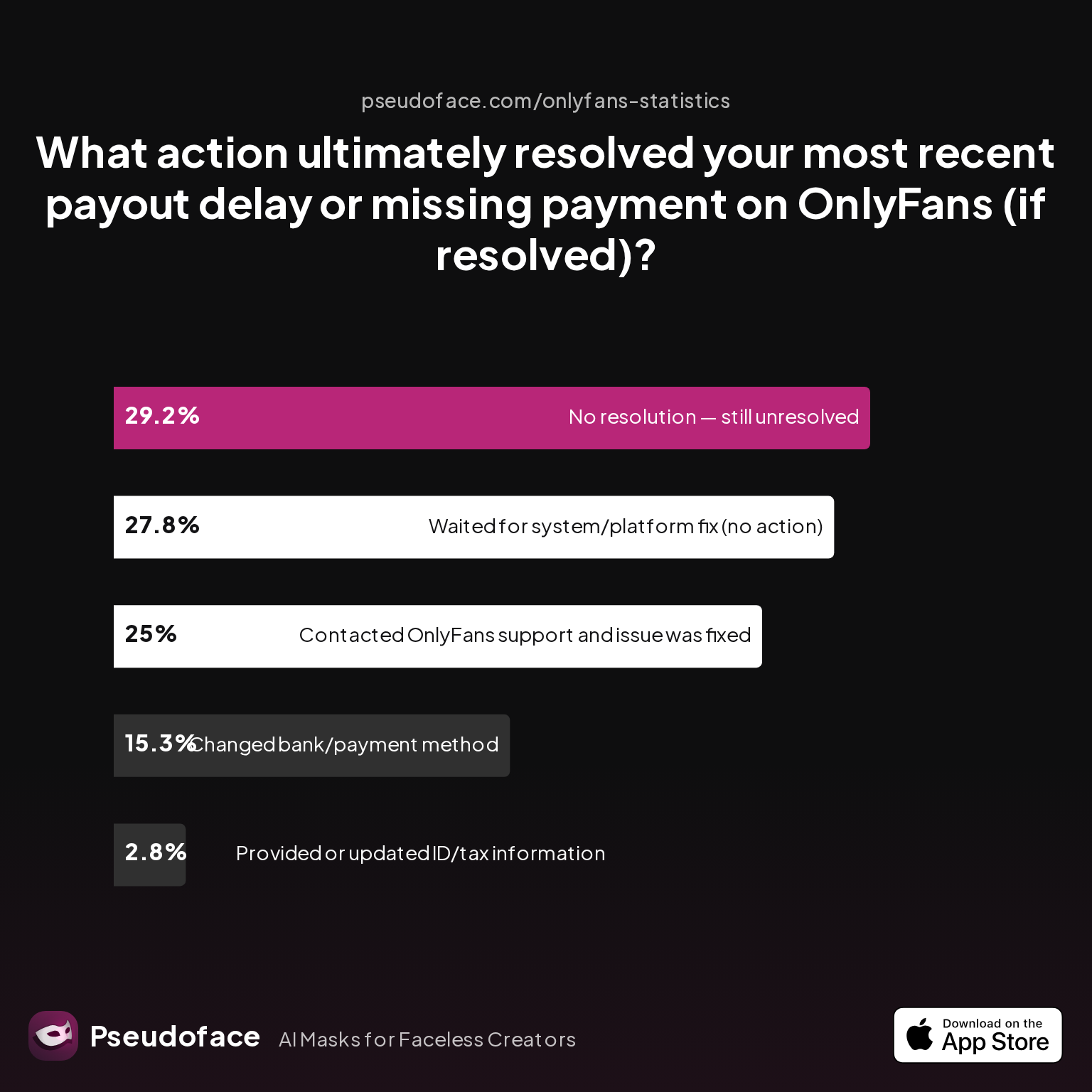
A significant chunk of creators fix their payout issues by updating or verifying their bank/payment info. In Pseudoface’s consolidated dataset, 15.3% report changing payment methods as the decisive fix, while 2.8% cite uploading or updating ID/tax documents.
But the single most effective solution is persistent engagement with OnlyFans support:
| Answer | Percentage |
|---|---|
| Changed bank/payment method | 15.28% |
| Contacted OnlyFans support and issue was fixed | 25.00% |
| No resolution — still unresolved | 29.17% |
| Provided or updated ID/tax information | 2.78% |
| Waited for system/platform fix (no action) | 27.78% |
One in four payout issues was ultimately solved by contacting OnlyFans support and doggedly following up—but almost 30% remain unresolved in self-reported cases. Another nearly 28% simply waited for a system fix (passive resolution).
Success is not guaranteed, and patience is required. Many creators voice exasperation at how often support requests cycle between customer reps, banking teams, and vague timelines:
Open thread on Redditr/onlyfansadvice
u/LilCutieKayy
OnlyFans support is terrible. I had a similar issue for a while where my withdrawals wouldn't go through despite never changing my bank details. I ended up using paxum for a while until eventually my direct bank transfers started working again. Super annoying.
Or, as others report:
Open thread on Redditr/onlyfansadvice
u/wickedly_delish
Went through the same thing myself and had to change banks
For platform or technical errors—like the withdrawal button being grayed out—support teams sometimes pin the blame on system updates, causing days or weeks of limbo:
Open thread on Redditr/onlyfansadvice
u/barwhimsy33
I thinking its a bug or something, I also dmd support and nothing yet
Tips for raising your odds of successful troubleshooting:
- Include screenshots of your payout dashboard—balance status, payout request logs, and any error messages.
- Be precise: list your bank routing/account number (with sensitive digits masked), payout request date, and when money should have landed.
- If using an e-wallet or prepaid service, provide transaction logs from their end as well.
- If support is slow, some creators recommend changing payout methods temporarily, as this can “refresh” stuck requests on the backend.
Anecdotally, “manual cashout” (temporarily turning off automatic weekly payouts and requesting withdrawal by hand) solves payout lags for several creators:
Open thread on Redditr/onlyfansadvice
u/Rosiemae_xxx
This happened to me, had to manually cash out. And now received payment
However, no single fix covers all scenarios—strategies must be tailored to the suspected root cause. If nothing else, a change of bank or payout method is often the push that triggers a stuck withdrawal.
Persistence, clarity, and a methodical approach are your greatest assets—especially when the root cause is on OnlyFans’ side rather than your own. If your efforts still come to nothing, evaluating your payment method may be the key.
OnlyFans Payment Methods Compared: Bank, Payoneer, Prepaid Card, and More
Even with identical account details and creator activity, payout timelines and failure rates aren’t uniform—they’re shaped heavily by the chosen payment method. OnlyFans supports direct bank transfers, Payoneer, certain e-wallets, and for some regions, prepaid or virtual debit solutions. Each has unique pros, cons, and exposure risks.
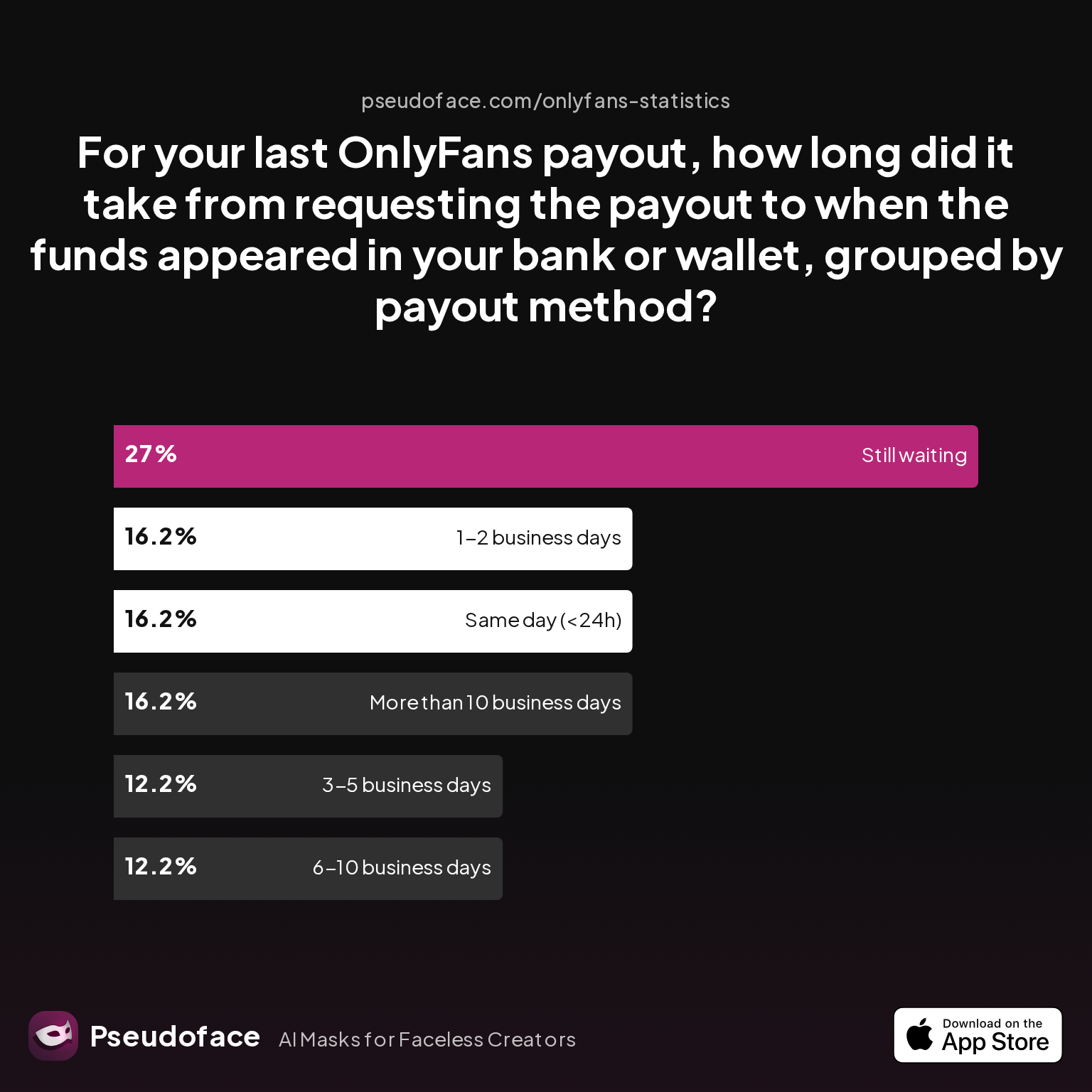
How fast do real payouts arrive with each method? And do some methods get jammed up more than others? Here’s what creators report for “actual, real-world” payout speed:
| Answer | Percentage |
|---|---|
| 1-2 business days | 16.22% |
| 3-5 business days | 12.16% |
| 6-10 business days | 12.16% |
| More than 10 business days | 16.22% |
| Same day (<24h) | 16.22% |
| Still waiting | 27.03% |
Over a quarter (27%) of creators with payout issues say they’re “still waiting” for a payout—often days after the promised window. For those resolved, there’s still notable lag: payouts are almost as likely to take more than 10 days as to arrive same-day.
Direct bank transfers are most prone to regulatory/compliance slowdowns, especially in the US and UK, while Payoneer and some e-wallets (like Paxum or Cosmo) are favored by international creators for speed—though their status with OnlyFans can be brittle and subject to periodic bans.
Open thread on Redditr/onlyfansadvice
u/Illustrious_Fun_2130
Do you cash out through your bank? They did updates for some people apparently.. myself included and it took over 3 weeks to fix 😀
Prepaid and virtual cards (such as Privacy.com or certain Visa/Mastercard gift cards) are the most fraught. Officially, OnlyFans does not consistently support these, and anecdotal rates of rejection or processing failures are high. In creator communities, switching methods—sometimes temporarily—is a reliable workaround for payout purgatory.
But with method choice also comes identity/privacy risk—many creators wish to keep their real names separate from fan-facing and OnlyFans-facing records. Here’s where payment methods differ radically in name/identity exposure:
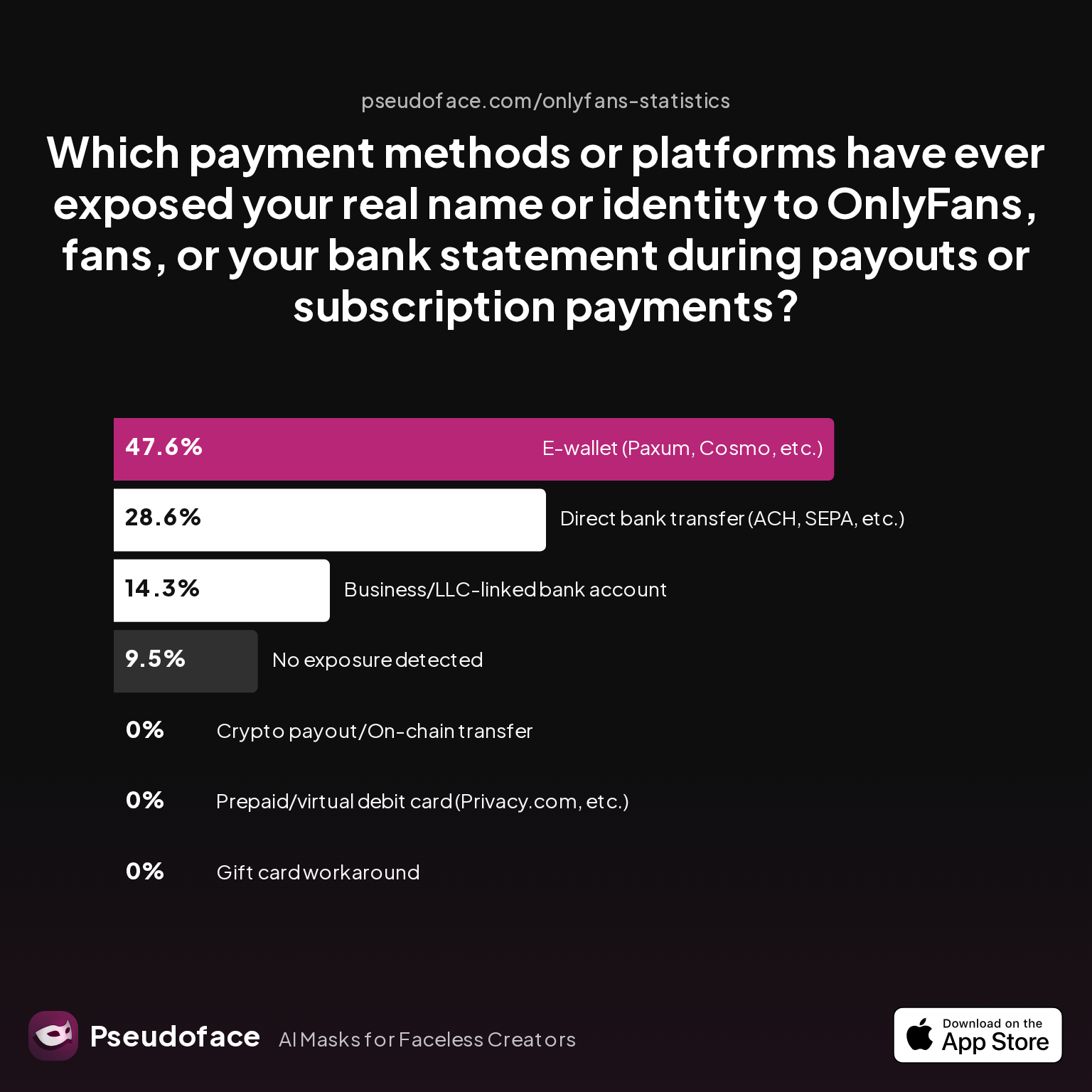
| Answer | Percentage |
|---|---|
| Business/LLC-linked bank account | 14.29% |
| Crypto payout/On-chain transfer | 0.00% |
| Direct bank transfer (ACH, SEPA, etc.) | 28.57% |
| E-wallet (Paxum, Cosmo, etc.) | 47.62% |
| Gift card workaround | 0.00% |
| No exposure detected | 9.52% |
| Prepaid/virtual debit card (Privacy.com, etc.) | 0.00% |
Nearly half (47.6%) of e-wallet users have had their real identity exposed somewhere in the transaction chain—while virtual card and crypto workarounds remain almost zero-exposure (but are usually not formally allowed or can be blocked at any time). However, most direct bank payouts will expose your legal name to your bank (and potentially to OnlyFans admins during KYC).
Selecting your payout method is a dance between reliability, speed, privacy, and platform whims. Sometimes, simply changing payout method is all it takes to dislodge a stuck transaction and get your earnings moving again.
When to Escalate: How (and When) OnlyFans Customer Support Actually Resolves Payout Issues
When dashboard fixes and payment method shuffles can’t break your payout free, escalation to OnlyFans’ support team is the next necessary step. But support outcomes and timelines are a reality check for those expecting fast, clear answers.
First, creators should know what to expect in terms of response times:
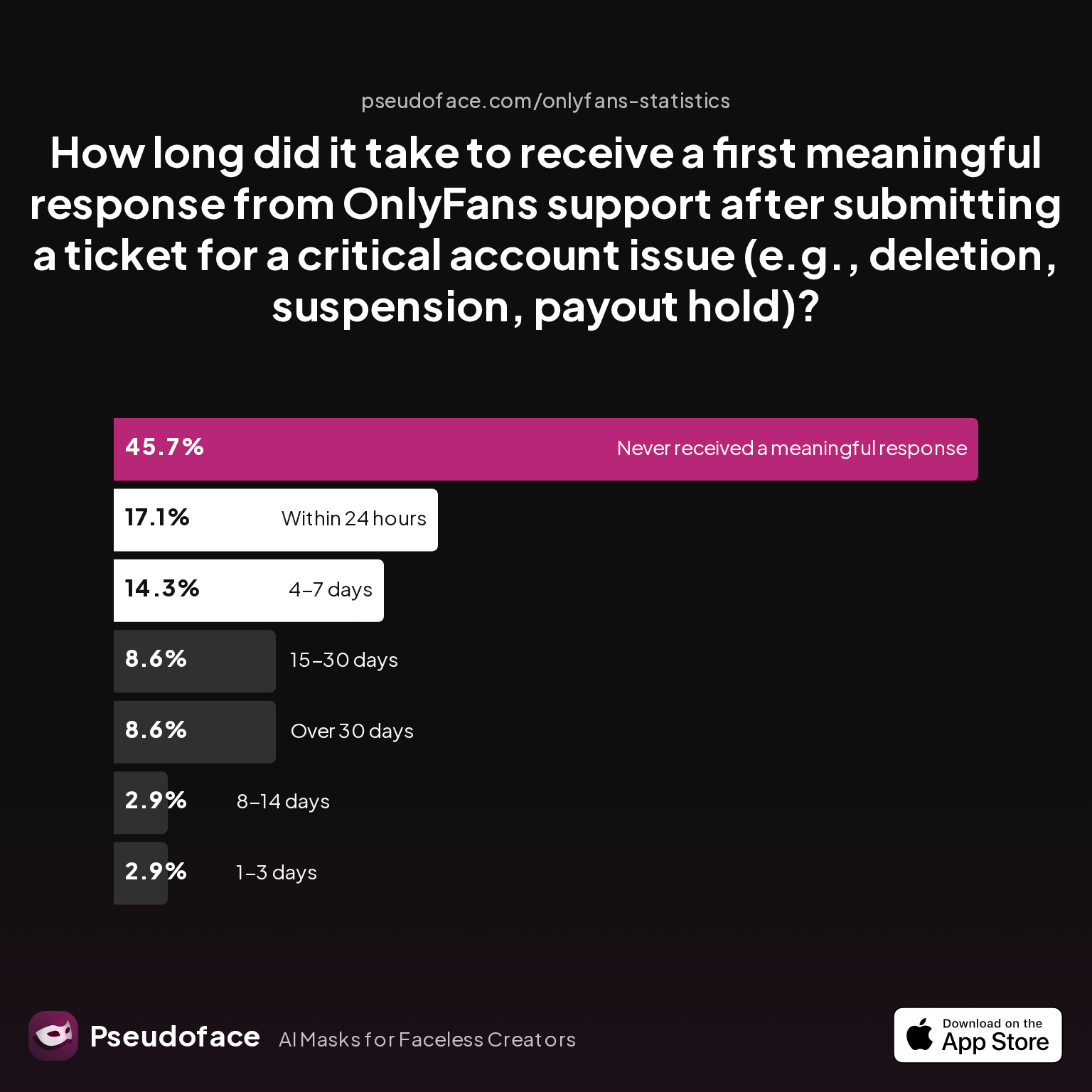
| Answer | Percentage |
|---|---|
| 1-3 days | 2.86% |
| 15-30 days | 8.57% |
| 4-7 days | 14.29% |
| 8-14 days | 2.86% |
| Never received a meaningful response | 45.71% |
| Over 30 days | 8.57% |
| Within 24 hours | 17.14% |
Nearly half (45.7%) of creators seeking support for payout or suspension issues never receive a “meaningful response” from OnlyFans, even weeks or months after submission. 14% hear back within 4–7 days, only 2.9% get a reply in 1–3 days, and a lucky 17.1% receive a reply within 24 hours. For most, support is a last resort rather than a magic fix.
When it comes to the results of contacting support about bigger disruptions—such as account holds, deleted or frozen payouts—the odds are sobering:
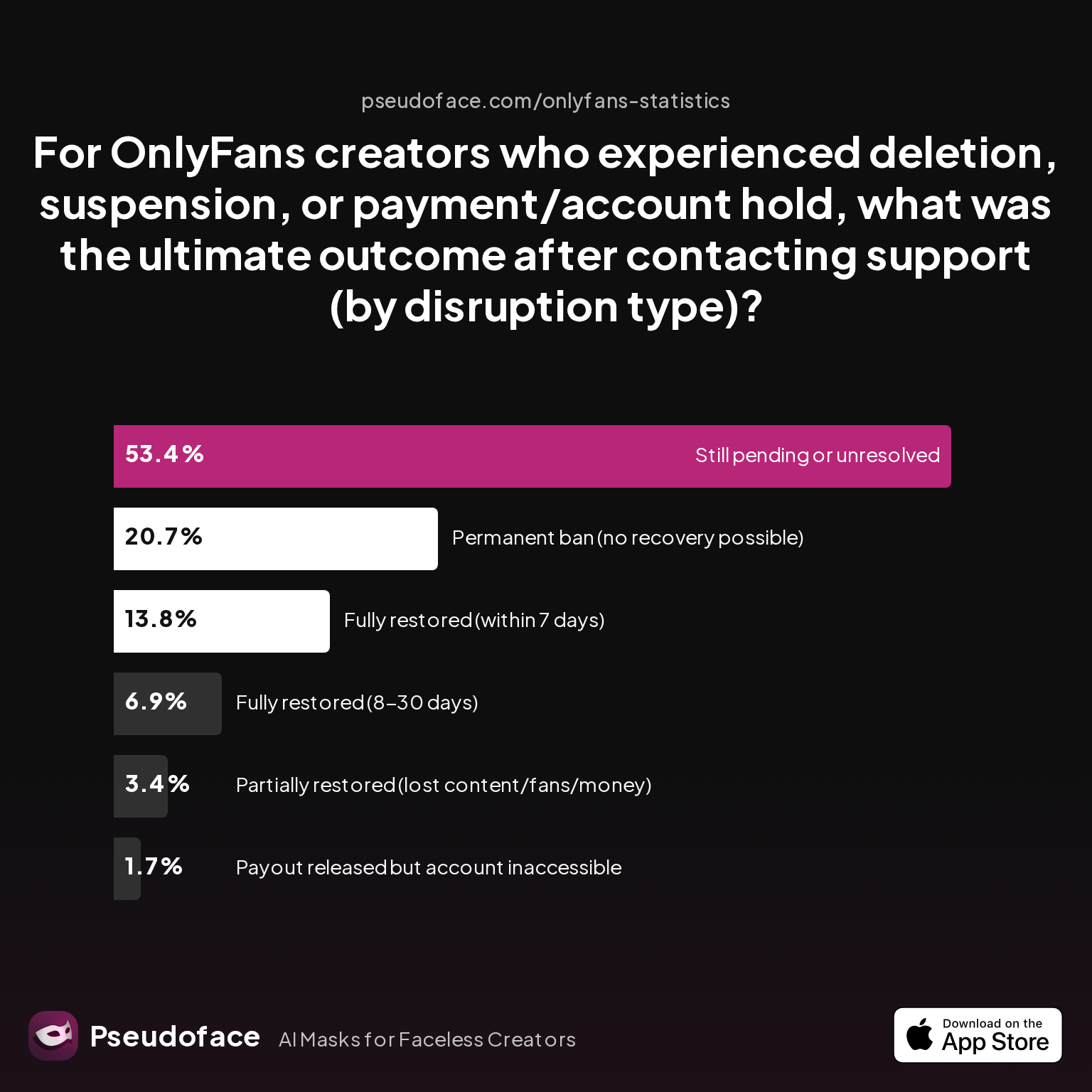
| Answer | Percentage |
|---|---|
| Fully restored (8-30 days) | 6.90% |
| Fully restored (within 7 days) | 13.79% |
| Partially restored (lost content/fans/money) | 3.45% |
| Payout released but account inaccessible | 1.72% |
| Permanent ban (no recovery possible) | 20.69% |
| Still pending or unresolved | 53.45% |
Just 20.7% of creators dealing with serious account or payout disruption see full restoration within 30 days; 53.5% are left pending or unresolved, and 20.7% are permanently banned. This points to a slow, unpredictable remediation funnel, especially when compliance or suspected policy violations are at play.
Here’s how creators describe the grind of escalation:
Open thread on Redditr/onlyfansadvice
u/LilCutieKayy
OnlyFans support is terrible. I had a similar issue for a while where my withdrawals wouldn't go through despite never changing my bank details. I ended up using paxum for a while until eventually my direct bank transfers started working again. Super annoying.
What improves your odds?
- Provide all relevant evidence up front: payout logs, screenshots, identity paperwork, and bank proof.
- Use clear, concise language and log ticket numbers for follow-up.
- If support is non-responsive after weeks, escalate via public channels (OnlyFans Twitter, creator forums).
- Be ready to temporarily change payout methods or even bank accounts—this shakes loose more tickets than platform-centric troubleshooting.
Persistence is frequently the only weapon creators have when stymied by support silos or ambiguous policy enforcement.
Chargebacks, Refunds, and Reversals: Unpacking the OnlyFans Refund Policy (and What You Can Do)
Not all payout failures are technical. Some are financial reversals triggered by chargebacks, refunds, or OnlyFans policy enforcement. If your expected earnings drop “overnight” or an available balance vanishes, the culprit is often a customer-initiated dispute—sometimes months after the original sale.
On OnlyFans, a “chargeback” means a user disputed a payment with their card issuer, forcing the platform to reverse the funds and, in most cases, debit the corresponding amount directly from your pending or available balance. Refunds can also be triggered by policy violations or unauthorized payment activity.
Self-reported data and Reddit experiences suggest that the platform often prioritizes rapid withdrawal of disputed funds, and can freeze further payouts if your chargeback rate crosses a (typically unpublished) risk threshold. Even a single large chargeback can disrupt normal payout timing, pushing cleared earnings days or weeks into the future.
Open thread on Redditr/onlyfansadvice
u/No-Bumblebee1872
Same thing happened to me. I had a huge CB back then (try checking if your CB rate is higher than 1% or not). From what I remember, they took the CB money right away from my pending balance, but the rest of my funds that were supposed to clear in 7 days got pushed back to like 10-14 days
For creators, this means that missing money is sometimes gone for good—and rarely does OnlyFans provide direct recourse beyond confirming with support whether a chargeback occurred. Preventative best practices:
- Screen new subscribers for suspicious payment patterns; avoid quick sells or risky custom content to brand-new, unverified accounts.
- Regularly audit your CB/Refunds dashboard in OnlyFans—do not wait for your balance to vanish.
- Immediately contact OnlyFans support if a chargeback hits, even if the dispute feels unjustified. Sometimes, documenting delivery of paid content can help (though resolution odds are low).
- Consider explicit terms in DMs and a warning that all sales are final—helpful if a dispute arises.
Refunds outside of formal chargebacks stem from OnlyFans’ own investigations of refund requests for accidental purchases, scammy user behavior, or unauthorized content. Policy clarity is limited, and communication to the creator is inconsistent; the best move is vigilance and meticulous balance tracking.
Proactive Steps: Preventing Future OnlyFans Payout Headaches and Managing Cash Flow
Having navigated the realities of payout failures, the most strategic creators take their scars and turn them into systems. Preventing problems is always easier than wrestling a frozen payout out of platform limbo.
First, cross-check and update your payout info regularly—especially after any changes in your banking setup:
- Set monthly calendar reminders to verify your bank details, tax status, and ID uploads in your OnlyFans settings.
- Consider using business/LLC-linked accounts if privacy and audit trails matter, but balance this with your region’s banking rules and exposure risk.
- If you rely on a single platform for your income, stagger withdrawals or use multiple payout methods when possible (Payoneer, Paxum, ACH, or e-wallet). This prevents total cash flow freezes when OnlyFans, your payment processor, or your bank institutes “routine reviews” or random blocks.
Many experienced creators recommend keeping a 1-2 week earnings buffer—never let all cleared funds sit in your OnlyFans wallet.
Open thread on Redditr/onlyfansadvice
u/Kallykat3
They said they will fix the issue soon but its Onlyfans so “soon” for them might take forever
Treat platform time estimates as rough guidelines, not gospel; always budget with delays in mind.
Cash flow planning:
- Keep a local buffer of at least one week’s expected income—never let OnlyFans’ cleared balance be your sole emergency reservoir.
- If you use e-wallets, regularly transfer to your true bank—even if this costs a small fee. The risk of an e-wallet freeze outweighs the value of prolonged storage.
- For high-volume creators: diversify income streams (custom sites, premium Snap/Discord, other distributor platforms) to soften rare but inevitable payout disruptions.
The throughline: Don’t let OnlyFans’ payout pipeline be your single point of failure, and treat even “reliable” payout methods with measured skepticism.
Frequently Asked Questions
Q: Why is my OnlyFans payment still pending or not showing up in my bank?
A: The most common causes are funds waiting to clear the 7-day window, incorrect banking details, a platform error, or delays from bank holidays or system updates. Check your OnlyFans “pending” tab, confirm eligibility and payout method, then escalate if funds are overdue by more than two business days past the promised window.
Q: What does “transaction could not be processed at this time OnlyFans” actually mean?
A: This message indicates OnlyFans’ system failed to process your requested payout, usually due to banking info issues, compliance holds, unsupported payment methods, or a backend/technical bug. Often, re-initiating a manual cashout or updating payout information resolves the issue.
Q: How do I contact OnlyFans customer support about a payout issue, and what information do I need?
A: Submit a ticket via the Help/Support section with screenshots of payout logs, error messages, bank/account details (with sensitive info masked), and any relevant correspondence. Resolution may take several days to weeks; log your ticket number for follow-ups.
Q: Are some OnlyFans payout methods (bank transfer vs Payoneer vs prepaid card) more reliable?
A: Yes. E-wallets (like Paxum and Cosmo) and Payoneer are often faster for international users, but direct bank transfers are generally more reliable for US/UK creators. Prepaid and virtual cards have the highest failure/rejection rates and are officially unsupported in many cases.
Q: How do I check for and limit the impact of chargebacks or OnlyFans refunds?
A: Review your CB/Refunds dashboard in the OnlyFans admin panel regularly to spot chargebacks early. Limit high-risk sales, document all delivered content, and set clear refund policies in DMs to reduce the risk of disputes.
Q: How long does it really take to resolve a missing or delayed OnlyFans payment?
A: Based on Pseudoface’s dataset (2025-2026), most issues resolve within one week, but 30% of cases remain unresolved for weeks or months. Patience and persistent follow-ups are typically required.
Q: Do I need to update tax or identity info for payouts to process?
A: Yes. OnlyFans must comply with KYC rules; missing or outdated tax/ID information can freeze payouts. Always ensure your legal details and uploaded documents are current.
Q: What if my payout is reversed or bounced back into my OnlyFans account?
A: This usually means a banking mismatch, compliance flag, or unsupported payout method. The funds will return to your available balance, and you may need to update your payout details or switch banks to clear the issue.
Q: Can using PayPal or a prepaid card cause payout issues on OnlyFans?
A: PayPal is not supported for payouts on OnlyFans. Prepaid cards often fail or are declined, and even if initially accepted, are prone to later rejection.
Q: What cash flow strategies do experienced creators use to avoid relying on a single payout?
A: Experienced creators diversify payout methods, stagger withdrawal timing, keep local financial buffers, and where possible, maintain side platforms or direct fan channels for redundancy.
If you’ve struggled with an OnlyFans payout not processed, remember: you are far from alone. Ground your troubleshooting in data, lean on the lived experience of the creator community, and never hesitate to escalate—whether to support, a new bank, or a backup platform. In the world of creator payouts, vigilance is the best defense.


