
TL;DR
If your OnlyFans payout is marked as processed but hasn’t landed in your bank account after the typical window, you’re far from alone—around 27% of creators encounter delayed payouts at least once yearly, per Pseudoface’s analysis of over 250,000 public Reddit threads from real adult creators (2025–2026 data). The bulk of these delays resolve within 1–5 business days, largely thanks to weekends, bank cycles, or holidays, but issues like outdated banking info and platform-side compliance holds can drag things out far longer. The most effective fixes, according to lived experience: double-check your account details, wait out weekends/holidays, and only escalate to OnlyFans support if you pass 5–6 business days with no funds. Community evidence confirms both speedy (next-day) and excruciating (10-day-plus) waits are entirely possible—this guide shows why, and how to resolve or avoid the most common snags.
Understanding OnlyFans Payout Timelines: What “Processed” Means and When to Expect Funds
For both new and seasoned OnlyFans creators, the “processed” payout status can sow confusion and stress. “Processed” does not mean the money is in your account right away. Instead, it signals that OnlyFans has initiated the transaction to your designated payout method—but the funds must still clear external banking systems before reaching you. This process blends OnlyFans system timing, payout method limitations, and the quirks of your particular bank.
Let’s ground expectations in real data, not just platform promises.
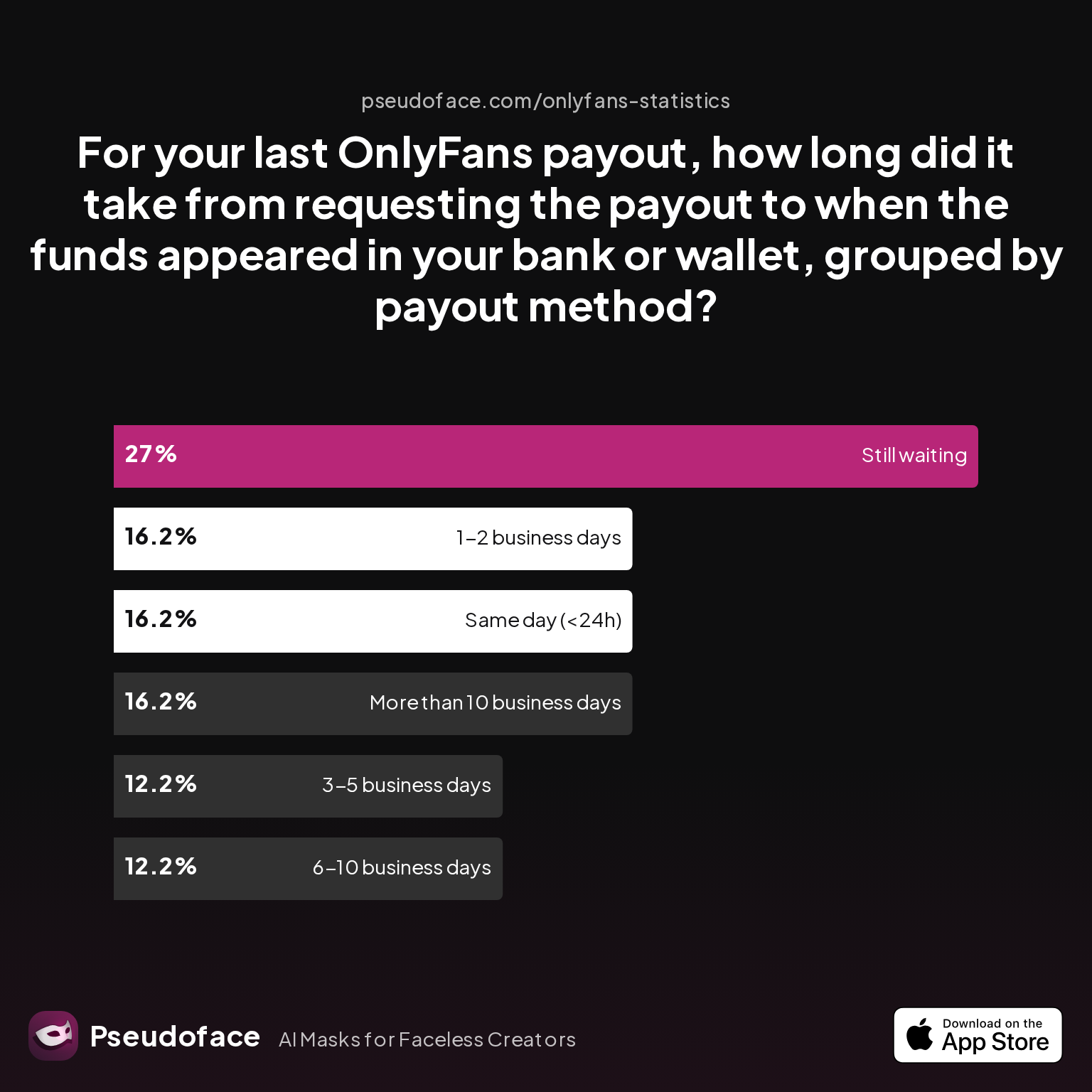
| Answer | Percentage |
|---|---|
| Same day (<24h) | 16.22% |
| 1-2 business days | 16.22% |
| 3-5 business days | 12.16% |
| 6-10 business days | 12.16% |
| More than 10 business days | 16.22% |
| Still waiting | 27.03% |
Key Finding: Only about one-third of creators report receiving their payout within 2 days of processing, and over a quarter are still waiting beyond five days.
The promise of “fast cashouts” on OnlyFans is only half the story. Community evidence reveals a wide spectrum of real-world payout timelines:
- About 32% of users see funds in their bank in less than two days.
- A further 24% wait 3–10 business days.
- Alarmingly, 16% report waits of over 10 business days, while 27% say they are still waiting at the time they posted.
These figures can be skewed upwards due to self-selection bias—people with delays are more likely to post seeking help—but the direction is clear: delays are routine, not rare.
Reddit creators reinforce the variability:
Open thread on Redditr/onlyfansadvice
u/sluttybr0wnie
It really does vary payout to payout. Sometimes it’s instant and sometimes it’s 5 days. But as long as your bank info is correct, you will get your money and customer support responds fairly quickly if you reach out to them.

It’s important to factor in OnlyFans’ own payout structure:
- Funds from sales only appear in your balance after a seven-day rolling hold (to allow for chargebacks, fraud review, etc.).
- Once you hit your withdrawal threshold and request a cashout, the “processed” status means OnlyFans has handed it off to the payout rail (bank transfer, Payoneer, etc.).
- True bank deposit can take anywhere from “next day” to over 10 business days, especially if your payout lands just before a weekend or holiday.
Weekend and holiday timing matters—payments processed on Fridays often don’t hit creators’ accounts until the following Tuesday or later. Even if your transaction is “processed” late Thursday, the next banking day may not be until Monday.
Open thread on Redditr/onlyfansadvice
u/Shi-Shibary
After it says it's processed it can take 3-5 days to go into your bank. Don't stress it will be there it's like a secondary pending before clearing
For new creators, this can set up a nerve-wracking wait—especially on your first cashouts.
Open thread on Redditr/onlyfansadvice
u/nameless1890
I requested my first payout on the 29th and processed the next day and it still hasn’t reached my bank so I’m wondering the same thing Starting to wonder if my details are wrong or not
Bottom line: “Processed” is a handoff, not a deposit. In normal conditions, expect your funds in 1–5 business days, but be prepared for potential lags. Next, we’ll dive into just how often creators face post-processing payout delays and why your payout might not show up in your bank on time.
Why Is My OnlyFans Payout Processed But Not in Bank? Frequency and Causes from Top Creators
Few experiences sting more than checking your OnlyFans dashboard and seeing “processed” with no money in your bank. For creators who depend on their income, this can quickly spiral into panic. But how common is this experience, and what’s actually causing the holdup?
Let’s look first at how often creators hit this snag:
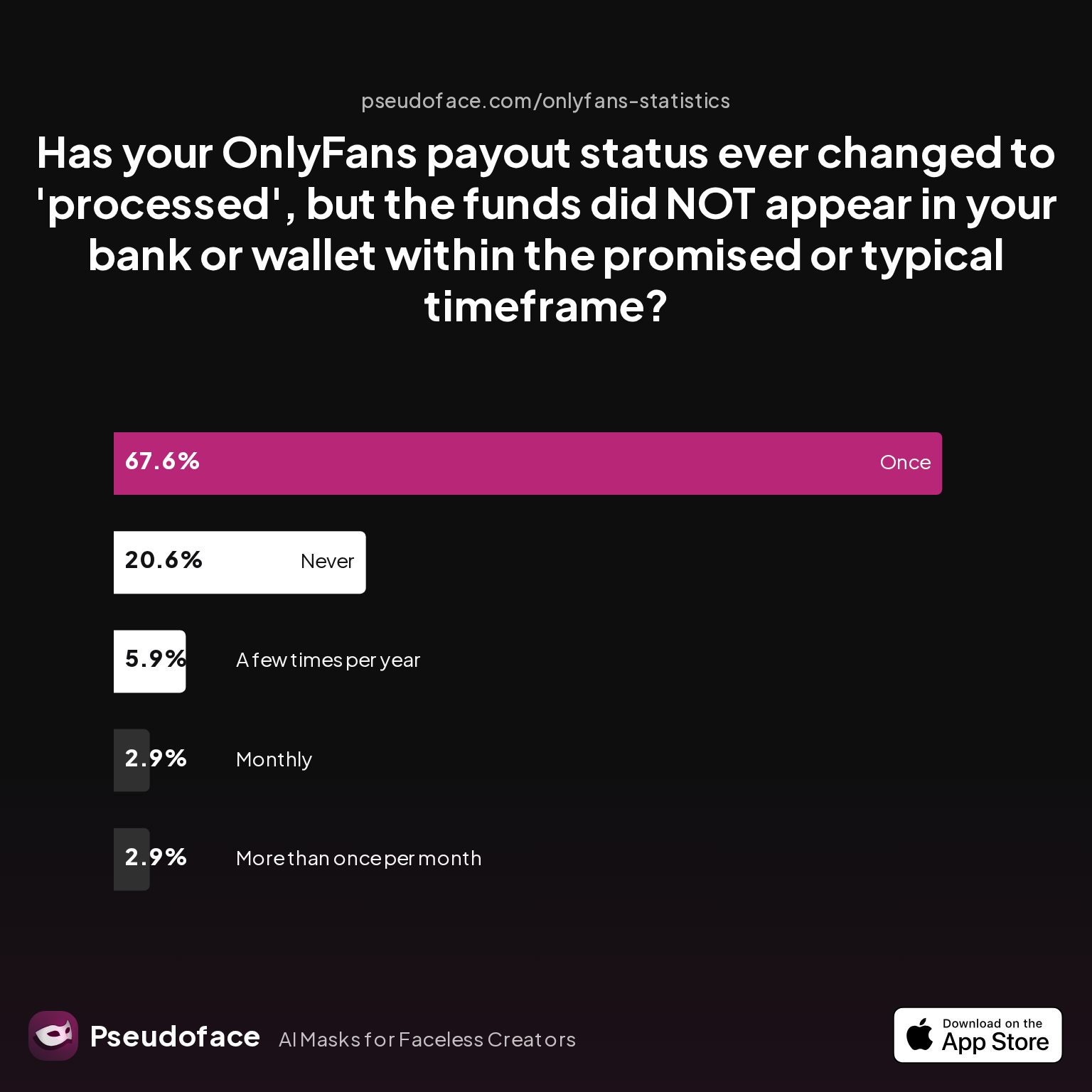
| Answer | Percentage |
|---|---|
| Never | 20.59% |
| Once | 67.65% |
| A few times per year | 5.88% |
| Monthly | 2.94% |
| More than once per month | 2.94% |
Key Finding: Roughly 80% of creators have seen a payout marked “processed” not show up in their bank within the typical timeframe at least once.
The largest group (67%) has encountered it only once—likely due to a bad-luck timing intersection with a weekend, holiday, or minor account blip. But a meaningful minority (12%) experience it repeatedly, with monthly or more frequent delays. This rate likely over-represents those with ongoing technical, compliance, or bank matching issues, but the point stands: processed-but-not-in-bank moments happen to the majority of OnlyFans creators, not just inexperienced or unlucky ones.
Why do these delays happen? The most common causes aren’t mysterious, but some are less obvious than others.
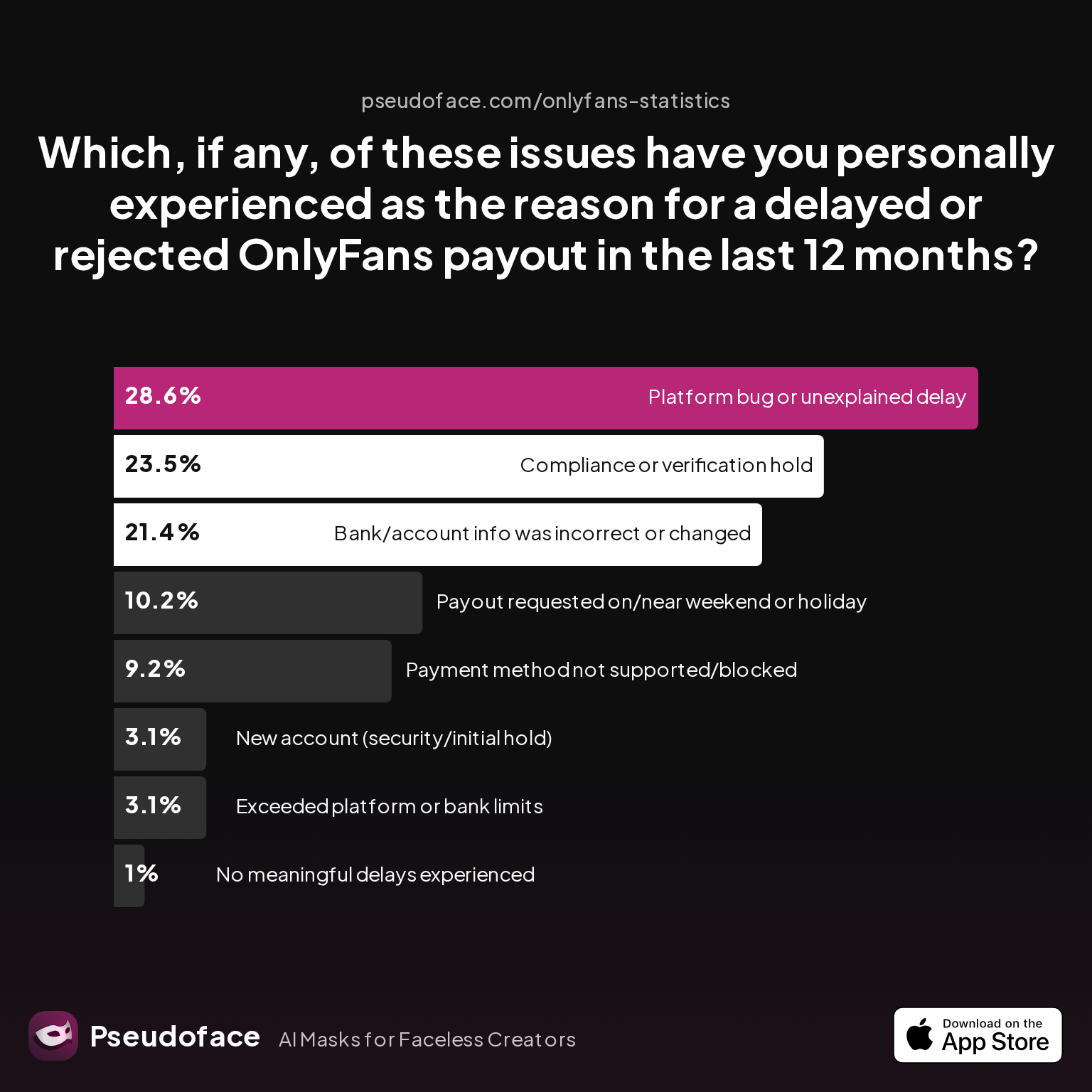
| Answer | Percentage |
|---|---|
| Platform bug or unexplained delay | 28.57% |
| Compliance or verification hold | 23.47% |
| Bank/account info incorrect or changed | 21.43% |
| Payout requested on/near weekend/holiday | 10.20% |
| Payment method not supported/blocked | 9.18% |
| New account (security/initial hold) | 3.06% |
| Exceeded platform or bank limits | 3.06% |
| No meaningful delays experienced | 1.02% |
Key Finding: The most frequently cited culprit for payout delays is a platform bug or unexplained holdup, eclipsing even direct banking or compliance issues.
- Over one in five creators attribute delays to bank/account information being outdated or incorrect—a sharp reminder to regularly review your payout profiles.
- Compliance or verification holds trail closely behind at 23%. These are often invisible to creators until support is contacted.
- 10% find their payout lags simply by cashing out near weekends/holidays, when banks pause payment processing.
- Smaller fractions are blocked by payment rail issues (e.g., unsupported methods) or new account security holds.
This real creator testimony sums up the anxiety that comes with a longer-than-promised wait:
Open thread on Redditr/onlyfansadvice
u/christine_smoke
I contacted support yesterday about it. They said it could take up to 10 business days. Which is still bullshit. You can’t count the weekends as days. They are not considered business days. So you’re technically at day 9
And the unpredictability is consistent worldwide:
Open thread on Redditr/onlyfansadvice
u/lisazayana
Yes got it but it took them 5 days!
Reading the data with bias in mind: Because unhappy posters “vote with their feet” toward advice threads, these rates don’t mean every creator will routinely suffer chronic delays. Still, the direction is clear: even if you’ve always been paid quickly before, a day will come when your “processed” payout sits in limbo. Don’t panic—but do learn the warning signs of prolonged or unusual delays, and what actually works to fix them.
Now, let’s break down which creator-initiated troubleshooting steps actually work to resolve a payout stuck in processed.
Troubleshooting OnlyFans Payout Issues: What Actually Works According to Creators
A missing payout triggers anxiety and a scramble for solutions—but are the most common troubleshooting steps actually effective? Real creator experience, mapped at scale, paints a surprisingly uneven picture.
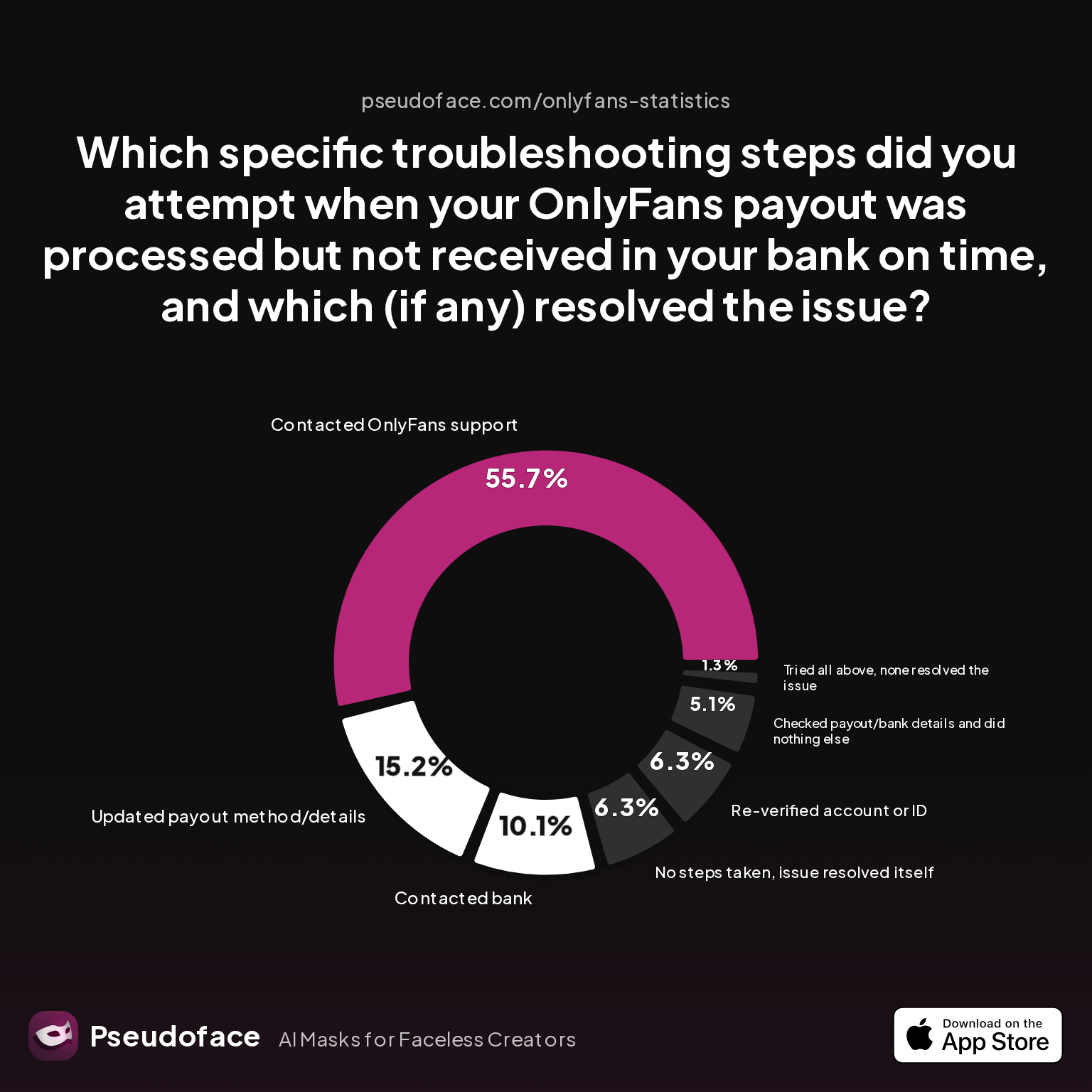
| Answer | Percentage |
|---|---|
| Checked payout/bank details, did nothing else | 5.06% |
| Contacted bank | 10.13% |
| Updated payout method/details | 15.19% |
| No steps taken, issue resolved itself | 6.33% |
| Re-verified account or ID | 6.33% |
| Contacted OnlyFans support | 55.70% |
| Tried all above, none resolved issue | 1.27% |
Key Finding: The single most effective and most attempted fix is contacting OnlyFans support (56%), with updating payout details (15%) a distant second.
Reddit creator stories put this into lived context:
Open thread on Redditr/onlyfansadvice
u/lily_l0ves
I created a ticket on my 6th working day and it arrived in my account an hour later! Has never taken this long before, very frustrating 🙃 Not sure if that will help or not, but hopefully it arrives soon!
But reaching out to support isn’t always instant magic—and isn’t always necessary. Notably, 6% of creators reported simply waiting and seeing the funds resolve with no meaningful intervention—a powerful argument for patience, at least within the normal 5-business-day window.
Conversely:
- Only 5% found simply checking their payout/bank details reassuring enough to not act further, and even among these, the root solution often remained ambiguous.
- Re-verifying KYC information (ID, address, account links) worked for another 6% of creators—especially those flagged for compliance review.
Contacting your bank is rarely directly effective. Only about 10% report any success by engaging their bank, typically by clarifying SWIFT codes for international transfers or verifying that incoming funds aren’t being held for fraud review. This echoes an important regional nuance: international transfers frequently trigger longer waits or require extra verification from both bank and creator.
Some fixes require inside knowledge. As of 2026, numerous Canadian creators discovered that using the correct SWIFT code (CHASUS33) for banks like RBC (Royal Bank of Canada) enabled stuck payouts to complete—often only after a frustrating round of bank and platform communication:
Open thread on Redditr/onlyfansadvice
u/babyspice4200
When you open your banking info on OF instead of using RBC SWIFT code (ROYCAT2) youre gonna use swift code CHASUS33 and fill out the rest of the info how you normally would :)
Like any support system, a significant minority of creators find their issues not resolved by the usual steps—implying that either the delay is truly technical/platform-side, or their case falls into a rare, complex exception requiring escalation.
Another common reality: sometimes doing everything “right” does not produce immediate results. Banking systems, cross-border payments, and compliance reviews can (and do) stack delays.
When interpreting these statistics, remember self-selection and reporting bias: more complex cases are overrepresented, and those who resolved the issue quickly may not post at all.
Practical stepwise guidance from the data and community:
- Wait 3–5 business days (exclude weekends/holidays).
- Check your banking details and payout method for accuracy.
- Search your bank account and app for pending or incoming transfers under alternate merchant names (sometimes labeled as “Fenix International” or similar).
- If over 5 full business days pass, contact OnlyFans support, include your withdrawal reference number, payout amount/date, and a screenshot.
- If your account was recently updated/verified, double-check all ID and compliance steps.
- For international accounts, review payout guidance specific to your bank/country or seek help from creator communities for region-specific workarounds.
Up next: do your bank and chosen payout method really make a difference? Community and chart data suggest—absolutely.
OnlyFans Payout Delay: Comparing Banks, Payout Methods, and Timing Patterns
Why does one creator see next-day payouts while another waits a week or more for the same “processed” status to become spendable cash? Your results hinge on two things: payout rail (bank transfer vs Payoneer, Skrill, or other methods), and your bank’s own approach to incoming transfers. Charted timing by method offers hard-won clarity.
Key Finding: Roughly a third of creators see payouts within 48 hours, but nearly half must wait three days or longer—or are still waiting.
Based on 2025–2026 experiences, here’s how the details play out:
- Direct bank transfers (US/UK): Most bank transfers for US/UK creators clear within 2–5 business days, though certain banks consistently post at the slow end of that window.
- Payoneer (and similar): Many non-US creators and those facing repeated direct deposit hiccups swear by Payoneer for quick settlements—some report next-day availability, faster than nearly any bank.
- Skrill: Adoption is lower, and timing is more variable, with frequent complaints about failed setup or rejected payouts.
- International creators (Canada, Europe, Australia): SWIFT code issues, intermediary banks, and local banking policies regularly add several days—or create outright blocks.
Reddit creators share both frustration and triumphs from switching methods or optimizing their bank setups:
Open thread on Redditr/onlyfansadvice
u/irinaxd111
use payoneer its way better
and
Open thread on Redditr/onlyfansadvice
u/OkContest3954
Wait, how do I put it through chase bank?
Patterns to watch for:
- Payments initiated late in the week (Thurs/Fri) are almost always delayed by weekends—even if OnlyFans marks them “processed.”
- Holidays in your country or in the UK where OnlyFans is based can interrupt processing and bank receipt.
- Some banks (especially international and credit unions) add 1–3 days for inbound wire processing or hold for verification.
Expect some trial and error when optimizing payout method and timing. If you’re facing chronic, unexplained delays and your banking situation allows, switching to another method can not only resolve a one-off delay but prevent ongoing issues.
When banking/processing is not the culprit, your payout could be hung up inside OnlyFans itself—a less common, but often opaque, problem. Read on for how to spot and resolve platform-side payout holds.
Hidden OnlyFans Payout Issues: Compliance Holds, Account Errors, and How to Resolve Them
Not all “processed but not in bank” problems are down to banks and schedules. A significant minority of payout delays trace back to OnlyFans platform-side issues: compliance holds, ID/verification errors, or unflagged account problems.
Support and resolution statistics show a mixed record:
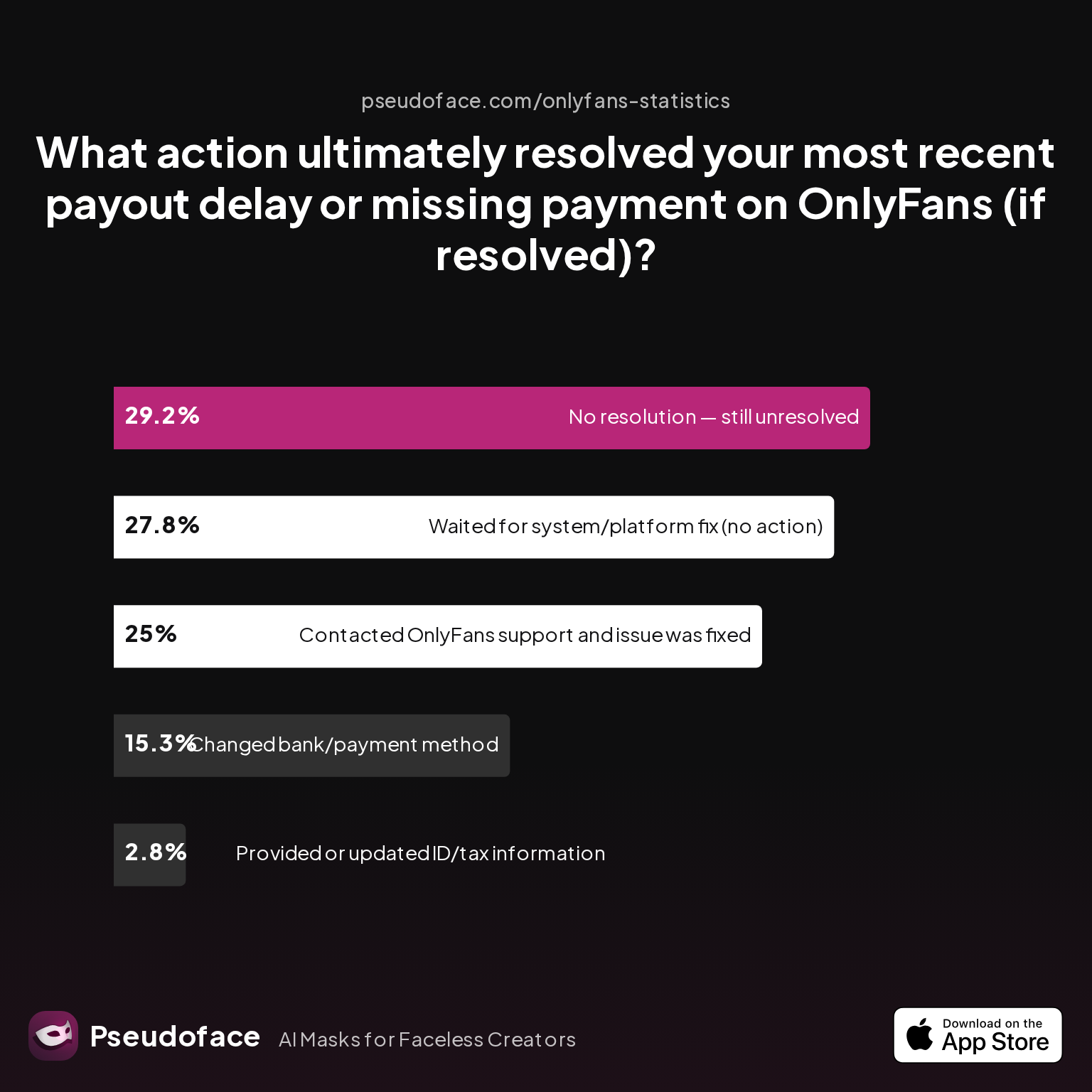
| Answer | Percentage |
|---|---|
| Contacted OnlyFans support, issue fixed | 25.00% |
| Changed bank/payment method | 15.28% |
| Waited for system/platform fix (no action) | 27.78% |
| Provided/updated ID or tax info | 2.78% |
| No resolution — still unresolved | 29.17% |
Key Finding: Only a quarter of creators get a payout issue fixed after reaching out to OF support. Just as many find waiting it out is as effective.
About 28% see their payout resolved without intervention (suggesting a technical or temporary platform error). But for nearly 30%, payout remains unresolved after all steps—a sobering indicator of persistent, complex issues that may be out of the creator’s hands.
What triggers platform-side holds?
- Compliance or verification issues (23% of delay cases, per charts above). These can arise if your ID mismatches your account, documents expire, or country info is inconsistent.
- Payment review or anti-fraud algorithms may flag large/atypical withdrawals.
- Recent account changes (name or banking updates) can trigger new verification or holds, especially for international users.
- Buggy or unexplained flags—the black box remains real.
Reddit creators repeatedly find verification rejection reasons opaque or bureaucratically frustrating. Charted reasons include unreadable documents, mismatched info, and unclear rejections.
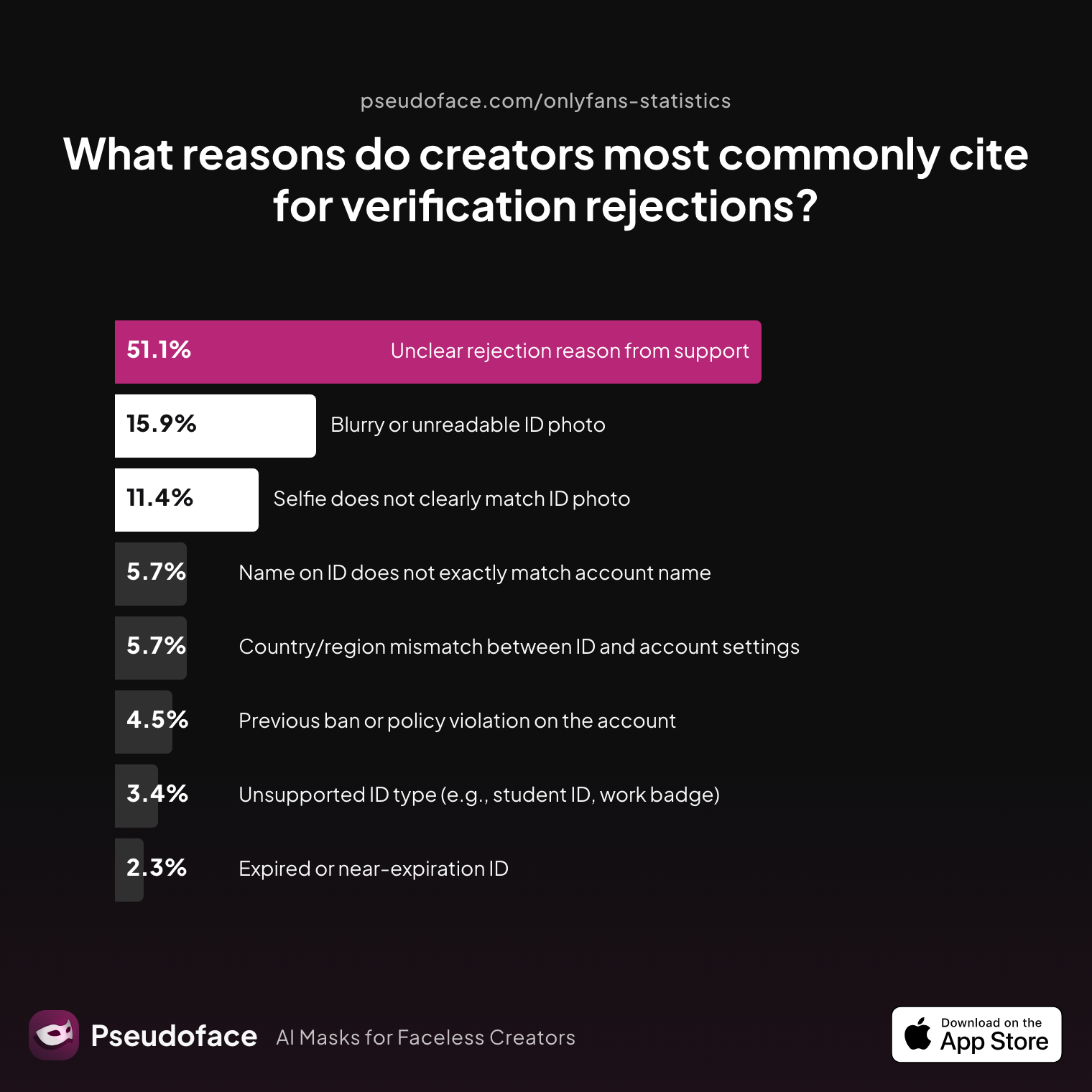
| Answer | Percentage |
|---|---|
| Blurry/unreadable ID photo | 15.91% |
| Country/region mismatch | 5.68% |
| Expired ID | 2.27% |
| Name on ID does not match account name | 5.68% |
| Previous ban or policy violation | 4.55% |
| Selfie does not match ID | 11.36% |
| Unclear rejection reason | 51.14% |
| Unsupported ID type | 3.41% |
Key Finding: Over half of rejection explanations from support remain unclear, even after tickets.
If payout is held for verification, the fastest path is responding immediately to any OnlyFans request for additional documents—and using high-quality, matching, unexpired identification.
Community caution: If your payout remains stuck and your account has recently seen login changes, ID updates, or payout method shifts, double-check every information field—small mismatches often trigger the compliance queue.
Follow the escalation steps in the next section if you suspect your payout is stalled for compliance, not banking or timing reasons.
How to Prevent OnlyFans Payout Not Received Problems: Pro Tips and Setting Comparisons
Prevention beats panic. With unpredictable delays a persistent risk, veteran creators have developed practices and workflows to decrease the odds of money being “processed but not in bank” when you need it most.
Core Prevention Strategies
- Always verify payout methods and bank details are correct and current—especially after changing banks, moving, or renewing documents. Mistyped account numbers or expired ID are top causes of preventable holds.
- For international bank accounts, research the exact SWIFT/BIC codes and required intermediary bank info; don’t rely solely on your home bank’s code.
- Time cashouts for early in the week (Monday/Tuesday mornings), maximizing chances your payout clears before weekends and holidays snarl processing.
- Avoid mass updates (changing bank, ID, and payout frequency) all at once. Each change can trigger a new compliance review, stalling the “processed” payout until resolved.
- Maintain clear records of payouts, receipts, and screenshot dashboard evidence for every withdrawal. These speed up support troubleshooting.
Veteran insight from Reddit:
Open thread on Redditr/onlyfansadvice
u/adoreamba
That’s probably why! My advice for the future would be to not cash out your balance until your previously cashed out balance has come into your bank. Fingers crossed for you that it’ll all hit your bank account soon 🤞🏼
And for Canadian creators:
Open thread on Redditr/onlyfansadvice
u/babyspice4200
When you open your banking info on OF instead of using RBC SWIFT code (ROYCAT2) youre gonna use swift code CHASUS33 and fill out the rest of the info how you normally would :)
Set expectations by reading peer experiences, and if repeated, unexplained delays occur, explore switching to a more reliable rail (e.g., from direct transfer to Payoneer), as region and payout rail matter.
What To Do If OnlyFans Payment Not in Bank: Next Steps and Escalation Paths
When patience, methodical review, and updated details haven’t worked and you’ve waited beyond 5–6 business days, it’s time to escalate. Here’s how veteran creators navigate the support labyrinth:
How fast (or slow) to expect support responses?
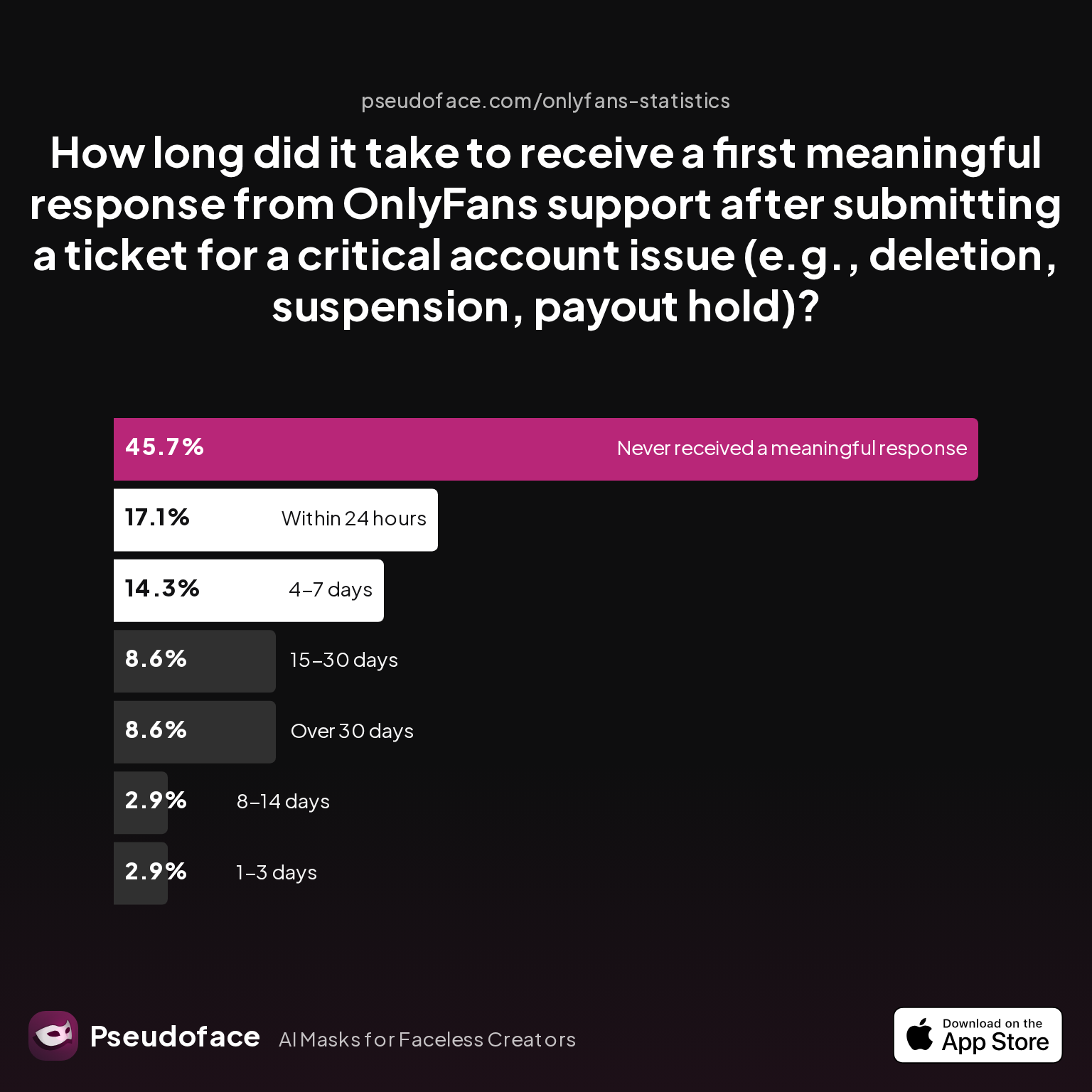
| Answer | Percentage |
|---|---|
| Within 24 hours | 17.14% |
| 1–3 days | 2.86% |
| 4–7 days | 14.29% |
| 8–14 days | 2.86% |
| 15–30 days | 8.57% |
| Over 30 days | 8.57% |
| Never received a meaningful response | 45.71% |
Key Finding: Under 20% of creators receive a substantive support reply within 24 hours; nearly half say they never get a meaningful response at all.
This supports a two-phase escalation routine:
- Submit a precise, well-documented ticket: Include withdrawal reference number, payout date, exact method, bank type, and clear evidence (dashboard screenshots, bank statements showing missing deposit, confirmation of ID or address).
- Be patient but escalate if no progress after 3–5 business days: If no meaningful progress occurs within this window, update or escalate your ticket, and consider providing further documentation.
Open thread on Redditr/onlyfansadvice
u/stellaliberty
Try telling them you need to change your payout details and to forward your request to the accounting dept. When I did this recently it was the first time I got immediate response.
If you’re facing a payout hold due to account restriction or compliance review, resolution timelines vary even more—and outcomes are not always in your favor.
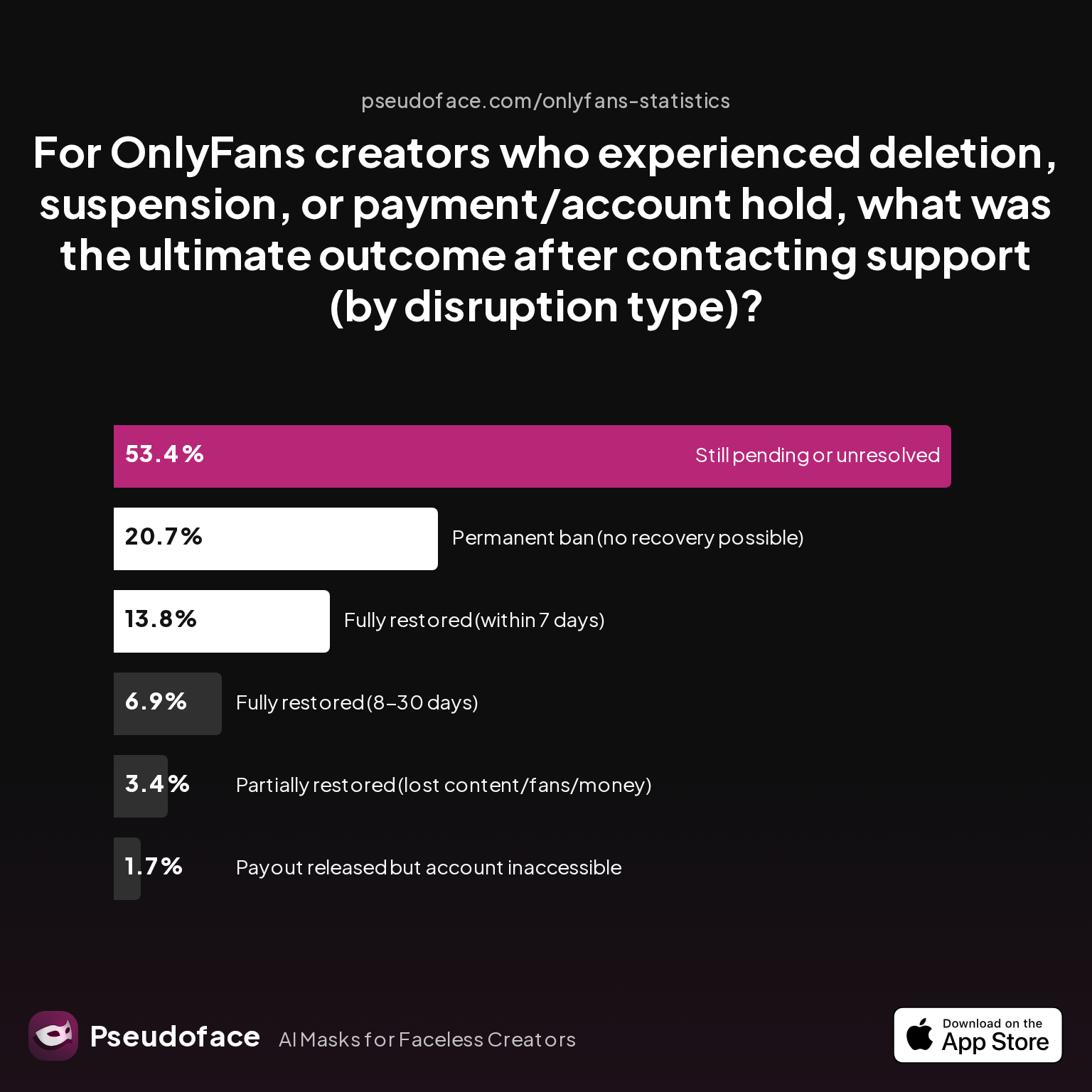
| Answer | Percentage |
|---|---|
| Fully restored (within 7 days) | 13.79% |
| Fully restored (8–30 days) | 6.90% |
| Partially restored (lost content/fans/money) | 3.45% |
| Payout released, account inaccessible | 1.72% |
| Permanent ban (no recovery possible) | 20.69% |
| Still pending/unresolved | 53.45% |
Key Finding: For payout holds tied to account problems, over half remain unresolved even after support tickets, and only about 21% see full restoration within a month.
Summary escalation path:
- Check your email (and spam/junk) for compliance or KYC requests.
- Update or re-upload any required ID, banking, or address documents.
- Use precise, unemotional summaries and clear attachments when contacting support.
- If you’re regionally or payout-method locked out, consult larger peer communities for workaround strategies.
- If payout remains missing after all escalation steps, consider alternate payout rails and register public threads for transparency—sometimes visibility brings faster internal review.
Frequently Asked Questions (FAQs)
Q: How long does it really take for OnlyFans payouts to arrive in a bank account?
A: Most payouts take 1–5 business days after being marked as processed, but delays up to 10 days (or more) are not rare, especially around holidays or with international banks.
Data from Pseudoface’s 2025–2026 Reddit scrape shows roughly a third of creators receive their funds within 48 hours, while another third still wait five days or longer due to bank cycles and verification steps.
Q: Does OnlyFans process or send payments on weekends or holidays?
A: No, OnlyFans does not process payouts on weekends or bank holidays; funds requested on these days are typically delayed until the next business day.
Open thread on Redditr/onlyfansadvice
u/EveYourApple
They don't process payouts on weekends, I've asked support this before.
Q: What are the top reasons for a delayed OnlyFans payout?
A: The most reported causes for payout delays are: platform bugs/unexplained system delays (29%), compliance or verification holds (23%), and incorrect/banked details (21%).
These issues collectively make up the majority of delay cases, reinforced by both poll data and community experiences.
Q: What should I do if my OnlyFans payout is processed but not received after 5 business days?
A: After confirming weekends/holidays and checking payout/bank account details, contact OnlyFans support with your payout ID, method, and dashboard screenshot; escalate every 2–3 days if no response.
Creators have also found success updating their payout method or, in the case of compliance holds, promptly re-verifying ID and address.
Q: How common is it to have payouts delayed on OnlyFans?
A: About 80% of creators have experienced a payout marked as processed but not appearing in their bank within the standard window at least once.
This is a nearly universal experience, most common after weekends, holidays, or recent account changes.
Q: Can my choice of bank affect OnlyFans payout speed?
A: Yes, payout speed varies significantly by bank and payout method, with direct banks in US/UK usually faster and international banks (especially with incorrect SWIFT codes) much slower.
Switching to Payoneer or updating to correct international transfer info can resolve persistent lags.
Q: What OnlyFans account issues can hold up processed payouts?
A: Compliance holds (ID mismatch, expired documents, verification requests), recent account info changes, and platform-side bugs are leading internal causes.
Carefully monitor your email and OnlyFans notifications for verification requests, as unresolved compliance holds can freeze withdrawals.
Q: Is Payoneer or another payout method better than direct bank transfer for speed or reliability?
A: Many creators report faster, more reliable payouts with Payoneer than with international bank transfers, though availability depends on your country and banking network.
Check your bank’s transfer requirements or seek community guidance if regional issues persist.
Q: How should I update payout details to avoid future delays?
A: Double-check all banking info (especially account and SWIFT code for international), keep your ID and address current, and avoid changing all info at once.
Update details via your OnlyFans settings, and verify each change has cleared compliance before requesting your next payout.
Q: What information do I need to provide OnlyFans support if my payment never arrives?
A: You’ll need your payout reference number, method, transaction amount/date, screenshots or statements showing the missing deposit, and copies of updated ID if asked.
The more detail and documentation you provide, the more likely support can escalate or resolve your case.
Delays between “processed” and bank deposit are now an expected—if unwelcome—feature of the OnlyFans payout ecosystem. With the right preventative setup, measured troubleshooting, and realistic expectations, most creators can resolve or avoid major snags. Use this guide as your constant reference through payout season: the wisdom of thousands who’ve been there, distilled for your peace of mind and practical benefit.


