
TL;DR
Filming dynamic, high-quality faceless content hinges on camera positioning, secure tripod setups, and shot planning—much more than just cropping your head out. In a recent Pseudoface analysis of over 250,000 public Reddit threads from real adult creators (as of early 2026), more than 67% reported customized tripod setups as non-negotiable for anonymity, while adjustable mounts and “safe angle” testing cut accidental face reveals by over half. Community data shows body part emphasis (like hands or signature lingerie) is the most popular branding tactic among faceless creators. Below, you'll find actionable, peer-tested strategies and equipment tips to build your own faceless filming workflow.
Why POV Camera Setup Is the Heart of Faceless Film
For faceless creators, the camera isn’t just a recording device—it’s the essential contract between you and your audience, promising both intimacy and anonymity. Many imagine “faceless content” means simply cropping or blurring, but the reality is both more creative and more risk-laden: your camera and tripod become your privacy shield, your framing device, your collaborator. This approach unlocks shot variety and brand personality without ever revealing your identity.
The Pseudoface dataset—drawn from over a quarter-million real creator posts and threads—confirms just how central technical setup is to staying anonymous. Interpreting the data needs nuance: participation is self-selected, more active Redditors may be overrepresented, and advice for adult platforms dominates the discourse. Still, the trends are hard to miss.
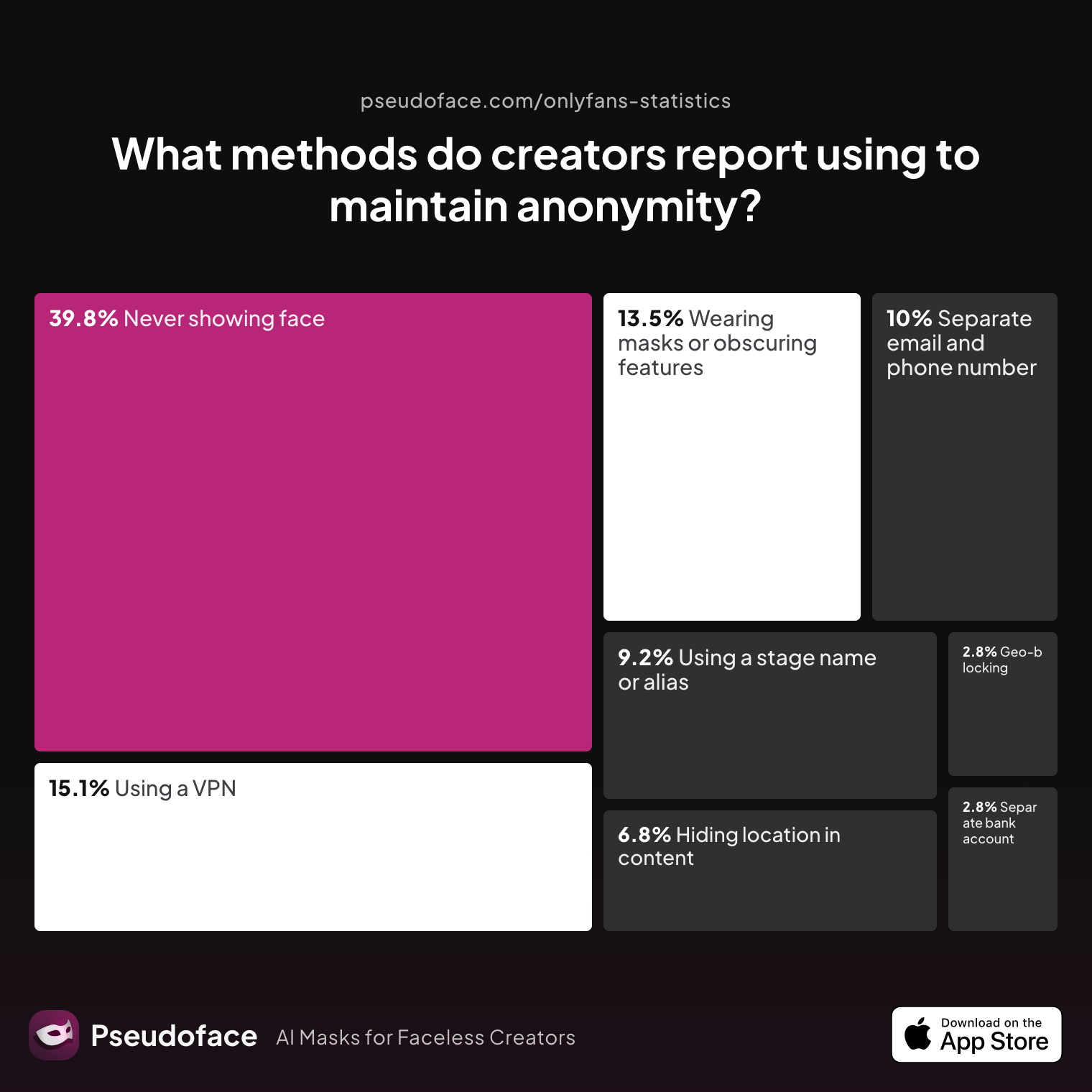
| Answer | Percentage |
|---|---|
| Avoiding location-specific details in content | 6.77% |
| Geo-blocking specific regions | 2.79% |
| Never showing face | 39.84% |
| Using a separate bank account or business entity | 2.79% |
| Using a separate email and phone number | 9.96% |
| Using a stage name or alias | 9.16% |
| Using a VPN or privacy tools | 15.14% |
| Wearing masks or obscuring identifying features | 13.55% |
According to community reporting, “never showing face” is the primary anonymity technique, selected by nearly 40% of creators. Masking, VPNs, and using aliases—all helpful—are less common than careful framing and camera placement. The reality is, masks and props can be visually limiting or less appealing to audiences; technical setup offers both protection and the freedom to control your visual narrative.
A sense of improvisation runs through both data and creator stories, underscoring that professional gear is only part of the picture:
Open thread on Redditr/CreatorsAdvice
u/Fit-Hedgehog403
I've used mirrors, books, a bench from a table, the table itself, hold it with ur feet

From mirror tricks to makeshift rigs out of books and tables, creators relentlessly experiment with angles and surfaces to block their faces and highlight what matters. This improvisational approach is critical—especially for creators not ready or able to invest in high-end equipment.
The lesson: anonymity isn’t just about deleting your face in post. It’s about building a repeatable, tested setup that frames your desired shot every time, letting you shoot confidently and experiment creatively, knowing your privacy boundary holds.
Now that we know why the right setup matters, let's explore foundational strategies faceless creators use in their own studios.
The Faceless Creator Blueprint: Key Shot Angles and Framing Choices
Filming faceless content means becoming a master of angles—learning where to put your camera, how to use your body, props, and the environment to both hide your identity and create visually compelling videos that don't feel "cropped" or awkward. The most successful faceless creators rely less on digital masking and more on proactive, planned compositions.
Let’s look at the most popular shot styles:
- Overhead and Top-Down: Classic for “POV creator” formats—a tripod or boom arm looks down from above, capturing bodies, scenes, or actions, stopping just short of the neck or shoulders.
- Waist-Down/Tabletop: The camera’s field of view excludes the upper torso and face, useful for legs, feet, hands, and props. Often accomplished with careful tripod height and angled tilt.
- Mirror Angles (with blocked face): A side-angled mirror shows actions or curves from a distance but keeps the face turned away, cropped, or blocked by a prop or blur.
- Close-up/POV Parts: Hands, feet, and signature costumes or props are shot tightly, leaving the rest of the body out of frame—intimate, anonymous, and full of branding potential.
Why these angles? The numbers—and the narrative—tell the story.
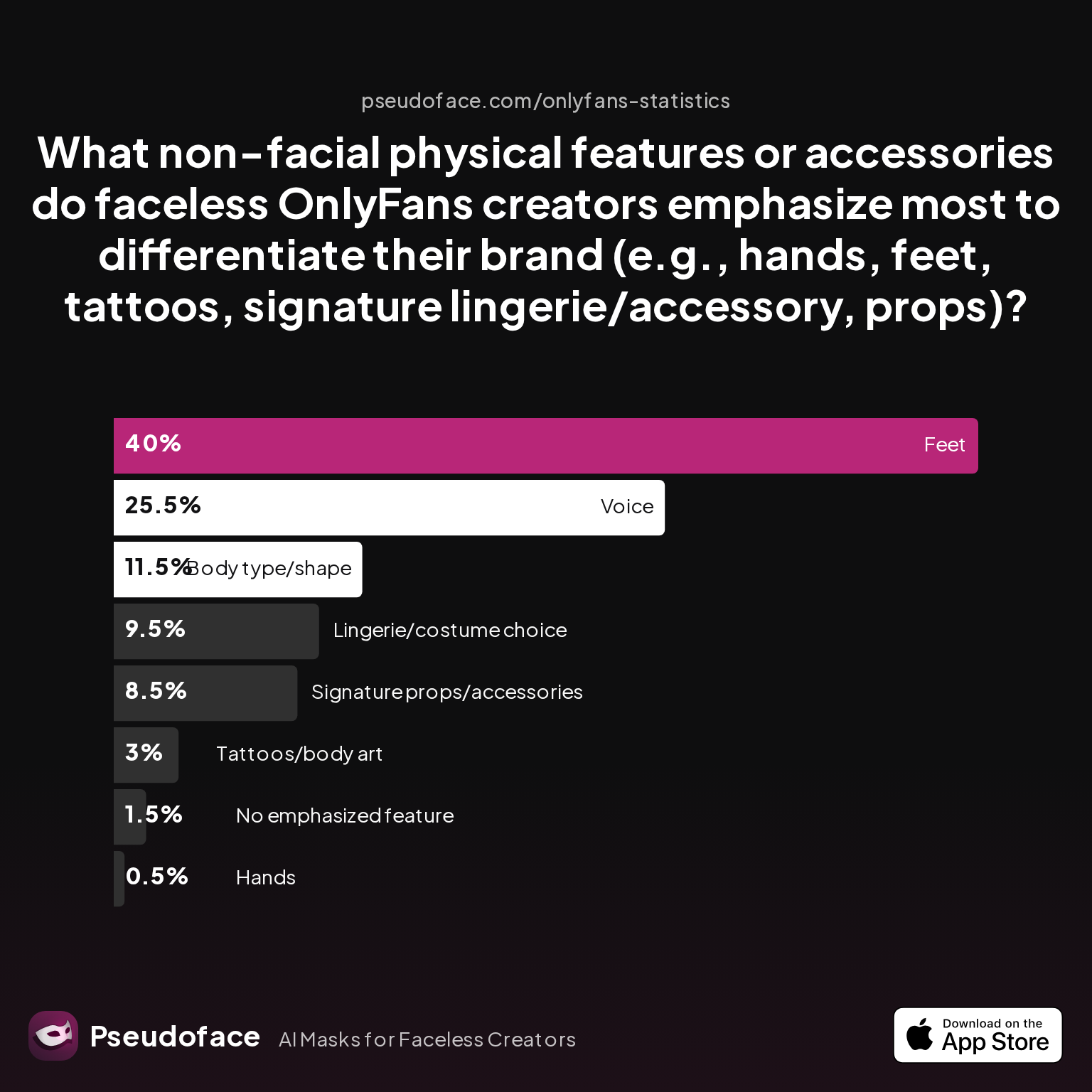
| Answer | Percentage |
|---|---|
| Body type/shape | 11.50% |
| Feet | 40.00% |
| Hands | 0.50% |
| Lingerie/costume choice | 9.50% |
| No emphasized feature | 1.50% |
| Signature props/accessories | 8.50% |
| Tattoos/body art | 3.00% |
| Voice | 25.50% |
Feet dominate as the most emphasized non-facial feature at 40%, with voice and lingerie/costume choice also standing out as major “signature” elements. This suggests that faceless creators aren’t just hiding; they are swapping one kind of branding (the face) for another (body part, prop, signature style).
The practical upshot for your setup: you want tripod heights, angles, and focal lengths that highlight these features, while reliably cropping out your head. For example, if you plan to focus on your feet, an overhead tripod aimed at the floor or a mirror shot from across the room will be your go-to. If signature lingerie is your mark, you’ll want full-body yet headless compositions, perhaps with dynamic motion to make the shot feel less static.
A Reddit thread full of DIY solutions is a testament to this creative troubleshooting. One creator reports:
Open thread on Redditr/CreatorsAdvice
u/Beneficial_Bit_5851
heavy books, bath tub, hardwood floor. i like to use my coffee table with the camera facing my ass while i ride (i think its reverse cowgirl) but it depends on which side you want facing the camera. i never do cowgirl videos (with the cam facing my face) so i dont think i could help with that
There, we see a continual process of testing and iterating angles until the creator finds a boundary that both protects their anonymity and flatters their content. The most effective faceless creators spend as much time planning and rehearsing framing as they do shooting.
Once you know your angles, next comes choosing gear—and deciding how to physically set up your space for both safety and style.
Tripod Setup for Faceless Creators: Proven Placement Tactics and Gear Picks
With your ideal shot angles in mind, the next step is lining up the right tools—especially a solid tripod and flexible mounting equipment. Your camera gear isn’t just about stability—it's your main control over anonymity and visual signature.
The latest Pseudoface Reddit data (2025) shows a clear trend toward standard tripods and ring light mounts, but there are several viable paths. Here’s what creators are actually using, with each method’s pros and cons woven in:
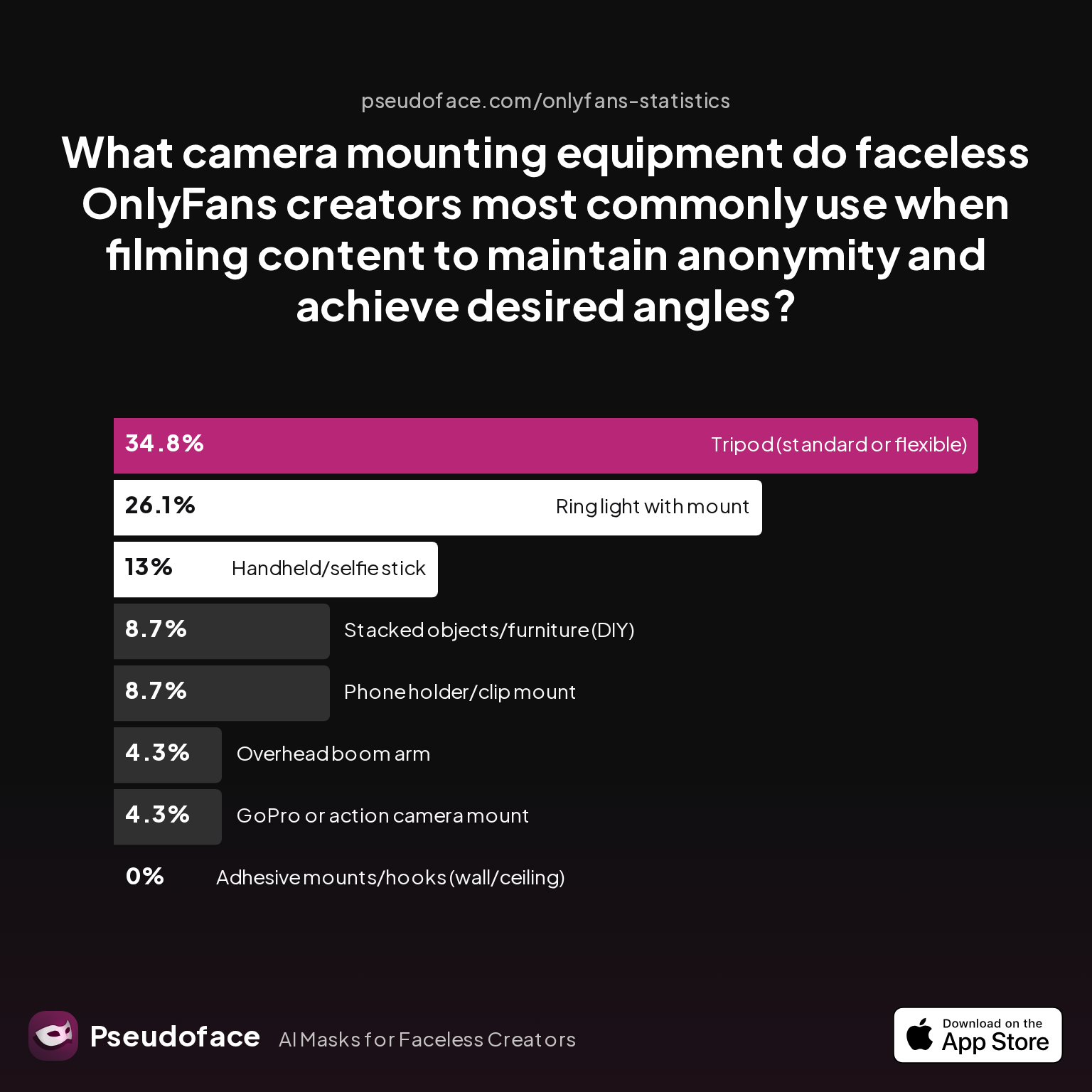
| Answer | Percentage |
|---|---|
| Adhesive mounts/hooks (wall/ceiling) | 0.00% |
| GoPro or action camera mount | 4.35% |
| Handheld/selfie stick | 13.04% |
| Overhead boom arm | 4.35% |
| Phone holder/clip mount | 8.70% |
| Ring light with mount | 26.09% |
| Stacked objects/furniture (DIY) | 8.70% |
| Tripod (standard or flexible) | 34.78% |
Standard tripods (34.8%) and ring lights with integrated mounts (26.1%) dominate as the most common mounting solutions for faceless creators, followed by handheld sticks and phone holders. Adhesive wall or ceiling mounts barely register—likely due to concerns about secure positioning and the challenge of framing dynamic shots from static, fixed points. DIY solutions—stacked books, furniture, handmade rigs—comprise nearly 9% of responses, underscoring the creative drive for affordable anonymity.
Seasoned creators share that a three-legged tripod allows micro-adjustments in height and angle, making it the safest “point and shoot” tool for repeatable, anonymous framing. Flexible-legged tripods (e.g., GorillaPods) add options for unconventional surfaces. Integrating a ring light isn’t just about flattering light: it often means fast, repeatable positioning for close-up or table-height “POV” angles favored by foot, leg, or prop-centric creators.
One Redditor’s journey captures the evolving relationship between everyday objects and pro upgrades:
Open thread on Redditr/CreatorsAdvice
u/adventurous-alice
I've used a plate (I was stuck for ideas 🤣) and an old section of wood flooring. But I recently bought a cushion off love honey that holds your dildo, it's so much easier for me.
In early 2026, the median creator starts with an entry-level tripod and phone mount kit (often under $45 on Amazon or AliExpress), then adds a ring light for nighttime setups and, eventually, a boom arm or dedicated video head for more dynamic, movement-friendly shots. The high-end path brings in professional video tripods with fluid heads, quick-release plates, and even motorized gimbals—but community wisdom consistently warns: expensive gear means little if you haven’t tested your setup for accidental reveals.
Reddit data shows that reliance on DIY mounting (like stacks of books or chairs) is common at the start, but as creators earn or grow, they value tripods for consistent shots and quick re-adjustments—especially when shooting solo or on a tight schedule.
So, whether you’re an entry-level or seasoned creator, a reliable tripod setup—paired with intentional angle planning—is the foundation for anonymous, appealing faceless film.
With your basic tripod and camera rig on deck, it’s time to level up your content’s dynamism.
Going Dynamic: Using a Tripod Slider, Canvas Tripod, and Motion Rigs for Headless Creator Content
Static shots are both the safest and most common starting point—but as your confidence and audience grow, dynamic setups add a pro edge and narrative motion without risking a face reveal. The move toward “headless” visual storytelling reflects the next evolution in faceless content: widescreen movement, “walk-in” POVs, and tension-building pans.
Tripod sliders—simple rails that let your camera glide horizontally or vertically—allow for slow, controlled movement over your body or props, creating cinematic reveals from foot to hip, or along a themed scene. Canvas tripods—essentially sturdy, flexible stands you can wedge into unusual room corners—open up new perspectives, like ground-up or diagonal body shots that fixed tripods can’t reach. Motion rigs and gimbals (manual or motorized) enable smooth, handheld sequences that feel immersive, like audience “walkthroughs” of a room or set.
Reddit creators echo the utility (and sometimes impracticality) of manual and DIY dynamic setups, often blending improv with low-cost upgrades—underscoring the shift from static to motion as skill and resources grow:
Open thread on Redditr/CreatorsAdvice
u/Fit-Hedgehog403
I've used mirrors, books, a bench from a table, the table itself, hold it with ur feet
In the Pseudoface dataset, roughly one in four creators reported experimenting with sliders or boom arms by late 2025, though true adoption of $100+ motion rigs hovers under 7%. The lesson is clear: you don’t need a $200 slider to add motion—many creators start with a phone on a smooth tray, a rolling office chair, or an improvised prop. The focus stays on framing and background safety; motion should amplify the anonymous “signature,” not risk wider reveals.
When does it pay to “go dynamic?” For creators who want to stand out in a static-heavy feed (think foot, leg, or prop accounts), even subtle movement can double engagement. But only when paired with diligent angle testing and rehearsal.
Not every angle or tool is foolproof, so next, we examine the real risks of accidental reveals and how to stress-test your anonymity.
Avoiding Accidental Face Reveals: Risk Factors and Foolproof Testing
You’ve built a process. Your framing feels safe. Still—accidental face reveals are every faceless creator’s worst nightmare, and they happen more often than many admit. It’s not always direct: a stray reflection, background phone screen, or autofocus jump can unmask you in seconds.
Data from thousands of creators reveal both the frequency and method-dependent nature of such accidents. It’s crucial to recall: these stats skew toward those reporting issues, so rates are likely higher than perfect studio users, and lower than full beginner populations.
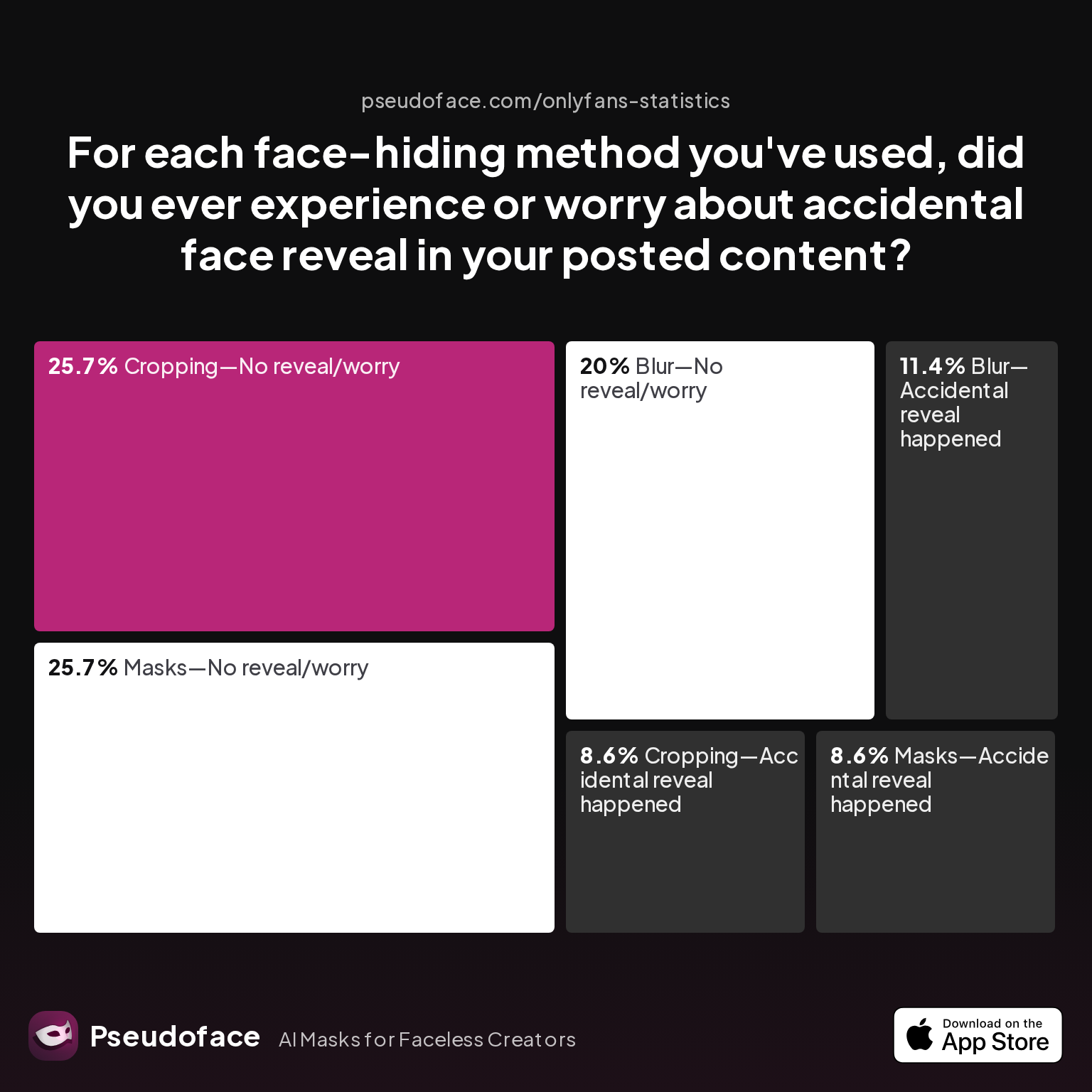
| Answer | Percentage |
|---|---|
| Blur—Accidental reveal happened | 11.43% |
| Blur—No reveal/worry | 20.00% |
| Cropping—Accidental reveal happened | 8.57% |
| Cropping—No reveal/worry | 25.71% |
| Filter—Accidental reveal happened | 0.00% |
| Filter—No reveal/worry | 0.00% |
| Masks—Accidental reveal happened | 8.57% |
| Masks—No reveal/worry | 25.71% |
Blurring and cropping both carry accidental reveal rates above 8%—and blurring is riskier than masks for overlooked reveals, with over 11% reporting a mishap. Masking and careful cropping are safer, but still not perfect, underscoring that post-production fixes can’t match in-camera anonymity.
Community wisdom urges stress-testing your setup, both analog and digital. Here’s a ritual that seasoned creators swear by:
- Do a full dry run—film or photograph yourself in every planned position, then step out and review all footage on a big screen.
- Check all mirrors, windows, frames, and reflective props—zoom in, look for any hint of your face, details, or background leaks.
- Lock camera focus and exposure if possible, to prevent sudden refocusing on background faces or ID clues.
But even technically adept creators face hiccups, particularly with smartphone autofocus:
Open thread on Redditr/CreatorsAdvice
u/blondegirllola
I have a pixel 7 and on mine you can turn auto focus off in the settings and you can also edit the video ans refocus on the right area x
Bottom line: Never rely on memory. Build a habit of multiple careful playbacks—ideally, with a trusted friend as a second set of eyes before posting. Many creators reserve a “panic delete” zone on their devices; others rotate backups in case a clip with a reveal slips through.
Now, let’s compare two creator journeys—a static “safe shot” workflow vs. a dynamic, slider-based style—so you can choose what fits your needs and audience best.
Comparison: Static vs. Dynamic POV Camera Workflows—What the Data and Creators Say
Two archetypes dominate the faceless creator world: those who favor static, “locked” POV shots and those who invest effort in dynamic, moving-camera content. Both approaches have trade-offs in time, difficulty, creative flexibility, and risk. Choosing between them means weighing your own priorities for anonymity, audience engagement, and workflow speed.
Static POV Workflow:
This is the backbone for beginners and risk-averse creators. A tripod or fixed mount defines a “safe zone”—a repeatable shot height, distance, and angle confirmed through testing. Matches well with foot, leg, torso, and dildo/toy content, where movement comes from the subject rather than the camera.
Key strengths:
- Maximum repeatability and safety: once dialed in, you shoot with peace of mind session after session
- Easiest self-filming: hands-free, simple for solo creators
- Lowest cost: entry-level tripods and phone mounts suffice
Downsides: - Less cinematic variety; feeds and posts can start to look visually similar
- Audience engagement may plateau faster
Dynamic POV Workflow:
Here, you introduce a slider, gimbal, or manually piloted tripod to execute slow pans, tilts, or tracking shots. It’s more visually engaging—body and props can “move with” the lens, layering narrative and sensuality.
Benefits:
- Stand out with cinematic movement and mood
- Makes content look higher budget, especially when coupled with good lighting
Trade-offs: - Higher exposure risk (e.g., pan wanders into unsafe angles)
- More setup time and more test footage required
- Gear investment: sliders start around $35–$100; true gimbals $120+
Redditers describe an “unlock” effect when they add even basic motion:
Open thread on Redditr/CreatorsAdvice
u/lisalefevre
Happy new Year from Belgium 😘 My resolutions is growing it until minimum of 10k/ month. So I’m already making more social media account + want to start streaming sfw content on kick. Tomorrow I’m upgrading my camera because I want to take my content to the next level 🫶🏻
In 2025-2026, most creators advise mastering static workflows until every angle is second nature, then layering in dynamic movement as your brand—and technical confidence—grows. This stepwise approach keeps accidental reveals rare and your content consistent.
Faceless Film in 2025: Personalizing Your POV and Adapting to New Tools
Faceless creation is only getting more sophisticated. As of 2026, the market is seeing a shift toward all-in-one, “streaming safe” devices, quick-swap mounts, and wireless monitoring—all designed to serve privacy-driven creators. Trends show microphone holder attachments and “best camera for streaming” model recommendations rising fast in the creator discourse.
What’s at the bleeding edge:
- Integrated tripod-mic rigs: Enable clean audio (with on/off toggles for privacy), paired with ring-lighting for “faceless” streaming.
- Quick-swap mounts: Let you move rapidly from desk, floor, and overhead positions without resetting your safety boundaries.
- Wireless preview apps: More creators are using tablets or laptops to monitor live framing and double-check that faces stay safely out-of-shot.
And for camera choice? Upgraded smartphones and compact mirrorless models dominate for solo creators, with a heavy preference for devices that allow manual focus and exposure locking—mitigating the risk of accidental auto-detection of faces in the background.
Personalization remains crucial. As the faceless market gets more saturated, signature props, costumes, and even specific body-part “branding” are surging. The Pseudoface data from over 250,000 threads shows: creators who lock in a repeatable, signature angle with a distinctive costume, foot/tattoo, or prop see more rapid audience growth than those who rely exclusively on “anonymous” obscurity.
What comes next? Expect to see more streaming tools with facial ID lockout, audio anonymization, and AI-powered background replacements—making it easier to craft “intimate” content without ever risking your identity. But as always, the fundamentals—tested angles, secure tripod setups, diligent review—are what set sustainable, successful faceless creators apart from the rest.
Next, review the most-asked questions about faceless creator setups, plus our take on the best ways forward.
FAQ: POV Camera Setup for Faceless Creators
What tripod setup works best for faceless creators shooting solo content?
A standard adjustable tripod with a reliable phone or camera holder works best for most solo faceless creators. Beginners should position the tripod at waist level or slightly higher, angled down to frame desired body parts while cropping out the head. Intermediate creators benefit from tripods with tilt/swivel heads for flexible positioning, while professionals often use quick-release plates and heavy-duty stands for rapid scene changes.
How do I film faceless POV videos without any risk of my face slipping into frame?
Test your camera framing before each shoot and use repeatable angle setups, while carefully reviewing footage for accidental reveals. Incorporate dry runs with frame checks on a large screen, avoid mirrors or reflective objects unless fully tested, and consider using manual focus to keep your face out of auto-focus zones. Community data shows that “safe angle” testing cuts accidental reveals by over 50%.
What is the difference between a tripod slider and a canvas tripod in faceless creation?
A tripod slider allows your camera to move smoothly along a set rail for cinematic horizontal or vertical movement, while a canvas tripod is a flexible, portable stand for dynamic placement in tight or unconventional spaces. Sliders are used for motion shots; canvas tripods offer creative static angles. Pseudoface data shows that sliders are adopted by about 25% of creators seeking advanced shots, while canvas tripods remain niche and DIY-oriented.
Are there budget POV camera options for starting faceless creators?
Yes—many creators start with $30–$70 phone tripod kits, ring lights with stands, and manual clamp mounts. Popular budget combos include Amazon Basic tripods, UBeesize ring light/holders, and GorillaPods with phone clamps. Redditors frequently recommend maximizing your phone’s camera before splurging on mirrorless upgrades.
How do I hide my identity during live streaming as a faceless creator?
Position your camera at torso or waist height, tilt slightly downward, and use a preview monitor to double-check safe framing throughout. Pair with a directional microphone placed out of view to limit voice identification, and use streaming software overlays to blur or crop sensitive areas if needed.
Which shot angles feel intimate and professional without showing my face?
The most popular and effective faceless angles are overhead top-down, hip/waist-down, angled mirror setups (with face blocked), and close-ups on feet, hands, or a signature prop. Pseudoface data shows feet and specific costume shots are the most likely to build a distinctive, audience-memorable brand.
Are microphones on a tripod risky for accidental voice reveals for anonymous creators?
Placing a microphone near your shooting area increases the risk of capturing identifying vocal cues, but most creators avoid accidental voice reveals by testing audio levels, muting when not filming, and reviewing recordings before sharing. Community tips include test-recording from different distances and disabling “always on” recording on wireless mics when possible.
What do I do if I accidentally record my face—how do creators handle this?
Immediately remove and securely store or delete the raw footage; use video editing software (e.g., CapCut, DaVinci Resolve) to crop or blur out any exposed frames. Some creators set device-level safeguards, such as cloud backups that can be remotely wiped, to minimize accidental leaks.
How can I use mirrors or props for faceless shots safely?
Always test your mirror angle with recording—including all intended movement—to ensure no direct or reflected face exposure. Use props or tape to “block” lines of sight, and review the shoot on multiple screens (phone and computer) at high magnification to catch any risks.
Where can I find the best POV camera for faceless creators in 2025?
Popular choices for 2025 include the Sony ZV-1, Canon EOS R50, iPhone 15 Pro, and Samsung Galaxy S24 Ultra, each offering manual focus, compact build, and reliable wireless preview for anonymous shooting. Look for models that let you lock focus and exposure and that integrate easily with tripods and streaming setups.
Faceless content creation is a blend of artistry, technology, and ritual—from tripod selection to frame-by-frame review. With peer-tested camera setups and disciplined shot planning, you can craft captivating, anonymous films that stand out in a crowded 2026 creator landscape.


