
TL;DR
You absolutely can go live on TikTok, YouTube, Instagram, or Facebook without ever showing your face—and thousands do so every day using creative tech tools, strategic setup choices, and clever engagement tactics. According to Pseudoface’s analysis of over 250,000 public Reddit threads from real adult and non-adult creators, nearly 1 in 3 live streamers actively use TikTok or YouTube as their faceless streaming platform, and more than half rely on overlays, filters, or non-facial branding to build dedicated audiences. The most successful strategies blend platform features (like TikTok Green Screen or Instagram AR masks) with clear privacy boundaries and interactive chat dynamics. Based on 2025-2026 data, these hard-won, self-reported trends are directional—not universal—but they offer a practical, trustworthy place to start faceless and stay in control.
Why Faceless Streaming? The Movement and the Mindset
Ask any privacy-focused creator and you’ll hear the same refrain: control over your image matters, especially in a world where livestreams are clipped, saved, and shared without consent in seconds. For thousands on TikTok, YouTube, Instagram, or Facebook, the stakes go beyond mere shyness. Creator anxiety is shaped by everything from doxxing risks to employer repercussions—real worries echoed in public Reddit threads, where anonymity isn’t just a preference, it’s sometimes a lifeline.
Behind the scenes, the broader cultural movement toward faceless streaming has accelerated sharply since late 2024. Googling “how to go live on TikTok without showing your face” now pulls up advice from every corner of creator culture—from VTubers with animated masks to hands-only unboxing accounts, to anonymous sexuality educators and adult content pros. The thread connecting them isn’t just safety: it’s artistry, confidence, and the freedom to experiment outside the gaze of friends, family, or trolls.
Notably, some creators pursue facelessness for brand differentiation, playing up mystery or focusing attention on skills, aesthetics, or stories that don’t require expressions. For others, it’s a workaround for personal comfort, body image, or even legal needs—think teachers, healthcare workers, or people working in restrictive environments. Even in non-adult spaces, fear of being “found out” can freeze the impulse to create before a single stream goes live.
Yet as of early 2026, the stigma around anonymous streaming has faded; you’ll find thriving faceless communities on Discord, Reddit, and across “faceless TikTok” tutorials. Livestreaming without your face isn’t an afterthought—it’s an expectation in privacy-first corners of the web. But the why shapes the how: a creator motivated by safety will value different features, filters, and engagement styles than someone chasing pure novelty. Understanding your own WHY is the first layer of strategy, informing not just your tech, but the tone and trust level of your eventual audience.
Knowing why creators choose not to show their faces, we can now map where they actually go live—and how those platforms stack up for faceless streaming.
Where Creators Go Faceless Live: Platform Choices and Comfort Zones
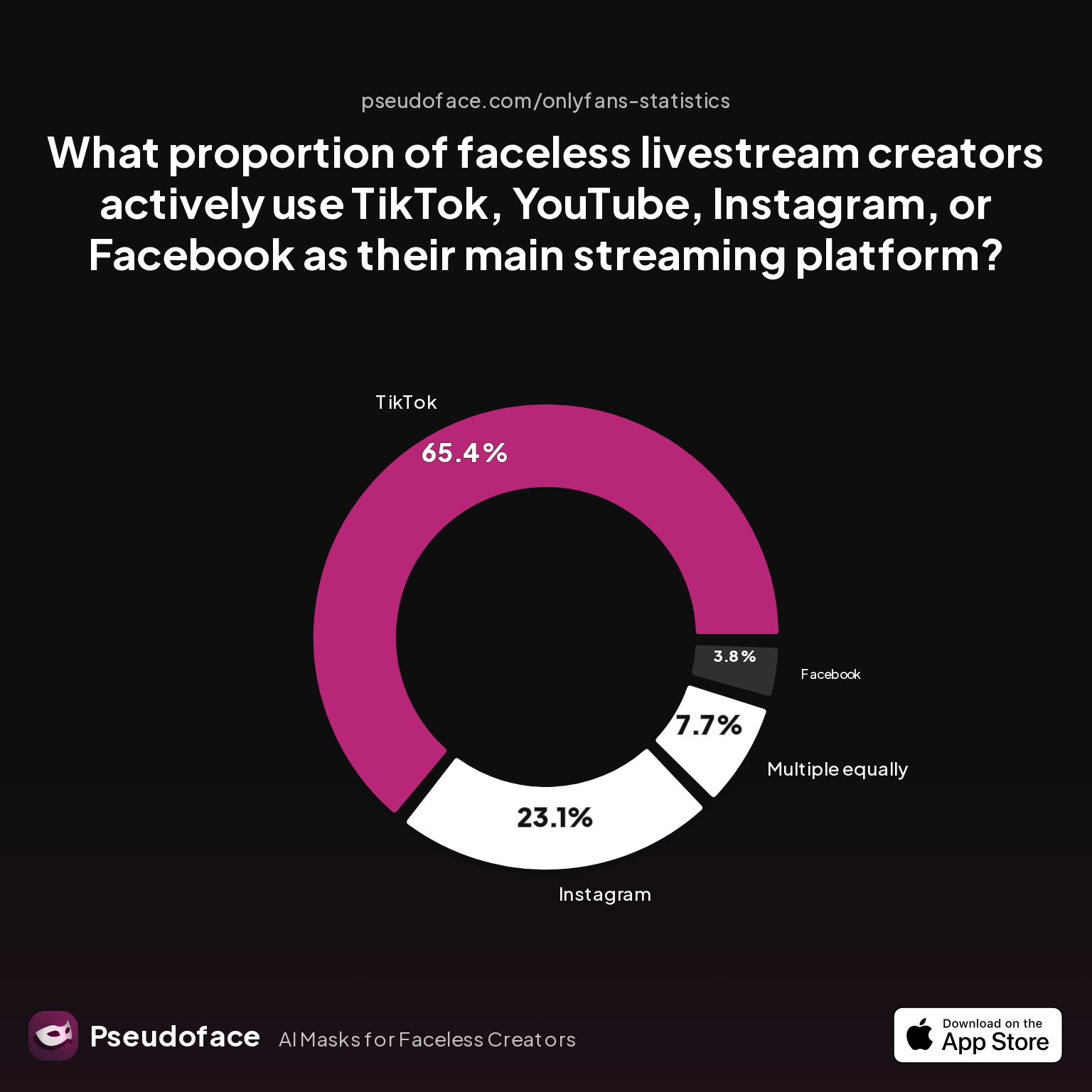
When it comes to picking your streaming home, comfort is as important as reach. As of late 2025, TikTok has surged ahead as the default launchpad for privacy-first livestreamers. But does that mean TikTok is the “best” or merely the most familiar? Pseudoface’s dataset provides a clear accounting of current platform choices among faceless creators:
| Answer | Percentage |
|---|---|
| 3.85% | |
| 23.08% | |
| Multiple equally | 7.69% |
| TikTok | 65.38% |
| YouTube | 0.00% |
The directional evidence is stark: TikTok is by far the most popular platform for faceless livestream creators, with roughly two-thirds choosing it as their primary venue. Instagram trails as a distant second (23%), while YouTube—contrary to much broader video dominance—accounts for a vanishingly small share among actively faceless streamers in this sample. Facebook is chosen by less than 4%.
How should we interpret this? First, remember that these figures reflect the self-reported experiences of highly engaged Reddit users—creators who are often early adopters and might overrepresent platforms known for younger, more privacy-savvy audiences. There’s also a survivorship bias: creators who burned out, got banned, or went private aren’t always counted.
Reddit discussions reinforce these trends, with TikTok favored for ease of entry, built-in filters, and rapid discoverability—but also for its ability to mask identity even in massive broadcast rooms. Instagram’s relatively high usage makes sense for creators with an established following who want to leverage stories and direct messaging while maintaining a softer, more “curated” brand image.
Open thread on Redditr/Fansly_Advice
u/SadieAnjelicaVoss
Yeah, I think it would be challenging to manage that many different TOS (especially if you wanted to do fansly and Youtube or something). Thank you again--I appreciate it <3

This comment underscores another thread: platform rules are a genuine concern for faceless creators, many of whom navigate different TOS (terms of service) across adult/non-adult and mainstream sites. The choice to go TikTok or Instagram often boils down to risk tolerance, monetization options, and how each platform polices anonymous, masked, or adult-leaning content.
If “where” is critical, “how” is equally essential. Your platform may offer tools, but what really protects your identity—and makes your stream viable—are the methods you use on camera.
How to Go Live Without Showing Your Face: Proven Methods & Real-World Results
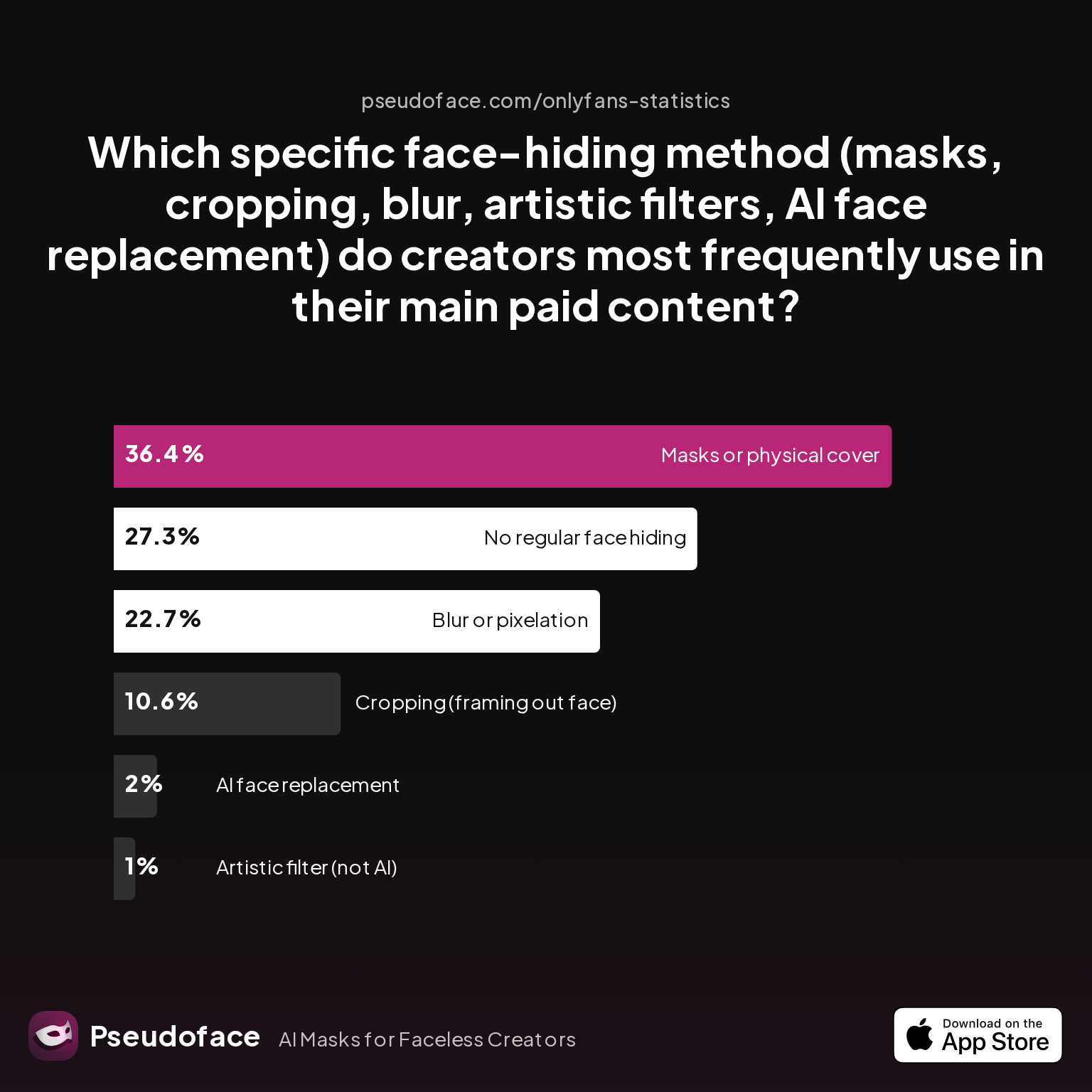
For as many reasons as there are not to show your face, there are just as many technical and creative workarounds. Here’s what 2025-2026 data (drawn from the largest public pool of creator testimony yet assembled) makes clear:
| Answer | Percentage |
|---|---|
| AI face replacement | 2.02% |
| Artistic filter | 1.01% |
| Blur/pixelation | 22.73% |
| Cropping | 10.61% |
| Masks/cover | 36.36% |
| No regular hiding | 27.27% |
Physical masks or facial coverings are the single most used method by faceless streamers (36%), closely followed by blur or pixelation (23%). Cropping the camera frame is used by about 11%, while high-tech options like AI face replacement or artistic (non-AI) filters remain fringe.
This breakdown highlights a telling split between low-tech and tech-heavy methods. Real-world reliability—not just novelty—drives creator choices. A mask or balaclava never “glitches” mid-stream; a carefully cropped field of view is always “on.”
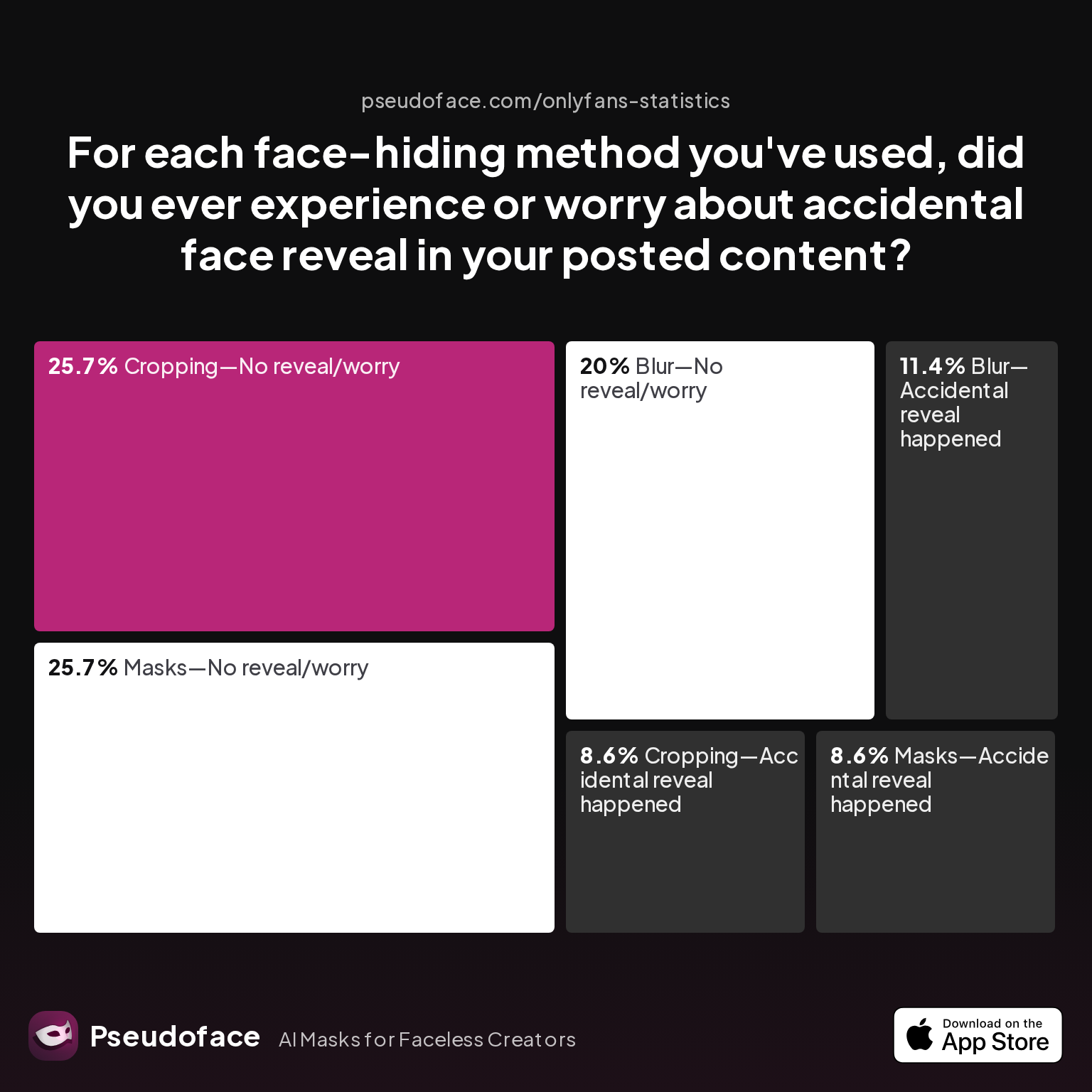
But does tech lead to more accidental reveals? The next chart, sourced from candid creator admissions, shows how each method fares under live-fire conditions:
| Answer | Percentage |
|---|---|
| Blur—Accidental reveal happened | 11.43% |
| Blur—No reveal/worry | 20.00% |
| Cropping—Accidental reveal happened | 8.57% |
| Cropping—No reveal/worry | 25.71% |
| Filter—Accidental reveal happened | 0.00% |
| Filter—No reveal/worry | 0.00% |
| Masks—Accidental reveal happened | 8.57% |
| Masks—No reveal/worry | 25.71% |
The numbers point to a fundamental truth: no method except physical masks is immune to mistakes, but most creators using cropping or masks never experience accidental reveals. Only around 8.5% of maskers or croppers report an actual slip-up. Blur/pixelation users report a higher rate of accidental reveals (over 11%), suggesting that real-time tracking or software interruptions expose users to sudden, unwanted face time.
It’s critical to factor in user error and technology learning curves. As one Redditor puts it:
Open thread on Redditr/Fansly_Advice
u/ERPG0D
You're welcome! I personally have a different instance of OBS for each platform, so I have one for Twitch and one for Fansly completely independent of one another. It makes it so that I never mess up and accidently stream to the wrong platform.
System separation and workflow discipline matter as much as the method itself. Many facehiding mishaps don’t result from failure of a tool, but from switching scenes, accidentally activating the wrong camera, or having overlays drop out mid-stream.
So what’s the bottom line for aspiring faceless streamers in 2026? If you’re new and anxious about “Oops, face reveal!” incidents, start with physical masking, cautious cropping, or both—layered for redundancy. Blur effects or digital overlays offer more flexibility, but demand more vigilance and technical setup.
As platforms roll out new AR, AI, or integrated filter tools, always road-test them offline, record dummy streams, and ask trusted friends to “attack” your stream for privacy holes before going public. Remember, the self-reported nature of these stats means you’re hearing most from those who stayed careful and kept streaming—so your mileage may vary. Embracing redundant methods, checklists, and a measured approach is your best insurance.
Once you pick your preferred method, the next question is which platform makes it easiest to use, and what technical hurdles you’ll encounter.
Platform-by-Platform Playbook: How to Go Live on TikTok Without Showing Face, and Beyond
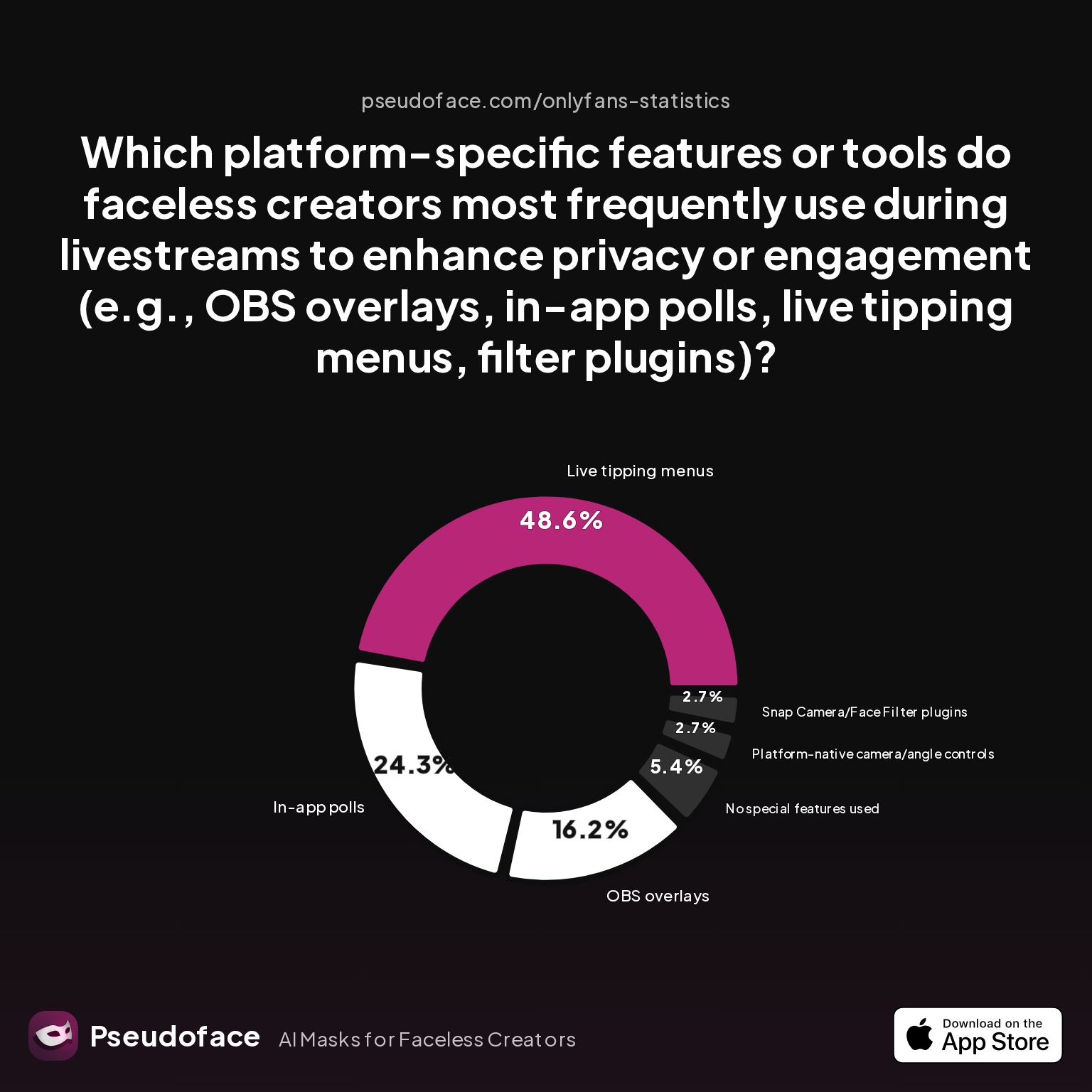
It’s one thing to decide on a mask or blur—it’s another to integrate your chosen method smoothly into TikTok, YouTube, Instagram, or Facebook Live. Each platform comes with its own toolset, compatibility surprises, and community norms. To navigate this, let’s start with which features privacy-first creators actually reach for:
| Answer | Percentage |
|---|---|
| In-app polls | 24.32% |
| Live tipping menus | 48.65% |
| No special features used | 5.41% |
| OBS overlays | 16.22% |
| Platform-native camera/angle controls | 2.70% |
| Snap Camera/Face Filter plugins | 2.70% |
Nearly half of all faceless streamers consistently use live tipping menus or on-screen overlays to structure their streams and enhance engagement. In-app polls remain popular, while advanced overlays (such as those enabled by OBS) serve about 16%. Relatively few lean exclusively on platform-native angle controls or external face filter plugins—possibly a function of integration headaches or feature bloat.
So how does that play out, platform by platform? Here’s the real-world playbook for each major site as of spring 2026:
TikTok:
With its heavy investment in creator tools, TikTok offers the easiest “green screen” and AR masking experience. TikTok’s built-in effects menu (tap “Effects” before you go live) allows for real-time blurring, cartoon overlays, and even animated avatars—no third-party software needed, though options deepen if you route your feed through OBS from desktop. The majority of faceless TikTok streamers use these effects combined with careful framing. Watch for changes: TikTok’s filter catalogue and enforcement policies can shift between updates. Always test your effect stability before showtime.
YouTube Live:
Though a giant in video, YouTube’s faceless streaming features are less robust natively. Most creators here rely on third-party tools like OBS Studio to crop, blur, or superimpose overlays before broadcasting. The absence of TikTok-style AR in-app means more setup work—but also more control if you crave detailed scene composition. Live tipping menus, Q&A plugins, and custom graphics are nearly all implemented at the software level, not in YouTube itself.
Instagram Live:
Instagram splits the difference—offering both story-centric AR “filters” (including animal masks, light-leaks, celebrities, and more) and curated camera angles. While real-time masking works well for most, be aware that Instagram’s automatic face-detection sometimes “corrects” your camera if you’re only partly visible. Some creators report sudden filter drop-offs mid-stream, especially on older phones or in groups. Stories integration is a win: you can go faceless on Live, then share “teaser” story content for pre- and post-event hype.
Facebook Live:
Of all four, Facebook is the least optimized for privacy-first or anonymous streaming in social contexts. While you can crop, blur, or use overlays via desktop software, few use it as their primary “faceless” channel—likely due to real-name expectations and less forgiving moderation. Integration with third-party tools is possible, but Facebook rarely sees dedicated faceless-first communities.
Importantly, tool fatigue can be your enemy, and streamers who try to go live across multiple platforms at once (multi-streaming) often quickly discover how different each workflow and feature set is. As one Redditor notes:
Open thread on Redditr/Fansly_Advice
u/ERPG0D
You're welcome! I personally have a different instance of OBS for each platform, so I have one for Twitch and one for Fansly completely independent of one another. It makes it so that I never mess up and accidently stream to the wrong platform.
Maintaining separate software “instances” or scene collections for each platform isn’t just organizational—it’s a practical privacy safeguard. Always study each platform’s latest update logs and feature sets: as of early 2026, TikTok leads for ease and built-in effects, while YouTube and Facebook depend more on creator-side tech skills and external software.
With the technical “how” in hand, building a memorable, engaged brand without facial identity is the next frontier.
Building Your Faceless Brand: Distinctive Elements Beyond the Face
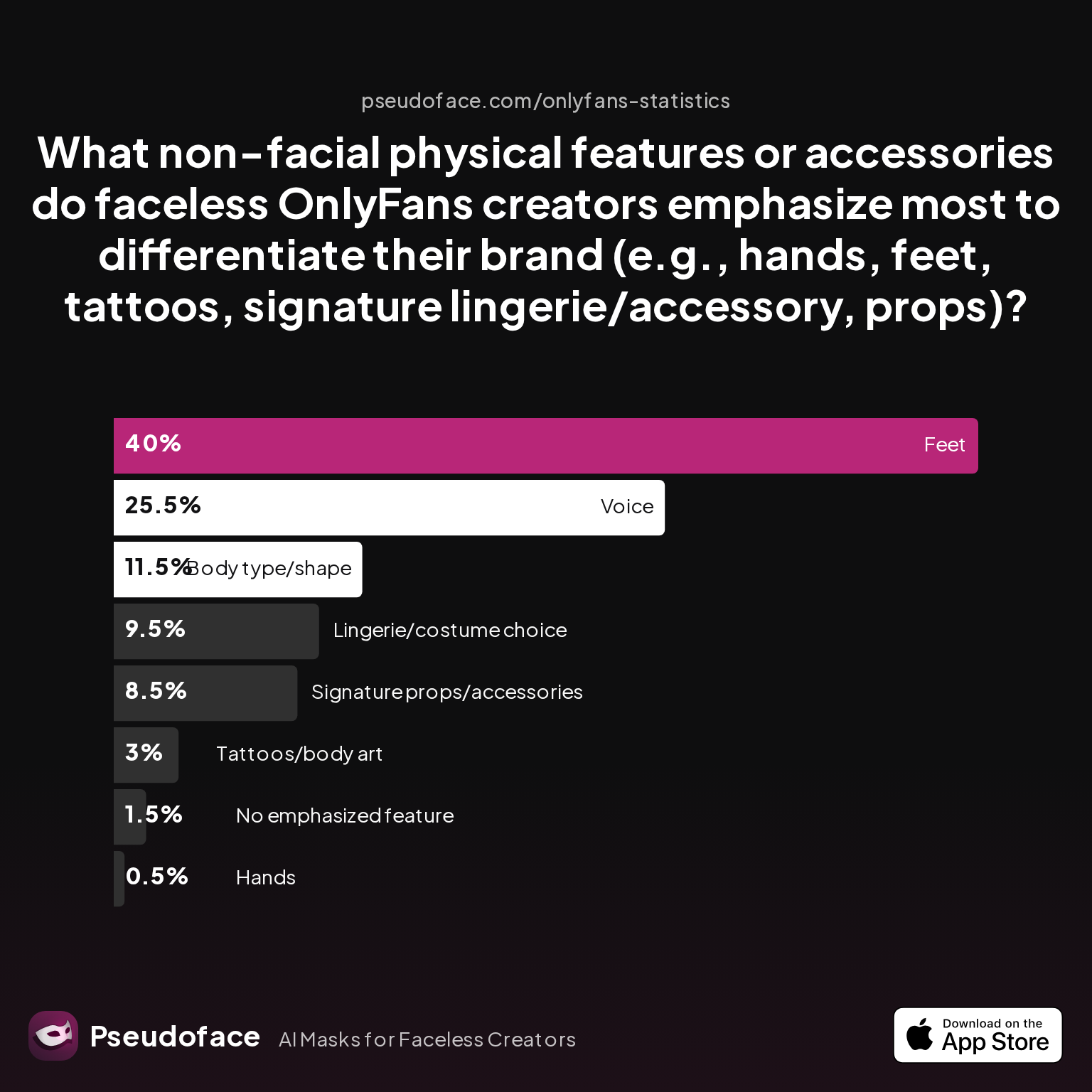
A truly engaging faceless stream isn’t just “face removed”—it’s built around other features that captivate, symbolize, or perform what your face otherwise would. Based on aggregated Reddit reporting (2025-2026), here’s what drives brand distinctiveness for privacy-first creators:
| Answer | Percentage |
|---|---|
| Body type/shape | 11.50% |
| Feet | 40.00% |
| Hands | 0.50% |
| Lingerie/costume choice | 9.50% |
| No emphasized feature | 1.50% |
| Signature props/accessories | 8.50% |
| Tattoos/body art | 3.00% |
| Voice | 25.50% |
Feet (40%) and voice (26%) are the most commonly emphasized non-facial features among faceless creators, followed by body type or shape and signature props. Tattoos or unique physical markings—and even hands—are rarely the focal point, a nod to anonymity.
For SFW and NSFW creators alike, turning a “limitation” into brand identity is both the challenge and opportunity of the faceless model. The data reflects a clear shift: props (think signature toys, books, plants, lights) and voice modulation (for storytelling, roleplay, or ambience) become core parts of the viewer experience.
Why voice? It’s expressive, dramatic, and conveys mood—sometimes better than a smile or wink. But it also presents risks, as discussed candidly in many creator circles. Some use voice changers or script their dialogue to sidestep recognizable speech patterns.
Lingerie, costume choices, and atmospheric accessories are popular with those working in visual niches. This is about crafting a “character” or theme that’s familiar and inviting—even when your audience never sees your eyes.
Reddit discussions repeatedly highlight the role of non-facial cues in sustaining viewer interest. One streamer’s neon-lit “hand only” streams become a branded sensory experience; another’s recognizable background music builds a loyal base.
If you’re just starting, list your personal “signature elements” that feel both private and creative—then test them in short live sessions or stories before centering your whole brand. The idea isn’t to perfectly replicate what facial streamers do, but to find new ways to signal authenticity, energy, and style.
Now that you have creative tools and a brand framework, engaging your audience—without facial expressions—takes center stage.
Engaging Audiences: Interactive Techniques for Faceless Streaming Success
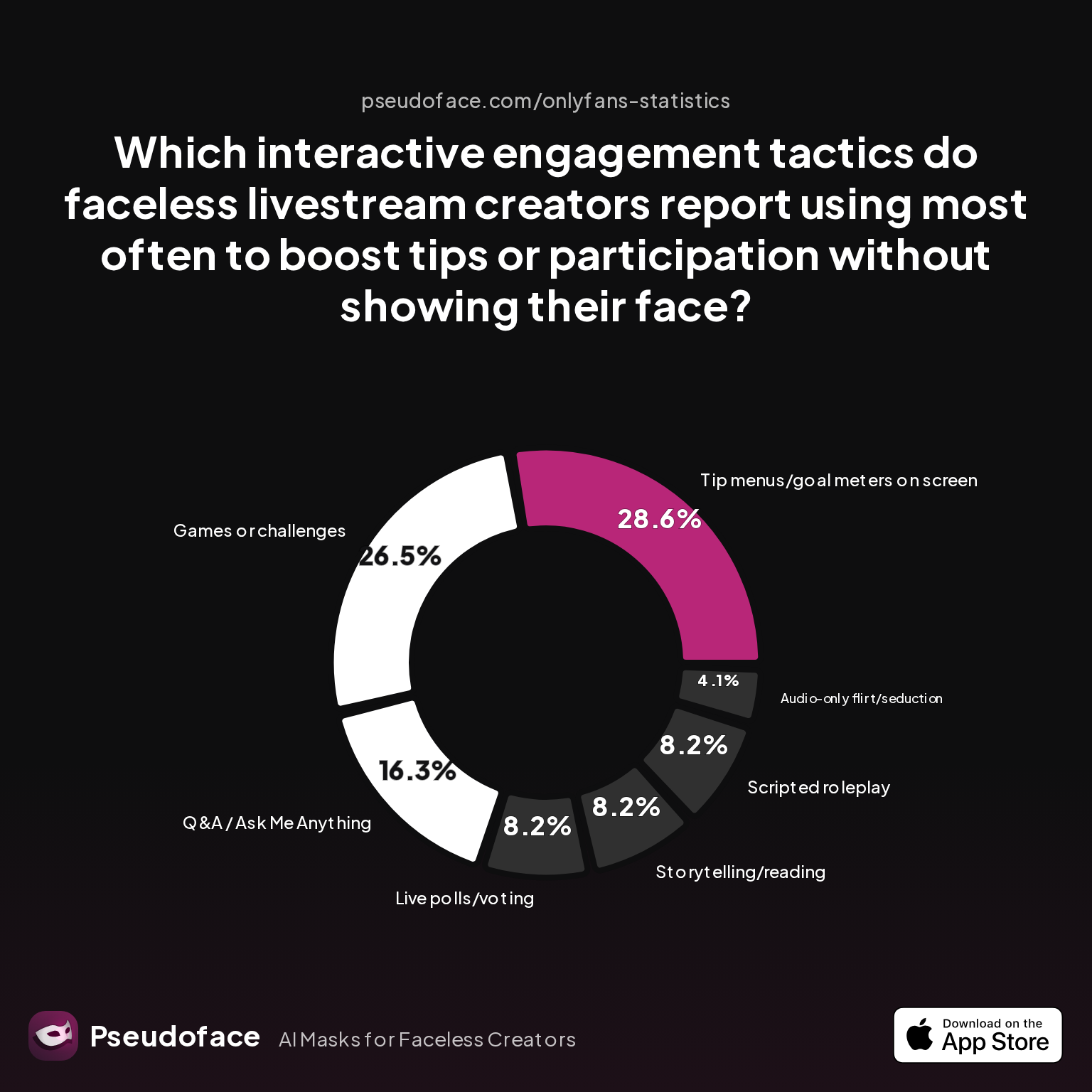
Without facial cues for connection, successful faceless streamers turn to interactivity—polls, games, on-screen goals—to sustain engagement and build real-time rapport. The latest survey data reveals which tactics get the most traction as of early 2026:
| Answer | Percentage |
|---|---|
| Audio-only flirt/seduction | 4.08% |
| Games or challenges | 26.53% |
| Live polls/voting | 8.16% |
| Q&A / Ask Me Anything | 16.33% |
| Scripted roleplay | 8.16% |
| Storytelling/reading | 8.16% |
| Tip menus/goal meters | 28.57% |
Tip menus and on-screen goal meters (29%) and games/challenges (27%) are the two most effective engagement tools for faceless streamers, followed by Q&A beats (16%) and interactive roleplay/story reading (8% each). Audio-only appeal, while influential in certain niches, remains a minority method.
What works in practice? Tip menus (visible on-screen or via pinned chat messages) give audiences specific, actionable ways to interact—and to reward you for your creativity, not your face. Challenges (“Guess what’s in the box”), games, or crowd-driven voting inject energy and create social proof of active, happy viewers.
Q&A segments humanize the avatar, mystery streamer, or masked persona—building trust through chat-based or mod-mediated dialogue. For those with stage fright or working to clarify policies on adult/NSFW sites, masked roleplay or storytelling allows for personality and playfulness without unintended intimacy.
As with all self-reported stats, recall bias is possible: streamers who profit from these methods are naturally more likely to report success. Newcomers should use engagement tactics as modular experiments, not gospel—test, iterate, and keep what works for your niche.
For those worried about feature fatigue or overwhelming multitasking, start with a single tactic—polls or a menu, for example—and add more as you build comfort behind the lens. Moderators or automation bots can handle much of the load once you hit scale.
Ready to decide which platform gives you the strongest head start? Let’s compare the field.
TikTok vs. YouTube vs. Instagram vs. Facebook: Best Platforms for Faceless Livestreaming in 2024
Choosing your “home base” is no longer just about audience size; it’s about the intersection of features, privacy controls, and workflow simplicity. Recent data (from late 2025 into early 2026) draws a sharply defined map:
- TikTok dominates for faceless-friendly tools, effects, and rapid discovery. If you prioritize ease, in-app masking, and organic growth, it’s your likely starting point.
- Instagram offers strong AR filters, “stories-as-previews”, and access to a vibe-aware, loyal base—especially if you build out non-live content in parallel.
- YouTube lags in faceless adoption, likely because of its heavier bias toward longform, archive-first content and the need for third-party software for privacy features.
- Facebook ranks lowest, hindered by real-name culture, minimal overlays, and a slow pace of feature rollout for privacy-focused creators.
Platform rules and enforcement evolve quickly. As of early 2026, TikTok is still pushing deeper into AR-enhanced content; Instagram, too, is expanding camera/masking tools, especially for Reels that dovetail with Live. Feature parity is not a guarantee: always double-check your app’s update logs, as a feature available to some creators could silently vanish in a future revision.
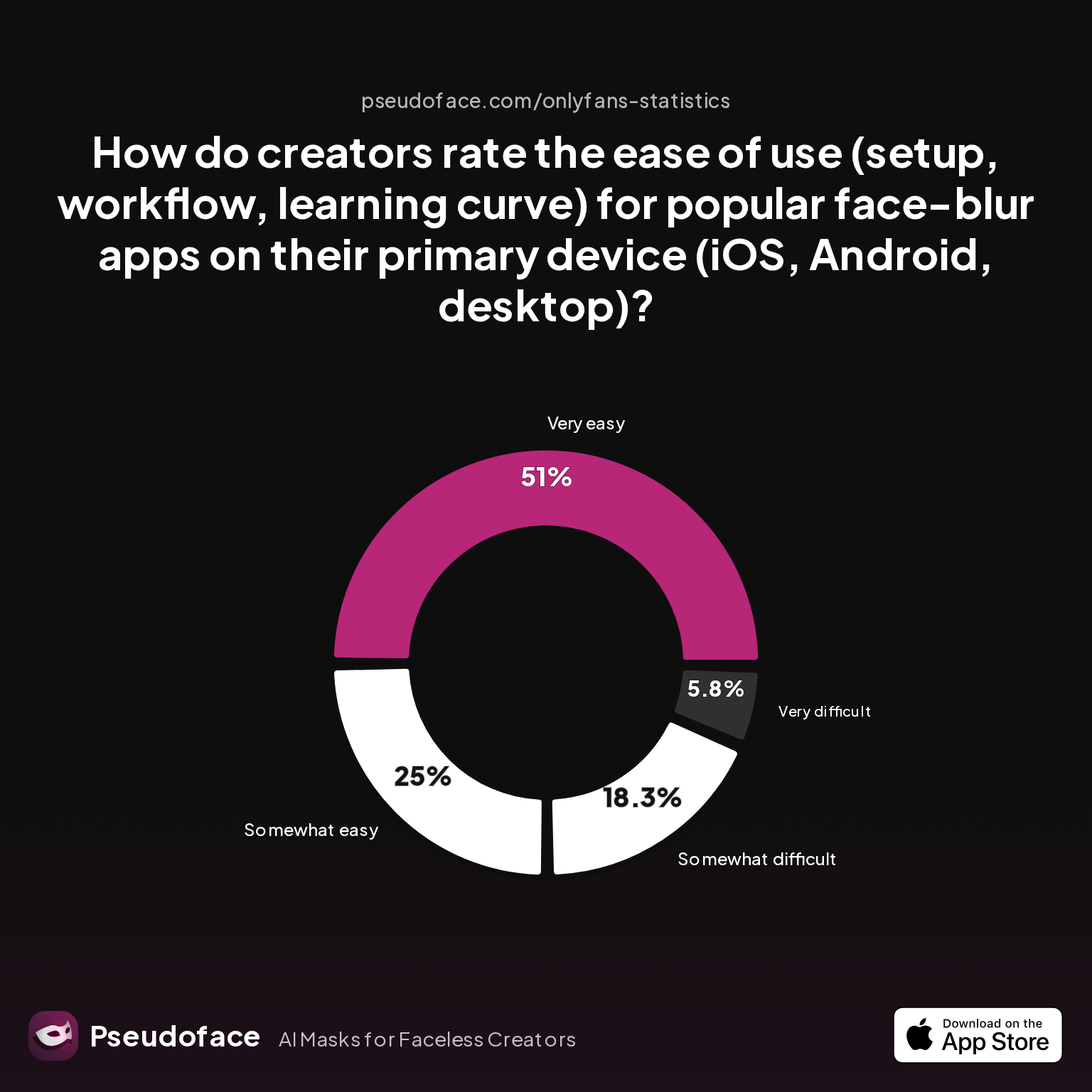
On the workflow side, perceived setup difficulty for blurring or face-masking apps can tip the scales. Here’s how creators rate real-world ease of use by platform:
| Answer | Percentage |
|---|---|
| Neutral | 0.00% |
| Somewhat difficult | 18.27% |
| Somewhat easy | 25.00% |
| Very difficult | 5.77% |
| Very easy | 50.96% |
Over 75% rate blurring or face-mask setup as “easy” to “very easy” on their chosen platform, with less than 6% finding it truly hard. This reflects not just better software, but also robust tutorial-sharing community culture; “how to go live on TikTok without showing your face” is a solved problem for most determined streamers.
A caution: these responses come from creators who’ve climbed the tech curve—raw beginners or the chronically discouraged may not be represented. Still, the clear takeaway is that workflow friction isn’t a dealbreaker on any major platform as of 2026.
Ultimately, let your goals and risk tolerance decide. For the most “out-of-the-box” private livestreaming, TikTok and Instagram are locked in the lead; if you’re building an archive or integrating non-live content, YouTube deserves a look—just expect more upfront setup.
Let’s round off with answers to the most persistent, real-world questions from privacy-conscious creators going live without a face.
FAQ: Faceless Livestreaming—Straight Talk for Privacy-First Creators
Can I go live on TikTok without ever showing my face, even by accident?
Yes, you can keep your face fully hidden on TikTok using effects, camera crop, and diligent workflow, but user error is the biggest threat. Use TikTok’s effects menu and always preview your live with another device. Double-check background reflections and enable a mod or friend to monitor during sessions. Even with all tech, slips can occur if you change angles, so practice your flow offline.
What’s the safest camera angle for anonymous livestreaming?
Low bodily or hands-only overhead angles are safest for faceless streams. Top-down (tabletop) shots avoid accidental facial reveals and rarely trigger platform face detection. Be cautious with reflective surfaces: mirrors, glasses, or glossy props can betray an angle at the wrong moment.
Which is better for faceless adult streaming: TikTok or YouTube?
TikTok is better for rapid, anonymous discovery and built-in privacy filters; YouTube’s moderation is stricter, but overlays and advanced privacy via OBS are possible. On TikTok you can control reach and block faster, while YouTube may hold archives longer and may suspend first, ask later.
Are masks or digital filters more reliable for hiding your face during livestreams?
Physical masks are most reliable by accidental reveal rate; digital filters can glitch under network load or poor lighting. Both methods are widely used, but tech hiccups are less likely to expose your identity with a mask.
How do I avoid being recognized by my voice on livestreams?
You can use a real-time voice modulator, script dialogue to minimize distinct intonation, or reduce live talking in favor of visual storytelling. If recognition is a high risk, blend music, sound effects, or text-to-speech overlays to dilute vocal fingerprinting.
What tools do most faceless creators use to engage their audience without showing their face?
Tip menus/goal meters, games/challenges, and live polls are the top audience engagement tactics for faceless streamers. For beginners, the in-app polls and Q&A tool in TikTok and Instagram are friendliest.
How much harder is it to build a following without showing your face?
It is somewhat harder at first, but consistent branding and interaction can compensate. Many creators report strong community bonds and loyal fans once their unique style is established.
What equipment/setup is most beginner-friendly for faceless streaming?
A ring light with a tripod (angled away from the face), a phone/PC with camera cropping, and a cheap physical mask or props are recommended by most creators. OBS is powerful but optional for many.
How can I switch from face streams to faceless without losing my audience?
Communicate clearly with your audience about the change, rebrand your look with distinctive props or voice, and reassure regulars that content quality will remain high. Many have successfully made this transition without major engagement loss.
Conclusion
Faceless livestreaming isn’t a compromise—it’s a creative stance and a safe space. Whether you’re launching your first TikTok or scaling up a branded YouTube channel, the data shows a wealth of proven strategies, pitfalls to avoid, and a fast-growing community ready to solve every technical and creative hurdle. Let your “why” guide your “how,” and you’ll find both privacy and impact are within reach—no face required.


