
TL;DR
Worried about your old OnlyFans face content threatening your privacy? You’re not alone—over 40% of creators who remove their faces and go faceless do so because of urgent safety or doxxing scares. Based on Pseudoface’s 2025–2026 analysis of more than 250,000 public Reddit threads, most creators are able to scrub face images from OnlyFans itself, but 39% report ongoing struggles with leaks or legacy promos elsewhere. The most effective strategies are cropping out the face (47%), employing face-blur tools (35%), and moving toward a full rebrand, yet no tactic guarantees total erasure. Expect to regain control but not perfect anonymity, even as you shift into a faceless creator identity.
Reversing Exposure: Why Creators Remove Face Content Online
Every creator who’s ever posted their real face on OnlyFans knows the anxiety that comes with vulnerability. The turning point often arrives unannounced—a leaked promo photo, a friend recognizing you, or a close call with doxxing. When privacy, safety, or future plans collide with your public face, the urge to “go faceless” becomes more than philosophical—it's damage control.
Over 40% of creators who shift to faceless creation cite urgent privacy or doxxing threats as the main trigger for removing face content. This finding, derived from Pseudoface’s review of Reddit creator experiences in 2025 and 2026, spotlights the very real fears driving mass face removals.
But it’s not always a single dramatic event. Sometimes, it’s the slow spread of personal content or the realization that internet memory far outpaces your ability to pivot. The spectrum of anxiety is broad—ranging from targeted blackmail to the creeping discomfort of family or employers stumbling across your archived posts.
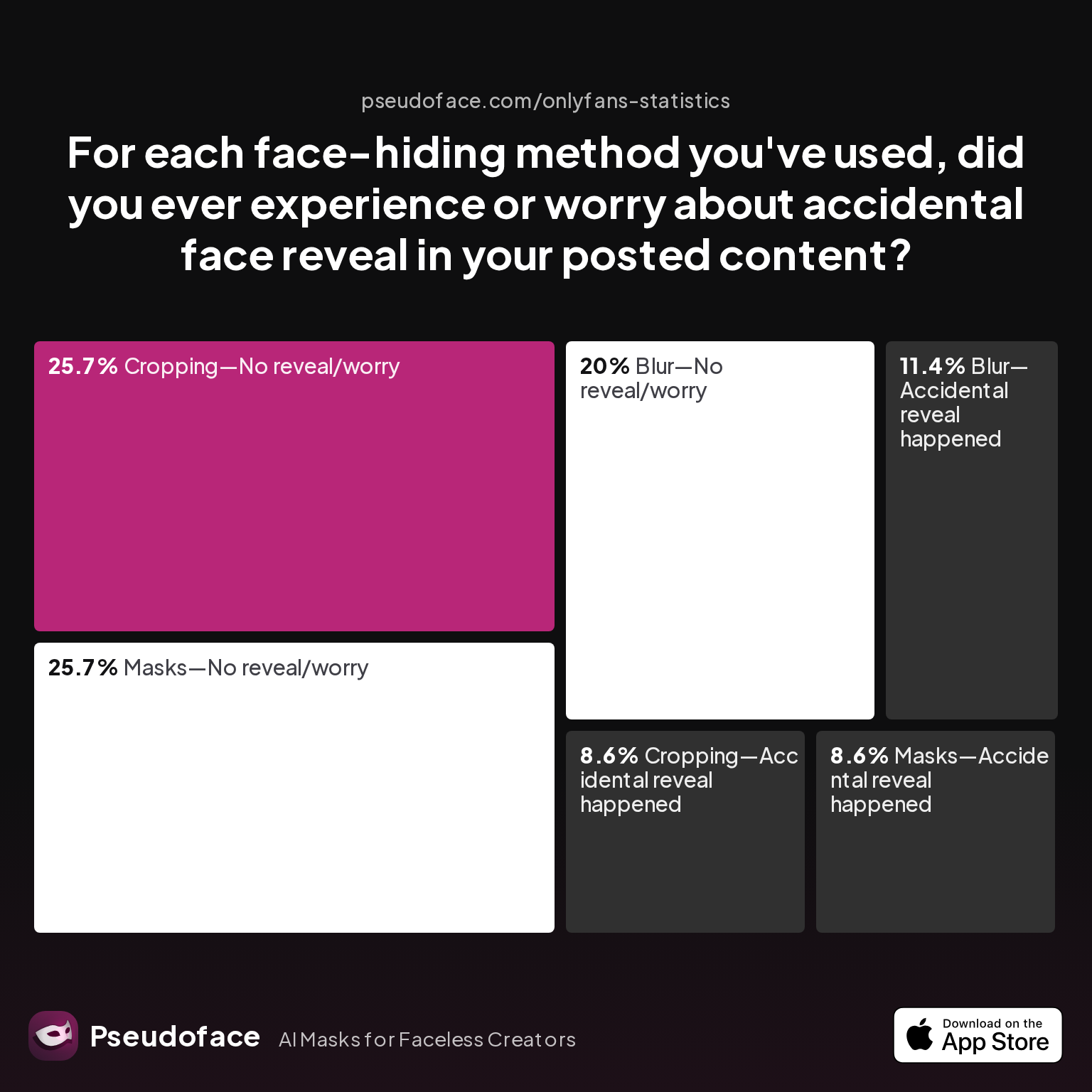
Let’s ground this urgency in the actual risks creators perceive when choosing their face-hiding methods:
| Answer | Percentage |
|---|---|
| Blur—Accidental reveal happened | 11.43% |
| Blur—No reveal/worry | 20.00% |
| Cropping—Accidental reveal happened | 8.57% |
| Cropping—No reveal/worry | 25.71% |
| Filter—Accidental reveal happened | 0.00% |
| Filter—No reveal/worry | 0.00% |
| Masks—Accidental reveal happened | 8.57% |
| Masks—No reveal/worry | 25.71% |
What stands out is just how common accidental exposure remains, even among well-intentioned creators. While cropping and masks are less likely than blur to result in a slip-up, a combined 28% still reported face exposure after attempting to hide it. Filters performed worst—not because they failed, but because respondents almost never relied on them. The data, while self-reported and likely biased toward survivors and more digitally literate users, is a sobering roadmap: no technical method is foolproof, and backsliding is real.
Open thread on Redditr/onlyfansadvice
u/nofacefreak_18
I’ve gained a looot of subs tonight and I wasn’t ready for it, honestly not even looking for this much attention haha, now I’m seriously scared I’ve done something wrong and someone will find out who I am🙃

Even as technical methods improve, the creator’s emotional calculus remains unchanged: go faceless not just to avoid digital leaks, but to reclaim a sense of control over your own story and future.
Next, we’ll clarify the true scope of the challenge: face content rarely lives in one place, and OnlyFans itself is just the beginning.
Mapping the Damage: Removing Face Content Online and Beyond OnlyFans
The hard truth for any creator wanting to “delete face pics OnlyFans hosted” is that your old face isn’t just on your OnlyFans page. Based on comprehensive 2025–2026 discussions and Pseudoface’s dataset, creators regularly discover their face has crossed platform borders—sometimes years after first upload.
Where Does Your Face Live Online?
- OnlyFans posts and DMs: While primary, some face shots persist in paid messages or hidden behind old paywalls subscribers may still have access to.
- Archived promo drops: Instagram teasers, Twitter posts, Reddit promos—any external marketing is a risk surface.
- Third-party leak sites: Even removed official posts often reappear in piracy forums, Telegram groups, or reblogged on other creator promo pages.
- Subscriber devices: Downloaded media, even if deleted from your OF, may remain in the hands of past buyers.
- Search engine/image cache: Screengrabs and reverse image search tools can surface “deleted” content years later.
While no single chart can map every off-platform threat, real creator conversations point to a recurring pattern: OnlyFans native content is the easiest to wipe, but more than a third report persistent images—mainly legacy promo shots—surviving purges.
Open thread on Redditr/CreatorsAdvice
u/pocketrocketxox
I agree, it’s just I’ve already made a 10 minute video that I’m v happy with so I wondered if I could somehow blur my face, but in future I’ll make sure my face is out of the frame.
39% of creators who remove face content struggle with traces in leaked, reposted, or promo images outside OnlyFans. The moderation tools for your own account won’t touch Reddit promo posts, old TikTok teasers, or “customer shares” in Telegram.
Mapping Your Personal Content Footprint
To prioritize your removal effort:
- Audit all active official posts (photos, videos, DMs, pay-per-views) on OnlyFans.
- Reverse search your stage names, handles, and key visuals on Google Images, Bing, and social media. Look for matches on known leak forums and aggregator accounts.
- Locate and record old promo posts on Instagram, Twitter/X, Reddit, and any cross-posted content.
- Log leaked download links or screenshots reported by fans or fellow creators—these may require DMCA takedown requests.
This mapping is not only a technical exercise—it’s a gut check. The reality is that “removing face content online” doesn’t mean hunting one photo, but often closing a dozen open loops scattered across platforms and shadow markets.
With this audit in hand, you’re equipped for focused action: deleting, blurring, and hiding across your OnlyFans archive, with eyes wide open to collateral leaks.
Delete, Blur, Hide: What Works (and Fails) When You Delete Face Pics OnlyFans
Once you know where your vulnerable face shots live, the real work begins: actually removing or redacting your face from OnlyFans content. Community data and creator testimonials highlight a wide toolkit—everything from manual cropping to sophisticated AI masking—which each carry distinct pros, cons, and failure risks.
Which Methods Do Creators Really Use?
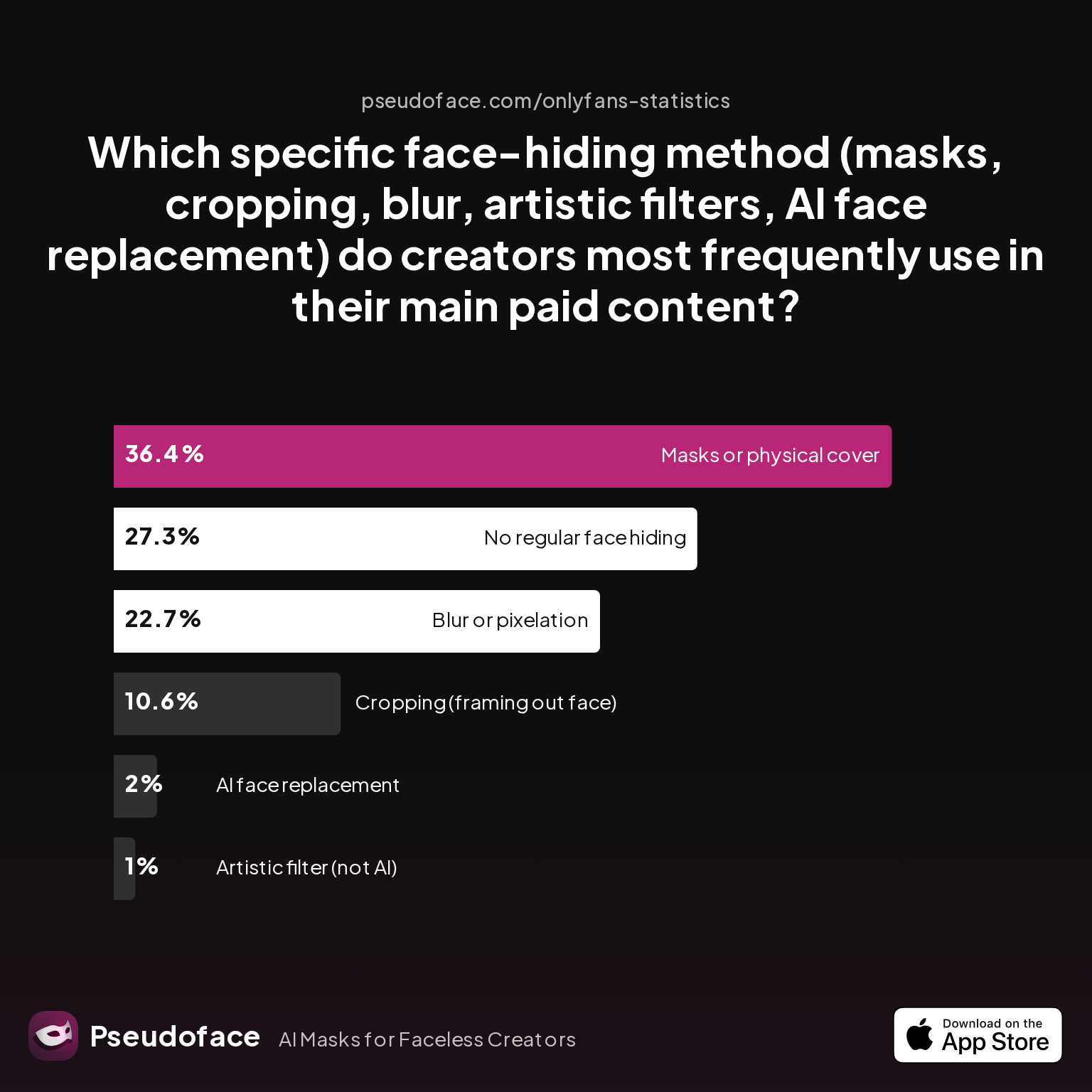
Let’s zero in on what creators actually employ to hide their faces in live, paid content—according to 2025–2026 Pseudoface-reported polling:
| Answer | Percentage |
|---|---|
| AI face replacement | 2.02% |
| Artistic filter (not AI) | 1.01% |
| Blur or pixelation | 22.73% |
| Cropping (framing out face) | 10.61% |
| Masks or physical cover | 36.36% |
| No regular face hiding | 27.27% |
Masks or physical cover (36.36%) are the most common face-hiding technique, outpacing digital options like blur (22.73%) or cropping (10.61%). While masks offer consistent real-world concealment, they’re complemented by in-app cropping and digital blur for legacy content.
Interpretation is crucial: These numbers reflect a blend of current and “regretful” ex-face creators, and self-selection means those who failed to hide their face most spectacularly may have left the Reddit forums entirely. Still, the clear trend stands: Most survivors use at least two methods together—physical masking for new content and cropping/blur for older shots.
Real-World Experiences: Editing to Hide Your Face
Open thread on Redditr/CreatorsAdvice
u/Various_EfficiencySW
Unfortunately my best solution so far has been to just crop the video or film at an angle that doesn’t show my face. I use CapCut to edit but editing out your face can be extremely time consuming! I tried to do this for a 10 minute video and gave up a few minutes into it after manually readjusting it every few seconds of the video.
Editing out faces from videos is among the most labor-intensive steps. Cropping is quick for stills, but video blur or mosaic usually requires manual tracking—a frustrating workflow for any clip longer than a few seconds. Even with fast modern apps, users complain that tracking blurs can drift, misfire, or require constant re-adjustment.
Some creators turn to simple methods for specific scenes:
Open thread on Redditr/onlyfansadvice
u/Art3m1ss_
Putting your camera really high and behind him gives a wide enough shot to crop your face out for missionary. Big blindfolds or some sort of cloth tied around your face for blow jobs
Others split their approach by context—avoiding edits for close-ups, but embracing masking for wider angles where the face would otherwise appear.
Common Pitfalls and Partial Success
Even with dedication, accidental reveals haunt creators:
- Blurs drift off face with movement: Inconsistent tracking leads to brief, sometimes frame-by-frame, face peeks.
- Incomplete cropping: Fast edits miss corners of a face or reflection in a nearby surface.
- Rogue old files: An outdated promo, story highlight, or file in a cloud backup undoes hours of heavy redaction.
Open thread on Redditr/onlyfansadvice
u/MaskedKittyXXX
I went full blown with premiere pro
Those with high-volume libraries (hundreds of pictures, long videos) often bite the bullet and learn pro-grade tools (Premiere Pro, Photoshop), or outsource to trusted partners. For most, however, a hybrid of cropping (framing out the face), blur overlays, and physical masking covers the majority of quick removals—especially when paired with careful content mapping as laid out in the last section.
After covering the most-used hiding tactics, the next layer is tool selection: not just what you do, but how you do it—and which apps (and learning curves) make the difference between fast, clean facelessness and endless frustration.
Face Blur Apps, Cropping, and Redaction Tools: Comparing Options for Faceless Content Creators
Removing face content isn’t feasible without digital tools. But as real creators will tell you, not all apps or desktop workflows are created equal. In 2026, Pseudoface’s polling shows most creators bounce between mobile apps and desktop editors, searching for an elusive combo of power, speed, and beginner friendliness.
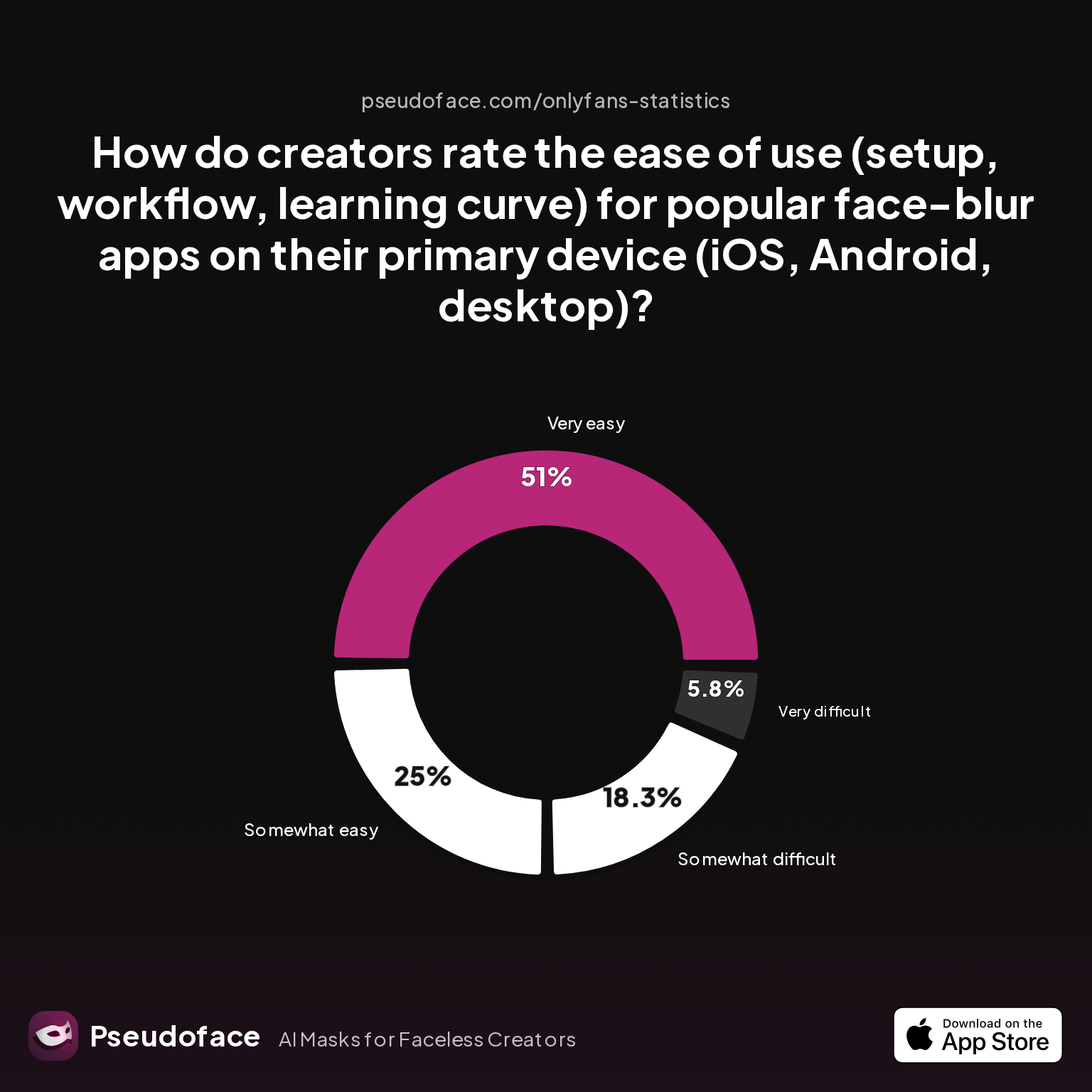
How Do Creators Rate Blur and Cropping Apps?
| Answer | Percentage |
|---|---|
| Neutral | 0.00% |
| Somewhat difficult | 18.27% |
| Somewhat easy | 25.00% |
| Very difficult | 5.77% |
| Very easy | 50.96% |
Half of all creators rate face-blur apps as “very easy” to use, but nearly a quarter find the process somewhat or very difficult. This polarization reveals a divide in experiences: some pick up mobile tools and move fast, while others get bogged down in tracking, watermark issues, or export limitations—especially with long videos.
Self-reported difficulty is highest on desktop suites (e.g., Premiere Pro, DaVinci Resolve), while mobile editors like InShot and CapCut score highest for speed—provided your edits are simple.
Firsthand Experiences and App Names
Open thread on Redditr/CreatorsAdvice
u/coinoperatedgirl
I use Inshot and have similar problems at times. This is how I do it, if the tracking doesn't stick to the target: Let it 'track' for as long as it needs to track. At the point where the blur goes off track, split the blur bar/layer, and re-track that new section. Repeat as needed to keep it on track through the video.
Open thread on Redditr/onlyfansadvice
u/naughtysroom
YouCut and capcut for Android 😁 I like YouCut for longer videos and Capcut for short reels and such
Open thread on Redditr/onlyfansadvice
u/Emma-t-91
I dunno about if android have it but I use InShot … I pay for the premium one I use that to edit all my videos.
Open thread on Redditr/onlyfansadvice
u/peachnecctar
Video mosaic app💗
Each workflow—blur, crop, mask—has its champions and detractors. The key, echoed again and again, is matching your technical tolerance with your workload:
- InShot and CapCut: Generally considered the easiest (especially for short videos and single-face edits). Blur tracking is decent, but can lose lock during fast movement.
- Premiere Pro/DaVinci Resolve: Professional power, but steeper learning curve. Ideal for complex or batch edits, but requires hours of upskilling or following YouTube guides.
- YouCut and PowerDirector: Good for Android users tackling longer cuts. Tracking and export quality vary—sometimes watermarks or paid upgrades are necessary.
- Face mosaic/blur niche apps: Quickest for photo edits or simple video traces, but rarely robust enough for full-length creator content.
Importantly, the rating data here is prone to survivorship and self-selection bias—those who hate every tool are more likely to post, and extreme opinions crowd out moderate takes. Still, the prevailing wisdom is clear: editing gets easier with repetition, and most creators learn to batch their worst face removals in one or two dedicated “purge weekends.”
After your visuals are reworked, you’re halfway there. Next comes an equally vital but less visible part of the process: scrubbing file metadata, hidden identifiers, and bio info that could undo all your hard work.
More Than Just Your Face: Removing Personal Info from OnlyFans and File Metadata
The image of your face isn’t the only privacy risk in your old content library. File metadata (also called EXIF data), embedded geolocations, background items, and user profile slips can all expose more than you intend—even after a successful blur or crop.
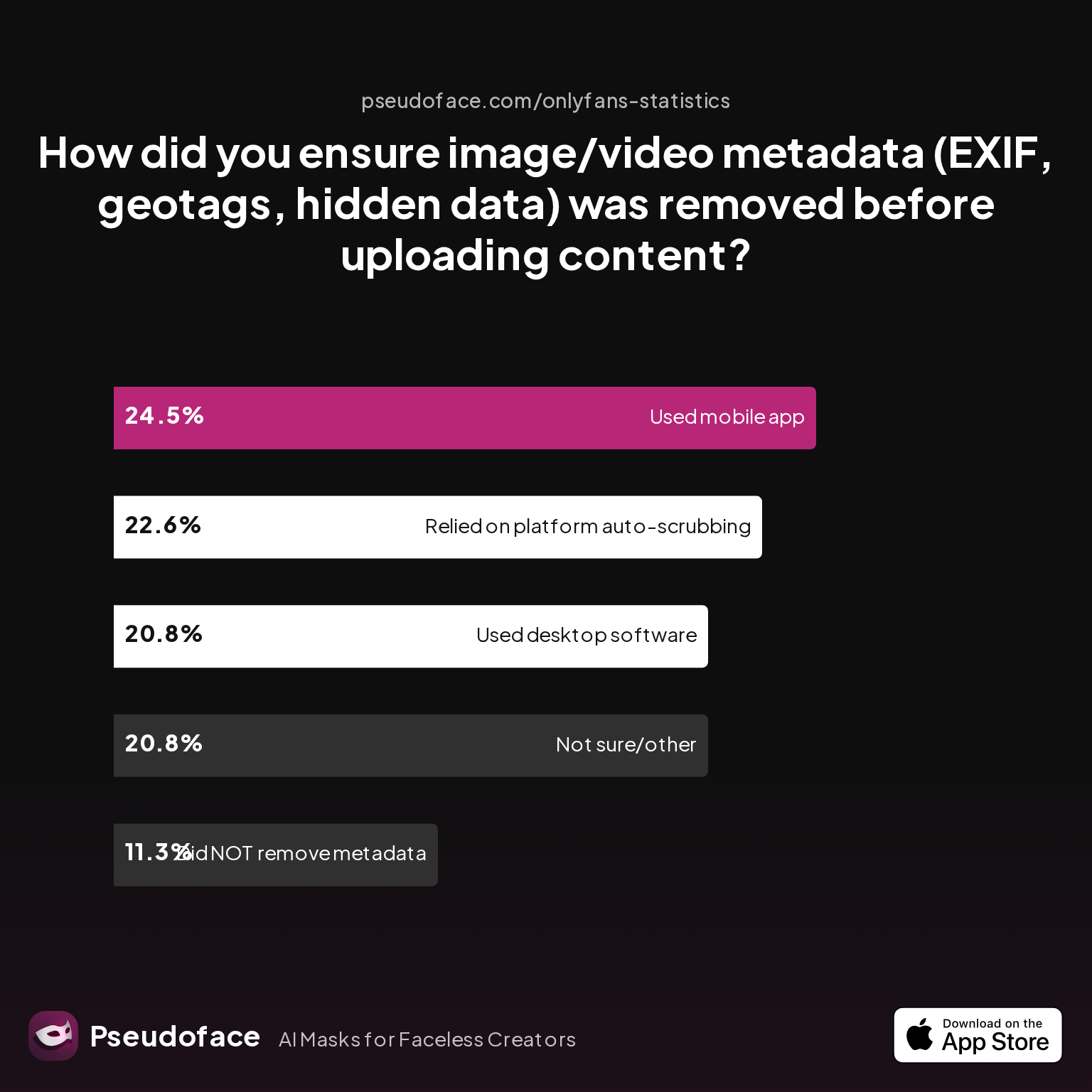
How Do Creators Remove Metadata and Info?
| Answer | Percentage |
|---|---|
| Did NOT take steps to remove metadata | 11.32% |
| Not sure/other | 20.75% |
| Relied on platform auto-scrubbing (e.g., OnlyFans upload process) | 22.64% |
| Used a dedicated metadata removal app on mobile | 24.53% |
| Used desktop software (e.g., Photoshop, custom scripts) | 20.75% |
Nearly a quarter (24.53%) of creators use dedicated mobile apps to scrub image/video metadata before uploading; another 22.64% trust OnlyFans to auto-strip it, while 11% take no steps at all. This points to a clear risk: forgetting metadata removal means lingering traces—photo timestamp, GPS coordinates, device model—can remain in original files, especially when uploading content cross-platform or if you forget to run files through OnlyFans’ uploader.
Apps like Photo Metadata Remover (Android), Metapho (iOS), and common desktop tools (Photoshop’s “export for web,” ExifTool) are the most-cited solutions for batch clearing. Still, around 20% of creators figure OnlyFans’ own scrubber is “good enough”—a risky bet for anyone who’s ever cross-posted or dealt with leaks.
Pro-Tips for True Anonymity Beyond the Visual
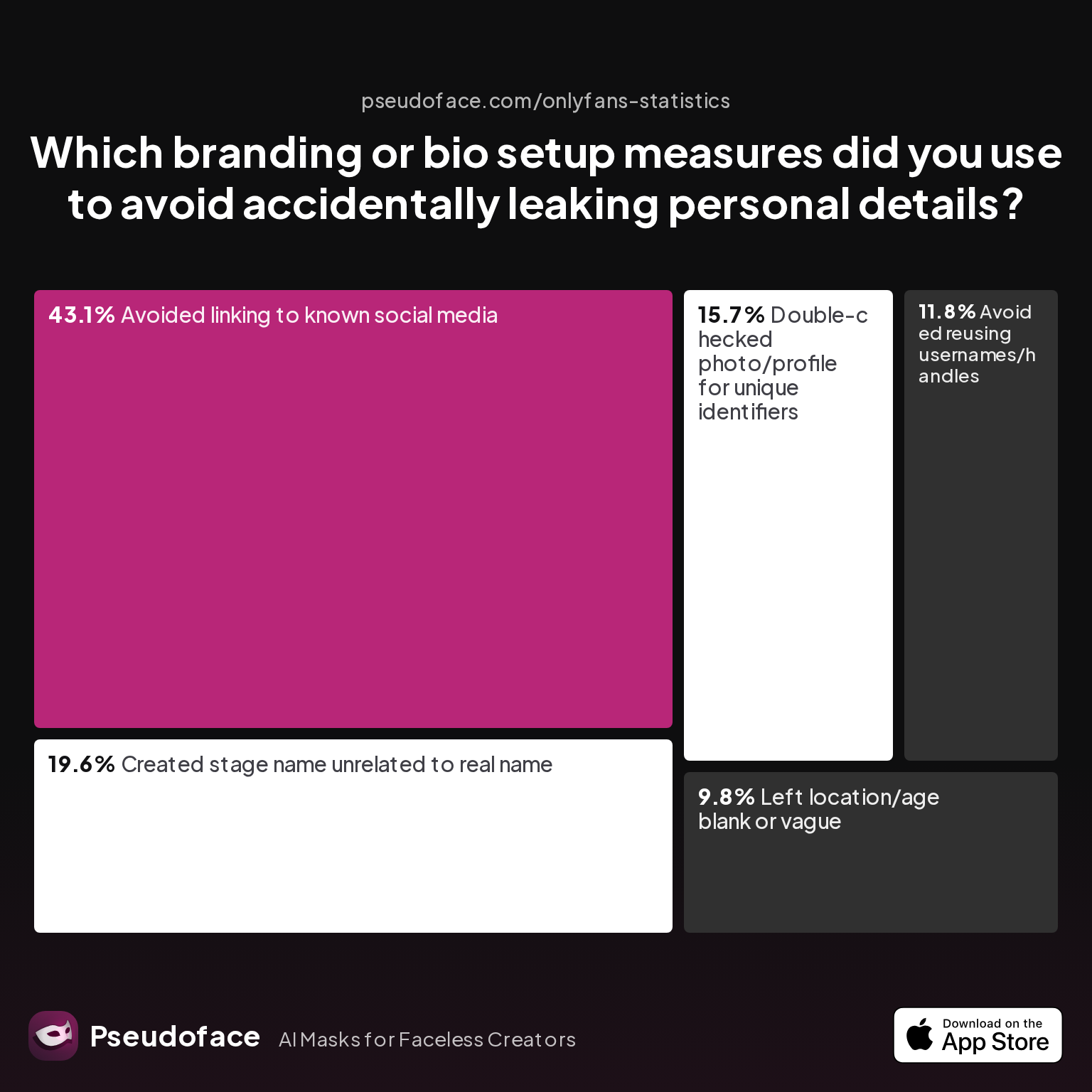
Bio and profile branding play a subtle but vital role in exposure. Here’s a snapshot of how creators guard against bio-based leaks:
| Answer | Percentage |
|---|---|
| Avoided linking to known social media | 43.14% |
| Avoided reusing usernames/handles | 11.76% |
| Created stage name unrelated to real name | 19.61% |
| Double-checked photo/profile for unique identifiers | 15.69% |
| Left location/age blank or vague | 9.80% |
Nearly 44% avoid linking back to known social media from their faceless persona; 20% create a stage name unrelated to their real one. Again, there’s a lesson: your face is just the start. Names, tags, and even offhand details (“hi from [your city]!”) can reidentify even the best-blurred creator.
Open thread on Redditr/onlyfansadvice
u/aaliyah_00
i stay anonymous, i crop my face out or i cover it and i blur out my tattoos and make sure you’re not wearing any unique jewelry that someone could recognize you by !
Before you hit “delete face pics onlyfans lets me,” run this fast checklist:
- Clear all old EXIF/geotag data in a batch using mobile or desktop tools.
- Confirm all new profile, bio, and display names can’t be linked to your real identity.
- Double-check background details (mirrors, street signs, mail, digital screens) in every posted image.
- When in doubt, err on the side of vagueness—your mysteriousness is your new asset.
Once your old content and profile are cleaned, the next step is convincing subscribers (and yourself) that this new faceless you is not just safe—but still interesting.
Rebranding and Communicating: How to Go Faceless OnlyFans Without Losing Your Audience
The technical side of going faceless is only half the story; the social and brand ramifications are equally crucial. Subscribers pay for connection, fantasy, and trust—so the abrupt disappearance of your face demands proactive communication, not silence.
Open, boundary-setting communication minimizes subscriber loss during a faceless transition. Readers of 2025–2026 Pseudoface conversations see parallel stories again and again: creators who explain the shift (even briefly, sometimes invoking “privacy, safety, or just a desire for change”) fare better than those who ghost or dodge the change.
Open thread on Redditr/onlyfansadvice
u/imlilpaw
Just post what you're comfortable with.
It’s tempting to avoid the awkward truth, but regulars notice fast. Retention depends on setting new expectations (e.g., “I’m making my account faceless for privacy and personal reasons, but my content and interaction will stay the same”) and sticking to them.
Message Templates for Announcing Facelessness
- “For personal and privacy reasons, I’ll be making all of my content faceless going forward. Thank you for understanding and supporting my boundaries.”
- “To continue creating safely, I won’t show my face or unique identifiers in future posts. My vibe isn’t changing, just how I keep myself protected.”
Proactivity pays: those who anticipate subscriber questions—and remind fans the core of the content remains—keep more of their loyal base. Some creators even pitch the transition as an enticement: “Guess who? Try to recognize me by my voice, style, or signature look.”
If you’re nervous subscribers will vanish overnight, data and testimonials suggest the churn is usually moderate, not catastrophic. Those most invested in your personality or story may leave, but new “faceless fans” find unique appeal in mystery and limited exposure.
Building a Faceless OnlyFans Brand: Distinction Without a Face
Transitioning to a faceless creator doesn’t mean losing all individuality. In fact, successful branding shifts from “face as identity” to signature non-facial features—body, style, props, or even sound.
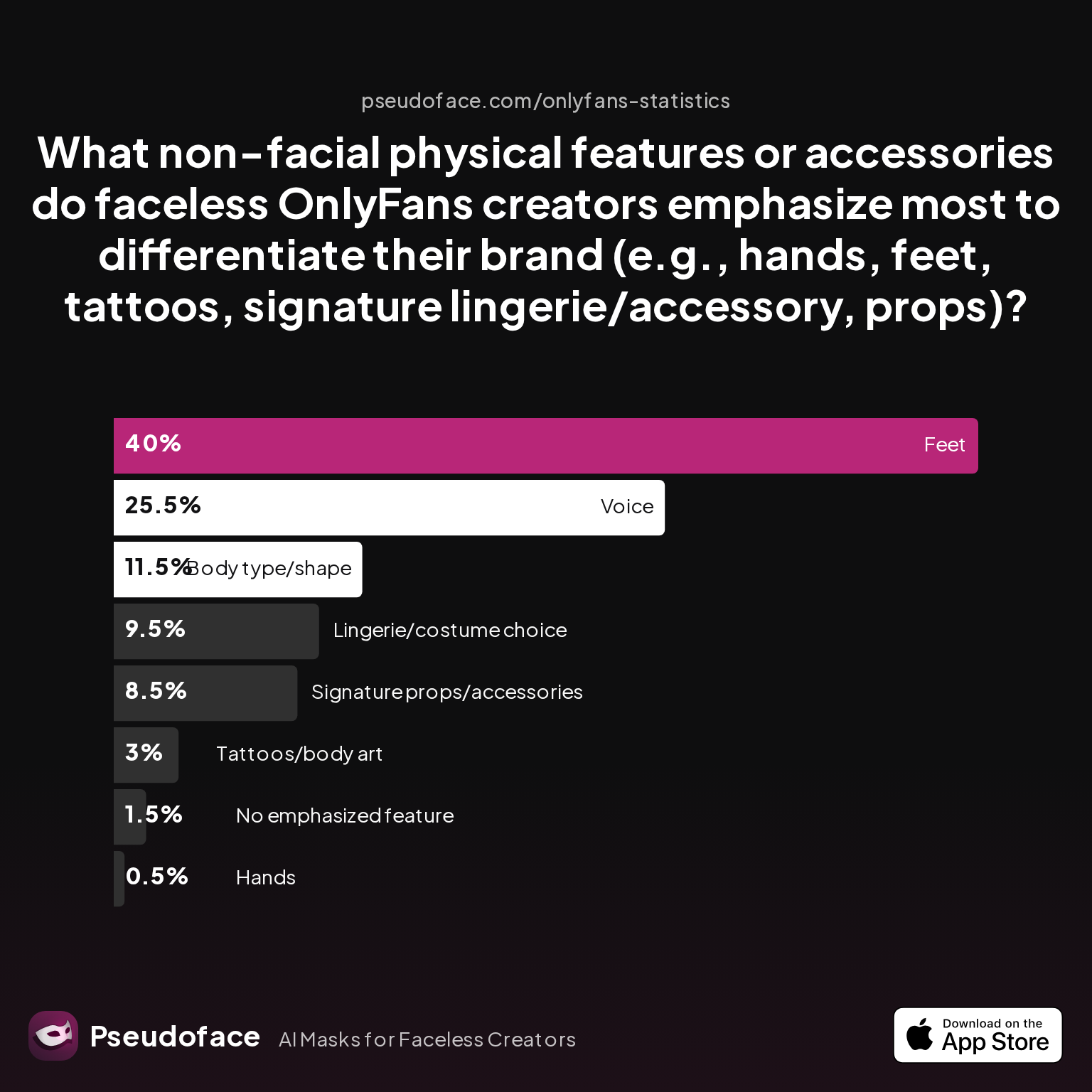
Let’s see what features most faceless creators lean on post-removal:
| Answer | Percentage |
|---|---|
| Body type/shape | 11.50% |
| Feet | 40.00% |
| Hands | 0.50% |
| Lingerie/costume choice | 9.50% |
| No emphasized feature | 1.50% |
| Signature props/accessories | 8.50% |
| Tattoos/body art | 3.00% |
| Voice | 25.50% |
Feet are the most commonly emphasized feature (40%), followed by voice (25.5%) and body type (11.5%). Far from being “faceless, generic blobs,” these creators weave distinctiveness into their work using everything from signature lingerie, playful props, characteristic body shapes, and most powerfully, vocal personality.
This is good news: even if you remove face content online, you can craft a strong, recognizable brand around what you do share. Those who thrive as faceless OnlyFans creators are usually those who double down on production value, interaction, or cleverly-marketed niches—think “glam heels collector,” “pro domme with the velvet voice,” or “mystery play partner in red latex.”
Open thread on Redditr/CreatorsAdvice
u/Latter-Ad-5018
I’m also a creator who doesn’t show face in nsfw content. Could never find an ACTUALLY GOOD blur tracker so now I film close up videos from angles that don’t have my face, for wider (further away) angles that include my face, I just wear a ski mask/balaclava, makes editing SO much easier
The fundamental takeaway: your face is one branding tool among many. If you choose to retire it, cultivate at least one “non-facial signature” to help anchor loyal followers and attract new ones post-pivot.
Honest Limits: The OnlyFans Privacy Guide to Life After Face Removal
It’s tempting to see all this—face deletion, metadata scrubbing, rebranding—as a magic fix. But the tough wisdom from tens of thousands of creator stories is that perfection isn’t possible. Once the internet has seen your face, some traces remain.
Full erasure of face content is rarely realistic; minimizing new leaks and regaining narrative control is achievable. As of 2026, most creators who make the faceless switch succeed in erasing high-traffic content on OnlyFans, but legacy leaks, archived promos, and cached promos can survive even the most disciplined takedown campaign.
Open thread on Redditr/onlyfansadvice
u/nofacefreak_18
I’ve gained a looot of subs tonight and I wasn’t ready for it, honestly not even looking for this much attention haha, now I’m seriously scared I’ve done something wrong and someone will find out who I am🙃
But there’s plenty of hope. By controlling current and future risks, setting strong boundaries with subscribers, and investing in privacy basics (from cropping to metadata scrubbing), most creators regain comfort and autonomy.
Honesty with yourself and your subscribers is the cornerstone of a sustainable, anonymous presence. No guide, app, or process can absolutely “delete your face from the internet”—but you can sharply reduce your exposure, defend against further leaks, and reclaim your creator identity.
FAQ
Can I fully erase my face from the internet after posting to OnlyFans?
No, you can rarely erase all traces, but you can remove and obscure face content from your own profile and major promo platforms. While OnlyFans allows you to delete posts and DMs, leaked or downloaded content elsewhere may persist; combine proactive deletion with regular online audits for best results.
What’s the best app to blur my face on OnlyFans videos?
There’s no single “best,” but InShot, CapCut, and YouCut are the most recommended for mobile workflows, while Premiere Pro and DaVinci Resolve are strongest for longer or batch video edits.
Open thread on Redditr/CreatorsAdvice
u/honee-beee
Inshot has a pretty decent and simple tracking feature for blurs. It’s nothing very fancy or elaborate, but better than nothing
How do I tell my subscribers I’m no longer showing my face?
Be direct and honest—announce the change as a boundary, cite privacy/safety if you wish, and stress what will remain the same about your content.
How do I find out where my face pics from OnlyFans have been leaked?
Search for your old stage name and visuals on Google Images, Reddit, and leak forums; consider using services that scrape for reposted content or request takedown of known leaks.
What are the risks of leaving file metadata in old OnlyFans uploads?
Metadata can reveal device type, upload time, or even GPS location, risking accidental doxxing or identification. Always scrub metadata before posting or after downloading for edits.
Can people still identify me from tattoos or body marks after I blur my face?
Yes, visible tattoos, scars, or unique features can identify you even if your face is erased. Blur or mask these features—and beware that reflection in mirrors or surfaces can betray you.
What’s the fastest way to delete face pics OnlyFans allows?
Manually delete posts via your Content tab, including in paid DMs, and consider re-uploading redacted versions as replacements if appropriate.
Does going faceless mean I’ll lose all my subscribers?
Subscriber loss varies but is not usually total; with clear announcements and a strong new brand identity, most creators report keeping a majority, especially if content style and engagement remain robust.
Are there professional services that will remove my OnlyFans face content for me?
While dedicated privacy agencies and DMCA takedown services exist, most OnlyFans face removal relies on creator self-action; professionals can assist for a fee, especially on leak sites.
Should I start a new OnlyFans profile to be fully anonymous?
Starting fresh reduces exposure, but resets your audience and revenue stream. Weigh the desire for deep anonymity versus audience loyalty and ongoing income.
If you’re reading this after a privacy scare, know you’re not alone. With deliberate, methodical steps and realistic expectations, removing your face from OnlyFans content—and stepping into a sustainable faceless creator identity—is possible, empowering, and more common than you might think.


